
用C++调用tensorflow在python下训练好的模型(centos7)
本文主要参考博客https://blog.csdn.net/luoyexuge/article/details/80399265 [1]
bazel安装参考:https://blog.csdn.net/luoyi131420/article/details/78585989 [2]
首先介绍下自己的环境是centos7,tensorflow版本是1.7,python是3.6(anaconda3)。
要调用tensorflow c++接口,首先要编译tensorflow,要装bazel,要装protobuf,要装Eigen;然后是用python训练模型并保存,最后才是调用训练好的模型,整体过程还是比较麻烦,下面按步骤一步步说明。
1.安装bazel
以下是引用的[2]
首先安装bazel依赖的环境:

sudo add-apt-repository ppa:webupd8team/java

sudo apt-get install openjdk-8-jdk openjdk-8-source

sudo apt-get install pkg-config zip g++ zlib1g-dev unzip

注意:如果你没有安装add-apt-repository命令,需要执行sudo apt-get install software-properties-common命令。- 1
- 2
- 3
- 4
- 5
- 6
- 7
- 8
实际上我自己只缺jdk工具,加上我没有sudo权限,我自己是在网上直接下的jdk-8,链接是
http://www.oracle.com/technetwork/java/javase/downloads/java-archive-javase8-2177648.html
然后解压,最后将其路径添加到环境变量中:
export JAVA_HOME=/home/guozitao001/tools/jdk1.8.0_171
export PATH=$JAVA_HOME/bin:$PATH
然后去git上下载bazel的安装文件https://github.com/bazelbuild/bazel/releases,具体是文件bazel-0.15.0-installer-linux-x86_64.sh。
(1) 终端切换到.sh文件存放的路径,文件添加可执行权限:
$ chmod +x bazel-0.5.3-installer-linux-x86_64.sh
(2)然后执行该文件:
$ ./bazel-0.5.3-installer-linux-x86_64.sh –user
注意:–user选项表示bazel安装到HOME/bin目录下,并设置.bazelrc的路径为HOME/.bazelrc。
安装完成后执行bazel看是否安装成功,这里我并没有添加环境变量就可以直接运行,大家根据自己需要添加。
2.安装protobuf
下载地址:https://github.com/google/protobuf/releases ,我下载的是3.5.1版本,如果你是下载新版的tensorflow,请确保protobuf版本也是最新的,安装步骤:

cd /protobuf

./configure

make

sudo make install

安装之后查看protobuf版本:

protoc --version- 1
- 2
- 3
- 4
- 5
- 6
- 7
根据[1]的作者采坑经历所说,protoc一定要注意版本要和tensorflow匹配,总之这里3.5.1的protoc和tensorflow1.7是能够匹配的。
3.安装Eigen
wget http://bitbucket.org/eigen/eigen/get/3.3.4.tar.bz2

下载之后解压放在重新命名为eigen3,我存放的路径是,/Users/zhoumeixu/Downloads/eigen3- 1
- 2
这个没什么好多说的,如果wget失败就直接用浏览器或者迅雷下载就是了。
4.tensorflow下载以及编译:
1下载TensorFlow ,使用 git clone - –recursive https://github.com/tensorflow/tensorflow
2.下载bazel工具(mac下载installer-darwin、linux用installer-linux)
3. 进入tensorflow的根目录
3.1 执行./configure 根据提示配置一下环境变量,这个不大重要。
要GPU的话要下载nvidia驱动的 尽量装最新版的驱动吧 还有cudnn version为5以上的 这些在官网都有提及的
3.2 有显卡的执行 ” bazel build –config=opt –config=cuda //tensorflow:libtensorflow_cc.so ”
没显卡的 ” –config=cuda ” 就不要加了
bazel build –config=opt //tensorflow:libtensorflow_cc.so。
编译成功后会有bazel成功的提示。
3.3这里编译完过后,最后调用tensorflow模型的时候的时候提示文件tensorflow/tensorflow/core/platform/default/mutex.h缺2个头文件:nsync_cv.h,nsync_mu.h,仔细查找后,发现这两个头文件在python的site-papackages里面,它只是没找到而已,所以我们在mutex.h中将这两个头文件的路径补充完整:
这样之后调用就不会提示缺少头文件了。

4.python训练tensorflow模型:
下面训练tensorflow模型的pb模型,[1]作者做了个简单的线性回归模型及生成pb格式模型代码:
# coding:utf-8

# python 3.6

import tensorflow as  tf

import  numpy as np

import  os

tf.app.flags.DEFINE_integer('training_iteration', 1000,

'number of training iterations.')

tf.app.flags.DEFINE_integer('model_version', 1, 'version number of the model.')

tf.app.flags.DEFINE_string('work_dir', 'model/', 'Working directory.')

FLAGS = tf.app.flags.FLAGS

sess = tf.InteractiveSession()

x = tf.placeholder('float', shape=[None, 5],name="inputs")

y_ = tf.placeholder('float', shape=[None, 1])

w = tf.get_variable('w', shape=[5, 1], initializer=tf.truncated_normal_initializer)

b = tf.get_variable('b', shape=[1], initializer=tf.zeros_initializer)

sess.run(tf.global_variables_initializer())

y = tf.add(tf.matmul(x, w) , b,name="outputs")

ms_loss = tf.reduce_mean((y - y_) ** 2)

train_step = tf.train.GradientDescentOptimizer(0.005).minimize(ms_loss)

train_x = np.random.randn(1000, 5)

# let the model learn the equation of y = x1 * 1 + x2 * 2 + x3 * 3

train_y = np.sum(train_x * np.array([1, 2, 3,4,5]) + np.random.randn(1000, 5) / 100, axis=1).reshape(-1, 1)

for i in range(FLAGS.training_iteration):

    loss, _ = sess.run([ms_loss, train_step], feed_dict={x: train_x, y_: train_y})

    if i%100==0:

        print("loss is:",loss)

        graph = tf.graph_util.convert_variables_to_constants(sess, sess.graph_def,

                                                             ["inputs", "outputs"])

        tf.train.write_graph(graph, ".", FLAGS.work_dir + "liner.pb",

                             as_text=False)

print('Done exporting!')
- 1
- 2
- 3
- 4
- 5
- 6
- 7
- 8
- 9
- 10
- 11
- 12
- 13
- 14
- 15
- 16
- 17
- 18
- 19
- 20
- 21
- 22
- 23
- 24
- 25
- 26
- 27
- 28
- 29
- 30
- 31
- 32
- 33
- 34
注意这里一定要把需要输入和输出的变量要以string形式的name在tf.graph_util.convert_variables_to_constants中进行保存,比如说这里的inputs和outputs。得到一个后缀为pb的文件
然后加载该模型,验证是否成功保存模型:
import tensorflow as tf

import  numpy as np

logdir = '/Users/zhoumeixu/Documents/python/credit-nlp-ner/model/'

output_graph_path = logdir+'liner.pb'

with tf.Graph().as_default():

    output_graph_def = tf.GraphDef()

    with open(output_graph_path, "rb") as f:

        output_graph_def.ParseFromString(f.read())

        _ = tf.import_graph_def(output_graph_def,name="")

    with tf.Session() as sess:

        input = sess.graph.get_tensor_by_name("inputs:0")

        output = sess.graph.get_tensor_by_name("outputs:0")

        result = sess.run(output, feed_dict={input: np.reshape([1.0,1.0,1.0,1.0,1.0],[-1,5])})

        print(result)
- 1
- 2
- 3
- 4
- 5
- 6
- 7
- 8
- 9
- 10
- 11
- 12
- 13
- 14
- 15
运行结果:[[14.998546]], 该结果完全符合预期。
5.C++项目代码,一共有4个文件
model_loader_base.h:
#ifndef CPPTENSORFLOW_MODEL_LOADER_BASE_H

#define CPPTENSORFLOW_MODEL_LOADER_BASE_H

#include <iostream>

#include <vector>

#include "tensorflow/core/public/session.h"

#include "tensorflow/core/platform/env.h"

using namespace tensorflow;

namespace tf_model {

/**

 * Base Class for feature adapter, common interface convert input format to tensors

 * */

    class FeatureAdapterBase{

    public:

        FeatureAdapterBase() {};

        virtual ~FeatureAdapterBase() {};

        virtual void assign(std::string, std::vector<double>*) = 0;  // tensor_name, tensor_double_vector

        std::vector<std::pair<std::string, tensorflow::Tensor> > input;

    };

    class ModelLoaderBase {

    public:

        ModelLoaderBase() {};

        virtual ~ModelLoaderBase() {};

        virtual int load(tensorflow::Session*, const std::string) = 0;     //pure virutal function load method

        virtual int predict(tensorflow::Session*, const FeatureAdapterBase&, const std::string, double*) = 0;

        tensorflow::GraphDef graphdef; //Graph Definition for current model

    };

}

#endif //CPPTENSORFLOW_MODEL_LOADER_BASE_H
- 1
- 2
- 3
- 4
- 5
- 6
- 7
- 8
- 9
- 10
- 11
- 12
- 13
- 14
- 15
- 16
- 17
- 18
- 19
- 20
- 21
- 22
- 23
- 24
- 25
- 26
- 27
- 28
- 29
- 30
- 31
- 32
- 33
- 34
- 35
- 36
- 37
- 38
- 39
- 40
- 41
- 42
- 43
- 44
- 45
ann_model_loader.h:
#ifndef CPPTENSORFLOW_ANN_MODEL_LOADER_H

#define CPPTENSORFLOW_ANN_MODEL_LOADER_H

#include "model_loader_base.h"

#include "tensorflow/core/public/session.h"

#include "tensorflow/core/platform/env.h"

using namespace tensorflow;

namespace tf_model {

/**

 * @brief: Model Loader for Feed Forward Neural Network

 * */

    class ANNFeatureAdapter: public FeatureAdapterBase {

    public:

        ANNFeatureAdapter();

        ~ANNFeatureAdapter();

        void assign(std::string tname, std::vector<double>*) override; // (tensor_name, tensor)

    };

    class ANNModelLoader: public ModelLoaderBase {

    public:

        ANNModelLoader();

        ~ANNModelLoader();

        int load(tensorflow::Session*, const std::string) override;    //Load graph file and new session

        int predict(tensorflow::Session*, const FeatureAdapterBase&, const std::string, double*) override;

    };

}

#endif //CPPTENSORFLOW_ANN_MODEL_LOADER_H
- 1
- 2
- 3
- 4
- 5
- 6
- 7
- 8
- 9
- 10
- 11
- 12
- 13
- 14
- 15
- 16
- 17
- 18
- 19
- 20
- 21
- 22
- 23
- 24
- 25
- 26
- 27
- 28
- 29
- 30
- 31
- 32
- 33
- 34
- 35
- 36
- 37
- 38
- 39
- 40
- 41
- 42
ann_model_loader.cpp:
#include <iostream>

#include <vector>

#include <map>

#include "ann_model_loader.h"

//#include <tensor_shape.h>

using namespace tensorflow;

namespace tf_model {

/**

 * ANNFeatureAdapter Implementation

 * */

    ANNFeatureAdapter::ANNFeatureAdapter() {

    }

    ANNFeatureAdapter::~ANNFeatureAdapter() {

    }

/*

 * @brief: Feature Adapter: convert 1-D double vector to Tensor, shape [1, ndim]

 * @param: std::string tname, tensor name;

 * @parma: std::vector<double>*, input vector;

 * */

    void ANNFeatureAdapter::assign(std::string tname, std::vector<double>* vec) {

        //Convert input 1-D double vector to Tensor

        int ndim = vec->size();

        if (ndim == 0) {

            std::cout << "WARNING: Input Vec size is 0 ..." << std::endl;

            return;

        }

        // Create New tensor and set value

        Tensor x(tensorflow::DT_FLOAT, tensorflow::TensorShape({1, ndim})); // New Tensor shape [1, ndim]

        auto x_map = x.tensor<float, 2>();

        for (int j = 0; j < ndim; j++) {

            x_map(0, j) = (*vec)[j];

        }

        // Append <tname, Tensor> to input

        input.push_back(std::pair<std::string, tensorflow::Tensor>(tname, x));

    }

/**

 * ANN Model Loader Implementation

 * */

    ANNModelLoader::ANNModelLoader() {

    }

    ANNModelLoader::~ANNModelLoader() {

    }

/**

 * @brief: load the graph and add to Session

 * @param: Session* session, add the graph to the session

 * @param: model_path absolute path to exported protobuf file *.pb

 * */

    int ANNModelLoader::load(tensorflow::Session* session, const std::string model_path) {

        //Read the pb file into the grapgdef member

        tensorflow::Status status_load = ReadBinaryProto(Env::Default(), model_path, &graphdef);

        if (!status_load.ok()) {

            std::cout << "ERROR: Loading model failed..." << model_path << std::endl;

            std::cout << status_load.ToString() << "\n";

            return -1;

        }

        // Add the graph to the session

        tensorflow::Status status_create = session->Create(graphdef);

        if (!status_create.ok()) {

            std::cout << "ERROR: Creating graph in session failed..." << status_create.ToString() << std::endl;

            return -1;

        }

        return 0;

    }

/**

 * @brief: Making new prediction

 * @param: Session* session

 * @param: FeatureAdapterBase, common interface of input feature

 * @param: std::string, output_node, tensorname of output node

 * @param: double, prediction values

 * */

    int ANNModelLoader::predict(tensorflow::Session* session, const FeatureAdapterBase& input_feature,

                                const std::string output_node, double* prediction) {

        // The session will initialize the outputs

        std::vector<tensorflow::Tensor> outputs;         //shape  [batch_size]

        // @input: vector<pair<string, tensor> >, feed_dict

        // @output_node: std::string, name of the output node op, defined in the protobuf file

        tensorflow::Status status = session->Run(input_feature.input, {output_node}, {}, &outputs);

        if (!status.ok()) {

            std::cout << "ERROR: prediction failed..." << status.ToString() << std::endl;

            return -1;

        }

        //Fetch output value

        std::cout << "Output tensor size:" << outputs.size() << std::endl;

        for (std::size_t i = 0; i < outputs.size(); i++) {

            std::cout << outputs[i].DebugString();

        }

        std::cout << std::endl;

        Tensor t = outputs[0];                   // Fetch the first tensor

        int ndim = t.shape().dims();             // Get the dimension of the tensor

        auto tmap = t.tensor<float, 2>();        // Tensor Shape: [batch_size, target_class_num]

        int output_dim = t.shape().dim_size(1);  // Get the target_class_num from 1st dimension

        std::vector<double> tout;

        // Argmax: Get Final Prediction Label and Probability

        int output_class_id = -1;

        double output_prob = 0.0;

        for (int j = 0; j < output_dim; j++) {

            std::cout << "Class " << j << " prob:" << tmap(0, j) << "," << std::endl;

            if (tmap(0, j) >= output_prob) {

                output_class_id = j;

                output_prob = tmap(0, j);

            }

        }

        // Log

        std::cout << "Final class id: " << output_class_id << std::endl;

        std::cout << "Final value is: " << output_prob << std::endl;

        (*prediction) = output_prob;   // Assign the probability to prediction

        return 0;

    }

}
- 1
- 2
- 3
- 4
- 5
- 6
- 7
- 8
- 9
- 10
- 11
- 12
- 13
- 14
- 15
- 16
- 17
- 18
- 19
- 20
- 21
- 22
- 23
- 24
- 25
- 26
- 27
- 28
- 29
- 30
- 31
- 32
- 33
- 34
- 35
- 36
- 37
- 38
- 39
- 40
- 41
- 42
- 43
- 44
- 45
- 46
- 47
- 48
- 49
- 50
- 51
- 52
- 53
- 54
- 55
- 56
- 57
- 58
- 59
- 60
- 61
- 62
- 63
- 64
- 65
- 66
- 67
- 68
- 69
- 70
- 71
- 72
- 73
- 74
- 75
- 76
- 77
- 78
- 79
- 80
- 81
- 82
- 83
- 84
- 85
- 86
- 87
- 88
- 89
- 90
- 91
- 92
- 93
- 94
- 95
- 96
- 97
- 98
- 99
- 100
- 101
- 102
- 103
- 104
- 105
- 106
- 107
- 108
- 109
- 110
- 111
- 112
- 113
- 114
- 115
- 116
- 117
- 118
- 119
- 120
- 121
- 122
- 123
- 124
- 125
- 126
- 127
- 128
- 129
- 130
- 131
- 132
- 133
main.cpp:
#include <iostream>

#include "tensorflow/core/public/session.h"

#include "tensorflow/core/platform/env.h"

#include "ann_model_loader.h"

using namespace tensorflow;

int main(int argc, char* argv[]) {

    if (argc != 2) {

        std::cout << "WARNING: Input Args missing" << std::endl;

        return 0;

    }

    std::string model_path = argv[1];  // Model_path *.pb file

    // TensorName pre-defined in python file, Need to extract values from tensors

    std::string input_tensor_name = "inputs";

    std::string output_tensor_name = "outputs";

    // Create New Session

    Session* session;

    Status status = NewSession(SessionOptions(), &session);

    if (!status.ok()) {

        std::cout << status.ToString() << "\n";

        return 0;

    }

    // Create prediction demo

    tf_model::ANNModelLoader model;  //Create demo for prediction

    if (0 != model.load(session, model_path)) {

        std::cout << "Error: Model Loading failed..." << std::endl;

        return 0;

    }

    // Define Input tensor and Feature Adapter

    // Demo example: [1.0, 1.0, 1.0, 1.0, 1.0] for Iris Example, including bias

    int ndim = 5;

    std::vector<double> input;

    for (int i = 0; i < ndim; i++) {

        input.push_back(1.0);

    }

    // New Feature Adapter to convert vector to tensors dictionary

    tf_model::ANNFeatureAdapter input_feat;

    input_feat.assign(input_tensor_name, &input);   //Assign vec<double> to tensor

    // Make New Prediction

    double prediction = 0.0;

    if (0 != model.predict(session, input_feat, output_tensor_name, &prediction)) {

        std::cout << "WARNING: Prediction failed..." << std::endl;

    }

    std::cout << "Output Prediction Value:" << prediction << std::endl;

    return 0;

}
- 1
- 2
- 3
- 4
- 5
- 6
- 7
- 8
- 9
- 10
- 11
- 12
- 13
- 14
- 15
- 16
- 17
- 18
- 19
- 20
- 21
- 22
- 23
- 24
- 25
- 26
- 27
- 28
- 29
- 30
- 31
- 32
- 33
- 34
- 35
- 36
- 37
- 38
- 39
- 40
- 41
- 42
- 43
- 44
- 45
- 46
- 47
- 48
- 49
- 50
- 51
- 52
- 53
- 54
- 55
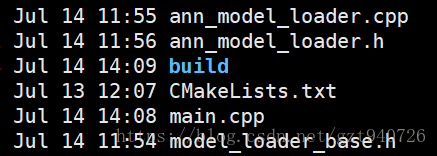
将这四个文件放在同一个路径下,然后还需要添加一个Cmake的txt文件:
cmake_minimum_required(VERSION 2.8)

project(cpptensorflow)

set(CMAKE_CXX_STANDARD 11)

set(CMAKE_CXX_FLAGS "${CMAKE_CXX_FLAGS} -std=gnu++0x -g -fopenmp -fno-strict-aliasing")

link_directories(/home/xxx/tensorflow/bazel-bin/tensorflow)

include_directories(

        /home/xxx/tensorflow

        /home/xxx/tensorflow/bazel-genfiles

        /home/xxx/tensorflow/bazel-bin/tensorflow

        /home/xxx/tools/eigen3

)

add_executable(cpptensorflow main.cpp ann_model_loader.h model_loader_base.h ann_model_loader.cpp)

target_link_libraries(cpptensorflow tensorflow_cc tensorflow_framework)
- 1
- 2
- 3
- 4
- 5
- 6
- 7
- 8
- 9
- 10
- 11
- 12
- 13
- 14
- 15
这里注意cmake_minimum_required(VERSION 2.8)要和自己系统的cmake最低版本相符合。
然后在当前目录下建立一个build的空文件夹:
mkdir  build

cd  build

cmake ..

make

生成cpptensorflow执行文件,后接保存的模型pb文件路径:

./cpptensorflow /Users/zhoumeixu/Documents/python/credit-nlp-ner/model/liner.pb

Final value is: 14.9985

Output Prediction Value:14.9985- 1
- 2
- 3
- 4
- 5
- 6
- 7
- 8
到此基本就结束了,最后感谢下作者[1],我真是差点被搞疯了。。。
原文:https://blog.csdn.net/gzt940726/article/details/81053378
用C++调用tensorflow在python下训练好的模型(centos7)的更多相关文章
- 在 C/C++ 中使用 TensorFlow 预训练好的模型—— 直接调用 C++ 接口实现
现在的深度学习框架一般都是基于 Python 来实现,构建.训练.保存和调用模型都可以很容易地在 Python 下完成.但有时候,我们在实际应用这些模型的时候可能需要在其他编程语言下进行,本文将通过直 ...
- 在 C/C++ 中使用 TensorFlow 预训练好的模型—— 间接调用 Python 实现
现在的深度学习框架一般都是基于 Python 来实现,构建.训练.保存和调用模型都可以很容易地在 Python 下完成.但有时候,我们在实际应用这些模型的时候可能需要在其他编程语言下进行,本文将通过 ...
- TensorFlow 调用预训练好的模型—— Python 实现
1. 准备预训练好的模型 TensorFlow 预训练好的模型被保存为以下四个文件 data 文件是训练好的参数值,meta 文件是定义的神经网络图,checkpoint 文件是所有模型的保存路径,如 ...
- TensorFlow Object Detection API(Windows下训练)
本文为作者原创,转载请注明出处(http://www.cnblogs.com/mar-q/)by 负赑屃 最近事情比较多,前面坑挖的有点久,今天终于有时间总结一下,顺便把Windows下训练跑通.Li ...
- TensorFlow 同时调用多个预训练好的模型
在某些任务中,我们需要针对不同的情况训练多个不同的神经网络模型,这时候,在测试阶段,我们就需要调用多个预训练好的模型分别来进行预测. 调用单个预训练好的模型请点击此处 弄明白了如何调用单个模型,其实调 ...
- TensorFlow利用A3C算法训练智能体玩CartPole游戏
本教程讲解如何使用深度强化学习训练一个可以在 CartPole 游戏中获胜的模型.研究人员使用 tf.keras.OpenAI 训练了一个使用「异步优势动作评价」(Asynchronous Advan ...
- DRL 教程 | 如何保持运动小车上的旗杆屹立不倒?TensorFlow利用A3C算法训练智能体玩CartPole游戏
本教程讲解如何使用深度强化学习训练一个可以在 CartPole 游戏中获胜的模型.研究人员使用 tf.keras.OpenAI 训练了一个使用「异步优势动作评价」(Asynchronous Advan ...
- tensorflow和python操作中的笔记
前一段时间做了一些项目,把一些笔记放在了txt中,现分享出来,自己也能够时长预习. 1) 读取文件时,将固定的文件地址,采用数组或者字符串的形式,提前表示出来,后期使用时候采用拼接操作 2) # 得到 ...
- 人脸检测及识别python实现系列(5)——利用keras库训练人脸识别模型
人脸检测及识别python实现系列(5)——利用keras库训练人脸识别模型 经过前面稍显罗嗦的准备工作,现在,我们终于可以尝试训练我们自己的卷积神经网络模型了.CNN擅长图像处理,keras库的te ...
随机推荐
- JAVA编程思想学习笔记4-chap10-12-斗之气4段
1.内部类:Iterator 2..this生成对外部类的引用 3..new:通过外部类对象创建内部类对象 package com.chengjie; public class TestInnerCl ...
- JAVA8流操作
* Stream 的三个操作步骤: * 1创建Stream * 2中间操作 * 3终止操作 package airycode_java8.nice6; import airycode_java8.ni ...
- repr()函数
http://www.cnblogs.com/itdyb/p/5046415.html
- ReactiveCocoa(II)
RAC类关系图: RAC 信号源: 需要导入的头文件: import ReactiveCocoa import Result import ReactiveSwift 冷信号 //1.冷信号 let ...
- Lua数据类型
[1]Lua数据类型 Lua语言共有8种基本类型 [1] nil 空.最简单,有且仅有值nil,表示一个无效值(在条件表达式中相当于false) [2] boolean 布尔.包含两个值:false和 ...
- tiny4412 硬件解码
今天发现了一个好的资源,上面有三星的一些实例代码.http://git.infradead.org/users/kmpark/public-apps
- 大数据权限管理工具 Apache Ranger 初识
资料参考: Apache Ranger – Introduction http://ranger.apache.org/ 阿里云 Ranger简介 Apache Ranger初识 - 阿里云 大数据权 ...
- android studio eclipse keymap theme 快捷键 主题风格设置
android studio eclipse keymap theme 快捷键 主题风格设置 将Android Studio的快捷键设置与eclipse一致,使用习惯的快捷键才顺手.Mac系统下:进入 ...
- Django框架----中间件
我们已经会了给视图函数加装饰器来判断是用户是否登录,把没有登录的用户请求跳转到登录页面.我们通过给几个特定视图函数加装饰器实现了这个需求.但是以后添加的视图函数可能也需要加上装饰器,这样是不是稍微有点 ...
- 阿里云部署Java web项目
林炳文Evankaka原创作品.转载请注明出处http://blog.csdn.net/evankaka 摘要:本文主要讲了如何在阿里云上安装JDK.Tomcat以及其配置过程.最后以一个实例来演示在 ...