
阅读DMA Controller Core 官方手册
阅读DMA Controller Core 官方手册

DMA控制器框架图
 怎样去设定一个DMA控制器

实例化DMA控制器
参数配置界面如下图所示:

对于width of the DMA length register的配置尝试如下:


正如官方文档中描述的那样:

DMA Length register的位宽决定了DMA Length的最大值,决定了可以用这个DMA控制器传递数据的个数。
DMA的工作模式:

搭建一个系统:
数据从ROM里面,经过DMA控制器传送到RAM里面,软件程序单独在RAM_Pro内存空间里面运行。
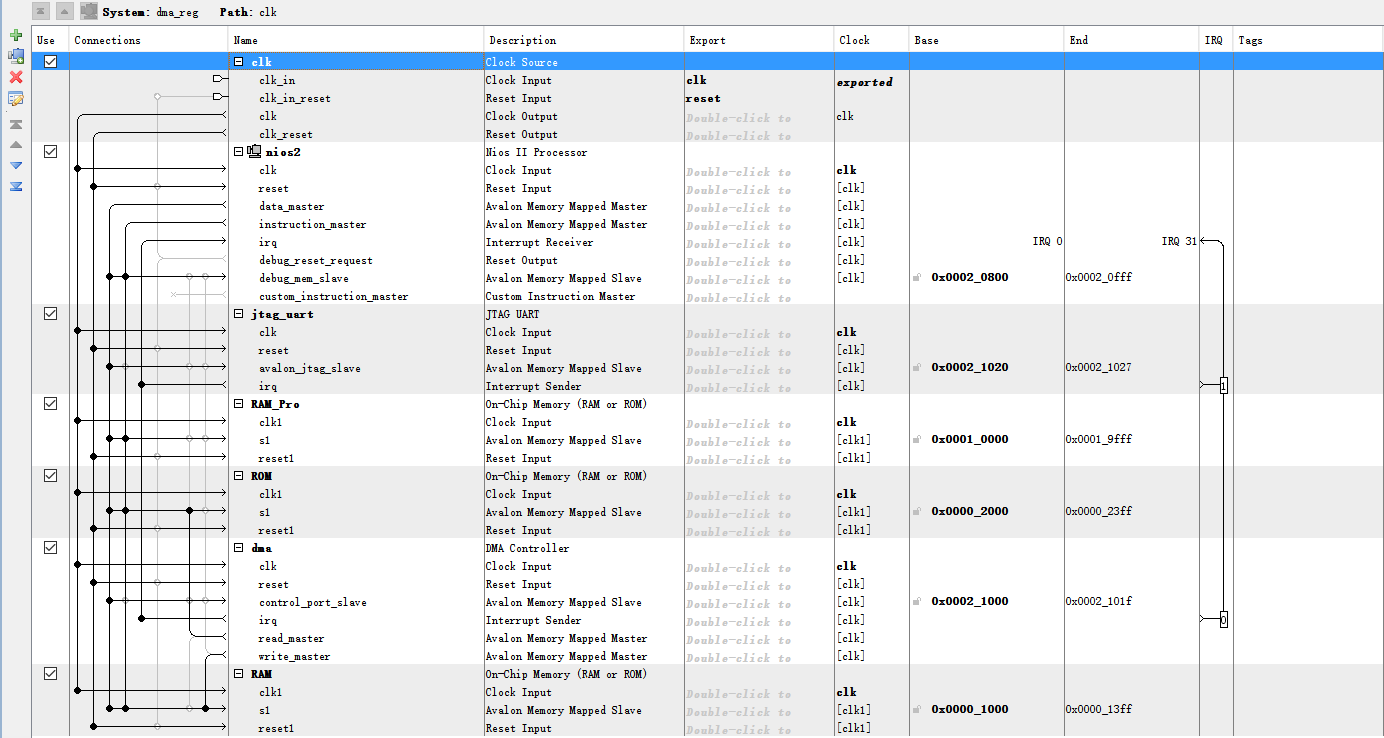
注意:片上ROM与片上RAM可以不与Nios II 处理器相连,这样会导致处理器监控不到ROM和RAM里面的数据,在Eclipse里面的debug界面中没法查找到相应的内存空间,但是连上处理器之后,可以查询得到,建议连上
 顶层例化:
顶层例化:
 DMA控制器软件程序的编写:
需要根据用户手册来指导编写:


在Eclipse中编写代码如下:
/*

 * "Hello World" example.

 *

 * This example prints 'Hello from Nios II' to the STDOUT stream. It runs on

 * the Nios II 'standard', 'full_featured', 'fast', and 'low_cost' example

 * designs. It runs with or without the MicroC/OS-II RTOS and requires a STDOUT

 * device in your system's hardware.

 * The memory footprint of this hosted application is ~69 kbytes by default

 * using the standard reference design.

 *

 * For a reduced footprint version of this template, and an explanation of how

 * to reduce the memory footprint for a given application, see the

 * "small_hello_world" template.

 *

 */

#include <stdio.h>

#include <stdlib.h>

#include "sys/alt_dma.h"

#include "system.h"

static volatile int rx_done = ;

static void done(void* handle, void* data)

{

    rx_done++;

}

int main(int argc, char* argv[], char* envp[])

{

    int rc;

    alt_dma_txchan txchan;

    alt_dma_rxchan rxchan;

    void* tx_data = (void*) 0x2000;

    void* rx_data = (void*) 0x1000;

    if((txchan = alt_dma_txchan_open("/dev/dma")) == NULL)

    {

        printf ("Failed to open transmit channel\n");

        exit();

    }

    if((rxchan = alt_dma_rxchan_open("/dev/dma")) == NULL)

    {

        printf ("Failed to open receive channel\n");

        exit();

    }

    if((rc = alt_dma_txchan_send(txchan,tx_data,,NULL,NULL)) < )

    {

        printf ("Failed to post transmit request,reason = %i\n",rc);

        exit();

    }

    if ((rc = alt_dma_rxchan_prepare(rxchan,rx_data,,NULL,NULL)) < )

    {

        printf ("Failed to post read request,reason = %i\n",rc);

        exit();

    }

    while(!rx_done)

    {

        printf ("Transfer successful!\n");

    }

    printf ("Hello from Nios II!\n");

    return ;

}
由于数据存储在片上的ROM和RAM中,因此可以用In-System Memory Content Editor来进行查看:
首先给ROM初始化数据文件和Instance ID:

 然后,同样需要给RAM分配Instance ID:
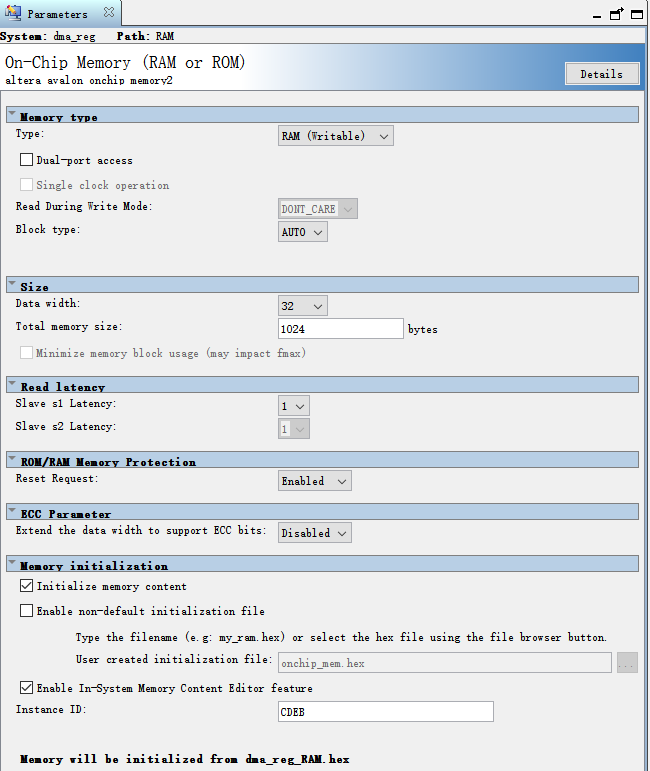
最后在In-System Memory Content Editor里面进行查看:

经过核对:数据传输无误。
阅读DMA Controller Core 官方手册的更多相关文章
- grub2详解(翻译和整理官方手册)
翻译了grub2官方手册的绝大部分内容,然后自己整理了一下.因为内容有点杂,所以章节安排上可能不是太合理,敬请谅解. 本文目录: 1.1 基础内容 1.2 安装grub2 1.3 grub2配置文件 ...
- 翻译:CREATE FUNCTION语句(已提交到MariaDB官方手册)
本文为mariadb官方手册:CREATE FUNCTION的译文. 原文:https://mariadb.com/kb/en/library/create-function/我提交到MariaDB官 ...
- Core官方DI剖析(1)--ServiceProvider类和ServiceCollection类
前段时间看了蒋老师的Core文章,对于DI那一块感觉挺有意思,然后就看了一下Core官方DI的源码,这也算是第一个看得懂大部分源码的框架,虽然官方DI相对来说特别简单, 官方DI相对于其它框架(例如 ...
- MariaDB官方手册翻译
MariaDB官方手册 翻译:create database语句(已提交到MariaDB官方手册) 翻译:rename table语句(已提交到MariaDB官方手册) 翻译:alter table语 ...
- 翻译:SET PASSWORD语句(已提交到MariaDB官方手册)
本文为mariadb官方手册:SET PASSWORD的译文. 原文:https://mariadb.com/kb/en/library/set-password/我提交到MariaDB官方手册的译文 ...
- XtraDB/InnoDB的文件格式(已提交到MariaDB官方手册)
本文为mariadb官方手册:XtraDB/InnoDB File Format的译文. 原文:https://mariadb.com/kb/en/library/xtradbinnodb-file- ...
- 翻译:SET Variable(已提交到MariaDB官方手册)
本文为mariadb官方手册:SET Variable的译文. 原文:https://mariadb.com/kb/en/set-variable/我提交到MariaDB官方手册的译文:https:/ ...
- 翻译:赋值操作符(:=)(已提交到MariaDB官方手册)
本文为mariadb官方手册:赋值操作符(:=)的译文. 原文:https://mariadb.com/kb/en/assignment-operator/ 我提交到MariaDB官方手册的译文:ht ...
- 翻译:last_value()函数(已提交到MariaDB官方手册)
本文为mariadb官方手册:LAST_VALUE()的译文. 原文:https://mariadb.com/kb/en/last_value/我提交到MariaDB官方手册的译文:https://m ...
随机推荐
- 解决react-native软键盘弹出挡住输入框的问题
解决react-native软键盘弹出挡住输入框的问题 写登录页面,整体界面居中之后就出现软键盘弹出挡住输入框,用户体验不好的情况.用了RN官方的KeyboardAvoidingView组件,会有多出 ...
- make clean,make distclean与make depend的区别
make clean仅仅是清除之前编译的可执行文件及配置文件. 而make distclean要清除所有生成的文件. Makefile 在符合GNU Makefiel惯例的Makefile中,包含了一 ...
- ANDROID BINDER机制浅析
Binder是Android上一种IPC机制,重要且较难理解.由于Linux上标准IPC在灵活和可靠性存在一定不足,Google基于OpenBinder的设计和构想实现了Binder. 本文只简单介绍 ...
- DG备库无法接受主库归档日志之密码文件
DG备库无法接受主库归档日志之密码文件 实验目的:还原某个客户案例,客户审计需要,对主库sys用户进行锁定,一小时后对sys用户进行解锁后,发现备库无法接受主库的归档日志 本篇文章,测试sys用户与D ...
- Foxmail软件添加QQ邮箱报错
#报错现象: -ERR Please using authorized code to login. More information at http://servi 请使用授权代码登录.http:/ ...
- POJ3090 Visible Lattice Points (数论:欧拉函数模板)
题目链接:传送门 思路: 所有gcd(x, y) = 1的数对都满足题意,然后还有(1, 0) 和 (0, 1). #include <iostream> #include <cst ...
- {"errcode":48001,"errmsg":"api unauthorized}
微信公众号基础知识说明 网页授权获取微信用户信息:两种 scope 域 https://open.weixin.qq.com/connect/oauth2/authorize?appid={0}&am ...
- C++学习(一)之Visual Studio安装以及首次使用
一.安装Visual Studio 首先下载Visual Studio 链接: http://pan.baidu.com/s/1pLhJt0Z 密码:uqyc 将.ios文件解压得到以下文件: 点击v ...
- OS模块(与操作系统交互)
os 模块提供了很多允许你的程序与操作系统直接交互的功能 得到当前工作目录,即当前Python脚本工作的目录路径: os.getcwd() 返回指定目录下的所有文件和目录名:os.listdir() ...
- 【shell编程】之基础知识-常用命令
一.Shell echo命令 Shell 的 echo 指令与 PHP 的 echo 指令类似,都是用于字符串的输出.命令格式: echo string 您可以使用echo实现更复杂的输出格式控制. ...