
iOS - UIAlertController三种显示提示框代码
UIAlertView在IOS 8以上版本已经过时了,官方推荐我们使用UIAlertController代替UIAlertView、UIActionSheet
1、UIAlertController显示普通的Alert
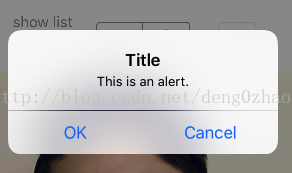
- (IBAction)showAlert:(UIButton *)sender {

    //显示提示框

    //过时

//    UIAlertView *alert = [[UIAlertView alloc] initWithTitle:@"Title" message:@"message" delegate:self cancelButtonTitle:@"cancel" otherButtonTitles:@"ok", nil];

//    [alert show];

    UIAlertController* alert = [UIAlertController alertControllerWithTitle:@"Title"

                                                                   message:@"This is an alert."

                                                            preferredStyle:UIAlertControllerStyleAlert];

    UIAlertAction* defaultAction = [UIAlertAction actionWithTitle:@"OK" style:UIAlertActionStyleDefault

                                                          handler:^(UIAlertAction * action) {

                                                              //响应事件

                                                              NSLog(@"action = %@", action);

                                                          }];

    UIAlertAction* cancelAction = [UIAlertAction actionWithTitle:@"Cancel" style:UIAlertActionStyleDefault

                                                          handler:^(UIAlertAction * action) {

                                                              //响应事件

                                                              NSLog(@"action = %@", action);

                                                          }];

    [alert addAction:defaultAction];

    [alert addAction:cancelAction];

    [self presentViewController:alert animated:YES completion:nil];

}
2、UIAlertController显示带文本输入的的Alert
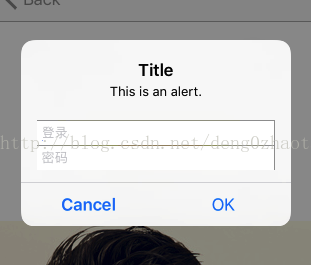
3、UIAlertController显示ActionSheet
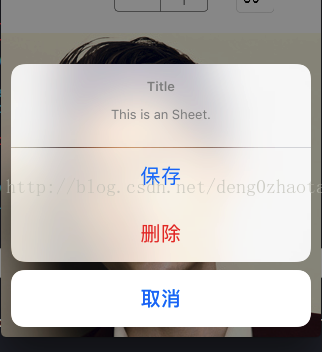
- (IBAction)showSheet:(UIButton *)sender {

    //显示弹出框列表选择

    UIAlertController* alert = [UIAlertController alertControllerWithTitle:@"Title"

                                                                   message:@"This is an Sheet."

                                                            preferredStyle:UIAlertControllerStyleActionSheet];

    UIAlertAction* cancelAction = [UIAlertAction actionWithTitle:@"取消" style:UIAlertActionStyleCancel

                                                          handler:^(UIAlertAction * action) {

                                                              //响应事件

                                                              NSLog(@"action = %@", action);

                                                          }];

    UIAlertAction* deleteAction = [UIAlertAction actionWithTitle:@"删除" style:UIAlertActionStyleDestructive

                                                         handler:^(UIAlertAction * action) {

                                                             //响应事件

                                                             NSLog(@"action = %@", action);

                                                         }];

    UIAlertAction* saveAction = [UIAlertAction actionWithTitle:@"保存" style:UIAlertActionStyleDefault

                                                         handler:^(UIAlertAction * action) {

                                                             //响应事件

                                                             NSLog(@"action = %@", action);

                                                         }];

    [alert addAction:saveAction];

    [alert addAction:cancelAction];

    [alert addAction:deleteAction];

    [self presentViewController:alert animated:YES completion:nil];

}
iOS - UIAlertController三种显示提示框代码的更多相关文章
- iOS的三种多线程技术NSThread/NSOperation/GCD
1.iOS的三种多线程技术 1.NSThread 每个NSThread对象对应一个线程,量级较轻(真正的多线程) 2.以下两点是苹果专门开发的"并发"技术,使得程序员可以不再去关心 ...
- 关于jsp和html页面中的三种弹出框
代码: <!-- 引入jquery 由于在下面使用jquery选择器,与弹出框无关 --> <script type="text/javascript" src= ...
- echarts —— tooltip 鼠标悬浮显示提示框属性
最近一直在使用echarts,当然也被其中的各种属性整的头大,记录一下其中遇到的问题. tooltip:鼠标悬浮时显示的提示框. 今天想要记录的是[自定义提示框的内容],如下图,鼠标悬浮时提示框内显示 ...
- ASP.NET 使用AJAX让GridView的数据行显示提示框(ToolTip)
介绍ASP.NET AJAX可以使你的web应用程序具有更丰富的功能和更多的用户响应. 本文中,我将演示如何通过ASP.NET AJAX的帮助,给像GridView这样的数据绑定控件的数据行增加pop ...
- JavaScript中的三种弹出框的区别与使用
JavaScript中有三种原生的弹出框,分别是alert.confirm.prompt.分别表示弹出框.确认框.信息框. 以下是示例代码: <!DOCTYPE html> <htm ...
- js基础 三种弹出框 数据类型
总结:js三个组成部分ES:语法DOM:对象模型 => 通过js代码与页面文档(出现在body中的所有可视化标签)进行交互BOM:对象模型 => 通过js代码与浏览器自带功能进行交互 引入 ...
- js值类型转换(boolean/String/number),js运算符,if条件,循环结构,函数,三种弹出框
js值类型转换 number | string | boolean boolean类型转换 num = 0; var b1 = Boolean(num); console.log(b1) 转化为数字类 ...
- 三种JavaScript 消息框
prompt 提示框 <html><head><script type="text/javascript">function disp_prom ...
- 写入cookie后只显示一次的DIV提示框代码
<script type="text/javascript"> function cookiesave(n, v, mins, dn, path){ if(n) { i ...
随机推荐
- Java中的ReentrantLock和synchronized两种锁定
原文:http://www.ibm.com/developerworks/cn/java/j-jtp10264/index.html 多线程和并发性并不是什么新内容,但是 Java 语言设计中的创新之 ...
- AIX上解压缩.tar.Z, .tar.gz, .zip及.tgz
在AIX上最常见的压缩文件就是.tar檔了,而除了tar文件以外,有时会遇到数据是用其它的压缩文件格式,所以偶顺手整理了一些常见的压缩文件格式,在AIX要怎么解压缩 : · .tar.Z fil ...
- (转)GrabPass捕捉屏幕纹理
转自:http://blog.sina.com.cn/s/blog_89d90b7c0102va4m.html 最近在看热扭曲效果,里面用到了GrabPass. 之前看过官方翻译版本的说明http:/ ...
- android highcharts 柱状图例子
android提供achartengine api 只能做简单的,如果是复杂的图表,个人的想法结合highcharts来完成:减小工作量,官方提供的例子也非常丰富. 通过android webview ...
- Objc的底层并发API
本文由webfrogs译自objc.io,原文作者Daniel Eggert.转载请注明出处! 小引 本篇英文原文所发布的站点objc.io是一个专门为iOS和OS X开发者提供的深入讨论技术的平台, ...
- Uploadify导致Chrome频繁崩溃Crash
上传功能是工作中经常会遇到的问题,应该作为开发标配的技能每个人都会. 我选用的是Uploadify 3.1.2进行上传,使用方法参考之前的一篇文章, 今天记录下一个我遇到的很神奇的bug chrome ...
- Effective Java 第三版——45. 明智审慎地使用Stream
Tips <Effective Java, Third Edition>一书英文版已经出版,这本书的第二版想必很多人都读过,号称Java四大名著之一,不过第二版2009年出版,到现在已经将 ...
- 空间谱专题13:联合解算DOA(ML/AP)
其中作者:桂. 时间:2017-10-16 07:51:40 链接:http://www.cnblogs.com/xingshansi/p/7675380.html 前言 主要记录二维测向中,分别利 ...
- malloc()參数为0的情况
以下的代码片段输出是什么?为什么? char *ptr; ))==NULL) puts("Got a null pointer"); else puts("Got a v ...
- Python序列化之Json基础
python的序列化就是将python的基本对象转换为字符串的过程,反之则是反序列化. 序列化类型: -> import json import pickle 序列化定义: 序列化:对象.列表. ...