
SpringBoot 2.x 整合ElasticSearch的demo
SpringBoot 2.x 整合ElasticSearch的demo
1.配置文件application.yml信息
# Tomcat

server:

    tomcat:

        uri-encoding: UTF-8

        max-threads: 1000

        min-spare-threads: 30

    port: 8088

    context-path: /lion-admin

# DataSource

spring:

  data:

    elasticsearch:

      cluster-name: elasticsearch

      cluster-nodes: 127.0.0.1:9300

      repositories:

        enabled: true
2.实体类User.java
package com.louis.lion.admin.model;

import org.springframework.data.elasticsearch.annotations.Document;

/**

 * @ClassName: Search

 * @Description: TODO(这里用一句话描述这个类的作用)

 * @author lr

 * @date 2018年12月5日 下午4:58:50

 *

 */

@Document(indexName = "userindex", type = "user")

public class User {

    /** 编号 */

    private Long id;

    /** 姓名 */

    private String name;

    /** 年龄 */

    private Integer age;

    /** 描述 */

    private String description;

    /** 创建时间 */

    private String createtm;

    public User(){

    }

   public User(Long id, String name, Integer age, String description, String createtm) {

           super();

           this.id = id;

           this.name = name;

           this.age = age;

           this.description = description;

           this.createtm = createtm;

   }

   /**

    * 获取编号

    * @return  id

    */

   public Long getId() {

           return id;

   }

   /**

    * 设置编号

    * @param Long id

    */

   public void setId(Long id) {

           this.id = id;

   }

   /**

    * 获取姓名

    * @return  name

    */

   public String getName() {

           return name;

   }

   /**

    * 设置姓名

    * @param String name

    */

   public void setName(String name) {

           this.name = name;

   }

   /**

    * 获取年龄

    * @return  age

    */

   public Integer getAge() {

           return age;

   }

   /**

    * 设置年龄

    * @param Integer age

    */

   public void setAge(Integer age) {

           this.age = age;

   }

   /**

    * 获取描述

    * @return  description

    */

   public String getDescription() {

           return description;

   }

   /**

    * 设置描述

    * @param String description

    */

   public void setDescription(String description) {

           this.description = description;

   }

   /**

    * 获取创建时间

    * @return  createtm

    */

   public String getCreatetm() {

           return createtm;

   }

   /**

    * 设置创建时间

    * @param String createtm

    */

   public void setCreatetm(String createtm) {

           this.createtm = createtm;

   }

   @Override

   public String toString() {

           return "User [id=" + id + ", name=" + name + ", age=" + age + ", description=" + description + ", createtm="

                           + createtm + "]";

   }

}
3.service类
package com.louis.lion.admin.service;

import java.util.List;

import com.louis.lion.admin.model.User;

/**

 * @ClassName: SearchService

 * @Description: TODO(这里用一句话描述这个类的作用)

 * @author lr

 * @date 2018年12月5日 下午5:05:12

 *

 */

public interface SearchService{

    boolean insert(User entity);

    List<User> search(String searchContent);

}
4.serviceImpl实现类
package com.louis.lion.admin.service.impl;

import java.util.ArrayList;

import java.util.Iterator;

import java.util.List;

import org.elasticsearch.index.query.QueryStringQueryBuilder;

import org.springframework.beans.factory.annotation.Autowired;

import org.springframework.stereotype.Service;

import com.louis.lion.admin.dao.SearchMapper;

import com.louis.lion.admin.model.User;

import com.louis.lion.admin.service.SearchService;

/**

 * @ClassName: SearchServiceImpl

 * @Description: TODO(这里用一句话描述这个类的作用)

 * @author lr

 * @date 2018年12月5日 下午5:06:03

 *

 */

@Service

public class SearchServiceImpl implements SearchService{

    @Autowired

    private SearchMapper searchMapper;

    @Override

    public boolean insert(User entity) {

            boolean falg=false;

            try{

                searchMapper.save(entity);

                    falg=true;

            }catch(Exception e){

                    e.printStackTrace();

            }

            return falg;

    }

    @Override

    public List<User> search(String searchContent){

        QueryStringQueryBuilder builder = new QueryStringQueryBuilder(searchContent);

        System.out.println("查询的语句:"+builder);

        Iterable<User> searchResult = searchMapper.search(builder);

        Iterator<User> iterator = searchResult.iterator();

        List<User> list=new ArrayList<User>();

        while (iterator.hasNext()) {

          list.add(iterator.next());

        }

     return list;

    }

}
5.dao类
/**

 * @Title: SearchMapper.java

 * @Package com.louis.lion.admin.dao

 * @Description: TODO(用一句话描述该文件做什么)

 * @author lr

 * @date 2018年12月5日 下午5:03:17

 * @version V1.0.0

 */

package com.louis.lion.admin.dao;

import org.springframework.data.elasticsearch.repository.ElasticsearchRepository;

import com.louis.lion.admin.model.User;

/**

 * @ClassName: SearchMapper

 * @Description: TODO(这里用一句话描述这个类的作用)

 * @author lr

 * @date 2018年12月5日 下午5:03:17

 *

 */

public interface SearchMapper extends ElasticsearchRepository<User, Long>{

}
6.SearchController.java
/**

 * @Title: SearchController.java

 * @Package com.louis.lion.admin.controller

 * @Description: TODO(用一句话描述该文件做什么)

 * @author lr

 * @date 2018年12月5日 下午4:56:18

 * @version V1.0.0

 */

package com.louis.lion.admin.controller;

import java.util.List;

import org.springframework.beans.factory.annotation.Autowired;

import org.springframework.web.bind.annotation.GetMapping;

import org.springframework.web.bind.annotation.PostMapping;

import org.springframework.web.bind.annotation.RequestBody;

import org.springframework.web.bind.annotation.RequestMapping;

import org.springframework.web.bind.annotation.RequestParam;

import org.springframework.web.bind.annotation.RestController;

import com.louis.lion.admin.model.User;

import com.louis.lion.admin.service.SearchService;

/**

 * @ClassName: SearchController

 * @Description: TODO(这里用一句话描述这个类的作用)

 * @author lr

 * @date 2018年12月5日 下午4:56:18

 *

 */

@RestController

@RequestMapping(value = "search")

public class SearchController {

    @Autowired

    private SearchService searchService;

    @PostMapping("/save")

    public boolean createUser(@RequestBody User user) {

        return searchService.insert(user);

    }

//    @GetMapping(value = "/{name}")

//    public Object search(@PathVariable("name") String name) {

//        return this.searchService.search(name);

//    }

    @GetMapping("/searchContent")

    public List<User> search(@RequestParam(value = "searchContent") String searchContent) {

                return searchService.search(searchContent);

    }

}
windows 上安装Elasticsearch服务
文件准备
下载地址:
https://www.elastic.co/downloads
选择ElasticSearch相关版本, 然后选择后缀名为ZIP文件进行下载,下载之后进行解压
修改解压后的配置文件,进入到elasticsearch-6.5.1\config 下修改elasticsearch.yml
# ======================== Elasticsearch Configuration =========================

#

# NOTE: Elasticsearch comes with reasonable defaults for most settings.

#       Before you set out to tweak and tune the configuration, make sure you

#       understand what are you trying to accomplish and the consequences.

#

# The primary way of configuring a node is via this file. This template lists

# the most important settings you may want to configure for a production cluster.

#

# Please consult the documentation for further information on configuration options:

# https://www.elastic.co/guide/en/elasticsearch/reference/index.html

#

# ---------------------------------- Cluster -----------------------------------

#

# Use a descriptive name for your cluster:

#

cluster.name: elasticsearch

#

# ------------------------------------ Node ------------------------------------

#

# Use a descriptive name for the node:

#

node.name: node-1

#

# Add custom attributes to the node:

#

#node.attr.rack: r1

#

# ----------------------------------- Paths ------------------------------------

#

# Path to directory where to store the data (separate multiple locations by comma):

#

#path.data: /path/to/data

#

# Path to log files:

#

#path.logs: /path/to/logs

#

# ----------------------------------- Memory -----------------------------------

#

# Lock the memory on startup:

#

#bootstrap.memory_lock: true

#

# Make sure that the heap size is set to about half the memory available

# on the system and that the owner of the process is allowed to use this

# limit.

#

# Elasticsearch performs poorly when the system is swapping the memory.

#

# ---------------------------------- Network -----------------------------------

#

# Set the bind address to a specific IP (IPv4 or IPv6):

#

network.host: 0.0.0.0

#

# Set a custom port for HTTP:

#

http.port: 9200

#

# For more information, consult the network module documentation.

#

# --------------------------------- Discovery ----------------------------------

#

# Pass an initial list of hosts to perform discovery when new node is started:

# The default list of hosts is ["127.0.0.1", "[::1]"]

#

#discovery.zen.ping.unicast.hosts: ["host1", "host2"]

#

# Prevent the "split brain" by configuring the majority of nodes (total number of master-eligible nodes / 2 + 1):

#

#discovery.zen.minimum_master_nodes:

#

# For more information, consult the zen discovery module documentation.

#

# ---------------------------------- Gateway -----------------------------------

#

# Block initial recovery after a full cluster restart until N nodes are started:

#

#gateway.recover_after_nodes: 3

#

# For more information, consult the gateway module documentation.

#

# ---------------------------------- Various -----------------------------------

#

# Require explicit names when deleting indices:

#

#action.destructive_requires_name: true

http.cors.enabled: true

http.cors.allow-origin: "*"

node.master: true

node.data: true
启动Elasticsearch
进入bin目录下,运行 elasticsearch.bat
然后在浏览上输入: localhost:9200
成功显示一下界面表示成功!
{

  "name" : "node-1",

  "cluster_name" : "elasticsearch",

  "cluster_uuid" : "Qt1HMowsQDqKUgBMVtwLAg",

  "version" : {

    "number" : "6.5.1",

    "build_flavor" : "default",

    "build_type" : "zip",

    "build_hash" : "8c58350",

    "build_date" : "2018-11-16T02:22:42.182257Z",

    "build_snapshot" : false,

    "lucene_version" : "7.5.0",

    "minimum_wire_compatibility_version" : "5.6.0",

    "minimum_index_compatibility_version" : "5.0.0"

  },

  "tagline" : "You Know, for Search"

}
web管理界面head 安装
Windows10搭建ElasticSearch 并配置head
中文分词使用
然后根据对应的版本下载,我下载的是V6.5.1,下载完成后,解压到elasticsearch-6.5.1的plugins目录下。把解压后的文件放到IK【自己新建】文件夹中,然后重新启动就可以了
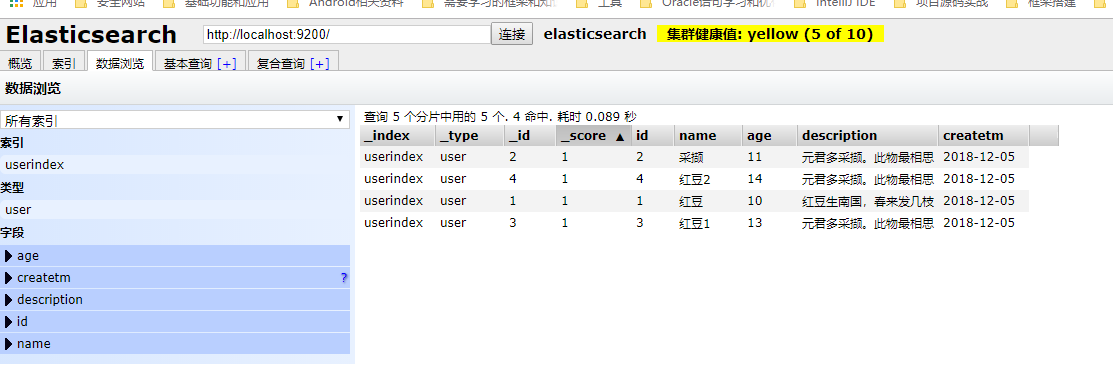
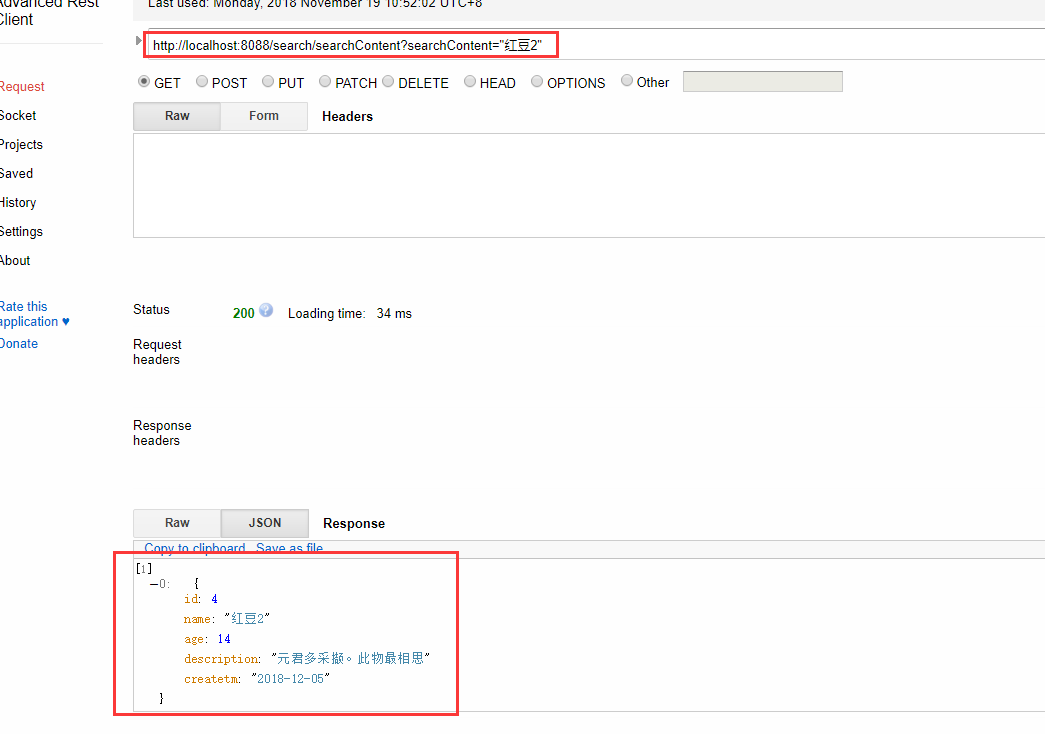
API调用效果如下,首先需要向分词器中添加数据
SpringBoot 2.x 整合ElasticSearch的demo的更多相关文章
- SpringBoot检索篇Ⅳ --- 整合ElasticSearch
知识储备: 关于ElasticSearch的基本使用我已经在上一篇文章介绍过了(传送门),本篇文章主要讲述的是SpringBoot与ElasticSearch的整合使用. SpringBoot与El ...
- SpringBoot整合elasticsearch
在这一篇文章开始之前,你需要先安装一个ElasticSearch,如果你是mac或者linux可以参考https://www.jianshu.com/p/e47b451375ea,如果是windows ...
- Springboot整合elasticsearch以及接口开发
Springboot整合elasticsearch以及接口开发 搭建elasticsearch集群 搭建过程略(我这里用的是elasticsearch5.5.2版本) 写入测试数据 新建索引book( ...
- SpringBoot进阶教程(七十三)整合elasticsearch
Elasticsearch 是一个分布式.高扩展.高实时的搜索与数据分析引擎.它能很方便的使大量数据具有搜索.分析和探索的能力.充分利用Elasticsearch的水平伸缩性,能使数据在生产环境变得更 ...
- SpringBoot整合ElasticSearch实现多版本的兼容
前言 在上一篇学习SpringBoot中,整合了Mybatis.Druid和PageHelper并实现了多数据源的操作.本篇主要是介绍和使用目前最火的搜索引擎ElastiSearch,并和Spring ...
- ElasticSearch(2)---SpringBoot整合ElasticSearch
SpringBoot整合ElasticSearch 一.基于spring-boot-starter-data-elasticsearch整合 开发环境:springboot版本:2.0.1,elast ...
- java框架之SpringBoot(13)-检索及整合Elasticsearch
ElasticSearch介绍 简介 我们的应用经常需要使用检索功能,开源的 Elasticsearch 是目前全文搜索引擎的首选.它可以快速的存储.搜索和分析海量数据.SpringBoot 通过整合 ...
- 【SpringBoot】搜索框架ElasticSearch介绍和整合SpringBoot
========================12章 搜索框架ElasticSearch介绍和整合SpringBoot ============================= 加入小D课堂技术交 ...
- springboot整合elasticsearch入门例子
springboot整合elasticsearch入门例子 https://blog.csdn.net/tianyaleixiaowu/article/details/72833940 Elastic ...
随机推荐
- docker 运行Django项目
一.概述 已经写好了一个Django项目,需要将这个项目用docker封装一个镜像,使用k8s发布! 在封装并运行的过程中,发现了很多问题,这里会一一介绍! 二.时区问题 采用的是镜像是 ubuntu ...
- HDU1711 Number Sequence(KMP模板题)
Number Sequence Time Limit: 10000/5000 MS (Java/Others) Memory Limit: 32768/32768 K (Java/Others) ...
- ERP采购申请管理(三十九)
获取当前表单在流程中的状态: /// <summary> /// 获取当前表单在流程表中的状态 /// </summary> /// <param name=" ...
- ActiveMQ的应用实例
一.部署和启动ActiveMQ 去官网下载:http://activemq.apache.org/ 我下载的是apache-activemq-5.12.0-bin.tar.gz, 解压到本地目录,进入 ...
- hdu 1542
链接:http://acm.hdu.edu.cn/showproblem.php?pid=1542 题意: 求所给矩形的覆盖面积 题解: 利用扫描线的思想,先将坐标离散化,之后以y轴分成多个矩形求解, ...
- python学习之集合
集合(set)是一个无序的不重复元素序列. 可以使用大括号 { } 或者 set() 函数创建集合,注意:创建一个空集合必须用 set() 而不是 { },因为 { } 是用来创建一个空字典. 创建格 ...
- java加密工具类,可设置对应的加解密key
public class AesEncryptUtil { //使用AES-128-CBC加密模式,key需要为16位,key和iv可以相同! private static String KEY =& ...
- PopupWindow分享页面
效果图 步骤: 1.布局中添加分享按钮 2.画出分享页面 3.设置分享页面animator进出动画,并在style.xml中配置 4.MainActivity中添加方法 *画出布局 主页面: < ...
- Linux学习之文件系统常用命令(七)
Linux文件系统常用命令 目录 df命令 du命令 fsck命令 dump2fs命令 df命令 df命令 统计文件系统的占有情况,分区用了多少空间,还剩多少空间 df [选项] [挂载点] 选项: ...
- P1799 数列_NOI导刊2010提高(06)
P1799 数列_NOI导刊2010提高(06)f[i][j]表示前i个数删去j个数得到的最大价值.if(i-j==x) f[i][j]=max(f[i][j],f[i-1][j]+1); else ...