
[To be translated] Nova:libvirt image 的生命周期
翻译自:http://www.pixelbeat.org/docs/openstack_libvirt_images/
The main stages of a Virtual Machine disk image as it transfers through OpenStack to be booted under libvirt are:
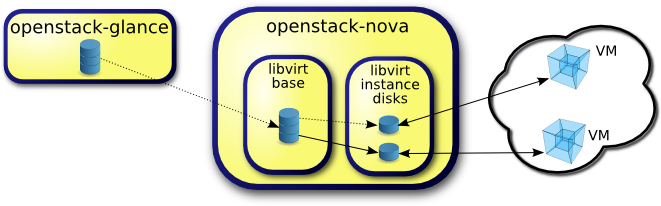
Initially the image is downloaded from glance and cached in libvirt base. We'll consider the options for handling a qcow2 image stored in glance, as that format can be downloaded quite efficiently from glance as it supports compression, and image sparseness can be maintained. This article will focus on the flow and transformations in "libvirt base", which is used to cache, preprocess and optionally back, VM disk images.
Configuration
First we'll summarize the config variables involved, before presenting the operations associated with each config combination, in each OpenStack release. Note I'm describing upstream OpenStack here, and not my employer's Red Hat OpenStack which has back-ported enhancements between versions where appropriate.
| Config | Default | Release | Description |
| use_cow_images | True | Cactus | Whether to use CoW images for "libvirt instance disks" |
| force_raw_images | True | Essex | Allows disabling convert to raw in "libvirt base" for operational reasons |
| libvirt_images_type | 'default' | Folsom | Deprecates use_cow_images and allows selecting LVM libvirt images |
| [libvirt]/images_type | 'default' | Icehouse | Deprecates libvirt_images_type in the [DEFAULT] section |
| preallocate_images | 'none' | Grizzly | Instance disks preallocation mode. 'space' => fallocate images |
| resize_fs_using_block_device | False | Havana | Allows enabling of direct resize for qcow2 images |
The main reason that raw images are written in "libvirt base" by default (since Diablo), is to remove possible compression from the qcow2 image received from glance. Note compression in qcow2 images is read only, and so this will impact reads from unwritten portions of the qcow2 image. Users may want to change this option, depending on CPU resources and I/O bandwidth available. For example, systems with slower I/O or less space available, may want to trade the higher CPU requirements of compression, to minimize input bandwidth. Note raw images are used unconditionally with libvirt_images_type=lvm.
Whether to use CoW images for the "libvirt instance disks" also depends on I/O characteristics of the user's system. Without CoW, more space will be used for common parts of the disk image, but on the flip side depending on the backing store and host caching, there may be better concurrency achieved by having each VM operate on its own copy.
Enabling preallocation of space for the "libvirt instance disks" can help with both space guarantees and I/O performance. Even when not using CoW instance disks, the copy each VM gets is sparse and so the VM may fail unexpectedly at run time with ENOSPC. By running fallocate(1) on the instance disk images, we immediately and efficiently allocate the space for them in the file system (if supported). Also run time performance should be improved as the file system doesn't have to dynamically allocate blocks at run time, reducing CPU overhead and more importantly file fragmentation.
Disk image operations
For each release and config combination, here are the created files and associated operations in getting a qcow2 image from glance through to being booted in a libvirt Virtual Machine.
Folsom, force_raw_images=True, use_cow_images=True
This results in each instance booting from a CoW image, backed by a resized raw image.
| Nova command | Source code | Notes |
| wget http://glance/$image -O base_/$hex.part | images.fetch | |
| qemu-img convert -O raw $hex.part $hex.converted | images.fetch_to_raw | Creates sparse file |
| mv $hex.converted $hex; rm $hex.part | images.fetch_to_raw | |
| imagebackend.create_image | ||
| cp $hex $hex_$size | libvirt.utils.copy_image | Creates sparse file |
| qemu-img resize $hex_$size $size | disk.extend | |
| resize2fs $hex_size | disk.extend | Unpartitioned ext[234] |
| qemu-img create -f qcow2 -o backing_file=... $instance_dir/disk | libvirt.utils.create_image |
Folsom, force_raw_images=True, use_cow_images=False
This results in each instance booting from a copy of a resized raw image.
| Nova command | Source code | Notes |
| wget http://glance/$image -O base_/$hex.part | images.fetch | |
| qemu-img convert -O raw $hex.part $hex.converted | images.fetch_to_raw | Creates sparse file |
| mv $hex.converted $hex; rm $hex.part | images.fetch_to_raw | |
| imagebackend.create_image | ||
| cp $hex $instance_dir/disk | libvirt.utils.copy_image | |
| qemu-img resize disk | disk.extend | |
| resize2fs disk | disk.extend | Unpartitioned ext[234] |
Folsom, force_raw_images=False, use_cow_images=False
This results in each instance booting from a copy of a resized qcow2 image.
| Nova command | Source code | Notes |
| wget http://glance/$image -O base_/$hex.part | images.fetch | |
| mv $hex.part $hex | images.fetch_to_raw | |
| imagebackend.create_image | ||
| cp $hex $instance_dir/disk | libvirt.utils.copy_image | |
| qemu-img resize disk | disk.extend | |
| resize2fs disk | disk.extend | Ignored for qcow2 ¹ |
Folsom, force_raw_images=False, use_cow_images=True
This results in each instance booting from a CoW image, backed by a resized qcow2 image.
| Nova command | Source code | Notes |
| wget http://glance/$image -O base_/$hex.part | images.fetch | |
| mv $hex.part $hex | images.fetch_to_raw | |
| imagebackend.create_image | ||
| cp $hex $hex_$size | libvirt.utils.copy_image | |
| qemu-img resize $hex_$size $size | disk.extend | |
| resize2fs $hex_size | disk.extend | Ignored for qcow2 ¹ |
| qemu-img create -f qcow2 -o backing_file=... $instance_dir/disk | libvirt.utils.create_image |
Grizzly, force_raw_images=True, use_cow_images=True
Grizzly introduces a change for use_cow_images=True, where it will resize in the $instance_dir rather than in base_. So the resize will not be cached, but this is minimal CPU tradeoff per instance boot, for the extra space saved in base_. We'll just present the default config values here which illustrates the only significant change from Folsom.
This results in each instance booting from a resized CoW image, backed by a raw image.
| Nova command | Source code | Notes |
| wget http://glance/$image -O base_/$hex.part | images.fetch | |
| qemu-img convert -O raw $hex.part $hex.converted | images.fetch_to_raw | Creates sparse file |
| mv $hex.converted $hex; rm $hex.part | images.fetch_to_raw | |
| imagebackend.create_image | ||
| qemu-img create -f qcow2 -o backing_file=... $instance_dir/disk | libvirt.utils.create_image | |
| qemu-img resize disk $size | disk.extend | |
| resize2fs disk | disk.extend | Grizzly always ignores ² |
[² Update Sep 2013: Stanislaw Pitucha also noticed that the above referenced Grizzly change introduced a regression where unpartitioned qcow2 images were no longer resized. See the Havana resize_fs_using_block_device option below for details.]
Grizzly, preallocate_images='space'
Grizzly also has new fallocate functionality in this area controlled by the preallocate_images config option. If that is set to 'space', then after the operations above, the $instance_dir/ images will be fallocated to immediately determine if enough space is available, and to possibly improve VM I/O performance due to ongoing allocation avoidance, and better locality of block allocations.
¹ Havana, resize_fs_using_block_device=False
As noted in the first Grizzly change above, Stanislaw Pitucha noticed that change introduced a regression where unpartitioned qcow2 images were no longer resized. He supplied a fix to resize qcow directly rather than relying on the raw image being available, which would also cater for the force_raw_images=False case that even pre Grizzly did not. This new option can be used to enable this support, but there are some large performance and possible security issues so it's not enabled by default. This support will be available in the upcoming Havana release.
General performance considerations
Performance has improved in this area through each OpenStack release, with some of the main topics to consider, for past and future changes being:
Minimize I/O
Note these were implemented in Essex:
- Copy images, then resize, rather than vice versa
- Directly generating images in the $instance_dir/
- Intelligent reading of sparse input
- Reproduction of sparse input on output
- Use compression
Note this was implemented in Folsom:
- Avoid file sytem overhead by setting libvirt_images_type=lvm. Note file system overhead varies depending on file system
Minimize storage
- Use compression
- Use sparse output/generation
- Avoid resized copies when not needed
- Use CoW if appropriate
Improve caching
- Avoid thrashing the page cache with large intermediate images
- Improve low level caching through better storage allocation
Preprocessing
- Preprocessing may be possible on images like preallocation=metadata which trades off initial CPU cost for possibly much better run time I/O performance
- Such cost would be some what alleviated by having asynchronous population of the base_ cache
[To be translated] Nova:libvirt image 的生命周期的更多相关文章
- KVM 介绍(6):Nova 通过 libvirt 管理 QEMU/KVM 虚机 [Nova Libvirt QEMU/KVM Domain]
学习 KVM 的系列文章: (1)介绍和安装 (2)CPU 和 内存虚拟化 (3)I/O QEMU 全虚拟化和准虚拟化(Para-virtulizaiton) (4)I/O PCI/PCIe设备直接分 ...
- [译] libvirt 虚机的生命周期 (Libvirt Virtual Machine Lifecycle)
翻译自:http://wiki.libvirt.org/page/VM_lifecycle 这篇文章描述虚机生命周期的基本概念.其目的在于在一篇文章中提供完整的关于虚机创建.运行.停止.迁移和删除 ...
- react组件的生命周期
写在前面: 阅读了多遍文章之后,自己总结了一个.一遍加强记忆,和日后回顾. 一.实例化(初始化) var Button = React.createClass({ getInitialState: f ...
- 浅谈 Fragment 生命周期
版权声明:本文为博主原创文章,未经博主允许不得转载. 微博:厉圣杰 源码:AndroidDemo/Fragment 文中如有纰漏,欢迎大家留言指出. Fragment 是在 Android 3.0 中 ...
- C# MVC 5 - 生命周期(应用程序生命周期&请求生命周期)
本文是根据网上的文章总结的. 1.介绍 本文讨论ASP.Net MVC框架MVC的请求生命周期. MVC有两个生命周期,一为应用程序生命周期,二为请求生命周期. 2.应用程序生命周期 应用程序生命周期 ...
- UIViewController生命周期-完整版
一.UIViewController 的生命周期 下面带 (NSObject)的方法是NSObject提供的方法.其他的都是UIViewController 提供的方法. load (NSObje ...
- angular2系列教程(十一)路由嵌套、路由生命周期、matrix URL notation
今天我们要讲的是ng2的路由的第二部分,包括路由嵌套.路由生命周期等知识点. 例子 例子仍然是上节课的例子:
- Spring中Bean的作用域、生命周期
Bean的作用域.生命周期 Bean的作用域 Spring 3中为Bean定义了5中作用域,分别为singleton(单例).protot ...
- Autofac - 生命周期
实例生命周期决定在同一个服务的每个请求的实例是如何共享的. 当请求一个服务的时候,Autofac会返回一个单例 (single instance作用域), 一个新的对象 (per lifetime作用 ...
随机推荐
- jQuery cbpContentSlider 滑动切换
cbpContentSlider是一款选项卡插件,只要按照以下html结构就可以自动生成菜单切换内容特效. 在线实例 实例演示 使用方法 <div id="cbp-contentsli ...
- 如何用.NET生成二维码?
二维码是用某种特定的几何图形按一定规律在平面(二维方向上)分布的黑白相间的图形记录数据符号信息的,国外对二维码技术的研究始于20世纪80年代末,在二维码符号表示技术研究方面已研制出多种码制,常见的有P ...
- Dom Animator – 提供 Dom 注释动画的 JS 库
DOM 动画是一个极好的 JavaScript 库,用来在页面的 DOM 注释中显示小的 ASCII 动画.这对于那些检查你的代码的人是一个小彩蛋,仅此而已.它是一个独立的库,不依赖 jQuery 或 ...
- 25款专业的 WordPress 电子商务网站主题
WordPress 作为最流行的博客系统,插件众多,易于扩充功能.安装和使用都非常方便,而且有许多第三方开发的免费模板,安装方式简单易用.这篇文章和大家分享35款专业的 WordPress 电子商务网 ...
- 学习笔记——关于HTML(含HTML5)的块级元素和行级(内联)元素总结
1.首先我们要知道什么是块级元素和行级(内联)元素? 块级(block)元素的特点: ①总是在新行上开始: ②高度,行高以及外边距和内边距都可控制: ③宽度缺省是它的容器的100%,除非设定一个宽度: ...
- VMware: XXX is still busy. Please wait until the operation is complete before closing
在使用vmware的过程中发现创建快照.恢复快照.管理快照等功能突然都变成灰色的,用不了.更觉得夸张的是仅仅剩下关闭虚机按钮是红色的.心想估计是虚机快照没处理完之类的问题导致的,于是想想关闭虚机重 ...
- Sharepoint学习笔记—习题系列--70-576习题解析 -(Q49-Q51)
Question 49You are designing a SharePoint 2010 intranet site for a corporation. Your design must mee ...
- SqlIte数据库并发性
把遇到的一些小问题都记下来,告诉自己,一些小细节会铸成打错的 今天没事复习以前的知识,用sqlite做数据库,发现修改数据的时候等好久才有反应,而且还失败,可是过一会之后又会好,好了以后又是一样,种以 ...
- Windows下修改Android手机的hosts
Windows下修改Android手机的hosts 1.首先,手机是Root过的. 2.连接手机和电脑, adb shell 进入命令行. 3.获取root用户权限: su -root 4.不知道为何 ...
- 好推二维码如何通过应用宝微下载支持微信自动打开APP下载?
好推二维码 官网 http://www.hotapp.cn 1. 为什么使用应用宝微下载? APP下载二维码,通过微信扫描下载的时候,微信目前只支持应用宝微下载,才能在微信里直接打开下载,否则就需要在 ...