
open-falcon 安装
openfalcon 规划
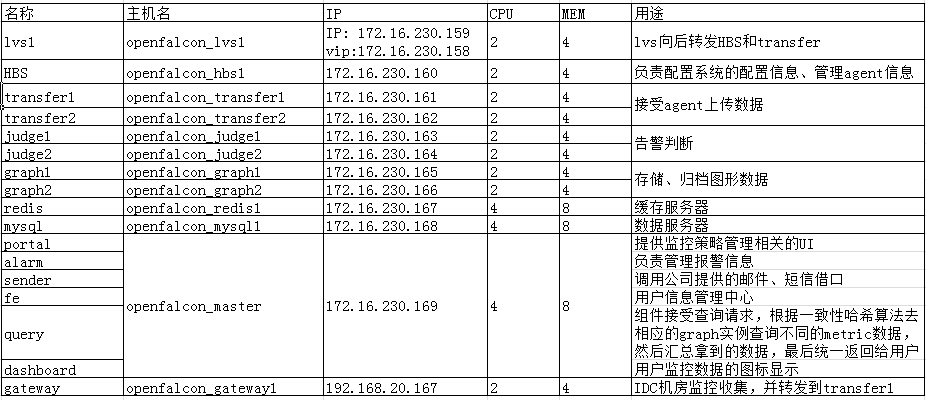
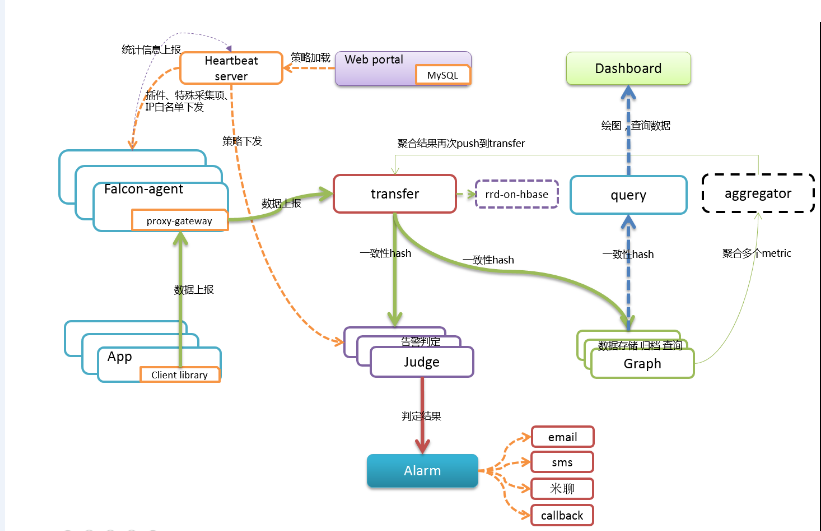
拓扑图
transfer 配置文件
[root@openfalcon_transfer1 transfer]# cat cfg.json

{

    "debug": true,

    "minStep": ,

    "http": {

        "enabled": true,

        "listen": "0.0.0.0:6060"

    },

    "rpc": {

        "enabled": true,

        "listen": "0.0.0.0:8433"

    },

    "socket": {

        "enabled": true,

        "listen": "0.0.0.0:4444",

        "timeout":

    },

    "judge": {

        "enabled": true,

        "batch": ,

        "connTimeout": ,

        "callTimeout": ,

        "maxConns": ,

        "maxIdle": ,

        "replicas": ,

        "cluster": {

            "judge-00" : "172.16.230.163:6080",

            "judge-01" : "172.16.230.164:6080"

        }

    },

    "graph": {

        "enabled": true,

        "batch": ,

        "connTimeout": ,

        "callTimeout": ,

        "maxConns": ,

        "maxIdle": ,

        "replicas": ,

        "cluster": {

            "graph-00" : "172.16.230.165:6070",

            "graph-01" : "172.16.230.166:6070"

        }

    },

    "tsdb": {

        "enabled": false,

        "batch": ,

        "connTimeout": ,

        "callTimeout": ,

        "maxConns": ,

        "maxIdle": ,

        "retry": ,

        "address": "127.0.0.1:8088"

    }

}
judge配置文件
[root@openfalcon_judge1 judge]# cat cfg.json

{

    "debug": true,

    "debugHost": "nil",

    "remain": ,

    "http": {

        "enabled": true,

        "listen": "0.0.0.0:6081"

    },

    "rpc": {

        "enabled": true,

        "listen": "0.0.0.0:6080"

    },

    "hbs": {

        "servers": ["172.16.230.169:6030"],

        "timeout": ,

        "interval":

    },

    "alarm": {

        "enabled": true,

        "minInterval": ,

        "queuePattern": "event:p%v",

        "redis": {

            "dsn": "172.16.230.167:6379",

            "maxIdle": ,

            "connTimeout": ,

            "readTimeout": ,

            "writeTimeout":

        }

    }

}
graph配置文件
[root@openfalcon_graph2 graph]# cat cfg.json

{

    "debug": false,

    "http": {

        "enabled": true,

        "listen": "0.0.0.0:6071"

    },

    "rpc": {

        "enabled": true,

        "listen": "0.0.0.0:6070"

    },

    "rrd": {

        "storage": "/data/graph/data6070"

    },

    "db": {

        "dsn": "openfalcon:123456@tcp(172.16.230.168:3306)/graph?loc=Local&parseTime=true",

        "maxIdle":

    },

    "callTimeout": ,

    "migrate": {

        "enabled": false,

        "concurrency": ,

        "replicas": ,

        "cluster": {

            "graph-00" : "127.0.0.1:6070"

        }

    }

}
alarm配置文件
[root@openfalcon_master alarm]# cat cfg.json

{

    "debug": true,

    "uicToken": "",

    "http": {

        "enabled": true,

        "listen": "0.0.0.0:9912"

    },

    "queue": {

        "sms": "/sms",

        "mail": "/mail"

    },

    "redis": {

        "addr": "172.16.230.167:6379",

        "maxIdle": ,

        "highQueues": [

            "event:p0",

            "event:p1",

            "event:p2",

            "event:p3",

            "event:p4",

            "event:p5"

        ],

        "lowQueues": [

            "event:p6"

        ],

        "userSmsQueue": "/queue/user/sms",

        "userMailQueue": "/queue/user/mail"

    },

    "api": {

        "portal": "http://172.16.230.169:5050",

        "uic": "http://172.16.230.169:1234",

        "links": "http://172.16.230.169:5090"

    }

}
dashboard配置文件
[root@openfalcon_master dashboard]# cat gunicorn.conf

workers =

bind = ':8081'

proc_name = 'falcon-dashboard-opensource'

pidfile = '/tmp/falcon-dashboard-opensource.pid'

limit_request_field_size =

limit_request_line =

[root@openfalcon_master rrd]# cat config.py

#-*-coding:utf8-*-

import os

#-- dashboard db config --

DASHBOARD_DB_HOST = "172.16.230.168"

DASHBOARD_DB_PORT =

DASHBOARD_DB_USER = "openfalcon"

DASHBOARD_DB_PASSWD = ""

DASHBOARD_DB_NAME = "dashboard"

#-- graph db config --

GRAPH_DB_HOST = "172.16.230.168"

GRAPH_DB_PORT =

GRAPH_DB_USER = "openfalcon"

GRAPH_DB_PASSWD = ""

GRAPH_DB_NAME = "graph"

#-- app config --

DEBUG = True

SECRET_KEY = "secret-key"

SESSION_COOKIE_NAME = "open-falcon"

PERMANENT_SESSION_LIFETIME =  *  *

SITE_COOKIE = "open-falcon-ck"

#-- query config --

QUERY_ADDR = "http://172.16.230.169:9966"

BASE_DIR = "/data/dashboard/"

LOG_PATH = os.path.join(BASE_DIR,"log/")

try:

    from rrd.local_config import *

except:

    pass
fe 配置文件
[root@openfalcon_master fe]# cat cfg.json

{

    "log": "debug",

    "company": "公司名称",

    "http": {

        "enabled": true,

        "listen": "0.0.0.0:1234"

    },

    "cache": {

        "enabled": true,

        "redis": "172.16.230.167:6379",

        "idle": ,

        "max": ,

        "timeout": {

            "conn": ,

            "read": ,

            "write":

        }

    },

    "salt": "0i923fejfd3",

    "canRegister": true,

    "ldap": {

        "enabled": false,

        "addr": "ldap.example.com:389",

        "baseDN": "dc=example,dc=com",

        "bindDN": "cn=mananger,dc=example,dc=com",

        "bindPasswd": "",

        "userField": "uid",

        "attributes": ["sn","mail","telephoneNumber"]

    },

    "uic": {

        "addr": "openfalcon:123456@tcp(172.16.230.168:3306)/uic?charset=utf8&loc=Asia%2FChongqing",

        "idle": ,

        "max":

    },

    "shortcut": {

        "falconPortal": "http://172.16.230.169:5050/",

        "falconDashboard": "http://172.16.230.169:8081/",

        "falconAlarm": "http://172.16.230.169:9912/"

    }

}
hbs配置文件
[root@openfalcon_master hbs]# cat cfg.json

{

    "debug": true,

    "database": "openfalcon:123456@tcp(172.16.230.168:3306)/falcon_portal?loc=Local&parseTime=true",

    "hosts": "",

    "maxIdle": ,

    "listen": ":6030",

    "trustable": [""],

    "http": {

        "enabled": true,

        "listen": "0.0.0.0:6031"

    }

}
sender配置文件
[root@openfalcon_master sender]# cat cfg.json

{

    "debug": true,

    "http": {

        "enabled": true,

        "listen": "0.0.0.0:6066"

    },

    "redis": {

        "addr": "172.16.230.167:6379",

        "maxIdle":

    },

    "queue": {

        "mail": "/mail"

    },

    "worker": {

        "sms": ,

        "mail":

    },

    "api": {

    "mail":"http://172.16.230.169:4000/sender/mail"

    }

}
mail_provider配置文件, sender通过mail_provider发送邮件
[root@openfalcon_master mail_provider]# cat cfg.json

{

    "debug": true,

    "http": {

        "listen": "0.0.0.0:4000",

        "token": ""

    },

    "smtp": {

        "addr": "smtp.163.com:25",

        "username": "fengjian1585@163.com",

        "password": "",

        "from": "fengjian1585@163.com"

    }

}
nodata配置文件,如果agent异常,图表上将显示-1
[root@openfalcon_master nodata]# cat cfg.json

{

    "debug": false,

    "http": {

        "enabled": true,

        "listen": "0.0.0.0:6090"

    },

    "query":{

        "connectTimeout": ,

        "requestTimeout": ,

        "queryAddr": "172.16.230.169:9966"

    },

    "config": {

        "enabled": true,

        "dsn": "openfalcon:123456@tcp(172.16.230.168:3306)/falcon_portal?loc=Local&parseTime=true&wait_timeout=604800",

        "maxIdle":

    },

    "collector":{

        "enabled": true,

        "batch": ,

        "concurrent":

    },

    "sender":{

        "enabled": true,

        "connectTimeout": ,

        "requestTimeout": ,

        "transferAddr": "172.16.230.161:6060",

        "transferAddr": "172.16.230.162:6060",

        "batch": ,

        "block": {

            "enabled": false,

            "threshold":

        }

    }

}
配置情况

portal配置文件
[root@openfalcon_master portal]# cat gunicorn.conf

workers =

bind = '0.0.0.0:5050'

proc_name = 'falcon-portal'

pidfile = 'var/app.pid'

limit_request_field_size =

limit_request_line =

[root@openfalcon_master portal]# cat frame/config.py

# -*- coding:utf- -*-

__author__ = 'Ulric Qin'

# -- app config --

DEBUG = True

# -- db config --

DB_HOST = "172.16.230.168"

DB_PORT =

DB_USER = "openfalcon"

DB_PASS = ""

DB_NAME = "falcon_portal"

# -- cookie config --

SECRET_KEY = "4e.5tyg8-u9ioj"

SESSION_COOKIE_NAME = "falcon-portal"

PERMANENT_SESSION_LIFETIME =  *  *

UIC_ADDRESS = {

    'internal': 'http://172.16.230.169:1234',

    'external': 'http://172.16.230.169:1234',

}

UIC_TOKEN = ''

MAINTAINERS = ['root']

CONTACT = 'ulric.qin@gmail.com'

COMMUNITY = True

try:

    from frame.local_config import *

except Exception, e:

    print "[warning] %s" % e
query配置文件
{

    "debug": "false",

    "http": {

        "enabled":  true,

        "listen":   "0.0.0.0:9966"

    },

    "graph": {

        "connTimeout": ,

        "callTimeout": ,

        "maxConns": ,

        "maxIdle": ,

        "replicas": ,

        "cluster": {

            "graph-00" : "172.16.230.165:6070",

            "graph-01" : "172.16.230.166:6070"

        }

    },

    "api": {

        "query": "http://192.168.230.169:9966",

        "dashboard": "http://192.168.230.169:8081",

        "max":

    }

}
task 配置文件
[root@openfalcon_master task]# cat cfg.json

{

    "debug": false,

    "http": {

        "enable": true,

        "listen": "0.0.0.0:8002"

    },

    "index": {

        "enable": true,

        "dsn": "openfalcon:senyint.rh@tcp(172.16.230.168:3306)/graph?loc=Local&parseTime=true",

        "maxIdle": ,

        "autoDelete": false,

        "cluster":{

            "openfalcon_judge1:6071" : "0 0 0 ? * 0-5",

            "openfalcon_judge2:6071" : "0 30 0 ? * 0-5"

        }

    },

    "collector" : {

        "enable": true,

        "destUrl" : "http://127.0.0.1:1988/v1/push",

        "srcUrlFmt" : "http://%s/statistics/all",

        "cluster" : [

            "transfer,openfalcon_transfer1:6060",

            "transfer,openfalcon_transfer2:6060",

            "graph,openfalcon_graph1:6071",

            "graph,openfalcon_graph2:6071",

            "task,openfalcon_master:8001"

        ]

    }

}
open-falcon 安装的更多相关文章
- open falcon dashboard 安装
open falcon dashboard 安装 yum -y install lrzsz python-virtualenv mysql-devel python-devel libffi-deve ...
- centos安装 Falcon+
1:环境 准备 : 安装 go环境 :下载 - Golang中国 参照 :http://www.cnblogs.com/Amos-Turing/p/8494250.html 安装 mysql 安装 r ...
- Hive SQL 监控系统 - Hive Falcon
1.概述 在开发工作当中,提交 Hadoop 任务,任务的运行详情,这是我们所关心的,当业务并不复杂的时候,我们可以使用 Hadoop 提供的命令工具去管理 YARN 中的任务.在编写 Hive SQ ...
- elk安装(这个是初级的可以把这个套件安上)
http://udn.yyuap.com/doc/logstash-best-practice-cn/index.html ELK其实并不是一款软件,而是一整套解决方案,是三个开源软件Elastics ...
- redis缓存的安装和使用
Redis介绍 Redis本质上一个Key/Value数据库,与Memcached类似的NoSQL型数据库,但是他的数据可以持久化的保存在磁盘上,解决了服务重启后数据不丢失的问题,他的值可以是s ...
- mysql 安装employees db的步骤
因为准备要开始学习ASP.NET的高级部分,所以今晚想安装一个数据库示例,百度发现原来mysql有个employees db 但是单纯按照网上的方法,也是没有办法导入的,所以写了这篇博文,作为笔记. ...
- Ambari安装之部署本地库(镜像服务器)(二)
部署本地库(镜像服务器) (1)下载HortWorks官网上的3个库到本地(也可以在线下载,但是速度会很慢) 我们先把hortworks官网上需要下载的3个库下载到本地(这个还是需要很长时间的,当然你 ...
- 监控 | open-falcon | 安装
监控 | open-falcon | 安装 1. 简介 主要看中了它的水平扩展,画图比zabbix要友好,告警支持简单压缩. 绿色:基础组件: 蓝色:作图链路 红色:报警链路 橙色:域名 架构 1.1 ...
- Linux记录-JMX监控Tomcat上传到falcon
1.登录测试服务器xxxxxx xxxxxx su root输入xxxx 2.先修改Tomcat的启动脚本,(linux下为catalina.sh),添加以下内容: CATALINA_OPTS=&qu ...
- 02:openf-falcon安装
open-falcon其他篇 目录: 1.1 安装open-falcon环境准备 1.2 部署open-falcon后端 1.2.1 agent配置文件 1.2.2 transfer(数据上报) 1. ...
随机推荐
- ACM 红黑树
红黑树 时间限制:3000 ms | 内存限制:65535 KB 难度:3 描述 什么是红黑树呢?顾名思义,跟枣树类似,红黑树是一种叶子是黑色果子是红色的树... 当然,这个是我说的... & ...
- IOS UI segmentedControl UISegmentedControl 常见属性和用法
UISegmentedControl中一些常见的属性和用法 //设置以图案作为分段的显示,仅需要图案的轮廓,这样颜色为分段的背景颜色 // NSArray *items = @[[UIImage ...
- 【BZOJ】1998: [Hnoi2010]Fsk物品调度
http://www.lydsy.com/JudgeOnline/problem.php?id=1998 题意: 给你6个整数$n,s,q,p,m,d$. 有$n$个位置和$n-1$个盒子,位置编号从 ...
- [BZOJ2794][Poi2012]Cloakroom
2794: [Poi2012]Cloakroom Time Limit: 20 Sec Memory Limit: 128 MBSubmit: 167 Solved: 119[Submit][St ...
- JS:操作样式表3:内联和外链样式
var box = document.getElementById("box"); box.style.属性;只能读取修改行内样式. //访问元素样式2,对外链样式表进行操作 do ...
- CF 335B. Palindrome(DP)
题目链接 挺好玩的一个题,1Y... #include <cstdio> #include <cstring> #include <iostream> using ...
- WinForm 快捷键设置(转载)
1.Alt+*(按钮快捷键) 按钮快捷键也为最常用快捷键,其设置也故为简单.在大家给button.label.menuStrip等其他控件的Text属性指定名称时,在其后面加上‘&’然后在加上 ...
- Map 映射
package lis0924; import java.util.HashMap; import java.util.Iterator; import java.util.Map; import j ...
- java web(一) 使用sql标签库+tomcat+mysql手动创建一个jsp练习总结
2016-09-0111:06:53 使用sql标签库+tomcat+mysql手动创建一个jsp 1. 1.1安装tomcat ...
- powerdesigner的基本使用转载
http://www.blogjava.net/wangdetian168/archive/2011/04/07/347847.html