
[转]Bootstrap 3.0.0 with ASP.NET Web Forms – Step by Step – Without NuGet Package
本文转自:http://www.mytecbits.com/microsoft/dot-net/bootstrap-3-0-0-with-asp-net-web-forms
In my earlier article, I wrote about the step by step instructions on creating ASP.NET web forms application with Bootstrap UI Framework, using Twitter Bootstrap from NuGet as a package. However, In this article, I’m not using bootstrap NuGet Package. Instead I’m using the Bootstrap version 3.0.0 files, downloaded from GitHub and with an empty ASP.NET web forms application. This will be a simple and light weight sample web form, for you to build your application on.
If you are interested in using Bootstrap from NuGet package in web forms, then read the article Twitter Bootstrap with ASP.NET. Step by step instruction for using bootstrap with MVC 4 Razor engine without NuGet package is available in the article Bootstrap with ASP.NET MVC 4 here.
Tools and frameworks used:
- Visual Studio Express 2012 for Web.
- Dot Net Framework 4.5.
- jQuery 2.0.3
- Twitter Bootstrap 3.0.0 RC1 straight from GitHub.
- Twitter Bootstrap Starter Template from http://getbootstrap.com/getting-started/#examples.
Sample Code:
The sample code is available in the continuation article� Bootstrap 3.0.0 with ASP.NET Web Forms – Step by Step – Sample Code.
Steps for using Bootstrap 3.0.0 with ASP.NET Web Forms:
- Launch Visual Studio (I’m using Visual Studio Express 2012 for Web).
- Create a new ASP.NET Empty Web Application.

- In the new project, create a folder Scripts to store the java script and jQuery files.
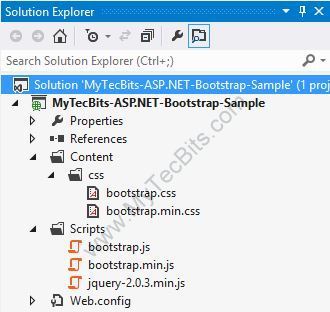
- Create another folder Content to store the css files and the image files. After creating new folders the solution looks like this.

- Bootstrap needs jQuery. So download the latest version of jQuery from http://jquery.com/download/. I’ve downloaded the compressed, production jQuery 2.0.3.
- Save the downloaded jQuery file in the Scripts folder in the project. Then include the file jquery-2.0.3.min.js to the project from the solution explorer.

- Download the latest version of Bootstrap from here.
- Extract the downloaded zip file (bs-v3.0.0-rc1-dist.zip). I’ve downloaded version 3.0.0 RC1. There will be 2 folders, one with js files and another with css files.


- Place the 2 bootstrap js files in the Scripts folder and include them to the project from the solution explorer.

- Copy the css folder from the bootstrap zip file and place it inside the Content folder of the project. Then include the css folder and it’s contents to the project.
- After including the files, the solution explorer looks like this.
- Download the bootstrap starter template from examples.getbootstrap.com.
- Create a master page for the project and re-name it if needed. For creating a master page, right-click the project in the solution explorer, select Add, select New Item… and create new Master Page.

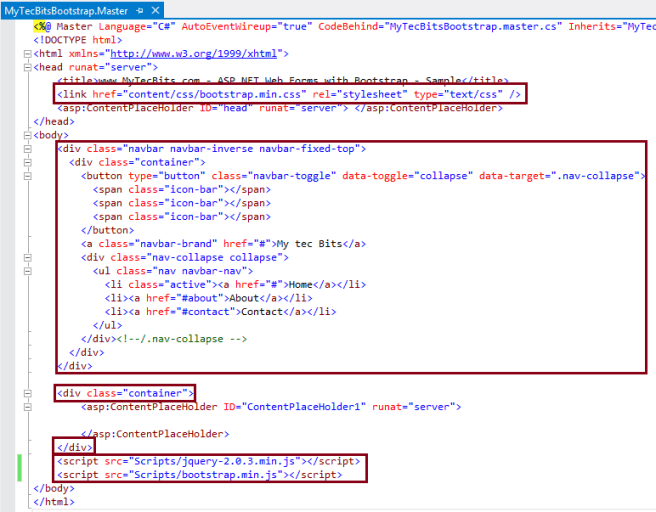
- Edit the new master page and link the bootstrap css inside the title block.

- Remove the <form> tag set from the master page.
- Add the navigation bar (navbar) section from the downloaded bootstrap sample template below the start of the <Body> tag.�
- In the <div> tag surrounding the <asp:ContentPlaceHolder> add the class� class=”container”.
- Just above the end of the body tag, add the jQuery file and the bootstrap.min.js file using the script tag with src attribute. Make sure to add jQuery file above the bootstrap file.
- The master page is now ready and looks like this:
- Create a default page. For creating Default.aspx page, right clicking the project, select Add, select New Item… and select Web Form Using Master Page. In the Master Page Selection screen select the new master page you have created earlier.
- Edit the� Default.aspx page and write something inside the� ContentPlaceHolder1 content section.

- Now your solution is ready to be build.
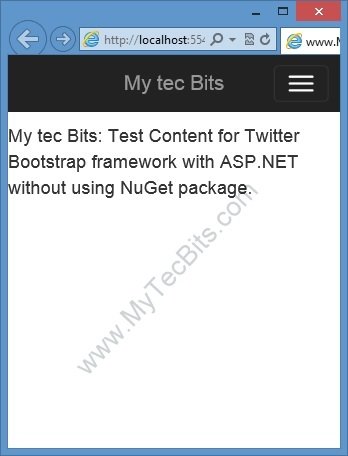
- Build the ASP.NET Web Forms solution, either by hitting the F5 key or by clicking the green build arrow at the Visual Studio tool bar. On successful build, the web page will be launched in the browser similar to the one shown below.

- This bootstrap User Interface layout is responsive in nature. This is, when you open this UI in small screens like smart phones or tablets, the menu and content rearrange itself to fit the screen. You can check this by re-sizing the browser screen in PC.
The location of the source code for the sample solution created with the above steps is available in the continuation article� Bootstrap 3.0.0 with ASP.NET Web Forms – Step by Step – Sample Code. Get The Sample Code –>
Other Dot Net Bootstrap Articles:
- Twitter Bootstrap with ASP.NET.
- Twitter Bootstrap with ASP.NET MVC 4.
- Bootstrap with ASP.NET MVC 4 – Step by Step – Without NuGet Package.
- Twitter Bootstrap Packages for Visual Studio.
[转]Bootstrap 3.0.0 with ASP.NET Web Forms – Step by Step – Without NuGet Package的更多相关文章
- Professional C# 6 and .NET Core 1.0 - Chapter 42 ASP.NET Web API
本文内容为转载,重新排版以供学习研究.如有侵权,请联系作者删除. 转载请注明本文出处: -------------------------------------------------------- ...
- Using Friendly URLs in ASP.NET Web Forms
Introduction Websites often need to generate SEO friendly URLs. In ASP.NET Web Forms applications, a ...
- 【翻译】使用Knockout, Web API 和 ASP.Net Web Forms 进行简单数据绑定
原文地址:http://www.dotnetjalps.com/2013/05/Simple-data-binding-with-Knockout-Web-API-and-ASP-Net-Web-Fo ...
- ASP.NET Web Forms的改进
虽然ASP.NET Web Forms不是vNext计划的一部分,但它并没有被忽视.作为Visual Studio 2013 Update 2的一部分,它重新开始支持新工具.EF集成和Roslyn. ...
- Knockout, Web API 和 ASP.Net Web Forms 进行简单数据绑定
使用Knockout, Web API 和 ASP.Net Web Forms 进行简单数据绑定 原文地址:http://www.dotnetjalps.com/2013/05/Simple-da ...
- ASP.NET Web Forms - 网站导航(Sitemap 文件)
[参考]ASP.NET Web Forms - 导航 ASP.NET 带有内建的导航控件. 网站导航 维护大型网站的菜单是困难而且费时的. 在 ASP.NET 中,菜单可存储在文件中,这样易于维护.文 ...
- 在ASP.NET Web Forms中用System.Web.Optimization取代SquishIt
将一个ASP.NET Web Forms项目从.NET Framework 4.0升级至.NET Framework 4.5之后,发现SquishIt竟然引发了HTTP Error 500.0 - I ...
- ASP.NET Web Forms 的 DI 應用範例
跟 ASP.NET MVC 与 Web API 比起来,在 Web Forms 应用程式中使用 Dependency Injection 要来的麻烦些.这里用一个范例来说明如何注入相依物件至 Web ...
- Asp.Net Web Forms/MVC/Console App中使用Autofac
本来简单介绍了Autofac在Asp.Net Web Forms中的应用,后来又添加了mvc.控制台应用程序中使用Autofac,详情请看源码. ASP.NET Web Forms使用Autofac, ...
随机推荐
- SQL查询数据的几大方法
有你,查询数据我什么都不怕.快快掌握!! 出大招的工具: 1.使用LIKE.BETWEEN.IN进行模糊查询 eg1: SELECT * FROM Students WHERE 姓名 like '张% ...
- [ASP.NET MVC] 使用CLK.AspNet.Identity提供依权限显示选单项目的功能
[ASP.NET MVC] 使用CLK.AspNet.Identity提供依权限显示选单项目的功能 CLK.AspNet.Identity CLK.AspNet.Identity是一个基于ASP.NE ...
- HTML+AngularJS+Groovy如何实现登录功能
AngularJS是一款优秀的前端JS框架,已经被用于Google的多款产品当中.AngularJS核心特性有:MVVM.模块化.自动化双向数据绑定.语义化标签.依赖注入等.AngularJS认为声明 ...
- CSS尺寸单位 % px em rem 详解
在CSS中,尺寸单位分为两类:相对长度单位和绝对长度单位.相对长度单位按照不同的参考元素,又可以分为字体相对单位和视窗相对单位.字体相对单位有:em.ex.ch.rem:视窗相对单位有:vw.vh.v ...
- 深入理解:JavaScript原型与继承
深入理解:JavaScript原型与继承 看过不少书籍,不少文章,对于原型与继承的说明基本上让人不明觉厉,特别是对于习惯了面向对象编程的人来说更难理解,这里我就给大家说说我的理解. 首先JavaScr ...
- Sap 常用Function 说明
函数名 描述 SD_VBAP_READ_WITH_VBELN 根据销售订单读取表vbap中的信息EDIT_LINES 把READ_TEXT返回的LINES中的行按照TDFORMAT=“*”重新组织VI ...
- FOR ALL ENTRIES IN 与 INNER JOIN 写在一个SQL上影响效率
SELECT likp~vbeln likp~lfart lips~werks likp~kunnr INTO CORRESPONDING FIELDS OF TABLE it_likps FROM ...
- python中的迭代与递归
遇到一个情况,需要进行递归操作,但是呢递归次数非常大,有一万多次.先不说一万多次递归,原来的测试代码是java的,没装jdk和编译环境,还是用python吧 先看下原本的java代码: public ...
- 读jQuery源码 - Deferred
Deferred首次出现在jQuery 1.5中,在jQuery 1.8之后被改写,它的出现抹平了javascript中的大量回调产生的金字塔,提供了异步编程的能力,它主要服役于jQuery.ajax ...
- 1分钟实现Autodesk Vault登录对话框
.csharpcode, .csharpcode pre { font-size: small; color: black; font-family: consolas, "Courie ...