
MVC - 16.MVC过滤器
filter
- n. 滤波器;[化工] 过滤器;筛选;滤光器
- vt. 过滤;渗透;用过滤法除去
1.过滤器表
|
过滤器类型 |
接口 |
默认实现 |
描述 |
| Action | IActionFilter | ActionFilterAttribute | 在动作方法之前及之后运行 |
| Result | IResultFilter | ActionFilterAttribute | 在动作结果被执行之前和之后运行 |
| AuthorizationFilter | IAuthorizationFilter | AuthorizeAttribute | 首先运行,在任何其它过滤器或动作方法之前 |
| Exception | IExceptionFilter | HandleErrorAttribute | 只在另一个过滤器、动作方法、动作结果弹出异常时运行 |
2.Action
2.1.创建Action特性
自定义一个ActionFilterAttribute类,使他继承自 ActionFilterAttribute
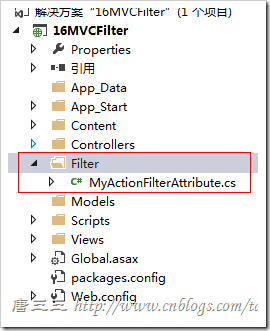
public class MyActionFilterAttribute : ActionFilterAttribute
{

}
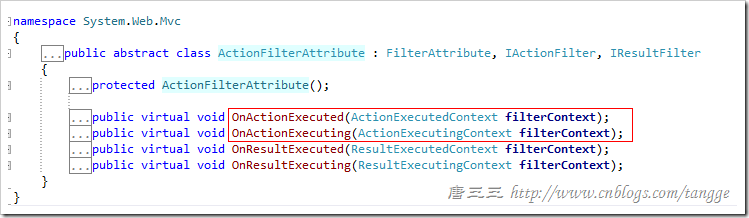
2.2. Action方法 过滤器 类
Filter/MyactionFilterAttribute.cs
Filter/MyactionFilterAttribute.cs

/// <summary>

    /// Action方法 过滤器 类

    /// </summary>

    public class MyActionFilterAttribute : ActionFilterAttribute

    {

        //执行Action方法之前

        public override void OnActionExecuting(ActionExecutingContext filterContext)

        {

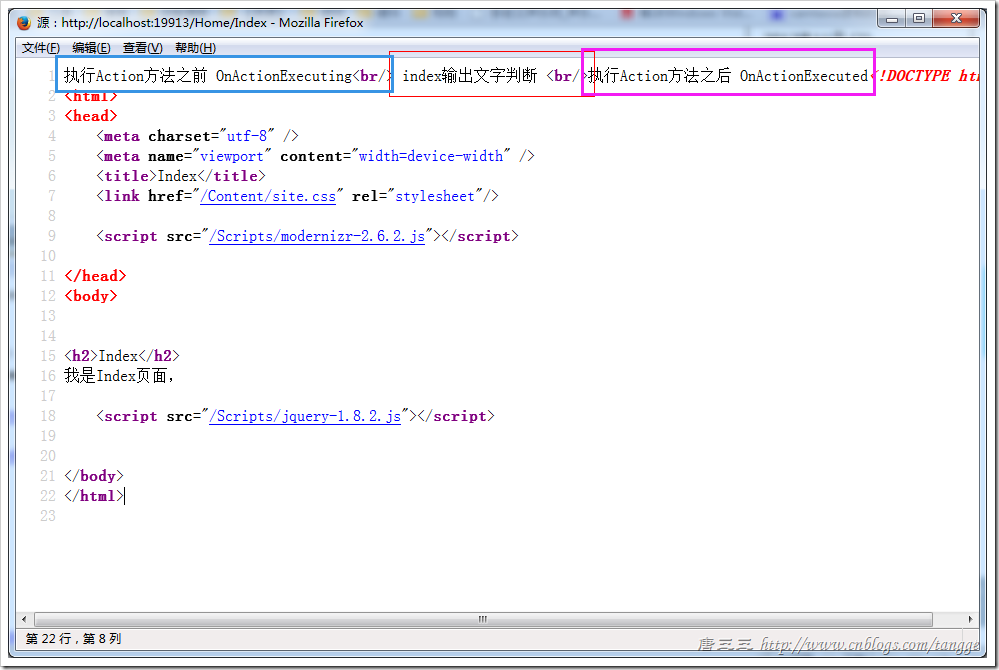
            filterContext.HttpContext.Response.Write("执行Action方法之前 OnActionExecuting<br/>");

            base.OnActionExecuting(filterContext);

        }

        //执行Action方法之后

        public override void OnActionExecuted(ActionExecutedContext filterContext)

        {

            filterContext.HttpContext.Response.Write("执行Action方法之后 OnActionExecuted");

            base.OnActionExecuted(filterContext);

        }

    }
Controller/HomeController.cs
public class HomeController : Controller

    {

        //

        // GET: /Home/

        [Filter.MyActionFilter]

        public ActionResult Index()

        {

            Response.Write(" index输出文字判断 <br/>");

            return View();

        }

    }
View/Index.cs
@{

    ViewBag.Title = "Index";

}

<h2>Index</h2>

我是Index页面,
2.3.全局Action特性
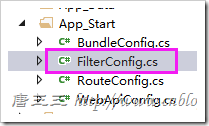
public class FilterConfig

    {

        public static void RegisterGlobalFilters(GlobalFilterCollection filters)

        {

            filters.Add(new HandleErrorAttribute());

            //添加全局 MyActionFilterAttribute

            filters.Add(new Filter.MyActionFilterAttribute());

        }

    }
3.Reslut
3.1.Action方法 过滤器 类
Filter/YouResultFilterAtrribute.cs
Filter/YouResultFilterAtrribute.cs

using System;

using System.Collections.Generic;

using System.Linq;

using System.Web;

using System.Web.Mvc;

namespace _16MVCFilter.Filter

{

    /// <summary>

    /// Result 过滤器 - 加载的是视图 “Action” 方法的话,在加载视图前后调用

    /// </summary>

    public class YouResultFilterAtrribute : ActionFilterAttribute

    {

        /// <summary>

        /// 加载“视图”前

        /// </summary>

        /// <param name="filterContext"></param>

        public override void OnResultExecuting(ResultExecutingContext filterContext)

        {

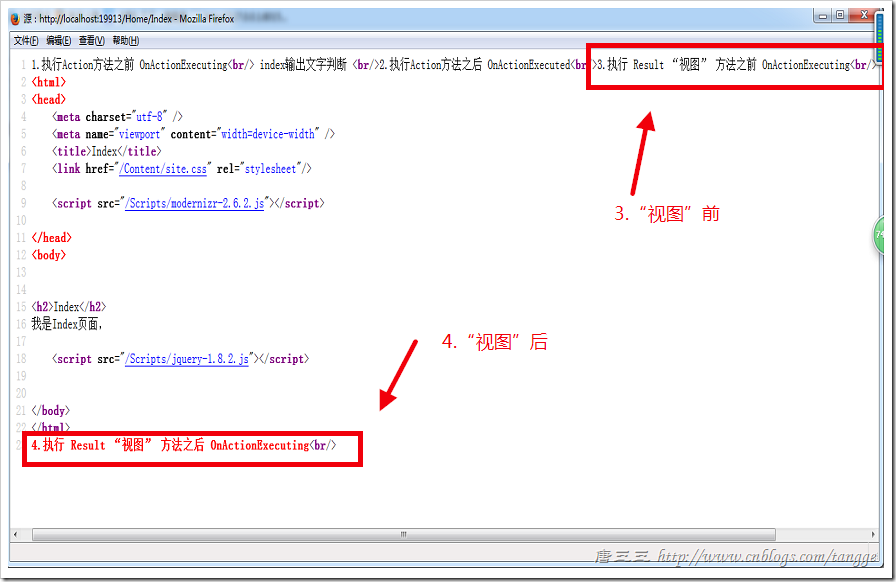
            filterContext.HttpContext.Response.Write("3.执行 Result “视图” 方法之前 OnActionExecuting<br/>");

            base.OnResultExecuting(filterContext);

        }

        /// <summary>

        /// 加载“视图”后

        /// </summary>

        /// <param name="filterContext"></param>

        public override void OnResultExecuted(ResultExecutedContext filterContext)

        {

            filterContext.HttpContext.Response.Write("4.执行 Result “视图” 方法之后 OnActionExecuting<br/>");

            base.OnResultExecuted(filterContext);

        }

    }

}
3.2.特性使用
Controller/HomeController.cs
[Filter.MyActionFilter]

        [Filter.YouResultFilterAtrribute]

        public ActionResult Index()

        {

            Response.Write(" index输出文字判断 <br/>");

            return View();

        }
3.3.全局Result特性
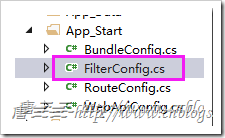
public class FilterConfig

    {

        public static void RegisterGlobalFilters(GlobalFilterCollection filters)

        {

            filters.Add(new HandleErrorAttribute());

            //添加全局 MyActionFilterAttribute

            filters.Add(new Filter.MyActionFilterAttribute());

            //添加全局 YOuResultFilterAttribute

            filters.Add(new Filter.YouResultFilterAtrribute());

        }

    }
4.过滤器上下文里RouteData中获取url数据
RouteData
1.获取Action方法名,
2.Controller类名
3.area区域名
//执行Action方法之前

        public override void OnActionExecuting(ActionExecutingContext filterContext)

        {

            //action 方法

            string strAction = filterContext.RouteData.Values["action"].ToString();

            //controller 类名

            string strContoller = filterContext.RouteData.Values["controller"].ToString();

            //RouteData.DataTokens["area"] 取得区域名称

            string areaName = filterContext.RouteData.DataTokens["area"].ToString();

           base.OnActionExecuting(filterContext);

        }
5.过滤器上下文里的补充-跳过Action方法(重要)
Controller/HomeController.cs
public class HomeController : Controller
{
    //
    // GET: /Home/
    //[Filter.MyActionFilter]
    //[Filter.YouResultFilterAtrribute]
    [Filter.Hide]
    public ActionResult Index()
    {
        Response.Write(" index输出文字判断 <br/>");
        return View();
    }

}
OnActionExecuting方法
OnActionExecuting方法

public override void OnActionExecuting(ActionExecutingContext filterContext)

        {

            #region 1.0.RouteData

            //action 方法

            string strAction = filterContext.RouteData.Values["action"].ToString();

            //contoller 类名

            string strContoller = filterContext.RouteData.Values["controller"].ToString();

            //RouteData.DataTokens["area"] 取得区域名称

            //string areaName = filterContext.RouteData.DataTokens["area"].ToString();

            //*{controller}/{action}/{id}

            string s = ((System.Web.Routing.Route)(filterContext.RouteData.Route)).Url;

            #endregion

            #region 2.0.另外一种获取请求的 类名 和 方法名

            string strAction2 = filterContext.ActionDescriptor.ActionName;

            string strController2 = filterContext.ActionDescriptor.ControllerDescriptor.ControllerName;

            #endregion

            #region 2.1.检查被请求的方法  是否加了 Hide 特性(Attribute)

            //2.1.检查被请求的方法  是否加了 Hide 特性(Attribute)

            if (filterContext.ActionDescriptor.IsDefined(typeof(Filter.Hide), false))

            {

                //直接为请求 设置 返回结果 而不执行队形的 Action 方法,也不执行 OnActionExcuted,但是会执行 Result过滤器和生成视图

                filterContext.Result = new ContentResult() { Content = "<br/>(11).后面直接跳过,!~~<br/>" };

            }

            #endregion

            filterContext.HttpContext.Response.Write("(1).执行Action方法之前 OnActionExecuting<br/>");

            base.OnActionExecuting(filterContext);

        }
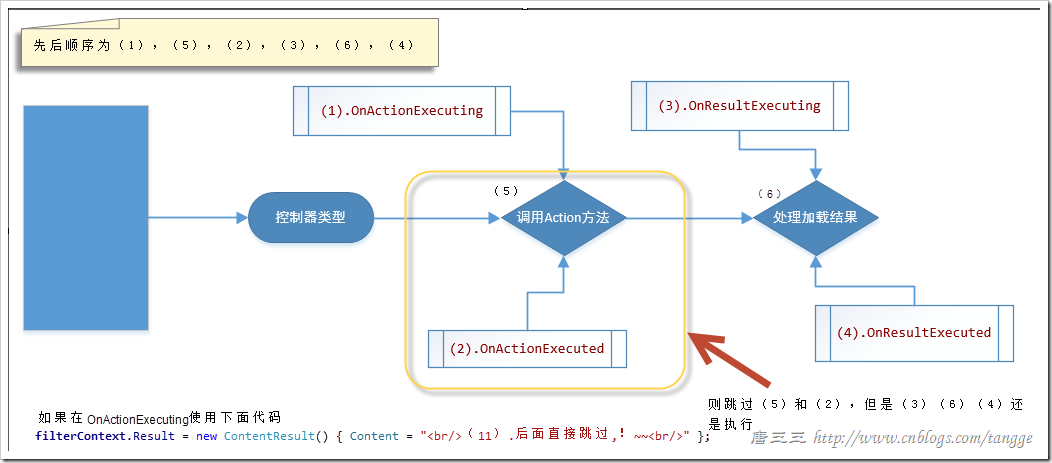
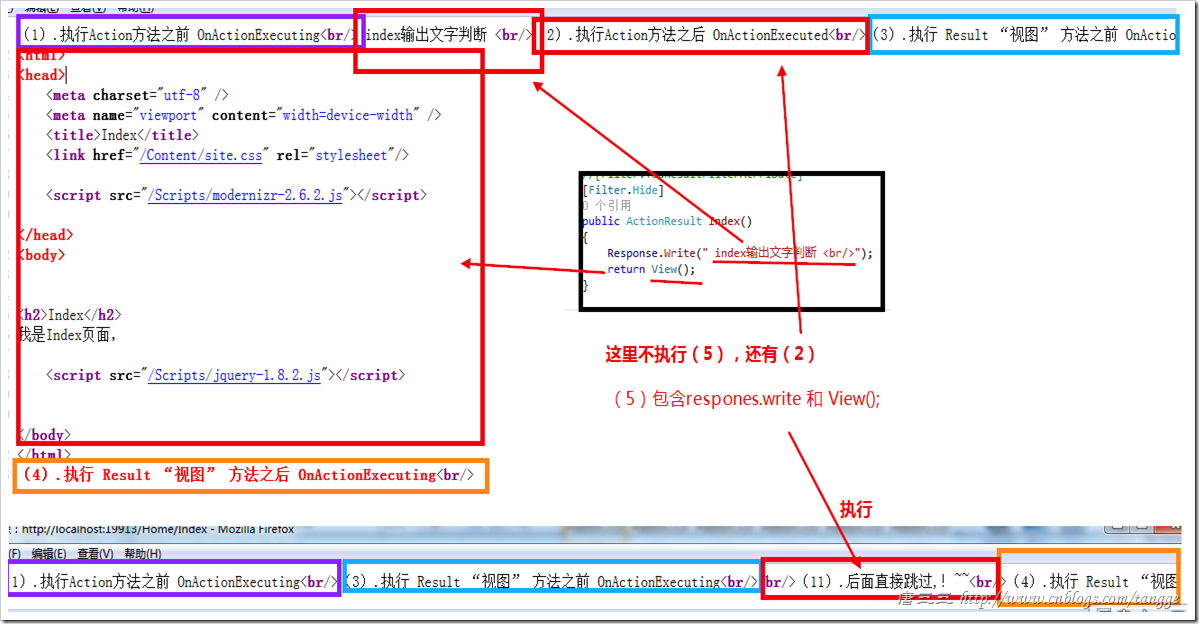
看下图,执行后源代码对比,(5)使用hide特性不执行,执行(11),(2)onacgtionExrcuted不执行。
6.AuthorizeAttribute 授权过滤器
6.1.执行的位置
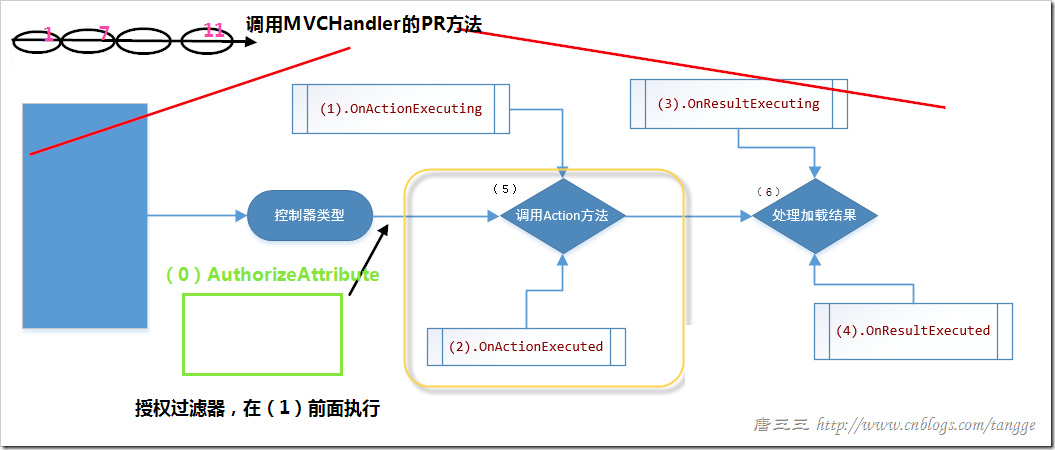
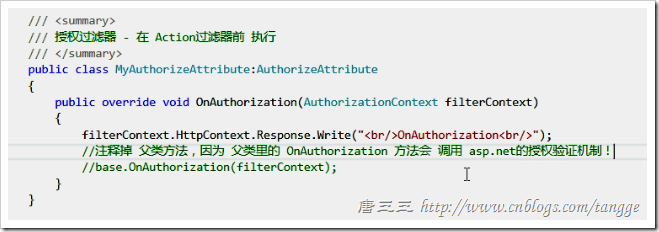
6.2.注释掉base.OnAuthorization,是因为我们不用ASP.NET授权验证,用自己的
MVC - 16.MVC过滤器的更多相关文章
- Asp.Net MVC<五>:过滤器
ControllerActionInvoker在执行过程中除了利用ActionDescriptor完成对目标Action方法本身的执行外,还会执行相关过滤器(Filter).过滤器采用AOP的设计,它 ...
- ASP.NET MVC 4 (三) 过滤器
先来看看一个例子演示过滤器有什么用: public class AdminController : Controller { // ... instance variables and constru ...
- ASP.NET MVC学习之过滤器篇(2)
下面我们继续之前的ASP.NET MVC学习之过滤器篇(1)进行学习. 3.动作过滤器 顾名思义,这个过滤器就是在动作方法调用前与调用后响应的.我们可以在调用前更改实际调用的动作,也可以在动作调用完成 ...
- MVC之 自定义过滤器(Filter)
MVC之 自定义过滤器(Filter) 一.自定义Filter 自定义Filter需要继承ActionFilterAttribute抽象类,重写其中需要的方法,来看下ActionFilterAttri ...
- APS.NET MVC + EF (11)---过滤器
过滤器本质就是对动作方法的执行过程进行干预,这种干预可以影响动作方法执行的各个过程.ASP.NET MVC 提供了4种类型的接口,并在接口中定义了各种成员,代表代码执行的各个阶段,这些接口和成员如表1 ...
- Spring MVC 解读——<mvc:annotation-driven/>(转)
转自:http://my.oschina.net/HeliosFly/blog/205343 Spring MVC 解读——<mvc:annotation-driven/> 一.Annot ...
- [转]MVC系列——MVC源码学习:打造自己的MVC框架(一:核心原理)
本文转自:http://www.cnblogs.com/landeanfen/p/5989092.html 阅读目录 一.MVC原理解析 1.MVC原理 二.HttpHandler 1.HttpHan ...
- MVC系列——MVC源码学习:打造自己的MVC框架(四:了解神奇的视图引擎)
前言:通过之前的三篇介绍,我们基本上完成了从请求发出到路由匹配.再到控制器的激活,再到Action的执行这些个过程.今天还是趁热打铁,将我们的View也来完善下,也让整个系列相对完整,博主不希望烂尾. ...
- MVC系列——MVC源码学习:打造自己的MVC框架(三:自定义路由规则)
前言:上篇介绍了下自己的MVC框架前两个版本,经过两天的整理,版本三基本已经完成,今天还是发出来供大家参考和学习.虽然微软的Routing功能已经非常强大,完全没有必要再“重复造轮子”了,但博主还是觉 ...
随机推荐
- 关于Promise:你可能不知道的6件事
FROM ME : 文章介绍了6个Promise的知识点: 1.then() 返回一个 forked Promise(分叉的 Promise):返回的有两种情况: 2.回调函数应该传递结果:在 pro ...
- 一起入门python6之函数
今天我们来学习新的一篇吧,那便是“函数(function)”我们用def来定义一个函数,以案例说话.>>> def name(x): #定义一个“name”的函数. ...
- opencv删除二值图中较小的噪点色块
CvSeq* contour = NULL; double minarea = 100.0; double tmparea = 0.0; CFileDialog dlg(true); if (dlg. ...
- mysql互换表中两列数据方法
1.创建表及记录用于测试 ) unsigned ) ,) unsigned ,) unsigned NOT NULL COMMENT '现价', PRIMARY KEY (`id`) ) ENGINE ...
- Bloom Filter 概念和原理
Bloom filter 是由 Howard Bloom 在 1970 年提出的二进制向量数据结构,它具有很好的空间和时间效率,被用来检测一个元素是不是集合中的一个成员.如果检测结果为是,该元素不一定 ...
- 17.1---编写一个函数交换两个变量的值(CC150)
用^来操作: public static int[] exchangeAB(int[] AB){ AB[0] = AB[0] ^ AB[1]; AB[1] = AB[0] ^ AB[1]; AB[0] ...
- 5.6---交换整数的奇数位和偶数位(CC150)
这道题要利用101010来&. 如下答案: public class Exchange { public int exchangeOddEven(int x) { // write code ...
- django 1.7+ default_permissions
由于做Caption要做权限设计.在核心类的设计的时候需要做好权限的基础设计.django 1.7+以后 django.db.modes新增特性 default_permissions,官方文档语焉不 ...
- 使用 PHP 7 给 Web 应用加速
PHP 20周年了!?? PHP 首发通告,1995年6月8日 发布于 COMP.INFOSYSTEMS.WWW.AUTHORING.CGI 主题:正式宣布:个人主页工具(Personal Home ...
- TCP三次握手、四次挥手及状态转换图
TCP/IP通信的三次握手如下: TCP是主机对主机层的传输控制协议,提供可靠的连接服务: 位码即tcp标志位,有6种标示:SYN(synchronous建立联机) .ACK(acknowledgem ...