
mybatis百科-结果集映射类ResultMap
@
ResultMap 对应的是结果集 <resultMap>中的一个结果集。 其基本组成部分中, 含有 ResultMapping 对象。
其组成大致如下:
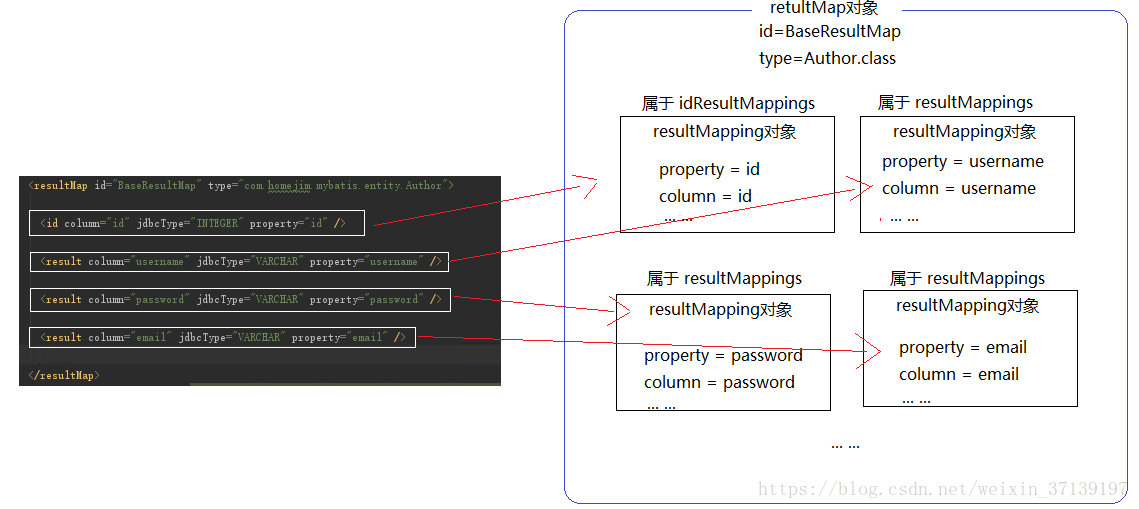
本文, 主要讲解一下该类的组成。
1 成员变量
  // resultMap 节点的 id

  private String id;

  // resultMap 节点的 type

  private Class<?> type;

  // 用于记录 <discriminayor> 节点之外的其他映射关系

  private List<ResultMapping> resultMappings;

  // 记录映射关系中带有 ID 标记的映射关系。 如 id, constructor 等节点

  private List<ResultMapping> idResultMappings;

  // 记录映射关系中有 Constructor 标记的映射关系

  private List<ResultMapping> constructorResultMappings;

  // 记录映射关系中没有 Constructor 标记的映射关系

  private List<ResultMapping> propertyResultMappings;

  // 记录所有映射关系中涉及 column 属性的集合

  private Set<String> mappedColumns;

  private Set<String> mappedProperties;

  // 鉴别器, 对应 <discriminayor> 节点

  private Discriminator discriminator;

  // 是否含有嵌套的结果映射, 如果某个映射关系中有 resultMap, 没有 resultSet , 则为true

  private boolean hasNestedResultMaps;

  // 是否存在嵌套查询

  private boolean hasNestedQueries;

  // 是否开启自动映射

  private Boolean autoMapping;
2 构造函数
只有默认构造函数
  private ResultMap() {

  }
3 其他函数
3.1 setter 和 getter 函数
对象创建使用的是建造者模式, 因此,只有部分成员变量含有 setter 函数。而除了 Configuration 对象, 其他都含有 getter 函数。
4 静态内部类
4.1 成员变量
private ResultMap resultMap = new ResultMap();
是要建造的对象。
4.2 构造函数
public Builder(Configuration configuration, String id, Class<?> type, List<ResultMapping> resultMappings) {

    this(configuration, id, type, resultMappings, null);

}

public Builder(Configuration configuration, String id, Class<?> type, List<ResultMapping> resultMappings, Boolean autoMapping) {

    resultMap.configuration = configuration;

    resultMap.id = id;

    resultMap.type = type;

    resultMap.resultMappings = resultMappings;

    resultMap.autoMapping = autoMapping;

}
没有默认构造函数, 必须要给ResultMap对象的一些成员变量赋值。
4.3 建造者相关的函数
    public Builder discriminator(Discriminator discriminator) {

      resultMap.discriminator = discriminator;

      return this;

    }
discriminator, 赋值后返回对象本身。
负责建造对象一些逻辑的函数。
 public ResultMap build() {

    if (resultMap.id == null) {

      throw new IllegalArgumentException("ResultMaps must have an id");

    }

    resultMap.mappedColumns = new HashSet<>();

    resultMap.mappedProperties = new HashSet<>();

    resultMap.idResultMappings = new ArrayList<>();

    resultMap.constructorResultMappings = new ArrayList<>();

    resultMap.propertyResultMappings = new ArrayList<>();

    final List<String> constructorArgNames = new ArrayList<>();

    // 遍历 resultMappings

    for (ResultMapping resultMapping : resultMap.resultMappings) {

      // 是否存在嵌套查询

      resultMap.hasNestedQueries = resultMap.hasNestedQueries || resultMapping.getNestedQueryId() != null;

      // 是否存在嵌套的结果

      resultMap.hasNestedResultMaps = resultMap.hasNestedResultMaps || (resultMapping.getNestedResultMapId() != null && resultMapping.getResultSet() == null);

      // 获取列名

      final String column = resultMapping.getColumn();

      if (column != null) {

        // 列名转大写添加到 mappedColumns 结果集中

        resultMap.mappedColumns.add(column.toUpperCase(Locale.ENGLISH));

      } else if (resultMapping.isCompositeResult()) {

        for (ResultMapping compositeResultMapping :   resultMapping.getComposites()) {

          final String compositeColumn = compositeResultMapping.getColumn();

          if (compositeColumn != null) {

            resultMap.mappedColumns.add(compositeColumn.toUpperCase(Locale.ENGLISH));

          }

        }

      }

      // 获取列映射对应的属性

      final String property = resultMapping.getProperty();

      if(property != null) {

        resultMap.mappedProperties.add(property);

      }

      if (resultMapping.getFlags().contains(ResultFlag.CONSTRUCTOR)) {

        resultMap.constructorResultMappings.add(resultMapping);

        if (resultMapping.getProperty() != null) {

          constructorArgNames.add(resultMapping.getProperty());

        }

      } else {

        resultMap.propertyResultMappings.add(resultMapping);

      }

      if (resultMapping.getFlags().contains(ResultFlag.ID)) {

        resultMap.idResultMappings.add(resultMapping);

      }

    }

    if (resultMap.idResultMappings.isEmpty()) {

      resultMap.idResultMappings.addAll(resultMap.resultMappings);

    }

    if (!constructorArgNames.isEmpty()) {

      final List<String> actualArgNames = argNamesOfMatchingConstructor(constructorArgNames);

      if (actualArgNames == null) {

        throw new BuilderException("Error in result map '" +   resultMap.id

            + "'. Failed to find a constructor in '"

            + resultMap.getType().getName() + "' by arg names " + constructorArgNames

            + ". There might be more info in debug log.");

      }

      Collections.sort(resultMap.constructorResultMappings, (o1, o2) -> {

        int paramIdx1 = actualArgNames.indexOf(o1.getProperty());

        int paramIdx2 = actualArgNames.indexOf(o2.getProperty());

        return paramIdx1 - paramIdx2;

      });

    }

    // lock down collections

    resultMap.resultMappings = Collections.unmodifiableList(resultMap.resultMappings);

    resultMap.idResultMappings = Collections.unmodifiableList(resultMap.idResultMappings);

    resultMap.constructorResultMappings = Collections.unmodifiableList(resultMap.constructorResultMappings);

    resultMap.propertyResultMappings = Collections.unmodifiableList(resultMap.propertyResultMappings);

    resultMap.mappedColumns = Collections.unmodifiableSet(resultMap.mappedColumns);

    return resultMap;

}
4.4 获取配置的构造方法参数列表
主函数是argNamesOfMatchingConstructor。 其功能主要是获取参数名。
private List<String> argNamesOfMatchingConstructor(List<String> constructorArgNames) {

  // 获取声明的构造方法

  Constructor<?>[] constructors = resultMap.type.getDeclaredConstructors();

  // 遍历每个构造方法

  for (Constructor<?> constructor : constructors) {

    // 获取构造方法的参数类型

    Class<?>[] paramTypes = constructor.getParameterTypes();

    // 参数长度和获取到参数类型数量一致

    if (constructorArgNames.size() == paramTypes.length) {

      // 获取构造函数的参数名称

      List<String> paramNames = getArgNames(constructor);

      if (constructorArgNames.containsAll(paramNames)

          && argTypesMatch(constructorArgNames, paramTypes, paramNames)) {

        return paramNames;

      }

    }

  }

  return null;

}
getArgNames获取构造函数的参数名
private List<String> getArgNames(Constructor<?> constructor) {

  List<String> paramNames = new ArrayList<>();

  List<String> actualParamNames = null;

  // 获取参数的注解

  final Annotation[][] paramAnnotations = constructor.getParameterAnnotations();

  int paramCount = paramAnnotations.length;

  for (int paramIndex = 0; paramIndex < paramCount; paramIndex++) {

    String name = null;

    for (Annotation annotation : paramAnnotations[paramIndex]) {

      if (annotation instanceof Param) {

        name = ((Param) annotation).value();

        break;

      }

    }

    if (name == null && resultMap.configuration.isUseActualParamName()) {

      if (actualParamNames == null) {

        actualParamNames = ParamNameUtil.getParamNames(constructor);

      }

      if (actualParamNames.size() > paramIndex) {

        name = actualParamNames.get(paramIndex);

      }

    }

    paramNames.add(name != null ? name : "arg" + paramIndex);

  }

  return paramNames;

}

}
argTypesMatch方法用来检查构造方法参数是否匹配
    private boolean argTypesMatch(final List<String> constructorArgNames,

        Class<?>[] paramTypes, List<String> paramNames) {

      for (int i = 0; i < constructorArgNames.size(); i++) {

        Class<?> actualType = paramTypes[paramNames.indexOf(constructorArgNames.get(i))];

        Class<?> specifiedType = resultMap.constructorResultMappings.get(i).getJavaType();

        if (!actualType.equals(specifiedType)) {

          if (log.isDebugEnabled()) {

            log.debug("While building result map '" + resultMap.id

                + "', found a constructor with arg names " + constructorArgNames

                + ", but the type of '" + constructorArgNames.get(i)

                + "' did not match. Specified: [" + specifiedType.getName() + "] Declared: ["

                + actualType.getName() + "]");

          }

          return false;

        }

      }

      return true;

    }
一起学 mybatis
你想不想来学习 mybatis? 学习其使用和源码呢?那么, 在博客园关注我吧!!
我自己打算把这个源码系列更新完毕, 同时会更新相应的注释。快去 star 吧!!
mybatis百科-结果集映射类ResultMap的更多相关文章
- mybatis百科-列映射类ResultMapping
目录 1 成员变量 2 构造函数 3 其他函数 3.1 setter 和 getter 函数 3.2 equals 和 hashCode 函数 3.3 toString 函数 4 内部类 Builde ...
- MyBatis的getMapper()接口、resultMap标签、Alias别名、 尽量提取sql列、动态操作
一.getMapper()接口 解析:getMapper()接口 IDept.class定义一个接口, 挂载一个没有实现的方法,特殊之处,借楼任何方法,必须和小配置中id属性是一致的 通过代理:生成接 ...
- Mybatis第七篇【resultMap、resultType、延迟加载】
resultMap 有的时候,我们看别的映射文件,可能看不到以下这么一段代码: <resultMap id="userListResultMap" type="us ...
- mybatis自定义枚举转换类
转载自:http://my.oschina.net/SEyanlei/blog/188919 mybatis提供了EnumTypeHandler和EnumOrdinalTypeHandler完成枚举类 ...
- mybatis 一对一 映射实体类、嵌套查询
一对一 在SysUser 类中增加SysRole字段.1.sql语句将role.role_name映射到role.roleName上. 2.还可以在XML 映射文件中配置结果映射.<result ...
- Mybatis笔记四:Mybatis中的resultType和resultMap查询操作实例详解
resultType和resultMap只能有一个成立,resultType是直接表示返回类型的,而resultMap则是对外部ResultMap的引用,resultMap解决复杂查询是的映射问题.比 ...
- MyBatis中的resultType和resultMap
MyBatis的查询在进行映射的时候,返回值类型可以使用resultType同时也可以使用resultMap.前者表示直接的返回值类型,一般是domain名称,当然这里可以写domain的全部路径也可 ...
- Mybatis自动生成实体类和实体映射工具
Mybatis Mysql生成实体类 用到的Lib包: mybatis-generator-core-1.3.2.jarmysql-connector-java-5.1.30.jar 1. 创建一个文 ...
- mybatis mapper xml文件配置resultmap时,id行和result行有什么区别?
mybatis mapper xml文件配置resultmap时,id行和result行有什么区别? <resultMap id = "CashInvoiceMap" typ ...
随机推荐
- 【效率工具】史上最好用的SSH一键登录脚本,第三版更新!
说明 时隔一周,GotoSSH又迎来了一次重大更新,让这个史诗级的shell工具变得更加丝般顺滑了~ 这次的主要更新是对自定义全局命令以及自定义属性的支持,让设置更加灵活,此外,对各个细节进行了调整, ...
- 如何训练AI
如何训练AI让其更加智能,而不是用特定的代码控制AI逻辑! AI守则 首先应该为机器人设置几个必要信息: 目标 规则 能力 目标,规定机器人要做到什么. 规则,规定机器人的限制,不能做什么. 能力,规 ...
- jsp笔记----97DatePicker日期插件简单使用
<s:form action="" theme="simple"> <s:hidden name="keyword3" v ...
- 如何下载 Google Play 应用的apk
Google Play 不能直接下载apk安装包,解决办法,安装插件下载 第一步 FQ就不说了 第二步 安装google浏览器 APK Downloader插件 第三步 打开Google play网站 ...
- Linux进程调度策略的发展和演变--Linux进程的管理与调度(十六)
1 前言 1.1 进程调度 内存中保存了对每个进程的唯一描述, 并通过若干结构与其他进程连接起来. 调度器面对的情形就是这样, 其任务是在程序之间共享CPU时间, 创造并行执行的错觉, 该任务分为两个 ...
- kali系统固化到固态硬盘小记(赠送给广大折腾党的笔记)
1.首先你需要一个移动硬盘和一个移动硬盘盒子(一根数据转换线,一般买盒子商家会赠送的) SSD硬盘要事先格式化一下格式,不然识别不出来 2.准备好Kali镜像,传送门在这里https://www.ka ...
- CentOS更换源
这里介绍如何把CentOS默认镜像源更换为阿里云镜像源 1.备份 mv /etc/yum.repos.d/CentOS-Base.repo /etc/yum.repos.d/CentOS-Base.r ...
- python3编写网络爬虫17-验证码识别
一.验证码识别 1.图形验证码的识别 识别图形验证码需要 tesserocr 库 OCR技术识别(光学字符识别,是指通过扫描字符,然后通过其形状将其翻译成电子文本的过程.)例如 中国知网注册页面 ht ...
- python3编写网络爬虫15-Splash的使用
Splash是一个JavaScript渲染服务 是一个带有HTTP API的轻量级浏览器 同时对接了python的Twisted 和QT库 利用它可以实现对动态渲染页面的抓取 功能介绍 1.异步方式处 ...
- 如何指定一个计划和目标——6W
作为一名IT人员,需要自己指定一个计划和目标,来保证完成进度和高效的完成任务. 参考管理学如何制作计划和目标的,套用过来,也是同样适用的.来先看看管理学的相关知识吧. 计划的概念:计划是为实现组织目标 ...