
C#串口数据收发数据
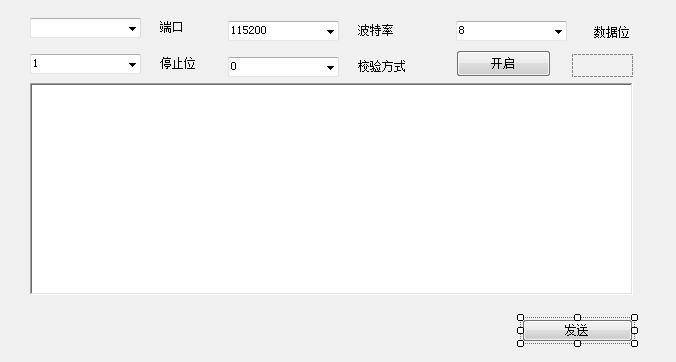
using System;
using System.Collections.Generic;
using System.ComponentModel;
using System.Data;
using System.Drawing;
using System.Linq;
using System.Text;
using System.Windows.Forms;
using System.IO.Ports;
using Microsoft.Win32;
namespace PotrTEST
{
public partial class Form1 : Form
{
public SerialPort com = new SerialPort();
//定义端口类
private SerialPort ComDevice = new SerialPort();
public Form1()
{
InitializeComponent();
InitralConfig(int.Parse(comboBox_BaudRate.Text));
}
/// <summary>
/// 从注册表获取系统串口列表
/// </summary>
public string[] GetComList()
{
RegistryKey keyCom = Registry.LocalMachine.OpenSubKey("Hardware\\DeviceMap\\SerialComm");
string[] sSubKeys = keyCom.GetValueNames();
string[] str = new string[sSubKeys.Length];
for (int i = 0; i < sSubKeys.Length; i++)
{
str[i] = (string)keyCom.GetValue(sSubKeys[i]);
}
return str;
}
/// <summary>
/// 配置初始化
/// </summary>
private void InitralConfig(int btl)
{
Boolean open = false;
string[] coms = GetComList();
for (int i = 0; i < coms.Length; i++)
{
open = false;
if (com.IsOpen)
{
com.Close();
}
comboBox_Port.Items.Add(coms[i]);
}
//向ComDevice.DataReceived(是一个事件)注册一个方法Com_DataReceived,当端口类接收到信息时时会自动调用Com_DataReceived方法
ComDevice.DataReceived += new SerialDataReceivedEventHandler(Com_DataReceived);
}
/// <summary>
/// 一旦ComDevice.DataReceived事件发生,就将从串口接收到的数据显示到接收端对话框
/// </summary>
/// <param name="sender"></param>
/// <param name="sender"></param>
/// <param name="sender"></param>
/// <param name="e"></param>
private void Com_DataReceived(object sender, SerialDataReceivedEventArgs e)
{
//开辟接收缓冲区
byte[] ReDatas = new byte[ComDevice.BytesToRead];
//从串口读取数据
ComDevice.Read(ReDatas, 0, ReDatas.Length);
//实现数据的解码与显示
AddData(ReDatas);
}
/// <summary>
/// 解码过程
/// </summary>
/// <param name="data">串口通信的数据编码方式因串口而异,需要查询串口相关信息以获取</param>
public void AddData(byte[] data)
{
StringBuilder sb = new StringBuilder();
for (int i = 0; i < data.Length; i++)
{
sb.AppendFormat("{0:x2}" + " ", data[i]);
}
AddContent(sb.ToString());//.ToUpper()
}
/// <summary>
/// 接收端对话框显示消息
/// </summary>
/// <param name="content"></param>
private void AddContent(string content)
{
BeginInvoke(new MethodInvoker(delegate
{
textBox_Receive.AppendText(content);
}));
}
/// <summary>
/// 串口开关
/// </summary>
/// <param name="sender"></param>
/// <param name="e"></param>
private void button_Switch_Click(object sender, EventArgs e)
{
if (comboBox_Port.Items.Count <= 0)
{
MessageBox.Show("未发现可用串口,请检查硬件设备");
return;
}
if (ComDevice.IsOpen == false)
{
//设置串口相关属性
ComDevice.PortName = comboBox_Port.Text;//comboBox_Port.SelectedItem.ToString();
ComDevice.BaudRate = Convert.ToInt32(comboBox_BaudRate.Text);//(comboBox_BaudRate.SelectedItem.ToString());
ComDevice.Parity = (Parity)Convert.ToInt32(comboBox_CheckBits.Text);//(comboBox_CheckBits.SelectedIndex.ToString());
ComDevice.DataBits = Convert.ToInt32(comboBox_DataBits.Text);// (comboBox_DataBits.SelectedItem.ToString());
ComDevice.StopBits = (StopBits)Convert.ToInt32(comboBox_StopBits.Text); //(comboBox_StopBits.SelectedItem.ToString());
try
{
//开启串口
ComDevice.Open();
button_Send.Enabled = true;
button_Switch.Text = "关闭";
//while (true)
{
//接收数据
ComDevice.DataReceived += new SerialDataReceivedEventHandler(Com_DataReceived);
}
}
catch (Exception ex)
{
MessageBox.Show(ex.Message, "未能成功开启串口", MessageBoxButtons.OK, MessageBoxIcon.Error);
return;
}
}
else
{
try
{
ComDevice.Close();
button_Send.Enabled = false;
}
catch (Exception ex)
{
MessageBox.Show(ex.Message, "串口关闭错误", MessageBoxButtons.OK, MessageBoxIcon.Error);
}
button_Switch.Text = "开启";
}
comboBox_Port.Enabled = !ComDevice.IsOpen;
comboBox_BaudRate.Enabled = !ComDevice.IsOpen;
comboBox_DataBits.Enabled = !ComDevice.IsOpen;
comboBox_StopBits.Enabled = !ComDevice.IsOpen;
comboBox_CheckBits.Enabled = !ComDevice.IsOpen;
}
/// <summary>
/// 将消息编码并发送
/// </summary>
/// <param name="sender"></param>
/// <param name="e"></param>
private void button_Send_Click(object sender, EventArgs e)
{
//if (textBox_Receive.Text.Length > 0)
//{
// textBox_Receive.AppendText("\n");
//}
byte[] sendData = null;
//sendData = Encoding.UTF8.GetBytes(textBox_Receive.Text);
sendData = Hex16StringToHex16Byte(textBox_Receive.Text);
SendData(sendData);
}
/// <summary>
/// 此方法用于将16进制的字符串转换成16进制的字节数组
/// </summary>
/// <param name="_hex16ToString">要转换的16进制的字符串。</param>
public static byte[] Hex16StringToHex16Byte(string _hex16String)
{
//去掉字符串中的空格。
_hex16String = _hex16String.Replace(" ", "");
if (_hex16String.Length / 2 == 0)
{
_hex16String += " ";
}
//声明一个字节数组,其长度等于字符串长度的一半。
byte[] buffer = new byte[_hex16String.Length / 2];
for (int i = 0; i < buffer.Length; i++)
{
//为字节数组的元素赋值。
buffer[i] = Convert.ToByte((_hex16String.Substring(i * 2, 2)), 16);
}
//返回字节数组。
return buffer;
}
/// <summary>
/// 此函数将编码后的消息传递给串口
/// </summary>
/// <param name="data"></param>
/// <returns></returns>
public bool SendData(byte[] data)
{
if (ComDevice.IsOpen)
{
try
{
//将消息传递给串口
ComDevice.Write(data, 0, data.Length);
return true;
}
catch (Exception ex)
{
MessageBox.Show(ex.Message, "发送失败", MessageBoxButtons.OK, MessageBoxIcon.Error);
}
}
else
{
MessageBox.Show("串口未开启", "错误", MessageBoxButtons.OK, MessageBoxIcon.Error);
}
return false;
}
/// <summary>
/// 16进制编码
/// </summary>
/// <param name="hexString"></param>
/// <returns></returns>
private byte[] strToHexByte(string hexString)
{
hexString = hexString.Replace(" ", "");
if ((hexString.Length % 2) != 0) hexString += " ";
byte[] returnBytes = new byte[hexString.Length / 2];
for (int i = 0; i < returnBytes.Length; i++)
returnBytes[i] = Convert.ToByte(hexString.Substring(i * 2, 2).Replace(" ", ""), 16);
return returnBytes;
}
private void Form1_Load(object sender, EventArgs e)
{
//button_Send.PerformClick();
}
//以下两个指令是结合一款继电器而设计的
//private void button_On_Click(object sender, EventArgs e)
//{
// textBox_Send.Text = "005A540001010000B0";
//}
//private void button_Off_Click(object sender, EventArgs e)
//{
// textBox_Send.Text = "005A540002010000B1";
//}
}
}
C#串口数据收发数据的更多相关文章
- Arduino通过串口监视器收发数据
在串口监视器中发送数据,板子收到数据并打印出来. 不需要额外电路,但是板子必须连接电脑,Arduino IDE的串口监视器也需要被打开. 代码 /* 串口事件 当新的串口数据到来时,我们会将它添加到一 ...
- 【AT91SAM3S】串口UART初始化及收发数据
SAM3S中的UART串口是一个两线异步收发器.这个串口能用来通信或者跟踪.有两个DMA通道与UART串口关联,可通过使用DMA处理串口传输以节省CPU时间. SAM3S4C中有两个UART.与外设引 ...
- STM32F407的串口采用DMA收发数据
源:STM32F407的串口采用DMA收发数据
- python 简单的串口收发数据
# -*- coding: utf- -*- import serial #打开串口 serialPort="COM3" #串口 baudRate= #波特率 ser=serial ...
- Java 实现TCP/IP协议的收发数据(服务端)
功能如下: 注: 只有服务端,没有客户端,测试时采用第三方软件作为客户端的. 收发数据目前能正常收发数据,只是中文的会变成乱码显示. 采用Thread类实现一个收发数据的线程. 服务端代码: impo ...
- C#串口通信及数据表格存储
1.开发环境 系统:win10 开发工具:Visual Studio 2017 2.界面设计 串口通信的界面大致如此,在此基础上添加项目所需的调试指令与数据存储功能,界面排布方面可参考其他教程. 3. ...
- HAL UART DMA 数据收发
UART使用DMA进行数据收发,实现功能,串口2发送指令到上位机,上位机返回数据给串口2,串口2收到数据后由串口1进行转发,该功能为实验功能 1.UART与DMA通道进行绑定 void HAL_UAR ...
- STM32与物联网02-网络数据收发
在上一节中,介绍了 ESP8266 的使用方法.不过上一节中都是通过串口调试工具手动发送信息的方式来操作 ESP8266 ,这肯定不能用于实际开发.因此,本节介绍如何编写合适的程序来和 ESP8266 ...
- 在Linux中如何使用命令进行RS-232串口通信和数据包解析
文章首发于浩瀚先森博客 1. 获取串口号 在Linux系统中一切皆为文件,所以串口端口号也不例外,都是以设备文件的形式出现.也就是说我们可以用访问文本文件的命令来访问它们. a. 一般串口都是以/de ...
随机推荐
- 写好的Java代码在命令窗口运行——总结
步骤: 1.快捷键 win+r,在窗口中输入cmd,enter键进入DOS窗口. 2.假设写好的代码的目录为:D:\ACM 在DOS中依次写入:cd d: cd ACM 利用cd切换到代码文件所在的目 ...
- shopex-百度爬虫抓取过于频繁导致php-cgi占用CPU过高的解决办法
步骤 1.开启slowlog:php-fpm里修改配置 观察slowlog里的超时文件,然后修改相应超时文件 2.1修改完后,仍然无效,查看access.log,发现大量如下的请求 220.181.1 ...
- github的markdown页内锚点以及本地资源链接
页内锚点参考 https://my.oschina.net/antsky/blog/1475173 [aaa](#2-aaabbb) 字母小写,.去掉,空格换成- 本地资源链接 [aaa](docs/ ...
- h5课件是什么?h5(html5)怎样实现交互动画开发?-----浅谈h5交互动画课件的优势
目前很多交互课件,尤其幼儿类的交互课件以动画和交互相结合的类型居多,越来越多的教育机构发现了这种课件对于幼儿的吸引力远大于其他类型的课件,随着flash逐渐被市场淘汰,动画和交互相结合的html5跨平 ...
- 用crontab部署定时任务
1.(centos)安装crontab服务 yum install crontabs 2.启动.停止.重启.重载服务 /sbin/service crond start /sbin/service c ...
- mysql数据库目录my.ini的内容
[mysql] # 设置mysql客户端默认字符集 default-character-set=utf8 [mysqld] #设置3306端口 port = 3306 # 设置mysql的 ...
- 【java8】使用lambda表达式对List去重
先收集再排序. public static void main(String[] args) { BookBo bookBo1 = new BookBo("1", "语文 ...
- @JSONField使用
参考博客:http://www.cnblogs.com/yucy/p/9057049.html 1.经常遇到这种情况,传过来json的key名和我们javaBean的属性名不一样,导致接收不到: Ch ...
- 关于Jupyter Notebook快捷操作
Jupyter Notebook 的快捷键 Jupyter Notebook 有两种键盘输入模式.编辑模式,允许你往单元中键入代码或文本:这时的单元框线是绿色的.命令模式,键盘输入运行程序命令:这时的 ...
- 关于matlab2018a版本错误使用 svmclassify 分类器
当我们照常使用分类器函数svmclassify时,2018版的matlab会报出以下错误: 解决办法: 1,下载libsvm(一般下载最新版本就ok了)包,并将其添加至matlab的toolbox文件 ...