
C# Common Code
DatePicker 控件日期格式化,可以在App.xaml.cs中添加下面代码
方法一 不推荐:
Thread.CurrentThread.CurrentCulture = (CultureInfo)Thread.CurrentThread.CurrentCulture.Clone();
Thread.CurrentThread.CurrentCulture.DateTimeFormat.ShortDatePattern = "yyyy-MM-dd";
方法二:
I have solved this problem with a help of this code. Hope it will help you all as well.
<Style TargetType="{x:Type DatePickerTextBox}">方法三:
<Setter Property="Control.Template">
<Setter.Value>
<ControlTemplate>
<TextBox x:Name="PART_TextBox"
Text="{Binding Path=SelectedDate, StringFormat='dd MMM yyyy',
RelativeSource={RelativeSource AncestorType={x:Type DatePicker}}}" />
</ControlTemplate>
</Setter.Value>
</Setter>
</Style>
Converter class:
public class DateFormat : IValueConverter

{

    public object Convert(object value, Type targetType, object parameter, System.Globalization.CultureInfo culture)

    {

        if (value == null) return null;

        return ((DateTime)value).ToString("dd-MMM-yyyy");

    }

    public object ConvertBack(object value, Type targetType, object parameter, System.Globalization.CultureInfo culture)

    {

        throw new NotImplementedException();

    }

}

WPF tag
<DatePicker Grid.Column="3" SelectedDate="{Binding DateProperty, Converter={StaticResource DateFormat}}" Margin="5"/>
FileHelper.cs
#region 01.读取文件方法 —— static string ReadFile(string path)
/// <summary>
/// 读取文件方法
/// </summary>
/// <param name="path">路径</param>
/// <returns>内容字符串</returns>
/// <exception cref="ArgumentNullException">路径为空</exception>
public static string ReadFile(string path)
{
#region # 验证参数
if (string.IsNullOrWhiteSpace(path))
{
throw new ArgumentNullException(nameof(path), @"路径不可为空!");
}
#endregion
StreamReader reader = null;
try
{
reader = new StreamReader(path, Encoding.UTF8);
string content = reader.ReadToEnd();
return content;
}
finally
{
reader?.Dispose();
}
}
#endregion
#region 02.写入文件方法 —— static void WriteFile(string path, string content)
/// <summary>
/// 写入文件方法
/// </summary>
/// <param name="path">路径</param>
/// <param name="content">内容</param>
/// <param name="append">是否附加</param>
/// <exception cref="ArgumentNullException">路径为空</exception>
public static void WriteFile(string path, string content, bool append = false)
{
#region # 验证参数
if (string.IsNullOrWhiteSpace(path))
{
throw new ArgumentNullException(nameof(path), "路径不可为空!");
}
#endregion
FileInfo file = new FileInfo(path);
StreamWriter writer = null;
if (file.Exists && !append)
{
file.Delete();
}
try
{
//获取文件目录并判断是否存在
string directory = Path.GetDirectoryName(path);
if (string.IsNullOrEmpty(directory))
{
throw new ArgumentNullException(nameof(path), "目录不可为空!");
}
if (!Directory.Exists(directory))
{
Directory.CreateDirectory(directory);
}
writer = append ? file.AppendText() : new StreamWriter(path, false, Encoding.UTF8);
writer.Write(content);
}
finally
{
writer?.Dispose();
}
}
#endregion
JsonHelper.cs
/// <summary>
/// JSON辅助操作类
/// </summary>
public static class JsonHelper
{
/// <summary>
/// 处理Json的时间格式为正常格式
/// </summary>
public static string JsonDateTimeFormat(string json)
{
json = Regex.Replace(json,
@"\\/Date\((\d+)\)\\/",
match =>
{
var dt = new DateTime(1970, 1, 1);
dt = dt.AddMilliseconds(long.Parse(match.Groups[1].Value));
dt = dt.ToLocalTime();
return dt.ToString("yyyy-MM-dd HH:mm:ss.fff");
});
return json;
}
/// <summary>
/// 把对象序列化成Json字符串格式
/// </summary>
/// <param name="object"></param>
/// <returns></returns>
public static string ToJson(object @object)
{
var json = JsonConvert.SerializeObject(@object);
return JsonDateTimeFormat(json);
}
/// <summary>
/// 把Json字符串转换为强类型对象
/// </summary>
public static T FromJson<T>(string json)
{
json = JsonDateTimeFormat(json);
return JsonConvert.DeserializeObject<T>(json);
}
}
WPF下载文件
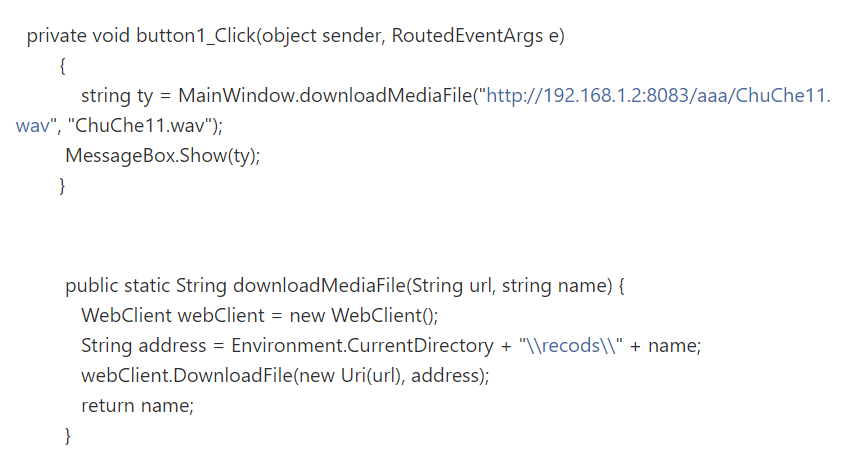
WPF下载远程文件,并显示进度条和百分比
WPF下载远程文件,并显示进度条和百分比
1、xaml
<ProgressBar HorizontalAlignment="Left" Height="10" Margin="96,104,0,0" Name="pbDown" VerticalAlignment="Top" Width="100"/><Label Content="Label" Name="label1" HorizontalAlignment="Left" VerticalAlignment="Top" Margin="206,104,0,0"/> |
2、CS程序
using System;using System.Windows;using System.Windows.Controls;using System.Net;using System.IO;using System.Threading;using System.Drawing;namespace WpfDemo{ /// <summary> /// MainWindow.xaml 的交互逻辑 /// </summary> public partial class MainWindow : Window { public MainWindow() { InitializeComponent(); if (HttpFileExist("http://183.62.138.31:57863/opt/resources/%E9%A3%8E%E6%99%AF/f1.jpg")) { DownloadHttpFile("http://183.62.138.31:57863/opt/resources/%E9%A3%8E%E6%99%AF/f1.jpg", @"d:\f1.jpg"); } } public void DownloadHttpFile(String http_url, String save_url) { WebResponse response = null; //获取远程文件 WebRequest request = WebRequest.Create(http_url); response = request.GetResponse(); if (response == null) return; //读远程文件的大小 pbDown.Maximum = response.ContentLength; //下载远程文件 ThreadPool.QueueUserWorkItem((obj) => { Stream netStream = response.GetResponseStream(); Stream fileStream = new FileStream(save_url, FileMode.Create); byte[] read = new byte[1024]; long progressBarValue = 0; int realReadLen = netStream.Read(read, 0, read.Length); while (realReadLen > 0) { fileStream.Write(read, 0, realReadLen); progressBarValue += realReadLen; pbDown.Dispatcher.BeginInvoke(new ProgressBarSetter(SetProgressBar), progressBarValue); realReadLen = netStream.Read(read, 0, read.Length); } netStream.Close(); fileStream.Close(); }, null); } /// <summary> /// 判断远程文件是否存在 /// </summary> /// <param name="fileUrl">文件URL</param> /// <returns>存在-true,不存在-false</returns> private bool HttpFileExist(string http_file_url) { WebResponse response = null; bool result = false;//下载结果 try { response = WebRequest.Create(http_file_url).GetResponse(); result = response == null ? false : true; } catch (Exception ex) { result = false; } finally { if (response != null) { response.Close(); } } return result; } public delegate void ProgressBarSetter(double value); public void SetProgressBar(double value) { //显示进度条 pbDown.Value = value; //显示百分比 label1.Content = (value / pbDown.Maximum) * 100 + "%"; } }} |
C# Common Code的更多相关文章
- CodeForcesGym 100641B A Cure for the Common Code
A Cure for the Common Code Time Limit: 3000ms Memory Limit: 262144KB This problem will be judged on ...
- CV code references
转:http://www.sigvc.org/bbs/thread-72-1-1.html 一.特征提取Feature Extraction: SIFT [1] [Demo program][SI ...
- Integrate Your Code with the Frameworks---整合你的代码和框架
Back to Frameworks Integrate Your Code with the Frameworks When you develop an app for OS X or iOS, ...
- Separate code and data contexts: an architectural approach to virtual text sharing
The present invention provides a processor including a core unit for processing requests from at lea ...
- JMM(java内存模型)
What is a memory model, anyway? In multiprocessorsystems, processors generally have one or more laye ...
- python简单搭建HTTP Web服务器
对于Python 2,简单搭建Web服务器,只需在i需要搭建Web服务器的目录(如C:/ 或 /home/klchang/)下,输入如下命令: python -m SimpleHTTPServer 8 ...
- JAVA深入研究——Method的Invoke方法。
在写代码的时候,发现Method可以调用子类的对象,但子类即使是改写了的Method,方法名一样,去调用父类的对象也会报错,虽然这是很符合多态的现象,也符合java的动态绑定规范,但还是想弄懂java ...
- http2协议翻译(转)
超文本传输协议版本 2 IETF HTTP2草案(draft-ietf-httpbis-http2-13) 摘要 本规范描述了一种优化的超文本传输协议(HTTP).HTTP/2通过引进报头字段压缩以及 ...
- Android按键事件处理流程 -- KeyEvent
刚接触Android开发的时候,对touch.key事件的处理总是一知半解,一会是Activity里的方法,一会是各种View 中的,自己始终不清楚到底哪个在先哪个在后,总之对整个处理流程没能很好的把 ...
随机推荐
- [UE4]插值interp
插值 在两个数之间补充一些数,让过渡变得更自然. UE4引擎提供的插值 一.CInterp To:颜色(Color)插值.C:Color,颜色. 二.FInterp To.FInterp To Con ...
- Django字符串翻译
文章出处:https://www.jb51.net/article/70077.htm Django模板使用两种模板标签,且语法格式与Python代码有些许不同. 为了使得模板访问到标签,需要将 {% ...
- 知识点:Mysql 索引优化实战(3)
知识点:Mysql 索引原理完全手册(1) 知识点:Mysql 索引原理完全手册(2) 知识点:Mysql 索引优化实战(3) 知识点:Mysql 数据库索引优化实战(4) 索引原理知识回顾 索引的性 ...
- OO第三次博客
规格化设计的发展历史 在计算机的早期发展中,软件开发没有可以遵循的系统方法,往往只有源代码而没有软件说明书等文档,因此这段时期的软件通用性时很有限的.后来到了20世纪60年代,软件开始被广泛使用,软件 ...
- django 三种缓存模式的使用及注意点
Django 缓存模式的使用(主要针对RestFul设计模式的项目) 有三种模式: 全站使用缓存模式(整个项目每个接口都会使用缓存,缺点:所以接口都无法实时性获取数据) 单独视图缓存模式(单个接口使用 ...
- 配置samba的流程
1.关闭防火墙和selinuxservice iptables stopsetenforce 02.配置本地yummount /dev/cdrom /mediacd /etc/yum.repos.dc ...
- 基于wepy和云开发的动漫资讯小程序----233次元
233次元小程序 # 233次元小程序 项目描述- 基于微信小程序的动漫咨询小程序,采用`wepy`框架开发:- 后台数据采用小程序的云开发存储: 线上体验 部分截图 ...
- es6的理解
目录:let——和var的区别const 特性:暂时性死区解构赋值 [] {}属性简洁函数简洁 属性表达式可以作为对象的属性名字符串扩展数组扩展对象扩展 Object.getPrototypeOf(实 ...
- Android 开发 启动activity并且将前面activity全部清空
方法一: Intent intent = new Intent(A.this,B.class); intent.setFlags(Intent.FLAG_ACTIVITY_CLEAR_TASK | I ...
- Disconnected from the target VM, address: '127.0.0.1:57178', transport: 'socket'
idea 执行测试单元debug时控制台出现:Disconnected from the target VM, address: '127.0.0.1:57178', transport: 'sock ...