
C# Common Code
DatePicker 控件日期格式化,可以在App.xaml.cs中添加下面代码
方法一 不推荐:
Thread.CurrentThread.CurrentCulture = (CultureInfo)Thread.CurrentThread.CurrentCulture.Clone();
Thread.CurrentThread.CurrentCulture.DateTimeFormat.ShortDatePattern = "yyyy-MM-dd";
方法二:
I have solved this problem with a help of this code. Hope it will help you all as well.
<Style TargetType="{x:Type DatePickerTextBox}">方法三:
<Setter Property="Control.Template">
<Setter.Value>
<ControlTemplate>
<TextBox x:Name="PART_TextBox"
Text="{Binding Path=SelectedDate, StringFormat='dd MMM yyyy',
RelativeSource={RelativeSource AncestorType={x:Type DatePicker}}}" />
</ControlTemplate>
</Setter.Value>
</Setter>
</Style>
Converter class:
public class DateFormat : IValueConverter

{

    public object Convert(object value, Type targetType, object parameter, System.Globalization.CultureInfo culture)

    {

        if (value == null) return null;

        return ((DateTime)value).ToString("dd-MMM-yyyy");

    }

    public object ConvertBack(object value, Type targetType, object parameter, System.Globalization.CultureInfo culture)

    {

        throw new NotImplementedException();

    }

}

WPF tag
<DatePicker Grid.Column="3" SelectedDate="{Binding DateProperty, Converter={StaticResource DateFormat}}" Margin="5"/>
FileHelper.cs
#region 01.读取文件方法 —— static string ReadFile(string path)
/// <summary>
/// 读取文件方法
/// </summary>
/// <param name="path">路径</param>
/// <returns>内容字符串</returns>
/// <exception cref="ArgumentNullException">路径为空</exception>
public static string ReadFile(string path)
{
#region # 验证参数
if (string.IsNullOrWhiteSpace(path))
{
throw new ArgumentNullException(nameof(path), @"路径不可为空!");
}
#endregion
StreamReader reader = null;
try
{
reader = new StreamReader(path, Encoding.UTF8);
string content = reader.ReadToEnd();
return content;
}
finally
{
reader?.Dispose();
}
}
#endregion
#region 02.写入文件方法 —— static void WriteFile(string path, string content)
/// <summary>
/// 写入文件方法
/// </summary>
/// <param name="path">路径</param>
/// <param name="content">内容</param>
/// <param name="append">是否附加</param>
/// <exception cref="ArgumentNullException">路径为空</exception>
public static void WriteFile(string path, string content, bool append = false)
{
#region # 验证参数
if (string.IsNullOrWhiteSpace(path))
{
throw new ArgumentNullException(nameof(path), "路径不可为空!");
}
#endregion
FileInfo file = new FileInfo(path);
StreamWriter writer = null;
if (file.Exists && !append)
{
file.Delete();
}
try
{
//获取文件目录并判断是否存在
string directory = Path.GetDirectoryName(path);
if (string.IsNullOrEmpty(directory))
{
throw new ArgumentNullException(nameof(path), "目录不可为空!");
}
if (!Directory.Exists(directory))
{
Directory.CreateDirectory(directory);
}
writer = append ? file.AppendText() : new StreamWriter(path, false, Encoding.UTF8);
writer.Write(content);
}
finally
{
writer?.Dispose();
}
}
#endregion
JsonHelper.cs
/// <summary>
/// JSON辅助操作类
/// </summary>
public static class JsonHelper
{
/// <summary>
/// 处理Json的时间格式为正常格式
/// </summary>
public static string JsonDateTimeFormat(string json)
{
json = Regex.Replace(json,
@"\\/Date\((\d+)\)\\/",
match =>
{
var dt = new DateTime(1970, 1, 1);
dt = dt.AddMilliseconds(long.Parse(match.Groups[1].Value));
dt = dt.ToLocalTime();
return dt.ToString("yyyy-MM-dd HH:mm:ss.fff");
});
return json;
}
/// <summary>
/// 把对象序列化成Json字符串格式
/// </summary>
/// <param name="object"></param>
/// <returns></returns>
public static string ToJson(object @object)
{
var json = JsonConvert.SerializeObject(@object);
return JsonDateTimeFormat(json);
}
/// <summary>
/// 把Json字符串转换为强类型对象
/// </summary>
public static T FromJson<T>(string json)
{
json = JsonDateTimeFormat(json);
return JsonConvert.DeserializeObject<T>(json);
}
}
WPF下载文件
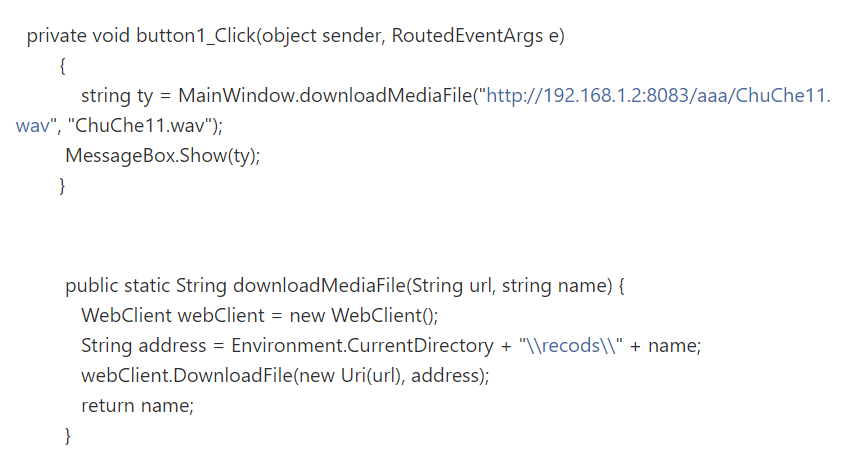
WPF下载远程文件,并显示进度条和百分比
WPF下载远程文件,并显示进度条和百分比
1、xaml
<ProgressBar HorizontalAlignment="Left" Height="10" Margin="96,104,0,0" Name="pbDown" VerticalAlignment="Top" Width="100"/><Label Content="Label" Name="label1" HorizontalAlignment="Left" VerticalAlignment="Top" Margin="206,104,0,0"/> |
2、CS程序
using System;using System.Windows;using System.Windows.Controls;using System.Net;using System.IO;using System.Threading;using System.Drawing;namespace WpfDemo{ /// <summary> /// MainWindow.xaml 的交互逻辑 /// </summary> public partial class MainWindow : Window { public MainWindow() { InitializeComponent(); if (HttpFileExist("http://183.62.138.31:57863/opt/resources/%E9%A3%8E%E6%99%AF/f1.jpg")) { DownloadHttpFile("http://183.62.138.31:57863/opt/resources/%E9%A3%8E%E6%99%AF/f1.jpg", @"d:\f1.jpg"); } } public void DownloadHttpFile(String http_url, String save_url) { WebResponse response = null; //获取远程文件 WebRequest request = WebRequest.Create(http_url); response = request.GetResponse(); if (response == null) return; //读远程文件的大小 pbDown.Maximum = response.ContentLength; //下载远程文件 ThreadPool.QueueUserWorkItem((obj) => { Stream netStream = response.GetResponseStream(); Stream fileStream = new FileStream(save_url, FileMode.Create); byte[] read = new byte[1024]; long progressBarValue = 0; int realReadLen = netStream.Read(read, 0, read.Length); while (realReadLen > 0) { fileStream.Write(read, 0, realReadLen); progressBarValue += realReadLen; pbDown.Dispatcher.BeginInvoke(new ProgressBarSetter(SetProgressBar), progressBarValue); realReadLen = netStream.Read(read, 0, read.Length); } netStream.Close(); fileStream.Close(); }, null); } /// <summary> /// 判断远程文件是否存在 /// </summary> /// <param name="fileUrl">文件URL</param> /// <returns>存在-true,不存在-false</returns> private bool HttpFileExist(string http_file_url) { WebResponse response = null; bool result = false;//下载结果 try { response = WebRequest.Create(http_file_url).GetResponse(); result = response == null ? false : true; } catch (Exception ex) { result = false; } finally { if (response != null) { response.Close(); } } return result; } public delegate void ProgressBarSetter(double value); public void SetProgressBar(double value) { //显示进度条 pbDown.Value = value; //显示百分比 label1.Content = (value / pbDown.Maximum) * 100 + "%"; } }} |
C# Common Code的更多相关文章
- CodeForcesGym 100641B A Cure for the Common Code
A Cure for the Common Code Time Limit: 3000ms Memory Limit: 262144KB This problem will be judged on ...
- CV code references
转:http://www.sigvc.org/bbs/thread-72-1-1.html 一.特征提取Feature Extraction: SIFT [1] [Demo program][SI ...
- Integrate Your Code with the Frameworks---整合你的代码和框架
Back to Frameworks Integrate Your Code with the Frameworks When you develop an app for OS X or iOS, ...
- Separate code and data contexts: an architectural approach to virtual text sharing
The present invention provides a processor including a core unit for processing requests from at lea ...
- JMM(java内存模型)
What is a memory model, anyway? In multiprocessorsystems, processors generally have one or more laye ...
- python简单搭建HTTP Web服务器
对于Python 2,简单搭建Web服务器,只需在i需要搭建Web服务器的目录(如C:/ 或 /home/klchang/)下,输入如下命令: python -m SimpleHTTPServer 8 ...
- JAVA深入研究——Method的Invoke方法。
在写代码的时候,发现Method可以调用子类的对象,但子类即使是改写了的Method,方法名一样,去调用父类的对象也会报错,虽然这是很符合多态的现象,也符合java的动态绑定规范,但还是想弄懂java ...
- http2协议翻译(转)
超文本传输协议版本 2 IETF HTTP2草案(draft-ietf-httpbis-http2-13) 摘要 本规范描述了一种优化的超文本传输协议(HTTP).HTTP/2通过引进报头字段压缩以及 ...
- Android按键事件处理流程 -- KeyEvent
刚接触Android开发的时候,对touch.key事件的处理总是一知半解,一会是Activity里的方法,一会是各种View 中的,自己始终不清楚到底哪个在先哪个在后,总之对整个处理流程没能很好的把 ...
随机推荐
- MFC 使用Skin++ 美化皮肤
查了好几天关于MFC应用程序换肤的资料,经过各种莫名其妙的问题的困扰,现分享一下自己的体会.希望可 以避免一些弯路.另外会在附上一些资源. 环境:Windows 7 + VS2012 + SkinSh ...
- spring 事物不回滚
使用spring控制事物,为什么有些情况事物,事物不回滚呢?? 默认spring事务只在发生未被捕获的 RuntimeException时才回滚. spring aop 异常捕获原理: 被拦截的 ...
- ES timeout 的一些笔记
首先解释下Timeout的作用: 比如,一个search,可能要10分钟才能搜完,那么,es就会等10分钟,直到结果出来.然而,在某些场景下,客户是等不了10分钟的.比如,淘宝搜东西的时候,客户宁可等 ...
- 使用腾讯地图和js,html实现地理位置的获取
转自http://blog.csdn.net/eele_one/article/details/64905218<!DOCTYPE html> <html> <head& ...
- [STM31F103]独立看门狗
独立看门狗步骤: l 取消寄存器写保护: n IWDG_WriteAccessCmd(); l 设置独立看门狗的预分频系数,确定时钟: n IWDG_SetPrescaler(); l 设置看门狗重装 ...
- windows开发各种dll缺失
推荐使用 depend这个工具,非常好用 http://www.dependencywalker.com/ 打开对应的文件,就能看到缺失了哪些dll 感谢博主: https://blog.csdn.n ...
- Open CDN 2.0管控端和节点端安装
原文:http://www.safecdn.cn/cdn/2018/12/opencdn-2-0/1076.html OpenCDN是一套快速部署CDN加速的工具,针对专门提供CDN加速服务的企业或对 ...
- 详细解说Windows 8.1与Windows 8的区别(Win8.1与Win8区别)
详细解说Windows 8.1与Windows 8的区别(Win8.1与Win8区别) 本文转自“吾乐吧软件站”,原文链接:http://www.wuleba.com/?p=23082 最近,吾乐吧软 ...
- Crontab 执行时没有环境变量!
Crontab 执行时没有环境变量! Crontab 执行时没有环境变量! Crontab 执行时没有环境变量! 重要的事情说三遍,浪费我半天时间去找问题!! 非系统默认工具,执行时候需要加全路径!!
- MTK6261初始化待机流程