
Spark的Streaming和Spark的SQL简单入门学习
1、Spark Streaming是什么?
a、Spark Streaming是什么?
  Spark Streaming类似于Apache Storm,用于流式数据的处理。根据其官方文档介绍,Spark Streaming有高吞吐量和容错能力强等特点。Spark Streaming支持的数据输入源很多,例如:Kafka、Flume、Twitter、ZeroMQ和简单的TCP套接字等等。数据输入后可以用Spark的高度抽象原语如:map、reduce、join、window等进行运算。而结果也能保存在很多地方,如HDFS,数据库等。另外Spark Streaming也能和MLlib(机器学习)以及Graphx完美融合。
b、Spark Streaming的特点?
  易用、容错、易整合到Spark体系、

2、Spark与Storm的对比
a、Spark开发语言:Scala、Storm的开发语言:Clojure。
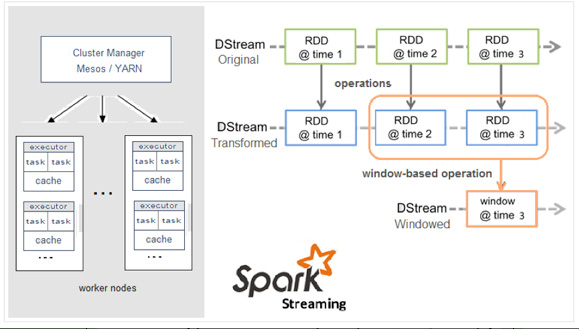
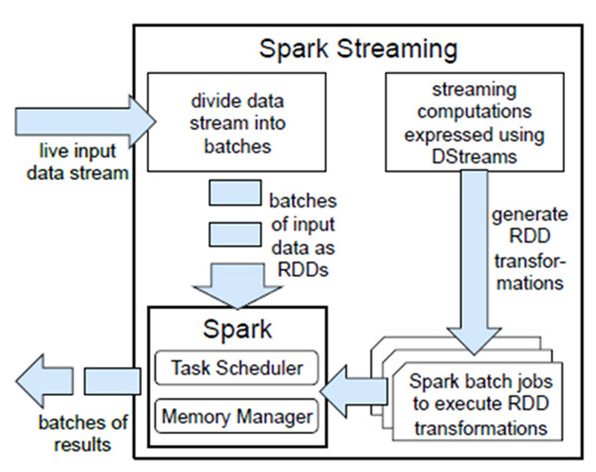
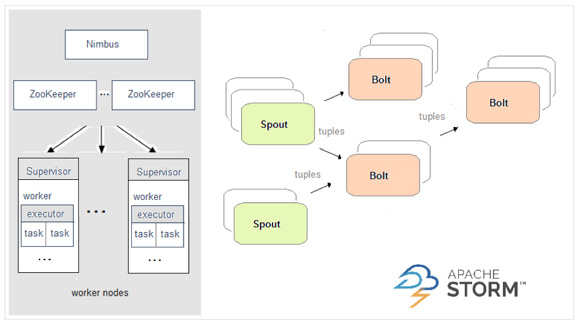
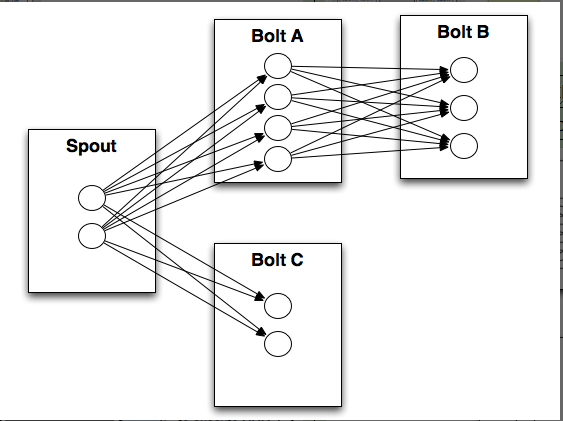
b、Spark编程模型:DStream、Storm编程模型:Spout/Bolt。
c、Spark和Storm的对比介绍:
Spark:
Storm:
3、什么是DStream?
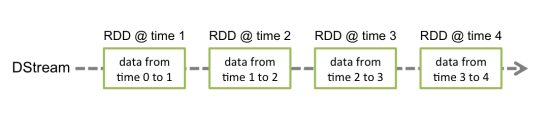
3.1、Discretized Stream是Spark Streaming的基础抽象,代表持续性的数据流和经过各种Spark原语操作后的结果数据流。在内部实现上,DStream是一系列连续的RDD来表示。每个RDD含有一段时间间隔内的数据,如下图:
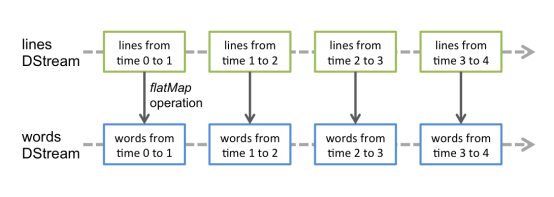
对数据的操作也是按照RDD为单位来进行的:
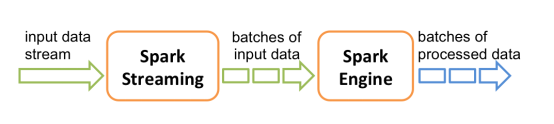
计算过程由Spark engine来完成
3.2、DStream相关操作:
  DStream上的原语与RDD的类似,分为Transformations(转换)和Output Operations(输出)两种,此外转换操作中还有一些比较特殊的原语,如:updateStateByKey()、transform()以及各种Window相关的原语。
a、Transformations on DStream:
|
Transformation |
Meaning |
|
map(func) |
Return a new DStream by passing each element of the source DStream through a function func. |
|
flatMap(func) |
Similar to map, but each input item can be mapped to 0 or more output items. |
|
filter(func) |
Return a new DStream by selecting only the records of the source DStream on which func returns true. |
|
repartition(numPartitions) |
Changes the level of parallelism in this DStream by creating more or fewer partitions. |
|
union(otherStream) |
Return a new DStream that contains the union of the elements in the source DStream and otherDStream. |
|
count() |
Return a new DStream of single-element RDDs by counting the number of elements in each RDD of the source DStream. |
|
reduce(func) |
Return a new DStream of single-element RDDs by aggregating the elements in each RDD of the source DStream using a function func (which takes two arguments and returns one). The function should be associative so that it can be computed in parallel. |
|
countByValue() |
When called on a DStream of elements of type K, return a new DStream of (K, Long) pairs where the value of each key is its frequency in each RDD of the source DStream. |
|
reduceByKey(func, [numTasks]) |
When called on a DStream of (K, V) pairs, return a new DStream of (K, V) pairs where the values for each key are aggregated using the given reduce function. Note: By default, this uses Spark's default number of parallel tasks (2 for local mode, and in cluster mode the number is determined by the config property spark.default.parallelism) to do the grouping. You can pass an optional numTasks argument to set a different number of tasks. |
|
join(otherStream, [numTasks]) |
When called on two DStreams of (K, V) and (K, W) pairs, return a new DStream of (K, (V, W)) pairs with all pairs of elements for each key. |
|
cogroup(otherStream, [numTasks]) |
When called on a DStream of (K, V) and (K, W) pairs, return a new DStream of (K, Seq[V], Seq[W]) tuples. |
|
transform(func) |
Return a new DStream by applying a RDD-to-RDD function to every RDD of the source DStream. This can be used to do arbitrary RDD operations on the DStream. |
|
updateStateByKey(func) |
Return a new "state" DStream where the state for each key is updated by applying the given function on the previous state of the key and the new values for the key. This can be used to maintain arbitrary state data for each key. |
特殊的Transformations

.UpdateStateByKey Operation

UpdateStateByKey原语用于记录历史记录,上文中Word Count示例中就用到了该特性。若不用UpdateStateByKey来更新状态,那么每次数据进来后分析完成后,结果输出后将不在保存

.Transform Operation

Transform原语允许DStream上执行任意的RDD-to-RDD函数。通过该函数可以方便的扩展Spark API。此外,MLlib(机器学习)以及Graphx也是通过本函数来进行结合的。

.Window Operations

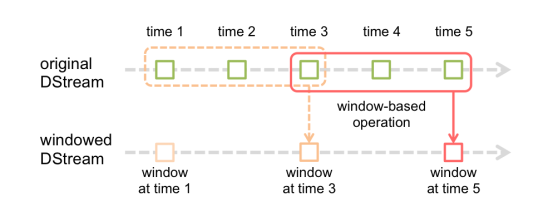
Window Operations有点类似于Storm中的State,可以设置窗口的大小和滑动窗口的间隔来动态的获取当前Steaming的允许状态
b、Output Operations on DStreams:
Output Operations可以将DStream的数据输出到外部的数据库或文件系统,当某个Output Operations原语被调用时(与RDD的Action相同),streaming程序才会开始真正的计算过程。
|
Output Operation |
Meaning |
|
print() |
Prints the first ten elements of every batch of data in a DStream on the driver node running the streaming application. This is useful for development and debugging. |
|
saveAsTextFiles(prefix, [suffix]) |
Save this DStream's contents as text files. The file name at each batch interval is generated based on prefix and suffix: "prefix-TIME_IN_MS[.suffix]". |
|
saveAsObjectFiles(prefix, [suffix]) |
Save this DStream's contents as SequenceFiles of serialized Java objects. The file name at each batch interval is generated based on prefix and suffix: "prefix-TIME_IN_MS[.suffix]". |
|
saveAsHadoopFiles(prefix, [suffix]) |
Save this DStream's contents as Hadoop files. The file name at each batch interval is generated based on prefix and suffix: "prefix-TIME_IN_MS[.suffix]". |
|
foreachRDD(func) |
The most generic output operator that applies a function, func, to each RDD generated from the stream. This function should push the data in each RDD to an external system, such as saving the RDD to files, or writing it over the network to a database. Note that the function func is executed in the driver process running the streaming application, and will usually have RDD actions in it that will force the computation of the streaming RDDs. |
4、 Spark Streaming的练习使用:
从Socket实时读取数据,进行实时处理,首先测试是否安装nc:
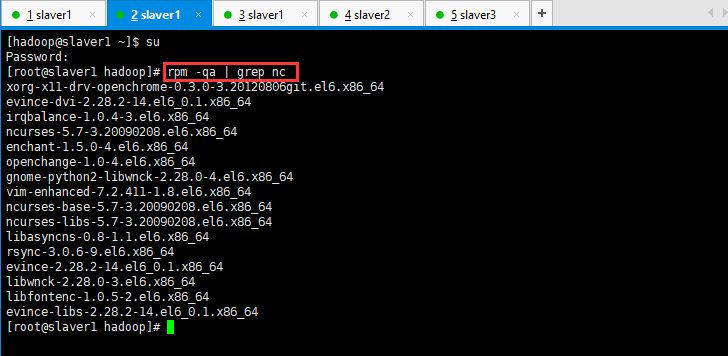
然后检查是否安装:[root@slaver1 hadoop]# which nc
然后安装nc:[root@slaver1 hadoop]# yum install -y nc(此种方法安装出现错误,不建议使用)
[root@slaver1 hadoop]# wget http://vault.centos.org/6.6/os/x86_64/Packages/nc-1.84-22.el6.x86_64.rpm
[root@slaver1 hadoop]# rpm -iUv nc-1.84-22.el6.x86_64.rpm
然后在窗口执行如下命令:[root@slaver1 hadoop]# nc -lk 9999(输入消息)。
然后复制这个窗口,执行如下命令:[root@slaver1 hadoop]# nc slaver1 9999(可以接受输入的消息)。
5、开始测试:
[hadoop@slaver1 ~]$ nc -lk 9999
[hadoop@slaver1 spark-1.5.1-bin-hadoop2.4]$ ./bin/run-example streaming.NetworkWordCount 192.168.19.131 9999
然后在第一行的窗口输入例如:hello world hello world hadoop world spark world flume world hello world
看第二行的窗口是否进行计数计算;
1、Spark SQL and DataFrame
a、什么是Spark SQL?
  Spark SQL是Spark用来处理结构化数据的一个模块,它提供了一个编程抽象叫做DataFrame并且作为分布式SQL查询引擎的作用。
b、为什么要学习Spark SQL?
  我们已经学习了Hive,它是将Hive SQL转换成MapReduce然后提交到集群上执行,大大简化了编写MapReduce的程序的复杂性,由于MapReduce这种计算模型执行效率比较慢。所有Spark SQL的应运而生,它是将Spark SQL转换成RDD,然后提交到集群执行,执行效率非常快!
c、Spark的特点:
  易整合、统一的数据访问方式、兼容Hive、标准的数据连接。
d、什么是DataFrames?
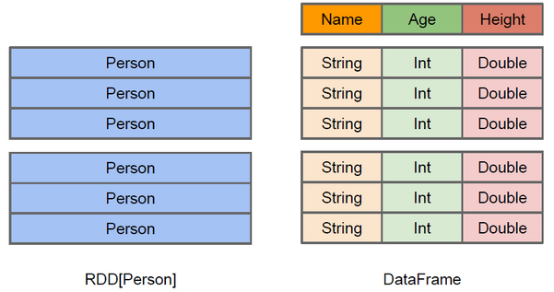
  与RDD类似,DataFrame也是一个分布式数据容器。然而DataFrame更像传统数据库的二维表格,除了数据以外,还记录数据的结构信息,即schema。同时,与Hive类似,DataFrame也支持嵌套数据类型(struct、array和map)。从API易用性的角度上 看,DataFrame API提供的是一套高层的关系操作,比函数式的RDD API要更加友好,门槛更低。由于与R和Pandas的DataFrame类似,Spark DataFrame很好地继承了传统单机数据分析的开发体验。
2、创建DataFrames?
在Spark SQL中SQLContext是创建DataFrames和执行SQL的入口,在spark-1.5.2中已经内置了一个sqlContext:
.在本地创建一个文件,有三列,分别是id、name、age,用空格分隔,然后上传到hdfs上

hdfs dfs -put person.txt /

.在spark shell执行下面命令,读取数据,将每一行的数据使用列分隔符分割

val lineRDD = sc.textFile("hdfs://node1.itcast.cn:9000/person.txt").map(_.split(" "))

.定义case class(相当于表的schema)

case class Person(id:Int, name:String, age:Int)

.将RDD和case class关联

val personRDD = lineRDD.map(x => Person(x().toInt, x(), x().toInt))

.将RDD转换成DataFrame

val personDF = personRDD.toDF

.对DataFrame进行处理

personDF.show
3、DataFrame常用操作:
DSL风格语法

//查看DataFrame中的内容

personDF.show

//查看DataFrame部分列中的内容

personDF.select(personDF.col("name")).show

personDF.select(col("name"), col("age")).show

personDF.select("name").show

//打印DataFrame的Schema信息

personDF.printSchema

//查询所有的name和age,并将age+1

personDF.select(col("id"), col("name"), col("age") + ).show

personDF.select(personDF("id"), personDF("name"), personDF("age") + ).show

//过滤age大于等于18的
personDF.filter(col("age") >= 18).show

//按年龄进行分组并统计相同年龄的人数
personDF.groupBy("age").count().show()
4、SQL风格语法:
如果想使用SQL风格的语法,需要将DataFrame注册成表

personDF.registerTempTable("t_person")

//查询年龄最大的前两名

sqlContext.sql("select * from t_person order by age desc limit 2").show

//显示表的Schema信息

sqlContext.sql("desc t_person").show
待续......
Spark的Streaming和Spark的SQL简单入门学习的更多相关文章
- Spring.Net 简单入门学习
Spring.NET IoC容器的用法. 通过简单的例子学习Spring.Net 1.先创建一个控制台程序项目. 2.添加IUserInfoDal 接口. namespace Spring.Net { ...
- android的简单入门学习
话说光配环境就整死我了, 不是说多么难, 是最近google被屏了, 很多sdk里面需要下载的东西都下不下来, 坑爹啊. 最后跟扫拉稀要了一个他配置好的,才运行了. android目录分析: ass ...
- SDL 简单入门学习
write by 九天雁翎(JTianLing) -- blog.csdn.net/vagrxie 讨论新闻组及文件 概要 实际学习使用SDL创建窗体,并绘制图形. 前言 今天想要做一个简单的demo ...
- MyBatis的简单入门学习
一个新知识开始是最难学的.(万事开头难) MyBatis大体分三层,接口层,数据处理层,基础支撑层. 其中接口层不是java中的那个interface,而是框架和程序员之间的对接.一个API,程序员可 ...
- JSTL简单入门学习实例
Maven依赖: <dependency> <groupId>javax.servlet</groupId> <artifactId>jstl</ ...
- Python 3 + Selenium 3 简单入门学习示例 126邮箱登录
这是一个很多基础演示的书上的例子,但是一般按照这些书上的代码可能都不能成功登录.也许是网易修改了126的页面导致的吧,下面给出最新的能够work的版本 from selenium import web ...
- [Spark] 06 - What is Spark Streaming
前言 Ref: 一文读懂 Spark 和 Spark Streaming[简明扼要的概览] 在讲解 "流计算" 之前,先做一个简单的回顾,亲! 一.MapReduce 的问题所在 ...
- Spark Structured streaming框架(1)之基本使用
Spark Struntured Streaming是Spark 2.1.0版本后新增加的流计算引擎,本博将通过几篇博文详细介绍这个框架.这篇是介绍Spark Structured Streamin ...
- Spark Structured Streaming框架(1)之基本用法
Spark Struntured Streaming是Spark 2.1.0版本后新增加的流计算引擎,本博将通过几篇博文详细介绍这个框架.这篇是介绍Spark Structured Streamin ...
随机推荐
- Java 类加载机制(阿里面试题)-何时初始化类
(1)阿里的面试官问我,可以不可以自己写个String类 答案:不可以,因为 根据类加载的双亲委派机制,会去加载父类,父类发现冲突了String就不再加载了; (2)能否在加载类的时候,对类的字节码进 ...
- windows下安装MySql + navicat(图形化界面)
MySQL安装过程参考:https://www.cnblogs.com/ayyl/p/5978418.html navicat图形化界面安装过程参考:https://www.cnblogs.com/l ...
- Redis 通过 info 查看信息和状态
INFO INFO [section] 以一种易于解释(parse)且易于阅读的格式,返回关于 Redis 服务器的各种信息和统计数值. 通过给定可选的参数 section ,可以让命令只返回某一部分 ...
- 设计模式C++学习笔记之十八(Visitor访问者模式)
18.1.解释 概念:表示一个作用于某对象结构中的各元素的操作.它使你可以在不改变各元素的类的前提下定义作用于这些元素的新操作. main(),客户 IVisitor,访问者接口 CBaseVis ...
- 题解-APIO2010 特别行动队
题目 洛谷 & bzoj 简要题意:给定一个长为\(n\)的序列\(\{s_i\}\)与常数\(a,b,c\),序列的一个连续子段\(s_i\)到\(s_j\)的贡献为\(at^2+bt+c\ ...
- 《转》return *this和 return this有什么区别?
别跟我说 return *this 表示返回当前对象,return this 表示返回当前对象的地址(指向当前对象的指针). 正确答案为:return *this 返回的是当前对象的克隆或者本身(若返 ...
- Linux基础知识之bashrc和profile的用途和区别
使用终端ssh登录Linux操作系统的控制台后,会出现一个提示符号(例如:#或~),在这个提示符号之后可以输入命令,Linux根据输入的命令会做回应,这一连串的动作是由一个所谓的Shell来做处理. ...
- OpenStack实践系列⑧可视化服务Horizon之Dashboard演示
OpenStack实践系列⑧可视化服务Horizon之Dashboard演示 七.可视化服务Horizon之Dashboard演示 仪表板依赖于功能核心服务,包括身份,图像服务,计算和网络两种(neu ...
- [C]变量作用域
函数环境变量作用域 C语言栈环境变量作用域跟JS是类似的. 就是内部函数可以访问外部函数的执行(栈)环境变量. 当访问一个变量时,程序将会查询当前栈环境是否存在这个变量,如果没有,将会往上层栈环境继续 ...
- python面试30-40题
1.简述python引用计数机制 python垃圾回收主要以引用计数为主,标记-清除和分代清除为辅的机制,其中标记-清除和分代回收主要是为了处理循环引用的难题. 引用计数算法 当有1个变量保存了对 ...