
最大化及等比例测试演化Demo-Grid方法
Demo1-简单测试:
 <!doctype html>

 <html>

 <head>

 <meta charset="utf-8">

 <title>无标题文档</title>

 <style type="text/css">

 html,body{

     width:100%;

     height:100%;

     padding:0;

     margin:0;

 }

 .container {

     width:100%;

     height:100%;

     display: grid;

     grid-template-columns: 25%  25% 25% 25%;

     grid-template-rows: 25%  25% 25%;

     grid-template-areas:

        ". . . ."

        ". c c ."

        ". . . .";

 }

 .cs{

     grid-area: c;

     background-color: pink;

 }

 </style>

 </head>

 <body>

 <div class="container">

   <div class="cs">cs</div>

   </div>

 </body>

 </html>
Demo2-页面布局练习:
<!doctype html>

<html>

<head>

<meta charset="utf-8">

<title>无标题文档</title>

<style type="text/css">

html,body{

    width:100%;

    height:100%;

    padding:0;

    margin:0;

}

.container {

    width:100%;

    height:100%;

    display: grid;

    /*grid-gap: 5px;*/

    grid-template-columns: repeat(12, 1fr);

    grid-template-rows: 1fr 8fr 1fr;

    grid-template-areas: "h h h h h h h h h h h h"  "m m c c c c c c c c c c"  "f f f f f f f f f f f f";

}

.header {

    grid-area: h;

    background-color: #0F0;

}

.menu {

    grid-area: m;

    background-color: blue;

}

.content{

    grid-area: c;

    background-color: pink;

}

.footer {

    grid-area: f;

    background-color: #666;

}

</style>

</head>

<body>

<div class="container">

  <div class="header">HEADER</div>

  <div class="leftmenu">MENU</div>

  <div class="content">CONTENT</div>

  <div class="footer">FOOTER</div>

</div>

</body>

</html>
Demo3-选手分值信息展示布局:
<!doctype html>

<html>

<head>

<meta charset="utf-8">

<title>无标题文档</title>

<style type="text/css">

html, body {

    width: 100%;

    height: 100%;

    padding: 0;

    margin: 0;

}

.container {

    width: 100%;

    height: 100%;

    display: grid;

    /*grid-gap: 5px;*/

/*    grid-template-columns: 5% 5% 5% 5% 5% 5% 5% 5% 5% 5% 5% 5% 5% 5% 5% 5% 5% 5% 5% 5%;*/

    grid-template-columns:repeat(22,1fr);

    grid-template-rows: repeat(22,1fr);

    grid-template-areas:

    ". . . . . . . . . . . . . . . . . . . . . ."

    ". l   l   l   l   l   l   l   l   l   l   l   l   l   l   l   l   l   l  l  l ."

    ". l   l   l   l   l   l   l   l   l   l   l   l   l   l   l   l   l   l  l  l ."

    ". . . . . . . . . . . . . . . . . . . . . ."

   ". . . . . . xx xx xx xx . . yy yy yy yy . . . . . . "

   ". . . . . . xx xx xx xx . . yy yy yy yy . . . . . . "

   ". . . . . . xx xx xx xx . . yy yy yy yy . . . . . . "

   ". . . . . . xx xx xx xx . . yy yy yy yy . . . . . . "

   ". . . . . . xx xx xx xx . . yy yy yy yy . . . . . . "

   ". . . . . . xx xx xx xx . . yy yy yy yy . . . . . . "

    ". . . . . . . . . . . . . . . . . . . . . ."

    ". rs rs rs rs rs rs rs rs rs rs rs rs rs rs rs rs rs rs rs rs ."

    ". rs rs rs rs rs rs rs rs rs rs rs rs rs rs rs rs rs rs rs rs ."

    ". rs rs rs rs rs rs rs rs rs rs rs rs rs rs rs rs rs rs rs rs ."

    ". rs rs rs rs rs rs rs rs rs rs rs rs rs rs rs rs rs rs rs rs ."

    ". rs rs rs rs rs rs rs rs rs rs rs rs rs rs rs rs rs rs rs rs ."

    ". re re re re re re re re re re re re re re re re re re re re ."

    ". re re re re re re re re re re re re re re re re re re re re ."

    ". re re re re re re re re re re re re re re re re re re re re ."

    ". at at at at at at at at at at at at at at  at at at at at at ."

    ". at at at at at at at at at at at at at at  at at at at at at ."

    ". . . . . . . . . . . . . . . . . . . . . ." ;

}

.banner {

    grid-area: l;

    background-color: red;

}

.playerphoto {

    grid-area: xx;

    background-color: blue;

}

.playerinfo {

    grid-area: yy;

    background-color: yellow;

}

.raters {

    grid-area: rs;

    background-color: green;

}

.result {

    grid-area: re;

    background-color: pink;

}

.admtip {

    grid-area: at;

    background-color: #9C6;

}

</style>

</head>

<body>

<div class="container">

  <div class="banner">banner</div>

  <div class="playerphoto">playerphoto</div>

  <div class="playerinfo">playerinfo</div>

  <div class="raters">raters</div>

  <div class="result">result</div>

  <div class="admtip">admtip</div>

</div>

</body>

</html>
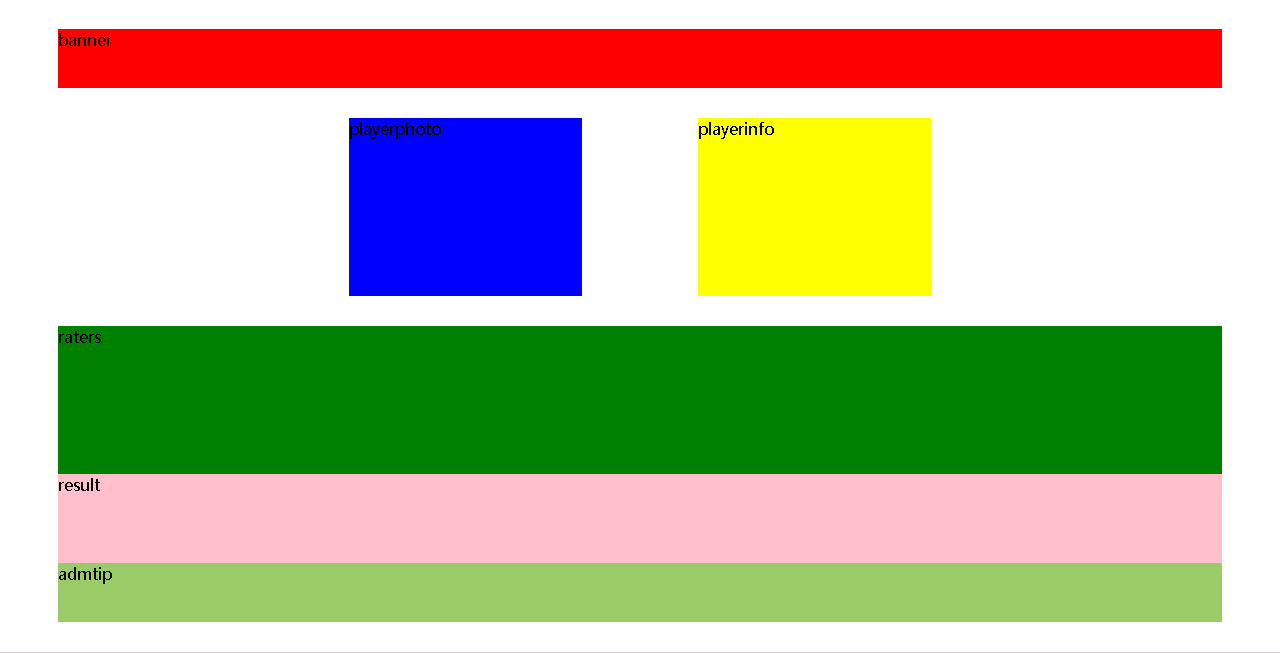
最大化及等比例测试演化Demo-Grid方法的更多相关文章
- 最大化等比例测试演化Demo-传统方法
demo-1: <!doctype html> <html> <head> <meta charset="utf-8"> <t ...
- Selenium关键字驱动测试框架Demo(Java版)
Selenium关键字驱动测试框架Demo(Java版)http://www.docin.com/p-803493675.html
- Spring Boot超简单的测试类demo
1 概述 Spring Boot结合Junit的简单测试类demo,流程是先引入依赖,接着编写测试类测试运行即可. 2 依赖 <dependency> <groupId>org ...
- appium+Python真机运行测试demo的方法
appium+Python真机运行测试demo的方法 一, 打开手机的USB调试模式 二, 连接手机到电脑 将手机用数据线连接到电脑,并授权USB调试模式.查看连接的效果,在cmd下运行命 ...
- 基于Python的XSS测试工具XSStrike使用方法
基于Python的XSS测试工具XSStrike使用方法 简介 XSStrike 是一款用于探测并利用XSS漏洞的脚本 XSStrike目前所提供的产品特性: 对参数进行模糊测试之后构建合适的payl ...
- Tkinter grid() 方法
Tkinter grid() 方法:这个的几何管理器组织在父部件的表状结构中的部件. 这的几何管理器组织表状结构中的小部件的父部件. 语法: widget.grid( grid_optio ...
- .NET中如何测试Private和Protected方法
TDD是1)写测试2)写通过这些测试的代码,3)然后重构的实践.在,NET社区中, 这个概念逐渐变得非常流行,这归功于它所增加的质量保证.此时,它很容易测试public方法,但是一个普遍的问题出现了, ...
- RegisterUserFunc为测试对象添加新方法或重写已有方法
QTP中为了提高扩展性,提供了一个为测试对象添加一个新的自定义方法,或者重写测试对象已有的方法的函数RegisterUserFunc,在此给大家分享一下. RegisterUserFunc:为测试对象 ...
- Java工作流引擎的测试容器-功能-使用方法-注意事项
工作流引擎的测试容器-功能-使用方法-注意事项 关键字 Ccbpm, ccflow,jflow,工作流引擎,工作流引擎测试容器,表单引擎 功能说明 工作流的测试容器是为了解决手工模拟人工登录模式下测试 ...
随机推荐
- HBase原理和设计
转载 2016年1月10日:http://www.sysdb.cn/index.php/2016/01/10/hbase_principle/ 简介 架构 数据组织 原理 RS定位 region写入 ...
- flume中sink到hdfs,文件系统频繁产生文件,文件滚动配置不起作用?
在测试hdfs的sink,发现sink端的文件滚动配置项起不到任何作用,配置如下: a1.sinks.k1.type=hdfs a1.sinks.k1.channel=c1 a1.sinks.k1.h ...
- python基本使用事项
1.绝对不能使用word及Windows自带的记事本编写代码,本人使用Notepad++, 2.python交互模式 命令符下输入python显示“ >>>“,表示进入了交互模式 在 ...
- linux下lampp的启动和停止脚本
今天试着写了lampp的启动停止脚本,和上一篇的tomcat的启动停止有一点小区别,就是lampp启动之后有很多的进程号,如果按照tomcat的停止脚本写就会出错,下面做细细的介绍 1.lampp的停 ...
- buildroot管理uboot+kernel+rootfs
鉴于自己制作根文件系统太麻烦了,所以想用buildroot管理uboot,kernel,另外还可以自动生产rootfs,于是花了两天研究了下buildroot的框架和使用,在自己的2440开发板上也跑 ...
- cf352E Jeff and Brackets dp+矩阵快速幂(加法+min运算)
题意大致是这样的,一共要放 m 段括号序列,每一段放 n 个括号,也就是放 n*m个括号,再每一段中的 n 个位置分别有放左括号和右括号的代价,问最终摆放出合法的括号序列的最小代价是多少. 另外保证, ...
- robotframework之用cmd去执行用例
1.电脑cmd进入 2.在cmd中输入相应的执行命令即可以正常执行 3.执行完成,会显示当前用例执行情况,以及output/log/report的默认保存路径 接下来详细说一下执行不同用例的具体指令, ...
- C语言 基础
内存的定义 在学习python的时候 了解过内存的管理机制,例如引用计数,垃圾回收,小内存池的概念. 但是并不了解内存究竟是个什么东西?不了解内存的实际存储方式. Mac OS Mojave 处理器 ...
- day-10初级函数
函数 函数的定义 函数:完成 特定 功能的代码块,作为一个整体,对其进行特定的命名,该名字就代表函数-- 现实中:很多问题要通过一些工具进行处理 => 可以将工具提前生产出来并命名=> 通 ...
- nginx ssl 配置
user www www; worker_processes auto; error_log /home/wwwlogs/nginx_error.log crit; pid /usr/local/ng ...