
HTML5+CSS3(2)
一、视频与音频
1.用JavaScript检测音频格式支持
<!DOCTYPE html>

<html>

	<head>

		<meta charset="UTF-8">

		<title></title>

		<script type/javascript>

			function checkAudio(){

				var myAudio = document.createElement('audio');

				if (myAudio.canPlayType) {

					if ( "" != myAudio.canPlayType('audio/mpeg')) {

						document.write("您的浏览器支持mp3编码。<br>");

					}

					if ( "" != myAudio.canPlayType('audio/ogg; codecs="vorbis"')){

						document.write("您的浏览器支持oog编码。<br>");

					}

					if ( "" != myAudio.canPlayType('audio/mp4; codecs="mp4a.40.5"')) { document.write("您的浏览器支持aac编码。");

					}

				}

				else {

					document.write("您的浏览器不支持要检测的音频格式。");

				}

			}

			window.onload=function() {

				checkAudio();

			}

		</script>

	</head>

	<body>

	</body>

</html>


2.播放音频
<!DOCTYPE html>

<html>

	<head>

		<meta charset="UTF-8">

		<title></title>

	</head>

	<body>

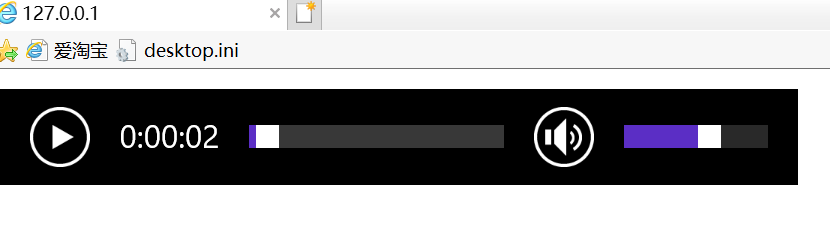
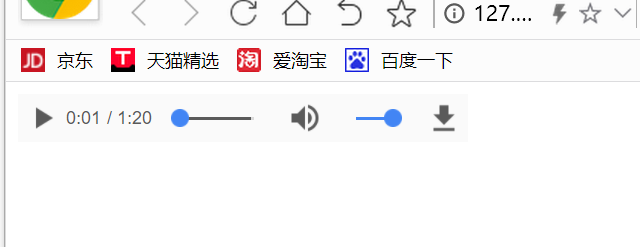
		<audio src="medias/Wah Game Loop.mp3" controls="controls">

			您的浏览器不支持audio标签!

		</audio>

	</body>

</html>
另一种方式插入多个音频
<audio controls>
<source src="medias/Wah Game Loop.ogg"></source>
<source src="medias/Wah Game Loop.mp3"></source>
您的浏览器不支持audio标签!
</audio>
3.播放视频
<!DOCTYPE html>

<html>

	<head>

		<meta charset="UTF-8">

		<title></title>

	</head>

	<body>

		<video controls>

			<source src="medias/volcano.mp4"></source>

		您的浏览器不支持video标签

		</video>

	</body>

</html>

- load():该函数可以加载音频或视频文件,为播放做准备。通常情况下不必调用,除非是动态生成的元素,用来在播放前预加载。
- paly():该函数可以加载并播放音频或者视频文件,除非音频或视频文件已经暂停在其他位了,否则默认从开头播放。
- pause():该函数暂停处于播放状态的音频或视频文件。
- canPlayType(type):该函数检测video元素是否支持给定MIME类型的文件。
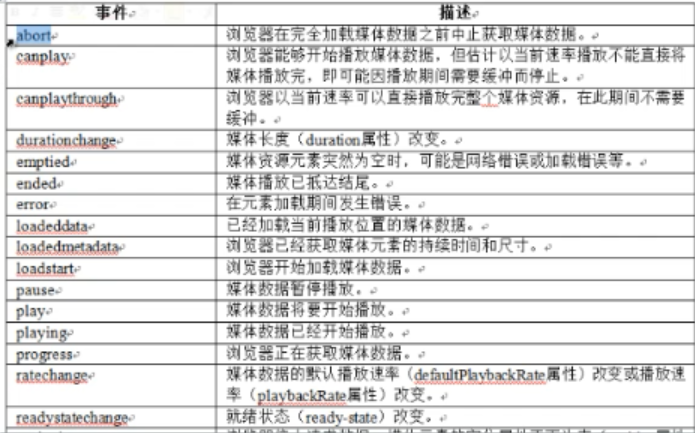
4.音频与视频相关事件

二、sessionStorage和localStorage区别
1.区别
2.设计计数器
<!DOCTYPE html>

<html>

	<head>

		<meta charset="UTF-8">

		<title>计数器</title>

	</head>

	<body>

		<script type="text/javascript">

			if(localStorage.pagecount){

				localStorage.pagecount=Number(localStorage.pagecount)+1;

			}else{

				localStorage.pagecount=1;

			}

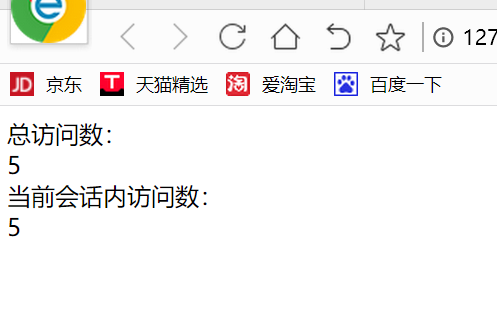
			document.write("总访问数:<br />"+localStorage.pagecount)+1;

			if(sessionStorage.pagecount){

				sessionStorage.pagecount=Number(sessionStorage.pagecount)+1;

			}else{

				sessionStorage.pagecount=1;

			}

			document.write("<br />当前会话内访问数:<br />"+sessionStorage.pagecount);

		</script>

	</body>

</html>
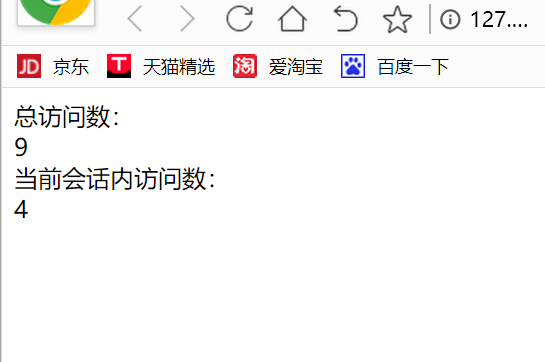
关闭窗口,重新打开,效果如下:
3.跟踪localStorage数据
HTML代码
<!DOCTYPE html>

<html>

    <head>

    <title>sessionStorage</title>

    <link rel="stylesheet" type="text/css" href="css/main.css">

    <script language="javascript" src="js/1.js"></script>

    <script language="javascript">

        var t = new bwTable();

        var db = getSessionStorage() || dispError('Session Storage not supported.');

        function getSessionStorage() {

            try {

                if( !! window.sessionStorage ) return window.sessionStorage;

            } catch(e) {

                return undefined;

            }

        }

        function dispResults() {

            if(errorMessage) {

                element('results').innerHTML = errorMessage;

                return;

            }

            var t = new bwTable();

            t.addRow( ['traveler', db.getItem('traveler')] );

            t.addRow( ['destination', db.getItem('destination')] );

            t.addRow( ['transportation', db.getItem('transportation')] );

            element('results').innerHTML = t.getTableHTML();

        }

        function dbGo() {

            if(errorMessage) return;

            var f = element('travelForm');

            db.setItem('traveler', f.elements['traveler'].value);

            db.setItem('destination', f.elements['destination'].value);

            db.setItem('transportation', f.elements['transportation'].value);

            dispResults();

        }

        function dbClear() {

            if(errorMessage) return;

            db.clear();

            dispResults();

        }

        function initDisp() {

            dispResults();

        }

        window.onload = function() {

            initDisp();

        }

    </script>

    </head>

    <body>

    <div id="content">

        <h1> sessionStorage</h1>

        <div id="form">

            <form id="travelForm">

                <table class="form">

                    <tr>

                        <td class="label"> Traveler </td>

                        <td><input type="text" name="traveler" /></td>

                    </tr>

                    <tr>

                        <td class="label"> Destination </td>

                        <td><input type="text" name="destination" /></td>

                    </tr>

                    <tr>

                        <td class="label"> Transportation </td>

                        <td><input type="text" name="transportation" /></td>

                    </tr>

                    <tr>

                        <td colspan="2" class="button"><input id="formSubmit" type="button" value="Clear" onClick="javascript:dbClear()" />

                            <input id="formSubmit" type="button" value="Go" onClick="javascript:dbGo()" /></td>

                    </tr>

                </table>

                <input id="inputAction" type="hidden" name="action" value="add" />

                <input id="inputKey" type="hidden" name="key" value="0" />

            </form>

        </div>

        <div id="results">

        </div>

    </div>

</body>

</html>
CSS代码
html, body, div, section, article, aside, header, hgroup, footer, nav, h1, h2, h3, h4, h5, h6, table, tr, td,

p, blockquote, address, time, span, em, strong, img, ol, ul, li, dl, dt, figure, canvas, video {

    margin: 0;

    padding: 0;

    border: 0;

}

body  {

    font-family: Georgia, serif;

    background-color: #3c6b92;

}

.red {

    color: #cb202a;

}

p.message, p.error {

    font: normal 1em Helvetica, Arial, sans-serif;

    padding: 0 3px;

}

p.message {

    border: 1px solid #995522;

    background-color: #e1d8b9;

    color: black;

}

p.error {

    border: 1px solid #193742;

    background-color: #cb202a;

    color: white;

}

#content {

    width: 85%;

    margin: 20px auto;

    padding: 5px;

    background-color: white;

    min-height: 300px;

}

#content h1, #content h2 {

    font: normal 1.4em Helvetica, Arial, sans-serif;

    color: #3c6b92;

}

#content p, h1, h2, h3 {

    margin-bottom: .5em;

}

#content h1 {

    border-bottom: solid 2px #3c6b92;

}

#content h2.error {

    color: #cb7d20;

}

.bwTable {

    background: #c3cebc;

    margin-bottom: .5em;

    border: 1px solid #995522;

    border-collapse: collapse;

}

.bwTable tr, .bwTable td, .bwTable th {

    font: normal 1em Helvetica, Arial, sans-serif;

    text-align: left;

    border: solid 1px #995522;

    padding: 1px 3px;

}

.bwTable tr:nth-child(odd) {

    background: #e1d8b9;

}

.bwTable th {

    background: #193742;

    color: #c3cebc;

    border: solid 1px #51341a;

}

.bwTable td {

    min-width: 100px;

}

#form {

    margin-bottom: 10px;

    border-bottom: 2px solid #3c6b92;

}

#form input[type=text] {

    width: 300px;

}

#form td.button, #form td.label {

    text-align: right;

}

#form td.label {

    padding-right: 3px;

}
JavaScript代码
var element = function(id) { return document.getElementById(id); }

var errorMessage = undefined;

function getOpenDatabase() {

    try {

        if( !! window.openDatabase ) return window.openDatabase;

        else return undefined;

    } catch(e) {

        return undefined;

    }

}

function getLocalStorage() {

    try {

        if( !! window.localStorage ) return window.localStorage;

        else return undefined;

    } catch(e) {

        return undefined;

    }

}

function getSessionStorage() {

    try {

        if( !! window.sessionStorage ) return window.sessionStorage;

        else return undefined;

    } catch(e) {

        return undefined;

    }

}

function dispError( message ) {

    errorMessage = '<p class="error">' + message + '</p>';

    haveError = true;

}

function bwTable( wrap ) {

    this.wrap = ( wrap == undefined ) ? true : wrap;    // default to true

    this.rows = new Array();

    this.header = [];

    this.setHeader = function( row ) {

        this.header = row;

    }

    this.addRow = function( row ) {

        this.rows.push(row);

    }

    this.getRow = function ( index ) {

        return this.rows[index];

    }

    this.countRows = function () {

        return this.rows.length;

    }

    this.getTableHTML = function () {

        var a = '';

        if(this.wrap) a += '<table class="bwTable">\n';

        a += this.getHeaderHTML();

        for(var row in this.rows) {

            a += this.getRowHTML(this.rows[row]);

        }

        if(this.wrap) a += '</table>\n';

        return a;

    }

    this.getHeaderHTML = function () {

        if( this.header.length == 0 ) return '';

        var a = '<tr>';

        for( var cell in this.header ) {

            a += '<th>' + this.header[cell] + '</th>';

        }

        a += '</tr>\n';

        return a;

    }

    this.getRowHTML = function (row ) {

        var a = '<tr>';

        for( var cell in row ) {

            var v= row[cell];

            if(v == null) v = '<span class="red">NULL</span>';

            a += '<td>' + v + '</td>';

        }

        a += '</tr>\n';

        return a;

    }

    this.writeTable = function () {

        document.write(this.getTableHTML());

    }

}
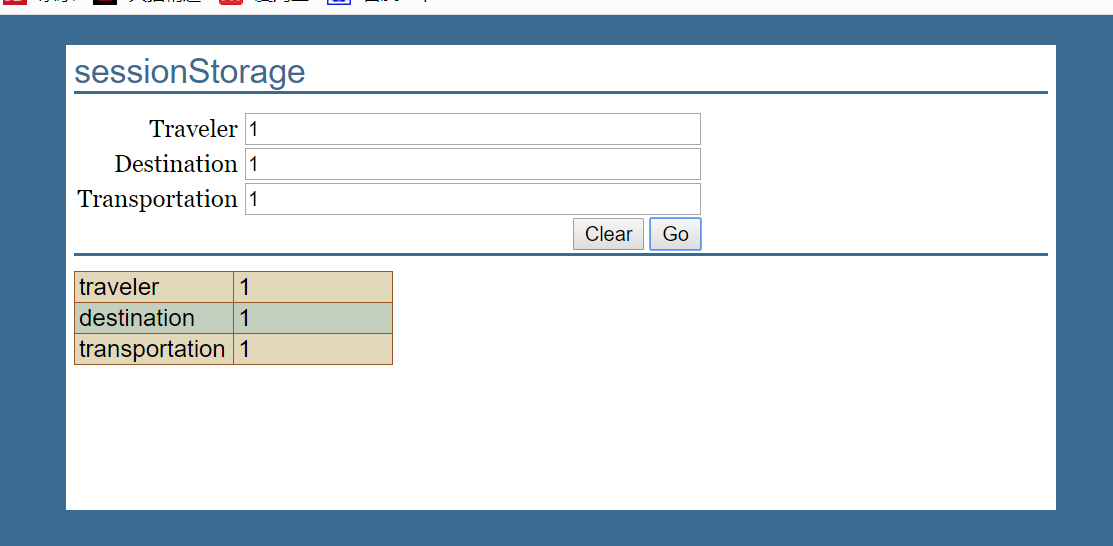
运行结果


HTML5+CSS3(2)的更多相关文章
- 前端笔记之HTML5&CSS3(上)新特性&音频视频&本地存储&自定义属性
一.HTML5简介 HTML 5 的第一份正式草案已于2008年1月22日公布.HTML5 仍处于完善之中.然而,大部分现代浏览器已经具备了某些 HTML5 支持. 2014年10月29日,万维网联盟 ...
- 前端笔记之HTML5&CSS3(下)2D/3D转换&animate动画
一.2D转换(transform) CSS3中的transform转换和PS中的变换是一样的,分别有:缩放.位移.斜切.旋转 1.1 transform:scale()缩放 transform:sca ...
- 前端笔记之HTML5&CSS3(中)选择器&伪类伪元素&CSS3效果&渐变背景&过渡
一.CSS3选择器 CSS3是CSS的第三代版本,新增了很多功能,例如:强大的选择器.盒模型.圆角.渐变.动画.2D/3D转换.文字特效等. CSS3和HTML5没有任何关系!HTML5骨架中,可以用 ...
- 菜鸟学习HTML5+CSS3(一)
主要内容: 1.新的文档类型声明(DTD) 2.新增的HTML5标签 3.删除的HTML标签 4.重新定义的HTML标签 一.新的文档类型声明(DTD) HTML 5的DTD声明为:<!d ...
- HTML5+CSS3(3)
一.CSS3新增属性用法整理 1.box-shadow(阴影效果) 2.border-color(为边框设置多种颜色) 3.border-image(图片边框) 4.text-shadow(文本阴影) ...
- HTML5漫谈(7)——如何保护HTML5应用代码
独家供稿:移动Labs HTML5应用采用的仍然是Javascript(JS).HTML.CSS 等Web语言,因而其代码保护就是这些Web代码的保护,而HTML5应用主要功能一般采用JS实现,因此J ...
- HTML5 Canvas(画布)实战编程初级篇:基本介绍和基础画布元素
欢迎大家阅读HTML5 Canvas(画布)实战编程初级篇系列,在这个系列中,我们将介绍最简单的HTML5画布编程.包括: 画布元素 绘制直线 绘制曲线 绘制路径 绘制图形 绘制颜色,渐变和图案 绘制 ...
- 使用HTML5画布(canvas)生成阴影效果
来源:GBin1.com 使用HTML5的画布特性,我们可以创建图形,在这片文章中,我们将创建图形的阴影. var canvas = document.getElementById('shadowca ...
- HTML5测试(二)
HTML5测试(四) 1.input 元素中,下列哪个类型属性定义了输入电话号码的控件? A.mob B.tel C.mobile D.telephone 答案:B 具有 type 属性的 input ...
随机推荐
- MySQL_DML语言
#MySQL--DML语言##SQL组成DDL:数据库模式定义语言,关键字:create DML:数据操纵语言,关键字:insert,delete,update DCL:数据库控制语言,关键字:gra ...
- 跨域访问技术CORS(Cross-Origin Resource Sharing)简介
为什么要用CORS? CORS是一个W3C标准,全称是"跨域资源共享"(Cross-origin resource sharing). 它允许浏览器向跨源服务器,发出XMLHttp ...
- PymongoDB_study
import pymongo client = pymongo.MongoClient(host='localhost',port=27017)#连接数据库 #db = client.test#指定数 ...
- 公司内网接口ip城市查询分析
require 'rubygems' require 'json' print ARGV print "fist is :",ARGV[0] logfile="#{ARG ...
- axios delete
- apache做反向代理
实验目的 通过apache实现反向代理的功能,类似nginx反向代理和haproxy反向代理 环境准备 逻辑架构如下 前端是apche服务器,监听80端口,后端有两台web服务器,分别是node1和n ...
- QQ浏览器中时区bug
在QQ浏览器 4.4.119.400 版本中,通过new Date('2018-11-11').getTime(); 获取的时间不是东8区的时间戳,而是0时区的时间戳,这就导致了获取的时间与实际的时间 ...
- angularjs 学习小结
1.过滤器的使用 <!DOCTYPE html> <html> <head> <meta charset="{CHARSET}"> ...
- UnicodeEncodeError: 'ascii' codec can't encode characters in position 1-5: ordinal not in range(128)
原因是pip安装python包会加载我的用户目录,我的用户目录恰好是中文的,ascii不能编码.解决办法是: python目录 Python27\Lib\site-packages 建一个文件site ...
- 模板语言 自定义函数simple_tag
模板语言自带的一些处理函数:通过管道符来处理 帮助方法:{{ item.event_start|date:"Y-m-d H:i:s"}} 转换成日期时间型{{ bio|trunc ...