
python操作excel文件一(xlrd读取文件)
一般做接口测试,会把参数和一些数据放入excel表中,这样就不会重新编译代码,提高效率。一般如何操作呢?接下来跟着步骤一起学习吧
执行步骤:
1.首先要安装 xlrd这个模块,用 pip install xlrd
2.倒入这个模块
3.打开一个excel文件(建一个excel的对象)
4.获取到想要的sheet
5.得到想要的列的内容,或者行的内容,或者具体哪个单元格里面的内容
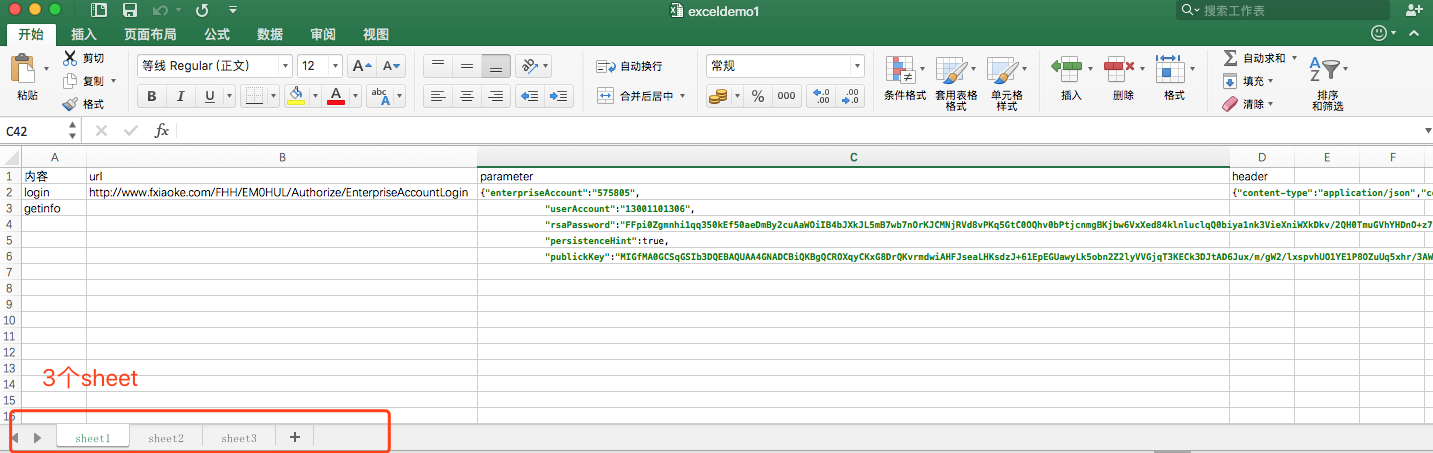
我有一个excel文件:3行4列,有三页,分别是sheet1,sheet2,sheet3
代码:
#!/usr/bin/env/python
# -*-coding:utf-8-*-
import xlrd

class excelUse(object):

    #Object:得到这个对象,也就是打开xlsx文件
    Object = xlrd.open_workbook("exceldemo1.xlsx")

    def getSheetsByIndex(self,index=0):
        """
        通过索引得到
        sheet: 得到第几页(index)的内容
        :return: 返回第几页的内容
        """
        sheet = self.Object.sheet_by_index(index)   #通过sheet_by_index()这个方法,得到想要的具体的某一页
        return sheet

    def getSheetsByName(self,name):
        """
        通过名字得到
        :param sheetName:得到所有的sheet,而且他的类型是一个list类型
        :return:
        """
        sheetNames = self.Object.sheet_names()   #通过sheet_names()这个方法,得到所有页的名
     print "sheetnames is {0},and the type is {1}".format(sheetNames, type(sheetNames))
        sheet = self.Object.sheet_by_name(name)   #通过sheet_by_name()这个方法,传入具体的sheet名字得到具体的sheet页
        return sheet

    def getNumber(self):
        """
        获取sheet的名字,行数,列数,通过属性 name,nrows,ncols(是number+rols/cols)
        :return:
        """
        print "获取sheet的名字",self.getSheetsByIndex(0).name
        print "获取sheet的行数",self.getSheetsByIndex(0).nrows
        print "获取sheet的列数",self.getSheetsByIndex(0).ncols

    def getRow(self,index=0):
        """
        index: 第几行的内容,默认从0开始
        :param index:
        :return:
        """
        print self.getSheetsByIndex(0).row_values(index)
        print type(self.getSheetsByIndex(0).row_values(index))

    def getCol(self,index=0):
        """
        index:第几列的内容,默认从0开始
        :return:
        """
        print self.getSheetsByIndex(0).col_values(index)
        print type(self.getSheetsByIndex(0).col_values(index))
  def getCell(self,rowIndex,colIndex):
        """
        获取具体的单元格的内容
        rowIndex:第几行
        colIndex:第几列
     type:单元格数据的类型
        :return:
        """
        print self.getSheetsByIndex(0).cell_value(rowIndex,colIndex)
        print self.getSheetsByIndex(0).cell(rowIndex,colIndex)
        #print self.getSheetsByName("sheet1").cell(rowIndex,colIndex)
        type = self.getSheetsByIndex(0).cell(rowIndex,colIndex).ctype
        #ctype的类型 0:empty,1:string, 2:number, 3:date, 4: boolean, 5: error
        print type

if __name__=="__main__":
    obj = excelUse()
    obj.getRow(0)
    obj.getCol(0)
    obj.getCell(0,0)
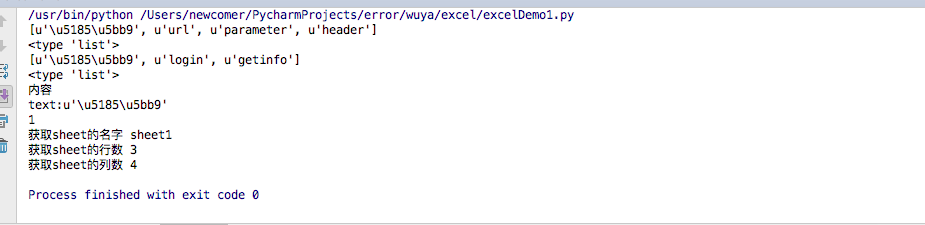
    obj.getNumber()
python操作excel文件一(xlrd读取文件)的更多相关文章
- python操作excel之 模块 xlrd (详解)
二.使用介绍 1.导入模块 import xlrd 2.打开Excel文件读取数据 data = xlrd.open_workbook('excelFile.xls') 3.使用技巧 获取一个工作表 ...
- python操作Excel读写--使用xlrd
一.安装xlrd模块 到python官网下载http://pypi.python.org/pypi/xlrd模块安装,前提是已经安装了python 环境. 二.使用介绍 1.导入模块 import x ...
- python操作Excel读--使用xlrd
一.安装xlrd模块 到python官网下载http://pypi.python.org/pypi/xlrd模块安装,前提是已经安装了python 环境. 二.使用介绍 1.导入模块 import x ...
- python操作excel之 模块 xlrd
xlrd是专门用来在python中读取微软execel的模块,可以自己直接下载安装,也可以通过包管理器安装. 官方资料: 下载地址:http://pypi.python.org/pypi/xlrd 官 ...
- python操作Excel读写--使用xlrd (转)
(转自:http://www.cnblogs.com/lhj588/archive/2012/01/06/2314181.html) 一.安装xlrd模块 到python官网下载http://pypi ...
- python操作Excel读写--使用xlrd和xlwt
一.安装xlrd模块 到python官网下载http://pypi.python.org/pypi/xlrd模块安装,前提是已经安装了python 环境. 进入到解压文件路径,输入 setup.py ...
- python操作Excel读写(使用xlrd和xlrt)
包下载地址:https://pypi.python.org/pypi/xlrd 导入 import xlrd 打开excel data = xlrd.open_workbook('demo.xls ...
- Python操作Excel
一.系统性学习 对于操作Excel,需要Xlrd/xlwt这两个模块,下面推荐出系统性学习的网址: python操作Excel读写--使用xlrd 官方文档 Python 使用 Xlrd/xlwt 操 ...
- 【python小记】python操作excel文件
题记: 最近因为工作需要,学习了python,瞬间对这个轻松快捷的语给吸引了,以前只知道js脚本是写网页的,没有想到python这个脚本语言的应用范围可以这么广泛,现在做一些简单或稍微复杂的操作,基本 ...
- python操作excel表格(xlrd/xlwt)
最近遇到一个情景,就是定期生成并发送服务器使用情况报表,按照不同维度统计,涉及python对excel的操作,上网搜罗了一番,大多大同小异,而且不太能满足需求,不过经过一番对源码的"研究&q ...
随机推荐
- linux查看端口是否开放
在讨论这个问题前,我们先来了解一下物理端口.逻辑端口.端口号等计算机概念. 端口相关的概念: 在网络技术中,端口(Port)包括逻辑端口和物理端口两种类型.物理端口指的是物理存在的端口,如ADSL M ...
- linux mysql -- ERROR! The server quit without updating PID file (/usr/local/mysql/data/localhost.localdomain.pid)
转载 http://blog.csdn.net/caiyaodeng/article/details/45937183 linux 链接mysql 报错 ERROR! The server quit ...
- Spring 使用介绍(九)—— 零配置(二)
三.Bean定义 1.开启bean定义注解支持 开启注解支持须添加以下配置项: <context:component-scan base-package="cn.matt"/ ...
- windows新增/修改/删除系统环境变量bat示例,一键配置JAVA_HOME
setx JAVA_HOME "C:\Program Files\java\jdk1.6.0_27" /m setx classpath = ".;%JAVA_HOME% ...
- [BZOJ 2705] [SDOI 2012] Longge的问题
Description Longge的数学成绩非常好,并且他非常乐于挑战高难度的数学问题.现在问题来了:给定一个整数 \(N\),你需要求出 \(\sum gcd(i, N)(1\le i \le N ...
- 洛谷P1007独木桥题解
题目 这个题看起来很难,但是只要理解了题目,一切都显得简单. 你只需想象出来每个人在碰撞之后仅仅是交换了灵魂, 这样一来,代码就好写了. 附代码: #include<iostream> # ...
- Spring模块介绍
GroupId ArtifactId 说明 org.springframework spring-beans Beans 支持,包含 Groovy org.springframework spring ...
- Quartus prime 16.0 signaltap II 使用
前言 由于逻辑分析仪太贵,altera贴心提供signal tap II来观察输出波形,不过使能signaltap II会占用片内ram,毕竟原理就是把数据采样到ram中再通过jtag口上传到quar ...
- 【BZOJ3771】Triple 生成函数 FFT 容斥原理
题目大意 有\(n\)把斧头,不同斧头的价值都不同且都是\([0,m]\)的整数.你可以选\(1\)~\(3\)把斧头,总价值为这三把斧头的价值之和.请你对于每种可能的总价值,求出有多少种选择方案. ...
- Codeforces Round #541 (Div. 2) D(并查集+拓扑排序) F (并查集)
D. Gourmet choice 链接:http://codeforces.com/contest/1131/problem/D 思路: = 的情况我们用并查集把他们扔到一个集合,然后根据 > ...