
zepto的构造器$
在zepto中,通过$来构造对象
$ = function(selector, context){

    return zepto.init(selector, context)

  }
由该函数,实际上,在调用$函数时相当于调用init方法,接下来看init函数:
zepto.init = function(selector, context) {

    var dom

    // If nothing given, return an empty Zepto collection

    //返回一空的zepto对象

    if (!selector) return zepto.Z()

    // Optimize for string selectors

    else if (typeof selector == 'string') {

      //消除空格

      selector = selector.trim()

      //这里根据不同的情况返回dom

      if (selector[0] == '<' && fragmentRE.test(selector))

        dom = zepto.fragment(selector, RegExp.$1, context), selector = null

      // If there's a context, create a collection on that context first, and select

      // nodes from there

      else if (context !== undefined) return $(context).find(selector)

      // If it's a CSS selector, use it to select nodes.

      else dom = zepto.qsa(document, selector)

    }

    // If a function is given, call it when the DOM is ready

    else if (isFunction(selector)) return $(document).ready(selector)

    // If a Zepto collection is given, just return it

    else if (zepto.isZ(selector)) return selector

    else {

      // normalize array if an array of nodes is given

      if (isArray(selector)) dom = compact(selector)

      // Wrap DOM nodes.

      else if (isObject(selector))

        dom = [selector], selector = null

      // If it's a html fragment, create nodes from it

      else if (fragmentRE.test(selector))

        dom = zepto.fragment(selector.trim(), RegExp.$1, context), selector = null

      // If there's a context, create a collection on that context first, and select

      // nodes from there

      else if (context !== undefined) return $(context).find(selector)

      // And last but no least, if it's a CSS selector, use it to select nodes.

      else dom = zepto.qsa(document, selector)

    }

    // create a new Zepto collection from the nodes found

    return zepto.Z(dom, selector)

  };
先来看一下当传入的是一个html标签的字符串时的构造过程:
if (selector[0] == '<' && fragmentRE.test(selector))

        dom = zepto.fragment(selector, RegExp.$1, context), selector = null

fragmentRE = /^\s*<(\w+|!)[^>]*>/;
fragmentRE是一个匹配普通标签<xxx>的表达式,关键是zepto.fragment()函数。
该函数传入三个参数,在这里传入的分别是selector, RegExp.$1, context,RegExp.$1储存的是当前调用的正则表达式匹配的第一个子表达式。即当我们传入<span>时,其值为span,接下来可以看fragment函数。
zepto.fragment = function(html, name, properties) {

    var dom, nodes, container

    // A special case optimization for a single tag

    //创建一个元素

    if (singleTagRE.test(html)) dom = $(document.createElement(RegExp.$1))

    if (!dom) {

      //将html转换为标签,$1$2表示的是匹配的第一个和第二个子表达式

      if (html.replace) html = html.replace(tagExpanderRE, "<$1></$2>")

      if (name === undefined) name = fragmentRE.test(html) && RegExp.$1

      //创建一个name元素  根据是否为表格元素对其进行下一步操作

      if (!(name in containers)) name = '*'

      container = containers[name]

      //将标签插入name元素

      container.innerHTML = '' + html

      //$.each函数最终返回传入的第一个数组参数

      dom = $.each(slice.call(container.childNodes), function(){

        container.removeChild(this)

      })

    }

    if (isPlainObject(properties)) {

      //将dom转成zepto对象

      nodes = $(dom)

      $.each(properties, function(key, value) {

        if (methodAttributes.indexOf(key) > -1) nodes[key](value)

        else nodes.attr(key, value)

      })

    }

    return dom

  }
在这个函数中,有两个正规表达式,分别是tagExpanderRE和singleTagRE
tagExpanderRE = /<(?!area|br|col|embed|hr|img|input|link|meta|param)(([\w:]+)[^>]*)\/>/ig;

singleTagRE = /^<(\w+)\s*\/?>(?:<\/\1>|)$/
singleTagRE匹配的是单个的<span></span>诸如此类的标签,而tagExpanderRE匹配的是自闭合标签,如<span/>,但不能是img之类,并将其转成<span><span/>;
从函数中,如果匹配的是单个的html标签,则直接创建该标签并$实例化,将其转变为一个zepto对象,如果匹配的是另一种情况,即将dom转成一个存储这些节点的数组。
然后就是最后一个条件判断了:
if (isPlainObject(properties)) {

      //将dom转成zepto对象

      nodes = $(dom)

      $.each(properties, function(key, value) {

        if (methodAttributes.indexOf(key) > -1) nodes[key](value)

        else nodes.attr(key, value)

      })

    }
先看一下isPlainObject函数,该函数判断是否为一个纯对象:
function isPlainObject(obj) {

    return isObject(obj) && !isWindow(obj) && Object.getPrototypeOf(obj) == Object.prototype

  }
主要的判断在于Object.getPrototypeOf(obj) == Object.prototype;不同的参数调用getPrototypeOf(obj)返回的值不同:
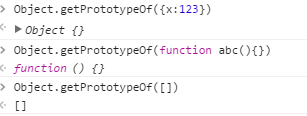
条件判断里的代码需要注意一点,即将dom转成zepto对象.使其能调用$的attr方法,attr函数留在后面。
重新回到init函数,接下来的都是一些条件判断,其中有一个是选择器函数 即zepto.qsa
zepto.qsa = function(element, selector){

    var found,

        maybeID = selector[] == '#',

        maybeClass = !maybeID && selector[] == '.',

        nameOnly = maybeID || maybeClass ? selector.slice() : selector, // Ensure that a 1 char tag name still gets checked

        isSimple = simpleSelectorRE.test(nameOnly)

        //条件判断

    return (element.getElementById && isSimple && maybeID) ? // Safari DocumentFragment doesn't have getElementById

      ( (found = element.getElementById(nameOnly)) ? [found] : [] ) :

      (element.nodeType !==  && element.nodeType !==  && element.nodeType !== ) ? [] :

      slice.call(

        isSimple && !maybeID && element.getElementsByClassName ? // DocumentFragment doesn't have getElementsByClassName/TagName

          maybeClass ? element.getElementsByClassName(nameOnly) : // If it's simple, it could be a class

          element.getElementsByTagName(selector) : // Or a tag

          element.querySelectorAll(selector) // Or it's not simple, and we need to query all

      )

  }
这个函数就是单纯的选择器函数,init函数最后返回的是zepto.z(dom,selector);
zepto.Z = function(dom, selector) {

    return new Z(dom, selector)

  }

function Z(dom, selector) {

    var i, len = dom ? dom.length : 0

    for (i = 0; i < len; i++) this[i] = dom[i]

    this.length = len

    this.selector = selector || ''

  }

zepto.Z.prototype = Z.prototype = $.fn
通过中间的构造函数Z,原型链接到$.fn方便调用其方法,最终返回结果对象。
zepto的构造器$的更多相关文章
- TypeScript为Zepto编写LazyLoad插件
平时项目中使用的全部是jQuery框架,但是对于做webapp来说jQuery太过于庞大,当然你可以选择jQuery 2.*针对移动端的版本. 这里我采用移动端使用率比较多的zepto框架,他跟jqu ...
- zepto/jQuery、AngularJS、React、Nuclear的演化
写在前面 因为zepto.jQuery2.x.x和Nuclear都是为现代浏览器而出现,不兼容IE8,适合现代浏览器的web开发或者移动web/hybrid开发.每个框架类库被大量用户大规模使用都说明 ...
- JavaScript事件详解-Zepto的事件实现(二)【新增fastclick阅读笔记】
正文 作者打字速度实在不咋地,源码部分就用图片代替了,都是截图,本文讲解的Zepto版本是1.2.0,在该版本中的event模块与1.1.6基本一致.此文的fastclick理解上在看过博客园各个大神 ...
- jquery和zepto的扩展方法extend
jquery和zepto的扩展方法extend 总结下jQuery(3.1.1)和zepto(1.1.6)到底是如何来开放接口,使之可以进行扩展,两者都会有类型判断,本文使用简单的类型判断,暂不考虑兼 ...
- [原创]zepto打造一款移动端划屏插件
最近忙着将项目内的jquery 2换成zepto 因为不想引用过多的zepto包,所以花了点时间 zepto真的精简了许多,源代码看着真舒服 正好项目内需要一个划屏插件,就用zepto写了一个 逻辑其 ...
- zepto之tap事件点透问题分析及解决方案
点透现象出现的场景: 当A/B两个层上下z轴重叠,上层的A点击后消失或移开(这一点很重要),并且B元素本身有默认click事件(如a标签)或绑定了click事件.在这种情况下,点击A/B重叠的部分,就 ...
- zepto弹出层组件
html: <!DOCTYPE html> <html> <meta charset="utf-8"> <title></ti ...
- 原生JS实现购物车结算功能代码+zepto版
html <!DOCTYPE html PUBLIC "-//W3C//DTD XHTML 1.0 Transitional//EN" "http://www.w3 ...
- zepto返回顶部动画
点击返回顶部 function goTop(acceleration, time) { acceleration = acceleration || 0.1; time = time || 16; v ...
随机推荐
- C#如何以管理员身份运行程序 转
在使用winform程序获取调用cmd命令提示符时,如果是win7以上的操作系统,会需要必须以管理员身份运行才会执行成功,否则无效果或提示错误. 比如在通过winform程序执行cmd命令时,某些情况 ...
- parrot os 安装后更改更新源
parrot os 安装后 parrot os 自带的更新源更新速度太慢(需要几个小时) 提供如下更新源 中国 USTC(中国科学技术大学和USTCLUG) - 合肥大学 CMCC 1 Gbps Ce ...
- 安装MySQL5.7.19 网上的文章参考 并做了部分修改
1,从官方网址下载MySQL5.7.19源码包 http://dev.MySQL.com/downloads/mysql/#downloads 2,安装好CentOS6.7 64位操作系统. ...
- java holdsLock()方法检测一个线程是否拥有锁
http://blog.csdn.net/w410589502/article/details/54949506 java.lang.Thread中有一个方法叫holdsLock(),它返回true如 ...
- 升讯威微信营销系统开发实践:(1)功能概要与架构设计( 完整开源于 Github)
GitHub:https://github.com/iccb1013/Sheng.WeixinConstruction因为个人精力时间有限,不会再对现有代码进行更新维护,不过微信接口比较稳定,经测试至 ...
- 背水一战 Windows 10 (96) - 选取器: ContactPicker
[源码下载] 背水一战 Windows 10 (96) - 选取器: ContactPicker 作者:webabcd 介绍背水一战 Windows 10 之 选取器 ContactPicker(联系 ...
- View事件分发
NOTE: 笔记,碎片式内容 控件 App界面的开主要就是使用View,或者称为控件.View既绘制内容又响应输入,输入事件主要就是触摸事件. ViewTree 控件基类为View,而ViewGrou ...
- select count(*) 底层究竟做了什么?
阅读本文大概需要 6.6 分钟. SELECT COUNT( * ) FROM t是个再常见不过的 SQL 需求了.在 MySQL 的使用规范中,我们一般使用事务引擎 InnoDB 作为(一般业务)表 ...
- Docker学习笔记-两种发布方式
第一种,自己手写dockerfile发布,上传至hubDocker 正常发布到文件夹中,发布文件上传至linux机器上.如 /www/app 将Dockerfile文件也复制到同目录 ./www/ap ...
- Web发展简史(精编故事版,贤来给你讲故事)
Web发展简史 一. Web发展简史之隔壁老王的故事 有一个人叫隔壁老王,老王有一个爱好就是爱看电影.有一天,这个隔壁老王想看一部电影,可是电脑里面存储的电影太多了,他费了老大劲才从里面找到,觉得很不 ...