
用sitemap做主页的菜单栏
首先打开vs--> 新建项-->选择站点地图.
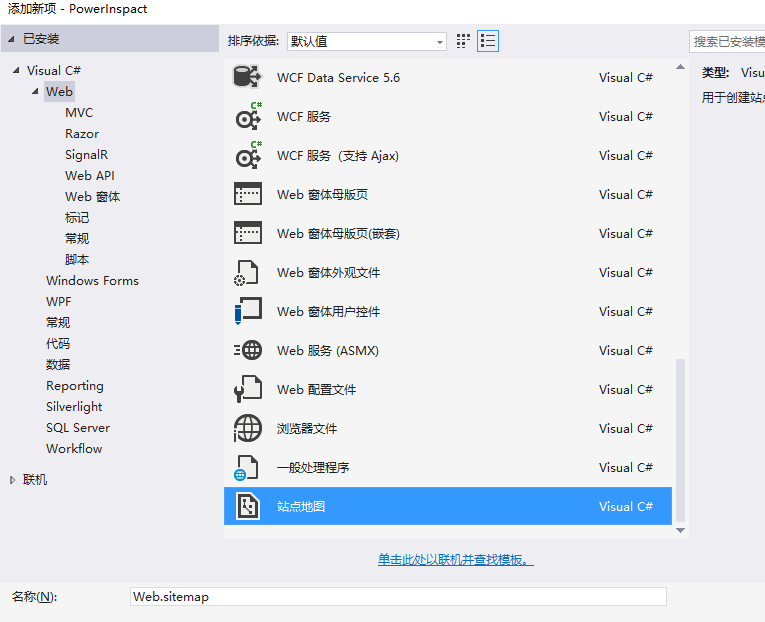
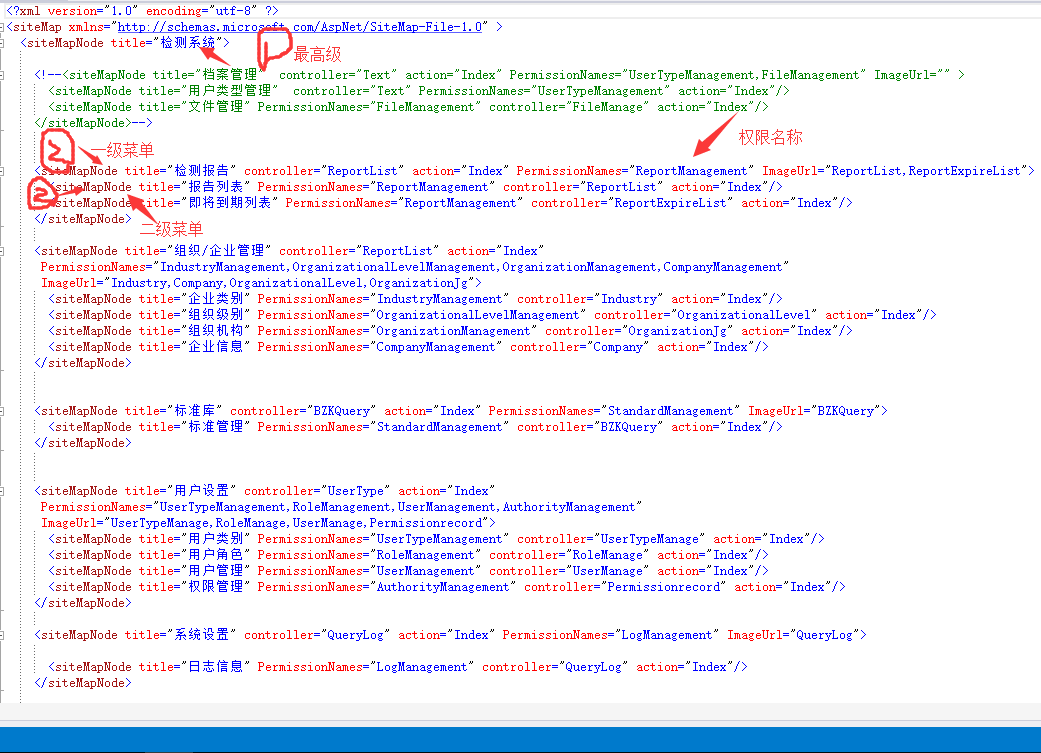
站点地图建好了 其中具体的节点根据自己情况配好就行。
接下来是两个非常重要的类:
using System.Collections.Generic;

using System.Web.Routing;

//code from Telerik MVC Extensions

namespace PowerInspact.Menu

{

    public class SiteMapNode

    {

        /// <summary>

        /// Initializes a new instance of the <see cref="SiteMapNode"/> class.

        /// </summary>

        public SiteMapNode()

        {

            RouteValues = new RouteValueDictionary();

            ChildNodes = new List<SiteMapNode>();

        }

        /// <summary>

        /// Gets or sets the title.

        /// </summary>

        /// <value>The title.</value>

        public string Title { get; set; }

        /// <summary>

        /// Gets or sets the name of the controller.

        /// </summary>

        /// <value>The name of the controller.</value>

        public string ControllerName { get; set; }

        /// <summary>

        /// Gets or sets the name of the action.

        /// </summary>

        /// <value>The name of the action.</value>

        public string ActionName { get; set; }

        /// <summary>

        /// Gets or sets the route values.

        /// </summary>

        /// <value>The route values.</value>

        public RouteValueDictionary RouteValues { get; set; }

        /// <summary>

        /// Gets or sets the URL.

        /// </summary>

        /// <value>The URL.</value>

        public string Url { get; set; }

        /// <summary>

        /// Gets or sets the child nodes.

        /// </summary>

        /// <value>The child nodes.</value>

        public IList<SiteMapNode> ChildNodes { get; set; }

        /// <summary>

        /// Gets or sets the image path

        /// </summary>

        /// <value>The name of the image path.</value>

        public string ImageUrl { get; set; }

        /// <summary>

        /// Gets or sets the item is visible

        /// </summary>

        /// <value>A value indicating whether the item is visible</value>

        public bool Visible { get; set; }

    }

}
//code from Telerik MVC Extensions

using System;

using System.IO;

using System.Linq;

using System.Web.Routing;

using System.Xml;

namespace PowerInspact.Menu

{

    public class XmlSiteMap

    {

        public XmlSiteMap()

        {

            RootNode = new SiteMapNode();

        }

        public SiteMapNode RootNode { get; set; }

        public virtual SiteMapNode LoadFrom(string physicalPath)

        {

            string str = AppDomain.CurrentDomain.SetupInformation.ApplicationBase;

            string content = File.ReadAllText(str + physicalPath);

            if (!string.IsNullOrEmpty(content))

            {

                using (var sr = new StringReader(content))

                {

                    using (var xr = XmlReader.Create(sr,

                            new XmlReaderSettings

                            {

                                CloseInput = true,

                                IgnoreWhitespace = true,

                                IgnoreComments = true,

                                IgnoreProcessingInstructions = true

                            }))

                    {

                        var doc = new XmlDocument();

                        doc.Load(xr);

                        if ((doc.DocumentElement != null) && doc.HasChildNodes)

                        {

                            XmlNode xmlRootNode = doc.DocumentElement.FirstChild;

                            Iterate(RootNode, xmlRootNode);

                        }

                    }

                }

            }

            return RootNode;

        }

        private static void Iterate(SiteMapNode siteMapNode, XmlNode xmlNode)

        {

            PopulateNode(siteMapNode, xmlNode);

            foreach (XmlNode xmlChildNode in xmlNode.ChildNodes)

            {

                if (xmlChildNode.LocalName.Equals("siteMapNode", StringComparison.InvariantCultureIgnoreCase))

                {

                    var siteMapChildNode = new SiteMapNode();

                    siteMapNode.ChildNodes.Add(siteMapChildNode);

                    Iterate(siteMapChildNode, xmlChildNode);

                }

            }

        }

        private static void PopulateNode(SiteMapNode siteMapNode, XmlNode xmlNode)

        {

            try

            {

                  //title

            siteMapNode.Title = GetStringValueFromAttribute(xmlNode, "title");

            //routes, url

            string controllerName = GetStringValueFromAttribute(xmlNode, "controller");

            string actionName = GetStringValueFromAttribute(xmlNode, "action");

            string url = GetStringValueFromAttribute(xmlNode, "url");

            if (!string.IsNullOrEmpty(controllerName) && !string.IsNullOrEmpty(actionName))

            {

                siteMapNode.ControllerName = controllerName;

                siteMapNode.ActionName = actionName;

            }

            else if (!string.IsNullOrEmpty(url))

            {

                siteMapNode.Url = url;

            }

            //image URL

            siteMapNode.ImageUrl = GetStringValueFromAttribute(xmlNode, "ImageUrl");

            //permission name

            var permissionNames = GetStringValueFromAttribute(xmlNode, "PermissionNames");

          string pers=System.Web.HttpContext.Current.Session["persioons"].ToString();

          string[] arr1 = pers.Substring(, pers.Length-).Split(',');  //当前该用户的权限

          if (siteMapNode.Title == "组织/企业管理" || siteMapNode.Title == "检测报告" || siteMapNode.Title == "系统设置" || siteMapNode.Title == "标准库" || siteMapNode.Title == "用户设置")

            {

                string[] arr = permissionNames.Split(',');

                if (IsVisible(arr, arr1))

                {

                    siteMapNode.Visible = true;

                }

                else

                {

                    siteMapNode.Visible = false; ;

                }

            }

            else

            {

                if (IsVisible(arr1, permissionNames))

                {

                    siteMapNode.Visible = true;

                }

                else

                {

                    siteMapNode.Visible = false; ;

                }

            }

            }

            catch (Exception)

            {

            }

        }

        public static bool IsVisible(string[] arr, string[] arr1)

        {

            bool b = false;

            for (int i = ; i < arr.Length; i++)

            {

                for (int j = ; j < arr1.Length; j++)

                {

                    if (arr[i] == arr1[j])

                    {

                        b = true;

                        break;

                    }

                }

            }

            return b;

        }

        public static bool IsVisible(string[] arr, string permissionNames)

        {

            bool b = false;

            for (int i = ; i < arr.Length; i++)

            {

                if (permissionNames == arr[i])

                {

                    b = true;

                    break;

                }

            }

            return b;

        }

        private static string GetStringValueFromAttribute(XmlNode node, string attributeName)

        {

            string value = null;

            if (node.Attributes.Count > )

            {

                XmlAttribute attribute = node.Attributes[attributeName];

                if (attribute != null)

                {

                    value = attribute.Value;

                }

            }

            return value;

        }

    }

}
这两个类完全可以直接拿去用,只是第二个类里面有一些判断要改一下(登陆成功是否显示),其他都不用动。
最后来看看在母版页里如何调用:
<!-- 左边菜单栏 style can be found in sidebar.less -->

                <ul class="sidebar-menu" data-widget="tree">

                    <li class="header">MAIN NAVIGATION</li>

                    @{

                           string strUrl = Request.Url.ToString();

                            //load sitemap   注意命名空间

                            var siteMap = new PowerInspact.Menu.XmlSiteMap();

                            PowerInspact.Menu.SiteMapNode Nodes = siteMap.LoadFrom("sitemap.config");  //注意站点地图路劲

                            string str = "";

                            if (Nodes.ChildNodes.Count > )

                            {

                                for (int i = ; i < Nodes.ChildNodes.Count; i++) //父级

                                {

                                    if (Nodes.ChildNodes[i].Visible)

                                    {

                                        bool IsActive=false;

                                        string[] Persionns = Nodes.ChildNodes[i].ImageUrl.ToString().Split(',');

                                        for (int k = ; k < Persionns.Length; k++)

                                        {

                                            if (strUrl.Contains(Persionns[k]))

                                            {

                                                IsActive = true;

                                            }

                                        }

                                        string ico = "";

                                        if (IsActive)

                                        {

                                            ico = "fa-suitcase";

                                            str += " <li class='active treeview'>";

                                        }

                                        else

                                        {

                                            ico = "fa-cogs";

                                            str += " <li class='treeview'>";

                                        }

                                        if (Nodes.ChildNodes[i].ChildNodes.Count > ) //子级fa fa-cogs   fa-suitcase

                                        {

                                            str += "<a href='#'><i class='fa "+ico+"'></i><span>" + Nodes.ChildNodes[i].Title + "</span><span class='pull-right-container'><i class='fa fa-angle-left pull-right'></i></span></a>";

                                            str += "<ul class='treeview-menu left_menu'>";

                                            for (int j = ; j < Nodes.ChildNodes[i].ChildNodes.Count; j++)

                                            {

                                                if (Nodes.ChildNodes[i].ChildNodes[j].Visible)

                                                {

                                                    if (strUrl.Contains(Nodes.ChildNodes[i].ChildNodes[j].ControllerName))

                                                    {

                                                        str += @"<li class='active'><a href='/" + Nodes.ChildNodes[i].ChildNodes[j].ControllerName + "'><i class='fa fa-circle-o'></i>" + Nodes.ChildNodes[i].ChildNodes[j].Title + "</a></li>";

                                                    }

                                                    else

                                                    {

                                                        str += @"<li><a href='/" + Nodes.ChildNodes[i].ChildNodes[j].ControllerName + "'><i class='fa fa-circle-o'></i>" + Nodes.ChildNodes[i].ChildNodes[j].Title + "</a></li>";

                                                    }

                                                }

                                            }

                                            str += "</ul>";

                                        }

                                        str += "</li>";

                                    }

                                }

                            }

                            ViewData["strhtnl"] = str;

                        }

                        @Html.Raw(ViewData["strhtnl"])</ul>
用sitemap做主页的菜单栏的更多相关文章
- QiyeProject SpringMVC 项目 d15866p148.iok.la 主要做主页应用,消息应用不管了 用户微信号有点像乱码的那个是openID 找同伴:在项目的GitHub页面里找提问过的人,还有fork,star的人
消息型应用支持文本.图片.语音.视频.文件.图文等消息类型. 主页型应用只支持文本消息类型,且文本长度不超过20个字. 填写必要信息 URL /QiyeProject/src/org/oms/qiye ...
- 使用Hexo+Github一步步搭建属于自己的博客(进阶)
主题的配置:这里以NexT主题作为题材 1.安装NexT,在其文件夹中鼠标右键,点击Git Base Here.输入命令:git clone https://github.com/iissnan/he ...
- vuejs、eggjs全栈式开发设备管理系统
vuejs.eggjs全栈式开发简单设备管理系统 业余时间用eggjs.vuejs开发了一个设备管理系统,通过mqtt协议上传设备数据至web端实时展现,包含设备参数分析.发送设备报警等模块.收获还是 ...
- iOS的非常全的三方库,插件,大牛博客
转自: http://www.cnblogs.com/zyjzyj/p/6015625.html github排名:https://github.com/trending, github搜索:http ...
- 使用Hexo+Github搭建属于自己的博客(进阶)
主题的配置:这里以NexT主题作为题材 1.安装NexT,在其文件夹中鼠标右键,点击Git Base Here.输入命令:git clone https://github.com/iissnan/he ...
- iOS 强大第三方资源库
Github用法 git-recipesGit recipes in Chinese. 高质量的Git中文教程. lark怎样在Github上面贡献代码 my-git有关 git 的学习资料 giti ...
- vuejs、eggjs、mqtt
vuejs.eggjs.mqtt全栈式开发设备管理系统 vuejs.eggjs.mqtt全栈式开发简单设备管理系统 业余时间用eggjs.vuejs开发了一个设备管理系统,通过mqtt协议上传设备数据 ...
- vuejs、eggjs、mqtt全栈式开发设备管理系统
vuejs.eggjs.mqtt全栈式开发简单设备管理系统 业余时间用eggjs.vuejs开发了一个设备管理系统,通过mqtt协议上传设备数据至web端实时展现,包含设备参数分析.发送设备报警等模块 ...
- Jquery Easy UI初步学习(一)
Easy UI 1.3.2 以前听说Easy UI很不错,当了一个dome,闲着没事就看了一下,也整理一下为了自己更好的记忆,也希望对象我这样小菜有帮助吧 先从后台管理的主页面开始,如要要做主页需要了 ...
随机推荐
- SSH框架的搭建和测试(Spring + Struts2 + Hibernate)
SSH框架实现了视图.控制器.和模型的彻底分离,同时还实现了业务逻辑层与持久层的分离. Spring实现了MVC中的 Controller的功能,Struts实现Web视图的功能,Hibernate则 ...
- C JAVA你可能不知道的那些编程细节
关于printf的格式化字符 %* *与其它占位符结合使用, *将首先被一个 int 变量值代替后再被格式化. 如 printf("%.*s.", 2, "Hello&q ...
- Nginx不支持Post数据中带有"."
如果提交的数据中带有.,nginx会把数据过滤掉,会导致后台收不到数据.下面是一个错误示例及解决办法
- telnet客户端程序
#include <stdio.h> #include <stdlib.h> #include <unistd.h> #include <sys/types. ...
- [C++]竞赛模板·数据统计与IO(重定向版与非重定向版)
/* 数据统计与IO 重定向版模板 描述:本机测试用文件数据流重定向,一旦提交到比赛就自动“删除”重定向语句 */ # define LOCAL #include<stdio.h> # ...
- Swiper.js使用教程
官网地址:(http://www.swiper.com.cn/). 一.Swiper.js简介: Swiper(前称Swiper master) 是一款免费以及轻量级的移动设备触控滑块的js框架,使用 ...
- Python 16 html 基础 jQuery & Javascript研究
基础内容 DOM操作 javascript探讨 JQuery初识 DOM innerText ==>获取仅文本 innerHtml ==>获取全部内容 <div id=" ...
- 列式数据库~clickhouse日常管理
clickhouse日常管理一 变量相关 1 查看变量 system.setting相关表 2 设置变量 set variables= 请注意这里是session级别,如果想永久生 ...
- es集群数据库~原理细节
ES原理一 基本定义 index(索引) 相当于mysql中的数据库 type(类型) 相当于mysql中的一张表 document(文档) 相当于mysql中的一行(一条记录) fie ...
- RabbitMQ简单应用の公平分发(fair dipatch)
公平分发(fair dipatch)和轮询分发其实基本一致,只是每次分发的机制变了,由原来的平均分配到现在每次只处理一条消息 1.MQ连接工厂类Connection package com.mmr.r ...