
firefox浏览器 插件--【维基百科+谷歌翻译】高级应用之 带图翻译
【维基词典+谷歌翻译】插件地址:
https://addons.mozilla.org/zh-CN/firefox/addon/google-dictionary-and-google-t/?src=search
【维基词典+谷歌翻译】插件官方设置图片教程 : http://www.toptip.ca/2013/11/adding-images-to-wiktionary-and-google.html
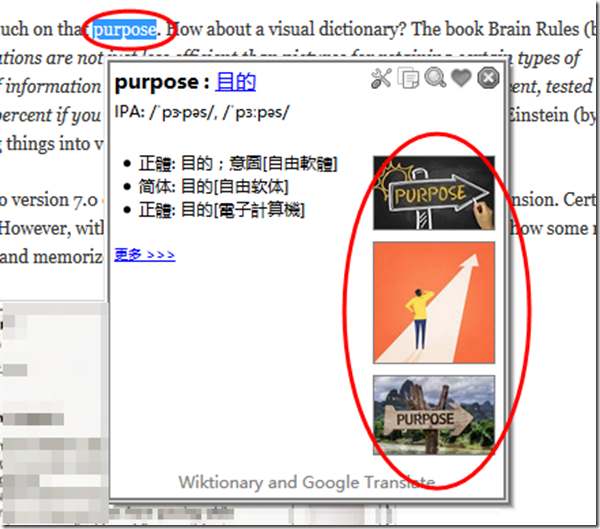
图片可以增加记忆效果,可以通过谷歌搜索引擎查找特定的图片(最近100天内排名靠前的关键字图片)。
最终效果如图:
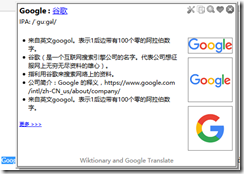
设置的步骤:
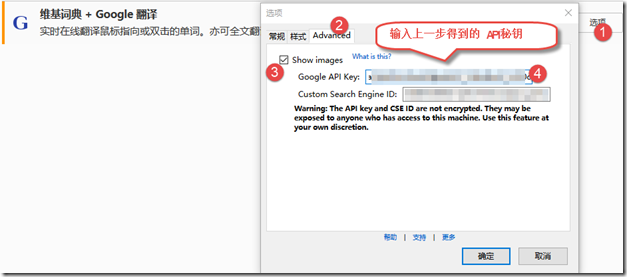
To enable this feature in Wiktionary and Google Translate, open the Options dialogue and select the Advanced tab. Enable the Show Images checkbox and fill in the Google API key and Custom Search Engine ID boxes. You need to get your own Google API key and Google Custom Search Engine ID (see below for the steps of getting them.)
How to get a Google API key
- Go to https://code.google.com/apis/console/
- Click the "Create project ..." button. You will be brought to the page of All Services.
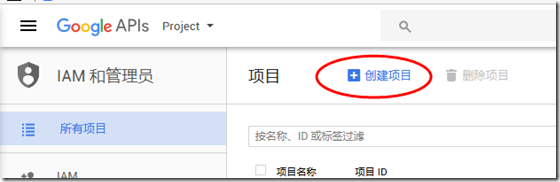

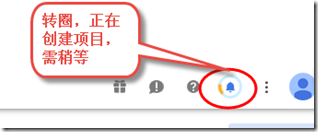
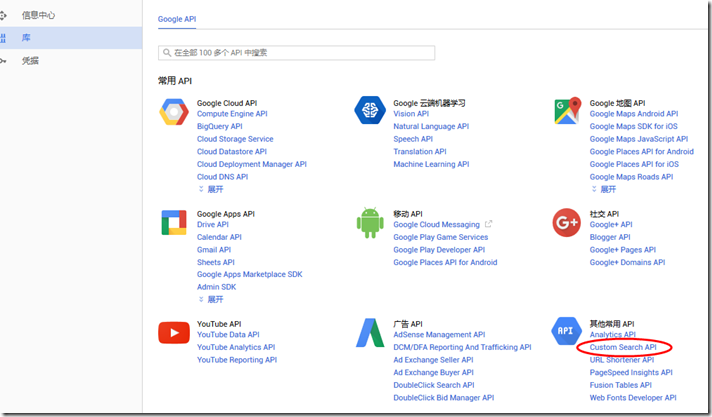
- Find Custome Search API from the list and turn it by clicking the ON/OFF button.
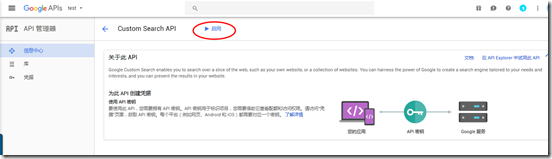
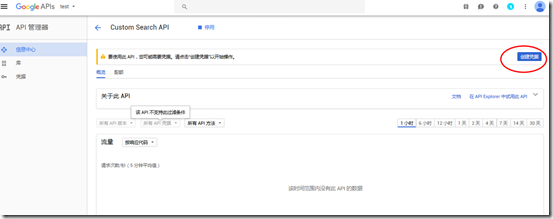
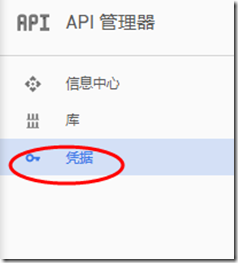
- Select API Access from the menu on the left side.
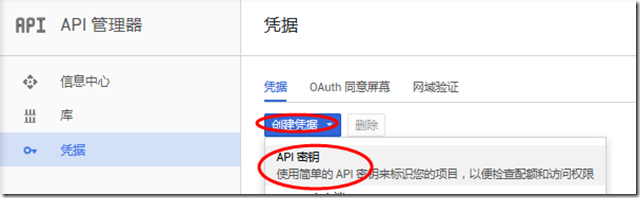
- Click the "Create new Browser key ..." button. An API key will be generated and shown.

How to get a Custom Search Engine ID
There is a trick to generate a CSE ID for searching the whole Web. Please keep on reading.
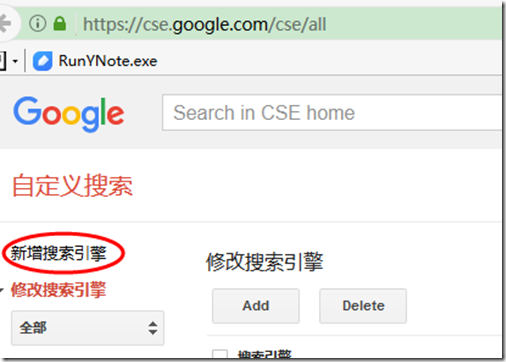
- Go to https://www.google.com/cse/ 自定义搜索引擎
- Click the Create a custom search engine button.
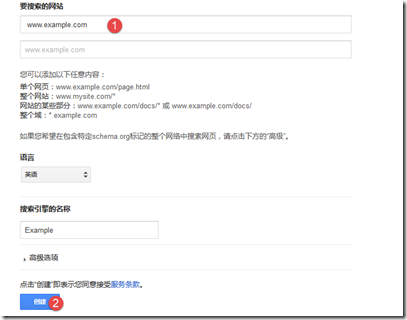
- Enter www.example.com in the Site to search box. Click the CREATE button.
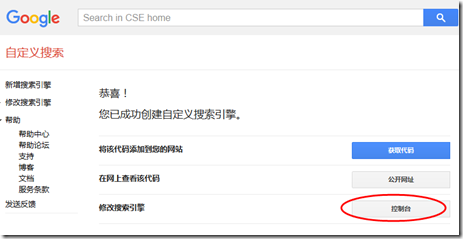
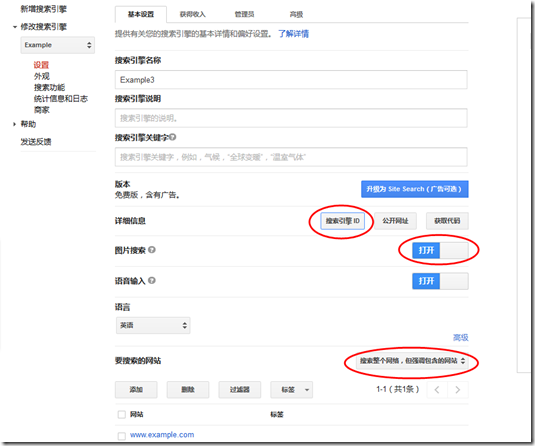
- Find the item of Modify your search engine and click the Control Panel button.
- On the Basics tab, scroll to the bottom. Find the Sites to search section and choose Search the entire web but emphasize included sites.
- Click on the checkbox of the site www.example.com (which we entered earlier) and press the Delete button to remove it.
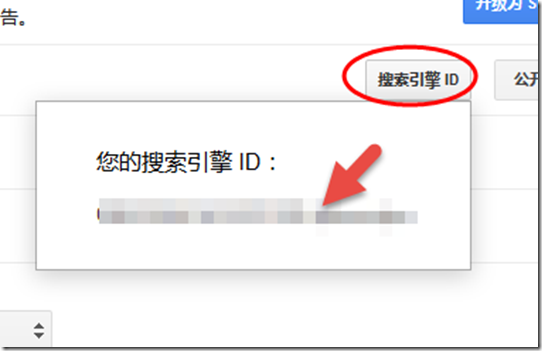
- On the same page, above the Sites to search section, find the Details section and press the Search Engine ID button to get your CSE ID.
- (As reminded by the first 3 comments below,) turn on the option of Image Search, which is near the middle of the Basics tab.

再展示一个带图翻译的实例:
firefox浏览器 插件--【维基百科+谷歌翻译】高级应用之 带图翻译的更多相关文章
- FireFox 浏览器插件/扩展开发学习
2014-11-08 内容存档在evernote,笔记名"FireFox 浏览器插件/扩展开发学习"
- 常用的Firefox浏览器插件、Chrome浏览器插件收藏
[血的教训] 不要去下载“Firefox中国版(谋智网络)”,默认情况下会给你安装好多的莫名其妙的插件,推荐去Firefox官方下载原版. Firefox 原版官方网址: https://www.mo ...
- FlashInspector 【Firefox浏览器插件,flash分析工具】
Inspect flash(swf)'s DisplayObject with mouse. Overview the swf's DisplayObject list. Set the inspec ...
- firefox浏览器插件---网址优化
安装:YSlow插件 之后还必须安装firebug.否则YSlow不能使用. 安装:firebug 下面就可以了
- firefox浏览器和IE
http://blog.csdn.net/pipisorry/article/details/40899701 firefox浏览器插件 [下载地址add-ons for firefox]皮皮blog ...
- 2018-08-29 浏览器插件实现GitHub代码翻译原型演示
此原型源自此想法: 中文化源码. 考虑到IDE插件工作量较大, 且与IDE绑定. 在代码转换工具的各种实现中, 综合考虑实用+易用+长远改进潜力, 浏览器插件似乎较有优势. 于是用最快捷的方式实现这一 ...
- vue 在浏览器控制台怎么调试 谷歌插件vue Devtools
vue 在浏览器控制台怎么调试 谷歌插件vue Devtools 问题: vuejs里面的变量,怎么用浏览器的console查看? 例如,想在chrome里用console.log查看变量$data, ...
- FireFox浏览器-xpath快速定位插件:Xpath Checker
FireFox浏览器-xpath快速定位插件:Xpath Checker 插件截图:
- webdriver高级应用- 启动带有用户配置信息的firefox浏览器窗口
由于WebDriver启动FireFox浏览器时会启用全新的FireFox浏览器窗口,导致当前机器的FireFox浏览器已经配置的信息在测试中均无法生效,例如已经安装的浏览器插件.个人收藏夹等.为了解 ...
随机推荐
- python包导入细节
包导入格式 导入模块时除了使用模块名进行导入,还可以使用目录名进行导入.例如,在sys.path路径下,有一个dir1/dir2/mod.py模块,那么在任意位置处都可以使用下面这种方式导入这个模块. ...
- 结构型---代理模式(Proxy Pattern)
代理模式的详细介绍 代理模式按照使用目的可以分为以下几种: 远程(Remote)代理:为一个位于不同的地址空间的对象提供一个局域代表对象.这个不同的地址空间可以是本电脑中,也可以在另一台电脑中.最典型 ...
- C# 动态代码生成控件后其他事件不能获取该控件的值
1.新建web项目,添加两个Button控件,结果如图. 2.Button按钮控件点击事件代码如下 protectedvoid Button1_Click(object sender, EventAr ...
- 通过批处理进行Windows服务的安装/卸载&启动/停止
安装服务 @echo off set checked=2 set PATHS=%~sdp0 echo 按任意键执行安装……? pause>nul if %checked% EQU 2 ( %PA ...
- vsCode 列选择、列选中、选中列、选中多列(转载)
VSCode列选择快捷键 来源 https://blog.csdn.net/Luyanc/article/details/80502069 VSCode列选择快捷键:Alt+Shift+左键 来一张效 ...
- SQL 語法
查詢 Sql = ("SELECT A1, A2, A5, A4 FROM Table1 ") 筆數 Sql = ("Select COUNT(*) From TW01. ...
- 【Spring】28、Spring中基于Java的配置@Configuration和@Bean用法.代替xml配置文件
Spring中为了减少xml中配置,可以生命一个配置类(例如SpringConfig)来对bean进行配置. 一.首先,需要xml中进行少量的配置来启动Java配置: <?xml version ...
- Docker 系列七(Dubbo 微服务部署实践).
一.前言 之前我们公司部署服务,就是大家都懂的那一套(安装JDK.Tomcat —> 编译好文件或者打war包上传 —> 启动Tomcat),这种部署方式一直持续了很久,带来的问题也很多: ...
- HTML 请求头,响应头和 HTTP状态码
请求头 选项 说明 Accept: text/html,application/xhtml+xml,application/xml;q=0.9,/;q=0.8 告诉服务器,当前客户端可以接收的文档类型 ...
- BZOJ 2463: [中山市选2009]谁能赢呢?(智商)
Time Limit: 10 Sec Memory Limit: 128 MBSubmit: 3110 Solved: 2250[Submit][Status][Discuss] Descript ...