
firefox浏览器 插件--【维基百科+谷歌翻译】高级应用之 带图翻译
【维基词典+谷歌翻译】插件地址:
https://addons.mozilla.org/zh-CN/firefox/addon/google-dictionary-and-google-t/?src=search
【维基词典+谷歌翻译】插件官方设置图片教程 : http://www.toptip.ca/2013/11/adding-images-to-wiktionary-and-google.html
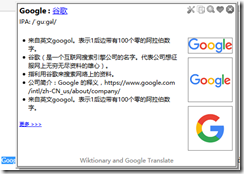
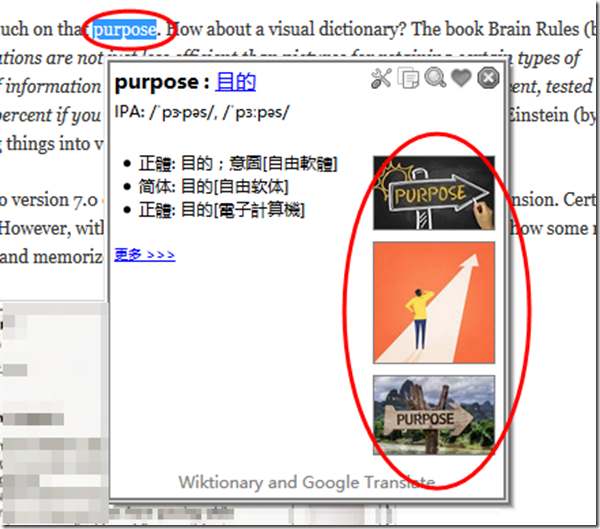
图片可以增加记忆效果,可以通过谷歌搜索引擎查找特定的图片(最近100天内排名靠前的关键字图片)。
最终效果如图:
设置的步骤:
To enable this feature in Wiktionary and Google Translate, open the Options dialogue and select the Advanced tab. Enable the Show Images checkbox and fill in the Google API key and Custom Search Engine ID boxes. You need to get your own Google API key and Google Custom Search Engine ID (see below for the steps of getting them.)
How to get a Google API key
- Go to https://code.google.com/apis/console/
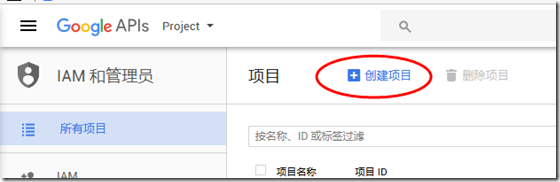
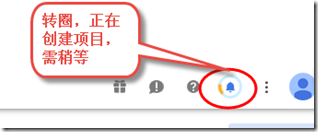
- Click the "Create project ..." button. You will be brought to the page of All Services.

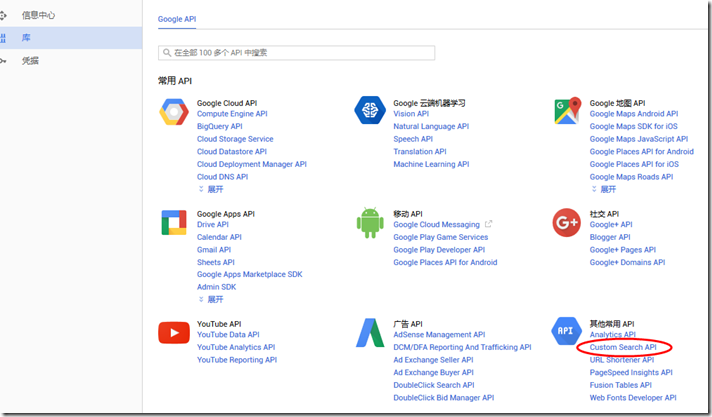
- Find Custome Search API from the list and turn it by clicking the ON/OFF button.
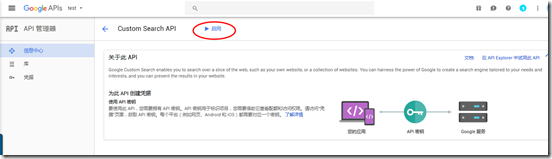
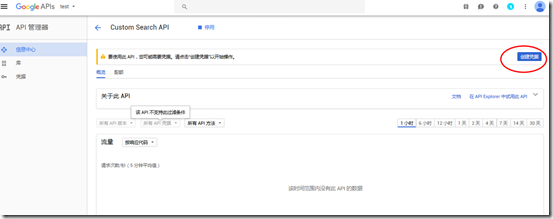
- Select API Access from the menu on the left side.
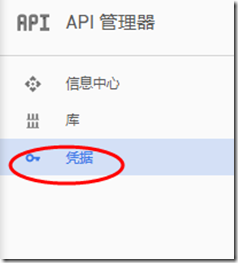
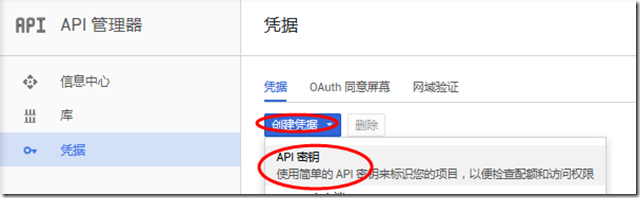
- Click the "Create new Browser key ..." button. An API key will be generated and shown.

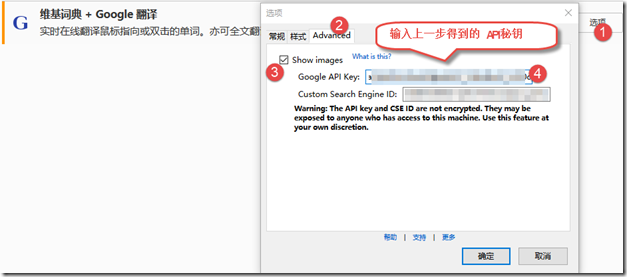
How to get a Custom Search Engine ID
There is a trick to generate a CSE ID for searching the whole Web. Please keep on reading.
- Go to https://www.google.com/cse/ 自定义搜索引擎
- Click the Create a custom search engine button.
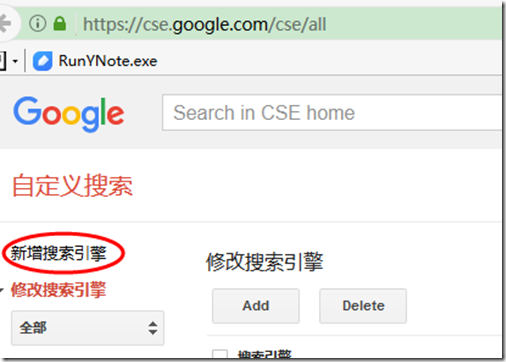
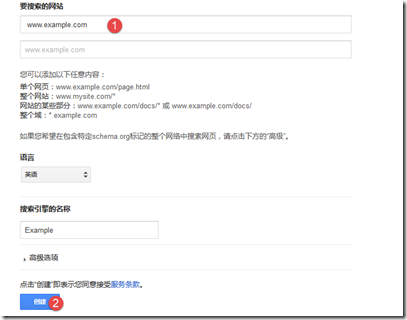
- Enter www.example.com in the Site to search box. Click the CREATE button.
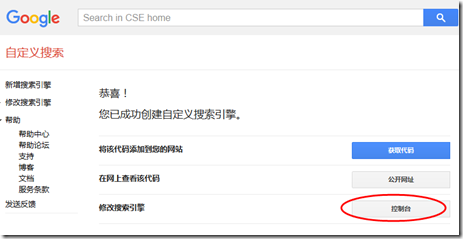
- Find the item of Modify your search engine and click the Control Panel button.
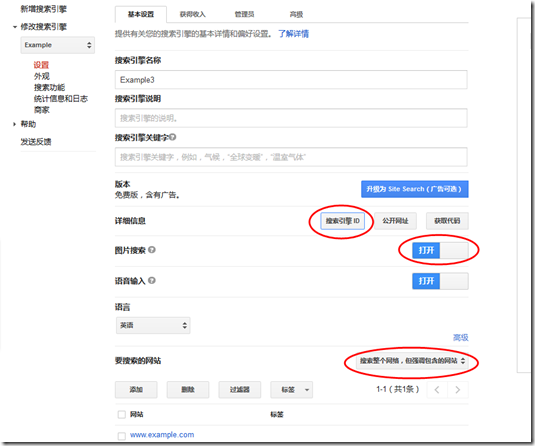
- On the Basics tab, scroll to the bottom. Find the Sites to search section and choose Search the entire web but emphasize included sites.
- Click on the checkbox of the site www.example.com (which we entered earlier) and press the Delete button to remove it.
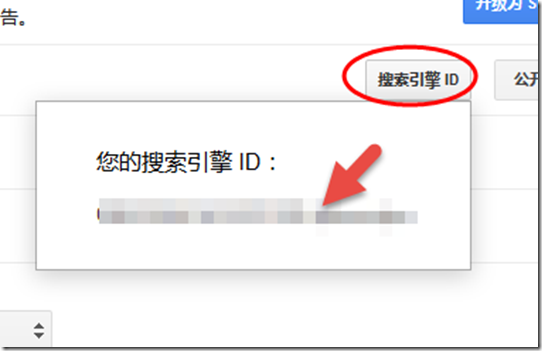
- On the same page, above the Sites to search section, find the Details section and press the Search Engine ID button to get your CSE ID.
- (As reminded by the first 3 comments below,) turn on the option of Image Search, which is near the middle of the Basics tab.

再展示一个带图翻译的实例:
firefox浏览器 插件--【维基百科+谷歌翻译】高级应用之 带图翻译的更多相关文章
- FireFox 浏览器插件/扩展开发学习
2014-11-08 内容存档在evernote,笔记名"FireFox 浏览器插件/扩展开发学习"
- 常用的Firefox浏览器插件、Chrome浏览器插件收藏
[血的教训] 不要去下载“Firefox中国版(谋智网络)”,默认情况下会给你安装好多的莫名其妙的插件,推荐去Firefox官方下载原版. Firefox 原版官方网址: https://www.mo ...
- FlashInspector 【Firefox浏览器插件,flash分析工具】
Inspect flash(swf)'s DisplayObject with mouse. Overview the swf's DisplayObject list. Set the inspec ...
- firefox浏览器插件---网址优化
安装:YSlow插件 之后还必须安装firebug.否则YSlow不能使用. 安装:firebug 下面就可以了
- firefox浏览器和IE
http://blog.csdn.net/pipisorry/article/details/40899701 firefox浏览器插件 [下载地址add-ons for firefox]皮皮blog ...
- 2018-08-29 浏览器插件实现GitHub代码翻译原型演示
此原型源自此想法: 中文化源码. 考虑到IDE插件工作量较大, 且与IDE绑定. 在代码转换工具的各种实现中, 综合考虑实用+易用+长远改进潜力, 浏览器插件似乎较有优势. 于是用最快捷的方式实现这一 ...
- vue 在浏览器控制台怎么调试 谷歌插件vue Devtools
vue 在浏览器控制台怎么调试 谷歌插件vue Devtools 问题: vuejs里面的变量,怎么用浏览器的console查看? 例如,想在chrome里用console.log查看变量$data, ...
- FireFox浏览器-xpath快速定位插件:Xpath Checker
FireFox浏览器-xpath快速定位插件:Xpath Checker 插件截图:
- webdriver高级应用- 启动带有用户配置信息的firefox浏览器窗口
由于WebDriver启动FireFox浏览器时会启用全新的FireFox浏览器窗口,导致当前机器的FireFox浏览器已经配置的信息在测试中均无法生效,例如已经安装的浏览器插件.个人收藏夹等.为了解 ...
随机推荐
- MyBatis源码解析(五)——DataSource数据源模块之非池型数据源
原创作品,可以转载,但是请标注出处地址:http://www.cnblogs.com/V1haoge/p/6675633.html 1 回顾 上一篇中我解说了数据源接口DataSource与数据源工厂 ...
- Shuffle过程
Shuffle过程 在MapReduce框架中,shuffle是连接Map和Reduce之间的桥梁,Map的输出要用到Reduce中必须经过shuffle这个环节,shuffle的性能高低直接影响了整 ...
- anoconda包管理汇总
anoconda默认的seaborn版本是0.8.1 seaborn的最新版本是0.9.0 并且已经没有0.8.1的文档了. 升级anoconda的seaborn版本 进入anoconda prom ...
- 如何扩展VS2017未安装的功能
扩展VS2017未安装的功能 我们在使用VS2017时,由于VS2017该ide功能过于强大,使用范围涵盖多个领域,我们在安装VS2017时很多时候只需要安装自己需要的某部分的功能即可,这个步骤在软件 ...
- [转]VirtualBox安装CentOS7
本文转自:http://www.cnblogs.com/xyinjie/p/9437049.html 一:.下载CentOS7的镜像 下载地址:https://www.centos.org/downl ...
- Laravel5性能优化技巧
分享一些 Laravel 开发的最佳实践,还有调优技巧,后面陆续整理中 1.配置缓存信息 使用laravel自带的artisan命令,将所有config里面的配置都缓存到一个文件里. php arti ...
- JavaWeb学习日记----XML的解析
XML的解析简介: 在学习JavaScript时,我们用的DOM来解析HEML文档,根据HTML的层级结构在内存中分配一个树形结构,把HTML的标签啊,属性啊和文本之类的都封装成对象. 比如:docu ...
- Windows驱动匹配详解
在Windows下,几乎所有的硬件设备都需要安装驱动后才能正常工作,我们重装系统后第一件事就是要为各设备安装好驱动,我们可以下载官方驱动手动安装,也可以让我Windows自动扫描安装,还可以使用驱动精 ...
- Codeforces Round #304 (Div. 2) -----CF546
A. Soldier and Bananas A soldier wants to buy w bananas in the shop. He has to pay k dollars for t ...
- vbscript 语言通过序列和ADODB实现取号不重复
目的:通过VBScript脚本利用序列的性质,实现取号不重复 首先,表空间中创建表名为TABLE_YEWID的表格,主要有以下几个字段 -- Create table create table TAB ...