
TensorRT 开始
TensorRT 是 NVIDIA 自家的高性能推理库,其 Getting Started 列出了各资料入口,如下:
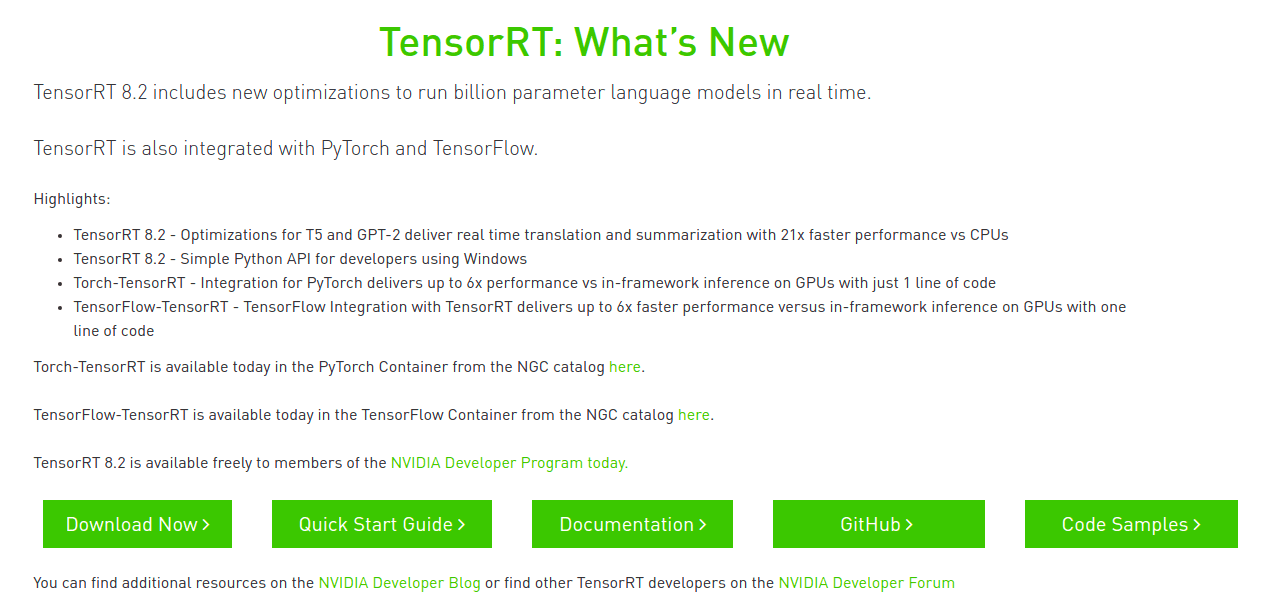
本文基于当前的 TensorRT 8.2 版本,将一步步介绍从安装,直到加速推理自己的 ONNX 模型。
安装
进 TensorRT 下载页 选择版本下载,需注册登录。
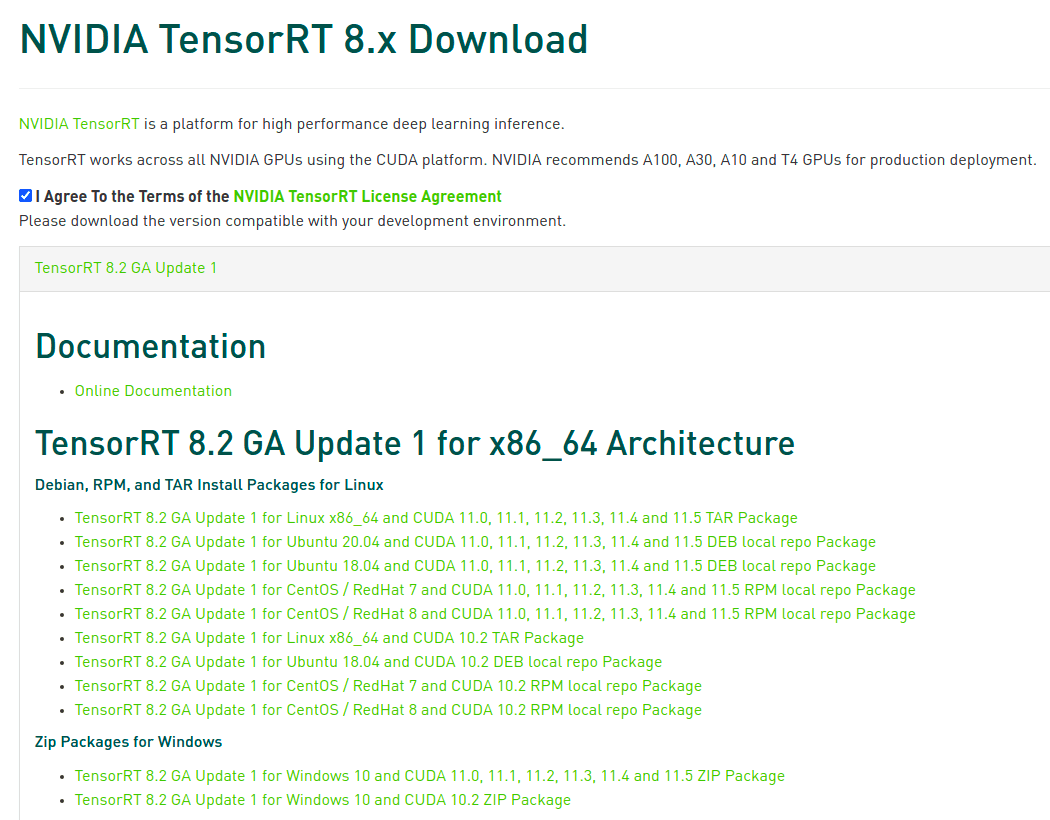
本文选择了 TensorRT-8.2.2.1.Linux.x86_64-gnu.cuda-11.4.cudnn8.2.tar.gz,可以注意到与 CUDA cuDNN 要匹配好版本。也可以准备 NVIDIA Docker 拉取对应版本的 nvidia/cuda 镜像,再 ADD TensorRT 即可。
# 解压进 $HOME (以免 sudo 编译样例,为当前用户)

tar -xzvf TensorRT-*.tar.gz -C $HOME/

# 软链到 /usr/local/TensorRT (以固定一个路径)

sudo ln -s $HOME/TensorRT-8.2.2.1 /usr/local/TensorRT
之后,编译运行样例,保证 TensorRT 安装正确。
编译样例
样例在 TensorRT/samples,说明见 Sample Support Guide 或各样例目录里的 README.md。
cd /usr/local/TensorRT/samples/

# 设定环境变量,可见 Makefile.config

export CUDA_INSTALL_DIR=/usr/local/cuda

export CUDNN_INSTALL_DIR=/usr/local/cuda

export ENABLE_DLA=

export TRT_LIB_DIR=../lib

export PROTOBUF_INSTALL_DIR=

# 编译

make -j`nproc`

# 运行

export LD_LIBRARY_PATH=/usr/local/TensorRT/lib:$LD_LIBRARY_PATH

cd /usr/local/TensorRT/

./bin/trtexec -h

./bin/sample_mnist -d data/mnist/ --fp16
运行结果参考:
$ ./bin/sample_mnist -d data/mnist/ --fp16

&&&& RUNNING TensorRT.sample_mnist [TensorRT v8202] # ./bin/sample_mnist -d data/mnist/ --fp16

[12/23/2021-20:20:16] [I] Building and running a GPU inference engine for MNIST

[12/23/2021-20:20:16] [I] [TRT] [MemUsageChange] Init CUDA: CPU +322, GPU +0, now: CPU 333, GPU 600 (MiB)

[12/23/2021-20:20:16] [I] [TRT] [MemUsageSnapshot] Begin constructing builder kernel library: CPU 333 MiB, GPU 600 MiB

[12/23/2021-20:20:16] [I] [TRT] [MemUsageSnapshot] End constructing builder kernel library: CPU 468 MiB, GPU 634 MiB

[12/23/2021-20:20:17] [I] [TRT] [MemUsageChange] Init cuBLAS/cuBLASLt: CPU +518, GPU +224, now: CPU 988, GPU 858 (MiB)

[12/23/2021-20:20:17] [I] [TRT] [MemUsageChange] Init cuDNN: CPU +114, GPU +52, now: CPU 1102, GPU 910 (MiB)

[12/23/2021-20:20:17] [I] [TRT] Local timing cache in use. Profiling results in this builder pass will not be stored.

[12/23/2021-20:20:33] [I] [TRT] Some tactics do not have sufficient workspace memory to run. Increasing workspace size may increase performance, please check verbose output.

[12/23/2021-20:20:34] [I] [TRT] Detected 1 inputs and 1 output network tensors.

[12/23/2021-20:20:34] [I] [TRT] Total Host Persistent Memory: 8448

[12/23/2021-20:20:34] [I] [TRT] Total Device Persistent Memory: 1626624

[12/23/2021-20:20:34] [I] [TRT] Total Scratch Memory: 0

[12/23/2021-20:20:34] [I] [TRT] [MemUsageStats] Peak memory usage of TRT CPU/GPU memory allocators: CPU 2 MiB, GPU 13 MiB

[12/23/2021-20:20:34] [I] [TRT] [BlockAssignment] Algorithm ShiftNTopDown took 0.01595ms to assign 3 blocks to 8 nodes requiring 57857 bytes.

[12/23/2021-20:20:34] [I] [TRT] Total Activation Memory: 57857

[12/23/2021-20:20:34] [I] [TRT] [MemUsageChange] Init cuBLAS/cuBLASLt: CPU +0, GPU +8, now: CPU 1621, GPU 1116 (MiB)

[12/23/2021-20:20:34] [I] [TRT] [MemUsageChange] Init cuDNN: CPU +0, GPU +8, now: CPU 1621, GPU 1124 (MiB)

[12/23/2021-20:20:34] [I] [TRT] [MemUsageChange] TensorRT-managed allocation in building engine: CPU +0, GPU +4, now: CPU 0, GPU 4 (MiB)

[12/23/2021-20:20:34] [I] [TRT] [MemUsageChange] Init CUDA: CPU +0, GPU +0, now: CPU 1622, GPU 1086 (MiB)

[12/23/2021-20:20:34] [I] [TRT] Loaded engine size: 1 MiB

[12/23/2021-20:20:34] [I] [TRT] [MemUsageChange] Init cuBLAS/cuBLASLt: CPU +0, GPU +8, now: CPU 1622, GPU 1096 (MiB)

[12/23/2021-20:20:34] [I] [TRT] [MemUsageChange] Init cuDNN: CPU +1, GPU +8, now: CPU 1623, GPU 1104 (MiB)

[12/23/2021-20:20:34] [I] [TRT] [MemUsageChange] TensorRT-managed allocation in engine deserialization: CPU +0, GPU +1, now: CPU 0, GPU 1 (MiB)

[12/23/2021-20:20:34] [I] [TRT] [MemUsageChange] Init cuBLAS/cuBLASLt: CPU +0, GPU +8, now: CPU 1485, GPU 1080 (MiB)

[12/23/2021-20:20:34] [I] [TRT] [MemUsageChange] Init cuDNN: CPU +0, GPU +8, now: CPU 1485, GPU 1088 (MiB)

[12/23/2021-20:20:34] [I] [TRT] [MemUsageChange] TensorRT-managed allocation in IExecutionContext creation: CPU +0, GPU +2, now: CPU 0, GPU 3 (MiB)

[12/23/2021-20:20:34] [I] Input:

@@@@@@@@@@@@@@@@@@@@@@@@@@@@

@@@@@@@@@@@@@@@@@@@@@@@@@@@@

@@@@@@@@@@@@@@@@@@@@@@@@@@@@

@@@@@@@@@@@@@@@@@@@@@@@@@@@@

@@@@@@@@@@@@@@@@@@@@@@@@@@@@

@@@@@@@@@@@@@@@@@@@@@@@@@@@@

@@@@@@@@@%+-:  =@@@@@@@@@@@@

@@@@@@@%=      -@@@**@@@@@@@

@@@@@@@   :%#@-#@@@. #@@@@@@

@@@@@@*  +@@@@:*@@@  *@@@@@@

@@@@@@#  +@@@@ @@@%  @@@@@@@

@@@@@@@.  :%@@.@@@. *@@@@@@@

@@@@@@@@-   =@@@@. -@@@@@@@@

@@@@@@@@@%:   +@- :@@@@@@@@@

@@@@@@@@@@@%.  : -@@@@@@@@@@

@@@@@@@@@@@@@+   #@@@@@@@@@@

@@@@@@@@@@@@@@+  :@@@@@@@@@@

@@@@@@@@@@@@@@+   *@@@@@@@@@

@@@@@@@@@@@@@@: =  @@@@@@@@@

@@@@@@@@@@@@@@ :@  @@@@@@@@@

@@@@@@@@@@@@@@ -@  @@@@@@@@@

@@@@@@@@@@@@@# +@  @@@@@@@@@

@@@@@@@@@@@@@* ++  @@@@@@@@@

@@@@@@@@@@@@@*    *@@@@@@@@@

@@@@@@@@@@@@@#   =@@@@@@@@@@

@@@@@@@@@@@@@@. +@@@@@@@@@@@

@@@@@@@@@@@@@@@@@@@@@@@@@@@@

@@@@@@@@@@@@@@@@@@@@@@@@@@@@

[12/23/2021-20:20:34] [I] Output:

0:

1:

2:

3:

4:

5:

6:

7:

8: **********

9:

&&&& PASSED TensorRT.sample_mnist [TensorRT v8202] # ./bin/sample_mnist -d data/mnist/ --fp16
快速开始
Quick Start Guide / Using The TensorRT Runtime API
准备教程代码,编译:
git clone --depth 1 https://github.com/NVIDIA/TensorRT.git

export CUDA_INSTALL_DIR=/usr/local/cuda

export CUDNN_INSTALL_DIR=/usr/local/cuda

export TRT_LIB_DIR=/usr/local/TensorRT/lib

# 编译 quickstart

cd TensorRT/quickstart

# Makefile.config

#  INCPATHS += -I"/usr/local/TensorRT/include"

# common/logging.h

#  void log(Severity severity, const char* msg) noexcept override

make

# 运行环境

export PATH=/usr/local/TensorRT/bin:$PATH

export LD_LIBRARY_PATH=/usr/local/TensorRT/lib:$LD_LIBRARY_PATH

cd SemanticSegmentation
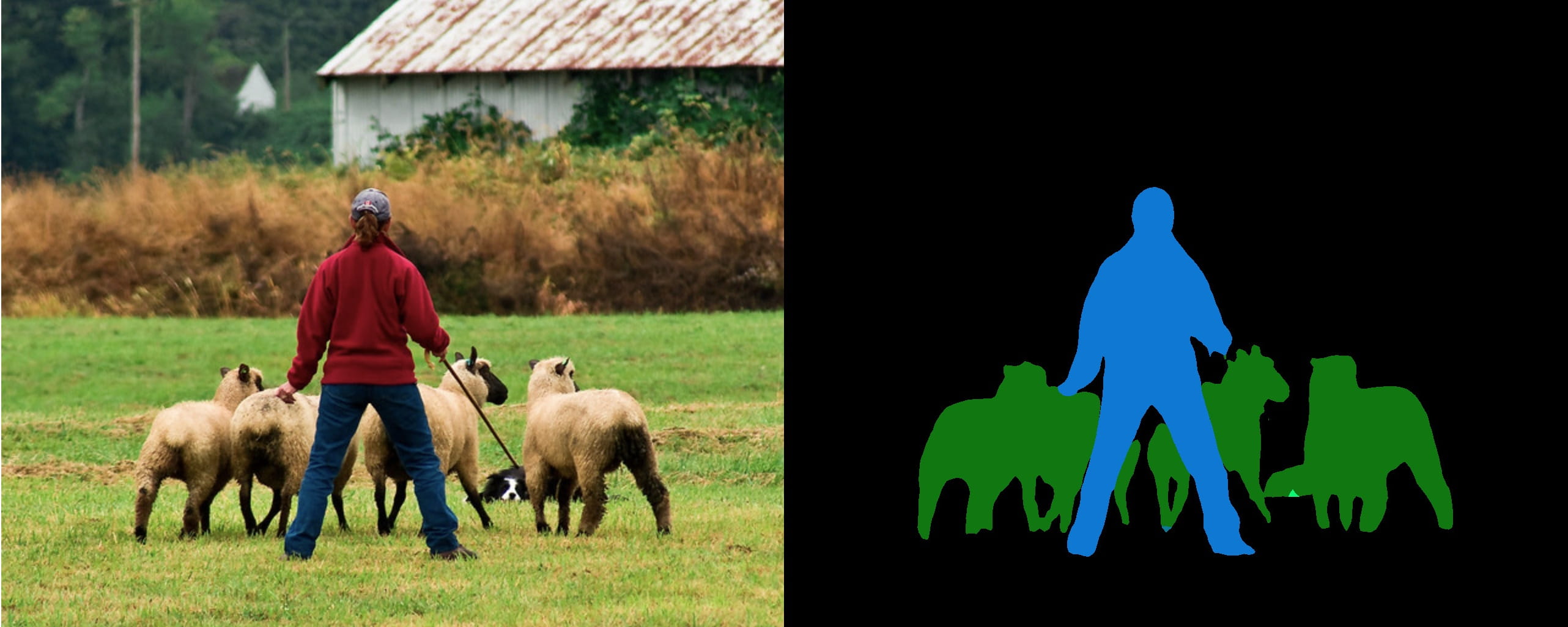
获取预训练 FCN-ResNet-101 模型,转成 ONNX:
# 创建本地环境

#  conda create -n torch python=3.9 -y

#  conda activate torch

#  conda install pytorch torchvision torchaudio cudatoolkit=11.3 -c pytorch -y

# 不然,容器环境

#  docker run --rm -it --gpus all -p 8888:8888 -v `pwd`:/workspace/SemanticSegmentation -w /workspace nvcr.io/nvidia/pytorch:20.12-py3 bash

$ python export.py

Exporting ppm image input.ppm

Downloading: "https://github.com/pytorch/vision/archive/v0.6.0.zip" to /home/john/.cache/torch/hub/v0.6.0.zip

Downloading: "https://download.pytorch.org/models/resnet101-5d3b4d8f.pth" to /home/john/.cache/torch/hub/checkpoints/resnet101-5d3b4d8f.pth

100%|████████████████████████████████████████| 170M/170M [00:27<00:00, 6.57MB/s]

Downloading: "https://download.pytorch.org/models/fcn_resnet101_coco-7ecb50ca.pth" to /home/john/.cache/torch/hub/checkpoints/fcn_resnet101_coco-7ecb50ca.pth

100%|████████████████████████████████████████| 208M/208M [02:26<00:00, 1.49MB/s]

Exporting ONNX model fcn-resnet101.onnx
再用 trtexec 将 ONNX 转成 TensorRT engine:
$ trtexec --onnx=fcn-resnet101.onnx --fp16 --workspace=64 --minShapes=input:1x3x256x256 --optShapes=input:1x3x1026x1282 --maxShapes=input:1x3x1440x2560 --buildOnly --saveEngine=fcn-resnet101.engine

...

[01/07/2022-20:20:00] [I] Engine built in 406.011 sec.

&&&& PASSED TensorRT.trtexec [TensorRT v8202] ...
随机输入,测试 engine:
$ trtexec --shapes=input:1x3x1026x1282 --loadEngine=fcn-resnet101.engine

...

[01/07/2022-20:20:00] [I] === Performance summary ===

[01/07/2022-20:20:00] [I] Throughput: 12.4749 qps

[01/07/2022-20:20:00] [I] Latency: min = 76.9746 ms, max = 98.8354 ms, mean = 79.5844 ms, median = 78.0542 ms, percentile(99%) = 98.8354 ms

[01/07/2022-20:20:00] [I] End-to-End Host Latency: min = 150.942 ms, max = 188.431 ms, mean = 155.834 ms, median = 152.444 ms, percentile(99%) = 188.431 ms

[01/07/2022-20:20:00] [I] Enqueue Time: min = 0.390625 ms, max = 1.61279 ms, mean = 1.41182 ms, median = 1.46136 ms, percentile(99%) = 1.61279 ms

[01/07/2022-20:20:00] [I] H2D Latency: min = 1.25977 ms, max = 1.53467 ms, mean = 1.27415 ms, median = 1.26514 ms, percentile(99%) = 1.53467 ms

[01/07/2022-20:20:00] [I] GPU Compute Time: min = 75.2869 ms, max = 97.1318 ms, mean = 77.8847 ms, median = 76.3599 ms, percentile(99%) = 97.1318 ms

[01/07/2022-20:20:00] [I] D2H Latency: min = 0.408447 ms, max = 0.454346 ms, mean = 0.425577 ms, median = 0.423004 ms, percentile(99%) = 0.454346 ms

[01/07/2022-20:20:00] [I] Total Host Walltime: 3.2866 s

[01/07/2022-20:20:00] [I] Total GPU Compute Time: 3.19327 s

[01/07/2022-20:20:00] [I] Explanations of the performance metrics are printed in the verbose logs.

[01/07/2022-20:20:00] [I]

&&&& PASSED TensorRT.trtexec [TensorRT v8202] ...
运行教程,使用 engine:
$ ./bin/segmentation_tutorial

[01/07/2022-20:20:34] [I] [TRT] [MemUsageChange] Init CUDA: CPU +322, GPU +0, now: CPU 463, GPU 707 (MiB)

[01/07/2022-20:20:34] [I] [TRT] Loaded engine size: 132 MiB

[01/07/2022-20:20:35] [I] [TRT] [MemUsageChange] Init cuBLAS/cuBLASLt: CPU +520, GPU +224, now: CPU 984, GPU 1065 (MiB)

[01/07/2022-20:20:35] [I] [TRT] [MemUsageChange] Init cuDNN: CPU +115, GPU +52, now: CPU 1099, GPU 1117 (MiB)

[01/07/2022-20:20:35] [I] [TRT] [MemUsageChange] TensorRT-managed allocation in engine deserialization: CPU +0, GPU +131, now: CPU 0, GPU 131 (MiB)

[01/07/2022-20:20:35] [I] Running TensorRT inference for FCN-ResNet101

[01/07/2022-20:20:35] [I] [TRT] [MemUsageChange] Init cuBLAS/cuBLASLt: CPU +0, GPU +10, now: CPU 966, GPU 1109 (MiB)

[01/07/2022-20:20:35] [I] [TRT] [MemUsageChange] Init cuDNN: CPU +0, GPU +8, now: CPU 966, GPU 1117 (MiB)

[01/07/2022-20:20:35] [I] [TRT] [MemUsageChange] TensorRT-managed allocation in IExecutionContext creation: CPU +0, GPU +722, now: CPU 0, GPU 853 (MiB)
实践
以上给到了官方样例与教程的编译使用。这里,另外找了个 RVM 的模型,从头开始试一试。
准备模型
Robust Video Matting (RVM) 稳定视频抠像,可在任意视频上做实时高清抠像。有 Webcam Demo 可以网页上体验。
准备 ONNX 模型 rvm_mobilenetv3_fp32.onnx,其 推断文档 给出了模型输入输出:
- 输入: [
src,r1i,r2i,r3i,r4i,downsample_ratio]src:输入帧,RGB 通道,形状为[B, C, H, W],范围为0~1rXi:记忆输入,初始值是是形状为[1, 1, 1, 1]的零张量downsample_ratio下采样比,张量形状为[1]- 只有
downsample_ratio必须是FP32,其他输入必须和加载的模型使用一样的dtype
- 输出: [
fgr,pha,r1o,r2o,r3o,r4o]fgr, pha:前景和透明度通道输出,范围为0~1rXo:记忆输出
准备输入图像 input.jpg 。不用视频,保持代码简单些。

准备环境
conda create -n torch python=3.9 -y

conda activate torch

conda install pytorch torchvision torchaudio cudatoolkit=11.3 -c pytorch -y

# Requirements

#  https://onnxruntime.ai/docs/execution-providers/CUDA-ExecutionProvider.html#requirements

pip install onnx onnxruntime-gpu==1.10
运行 ONNX 模型
import onnxruntime as ort

import numpy as np

from PIL import Image

# 读取图像

with Image.open('input.jpg') as img:

    img.load()

#  HWC [0,255] > BCHW [0,1]

src = np.array(img)

src = np.moveaxis(src, -1, 0) .astype(np.float32)

src = src[np.newaxis, :] / 255.

# 载入模型

sess = ort.InferenceSession('rvm_mobilenetv3_fp32.onnx', providers=['CUDAExecutionProvider'])

# 创建 io binding

io = sess.io_binding()

# 在 CUDA 上创建张量

rec = [ ort.OrtValue.ortvalue_from_numpy(np.zeros([1, 1, 1, 1], dtype=np.float32), 'cuda') ] * 4

downsample_ratio = ort.OrtValue.ortvalue_from_numpy(np.asarray([0.25], dtype=np.float32), 'cuda')

# 设置输出项

for name in ['fgr', 'pha', 'r1o', 'r2o', 'r3o', 'r4o']:

    io.bind_output(name, 'cuda')

# 推断

io.bind_cpu_input('src', src)

io.bind_ortvalue_input('r1i', rec[0])

io.bind_ortvalue_input('r2i', rec[1])

io.bind_ortvalue_input('r3i', rec[2])

io.bind_ortvalue_input('r4i', rec[3])

io.bind_ortvalue_input('downsample_ratio', downsample_ratio)

sess.run_with_iobinding(io)

fgr, pha, *rec = io.get_outputs()

# 只将 `fgr` 和 `pha` 回传到 CPU

fgr = fgr.numpy()

pha = pha.numpy()

# 合成 RGBA

com = np.where(pha > 0, fgr, pha)

com = np.concatenate([com, pha], axis=1) # + alpha

#  BCHW [0,1] > HWC [0,255]

com = np.squeeze(com, axis=0)

com = np.moveaxis(com, 0, -1) * 255

img = Image.fromarray(com.astype(np.uint8))

img.show()
运行:
python rvm_onnx_infer.py --model "rvm_mobilenetv3_fp32.onnx" --input-image "input.jpg" --precision float32 --show
结果(背景透明):

ONNX 转成 TRT 模型
trtexec 将 ONNX 转成 TensorRT engine:
export PATH=/usr/local/TensorRT/bin:$PATH

export LD_LIBRARY_PATH=/usr/local/TensorRT/lib:$LD_LIBRARY_PATH

trtexec --onnx=rvm_mobilenetv3_fp32.onnx --workspace=64 --saveEngine=rvm_mobilenetv3_fp32.engine --verbose
发生问题:
[01/08/2022-20:20:36] [E] [TRT] ModelImporter.cpp:773: While parsing node number 3 [Resize -> "389"]:

[01/08/2022-20:20:36] [E] [TRT] ModelImporter.cpp:774: --- Begin node ---

[01/08/2022-20:20:36] [E] [TRT] ModelImporter.cpp:775: input: "src"

input: "386"

input: "388"

output: "389"

name: "Resize_3"

op_type: "Resize"

attribute {

  name: "coordinate_transformation_mode"

  s: "pytorch_half_pixel"

  type: STRING

}

attribute {

  name: "cubic_coeff_a"

  f: -0.75

  type: FLOAT

}

attribute {

  name: "mode"

  s: "linear"

  type: STRING

}

attribute {

  name: "nearest_mode"

  s: "floor"

  type: STRING

}

[01/08/2022-20:20:36] [E] [TRT] ModelImporter.cpp:776: --- End node ---

[01/08/2022-20:20:36] [E] [TRT] ModelImporter.cpp:779: ERROR: builtin_op_importers.cpp:3608 In function importResize:

[8] Assertion failed: scales.is_weights() && "Resize scales must be an initializer!"
这时,需要动手改动模型了。
首先,安装必要工具:
snap install netron

pip install onnx-simplifier

pip install onnx_graphsurgeon --index-url https://pypi.ngc.nvidia.com
之后,Netron 查看模型 Resize_3 节点:
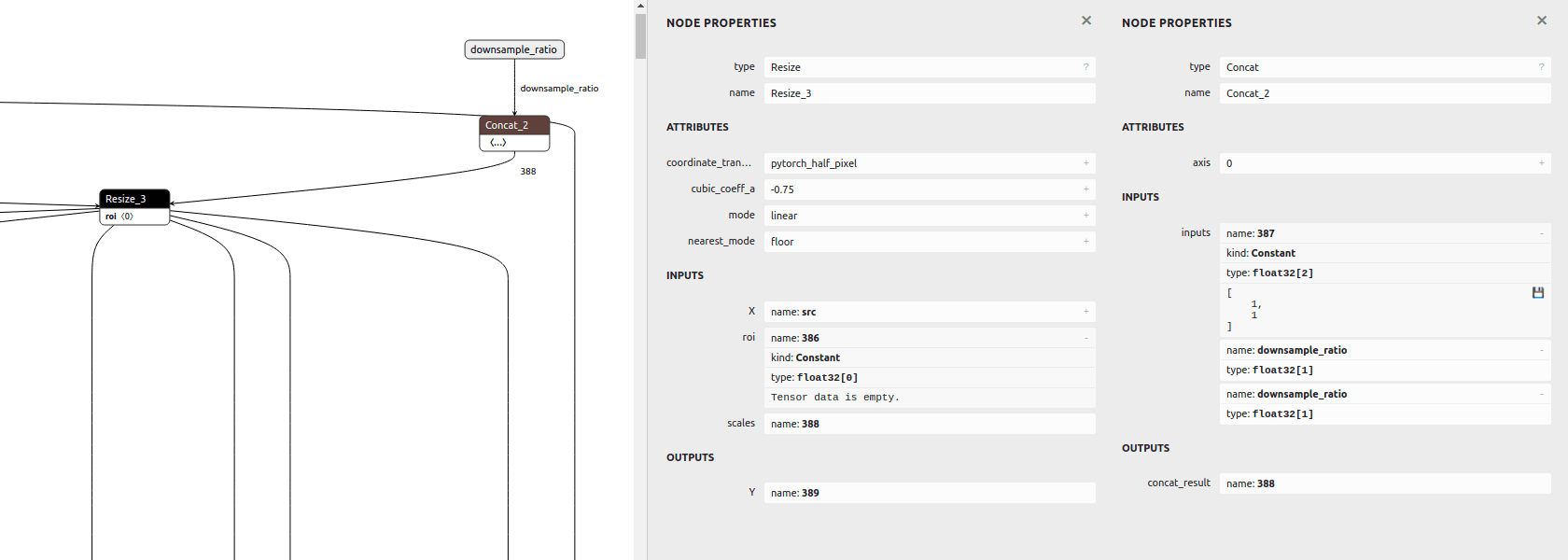
发现其 scales 输入是依据 downsample_ratio 得到的,即 [1,1,downsample_ratio,downsample_ratio],可用 ONNX GraphSurgeon 修改成常量。
最后,模型改动步骤如下:
# ONNX 模型简化,并改为静态输入尺寸

python -m onnxsim rvm_mobilenetv3_fp32.onnx rvm_mobilenetv3_fp32_sim.onnx \

--input-shape src:1,3,1080,1920 r1i:1,1,1,1 r2i:1,1,1,1 r3i:1,1,1,1 r4i:1,1,1,1

# ONNX GraphSurgeon 修改模型

python rvm_onnx_modify.py -i rvm_mobilenetv3_fp32_sim.onnx --input-size 1920 1280

# trtexec 将 ONNX 转成 TensorRT engine

trtexec --onnx=rvm_mobilenetv3_fp32_sim_modified.onnx --workspace=64 --saveEngine=rvm_mobilenetv3_fp32_sim_modified.engine
def modify(input: str, output: str, downsample_ratio: float = 0.25) -> None:

    print(f'\nonnx load: {input}')

    graph = gs.import_onnx(onnx.load(input))

    _print_graph(graph)

    # update node Resize_3: scales

    resize_3 = [n for n in graph.nodes if n.name == 'Resize_3'][0]

    print()

    print(resize_3)

    scales = gs.Constant('388',

        np.asarray([1, 1, downsample_ratio, downsample_ratio], dtype=np.float32))

    resize_3.inputs = [i if i.name != '388' else scales for i in resize_3.inputs]

    print()

    print(resize_3)

    # remove input downsample_ratio

    graph.inputs = [i for i in graph.inputs if i.name != 'downsample_ratio']

    # remove node Concat_2

    concat_2 = [n for n in graph.nodes if n.name == 'Concat_2'][0]

    concat_2.outputs.clear()

    # remove unused nodes/tensors

    graph.cleanup()

    onnx.save(gs.export_onnx(graph), output)
ONNX 与 TRT 模型输出差异
可用 Polygraphy 查看 ONNX 与 TRT 模型的输出差异。
首先,安装
# 安装 TensorRT Python API

cd /usr/local/TensorRT/python/

pip install tensorrt-8.2.2.1-cp39-none-linux_x86_64.whl

export LD_LIBRARY_PATH=/usr/local/TensorRT/lib:$LD_LIBRARY_PATH

python -c "import tensorrt; print(tensorrt.__version__)"

# 安装 Polygraphy,或者通过 TensorRT/tools/Polygraphy 源码安装

python -m pip install colored polygraphy --extra-index-url https://pypi.ngc.nvidia.com
运行 ONNX 与 TRT 模型,对比输出误差:
# 运行 ONNX 模型,保存输入输出

polygraphy run rvm_mobilenetv3_fp32_sim_modified.onnx --onnxrt --val-range [0,1] --save-inputs onnx_inputs.json --save-outputs onnx_outputs.json

# 运行 TRT 模型,载入 ONNX 输入输出,对比输出的相对误差与绝对误差

polygraphy run rvm_mobilenetv3_fp32_sim_modified.engine --model-type engine --trt --load-inputs onnx_inputs.json --load-outputs onnx_outputs.json --rtol 1e-3 --atol 1e-3
可见 fp32 精度误差在 1e-3 以内,PASSED:
[I]     PASSED | All outputs matched | Outputs: ['r4o', 'r3o', 'r2o', 'r1o', 'fgr', 'pha']

[I] PASSED | Command: /home/john/anaconda3/envs/torch/bin/polygraphy run rvm_mobilenetv3_fp32_sim_modified.engine --model-type engine --trt --load-inputs onnx_inputs.json --load-outputs onnx_outputs.json --rtol 1e-3 --atol 1e-3
也试了 fp16,其精度损失就比较大,FAILED:
[E]     FAILED | Mismatched outputs: ['r4o', 'r3o', 'r2o', 'r1o', 'fgr', 'pha']

[!] FAILED | Command: /home/john/anaconda3/envs/torch/bin/polygraphy run rvm_mobilenetv3_fp16_sim_modified.engine --model-type engine --trt --load-inputs onnx_inputs.json --load-outputs onnx_outputs.json --rtol 1e-3 --atol 1e-3
运行 TRT 模型
这里以 TensorRT C++ runtime APIs 为例,将转出的 RVM TRT 模型运行起来。完整代码见 rvm_infer.cc。
1. 载入模型:创建 runtime,反序列化 TRT 模型文件的数据
static Logger logger{Logger::Severity::kINFO};

auto runtime = std::unique_ptr<nvinfer1::IRuntime>(nvinfer1::createInferRuntime(logger));

auto engine = runtime->deserializeCudaEngine(engine_data.data(), fsize, nullptr);
遍历全部输入输出 bindings:
auto nb = engine->getNbBindings();

for (int32_t i = 0; i < nb; i++) {

  auto is_input = engine->bindingIsInput(i);

  auto name = engine->getBindingName(i);

  auto dims = engine->getBindingDimensions(i);

  auto datatype = engine->getBindingDataType(i);

  // ...

}
Engine

 Name=Unnamed Network 0

 DeviceMemorySize=148 MiB

 MaxBatchSize=1

Bindings

 Input[0] name=src dims=[1,3,1080,1920] datatype=FLOAT

 Input[1] name=r1i dims=[1,1,1,1] datatype=FLOAT

 Input[2] name=r2i dims=[1,1,1,1] datatype=FLOAT

 Input[3] name=r3i dims=[1,1,1,1] datatype=FLOAT

 Input[4] name=r4i dims=[1,1,1,1] datatype=FLOAT

 Output[5] name=r4o dims=[1,64,18,32] datatype=FLOAT

 Output[6] name=r3o dims=[1,40,36,64] datatype=FLOAT

 Output[7] name=r2o dims=[1,20,72,128] datatype=FLOAT

 Output[8] name=r1o dims=[1,16,144,256] datatype=FLOAT

 Output[9] name=fgr dims=[1,3,1080,1920] datatype=FLOAT

 Output[10] name=pha dims=[1,1,1080,1920] datatype=FLOAT
之后,分配好所有 bindings 的 device 内存:
auto nb = engine->getNbBindings();

std::vector<void *> bindings(nb, nullptr);

std::vector<int32_t> bindings_size(nb, 0);

for (int32_t i = 0; i < nb; i++) {

  auto dims = engine->getBindingDimensions(i);

  auto size = GetMemorySize(dims, sizeof(float));

  if (cudaMalloc(&bindings[i], size) != cudaSuccess) {

    std::cerr << "ERROR: cuda memory allocation failed, size = " << size

        << " bytes" << std::endl;

    return false;

  }

  bindings_size[i] = size;

}
到此,准备工作就好了。
2. 前处理:输入数据处理成输入格式,存进输入 bindings
用 OpenCV 读取图像,缩放成 src 的输入尺寸。再把数据从 BGR [0,255] 处理成 RGB [0,1]。因 batch=1,所以处理时可忽略。
// img: HWC BGR [0,255] u8

auto img = cv::imread(input_filename, cv::IMREAD_COLOR);

if (src_h != img.rows || src_w != img.cols) {

  cv::resize(img, img, cv::Size(src_w, src_h));

}

// src: BCHW RGB [0,1] fp32

auto src = cv::Mat(img.rows, img.cols, CV_32FC3);

{

  auto src_data = (float*)(src.data);

  for (int y = 0; y < src_h; ++y) {

    for (int x = 0; x < src_w; ++x) {

      auto &&bgr = img.at<cv::Vec3b>(y, x);

      /*r*/ *(src_data + y*src_w + x) = bgr[2] / 255.;

      /*g*/ *(src_data + src_n + y*src_w + x) = bgr[1] / 255.;

      /*b*/ *(src_data + src_n*2 + y*src_w + x) = bgr[0] / 255.;

    }

  }

}

if (cudaMemcpyAsync(bindings[0], src.data, bindings_size[0],

    cudaMemcpyHostToDevice, stream) != cudaSuccess) {

  std::cerr << "ERROR: CUDA memory copy of src failed, size = "

      << bindings_size[0] << " bytes" << std::endl;

  return false;

}
3. 推理:将 bindings 给到 engine 执行上下文进行推理
auto context = std::unique_ptr<nvinfer1::IExecutionContext>(

    engine->createExecutionContext());

if (!context) {

  return false;

}

bool status = context->enqueueV2(bindings.data(), stream, nullptr);

if (!status) {

  std::cout << "ERROR: TensorRT inference failed" << std::endl;

  return false;

}
4. 后处理:从输出 bindings 取出数据,根据输出格式处理数据
用 cv::Mat 接收输出的前景 fgr 和透明通道 pha:
auto fgr = cv::Mat(src_h, src_w, CV_32FC3);  // BCHW RGB [0,1] fp32

if (cudaMemcpyAsync(fgr.data, bindings[9], bindings_size[9],

    cudaMemcpyDeviceToHost, stream) != cudaSuccess) {

  std::cerr << "ERROR: CUDA memory copy of output failed, size = "

      << bindings_size[9] << " bytes" << std::endl;

  return false;

}

auto pha = cv::Mat(src_h, src_w, CV_32FC1);  // BCHW A [0,1] fp32

if (cudaMemcpyAsync(pha.data, bindings[10], bindings_size[10],

    cudaMemcpyDeviceToHost, stream) != cudaSuccess) {

  std::cerr << "ERROR: CUDA memory copy of output failed, size = "

      << bindings_size[10] << " bytes" << std::endl;

  return false;

}

cudaStreamSynchronize(stream);
再将 fgr pha 合成 RGBA 数据,并复原成原尺寸:
// Compose `fgr` and `pha`

auto com = cv::Mat(src_h, src_w, CV_8UC4);  // HWC BGRA [0,255] u8

{

  auto fgr_data = (float*)(fgr.data);

  auto pha_data = (float*)(pha.data);

  for (int y = 0; y < com.rows; ++y) {

    for (int x = 0; x < com.cols; ++x) {

      auto &&elem = com.at<cv::Vec4b>(y, x);

      auto alpha = *(pha_data + y*src_w + x);

      if (alpha > 0) {

        /*r*/ elem[2] = *(fgr_data + y*src_w + x) * 255;

        /*g*/ elem[1] = *(fgr_data + src_n + y*src_w + x) * 255;

        /*b*/ elem[0] = *(fgr_data + src_n*2 + y*src_w + x) * 255;

      } else {

        /*r*/ elem[2] = 0;

        /*g*/ elem[1] = 0;

        /*b*/ elem[0] = 0;

      }

      /*a*/ elem[3] = alpha * 255;

    }

  }

}

if (dst_h != com.rows || dst_w != com.cols) {

  cv::resize(com, com, cv::Size(dst_w, dst_h));

}
5. 运行得到的抠像结果(背景透明):

最后
想入门 TensorRT 的,动手实践一下吧!
GoCoding 个人实践的经验分享,可关注公众号!
TensorRT 开始的更多相关文章
- TensorRT学习总结
TensorRT是什么 建议先看看这篇https://zhuanlan.zhihu.com/p/35657027 深度学习 训练 部署 平常自学深度学习的时候关注的更多是训练的部分,即得到一个模型.而 ...
- TensorRT&Sample&Python[yolov3_onnx]
本文是基于TensorRT 5.0.2基础上,关于其内部的yolov3_onnx例子的分析和介绍. 本例子展示一个完整的ONNX的pipline,在tensorrt 5.0的ONNX-TensorRT ...
- TensorRT&Sample&Python[uff_custom_plugin]
本文是基于TensorRT 5.0.2基础上,关于其内部的uff_custom_plugin例子的分析和介绍. 本例子展示如何使用cpp基于tensorrt python绑定和UFF解析器进行编写pl ...
- TensorRT&Sample&Python[fc_plugin_caffe_mnist]
本文是基于TensorRT 5.0.2基础上,关于其内部的fc_plugin_caffe_mnist例子的分析和介绍. 本例子相较于前面例子的不同在于,其还包含cpp代码,且此时依赖项还挺多.该例子展 ...
- TensorRT&Sample&Python[network_api_pytorch_mnist]
本文是基于TensorRT 5.0.2基础上,关于其内部的network_api_pytorch_mnist例子的分析和介绍. 本例子直接基于pytorch进行训练,然后直接导出权重值为字典,此时并未 ...
- TensorRT&Sample&Python[end_to_end_tensorflow_mnist]
本文是基于TensorRT 5.0.2基础上,关于其内部的end_to_end_tensorflow_mnist例子的分析和介绍. 1 引言 假设当前路径为: TensorRT-5.0.2.6/sam ...
- TensorRT&Sample&Python[introductory_parser_samples]
本文是基于TensorRT 5.0.2基础上,关于其内部的introductory_parser_samples例子的分析和介绍. 1 引言 假设当前路径为: TensorRT-5.0.2.6/sam ...
- 模型加速[tensorflow&tensorrt]
在tensorflow1.8之后的版本中,tensorflow.contrib部分都有tensorrt的组件,该组件存在的意义在于,你可以读取pb文件,并调用tensorrt的方法进行subgraph ...
- TensorRT层和每个层支持的精度模式
下表列出了TensorRT层和每个层支持的精确模式.它还列出了该层在深度学习加速器(DLA)上运行的能力.有关附加约束的更多信息,请参见 DLA Supported Layershttps://doc ...
- 文本分类-TensorRT优化结果对比图
做的文本二分类,使用tensorRT进行图优化和加速,输出预测概率结果对比如下: 从结果对比来看,概率值有微小的变化,但不影响最终的分类
随机推荐
- HUST-计算机网络实验-socket编程
随笔---HUST计网实验:socket编程 博主大三在读,第一次写随笔,水平有限,就当记录一下学习的过程,顺便面试前复习项目的时候看看. 实验要求: 编写一个 Web 服务器软件,要求如下: 基本要 ...
- 去除爬虫采集到的\xa0、\u3000等字符
\xa0表示不间断空白符,爬虫中遇到它的概率不可谓不小,而经常和它一同出现的还有\u3000.\u2800.\t等Unicode字符串.单从对\xa0.\t.\u3000等含空白字符的处理来说,有以下 ...
- [BUUCTF]PWN7——[OGeek2019]babyrop
[BUUCTF]PWN7--[OGeek2019]babyrop 题目网址:https://buuoj.cn/challenges#[OGeek2019]babyrop 步骤: 例行检查,32位,开启 ...
- react Input 表单
input react 表单 input 密码框在谷歌浏览器下 会有黄色填充 官网的不太用,这个比较好用 type="password" autoComplete=" ...
- [WPF] 实现 WPF 的 Inner Shadow
在 WPF 中,我们通常用 DropShadow 做阴影效果,但都是做外阴影.内阴影(Inner Shadow)的话其实也不是不可以,就是有些曲折.这篇文章介绍几种做内引用的做法. 文章涉及到以下概念 ...
- vue+el-element中根据文件名动态创建dialog的方法
背景 在项目中使用对话框的通常做法是把对话框封装成组件,在使用的地方引入,然后添加到template,使用visible.sync控制对话框的显示/隐藏,监听confirm事件处理用户点击确定.如下: ...
- JS监控浏览器窗口是否活动,最小化操作
<!DOCTYPE html> <html lang="en"> <head> <meta charset="UTF-8&quo ...
- 【LeetCode】91. Decode Ways 解题报告(Python)
[LeetCode]91. Decode Ways 解题报告(Python) 标签(空格分隔): LeetCode 作者: 负雪明烛 id: fuxuemingzhu 个人博客: http://fux ...
- Brute-force Algorithm(hdu3221)
Brute-force Algorithm Time Limit: 2000/1000 MS (Java/Others) Memory Limit: 32768/32768 K (Java/Ot ...
- codeforce-424C. Magic Formulas(数学)
C. Magic Formulas time limit per test:2 seconds memory limit per test:256 megabytes input stan ...