
老vue项目webpack3升级到webpack5全过程记录(一)
背景
19年新建的vue项目,使用的是webpack3,随着项目的积累,组件的增多导致本地构建,线上打包等操作速度极慢,非常影响开发效率和部署效率,基于此问题,本次对webpack及相关插件进行了优化和升级。本博文分为2篇,第 1 篇 会直接附上可运行的代码(去除了一些业务代码配置),直接粘贴复制即可使用(注意是基于vue2.0项目原配置基础上的修改哦,在网上找了一堆都是升级过程的各种坑说明,不如直接粘贴复制运行来的爽丫~~~),第 2 篇也会对相关的修改和遇到的坑进行描述说明。
升级效果
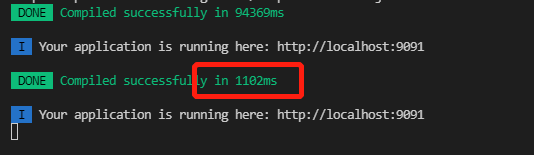
1、本地构建
第一次构建 5分钟 缩短至 1.5分钟左右, 构建时间提升近 4 倍;
更新构建 由 5-10s 缩短至 1-5s ,构建提升 2 倍;
2、线上打包
执行npm run build 由10-15分钟 缩短至 3-5分钟,构建时间提升近4倍;
升级过程
1. 更新webpack依赖
yarn upgrade webpack@5.37.0

yarn add webpack-dev-server webpack-cli -D
更新其他相关的组件,这里不需要一个个找了,可以使用npm-check-updates一键升级所需的组件,不再赘述怎么用的了,百度一下,你就知道,实在不会就一个个install吧~
2. package.json启动命令修改
  "scripts": {

    "dev": "npx webpack serve --config build/webpack.dev.conf.js --color --progress",

    "build": "node build/build.js",

    "dll": "npx webpack --config build/webpack.dll.conf.js",

    "start": "npm run dev"

  }
3、webpack.base.conf.js配置修改
'use strict'

const path = require('path')

const utils = require('./utils')

const config = require('../config')

const webpack = require('webpack')

const vueLoaderConfig = require('./vue-loader.conf')

const { VueLoaderPlugin } = require('vue-loader');

function resolve (dir) {

    return path.join(__dirname, '..', dir)

}

module.exports = {

    context: path.resolve(__dirname, '../'),

    entry: {

        app: './src/main.ts'

    },

    output: {

        path: config.build.assetsRoot,

        filename: '[name].js',

        publicPath: process.env.NODE_ENV === 'production' ? config.build.assetsPublicPath : config.dev.assetsPublicPath

    },

    resolve: {

        extensions: ['.js', '.vue', '.json', '.ts'],

        alias: {

            vue$: 'vue/dist/vue.esm.js',

            '@': resolve('src'),

            pages: resolve('src/pages')

        }

    },

    module: {

        rules: [

            {

                test: /\.vue$/,

                use: {

                    loader: 'vue-loader'

                }

            },

            {

                test: /\.tsx?$/,

                exclude: resolve('node_modules'),

                use: [

                    {

                        loader: 'babel-loader'

                    },

                    {

                        loader: "ts-loader",

                        options: { appendTsxSuffixTo: [/\.vue$/], transpileOnly: true }

                    }

                ]

            },

            {

                test: /\.js$/,

                use: {

                    loader: 'babel-loader'

                },

                exclude: resolve('node_modules'),

                include: resolve('src')

            },

            {

                test: /\.(png|jpe?g|gif|svg)(\?.*)?$/,

                type: 'asset',

                parser: {

                    dataUrlCondition: {

                        maxSize: 10 * 1024 // 10kb

                    }

                },

                generator: {

                    filename: utils.assetsPath('img/[name].[hash:7].[ext]')

                }

            }

        ]

    },

    node: {

        global: false

    },

    plugins: [

        new VueLoaderPlugin(),

        new webpack.ProvidePlugin({

            jQuery: 'jquery',

            $: 'jquery'

        }),

        new webpack.DllReferencePlugin({

            context: __dirname,

            manifest: path.resolve(__dirname, './vendors.manifest.json')

        })

    ]

}
4、webpack.dev.conf.js配置修改
'use strict'

const utils = require('./utils')

const webpack = require('webpack')

const config = require('../config')

const { merge } = require('webpack-merge')

const path = require('path')

const baseWebpackConfig = require('./webpack.base.conf')

const CopyWebpackPlugin = require('copy-webpack-plugin')

const HtmlWebpackPlugin = require('html-webpack-plugin')

const FriendlyErrorsPlugin = require('friendly-errors-webpack-plugin')

const portfinder = require('portfinder')

const HOST = process.env.HOST

const PORT = process.env.PORT && Number(process.env.PORT)

const devWebpackConfig = merge(baseWebpackConfig, {

  mode: 'development',

  module: {

    rules: utils.styleLoaders({ sourceMap: config.dev.cssSourceMap, usePostCSS: true })

  },

  devtool: config.dev.devtool,

  devServer: {

    clientLogLevel: 'warning',

    historyApiFallback: {

      rewrites: [

        { from: /.*/, to: path.posix.join(config.dev.assetsPublicPath, 'index.html') },

      ],

    },

    hot: true,

    contentBase: false,

    compress: true,

    host: HOST || config.dev.host,

    port: PORT || config.dev.port,

    open: config.dev.autoOpenBrowser,

    overlay: config.dev.errorOverlay ? { warnings: false, errors: true } : false,

    publicPath: config.dev.assetsPublicPath,

    proxy: config.dev.proxyTable,

    quiet: true,

    watchOptions: {

      poll: config.dev.poll,

    }

  },

  plugins: [

    new webpack.DefinePlugin({

      'process.env': require('../config/dev.env')

    }),

    new webpack.HotModuleReplacementPlugin(),

    new HtmlWebpackPlugin({

      filename: 'index.html',

      template: 'index.html',

      inject: 'body',

      scriptLoading: 'blocking',

      minify: {

        removeComments: true

      }

    }),

    new CopyWebpackPlugin({

      patterns: [

        {

          from: path.resolve(__dirname, '../static'),

          to: config.dev.assetsSubDirectory,

          globOptions: {

            dot: true,

            gitignore: true,

            ignore: ['.*'],

          }

        },

      ]

    })

  ]

})

module.exports = new Promise((resolve, reject) => {

  portfinder.basePort = process.env.PORT || config.dev.port

  portfinder.getPort((err, port) => {

    if (err) {

      reject(err)

    } else {

      process.env.PORT = port

      devWebpackConfig.devServer.port = port

      // Add FriendlyErrorsPlugin

      devWebpackConfig.plugins.push(new FriendlyErrorsPlugin({

        compilationSuccessInfo: {

          messages: [`Your application is running here: http://${devWebpackConfig.devServer.host}:${port}`],

        },

        onErrors: config.dev.notifyOnErrors  ? utils.createNotifierCallback() : undefined

      }))

      resolve(devWebpackConfig)

    }

  })

})
5、webpack.prod.conf.js配置修改
'use strict'

const path = require('path')

const utils = require('./utils')

const webpack = require('webpack')

const config = require('../config')

const { merge } = require('webpack-merge')

const baseWebpackConfig = require('./webpack.base.conf')

const CopyWebpackPlugin = require('copy-webpack-plugin')

const HtmlWebpackPlugin = require('html-webpack-plugin')

const OptimizeCSSPlugin = require('optimize-css-assets-webpack-plugin');

const TerserWebpackPlugin = require('terser-webpack-plugin');

const MiniCssExtractPlugin = require("mini-css-extract-plugin");

const env = require('../config/prod.env')

const webpackConfig = merge(baseWebpackConfig, {

    mode: "production",

    module: {

        rules: utils.styleLoaders({

            sourceMap: false,

            extract: true,

            usePostCSS: true

        })

    },

    devtool: config.build.devtool,

    output: {

        path: config.build.assetsRoot,

        filename: utils.assetsPath('js/[name].[chunkhash].js'),

        chunkFilename: utils.assetsPath('js/[id].[chunkhash].js'),

        clean: true

    },

    optimization: {

        minimize: true,

        minimizer: [

            new TerserWebpackPlugin(),

            new OptimizeCSSPlugin(),

        ],

        runtimeChunk: { name: 'runtime' },

        concatenateModules: true,

        splitChunks: {

            cacheGroups: {

                vendor: {

                    test: /[\\/]node_modules[\\/]/,

                    name: 'vendor',

                    chunks: 'all',

                    priority: -10

                },

                'async-vendors': {

                    test: /[\\/]node_modules[\\/]/,

                    minChunks: 2,

                    chunks: 'async',

                    name: 'async-vendors'

                }

            },

        },

        moduleIds: 'deterministic'

    },

    plugins: [

        new webpack.DefinePlugin({

            'process.env': env

        }),

        new MiniCssExtractPlugin({

            filename: utils.assetsPath('css/[name].[contenthash].css'),

            chunkFilename: utils.assetsPath('css/[name].[contenthash].css')

        }),

        new HtmlWebpackPlugin({

            filename: config.build.index,

            template: 'index.html',

            inject: true,

            scriptLoading: 'blocking',

            minify: {

                removeComments: true,

                collapseWhitespace: true,

                removeAttributeQuotes: true

            },

            chunksSortMode: 'auto'

        }),

        new CopyWebpackPlugin({

            patterns: [

                {

                    from: path.resolve(__dirname, '../static'),

                    to: config.build.assetsSubDirectory,

                    globOptions: {

                        dot: true,

                        gitignore: true,

                        ignore: ['.*'],

                    }

                },

            ]

        })

    ]

})

if (config.build.productionGzip) {

    const CompressionWebpackPlugin = require('compression-webpack-plugin');

    webpackConfig.plugins.push(

        new CompressionWebpackPlugin({

            filename: '[path][base].gz[query]',

            algorithm: 'gzip',

            test: /\.(js|css|json|txt|html|ico|svg)(\?.*)?$/i,

            threshold: 10240,

            minRatio: 0.8,

            deleteOriginalAssets: true

        })

    )

}

if (config.build.bundleAnalyzerReport) {

    const BundleAnalyzerPlugin = require('webpack-bundle-analyzer').BundleAnalyzerPlugin

    webpackConfig.plugins.push(new BundleAnalyzerPlugin())

}

module.exports = webpackConfig
6、utils.js配置修改
'use strict'

const path = require('path')

const config = require('../config')

const MiniCssExtractPlugin = require("mini-css-extract-plugin");

const packageConfig = require('../package.json')

exports.assetsPath = function (_path) {

  const assetsSubDirectory = process.env.NODE_ENV === 'production' ?  config.build.assetsSubDirectory : config.dev.assetsSubDirectory;

  return path.posix.join(assetsSubDirectory, _path)

}

exports.cssLoaders = function (options) {

  options = options || {}

  const cssLoader = {

    loader: 'css-loader',

    options: {

      sourceMap: options.sourceMap

    }

  }

  const postcssLoader = {

    loader: 'postcss-loader',

    options: {

      sourceMap: options.sourceMap

    }

  }

  // generate loader string to be used with extract text plugin

  function generateLoaders (loader, loaderOptions) {

    const loaders = options.usePostCSS ? [cssLoader, postcssLoader] : [cssLoader]

    if (loader) {

      loaders.push({

        loader: loader + '-loader',

        options: Object.assign({}, loaderOptions, {

          sourceMap: options.sourceMap

        })

      })

    }

    // Extract CSS when that option is specified

    // (which is the case during production build)

    if (options.extract) {

      return [

        {

          loader: MiniCssExtractPlugin.loader,

        }

      ].concat(loaders)

    } else {

      return [

        {

          loader: 'style-loader'

        }

      ].concat(loaders)

    }

  }

  // https://vue-loader.vuejs.org/en/configurations/extract-css.html

  return {

    css: generateLoaders(),

    postcss: generateLoaders(),

    less: generateLoaders('less'),

    // sass: generateLoaders('sass', { indentedSyntax: true }),

    // scss: generateLoaders('sass'),

    // stylus: generateLoaders('stylus'),

    // styl: generateLoaders('stylus')

  }

}

// Generate loaders for standalone style files (outside of .vue)

exports.styleLoaders = function (options) {

  const output = []

  const loaders = exports.cssLoaders(options)

  for (const extension in loaders) {

    const loader = loaders[extension];

    // console.log("css-loader", loader)

    output.push({

      test: new RegExp('\\.' + extension + '$'),

      use: loader

    })

  }

  return output

}

exports.createNotifierCallback = () => {

  const notifier = require('node-notifier')

  return (severity, errors) => {

    if (severity !== 'error') return

    const error = errors[0]

    const filename = error.file && error.file.split('!').pop()

    notifier.notify({

      title: packageConfig.name,

      message: severity + ': ' + error.name,

      subtitle: filename || '',

      icon: path.join(__dirname, 'logo.png')

    })

  }

}
转载请说明来处 黑玛鱼的前端博客
老vue项目webpack3升级到webpack5全过程记录(一)的更多相关文章
- Eclipse 导入项目与 svn 插件关联全过程记录
文章摘自:http://www.cnblogs.com/xmmcn/archive/2013/03/01/2938365.html 感谢博友分享! Eclipse 导入项目与 svn 插件关联全过程记 ...
- 在vue项目中的axios使用配置记录
默认vue项目中已经安装axios,基于element-ui开发,主要记录配置的相关. axiosConfig.js import Vue from 'vue' import axios from ' ...
- vue项目node升级后,node-saas报错解决办法
ERROR in ./node_modules/_extract-text-webpack-plugin@3.0.2@extract-text-webpack-plugin/dist/loader.j ...
- 如何快速把 Vue 项目升级到 webpack3
由于 webpack3升级后,新增了 Scope Hositing(作用域提升) 功能,据说是对 js的性能提升很大.因此,我们做了一个测试对比,就是 webpack3和 webpack1/2 的性能 ...
- Vue项目搭建完整剖析全过程
Vue项目搭建完整剖析全过程 项目源码地址:https://github.com/ballyalex 有帮助的话就加个星星呗~! 项目技术栈:vue+webpack+bower+sass+axios ...
- prettier包升级后vue项目运行报错
今天用vue-cli新建vue项目的时候,发现项目怎么都跑不起来. 最后通过与以前项目作比较,发现prettier这个依赖的版本从原来的1.12.0升级成了1.13.1.我也不太清楚为什么升级后项目跑 ...
- 简单vue项目脚手架(vue+webpack2.0+vuex+vue-router)
github地址 使用技术栈 webpack(^2.6.1) webpack-dev-server(^2.4.5) vue(^2.3.3) vuex(^2.3.1) vue-router(^2.5.3 ...
- 原有vue项目接入typescript
原有vue项目接入typescript 为什么要接入typescript javascript由于自身的弱类型,使用起来非常灵活. 这也就为大型项目.多人协作开发埋下了很多隐患.如果是自己的私有业务倒 ...
- element-ui和npm、webpack、vue-cli搭建Vue项目
一.element-ui的简单使用 1.安装 1. npm 安装 推荐使用 npm 的方式安装,它能更好地和 webpack 打包工具配合使用. npm i element-ui -S 2. CDN ...
随机推荐
- C语言函数调用完整过程
C语言函数调用详细过程 函数调用是步骤如下: 按照调用约定传参 调用约定是调用方(Caller)和被调方(Callee)之间按相关标准 对函数的某些行为做出是商议,其中包括下面内容: 传参顺序:是从左 ...
- SFDC 利用Schema.Describe来取得Picklist所有的选项
Salesforce的开发语言Apex与Java极为类似.也有封装,基础,多态特性. 并且也能 反射,Object的属性和Field属性. 今天主要记录的是一个需求:Visualforce Page或 ...
- CodeForces571A. Lengthening Sticks(组合数学-容斥)
题目大意: a,b,c三根木棍可以增加三个不同的数字,aa,bb,cc,且aa+bb+cc<=L,问能构成三角形的木棒有多少种方案 题目思路: 如果我们直接考虑把L分配给aa,bb,cc好像不好 ...
- bootstrap期末考试习题整理
1.Which is true about Bootstrap? A. Bootstrap is the most popular and powerful front-end (HTML, CSS, ...
- 常见SQL命令总结学习 -- <1>
SQL学习网练习记录 参考1:http://sample.jimstone.com.cn/xsql/Course/4.html 参考2:http://sample.jimstone.com.cn/xs ...
- shell分支与循环结构
1. 条件选择 1.1 条件判断分支介绍 格式 if COMMANDS; then COMMANDS; [ elif COMMANDS; then COMMANDS; ]... [ else COMM ...
- 【Java并发】1. Java线程内存模型JMM及volatile相关知识
Java招聘知识合集:https://www.cnblogs.com/spzmmd/tag/Java招聘知识合集/ 该系列用于汇集Java招聘需要的知识点 JMM 并发编程的三大特性:可见性(vola ...
- 通过Dapr实现一个简单的基于.net的微服务电商系统(二)——通讯框架讲解
首先感谢张队@geffzhang公众号转发了上一篇文章,希望广大.neter多多推广dapr,让云原生更快更好的在.net这片土地上落地生根. 目录:一.通过Dapr实现一个简单的基于.net的微服务 ...
- uni-app 微信小程序授权登录
1.微信小程序 获取用户信息 与获取手机号 详细信息看官方公告:https://developers.weixin.qq.com/community/develop/doc/000cacfa20ce8 ...
- Docker安装Nacos动态服务发现、配置和服务管理平台
一.通过DockerHub拉镜像,版本查看:https://github.com/nacos-group/nacos-docker //稳定版,有权限 docker pull nacos/nacos- ...