
LVS的跨网络DR实现
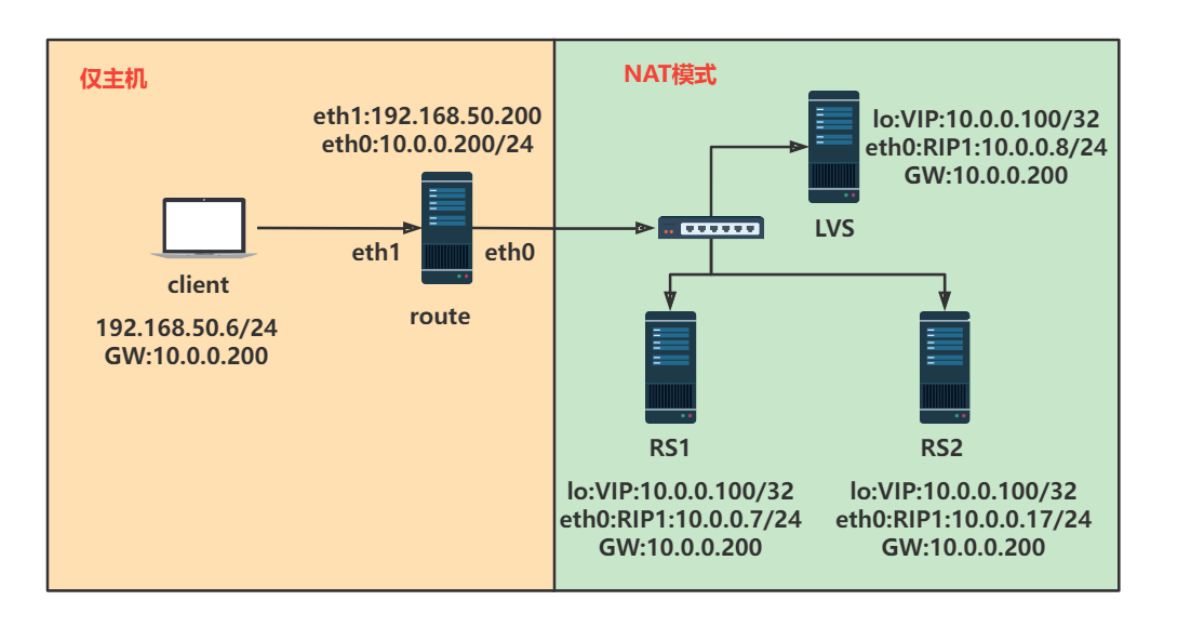
一、网络配置
1.1 客户端
#客户端配置

[root@client ~]#cat /etc/sysconfig/network-scripts/ifcfg-eth0

DEVICE=eth0

NAME=eth0

BOOTPROTO=static

IPADDR=192.168.50.6

GATEWAY=10.0.0.200

PREFIX=24

ONBOOT=yes

[root@client ~]#route -n

Kernel IP routing table

Destination     Gateway         Genmask         Flags Metric Ref    Use Iface

0.0.0.0         10.0.0.200      0.0.0.0         UG    100    0        0 eth0

10.0.0.200      0.0.0.0         255.255.255.255 UH    100    0        0 eth0

192.168.50.0    0.0.0.0         255.255.255.0   U     100    0        0 eth0
1.2 路由器配置
#启用ip_forward

[root@router ~]#echo 'net.ipv4.ip_forward=1' >> /etc/sysctl.conf

[root@router ~]#sysctl -p

[root@router ~]#cat /etc/sysconfig/network-scripts/ifcfg-eth0

DEVICE=eth0

NAME=eth0

BOOTPROTO=static

IPADDR=10.0.0.200

PREFIX=24

ONBOOT=yes

[root@router ~]#cat /etc/sysconfig/network-scripts/ifcfg-eth1

DEVICE=eth1

NAME=eth1

BOOTPROTO=static

IPADDR=192.168.50.200

PREFIX=24

ONBOOT=yes
1.3后端服务器RS
#RS1

[root@rs1 ~]#cat /etc/sysconfig/network-scripts/ifcfg-eth0

DEVICE=eth0

NAME=eth0

BOOTPROTO=static

IPADDR=10.0.0.7

PREFIX=24

GATEWAY=10.0.0.200

ONBOOT=yes

[root@rs1 ~]#route -n

Kernel IP routing table

Destination     Gateway         Genmask         Flags Metric Ref    Use Iface

0.0.0.0         10.0.0.200      0.0.0.0         UG    100    0        0 eth0

10.0.0.0        0.0.0.0         255.255.255.0   U     100    0        0 eth0

[root@rs1 ~]#yum -y install httpd

[root@rs1 ~]#systemctl enable --now httpd

[root@rs1 ~]#hostname -I > /var/www/html/index.html

[root@rs1 ~]#curl 10.0.0.7

10.0.0.7

#RS2

[root@rs2 ~]#cat /etc/sysconfig/network-scripts/ifcfg-eth0

NAME=eth0

BOOTPROTO=static

IPADDR=10.0.0.17

PREFIX=24

GATEWAY=10.0.0.200

ONBOOT=yes

[root@rs2 ~]#route -n

Kernel IP routing table

Destination     Gateway         Genmask         Flags Metric Ref    Use Iface

0.0.0.0         10.0.0.200      0.0.0.0         UG    100    0        0 eth0

10.0.0.0        0.0.0.0         255.255.255.0   U     100    0        0 eth0

[root@rs2 ~]#yum -y install httpd

[root@rs2 ~]#systemctl enable --now httpd

[root@rs2 ~]#hostname -I > /var/www/html/index.html

[root@rs2 ~]#curl 10.0.0.17

10.0.0.17
1.4LVS
[root@lvs ~]#cat /etc/sysconfig/network-scripts/ifcfg-eth0

DEVICE=eth0

NAME=eth0

BOOTPROTO=static

IPADDR=10.0.0.8

PREFIX=24

GATEWAY=10.0.0.200

ONBOOT=yes

[root@lvs ~]#route -n

Kernel IP routing table

Destination     Gateway         Genmask         Flags Metric Ref    Use Iface

0.0.0.0         10.0.0.200      0.0.0.0         UG    100    0        0 eth0

10.0.0.0        0.0.0.0         255.255.255.0   U     100    0        0 eth0
1.5 网络测试
#确保能够ping通

[root@client ~]#ping 10.0.0.7

[root@client ~]#ping 10.0.0.17

[root@client ~]#ping 10.0.0.8
二、配置LVS
2.1 后端RS的IPVS配置
# LVS的IPVS配置

[root@lvs ~]#ifconfig lo:1 170.16.0.100/32

#RS1的IPVS配置

[root@rs1 ~]#echo 1 > /proc/sys/net/ipv4/conf/all/arp_ignore

[root@rs1 ~]#echo 2 > /proc/sys/net/ipv4/conf/all/arp_announce

[root@rs1 ~]#echo 1 > /proc/sys/net/ipv4/conf/lo/arp_ignore

[root@rs1 ~]#echo 2 > /proc/sys/net/ipv4/conf/lo/arp_announce

[root@rs1 ~]#ifconfig lo:1 10.0.0.100/32

#RS2的IPVS配置

[root@rs2 ~]#echo 1 > /proc/sys/net/ipv4/conf/all/arp_ignore

[root@rs2 ~]#echo 1 > /proc/sys/net/ipv4/conf/lo/arp_ignore

[root@rs2 ~]#echo 2 > /proc/sys/net/ipv4/conf/all/arp_announce

[root@rs2 ~]#echo 2 > /proc/sys/net/ipv4/conf/lo/arp_announce

[root@rs2 ~]#ifconfig lo:1 10.0.0.100/32
2.2 实现LVS 规则
[root@lvs ~]#yum -y install ipvsadm

[root@lvs ~]#ipvsadm -A -t 10.0.0.100:80 -s rr

[root@lvs ~]#ipvsadm -a -t 10.0.0.100:80 -r 10.0.0.7:80 -g

[root@lvs ~]#ipvsadm -a -t 10.0.0.100:80 -r 10.0.0.17:80 -

[root@lvs ~]#ipvsadm -Ln

IP Virtual Server version 1.2.1 (size=4096)

Prot LocalAddress:Port Scheduler Flags

  -> RemoteAddress:Port           Forward Weight ActiveConn InActConn

TCP  10.0.0.100:80 rr

  -> 10.0.0.7:80                  Route   1      0          0

  -> 10.0.0.17:80                 Route   1      0          0
2.3 测试访问
[root@client ~]#while :;do curl 10.0.0.100;sleep 1;done

10.0.0.7

10.0.0.17

10.0.0.7

10.0.0.17

10.0.0.7

....
LVS的跨网络DR实现的更多相关文章
- Linux学习-LVS跨网段DR模型和FWM多服务绑定
一.实验环境 系统:CentOS7.6 主机:5台 (虚拟机) 客户端1台:172.16.236.134/24 (NAT网卡),网关指向 172.16.236.185/24(路由服务器) 路由服务器1 ...
- LVS跨网段DR模型
客户端IP地址:172.16.8.147 路由器服务器IP地址:172.16.8.167内网IP地址:192.168.1.3 一.将客户端的网关修改为路由服务器IP地址 vim ifcfg-ens33 ...
- LVS负载均衡之DR模式原理介绍
LVS基本原理 流程解释: 当用户向负载均衡调度器(Director Server)发起请求,调度器将请求发往至内核空间 PREROUTING 链首先会接收到用户请求,判断目标 IP 确定是本机 IP ...
- Lvs之NAT、DR、TUN三种模式的应用配置案例
LVS 一.LVS简介 LVS是Linux Virtual Server的简写,意即Linux虚拟服务器,是一个虚拟服务器集群系统.本项目在1998年5月由章文嵩博士成立,是中国国内最早出现的 ...
- LVS负载均衡之DR模式部署
1.LVS的DR模式介绍 参考自官网:http://www.linuxvirtualserver.org/zh/lvs3.html VS/DR利用大多数Internet服务的非对称特点,负 ...
- 21.LVS负载均衡群集-DR群集
LVS负载均衡群集-DR群集 目录 LVS负载均衡群集-DR群集 数据包流向分析 DR模式的特点 LVS-DR中的ARP问题 IP地址冲突 解决办法 路由根据ARP表项,会将新来的请求报文转发给Rea ...
- LVS之NAT和DR服务脚本
NAT服务控制脚本 #!/bin/bash # # chkconfig: - 88 12 # description: LVS script for VS/NAT # . /etc/rc.d/init ...
- 【前端_js】前端跨网络异步获取资源——fetch()
Fetch API 提供了一个 JavaScript接口,用于访问和操纵HTTP管道的部分,例如请求和响应.它还提供了一个全局 fetch()方法,该方法提供了一种简单,合理的方式来跨网络异步获取资源 ...
- MongoDB集群跨网络、跨集群同步方案
MongoDB集群跨网络.跨集群数据同步有以下几个方案,此处只是简单介绍,不过详细描述. 1.MongoDB自带的复制方案 优点:实施简单,不需要额外的技术栈 缺点:网络双向可连通. 2.CDC同步方 ...
随机推荐
- [学习笔记] Oracle创建用户、分配权限、设置角色
创建用户 create user student --用户名 identified by "123456" --密码 default tablespace USERS --表空间名 ...
- 《手把手教你》系列技巧篇(五十五)-java+ selenium自动化测试-上传文件-下篇(详细教程)
1.简介 在实际工作中,我们进行web自动化的时候,文件上传是很常见的操作,例如上传用户头像,上传身份证信息等.所以宏哥打算按上传文件的分类对其进行一下讲解和分享. 2.为什么selenium没有提供 ...
- SQL怎么求多列的和?
日常比较常使用的SQL,查询各科的总分,并求出总分大于240的学生名字和总分,如图,要求出linux.Mysql.Java三科的总分,并查处总分大于240的学生姓名和总分 可能你会想到sum,但是su ...
- MySQL约束和数据类型
约束条件 约束条件就是在给字段加一些约束,使该字段存储的值更加符合我们的预期. 常用约束条件如下: UNSIGNED :无符号,值从0开始,无负数 ZEROFILL:零填充,当数据的显示长度不够的时候 ...
- git branch --set-upstream-to 本地关联远程分支
最近使用git pull的时候多次碰见下面的情况: There is no tracking information for the current branch. Please specify wh ...
- 安装devstack中遇到的一些问题整理
1.执行stack.sh文件后提示 ./stack.sh:528:check_path_perm_sanity /opt/devstack/functions:582:die [ERROR] /opt ...
- Standalone集群搭建和Spark应用监控
注:图片如果损坏,点击文章链接:https://www.toutiao.com/i6815920501530034696/ 承接上一篇文档<Spark词频前十的统计练习> Spark on ...
- Unity3D开发入门教程(三)——添加启动脚本
五邑隐侠,本名关健昌,12年游戏生涯. 本教程以 Unity 3D + VS Code + C# + tolua 为例. 一.启动脚本 第一篇 "搭建开发环境",在 "配 ...
- Python常用的数据结构
一.list 列表 1.列表的特点 有序的,元素可以重复,列表中的元素可以进行增上改查,可以存放不同的数据类型 2.创建列表 中括号创建并填充 --->[] 通过构造函数创建 list() 列表 ...
- 在KALI以外的Linux上安装KALI上的工具(ubuntu,debian)
添加KALI源 vim /etc/apt/sources.list 在sources.list中加入 deb http://http.kali.org/kali kali-rolling main c ...