
超过三张表禁止join
一、 问题提出
《阿里巴巴JAVA开发手册》里面写超过三张表禁止join,这是为什么?

二、问题分析
对这个结论,你是否有怀疑呢?也不知道是哪位先哲说的不要人云亦云,今天我设计sql,来验证这个结论。(实验没有从代码角度分析,目前达不到。可以把mysql当一个黑盒,使用角度来验证这个结论) 验证结论的时候,会有很多发现,各位往后看。
三、 实验环境
vmware10+centos7.4+mysql5.7.22 ,centos7内存4.5G,4核,50G硬盘。mysql配置为2G,特别说明硬盘是SSD。
四、先概述下实验
有4张表,student学生表,teacher老师表,course课程表,sc中间关系表,记录了学生选修课程以及分数。具体sql脚本,看文章结尾,我附上。中间我自己写了造数据的脚本,也在结尾。
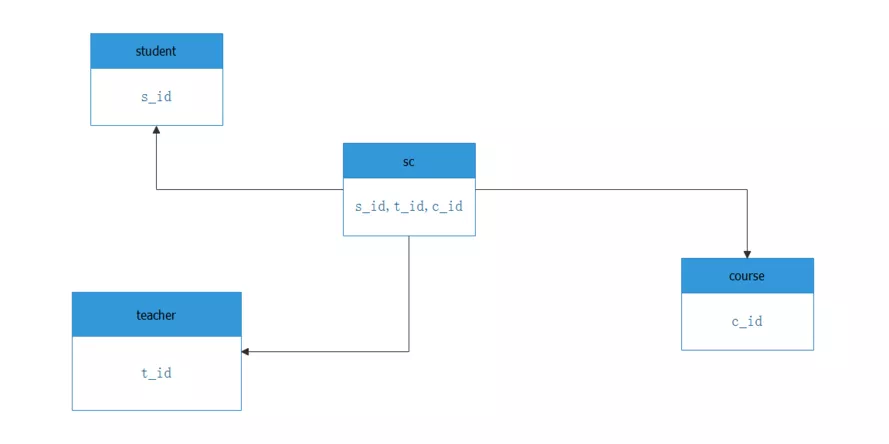
实验是为解决一个问题的:查询选修“tname553”老师所授课程的学生中,成绩最高的学生姓名及其成绩 。查询sql是:
select Student.Sname,course.cname,score

    from Student,SC,Course ,Teacher

    where Student.s_id=SC.s_id and SC.c_id=Course.c_id  and sc.t_id=teacher.t_id

    and Teacher.Tname='tname553'

    and SC.score=(select max(score)from SC where sc.t_id=teacher.t_Id);
我来分析一下这个语句:4张表等值join,还有一个子查询。算是比较简单的sql语句了(相比ERP动就10张表的哦,已经很简单了)。我 还会分解这个语句成3个简单的sql:
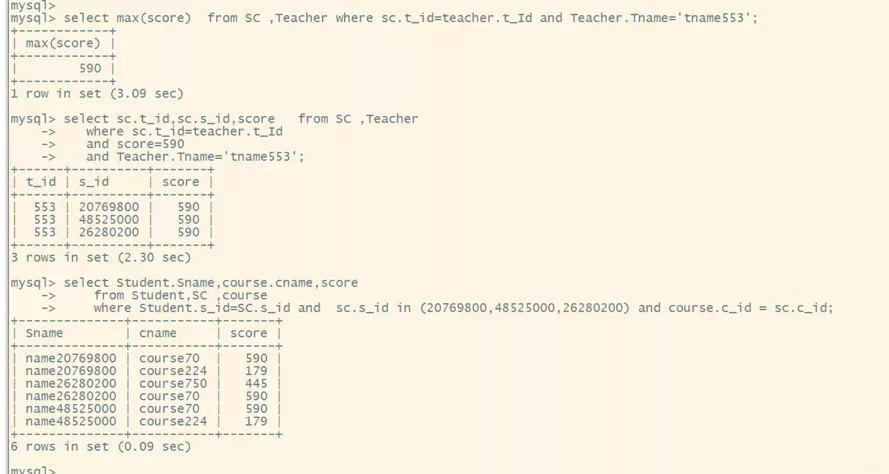
 select max(score)  from SC ,Teacher where sc.t_id=teacher.t_Id and Teacher.Tname='tname553';

   select sc.t_id,sc.s_id,score   from SC ,Teacher

   where sc.t_id=teacher.t_Id

   and score=590

   and Teacher.Tname='tname553';

    select Student.Sname,course.cname,score

    from Student,SC ,course

    where Student.s_id=SC.s_id and  sc.s_id in (20769800,48525000,26280200) and course.c_id = sc.c_id;
我来分析下:第一句,就是查询最高分,得到最高分590分。第二句就是查询出最高分的学生id,得到
20769800,48525000,26280200
。第三句就是查询出学生名字和分数。这样这3个语句的就可以查询出来 成绩最高的学生姓名及其成绩 。
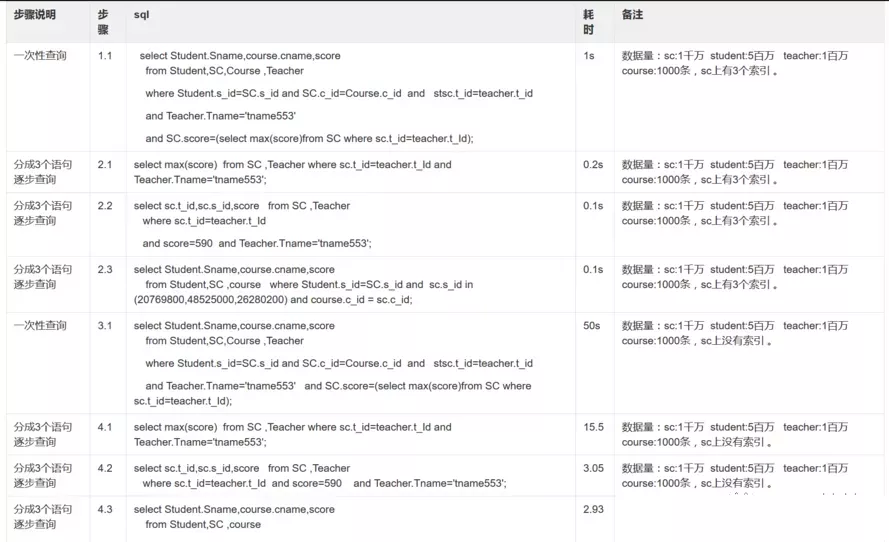
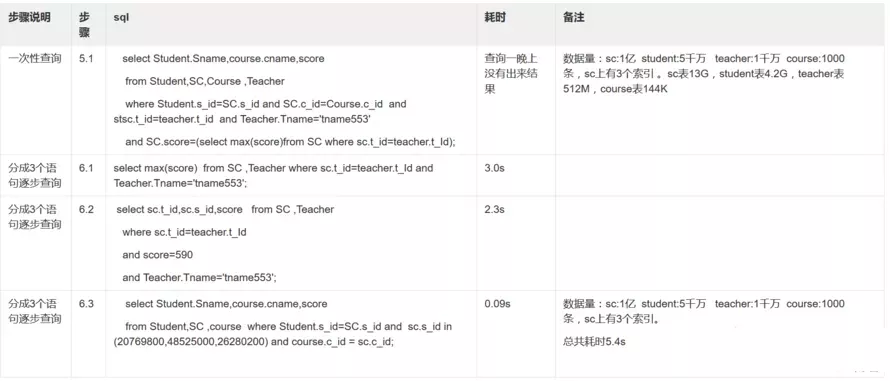
接下来我会分别造数据:1千万选课记录(一个学生选修2门课),造500万学生,100万老师(一个老师带5个学生,挺高端的吧),1000门课,。用上面查询语句查询。其中sc表我测试了下有索引和没有索引情况,具体见下表。再接下来,我会造1亿选课记录(一个学生选修2门课),5000万学生,1000万老师,1000门课。然后分别执行上述语句。最后我会在oracle数据库上执行上述语句。
五、下面两张表是测试结果
六、仔细看上表,可以发现?
- 步骤3.1没有在连接键上加索引,查询很慢,说明:“多表关联查询时,保证被关联的字段需要有索引”;
- 步骤6.1,6.2,6.3,换成简单sql,在数据量1亿以上, 查询时间还能勉强接受。此时说明mysql查询有些吃力了,但是仍然嫩查询出来。
- 步骤5.1,mysql查询不出来,4表连接,对我本机mysql来说,1.5亿数据超过极限了(我调优过这个SQL,执行计划和索引都走了,没有问题,show profile显示在sending data.这个问题另外文章详谈。)
4.对比1.1 和5.1 步骤sql查询,4表连接,对我本机mysql来说 ,1.5千万数据查询很流利,是一个mysql数据量流利分水岭。(这个只是现象,不太准确,需要同时计算表的容量)。
5.步骤5.1对比6.1,6.2,6.3,多表join对mysql来说,处理有些吃力。
6.超过三张表禁止join,这个规则是针对mysql来说的。后续会看到我用同样机器,同样数据量,同样内存,可以完美计算 1.5亿数据量join。针对这样一个规则,对开发来说 ,需要把一些逻辑放到应用层去查询。
总结:这个规则 超过三张表禁止join ,由于数据量太大的时候,mysql根本查询不出来,导致阿里出了这样一个规定。(其实如果表数据量少,10张表也不成问题,你自己可以试试)而我们公司支付系统朝着大规模高并发目标设计的,所以,遵循这个规定。在业务层面来讲,写简单sql,把更多逻辑放到应用层,我的需求我会更了解,在应用层实现特定的join也容易得多。
七、让我们来看看oracle数据库的优秀表现
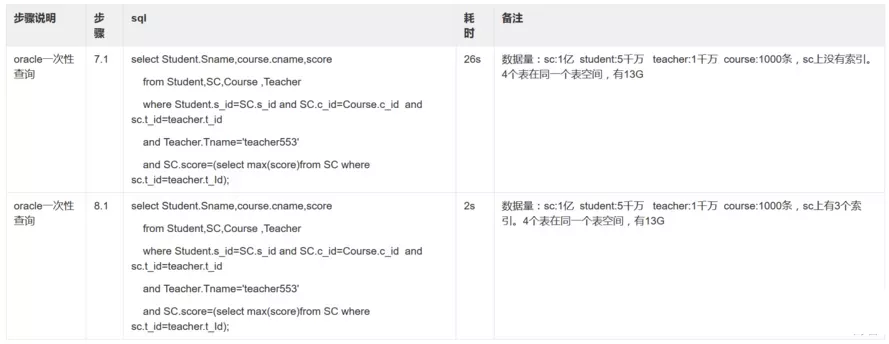
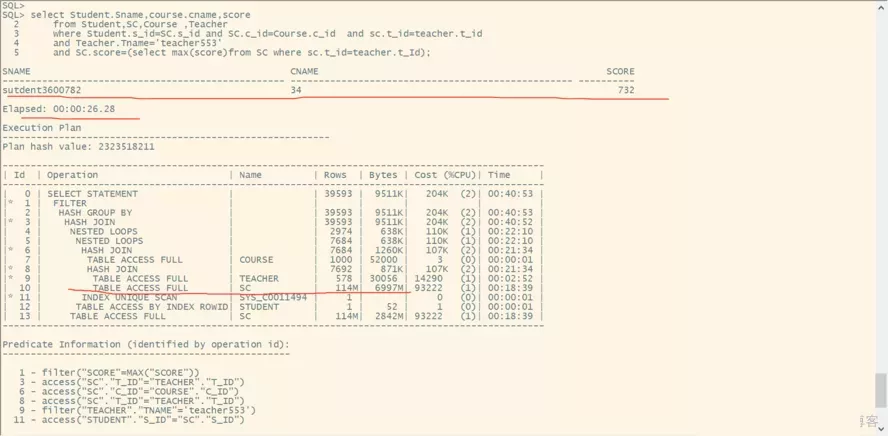
看步骤7.1,就是没有索引,join表很多的情况下,oracle仍然26秒查询出结果来。所以我会说mysql的join很弱。那么问题来了,为什么现在使用很多人使用mysql呢?这是另外一个问题,我会另外说下我的思考。
看完本篇文章,另外我还附加赠送,所谓搂草打兔子。就是快速造数据。你可以自己先写脚本造数据,看看我是怎么造数据的,就知道我的技巧了。
八、附上部分截图

附上sql语句和造数据脚本
use stu;

drop table if exists student;

create table student

  (  s_id int(11) not null auto_increment ,

     sno    int(11),

     sname varchar(50),

     sage  int(11),

     ssex  varchar(8) ,

     father_id int(11),

      mather_id int(11),

      note varchar(500),

     primary key (s_id),

   unique key uk_sno (sno)

  ) engine=innodb default charset=utf8mb4;

truncate table student;

  delimiter $$

drop function if exists   insert_student_data $$

create function insert_student_data()

 returns  int deterministic

    begin

    declare  i int;

      set i=1;

      while  i<50000000 do

      insert into student  values(i ,i, concat('name',i),i,case when floor(rand()*10)%2=0 then 'f' else 'm' end,floor(rand()*100000),floor(rand()*1000000),concat('note',i) );

      set i=i+1;

      end while;

      return 1;

    end$$

delimiter ;

select  insert_student_data();

select count(*) from student;

use stu;

create table course

  (

     c_id int(11) not null auto_increment ,

     cname varchar(50)

     note varchar(500), primary key (c_id)

  )  engine=innodb default charset=utf8mb4;

truncate table course;

  delimiter $$

drop function if exists   insert_course_data $$

create function insert_course_data()

 returns  int deterministic

    begin

    declare  i int;

      set i=1;

      while  i<=1000 do

      insert into course  values(i , concat('course',i),floor(rand()*1000),concat('note',i) );

      set i=i+1;

      end while;

      return 1;

    end$$

delimiter ;

select  insert_course_data();

select count(*) from course;

use stu;

drop table if exists sc;

create table sc

  (

     s_id    int(11),

     c_id    int(11),

     t_id    int(11),

     score int(11)

  )  engine=innodb default charset=utf8mb4;

truncate table sc;

  delimiter $$

drop function if exists   insert_sc_data $$

create function insert_sc_data()

 returns  int deterministic

    begin

    declare  i int;

      set i=1;

      while  i<=50000000 do

      insert into sc  values( i,floor(rand()*1000),floor(rand()*10000000),floor(rand()*750)) ;

      set i=i+1;

      end while;

      return 1;

    end$$

delimiter ;

select  insert_sc_data();

commit;

select  insert_sc_data();

commit;

create index idx_s_id  on sc(s_id)   ;

create index idx_t_id  on sc(t_id)   ;

create index idx_c_id  on sc(c_id)   ;

select count(*) from sc;

use stu;

drop table if exists teacher;

create table teacher

  (

    t_id  int(11) not null auto_increment ,

     tname varchar(50) ,

     note varchar(500),primary key (t_id)

  )  engine=innodb default charset=utf8mb4;

  truncate table teacher;

  delimiter $$

drop function if exists   insert_teacher_data $$

create function insert_teacher_data()

 returns  int deterministic

    begin

    declare  i int;

      set i=1;

      while  i<=10000000 do

      insert into teacher  values(i , concat('tname',i),concat('note',i) );

      set i=i+1;

      end while;

      return 1;

    end$$

delimiter ;

select  insert_teacher_data();

commit;

select count(*) from teacher;
这个是oracle的测试和造数据脚本

create tablespace scott_data  datafile  '/home/oracle/oracle_space/sitpay1/scott_data.dbf'  size 1024m autoextend on;

create tablespace scott_index   datafile  '/home/oracle/oracle_space/sitpay1/scott_index.dbf'  size 64m  autoextend on;

create temporary tablespace scott_temp  tempfile  '/home/oracle/oracle_space/sitpay1/scott_temp.dbf'  size 64m autoextend on;

drop user  scott cascade;

create user  scott  identified by  tiger  default tablespace scott_data  temporary tablespace scott_temp  ;

grant resource,connect,dba to  scott;

drop table student;

create table student

  (  s_id number(11) ,

     sno    number(11) ,

     sname varchar2(50),

     sage  number(11),

     ssex  varchar2(8) ,

     father_id number(11),

      mather_id number(11),

      note varchar2(500)

  ) nologging;

truncate table student;

create or replace procedure insert_student_data

 is

   q number(11);

    begin

     q:=0;

      for i in  1..50 loop

      insert /*+append*/ into student   select rownum+q as s_id,rownum+q  as sno, concat('sutdent',rownum+q ) as sname,floor(dbms_random.value(1,100)) as sage,'f' as ssex,rownum+q  as father_id,rownum+q  as mather_id,concat('note',rownum+q ) as note from dual connect by level<=1000000;

      q:=q+1000000;

      commit;

      end loop;

end insert_student_data;

/

call insert_student_data();

alter table student  add constraint  pk_student primary key (s_id);

commit;

select count(*) from student;

create table course

  (

     c_id number(11) primary key,

     cname varchar2(50),

     note varchar2(500)

  )  ;

truncate table course;

 create or replace procedure insert_course_data

 is

   q number(11);

    begin

      for i in  1..1000 loop

      insert /*+append*/ into course  values(i , concat('name',i),concat('note',i) );

      end loop;

end insert_course_data;

/

call insert_course_data();

commit;

select count(*) from course;

create table sc

  (

     s_id    number(11),

     c_id    number(11),

     t_id    number(11),

     score number(11)

  ) nologging;

truncate table sc;

 create or replace procedure insert_sc_data

 is

   q number(11);

    begin

     q:=0;

      for i in  1..50 loop

      insert /*+append*/ into sc   select rownum+q as s_id, floor(dbms_random.value(0,1000))  as c_id,floor(dbms_random.value(0,10000000)) t_id,floor(dbms_random.value(0,750)) as score from dual connect by level<=1000000;

      q:=q+1000000;

      commit;

      end loop;

end insert_sc_data;

/

call insert_sc_data();

create index idx_s_id  on sc(s_id)   ;

create index idx_t_id  on sc(t_id)   ;

create index idx_c_id  on sc(c_id)   ;

select count(*) from sc;

create table teacher

  (

    t_id  number(11) ,

     tname varchar2(50) ,

     note varchar2(500)

  )nologging ;

    truncate table teacher;

create or replace procedure insert_teacher_data

 is

   q number(11);

    begin

     q:=0;

      for i in  1..10 loop

      insert /*+append*/ into teacher   select rownum+q as t_id, concat('teacher',rownum+q ) as tname,concat('note',rownum+q ) as note from dual connect by level<=1000000;

      q:=q+1000000;

      commit;

      end loop;

end insert_teacher_data;

/

call insert_teacher_data();

alter table teacher  add constraint  pk_teacher primary key (t_id);

select count(*) from teacher;
如果您正在学习Spring Boot,推荐一个连载多年还在继续更新的免费教程:http://blog.didispace.com/spring-boot-learning-2x/
超过三张表禁止join的更多相关文章
- 《阿里巴巴JAVA开发手册》里面写超过三张表禁止join这是为什么?
分库分页.应用里做join 多表join性能很差 参考: 1.https://www.zhihu.com/question/56236190
- mysql三张表关联查询
三张表,需要得到的数据是标红色部分的.sql如下: select a.uid,a.uname,a.upsw,a.urealname,a.utel,a.uremark, b.rid,b.rname,b. ...
- Oracle将两张表的数据插入第三张表且第三张表中不存在
1.由于是先查再插所以不能使用insert into table1() values(), 要使用insert into table1() select * table2,不能使用values. 2. ...
- 【Oracle/Java】向三张表各插入百万数据,共用时18分3秒,平均每张表6分钟
三张表DDL如下: CREATE TABLE tb01 ( "ID" ,) not null primary key, "NAME" NVARCHAR2() n ...
- 十几张表的join(千万级/百万级表) 7hours-->5mins
================START============================== 来了一个mail说是job跑得很慢,调查下原因 先来看下sql: SELECT h.order_ ...
- Ajax案例:三级联动查询员工的信息(三张表进行内连接)
需求分析: 通过数据库连接池,可以查询到数据库中员工的各种信息,通过点击下拉框的方式实现三级联动,即:没有点击city下拉框,后面两个下拉框中没有值,这样,点击city下拉框,department下拉 ...
- Yii的Relational Active Record三张表连接查询
需求如下: 查询book表信息,同时关联entitystags表,以entitystags的字段eid关联book的主键,再关联查询tags表,以entitystags表的tid字段关联tags表的主 ...
- django 多对多自定义第三张表时的注意事项
杂交(自定义第三张表+ManyToManyField) # modles.py class Boy(models.Model): name = models.CharField(max_length= ...
- $Django 多对多-自定义第三张表 基于双下划线的跨表查询(补充)
自定义第三张表的好处:可以定义多个字段, 缺点:查询不方便(有方法解决) 1.第三张表设置外键,联合唯一(查询不方便) class Books(models.Model): name=models.C ...
随机推荐
- 【java+selenium3】模拟键盘操作 (十二)
一.键盘操作 用代码来模拟键盘的Enter或一系列的组合键,前面使用sendkeys()方法模拟键盘的输入,除此之外还可以模拟键盘组合键输入如下: 整理一些比较常用的键盘操作如下: sendKeys( ...
- centos yum更换阿里镜像
#1.如果没有wget命令,则需要执行下面命令进行安装.为保险期间,先执行下面命令. yum install wget #2.备份原镜像源,以免出错后可以恢复. mv /etc/yum.repos.d ...
- 浅谈springboot自动配置原理
前言 springboot自动配置关键在于@SpringBootApplication注解,启动类之所以作为项目启动的入口,也是因为该注解,下面浅谈下这个注解的作用和实现原理 @SpringBootA ...
- 二.什么是Promise
二.什么是Promise 1.理解 2.promise 的状态改变 3.promise的基本流程 4.promise的基本使用 1.理解 抽象表达: Promise 是JS 中进行异步编程的新的解决方 ...
- sqlalchemy delete object
In SQL Alchemy you are deleting Objects that you get with a query from the database. This you can do ...
- Sqlserver中判断表是否存在
在sqlserver(应该说在目前所有数据库产品)中创建一个资源如表,视图,存储过程中都要判断与创建的资源是否已经存在 在sqlserver中一般可通过查询sys.objects系统表来得知结果,不 ...
- 《Python语言程序设计》【第2周】Python基本图形绘制
实例2:Python蟒蛇绘制 #PythonDraw.py import turtle #import 引入了一个绘图库 turtle 海龟库--最小单位像素 turtle.setup(650, 35 ...
- Android Activity Deeplink启动来源获取源码分析
一.前言 目前有很多的业务模块提供了Deeplink服务,Deeplink简单来说就是对外部应用提供入口. 针对不同的跳入类型,app可能会选择提供不一致的服务,这个时候就需要对外部跳入的应用进行区分 ...
- 浏览器 Proxy SwitchyOmega 插件设置代理访问内网服务器
使用Proxy SwitchyOmega 插件通过代理 直接访问到内网网站 一.使用场景 如下图所示,如果在电脑的网络设置中开启代理,每次更换代理就需要进入这里设置改变代理.且我们可能回需求到两个网页 ...
- vivo统一告警平台设计与实践
一.背景 一套监控系统检测和告警是密不可分的,检测用来发现异常,告警用来将问题信息发送给相应的人.vivo监控系统1.0时代各个监控系统分别维护一套计算.存储.检测.告警收敛逻辑,这种架构下对底层数据 ...