
Spring Batch(8) -- Listeners
September 29, 2020 by Ayoosh Sharma
In this article, we will take a deep dive into different types of *Spring Batch Listeners* and how to configure and use them along with Spring Batch Job. We will see listeners intercept jobs and steps.
Spring Batch Listeners
Spring Batch listeners are a way of intercepting the execution of a Job or a Step to perform some meaningful operations or logging the progress. Spring Batch provides some very useful listeners and we can use them to control the flow of the batch processing and take important actions on a particular value at a certain point of the execution.We will see some samples and eventually see the execution of these various listeners.
1. Why do we need Listener?
Take an example of a Trading Application, who wants to keep a track of the trade’s life-cycle and its moment between different stages of the trade’s life-cycle like booking, allocation, clearing, and take some actions on it.We can decide that before processing the trade of “Infosys” for quantities over 5000, we have to send the trader an email saying that we have received a big order.
2. JobExecutionListener
JobExecutionListener provides interceptions and life-cycle methods for spring batch Jobs. There are two methods *beforeJob*() and *afterJob*() and as the name suggests it gives us the liberty to do anything we want to before the execution of a job start and after the execution of the job ends.
Interface:
public interface JobExecutionListener {

    void beforeJob(JobExecution var1);

    void afterJob(JobExecution var1);

}
Copy
Implementation:
public class SPJobExecutionListener implements JobExecutionListener {

    Logger logger = LoggerFactory.getLogger(SPJobExecutionListener.class);

    public void beforeJob(JobExecution jobExecution) {

        logger.info("Called beforeJob().");

    }

    public void afterJob(JobExecution jobExecution) {

        logger.info("Called afterJob().");

    }

}
Copy
3. StepListerner
This is the primary interface and all the following spring batch listeners have implemented this interface.
Interface:
package org.springframework.batch.core;

public interface StepListener {

}
Copy
3.1. ChunkListener
ChunkListener provides interceptions and life cycle methods for spring batch chunks. We use chunks when we are working on a set of items that are to be combined as a unit within a transaction. There are two methods beforeChunk() and *afterChunk().*
The beforeChunk() method gets executed after the transaction has started but before it executes the read on ItemReader. The afterChunk() method gets executed post the commit of the chunk.
Interface:
public interface ChunkListener extends StepListener {

    String ROLLBACK_EXCEPTION_KEY = "sb_rollback_exception";

    void beforeChunk(ChunkContext var1);

    void afterChunk(ChunkContext var1);

    void afterChunkError(ChunkContext var1);

}
Copy
Implementation:
public class SPChunkListener implements ChunkListener {

    Logger logger = LoggerFactory.getLogger(SPChunkListener.class);

    @Override

    public void beforeChunk(ChunkContext chunkContext) {

        logger.info("beforeChunk");

    }

    @Override

    public void afterChunk(ChunkContext chunkContext) {

        logger.info("afterChunk");

    }

    @Override

    public void afterChunkError(ChunkContext chunkContext) {

        logger.error("afterChunkError");

    }

}
Copy
3.2. StepExecutionListener
StepExecutionListener provides interceptions and life-cycle methods for spring batch steps. There are two methods beforeStep() and afterStep() and as the name suggests it gives us the liberty to do anything we want to before the execution of a step start and after the execution of the step ends. The afterStep() method returns an ExitStatus which tells us whether the step execution was completed successfully or not.
Interface:
import org.springframework.lang.Nullable;

public interface StepExecutionListener extends StepListener {

    void beforeStep(StepExecution var1);

    @Nullable

    ExitStatus afterStep(StepExecution var1);

}
Copy
Implementation:
public class SPStepListener implements StepExecutionListener {

    Logger logger = LoggerFactory.getLogger(SPStepListener.class);

    @Override

    public void beforeStep(StepExecution stepExecution) {

        logger.info("beforeStep().");

    }

    @Override

    public ExitStatus afterStep(StepExecution stepExecution) {

        logger.info("Called afterStep().");

        return ExitStatus.COMPLETED;

    }

}
Copy
3.3. ItemReadListener
ItemReadListener provides interceptions and life-cycle methods while reading the items. There are three methods beforeRead(), afterRead(), and *onReadError*(). As the method names suggest, it gives us the liberty to do anything we want before we read an item, after we read the item, and in case of an error while reading the item itself.
Interface:
public interface ItemReadListener < T > extends StepListener {

    void beforeRead();

    void afterRead(T var1);

    void onReadError(Exception var1);

}
Copy
Implementation:
public class SPItemReadListener implements ItemReadListener < String > {

    Logger logger = LoggerFactory.getLogger(SPItemReadListener.class);

    @Override

    public void beforeRead() {

        logger.info("Before reading an item");

    }

    @Override

    public void afterRead(String item) {

        logger.info("After reading an item: " + item.toString());

    }

    @Override

    public void onReadError(Exception ex) {

        logger.error("Error occurred while reading an item!");

    }

}
Copy
3.4. ItemProcessListener
ItemProcessListener provides interceptions and life cycle methods while processing the items. It has three methods beforeProcess(), afterProcess(), and onProcessError(). As the method names suggest, they give us the liberty to do anything we want before it processes an item, after the item processing and in case of an error while processing the item itself.
Interface:
public interface ItemProcessListener < T, S > extends StepListener {

    void beforeProcess(T var1);

    void afterProcess(T var1, @Nullable S var2);

    void onProcessError(T var1, Exception var2);

}
Copy
Implementation:
public class SPItemProcessorListener implements ItemProcessListener < String, Number > {

    Logger logger = LoggerFactory.getLogger(SPItemProcessorListener.class);

    @Override

    public void beforeProcess(String item) {

        logger.info("beforeProcess");

    }

    @Override

    public void afterProcess(String item, Number result) {

        logger.info("afterProcess");

    }

    @Override

    public void onProcessError(String item, Exception e) {

        logger.error(" onProcessError");

    }

}
Copy
3.5. ItemWriteListener
ItemWriteListener provides interceptions and life-cycle methods while writing the items. It has three methods beforeWrite(), afterWrite(), and onWriteError(). As the method names suggest, they give us the liberty to do anything we want before we write an item, after the item has been written and in case of an error while writing the item itself.
Interface:
public interface ItemWriteListener < S > extends StepListener {

    void beforeWrite(List << ? extends S > var1);

    void afterWrite(List << ? extends S > var1);

    void onWriteError(Exception var1, List << ? extends S > var2);

}
Copy
Implementation:
public class SPItemWriteListener implements ItemWriteListener < Number > {

    Logger logger = LoggerFactory.getLogger(SPItemWriteListener.class);

    @Override

    public void beforeWrite(List << ? extends Number > items) {

        logger.info("beforeWrite");

    }

    @Override

    public void afterWrite(List << ? extends Number > items) {

        logger.info("afterWrite");

    }

    @Override

    public void onWriteError(Exception exception, List << ? extends Number > items) {

        logger.info("onWriteError");

    }

}
Copy
3.6. SkipListener
SkipListener Interface is dedicated to skipped items. The methods will be called by step implementation at the right time.There are three methods onSkipInRead(),onSkipInWrite(), and onSkipInProcess(). As the method names suggest, they give us the liberty to do anything we want when an item is skipped in reading, when an item is skipped in writing, and when an item is skipped in processing.
Interface:
public interface SkipListener < T, S > extends StepListener {

    void onSkipInRead(Throwable var1);

    void onSkipInWrite(S var1, Throwable var2);

    void onSkipInProcess(T var1, Throwable var2);

}
Copy
Implementation:
public class SPSkipListener implements SkipListener < String, Number > {

    Logger logger = LoggerFactory.getLogger(SPSkipListener.class);

    @Override

    public void onSkipInRead(Throwable t) {

        logger.info("onSkipInRead");

    }

    @Override

    public void onSkipInWrite(Number item, Throwable t) {

        logger.info("onSkipInWrite");

    }

    @Override

    public void onSkipInProcess(String item, Throwable t) {

        logger.info("onWriteError");

    }

}
Copy
4. Listener Setup
We can set up any of the above job listeners for our job processing at the time of creating the JobInstance. For simplicity, let’s see how we have set up the JobExecutionListener below, and remember we just need to change the listener to use them.
Implementation:
@Bean

public Job processJob() {

    return jobBuilderFactory.get("stockpricesinfojob")

        .incrementer(new RunIdIncrementer())

        .listener(new SpringBatchJobExecutionListener())

        .flow(StockPricesInfoStep())

        .end()

        .build();

}
Copy
Similarly, we can set up any of the above step listeners for our step processing at the time of creating the Step Instance. For simplicity, let’s see how we have set up the StepExecutionListener Below and remember we just need to change the listener to use them.
Implementation:
@Bean

public Step StockPricesInfoStep() {

    return stepBuilderFactory.get("step1")

        .listener(new SpringBatchStepListener())

        . < StockInfo, String > chunk(10)

        .reader(reader())

        .processor(stockInfoProcessor())

        .writer(writer())

        .faultTolerant()

        .retryLimit(3)

        .retry(Exception.class)

        .build();

}
Copy
5. Real-Life Example
We will develop a real-life example outline the use of Spring batch listeners using JobExecutionListener and StepExecutionListener. We will read stock info CSV file content and write it on the output file and in between print the logs from our listeners. We are using Spring Boot to build our example but you can build it on using spring core APIs.
Our input file stockInfo.csv is kept at *resources/csv/employees.csv* and our generated output will be stored in *target/output.txt*.You can see the configuration class embedding the JobExecutionListener and StepExecutionListener while creating the instances for Job and Step.
Model:
import lombok.Data;

import java.util.List;

@Data

public class StockInfo {

    private String stockId;

    private String stockName;

    private double stockPrice;

    private double yearlyHigh;

    private double yearlyLow;

    private String address;

    private String sector;

    private String market;

}
Copy
ItemProcessor.java
public class StockInfoProcessor

implements ItemProcessor < StockInfo, String > {

    private static final Logger LOGGER =

    LoggerFactory.getLogger(StockInfoProcessor.class);

    @Override

    public String process(StockInfo stockInfo) throws Exception {

        System.out.println("Hello");

        String message = stockInfo.getStockName() + " is trading at  " +

            stockInfo.getStockPrice() + " on " + stockInfo.getMarket() + " at " + new Date().toString() + "!";

        LOGGER.info("printing '{}' to output file", message);

        return message;

    }

}
Copy
SpringBatchConfig.java
@Configuration

public class SpringBatchConfig {

    @Autowired

    public JobBuilderFactory jobBuilderFactory;

    @Autowired

    public StepBuilderFactory stepBuilderFactory;

    @Bean

    public Job processJob() {

        return jobBuilderFactory.get("stockpricesinfojob")

            .incrementer(new RunIdIncrementer())

            .listener(new SpringBatchJobExecutionListener())

            .flow(StockPricesInfoStep())

            .end()

            .build();

    }

    @Bean

    public Step StockPricesInfoStep() {

        return stepBuilderFactory.get("step1")

            .listener(new SpringBatchStepListener())

            . < StockInfo, String > chunk(10)

            .reader(reader())

            .processor(stockInfoProcessor())

            .writer(writer())

            .faultTolerant() //to allow retries

            .retryLimit(3) //Retries in case of exceptions

            .retry(Exception.class) //all exceptions are covered

            .build();

    }

    @Bean

    public FlatFileItemReader < StockInfo > reader() {

        return new FlatFileItemReaderBuilder < StockInfo > ()

            .name("stockInfoItemReader")

            .resource(new ClassPathResource("csv/stockinfo.csv"))

            .delimited()

            .names(new String[] {

                "stockId",

                "stockName",

                "stockPrice",

                "yearlyHigh",

                "yearlyLow",

                "address",

                "sector",

                "market"

            })

            .targetType(StockInfo.class)

            .build();

    }

    @Bean

    public StockInfoProcessor stockInfoProcessor() {

        return new StockInfoProcessor();

    }

    @Bean

    public FlatFileItemWriter < String > writer() {

        return new FlatFileItemWriterBuilder < String > ()

            .name("stockInfoItemWriter")

            .resource(new FileSystemResource(

                "target/output.txt"))

            .lineAggregator(new PassThroughLineAggregator < > ()).build();

    }

    @Bean

    public JobExecutionListener listener() {

        return new SpringBatchJobCompletionListener();

    }

}
Copy
5.1 StepExecutionListener:
public class SPStepListener implements StepExecutionListener {

    Logger logger = LoggerFactory.getLogger(SPStepListener.class);

    @Override

    public void beforeStep(StepExecution stepExecution) {

        logger.info("SPStepListener - CALLED BEFORE STEP.");

    }

    @Override

    public ExitStatus afterStep(StepExecution stepExecution) {

        logger.info("SPStepListener - CALLED AFTER STEP.");

        return ExitStatus.COMPLETED;

    }

}
Copy
5.2. JobExecutionListener:
public class SpringBatchJobCompletionListener extends JobExecutionListenerSupport {

    Logger logger = LoggerFactory.getLogger(SpringBatchJobCompletionListener.class);

    @Override

    public void beforeJob(JobExecution jobExecution) {

        logger.info("SpringBatchJobCompletionListener - BEFORE BATCH JOB STARTS");

    }

    @Override

    public void afterJob(JobExecution jobExecution) {

        if (jobExecution.getStatus() == BatchStatus.COMPLETED) {

            logger.info("SpringBatchJobCompletionListener - BATCH JOB COMPLETED SUCCESSFULLY");

        } else if (jobExecution.getStatus() == BatchStatus.FAILED) {

            logger.info("SpringBatchJobCompletionListener - BATCH JOB FAILED");

        }

    }

}
Copy
stockInfo.csv

Logs:
15204 --- [   scheduling-1] o.s.b.c.l.support.SimpleJobLauncher      : Job: [FlowJob: [name=stockpricesinfojob]] launched with the following parameters: [{time=1594496238219}]

2020-07-12 01:07:18.256  INFO 15204 --- [   scheduling-1] c.j.s.l.SpringBatchJobExecutionListener  : BEFORE BATCH JOB STARTS

2020-07-12 01:07:18.354  INFO 15204 --- [   scheduling-1] o.s.batch.core.job.SimpleStepHandler     : Executing step: [step1]

2020-07-12 01:07:18.362  INFO 15204 --- [   scheduling-1] c.j.s.listener.SpringBatchStepListener   : SPStepListener - CALLED BEFORE STEP.

Hello

2020-07-12 01:07:18.422  INFO 15204 --- [   scheduling-1] c.j.s.step.StockInfoProcessor            : printing 'Infy is trading at  780.98 on BSE atSun Jul 12 01:07:18 IST 2020!' to output file

Hello

2020-07-12 01:07:18.429  INFO 15204 --- [   scheduling-1] c.j.s.step.StockInfoProcessor            : printing 'TCS is trading at  780.98 on BSE atSun Jul 12 01:07:18 IST 2020!' to output file

Hello

2020-07-12 01:07:18.436  INFO 15204 --- [   scheduling-1] c.j.s.step.StockInfoProcessor            : printing 'Wipro is trading at  780.98 on BSE atSun Jul 12 01:07:18 IST 2020!' to output file

2020-07-12 01:07:18.444  INFO 15204 --- [   scheduling-1] c.j.s.listener.SpringBatchStepListener   : SPStepListener - CALLED AFTER STEP.

2020-07-12 01:07:18.455  INFO 15204 --- [   scheduling-1] o.s.batch.core.step.AbstractStep         : Step: [step1] executed in 100ms

2020-07-12 01:07:18.649  INFO 15204 --- [   scheduling-1] c.j.s.l.SpringBatchJobExecutionListener  : BATCH JOB COMPLETED SUCCESSFULLY

2020-07-12 01:07:18.687  INFO 15204 --- [   scheduling-1] o.s.b.c.l.support.SimpleJobLauncher      : Job: [FlowJob: [name=stockpricesinfojob]] completed with the following parameters: [{time=1594496238219}] and the following status: [COMPLETED] in 405ms

2020-07-12 01:08:18.224  INFO 15204 --- [   scheduling-1] o.s.b.c.l.support.SimpleJobLauncher      : Job: [FlowJob: [name=stockpricesinfojob]] launched with the following parameters: [{time=1594496298216}]

2020-07-12 01:08:18.227  INFO 15204 --- [   scheduling-1] c.j.s.l.SpringBatchJobExecutionListener  : BEFORE BATCH JOB STARTS

2020-07-12 01:08:18.236  INFO 15204 --- [   scheduling-1] o.s.batch.core.job.SimpleStepHandler     : Executing step: [step1]

2020-07-12 01:08:18.239  INFO 15204 --- [   scheduling-1] c.j.s.listener.SpringBatchStepListener   : SPStepListener - CALLED BEFORE STEP.

Hello

2020-07-12 01:08:18.249  INFO 15204 --- [   scheduling-1] c.j.s.step.StockInfoProcessor            : printing 'Infy is trading at  780.98 on BSE atSun Jul 12 01:08:18 IST 2020!' to output file

Hello

2020-07-12 01:08:18.250  INFO 15204 --- [   scheduling-1] c.j.s.step.StockInfoProcessor            : printing 'TCS is trading at  780.98 on BSE atSun Jul 12 01:08:18 IST 2020!' to output file

Hello

2020-07-12 01:08:18.251  INFO 15204 --- [   scheduling-1] c.j.s.step.StockInfoProcessor            : printing 'Wipro is trading at  780.98 on BSE atSun Jul 12 01:08:18 IST 2020!' to output file

2020-07-12 01:08:18.254  INFO 15204 --- [   scheduling-1] c.j.s.listener.SpringBatchStepListener   : SPStepListener - CALLED AFTER STEP.

2020-07-12 01:08:18.256  INFO 15204 --- [   scheduling-1] o.s.batch.core.step.AbstractStep         : Step: [step1] executed in 20ms

2020-07-12 01:08:18.259  INFO 15204 --- [   scheduling-1] c.j.s.l.SpringBatchJobExecutionListener  : BATCH JOB COMPLETED SUCCESSFULLY
Copy
Output Location:
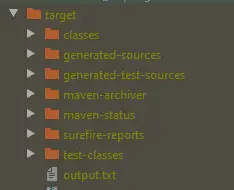
**Output.txt
**
Summary
- We have learned about Spring Batch Listeners, and why we need them.
- We have learned to configure a different variety of listeners and why each one of them is unique and important.
- We have learned to configure the spring batch job listener while creating the JobInstance object.
- We have learned to configure the spring batch step listener while creating the Step object.
- We have developed and gone through a real-life example for JobExecutionListener and StepExecutionListener.
The source code for this application is available on GitHub.
Spring Batch(8) -- Listeners的更多相关文章
- Spring Batch Event Listeners
Learn to create and configure Spring batch's JobExecutionListener (before and after job), StepExecut ...
- Spring Batch的事务– Part 3: 略过和重试
原文:https://blog.codecentric.de/en/2012/03/transactions-in-spring-batch-part-3-skip-and-retry/ This i ...
- Spring Batch的事务-Part 1:基础
原文 https://blog.codecentric.de/en/2012/03/transactions-in-spring-batch-part-1-the-basics/ This is th ...
- spring batch (四) Job的配置及配置文件说明介绍
内容来自<Spring Batch 批处理框架>,作者:刘相.我只是个搬运工. 一.Spring Batch提供了独立的标签用来顶一个Job配置,分别是job.step.tasklet.c ...
- Spring Batch批处理以及编程模型
1.批处理: 类似于SQL里面的批处理提交 2.场景: 业务定时进行批处理操作,但是批处理的编程模型是怎么的呢? 3.开源框架 Spring Batch 4.编程模型: reader-processo ...
- 批处理框架-spring Batch
并发处理业务 数据量大,并发度高,要支持事物,回滚,并发机制.事务.并发.监控.执行等,并不提供相应的调度功能.因此,如果我们希望批处理任务定期执行,可结合 Quartz 等成熟的调度框架实现. 业务 ...
- Spring batch学习 详细配置解读(3)
第一篇讲到普通job 配置 那么spring batch 给我们提供了丰富的配置,包括定时任务,校验,复合监听器,父类,重启机制等. 下面看一个动态设置读取文件的配置 1.动态文件读取 <?x ...
- Spring Batch @SpringBatchTest 注解
Spring Batch 提供了一些非常有用的工具类(例如 JobLauncherTestUtils 和 JobRepositoryTestUtils)和测试执行监听器(StepScopeTestEx ...
- [Spring Batch 系列] 第一节 初识 Spring Batch
距离开始使用 Spring Batch 有一段时间了,一直没有时间整理,现在项目即将完结,整理下这段时间学习和使用经历. 官网地址:http://projects.spring.io/spring-b ...
随机推荐
- Linux NameSpace (目录)
1. User Namespace 详解 2. Pid Namespace 详解 3. Mnt Namespace 详解 4. UTS Namespace 详解 5. IPC Namespace 详解 ...
- redis异常:(error) MISCONF Redis is configured to save RDB snapshots, but is currently not able to persist on disk.
(error) MISCONF Redis is configured to save RDB snapshots, but is currently not able to persist on d ...
- CentOS7 hadoop3.3.1安装(单机分布式、伪分布式、分布式)
@ 目录 前言 预先设置 修改主机名 关闭防火墙 创建hadoop用户 SSH安装免密登陆 单机免密登陆--linux配置ssh免密登录 linux环境配置Java变量 配置Java环境变量 安装Ha ...
- 菜鸡的Java笔记 Object 类
Object 类 Object类 的主要作用 Object 类的常用方法 内容 虽然有了对象的向上转型,可以解决了参数的统一问题,但是 ...
- [loj2478]林克卡特树
原题等价于选择恰好$k+1$条不相交(无公共点)的路径使得边权和最大 证明:对于原题中的最优解,一定包含了k条0边权的边(否则可以将未使用的边删掉,然后将这条路径的末尾与不在同一个连通块内的点连边), ...
- 爬虫进阶篇(一)scrapy
1.本教程默认认为您已经像我一样是个半吊子爬虫程序员 2.学习爬虫首先要懂得request,json,bs4,re,xpath,pymysql,random,time,文件相关,理解网络编程基本原理, ...
- 模数不超过 long long 范围时的快速乘
笔者的话:使用前请确保评测系统的long double严格为16B ! 模数不在 int 范围内的乘法在 OI 中运用广泛,例如Millar-Rabin,Pollard-Rho等等.这样的乘法,直接乘 ...
- Linux服务器查看个人硬盘配额
quota -uvs
- 2021-2-3-利用anaconda+prefetch+aspera从NCBI的SRA数据库中下载原始测序数据
目录 1.Conda连接不上镜像源问题 2. aspera不能再独立使用 3.使用prefetch搭配aspera 4. prefetch下载方法 记录下下载过程,为自己和后人避坑. 1.Conda连 ...
- Pycharm的简单配置和使用
外观 Ctrl+滚轮改变字体大小:file -> Setting ->Editor-〉General -> Mouse: 字体.颜色:file->settings->Ed ...