
nginx拒绝国外IP访问
nginx拒绝国外IP访问方法很多,比如iptables,geoip模块,域名解析等等。这些方法不会相互冲突,可以结合起来一起使用。
今天来教大家利用两个小方法解决 域名解析禁止掉海外IP访问网站。
域名解析方法:
绝大多数域名解析服务商都是提供电信联通移动海外线路区分解析的,所以我们可以充分利用这个功能,来禁止海外访问。
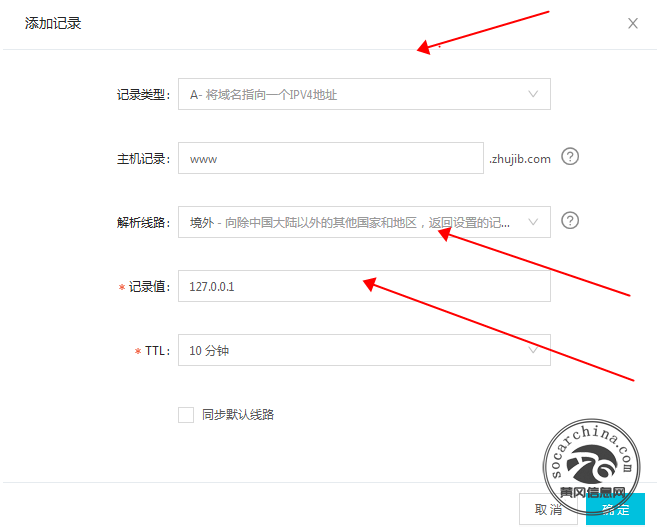
以阿里云DNS解析为例:
设置A记录类型
解析线路:境外
记录值:127.0.0.1
设置后等30分钟后我们再用ping工具测试下境外解析,就会发现所有的海外线路都会解析至127.0.0.1这个IP上,为什么是127.0.0.1呢?因为这个是本地IP,如果有攻击海外肉鸡攻击这个网站,就会自己攻击自己。
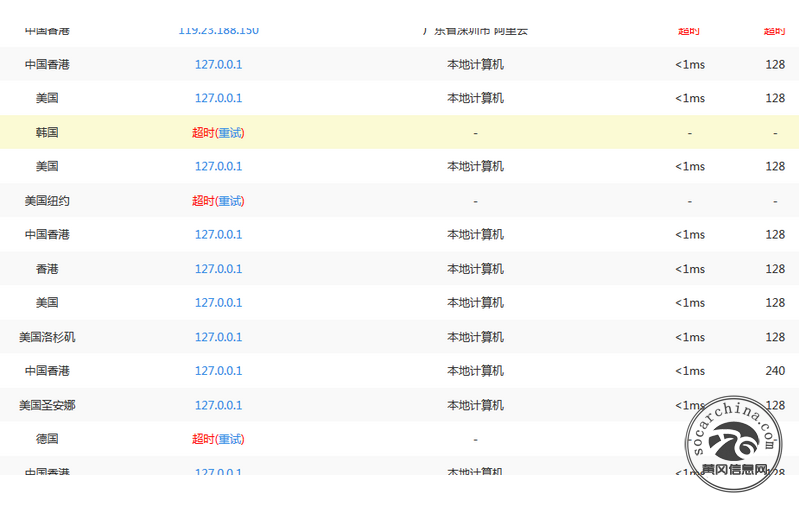
结合我写的另外一个方法:
用脚本每周更新国外IP库,利用nginx deny功能直接拒绝这些IP地址。
#添加到crontab

0 0 * * 5 /bin/bash /root/tools/black_nginx.sh
代码内容
#!/bin/bash


rm -f legacy-apnic-latest black_`date +%F`.conf && wget http://ftp.apnic.net/apnic/stats/apnic/legacy-apnic-latest

awk -F '|' '{if(NR>2)printf("%s %s/%d%s\n","deny",$4,24,";")}' legacy-apnic-latest > black_`date +%F`.conf && rm -f /usr/local/nginx/conf/black.conf && ln -s $PWD/black_`date +%F`.conf /usr/local/nginx/conf/black.conf && /etc/init.d/nginx reload
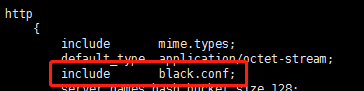
在nginx主配置文件的http段include black.conf; 这样此服务器所有网站都拒绝这些IP
经过学习更新一个方法,使用openresty:
官方下载地址:http://openresty.org/cn/download.html
推荐几个waf模块 https://github.com/unixhot/waf
https://github.com/loveshell/ngx_lua_waf
下载完waf模块,把waf文件夹移动到/usr/local/openresty/nginx/conf/
git clone https://github.com/unixhot/waf.git

cp -a ./waf/waf /usr/local/openresty/nginx/conf/

或者

cd /usr/local/openresty/server/nginx/conf

git clone https://github.com/loveshell/ngx_lua_waf.git

mv ngx_lua_waf waf
在主配置文件夹内引入
vim /usr/local/openresty/nginx/conf/nginx.conf

...

http {

lua_shared_dict limit 10m;

lua_package_path "/usr/local/openresty/nginx/conf/waf/?.lua";

init_by_lua_file "/usr/local/openresty/nginx/conf/waf/init.lua";

access_by_lua_file "/usr/local/openresty/nginx/conf/waf/access.lua";

...

}
启动报错
nginx: [error] lua_load_resty_core failed to load the resty.core module from https://github.com/openresty/lua-resty-core; ensure you are using an OpenResty release from https://openresty.org/en/download.html (rc: 2, reason: module 'resty.core' not found:

    no field package.preload['resty.core']

    no file '/usr/local/openresty/nginx/conf/waf/resty/core.lua'

    no file '/usr/local/openresty/site/lualib/resty/core.so'

    no file '/usr/local/openresty/lualib/resty/core.so'

    no file './resty/core.so'

    no file '/usr/local/lib/lua/5.1/resty/core.so'

    no file '/usr/local/openresty/luajit/lib/lua/5.1/resty/core.so'

    no file '/usr/local/lib/lua/5.1/loadall.so'

    no file '/usr/local/openresty/site/lualib/resty.so'

    no file '/usr/local/openresty/lualib/resty.so'

    no file './resty.so'

    no file '/usr/local/lib/lua/5.1/resty.so'

    no file '/usr/local/openresty/luajit/lib/lua/5.1/resty.so'

    no file '/usr/local/lib/lua/5.1/loadall.so')

或者

failed to load the 'resty.core' module (https://github.com/openresty/lua-resty-core); ensure you are using an OpenResty release from https://openresty.org/en/download.html (reason: module 'resty.core' not found:

no field package.preload['resty.core']

no file '/usr/local/openresty/nginx/conf/waf/resty/core.lua'

no file '/usr/local/openresty/site/lualib/resty/core.so'

no file '/usr/local/openresty/lualib/resty/core.so'

no file './resty/core.so'

no file '/usr/local/lib/lua/5.1/resty/core.so'

no file '/usr/local/openresty/luajit/lib/lua/5.1/resty/core.so'

no file '/usr/local/lib/lua/5.1/loadall.so'

no file '/usr/local/openresty/site/lualib/resty.so'

no file '/usr/local/openresty/lualib/resty.so'

no file './resty.so'

no file '/usr/local/lib/lua/5.1/resty.so'

no file '/usr/local/openresty/luajit/lib/lua/5.1/resty.so'

no file '/usr/local/lib/lua/5.1/loadall.so') in /usr/local/openresty/nginx/conf/nginx.conf:130
解决办法
ln -s /usr/local/openresty/server/lualib /usr/local/lib/lua

ln -s /usr/local/openresty/server/lualib/resty /usr/local/openresty/server/nginx/conf/waf/resty
https://www.cnblogs.com/cheyunhua/p/13395745.html
https://www.jianshu.com/p/bffbd9bc4c53
nginx拒绝国外IP访问的更多相关文章
- Nginx 拒绝指定IP访问
来源 : http://www.ttlsa.com/nginx/nginx-deny-ip-access/ 闲来无事,登陆服务器,发现有个IP不断的猜测路径.试图往服务器上传文件(木马).于是查看 ...
- nginx 拒绝本地ip访问
server { listen default_server; server_name _; server_name localhost; ; }
- 【转载】 禁止国外IP访问你的网站
在网站的运维过程中,我们通过网站记录的IP列表记录有时候会发现很多国外的IP的访问,如美国的IP等,而很多的服务器攻击行为的发起点很有可能在国外,此时为了服务器安全的考虑,我们可以考虑禁止国外IP访问 ...
- 使用 Nginx 阻止恶意 IP 访问
找到具有明显特征的访问记录,比如: /Dec/::: +] "-" "Ouija_x.86/2.0" "-" 也许是某个开源框架的漏洞,执行 ...
- nginx 禁止某IP访问
首先建立下面的配置文件放在nginx的conf目录下面,命名为blocksip.conf: deny 95.105.25.181; 保存一下. 在nginx的配置文件nginx.conf中加入:inc ...
- Nginx禁止使用ip访问,只允许使用域名访问
Nginx虚拟主机配置,vhosts下面有很多域名的配置: [root@external-lb01 vhosts]# pwd/data/nginx/conf/vhosts [root@external ...
- Nginx禁止使用IP访问
在nginx的访问日志中,会出现只显示IP,而不出现域名的情况,在经过尝试之后,是因为没有设置禁止IP访问导致的. 下面就是在配置文件中设置禁止IP访问,来实现日志文件中$host显示域名. vim ...
- Nginx 如何限定IP访问
在nginx.conf中的server限制段中.deny IP.表示需要限制该IP不可访问.allow IP表示权该IP可以访问. 如上图.表示阻止192.168.1.122的IP的访问.那当然也可以 ...
- nginx限制单个IP访问配置
最近公司做了一个砸金蛋的活动,经过几天的发酵宣传后,每天以几万的的用户数在增长,后面才发现原来有人专门为此开发了一个全自动注册的软件 一时间网站被刷得打开异常缓慢,查看日志发现大部分都是用软件在刷,于 ...
随机推荐
- 通过springBoot集成搭建webScoket服务器
前言: 最近工作中有一个需求,就是服务端要主动推送消息给客户端,而我们平常的Http请求只能一请求一响应,为此学习了webScokset通讯技术,以下介绍的是java 通过SpringBoot集成we ...
- XXE题型记录
XXE题型记录 [CSAWQual 2019]Web_Unagi 题解 打开题目,点开upload中的例子发现是上传xml文件 根据about中的提示Flag is located at /flag, ...
- VictoriaMerics学习笔记(1):翻译官方广告
先看看VictoriaMetrics官网网站上是如何作(tree)宣(new)传(bee)的: 官方广告 0.(监控领域)最快解决方案 为高性能而设计 便于安装 支持单机和群集版本 1.更高效的存储空 ...
- 保存网页到zotero研究
打印长页 打印长页很麻烦,打印加载时间过长,打印后无法选取文字 https://www.zhihu.com/question/52639201?sort=created 插件 浏览器自带直接网页打印p ...
- Spring Boot 3.0.0 发布第一个里程碑版本M1,你的 Java 升到17 了吗?
2022年1月20日,Spring官方发布了Spring Boot 3.0.0的第一个里程碑版本M1. 下面一起来来看看Spring Boot 3.0.0 M1版本都有哪些重大变化: Java基线从 ...
- vue学习4-class和sytle绑定
#### Class绑定: 1. 通过数组的方式来实现: 2. 通过对象的方式来实现: 通过对象: 通过数组,通过数组是把多个style样式对象添加进去:
- listen()和accept()
1.listen()队列剖析 作用:监听端口,TCP连接中的服务器端角色 调用格式:int listen(int sockfd, int backlog); 第一个参数:创建的sockfd, 好好理解 ...
- Qt之进入和出去和关闭事件
widget.h: #ifndef WIDGET_H #define WIDGET_H #include <QWidget> #include<QEvent> class Wi ...
- 6. java IO 流
一.流的分类: * 1.操作数据单位:字节流.字符流 * 2.数据的流向:输入流.输出流 * 3.流的角色:节点流.处理流 *二.流的体系结构 * 抽象基类 节点流(或文件 ...
- ESP32:蓝牙BLE控制M3508电机
ESP32:蓝牙BLE控制M3508电机 先给各位朋友拜个年,祝大家新春快乐,事事顺利,身体健康啊! 还是熟悉的3508,内容概述: ESP32主控 蓝牙BLE通信 使用实时系统(FreeRTOS) ...