
nginx拒绝国外IP访问
nginx拒绝国外IP访问方法很多,比如iptables,geoip模块,域名解析等等。这些方法不会相互冲突,可以结合起来一起使用。
今天来教大家利用两个小方法解决 域名解析禁止掉海外IP访问网站。
域名解析方法:
绝大多数域名解析服务商都是提供电信联通移动海外线路区分解析的,所以我们可以充分利用这个功能,来禁止海外访问。
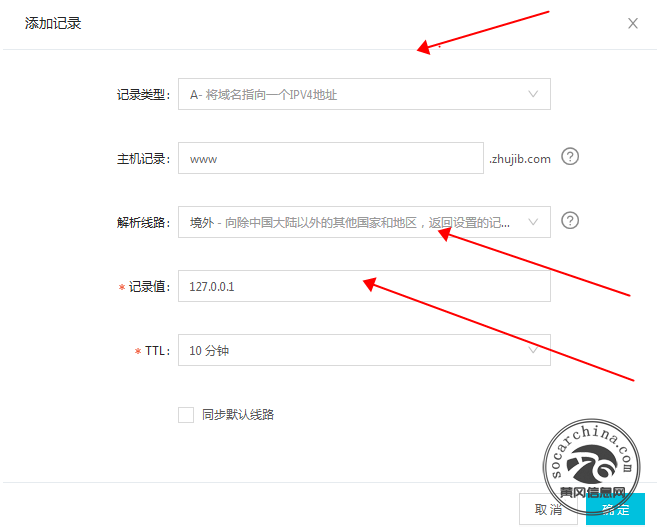
以阿里云DNS解析为例:
设置A记录类型
解析线路:境外
记录值:127.0.0.1
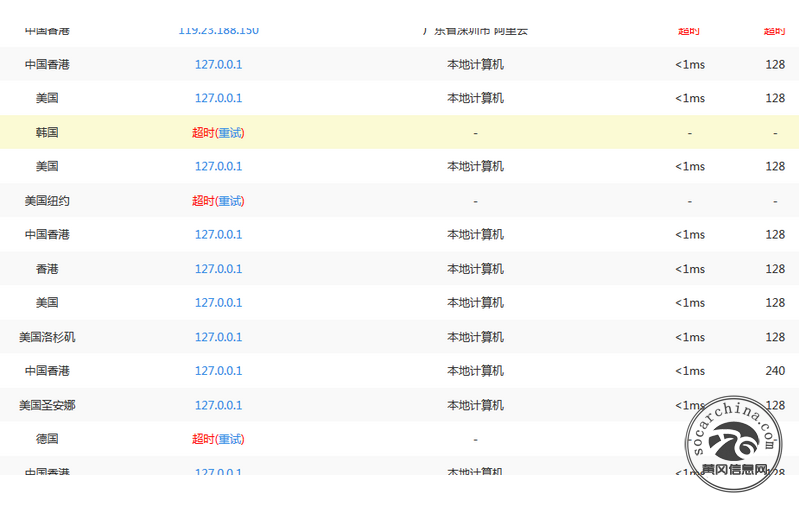
设置后等30分钟后我们再用ping工具测试下境外解析,就会发现所有的海外线路都会解析至127.0.0.1这个IP上,为什么是127.0.0.1呢?因为这个是本地IP,如果有攻击海外肉鸡攻击这个网站,就会自己攻击自己。
结合我写的另外一个方法:
用脚本每周更新国外IP库,利用nginx deny功能直接拒绝这些IP地址。
#添加到crontab

0 0 * * 5 /bin/bash /root/tools/black_nginx.sh
代码内容
#!/bin/bash


rm -f legacy-apnic-latest black_`date +%F`.conf && wget http://ftp.apnic.net/apnic/stats/apnic/legacy-apnic-latest

awk -F '|' '{if(NR>2)printf("%s %s/%d%s\n","deny",$4,24,";")}' legacy-apnic-latest > black_`date +%F`.conf && rm -f /usr/local/nginx/conf/black.conf && ln -s $PWD/black_`date +%F`.conf /usr/local/nginx/conf/black.conf && /etc/init.d/nginx reload
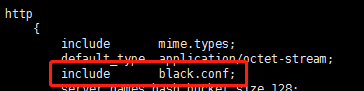
在nginx主配置文件的http段include black.conf; 这样此服务器所有网站都拒绝这些IP
经过学习更新一个方法,使用openresty:
官方下载地址:http://openresty.org/cn/download.html
推荐几个waf模块 https://github.com/unixhot/waf
https://github.com/loveshell/ngx_lua_waf
下载完waf模块,把waf文件夹移动到/usr/local/openresty/nginx/conf/
git clone https://github.com/unixhot/waf.git

cp -a ./waf/waf /usr/local/openresty/nginx/conf/

或者

cd /usr/local/openresty/server/nginx/conf

git clone https://github.com/loveshell/ngx_lua_waf.git

mv ngx_lua_waf waf
在主配置文件夹内引入
vim /usr/local/openresty/nginx/conf/nginx.conf

...

http {

lua_shared_dict limit 10m;

lua_package_path "/usr/local/openresty/nginx/conf/waf/?.lua";

init_by_lua_file "/usr/local/openresty/nginx/conf/waf/init.lua";

access_by_lua_file "/usr/local/openresty/nginx/conf/waf/access.lua";

...

}
启动报错
nginx: [error] lua_load_resty_core failed to load the resty.core module from https://github.com/openresty/lua-resty-core; ensure you are using an OpenResty release from https://openresty.org/en/download.html (rc: 2, reason: module 'resty.core' not found:

    no field package.preload['resty.core']

    no file '/usr/local/openresty/nginx/conf/waf/resty/core.lua'

    no file '/usr/local/openresty/site/lualib/resty/core.so'

    no file '/usr/local/openresty/lualib/resty/core.so'

    no file './resty/core.so'

    no file '/usr/local/lib/lua/5.1/resty/core.so'

    no file '/usr/local/openresty/luajit/lib/lua/5.1/resty/core.so'

    no file '/usr/local/lib/lua/5.1/loadall.so'

    no file '/usr/local/openresty/site/lualib/resty.so'

    no file '/usr/local/openresty/lualib/resty.so'

    no file './resty.so'

    no file '/usr/local/lib/lua/5.1/resty.so'

    no file '/usr/local/openresty/luajit/lib/lua/5.1/resty.so'

    no file '/usr/local/lib/lua/5.1/loadall.so')

或者

failed to load the 'resty.core' module (https://github.com/openresty/lua-resty-core); ensure you are using an OpenResty release from https://openresty.org/en/download.html (reason: module 'resty.core' not found:

no field package.preload['resty.core']

no file '/usr/local/openresty/nginx/conf/waf/resty/core.lua'

no file '/usr/local/openresty/site/lualib/resty/core.so'

no file '/usr/local/openresty/lualib/resty/core.so'

no file './resty/core.so'

no file '/usr/local/lib/lua/5.1/resty/core.so'

no file '/usr/local/openresty/luajit/lib/lua/5.1/resty/core.so'

no file '/usr/local/lib/lua/5.1/loadall.so'

no file '/usr/local/openresty/site/lualib/resty.so'

no file '/usr/local/openresty/lualib/resty.so'

no file './resty.so'

no file '/usr/local/lib/lua/5.1/resty.so'

no file '/usr/local/openresty/luajit/lib/lua/5.1/resty.so'

no file '/usr/local/lib/lua/5.1/loadall.so') in /usr/local/openresty/nginx/conf/nginx.conf:130
解决办法
ln -s /usr/local/openresty/server/lualib /usr/local/lib/lua

ln -s /usr/local/openresty/server/lualib/resty /usr/local/openresty/server/nginx/conf/waf/resty
https://www.cnblogs.com/cheyunhua/p/13395745.html
https://www.jianshu.com/p/bffbd9bc4c53
nginx拒绝国外IP访问的更多相关文章
- Nginx 拒绝指定IP访问
来源 : http://www.ttlsa.com/nginx/nginx-deny-ip-access/ 闲来无事,登陆服务器,发现有个IP不断的猜测路径.试图往服务器上传文件(木马).于是查看 ...
- nginx 拒绝本地ip访问
server { listen default_server; server_name _; server_name localhost; ; }
- 【转载】 禁止国外IP访问你的网站
在网站的运维过程中,我们通过网站记录的IP列表记录有时候会发现很多国外的IP的访问,如美国的IP等,而很多的服务器攻击行为的发起点很有可能在国外,此时为了服务器安全的考虑,我们可以考虑禁止国外IP访问 ...
- 使用 Nginx 阻止恶意 IP 访问
找到具有明显特征的访问记录,比如: /Dec/::: +] "-" "Ouija_x.86/2.0" "-" 也许是某个开源框架的漏洞,执行 ...
- nginx 禁止某IP访问
首先建立下面的配置文件放在nginx的conf目录下面,命名为blocksip.conf: deny 95.105.25.181; 保存一下. 在nginx的配置文件nginx.conf中加入:inc ...
- Nginx禁止使用ip访问,只允许使用域名访问
Nginx虚拟主机配置,vhosts下面有很多域名的配置: [root@external-lb01 vhosts]# pwd/data/nginx/conf/vhosts [root@external ...
- Nginx禁止使用IP访问
在nginx的访问日志中,会出现只显示IP,而不出现域名的情况,在经过尝试之后,是因为没有设置禁止IP访问导致的. 下面就是在配置文件中设置禁止IP访问,来实现日志文件中$host显示域名. vim ...
- Nginx 如何限定IP访问
在nginx.conf中的server限制段中.deny IP.表示需要限制该IP不可访问.allow IP表示权该IP可以访问. 如上图.表示阻止192.168.1.122的IP的访问.那当然也可以 ...
- nginx限制单个IP访问配置
最近公司做了一个砸金蛋的活动,经过几天的发酵宣传后,每天以几万的的用户数在增长,后面才发现原来有人专门为此开发了一个全自动注册的软件 一时间网站被刷得打开异常缓慢,查看日志发现大部分都是用软件在刷,于 ...
随机推荐
- 输出2到n之间的全部素数
本题要求输出2到n之间的全部素数,每行输出10个.素数就是只能被1和自身整除的正整数.注意:1不是素数,2是素数. 输入格式: 输入在一行中给出一个长整型范围内的整数. 输出格式: 输出素数,每个数占 ...
- RHCSA 第七天
1.创建文件,并赋予权限611(两种方式,一种guoa,一种nnn) 2.创建目录,并赋予权限755(两种方式,一种guoa,一种nnn) 3.创建文件,并将文件的属主和属组修改其他用户 4.设置su ...
- 《剑指offer》面试题52. 两个链表的第一个公共节点
问题描述 输入两个链表,找出它们的第一个公共节点. 如下面的两个链表: 在节点 c1 开始相交. 示例 1: 输入:intersectVal = 8, listA = [4,1,8,4,5], lis ...
- 【刷题-LeetCode】207. Course Schedule
Course Schedule There are a total of numCourses courses you have to take, labeled from 0 to numCours ...
- 一、neo4j中文文档-入门指南
目录 neo4j中文文档-入门指南 Neo4j v4.4 neo4j **Cypher ** 开始使用 Neo4j 1. 安装 Neo4j 2. 文档 图数据库概念 1. 示例图 2.节点 3. 节点 ...
- gin框架简介
介绍 Gin是一个golang的微框架,封装比较优雅,API友好,源码注释比较明确,具有快速灵活,容错方便等特点 对于golang而言,web框架的依赖要远比Python,Java之类的要小.自身的n ...
- python第三方模块详细教程(紧急情况宝典)
目录 一:第三方模块 第三方模块:并不是python自带的 需要基于网络下载! 使用下载第三方模块 需要将python pip添加到环境变量 1.验证pip路径添加成功 2.pycharm添加第三方模 ...
- IDEA导入建立图标类型的包失败
开发安卓app时当我导入下面的包时,显示包名变红,并且包不可用,这可能与你建立的项目类型有关. MPAndroidChart包是建立图标类型的包,需要自己下载并添加进libs目录 解决方案是在libs ...
- 使用Canny+hough实现钱币检测
目录 Canny边缘提取算法实现 霍夫变换实现 参考 这个是北京邮电大学<计算机视觉>的一门作业: Canny边缘提取算法实现 首先定义一个Canny类 其init函数是: class C ...
- AWS SAA_C01 考试分享。
Saa-c01 经验分享! 序言1.介绍自己的情况,我是一个做后台开发的初级java程序员.还是处于在写业务逻辑的阶段,我对aws可谓是啥都不懂,纯种的小白,完全是从0基础开始学习的.希望分享一些我的 ...