
C#特性(属性)Attribute
先明确一个概念:
元数据。.NET中元数据是指程序集中的命名空间、类、方法、属性等信息。这些信息是可以通过Reflection读取出来的。
再来看个例子:
#define BUG

//#define NOBUG

using System;

using System.Diagnostics;

namespace AttributeExample

{

    public static class AttributeTest

    {

        [Conditional("BUG")]

        public static void OutputDebug(string msg)

        {

            Console.WriteLine(msg + " : bug");

        }

        [Conditional("NOBUG")]

        public static void OutputMessage(string msg)

        {

            Console.WriteLine(msg + " : no bug");

        }

    }

    class Program

    {

        static void Main(string[] args)

        {

            AttributeTest.OutputDebug("Function");

            AttributeTest.OutputMessage("Function");

            Console.Read();

        }

    }

}
运行结果:

将#define BUG注释掉,#define NOBUG的注释取消,重新运行的结果如下:
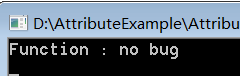
那么可以理解为,上述代码中的[Conditional()]起到了条件的作用。这就是一种特性。
特性是用于在运行时传递程序中各种元素(类、方法、结构、枚举等)的行为信息的声明性标签。可以通过使用特性向程序中添加声明性信息。这些信息添加到了元数据中。.NET框架中的特性包括Common Attributes和Custom Attributes。其中Common Attributes包括Global Attributes, Obsolete Attributes, Conditional Attributes, Caller Info Attributes。
Common Attributes
- Global Attributes 全局特性,应用于整个程序集。置于using后代码最上端。全局特性提供一个程序集的信息,分为三种类别:
- Assembly identity attributes 程序集标识符特性。name, version, and culture这三个特性用于确定一个程序集的标识符。可以查看一下项目中Properties下面的AssemblyInfo.cs文件。
- Informational attributes 信息特性,提供一些与公司或产品相关的信息,包括AssemblyProductAttribute,AssemblyTrademarkAttribute等。
- Assembly manifest attributes 程序集清单特性。包括title, description, default alias, and configuration。
- Conditional Attributes 标记了一个条件方法,其执行依赖于指定的预处理标识符(#define),实例就是上面那个。条件特性可以同时使用多个。比如[Conditional("A"), Conditional("B")]。
- Obsolete Attributes 标记了不应被使用的程序实体。它可以让您通知编译器丢弃某个特定的目标元素。其语法表示为:[Obsolete(message)]、[Obsolete(message, iserror)]
其中,message是一个string,描述项目为什么过时以及该替代使用什么;iserror是一个bool,如果为true,编译器应该把项目的使用当做一个错误,默认值是false,此时编译器生成一个警告。比如下面的例子:
using System;

using System.Diagnostics;

namespace AttributeExample

{

    class Program

    {

        [Obsolete("Don't use OldMethod, use NewMethod instead", true)]

        static void OldMethod()

        {

            Console.WriteLine("It is the old method");

        }

        static void NewMethod()

        {

            Console.WriteLine("It is the new method");

        }

        static void Main(string[] args)

        {

            OldMethod();

            Console.Read();

        }

    }

}
这时程序无法编译,显示如下的错误:

- Caller Info Attributes 通过使用该特性,可以获取调用某个方法的调用者的信息。比如代码的文件路径、代码的行等。比如下面所示的代码。
using System;

using System.Runtime.CompilerServices;

namespace AttributeExample

{

    class Program

    {

        public static void DoSomething()

        {

            TraceMessage("Something happened.");

        }

        public static void TraceMessage(string message,

            [CallerMemberName] string memberName = "",

            [CallerFilePath] string sourceFilePath = "",

            [CallerLineNumber] int sourceLineNumber = 0)

        {

            Console.WriteLine("message: " + message);

            Console.WriteLine("member name: " + memberName);

            Console.WriteLine("source file path: " + sourceFilePath);

            Console.WriteLine("source line number: " + sourceLineNumber);

        }

        static void Main(string[] args)

        {

            DoSomething();

            Console.Read();

        }

    }

}
运行结果如图所示:

Custom Attributes
.NET框架允许创建自定义特性,用于存储声明性的信息,且可在运行时被检索。该信息根据设计标准和应用程序需要,可与任务目标元素相关。创建并使用自定义特性包含四个步骤:
1. 声明自定义特性
一个新的自定义特性应派生自System.Attribute类,比如:
   // 声明名为FirstAttribute的自定义特性
  [AttributeUsage(AttributeTargets.Class, Inherited =false)]

    class FirstAttribute : Attribute { }


  // 声明名为SecondAttribute的自定义特性

    [AttributeUsage(AttributeTargets.Class)]

    class SecondAttribute : Attribute { }


  // 声明名为ThirdAttribute的自定义特性

    [AttributeUsage(AttributeTargets.Class, AllowMultiple =true)]

    class ThirdAttribute : Attribute { }
又比如:
   // 声明名为CustomAttribute的自定义特性
  [AttributeUsage(AttributeTargets.Class|

        AttributeTargets.Constructor|

        AttributeTargets.Field|

        AttributeTargets.Method|

        AttributeTargets.Property,

        AllowMultiple =true)]

    public class CustomAttributes : System.Attribute{}
2.构建自定义特性
上面已经声明了一个名为CustomAttribute的自定义特性,现在构建这个特性。该特性将存储调试程序获得的信息,包括:bug的代码编号、辨认该bug的开发人员名字、最后一次审查该代码的日期以及一个存储了开发人员标记的字符串消息。
CustomAttribute类将带有三个用于存储前三个信息的私有属性和一个用于存储消息的公有属性。因此bug编号、开发人员名字和审查日期将是CustomAttribute类的必需的定位(positional)参数,消息将是一个可选的命名(named)参数。每个特性必须至少有一个构造函数。必需的定位参数应通过构造函数传递,如下面的代码所示:
    [AttributeUsage(AttributeTargets.Class|

        AttributeTargets.Constructor|

        AttributeTargets.Field|

        AttributeTargets.Method|

        AttributeTargets.Property,

        AllowMultiple =true)]

    public class CustomAttributes : System.Attribute

    {

        public int BugNo { get; }

        public string Developer { get; }

        public string LastReview { get; }

        public string Message { get; set; }

        public CustomAttributes(int BugNo, string Developer, string LastReview)

        {

            this.BugNo = BugNo;

            this.Developer = Developer;

            this.LastReview = LastReview;

        }

    }
3.在目标程序元素上应用自定义特性
通过把特性放置在紧接着它的目标之前,来应用该特性:
    [CustomAttributes(45,"Zara Ali","12/8/2012", Message ="Return type mismatch")]

    [CustomAttributes(49,"Nuha Ali","10/10/2012",Message ="Unused variable")]

    class Rectangle

    {

        protected double length;

        protected double width;

        public Rectangle(double length, double width)

        {

            this.length = length;

            this.width = width;

        }

        [CustomAttributes(55,"Zara Ali","19/10/2012", Message ="Return type mismatch")]

        public double GetArea()

        {

            return length * width;

        }

        [CustomAttributes(56,"Zara Ali", "19/10/2012")]

        public void Display()

        {

            Console.WriteLine("Length: {0}", length);

            Console.WriteLine("Width: {0}", width);

            Console.WriteLine("Area: {0}", GetArea());

        }

    }
4.通过反射访问特性
别忘了使用using System.Reflection;
class ExecuteRectangle

    {

        static void Main(string[] args)

        {

            Rectangle r = new Rectangle(4.5, 7.5);

            r.Display();

            object[] attrs = r.GetType().GetCustomAttributes(false);

            // 遍历Rectangle类的特性

            foreach(Attribute attr in attrs)

            {

                CustomAttributes attribute = (CustomAttributes)attr;

                if(null != attribute)

                {

                    Console.WriteLine("Bug no: {0}", attribute.BugNo);

                    Console.WriteLine("Developor: {0}", attribute.Developer);

                    Console.WriteLine("Last Reviewed: {0}", attribute.LastReview);

                    Console.WriteLine("Remarks: {0}", attribute.Message);

                }

            }

            // 遍历方法特性

            object[] methods = r.GetType().GetMethods();

            foreach(MethodInfo method in methods)

            {

                foreach(object attribute in method.GetCustomAttributes(true))

                {

                    CustomAttributes attr = attribute as CustomAttributes;

                    if(null != attr)

                    {

                        Console.WriteLine("Bug no: {0}, for Method: {1}", attr.BugNo, method.Name);

                        Console.WriteLine("Developer: {0}", attr.Developer);

                        Console.WriteLine("Last Reviewed: {0}", attr.LastReview);

                        Console.WriteLine("Remarks: {0}", attr.Message);

                    }

                }

            }

            Console.Read();

        }

    }
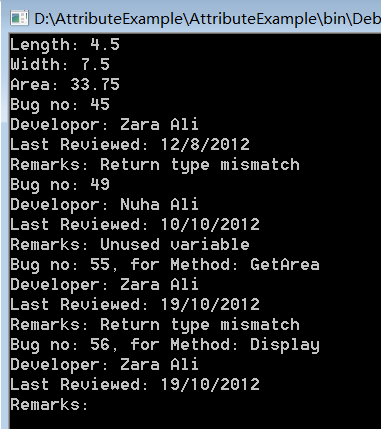
运行结果如图所示:
参考文献:
1.https://www.runoob.com/csharp/csharp-attribute.html
2.https://www.runoob.com/csharp/csharp-reflection.html
3.https://docs.microsoft.com/en-us/dotnet/csharp/programming-guide/concepts/attributes/
4.https://blog.csdn.net/xiaouncle/article/details/70216951
C#特性(属性)Attribute的更多相关文章
- JavaScript特性(attribute)、属性(property)和样式(style)
最近在研读一本巨著<JavaScript忍者秘籍>,里面有一篇文章提到了这3个概念. 书中的源码可以在此下载.我将源码放到了线上,如果不想下载,可以直接访问在线网址,修改页面名就能访问到相 ...
- js便签笔记(2)——DOM元素的特性(Attribute)和属性(Property)
1.介绍: 上篇js便签笔记http://www.cnblogs.com/wangfupeng1988/p/3626300.html最后提到了dom元素的Attribute和Property,本文简单 ...
- ASP.NET Web API 2.0新特性:Attribute Routing1
ASP.NET Web API 2.0新特性:Attribute Routing[上篇] 对于一个针对ASP.NET Web API的调用请求来说,请求的URL和对应的HTTP方法的组合最终决定了目标 ...
- Unity3D编辑器扩展(五)——常用特性(Attribute)以及Selection类
前面写了四篇关于编辑器的: Unity3D编辑器扩展(一)——定义自己的菜单按钮 Unity3D编辑器扩展(二)——定义自己的窗口 Unity3D编辑器扩展(三)——使用GUI绘制窗口 Unity3D ...
- 特性(attribute)
一.什么是特性? 特性(attribute)是被指定给某一声明的一则附加的声明性信息. 在C#中,有一个小的预定义特性集合.在学习如何建立我们自己的定制特性(custom attributes)之前, ...
- C#提高--------------获取方法返回值的自定义特性(Attribute)
.NET(C#):获取方法返回值的自定义特性(Attribute) 转载 2013年05月08日 10:54:42 1456 来自:http://www.cnblogs.com/mgen/archiv ...
- C# 特性(Attribute)
C# 特性(Attribute) 特性(Attribute)是用于在运行时传递程序中各种元素(比如类.方法.结构.枚举.组件等)的行为信息的声明性标签.您可以通过使用特性向程序添加声明性信息.一个声明 ...
- NET 特性(Attribute)
NET 特性(Attribute) 转自 博客园(Fish) 特性(Attribute):是用于在运行时传递程序中各种元素(比如类.方法.结构.枚举.组件等)的行为信息的声明性标签. 您可以通过使用特 ...
- 【Unity|C#】基础篇(13)——特性(Attribute)
[学习资料] <C#图解教程>(第24章):https://www.cnblogs.com/moonache/p/7687551.html 电子书下载:https://pan.baidu. ...
- 特性节点Attribute
深入理解DOM节点类型第六篇——特性节点Attribute document.getElementById('b_results').attributes[0].textContent documen ...
随机推荐
- 网络流 HLPP 板子
#include<bits/stdc++.h> using namespace std; const int MM=4e5+5,inf=0x3f3f3f3f; int n,m,s,t,to ...
- jstack定位java程序CPU使用高问题
top top -Hp 进程id printf "0x%x\n" 2769746 jstack 进程id [root ~]$ printf "0x%x\n" 2 ...
- QPS、TPS、并发用户数、吞吐量
1.QPS QPS Queries Per Second 是每秒查询率 ,是一台服务器 每秒能够相应的查询次数,是对一个特定的查询服务器在规定时间内 所处理流量多少的衡量标准, 即每秒的响应请求数,也 ...
- K8s QoS Pod资源服务质量控制
Kubernetes 中如果一个 Node 节点上的 Pod 占用资源过多并且不断飙升导致 Node 节点资源不足,可能会导致为了保证节点可用,将容器被杀掉.在遇见这种情况时候,我们希望先杀掉那些不太 ...
- python if-elif-else 判断
#!/usr/bin/python #coding=utf-8 #好好学习,天天向上 age=12 if age<4: price=0 elif age<18: price=40 elif ...
- a-b转换A-B
- list概述
1.list概述 list 是一种双向链表.list 的设计更加复杂一点,好处是每次插入或删除一个元素,就配置或释放一个元素,list 对于空间的运用有绝对的精准,一点也不浪费.而且对于任何位置的元素 ...
- C++的set重载运算符
转载: https://www.cnblogs.com/zhihaospace/p/12843802.html set 容器模版需要3个泛型参数,如下: template<class T, cl ...
- ApacheCN Python 译文集(二)20211110 更新
Python 应用计算思维 零.序言 第一部分:计算思维导论 一.计算机科学基础 二.计算思维要素 三.理解算法和算法思维 四.理解逻辑推理 五.探究性问题分析 六.设计解决方案和解决流程 七.识别解 ...
- react之withRouter的作用
withRouter的作用:把不是通过路由切换过来的组件,将react-router的history.location和match三个对象传入到props对象上: 默认情况下必须是经过路由匹配渲染的组 ...