
C#硬件访问(摄像头、麦克风)
#需要引用:AForge类库、Microsoft.DirectX
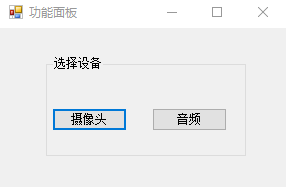
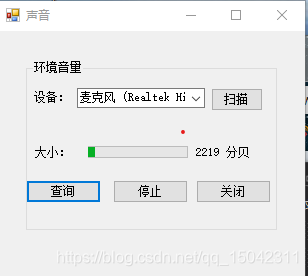
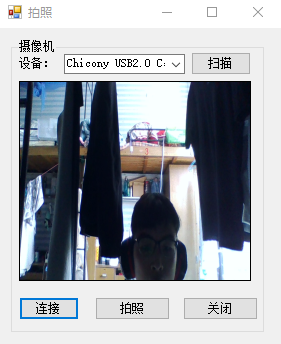
using System;
using System.Windows.Forms;
namespace CameraTest
{
public partial class Form1 : Form
{
public Form1()
{
InitializeComponent();
}
private void button5_Click(object sender, EventArgs e)
{
Form2 form = new Form2();
form.Text = "拍照";
form.Show();
}
private void button1_Click(object sender, EventArgs e)
{
Form3 form = new Form3();
form.Text = "声音";
form.Show();
}
}
}
using AForge.Video.DirectShow;
using System;
using System.Drawing;
using System.Windows.Forms;
namespace CameraTest
{
public partial class Form2 : Form
{
private FilterInfoCollection videoDevices;
public Form2()
{
InitializeComponent();
}
private void videoSourcePlayer()
{
VideoCaptureDevice videoCapture = new VideoCaptureDevice(videoDevices[comboBox1.SelectedIndex].MonikerString);
#pragma warning disable CS0612 // 类型或成员已过时
videoCapture.DesiredFrameSize = new Size(320, 240);
#pragma warning restore CS0612 // 类型或成员已过时
#pragma warning disable CS0612 // 类型或成员已过时
videoCapture.DesiredFrameRate = 1;
#pragma warning restore CS0612 // 类型或成员已过时
videoPlayer1.VideoSource = videoCapture;
videoPlayer1.Start();
}
private void button4_Click_1(object sender, EventArgs e)
{
try
{
//枚举视频输入设备
videoDevices = new FilterInfoCollection(FilterCategory.VideoInputDevice);
if (videoDevices.Count == 0)
{
throw new ApplicationException();
}
foreach (FilterInfo device in videoDevices)
{
comboBox1.Items.Add(device.Name);
}
comboBox1.SelectedIndex = 0;
}
catch
{
comboBox1.Items.Add("没有视频设备!");
videoDevices = null;
}
}
private void button1_Click_1(object sender, EventArgs e)
{
videoSourcePlayer();
}
private void button3_Click_1(object sender, EventArgs e)
{
//拍照
if (videoPlayer1 == null)
return;
Bitmap bitmap = videoPlayer1.GetCurrentVideoFrame();
saveFileDialog1.Filter = "Jpg 图片|*.jpg|Bmp 图片|*.bmp|Gif 图片|*.gif|Png 图片|*.png|Wmf 图片|*.wmf";
saveFileDialog1.FilterIndex = 0;
saveFileDialog1.RestoreDirectory = true;//保存对话框是否记忆上次打开的目录
saveFileDialog1.CheckPathExists = true;//检查目录
saveFileDialog1.FileName = System.DateTime.Now.ToString("yyyyMMddHHmmss") + "-"; ;//设置默认文件名
if (saveFileDialog1.ShowDialog() == DialogResult.OK)
{
bitmap.Save(saveFileDialog1.FileName, System.Drawing.Imaging.ImageFormat.Jpeg);// image为要保存的图片
MessageBox.Show(this, "图片保存成功!", "信息提示");
}
bitmap.Dispose();
}
private void button2_Click_1(object sender, EventArgs e)
{
videoPlayer1.SignalToStop();
videoPlayer1.WaitForStop();
this.Close();
}
private void Form2_Load(object sender, EventArgs e)
{}
}
}
using Microsoft.DirectX.DirectSound;
using System;
using System.Threading;
using System.Windows.Forms;
namespace CameraTest
{
public partial class Form3 : Form
{
private const int SAMPLES = 8;
private static int deviceIndex = -1;
private CaptureBuffer buffer=null;
private static Capture cap = null;
private string deviceName = "没有检测到音频输入设备";
///
// *****更改处
///
private static AutoCompleteStringCollection deviceNames;
private Thread liveVolumeThread;
private int sampleDelay = 100;
private int frameDelay = 10;
private static int[] SAMPLE_FORMAT_ARRAY = { SAMPLES, 2, 1 };
public Form3()
{
InitializeComponent();
progressBar1.Maximum = Int16.MaxValue + 1;
CheckForIllegalCrossThreadCalls = false;
}
/// <summary>
/// 加载麦克风列表
/// </summary>
public void Stop()
{
if (liveVolumeThread != null)
{
liveVolumeThread.Abort();
liveVolumeThread.Join();
liveVolumeThread = null;
}
if (buffer != null)
{
if (buffer.Capturing)
{
buffer.Stop();
}
buffer.Dispose();
buffer = null;
}
}
public void Start()
{
Stop();
if (deviceIndex != -1)
{
// capture 对象 捕获麦克风设备
///
// *****更改处
///
CaptureDevicesCollection audioDevices = new CaptureDevicesCollection();
cap = new Capture(audioDevices[deviceIndex].DriverGuid);
// 创建对 缓冲区信息 的描述
CaptureBufferDescription desc = new CaptureBufferDescription();
WaveFormat wf = new WaveFormat();
wf.BitsPerSample = 16;
wf.SamplesPerSecond = 44100;
wf.Channels = 2;
// 数据的最小的原子单元
wf.BlockAlign = (short)(wf.Channels * wf.BitsPerSample / 8);
// 单位采样点的字节数
wf.AverageBytesPerSecond = wf.BlockAlign * wf.SamplesPerSecond;
// 未经压缩的PCM
wf.FormatTag = WaveFormatTag.Pcm;
desc.Format = wf;
desc.BufferBytes = SAMPLES * wf.BlockAlign;
// 创建 capturebuffer对象
buffer = new CaptureBuffer(desc, cap);
// 捕捉数据至缓存
buffer.Start(true);
liveVolumeThread = new Thread(new ThreadStart(updateProgress));
liveVolumeThread.Priority = ThreadPriority.Lowest;
liveVolumeThread.Start();
}
}
private void updateProgress()
{
while (true)
{
int tempFrameDelay = frameDelay;
int tempSampleDelay = sampleDelay;
///
// *****更改处
///
label1.Text = "0";
Array samples = buffer.Read(0, typeof(Int16), LockFlag.FromWriteCursor, SAMPLE_FORMAT_ARRAY);
int goal = 0;
for (int i = 0; i < SAMPLES; i++)
{
goal += (Int16)samples.GetValue(i, 0, 0);
}
goal = (int)Math.Abs(goal / SAMPLES);
double range = goal - progressBar1.Value;
double exactValue = progressBar1.Value;
double stepSize = range / tempSampleDelay * tempFrameDelay;
if (Math.Abs(stepSize) < .01)
{
stepSize = Math.Sign(range) * .01;
}
double absStepSize = Math.Abs(stepSize);
if ((progressBar1.Value == goal))
{
Thread.Sleep(tempSampleDelay);
}
else
{
do
{
if (progressBar1.Value != goal)
{
if (absStepSize < Math.Abs(goal - progressBar1.Value))
{
exactValue += stepSize;
progressBar1.Value = (int)Math.Round(exactValue);
///
// *****更改处
///
if (int.Parse(label1.Text) > (int)Math.Round(exactValue)+100|| int.Parse(label1.Text)< (int)Math.Round(exactValue) - 100)
{
label1.Text = Math.Round(exactValue).ToString();
Application.DoEvents();
}
}
else
{
progressBar1.Value = goal;
}
}
Thread.Sleep(tempFrameDelay);
} while ((progressBar1.Value != goal));
}
}
}
private void button2_Click(object sender, EventArgs e)
{
Stop();
}
private void button3_Click(object sender, EventArgs e)
{
CaptureDevicesCollection audioDevices = new CaptureDevicesCollection();
deviceNames = new AutoCompleteStringCollection();
for (int i = 0; i < audioDevices.Count; i++)
{
deviceNames.Add(audioDevices[i].Description);
comboBox1.Items.Add(deviceNames[i].ToString());
comboBox1.SelectedIndex = 0;
}
if (deviceNames.Count < 0)
{
comboBox1.Items.Clear();
comboBox1.Items.Add(deviceName);
}
}
private void button1_Click(object sender, EventArgs e)
{
deviceIndex = comboBox1.SelectedIndex;
Start();
}
private void button4_Click(object sender, EventArgs e)
{
this.Close();
}
private void Form3_Load(object sender, EventArgs e)
{ }
}
}
C#硬件访问(摄像头、麦克风)的更多相关文章
- 升级iOS10之后调用摄像头/麦克风等硬件程序崩溃闪退的问题
在升级到iOS10之后, 开发过程中难免会遇到很多的坑, 下面是一些常见的坑, 我做了一些整理, 希望对大家开发有帮助: &1. 调用视频,摄像头, 麦克风,等硬件程序崩溃闪退的问题: 要注意 ...
- 1┃音视频直播系统之浏览器中通过WebRTC访问摄像头
一.WebRTC的由来 对于前端开发小伙伴而言,如果用 JavaScript 做音视频处理 在以前是不可想象的,因为首先就要考虑浏览器的性能是否跟得上音视频的采集 但是 Google 作为国际顶尖科技 ...
- Android驱动入门-LED--HAL硬件访问服务层②
硬件平台: FriendlyARM Tiny4412 Cortex-A9 操作系统: UBUNTU 14.04 LTS 时间:2016-09-21 16:58:56 为了避免访问冲突,则创建了硬件访 ...
- 2.Android硬件访问服务编写系统代码【转】
本文转载自:https://blog.csdn.net/qq_33443989/article/details/76696772 版权声明:本文为博主(Tower)自学笔记,欢迎转载! :-) ...
- LED硬件访问服务(2)——JNI/HAL
一.系统编程 1.SystemServer.java类中提供了main()方法,说明它是以一个进程的方式存在的,启动后直接执行其run() 2.注册服务ServiceManager.addServic ...
- 硬件访问服务学习笔记_WDS
1.Android驱动框架App1 App2 App3 App4-------------------硬件访问服务-------------------JNI-------------------C库 ...
- EasyDarwin+ffmpeg进行PC(摄像头+麦克风)流媒体直播服务
上一回我们描述了用EasyDarwin+ffmpeg进行摄像机直播的过程:ffmpeg推送,EasyDarwin转发,vlc播放 实现整个RTSP直播 我们再进行一个方面的描述,那就是pc摄像头+麦克 ...
- 6.1、Android硬件访问服务之框架
1.通过前面led点亮的例子,其流程如下 Android app(java)(通过loadLibrary)——>C library(C库做如下事情)——>1.JNI_Onload 2.jn ...
- Android系统编程入门系列之硬件交互——多媒体麦克风
在多媒体摄像头及相关硬件文章中,对摄像头的使用方式需要区分应用程序的目标版本以使用不同的代码流程,而与之相比,麦克风硬件的使用就简单多了. 麦克风及相关硬件 麦克风硬件在移动设备上作为音频的采集设备, ...
随机推荐
- YAOI Round #5 题解
前言 比赛链接: Div.1 : http://47.110.12.131:9016/contest/13 Div.2 : http://47.110.12.131:9016/contest/12 D ...
- TWAIN.CPP
include "twaincpp.h" #include <QtGlobal> #include <QDateTime> #include <QSt ...
- 浅谈MVC设计模式
摘要:MVC即Model.View.Controller即模型.视图.控制器,它是用一种业务逻辑.数据与界面显示分离的方法来组织代码,将众多的业务逻辑聚集到一个部件里面,在需要改进和个性化定制界面及用 ...
- nginx+waf防火墙
1.官网下载nginx源码包(nginx-1.20.0.tar.gz) 新建nginx安装目录mkdir -p /opt/nginx新增nginx运行用户useradd -s /sbin/nol ...
- deepin修改数据源升级到deepin15.11桌面版
参考:https://blog.csdn.net/baidu_41751590/article/details/89064220 1,我修改数据源地址: 换成上海交通大学源地址: http://ftp ...
- Apache Unomi 远程表达式代码执行漏洞(CVE-2020-13942)
影响版本: Apache Unomi < 1.5.2
- Spring Messaging 远程命令执行漏洞(CVE-2018-1270)
影响版本 Spring Framework 5.0 to 5.0.4 Spring Framework 4.3 to 4.3.14 参考 https://www.it610.com/article/1 ...
- 当鼠标移入div上时,div的背景色在4s之内渐变为灰色,同时在5s之内顺时针旋转45度,且尺寸缩小一半;当鼠标移走时,再渐变恢复初始样式
<style> #d1{ width:200px; height:200px; border:1px solid #000; transition:background 4s linear ...
- 02.反射Reflection
1. 基本了解 1.1 反射概述 文字说明 审查元数据并收集关于它的类型信息的能力称为反射,其中元数据(编译以后的最基本数据单元)就是一大堆的表,当编译程序集或者模块时,编译器会创建一个类定义表,一个 ...
- ASPX页面传参中文乱码处理
前端 function() { var msg='这是一段中文参数'; window.location.href="New.aspx?name="+escape(msg); } 后 ...