
C#制作网盘搜索工具(简单的爬虫)
最近学习C#编程,在网上发现一篇winform下制作百度网盘搜索器的文章,故而下载源码学习一二。无奈原博所用的网址失效,故而自己改写了网址和相关源代码,也进行了实现。因为初学,接触的知识较多,为免忘记,进行整理复习。
1.知识点:
思路:主要是利用HttpWebRequest,HttpWebResponse进行http模拟请求,然后利用HtmlAgilityPack+XPath语法对html dom进行元素获取,将截取到的相关内容在datagridview中展示,最后利用process.start()方法进行点击访问。
2.具体实现:
2.1关于请求头的获取:
本例子使用网址为:http://www.pansoso.com/
分析上述网址的请求头进行模拟:
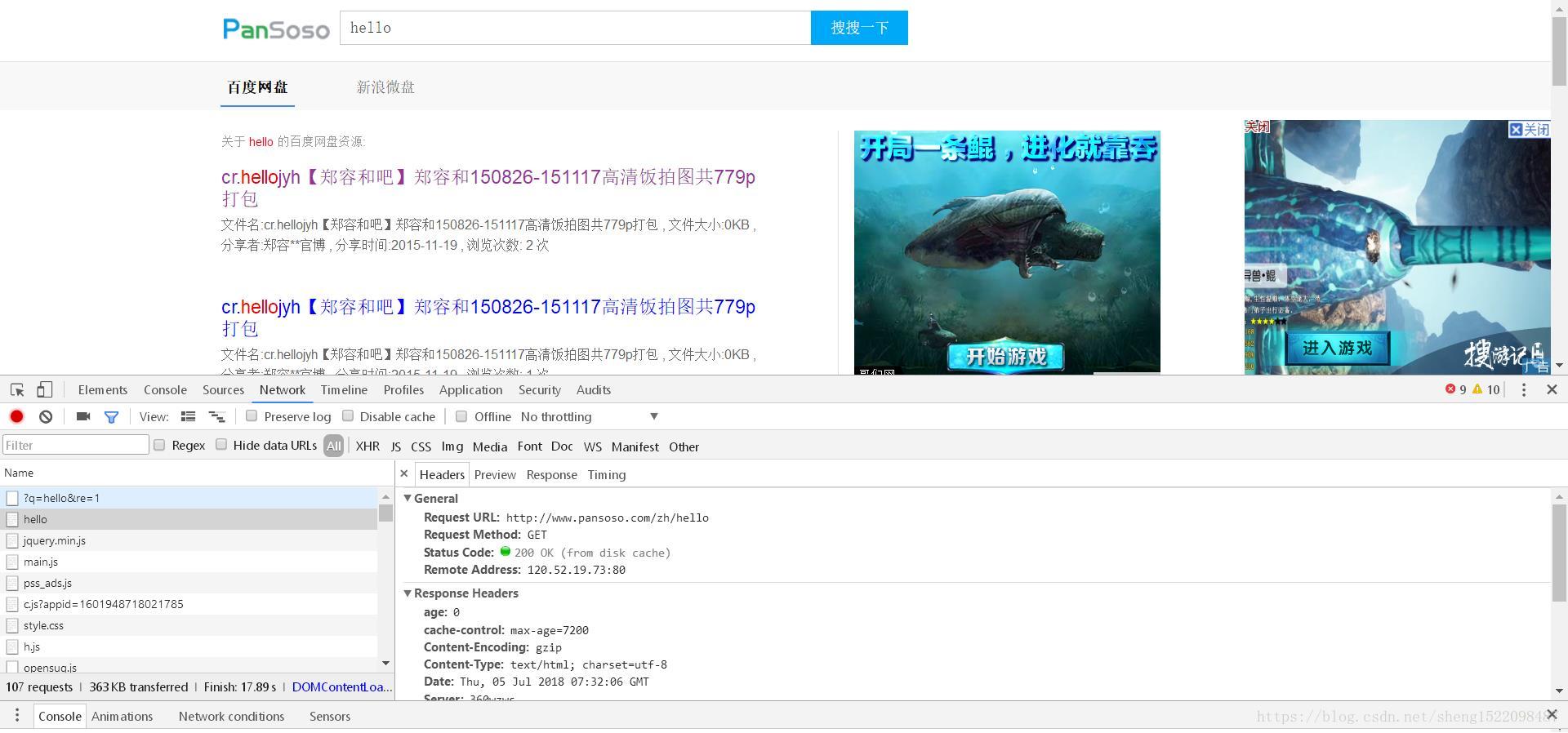
查看具体请求头信息:
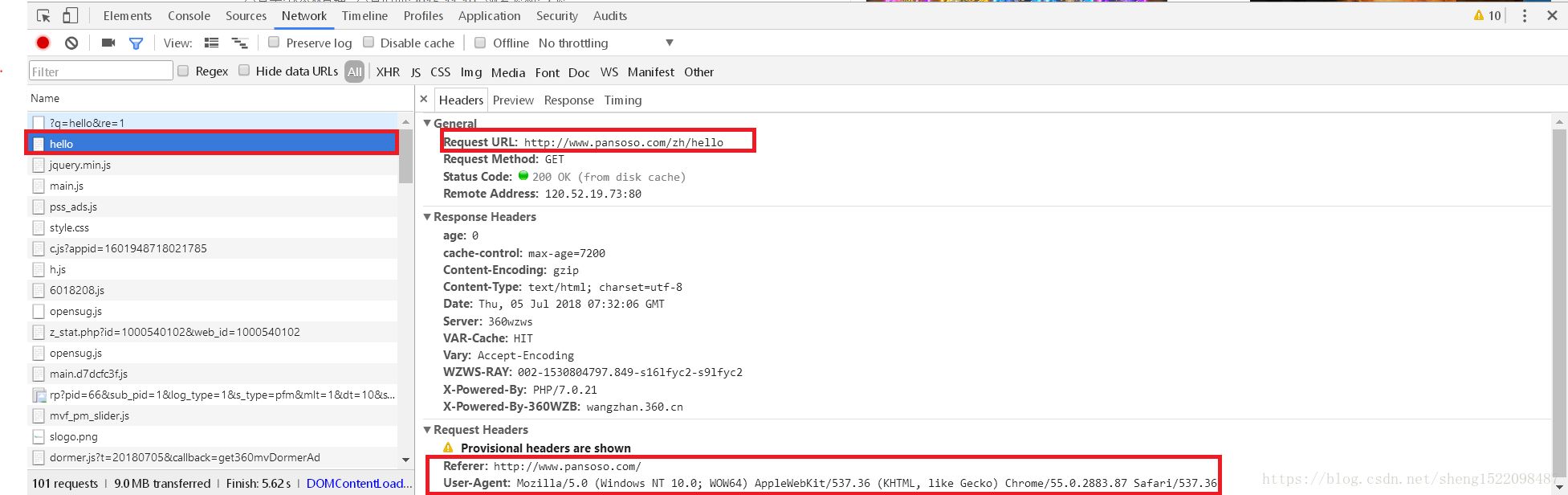
根据获取的request url分析出其请求地址的规律为:所搜索的关键字:hello直接利用get方法添加到了url的最后,其中页数规律为hello_1,hello_2。。。(每页十条记录)
2.2关于结果的获取:
结果的获取,直接利用对response网页的分析截取关键信息即可。
3.代码实现:
using System;

using System.Collections.Generic;

using System.IO;

using System.Linq;

using System.Net;

using System.Text;

namespace 百度网盘资源搜索

{

class HttpHelper

{

    static readonly string urlTemplate = "http://www.pansoso.com/zh/{0}";

    public static string Requset(string key)

    {

        string url = string.Format(urlTemplate, key);

        //Console.WriteLine(url);

        HttpWebRequest httpRequest = (HttpWebRequest)WebRequest.Create(url);

        httpRequest.Accept = "text/html,application/xhtml+xml,application/xml;q=0.9,image/webp,image/apng,*/*;q=0.8";

        httpRequest.UserAgent = "Mozilla/5.0 (Windows NT 10.0; Win64; x64) AppleWebKit/537.36 (KHTML, like Gecko) Chrome/66.0.3359.181 Safari/537.36";

        httpRequest.Host = "www.pansoso.com";

        httpRequest.Referer = "http://www.pansoso.com/zh/" + Uri.EscapeUriString(key);

        try

        {

            HttpWebResponse httpResponse = (HttpWebResponse)httpRequest.GetResponse();

            Stream s = httpResponse.GetResponseStream();

            StreamReader sr = new StreamReader(s);

            string jsonString = sr.ReadToEnd();

            //Console.WriteLine(jsonString);

            //string jsonProcessed = null;

            //if ((jsonProcessed = JsonPreProcessing(jsonString)) != null)

            //{

             //  SearchResult searchResult = UtilityClass.GetObject<SearchResult>(jsonProcessed);

            //    return searchResult;

            //}

            return jsonString;

        }

        catch

        {

            return null;

        }

    }

    public static SearchResult dodata(string str)

    {

        SearchResult searchResult = UtilityClass.GetObject<SearchResult>(str);

        return searchResult;

    }

        //if (doc.DocumentNode.SelectNodes("//comment()") != null)

        //{

        //    foreach (var commet in doc.DocumentNode.SelectNodes("//comment"))

        //    {

        //        commet.Remove();

        //    }

        //}

    public static string JsonPreProcessing(string jsonString)

    {

        int startIndex = jsonString.IndexOf("(");

        if (startIndex > 0)

        {

            string json = jsonString.Substring(startIndex + 1);

            return "{\"resources\":" + json.Remove(json.Length - 3) + "}";

        }

        else

        {

            return null;

        }

    }

}

}
Utility.Class
using System;

using System.Collections.Generic;

using System.IO;

//using System.Linq;

using System.Runtime.Serialization.Json;

using System.Text;

namespace 百度网盘资源搜索

{

    class UtilityClass

    {

    public static T GetObject<T>(string json)

    {

        DataContractJsonSerializer serializer = new DataContractJsonSerializer(typeof(T));

        MemoryStream ms = new MemoryStream(Encoding.UTF8.GetBytes(json));

        T obj = (T)serializer.ReadObject(ms);

        return obj;

    }

    }

}
JSontoObject.cs
using System;

using System.Collections.Generic;

using System.Linq;

using System.Text;

namespace 百度网盘资源搜索

{

public class SearchResult

{

    public BDWPResource[] resources { get; set; }

}

public class BDWPResource

{

    public string title { get; set; }

    public string content { get; set; }

    public string unescapedUrl { get; set; }

}

}
using System;
using System.Collections.Generic;
using System.ComponentModel;
using System.Data;
using System.Drawing;
using System.Linq;
using System.Text;
using System.Windows.Forms;
using System.Threading;
using System.Diagnostics;
namespace 百度网盘资源搜索
{//主窗体
public partial class FrmMain : Form
{
bool isSearch = true;
string url = "http://www.pansoso.com";
public FrmMain()
{
InitializeComponent();
}
private void btnSearch_Click(object sender, EventArgs e)
{
string key = this.txtKey.Text;
if (!string.IsNullOrEmpty(key))
{
this.dataGridView1.Rows.Clear();
this.lblResult.Text = "0";
this.pgsBar.Value = 0;
this.btnSearch.Text = "正在搜索";
this.btnSearch.Enabled = false;
this.btnStop.Enabled = true;
Thread thread = new Thread(() =>
{
for (int i = 1; i < 11; i ++)//共取得10页网页数据
{
if (isSearch)
{
gethtml(HttpHelper.Requset(key+"_"+i));
//gethtml(HttpHelper.Requset(key));
//if(textBox1.Text!=null)
//{
// string name=textBox1.Text;
// SearchResult sr= HttpHelper.dodata(name);
// if (sr != null)
// {
// foreach (BDWPResource resource in sr.resources)
// {
// BindResource(resource);
// }
// }
// }
// webBrowser1.DocumentText = HttpHelper.Requset(key);
// Navigate to HTML document string
//webBrowser1.Navigate(HttpHelper.Requset(key));
// SearchResult sr = HttpHelper.Requset(key);
}
else break;
}
//搜索完成
SearchOver();
});
thread.IsBackground = true;
thread.Start();
}
}
public void gethtml(string docs)
{
try
{
HtmlAgilityPack.HtmlDocument doc = new HtmlAgilityPack.HtmlDocument();
doc.LoadHtml(docs);
if (doc.DocumentNode.SelectNodes("//script") != null)
{
foreach (var script in doc.DocumentNode.SelectNodes("//script"))
{
script.Remove();
}
HtmlAgilityPack.HtmlNodeCollection hrefList = doc.DocumentNode.SelectNodes(".//h2/a[@href]");
HtmlAgilityPack.HtmlNodeCollection list2 = doc.DocumentNode.SelectNodes(".//div[@class='des']");
HtmlAgilityPack.HtmlNodeCollection list3 = doc.DocumentNode.SelectNodes(".//h2/a[@href]");
if (hrefList != null && list2 != null && list3 != null)
{
for (int i = 0; i < list2.Count; i++)
{
string url1 = url + list3[i].Attributes["href"].Value;
string json = "title:" + hrefList[i].InnerText + "content:" + list2[i].InnerText + "unescapedUrl:" +"【"+url1+"】" ;
// Process.Start(url1);
SearchOver1(json);
this.Invoke(new Action<string, string, string>((tle, ctt, url3) =>
{
this.dataGridView1.Rows.Add(tle, ctt, url3);
this.lblResult.Text = (Int32.Parse(this.lblResult.Text) + 1).ToString();
if (this.pgsBar.Value < this.pgsBar.Maximum)
{
this.pgsBar.Value++;
}
}), hrefList[i].InnerText,list2[i].InnerText, url1);
}
}
}
}
catch (Exception)
{
MessageBox.Show("该关键字没有收录资源!!!");
}
}
//if (doc.DocumentNode.SelectNodes("//style") != null)
//{
// foreach (var style in doc.DocumentNode.SelectNodes("style"))
// {
// style.Remove();
// }
//}
private void BindResource(BDWPResource resource)
{
string title = resource.title.Replace("</b>", "").Replace("<b>", "");
string content = resource.content.Replace("</b>", "").Replace("<b>", "");
this.Invoke(new Action<string, string, string>((tle, ctt, url) =>
{
this.dataGridView1.Rows.Add(tle, ctt, url);
this.lblResult.Text = (Int32.Parse(this.lblResult.Text) + 1).ToString();
if (this.pgsBar.Value < this.pgsBar.Maximum)
{
this.pgsBar.Value++;
}
}), title, content, resource.unescapedUrl);
}
private void SearchOver()
{
this.Invoke(new Action(() =>
{
this.btnSearch.Text = "开始搜索";
this.btnSearch.Enabled = true;
this.btnStop.Enabled = false;
this.isSearch = true;
}));
}
public void SearchOver1(string str)
{
this.Invoke(new Action(() =>
{
this.richTextBox1.Text += str + System.Environment.NewLine;
}));
}
private void dataGridView1_RowPostPaint(object sender, DataGridViewRowPostPaintEventArgs e)
{
SolidBrush b = new SolidBrush(this.dataGridView1.RowHeadersDefaultCellStyle.ForeColor);
e.Graphics.DrawString((e.RowIndex + 1).ToString(System.Globalization.CultureInfo.CurrentUICulture), this.dataGridView1.DefaultCellStyle.Font, b, e.RowBounds.Location.X + 20, e.RowBounds.Location.Y + 6);
e.Graphics.FillRectangle(Brushes.White, new Rectangle(new Point(e.RowBounds.Location.X + 2, e.RowBounds.Location.Y + 2), new Size(20, 20)));//隐藏每行前面的图标
}
//打开网页链接
private void dataGridView1_CellDoubleClick(object sender, DataGridViewCellEventArgs e)
{
if (e.RowIndex > -1)
{
string url = this.dataGridView1.Rows[e.RowIndex].Cells[2].Value.ToString();
Process.Start(url);//进行打开浏览器的方法。
}
}
private void btnStop_Click(object sender, EventArgs e)
{
isSearch = false;
this.btnSearch.Enabled = true;
}
private void richTextBox1_LinkClicked(object sender, LinkClickedEventArgs e)
{
System.Diagnostics.Process.Start(e.LinkText);
}
}
}
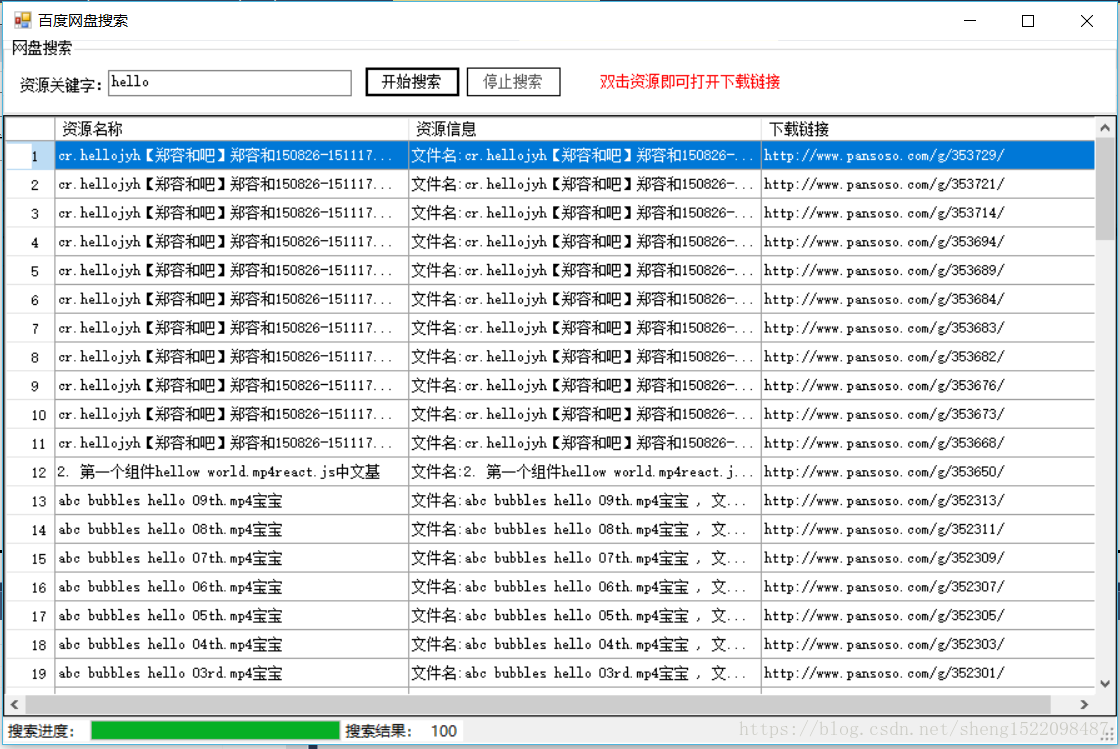
4.效果实现:
C#制作网盘搜索工具(简单的爬虫)的更多相关文章
- 推荐一个百度网盘搜索工具www.sososo.me
推荐一个百度网盘搜索工具 http://www.sososo.me
- [C#]使用Windows Form开发的百度网盘搜索工具
BaiduDiskSearcher 用C#编写的百度网盘搜索工具(.NET4.0 & Visual Studio 2017) 功能 1.搜索任意名称的百度网盘共享文件 2.可以左键双击打开网盘 ...
- [PHP] 网盘搜索引擎-采集爬取百度网盘分享文件实现网盘搜索
标题起的太大了,都是骗人的.最近使用PHP实现了简单的网盘搜索程序,并且关联了微信公众平台.用户可以通过公众号输入关键字,公众号会返回相应的网盘下载地址.就是这么一个简单的功能,类似很多的网盘搜索类网 ...
- 分享一个开源的网盘下载工具BaiduPCS-Go
大家在使用网盘的时候,一定忍受不了限速下载的速度.今天给大家分享一个开源的网盘下载项目BaiduPCS-Go.Go语言编写,仿 Linux shell 文件处理命令的百度网盘命令行客户端.多平台支持, ...
- SpringBoot2.0+ElasticSearch网盘搜索实现
1.ES是如何实现分布式高并发全文检索 2.简单介绍ES分片Shards分片技术 3.为什么ES主分片对应的备分片不在同一台节点存放 4.索引的主分片定义好后为什么不能做修改 5.ES如何实现高可用容 ...
- 网盘直链工具 winform版 V1.0
软件需要.net2.0支持 win7及以上版本用户无需安装 xp用户需要安装 支持网盘:好盘 坚果云 百度云 乐视云 华为网盘 微云 新浪网盘 126disk 速度盘 乐齐盘 天空网盘 千脑网盘 可乐 ...
- osx 10.11 一键制作U盘傻瓜工具最新版 无需任何命令
osx 10.11 最新版U盘制作工具 无需任何命令 纯傻瓜式 !!!只要把app下载下来放在应用程序 鼠标点点就可以做了... 下载地址:http://diskmakerx.com/do ...
- 4款Github泄漏敏感信息搜索工具简单比较
gitrob Ruby开发,支持通过postgresql数据库https://github.com/michenriksen/gitrob weakfilescan Python开发,多线程,猪猪侠开 ...
- 跑满带宽的一款百度网盘下载工具 : PanDownload
下载地址 : 点击进入 官网上面也有介绍使用.在这里,我再说一下 下载之后,解压,运行,登录, 登录好之后,准备进行设置 重要:下载情况分以下三部分 下载内容 < 300M,选择`打包下载`,只 ...
随机推荐
- 【二分 贪心】覆盖问题 BZOJ1052 HAOI2007
覆盖问题 bzoj1052 题目来源:HAOI 2007 题目描述 某人在山上种了N棵小树苗.冬天来了,温度急速下降,小树苗脆弱得不堪一击,于是树主人想用一些塑料薄膜把这些小树遮盖起来,经过一番长久的 ...
- Centos8.3、proxysql2.0读写分离实战记录
接着主从复制继续往下讲,这个项目中我是使用proxysql做读写分离的中间件,之前是使用mycat.老实说mycat属于比较重量级的中间件,1.0还好到了2.0配置变得很复杂而且文档不是很齐全,我看着 ...
- 不管卷不卷,面试还是得问问你G1原理!
所有的垃圾回收器的目的都是朝着减少STW的目的而前进,G1(Garbage First)回收器的出现颠覆了之前版本CMS.Parallel等垃圾回收器的分代收集方式,从2004年Sun发布第一篇关于G ...
- 一个例子让你秒懂 Qt Creator 编译原理
小北师兄作品 首发于微信公众号 小北师兄 微信 ID: ncuneupa 由于排版原因,文章可能读起来不太清晰,如果想看更好的排版,可以来我的公众号:小北师兄 大家好,我是你们的小北师兄,由于工作原因 ...
- Golang通过结构体解析和封装XML
Golang解析和封装XML 解析XML成结构体Demo package main import ( "encoding/xml" "fmt" ) //我们通过 ...
- 给STM32MP157C-DK2烧录固件
环境: 一台PC(window/linux) STM32CubeProgrammer 我下载到的是 2.1 版本(19\07\10下载的) 里面的文件是: 里面有 3 个文件,分别window.Lin ...
- 温故知新,Blazor遇见大写人民币翻译机(ChineseYuanParser),践行WebAssembly SPA的实践之路
背景 在之前<温故知新,.Net Core遇见Blazor(FluentUI),属于未来的SPA框架>中我们已经初步了解了Blazor的相关概念,并且根据官方的指引完成了<创建我的第 ...
- A Simple Math Problem 矩阵打水题
A Simple Math Problem Lele now is thinking about a simple function f(x).If x < 10 f(x) = x.If x & ...
- ssh-正向与反向代理
常用参数 栗子 实战 常用参数 -N 告诉SSH客户端,这个连接不需要执行任何命令.仅仅做端口转发 -C 表示压缩数据传输 -f 告诉SSH客户端在后台运行 -q Quiet mode. 安静模式,忽 ...
- CentOS-常用命令(版本:7.x)
常用命令 注:centos命令不定期持续更新,希望能够帮到你~ 修改主机名 $ hostnamectl set-hostname xxx 查看IP $ vim /etc/sysconfig/netwo ...