
Visual Studio 2015 MFC之Button颜色变化-断点调试(Debug)
软件开发,对自己的程序进行调试很重要,本次文章在上一边随笔的基础上,介绍一下Button控件做显示灯的用法,Button控件的添加和变量设置等可以参考下面的的链接:Visaul Studio 2015 MFC控件使用之--按钮(Button) - 熊来闯一闯 - 博客园 (cnblogs.com),在以上的基础上进一步介绍断点调试;
- 在xxxDlg.cpp中的OnInitDialog()窗体初始化函数添加Button控件颜色初始化,在程序当中首次对Button控件进行颜色更改,需添加以下两句,否则直接对Button控件进行设置颜色无效;
mfc_Button_OpenClose.m_bTransparent = FALSE;
mfc_Button_OpenClose.m_bDontUseWinXPTheme = TRUE;
 1 BOOL CMFCApplication1Dlg::OnInitDialog()

 2 {

 3     CDialogEx::OnInitDialog();

 4

 5     // Set the icon for this dialog.  The framework does this automatically

 6     //  when the application's main window is not a dialog

 7     SetIcon(m_hIcon, TRUE);            // Set big icon

 8     SetIcon(m_hIcon, FALSE);        // Set small icon

 9

10     // TODO: Add extra initialization here

11     //Button按钮初始化

12     mfc_Button_OpenClose.m_bTransparent = FALSE;

13     mfc_Button_OpenClose.m_bDontUseWinXPTheme = TRUE;

14     mfc_Button_OpenClose.SetFaceColor(RGB(255, 255, 255));15

16     return TRUE;  // return TRUE  unless you set the focus to a control

17 }
- 在OnClickedMfcbutton1()函数中添加如下事件,即可实现Button按钮的颜色变化
 1 void CMFCApplication1Dlg::OnClickedMfcbutton1()

 2 {

 3     // TODO: Add your control notification handler code here

 4     if (Button_flag == 0)

 5     {

 6         Button_flag = 1;

 7         mfc_Button_OpenClose.SetWindowTextW(L"关闭");

 8         mfc_Button_OpenClose.SetFaceColor(RGB(0, 255, 0));//绿色

 9     }

10     else

11     {

12         Button_flag = 0;

13         mfc_Button_OpenClose.SetWindowTextW(L"打开");

14         mfc_Button_OpenClose.SetFaceColor(RGB(255, 255, 255));//白色

15     }

16

17

18 }
- 实现的最终效果如下:
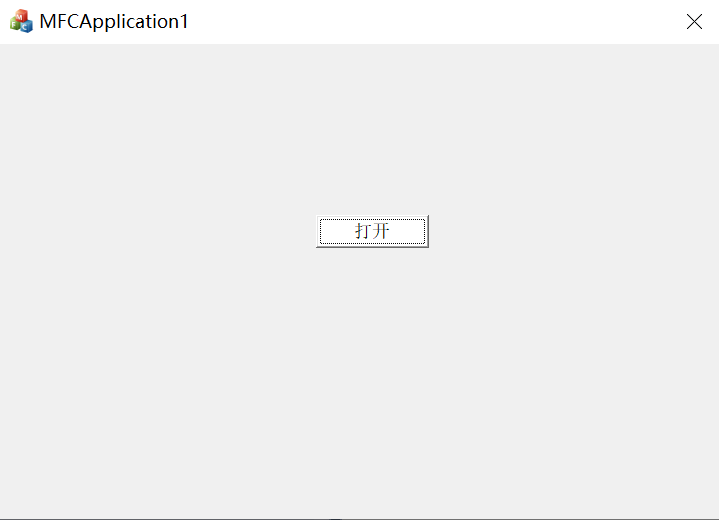
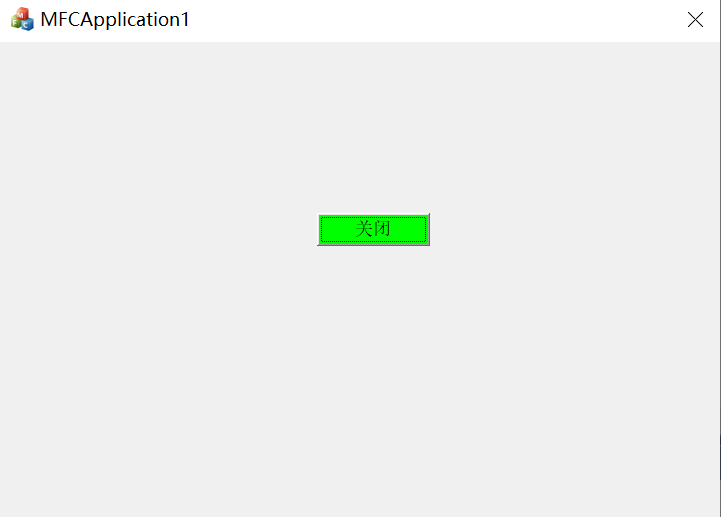
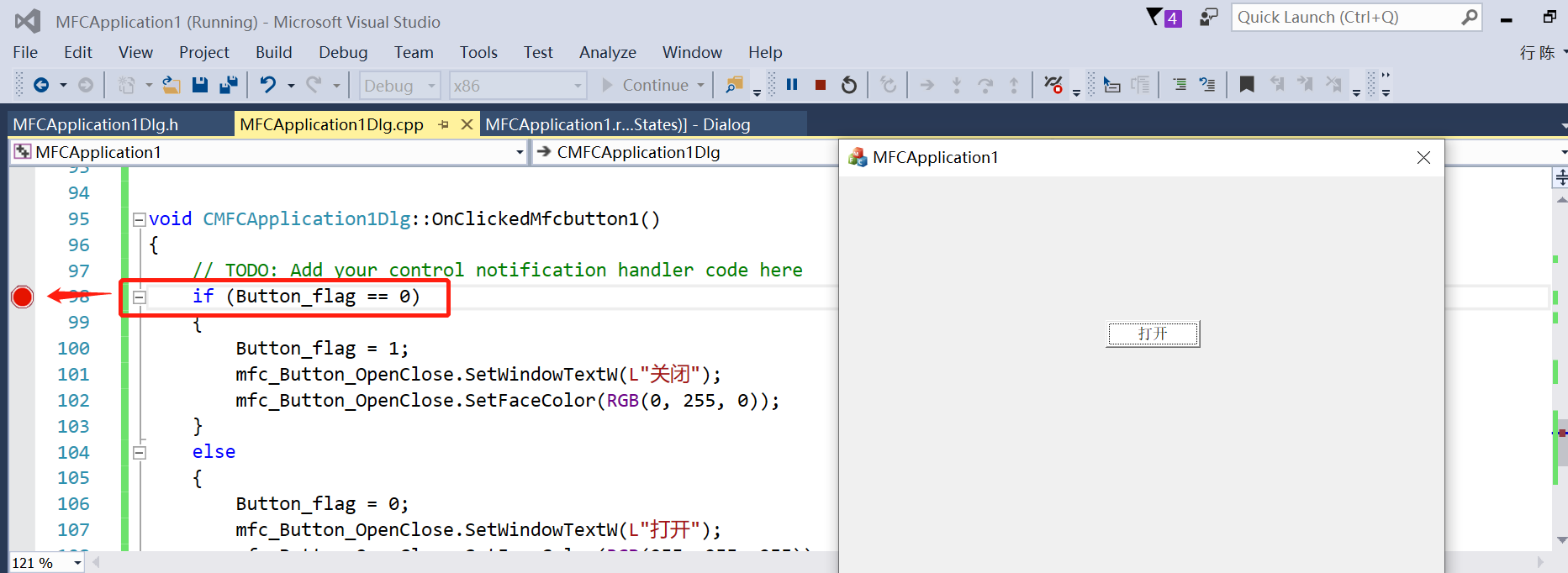
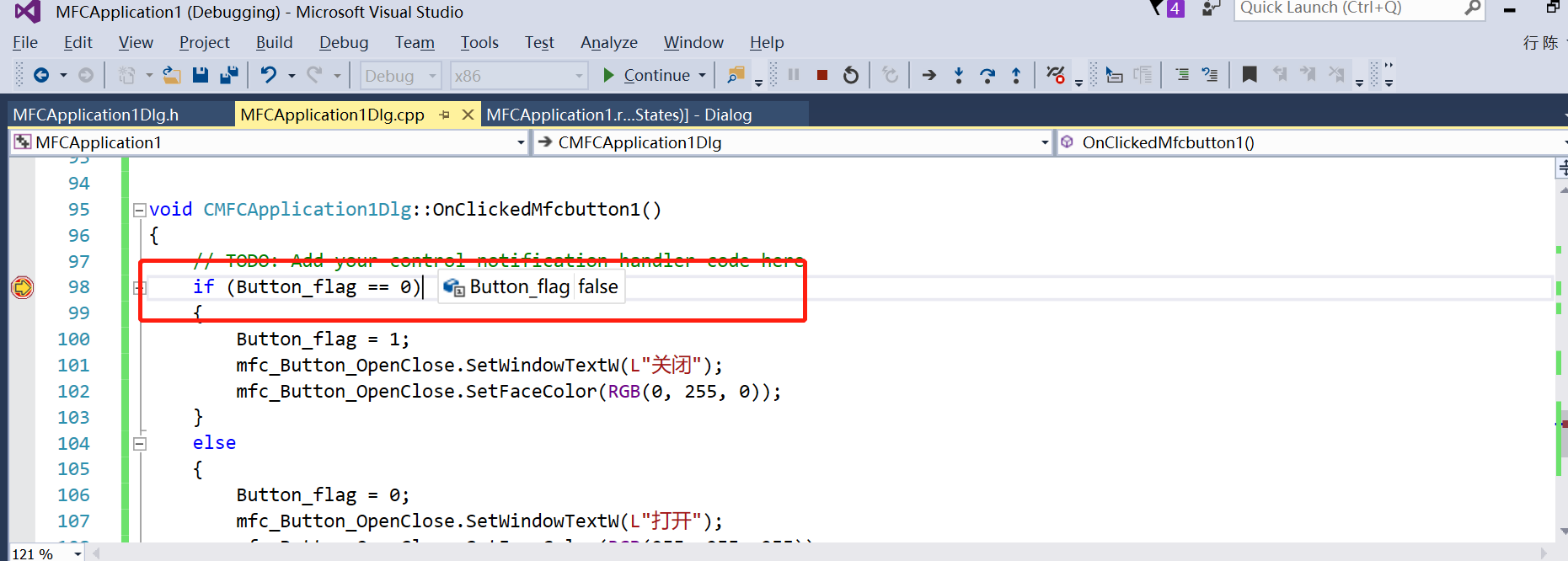
- 使用Visual Studio的断点调试功能,来查看Button_flag变量在点击Button之后的赋值变化,在Button点击事件函数Button_flag变量对应的行数右侧单击,会出现对应的红点,然后点击程序窗口的打开按钮,程序会自动跳转到设置断点了的一行程序;
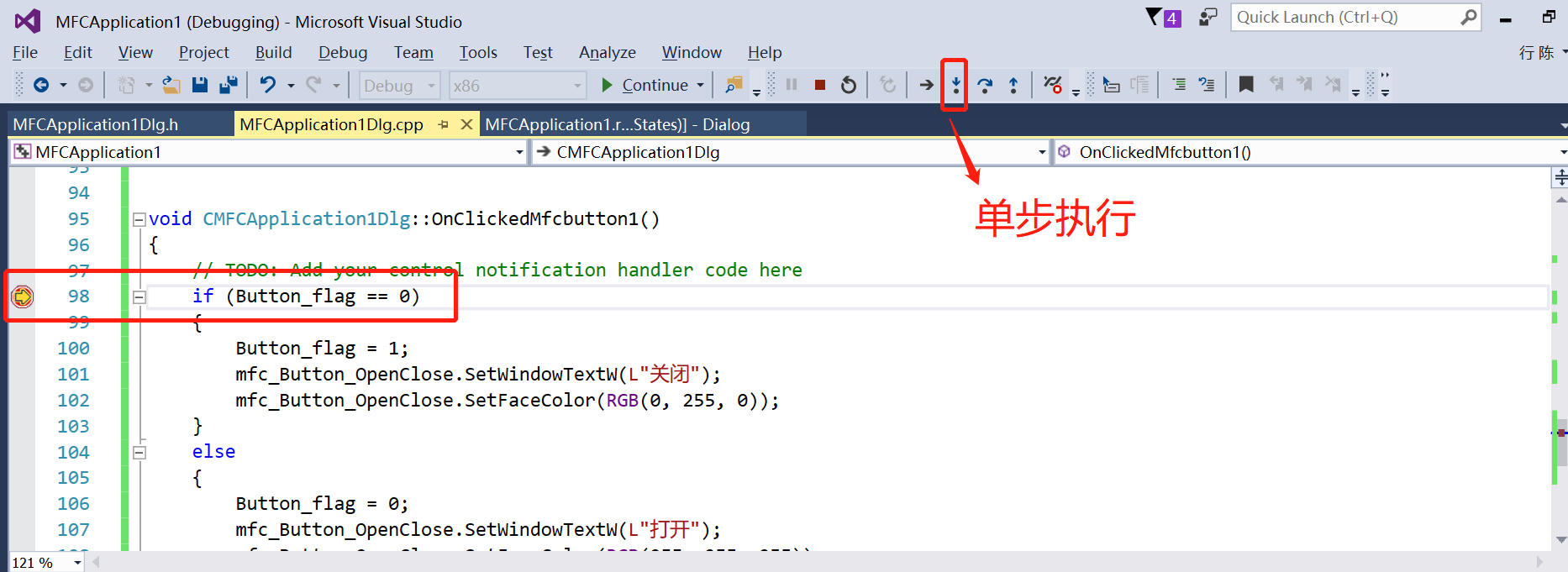
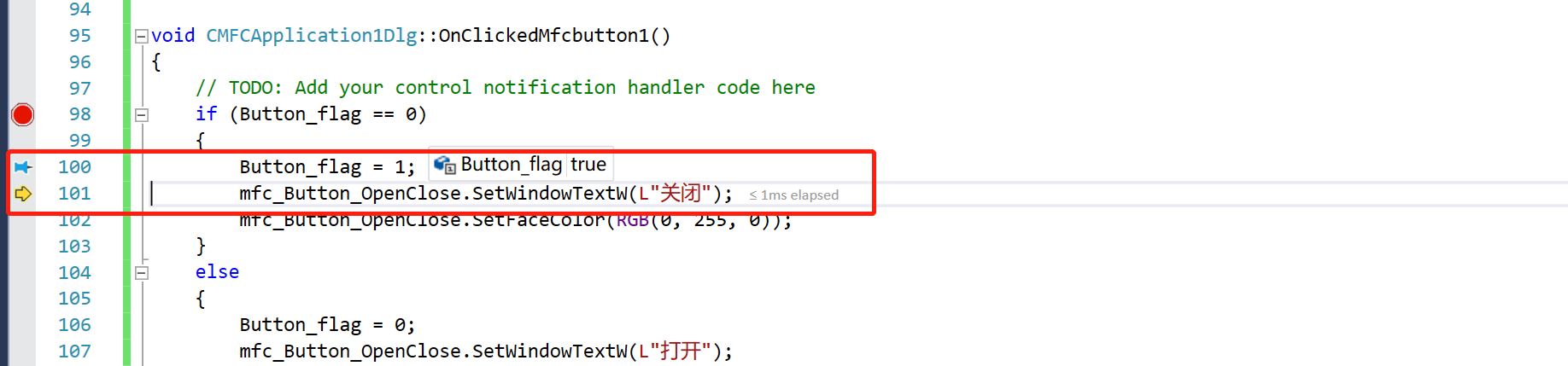
- 可以通过菜单栏的单步执行按钮,对所编写的代码一行一行地执行
- 将鼠标放置到Button_flag变量,会显示当前变量地值,如下图所示,当前值为false,当程序往下继续执行的时候,在Button_flag = 1处,该变量被赋值为true,通过这种调试方式可以追踪变量的变化,在程序有bug的时候,可以很方便的帮忙定位错误。
软件编程并不是博主的特长,如有解释的不够清楚的地方敬请见谅,刚好最近的项目当中用到了MFC,后续会继续分享在开发当中使用到的东西,希望能在分享中共同进步。
Visual Studio 2015 MFC之Button颜色变化-断点调试(Debug)的更多相关文章
- Visual Studio Code 通过 Chrome插件Type Script断点调试Angular 2
1. 下载Visual Studio Code (https://code.visualstudio.com/) 2. 安装插件Debugger for chrome 3. 确定tsconfig.js ...
- visual studio 2010 出现问题,不能设置断点调试了,一运行就未响应,然后程序退出
经网络查找原因,怀疑是插件问题: 解决方案: 1.工具->扩展管理 2.禁用或卸载VS2010的插件(扩展程序)
- 体验Visual Studio 2015 Windows Forms应用程序开发与维护
昨天到半夜还没有等到Visual Studio 2015的下载地址,实在熬不住就先休息了.北美地区的时区比北京时间要晚一些,今天早上到公司就看到Visual Studio 2015的下载地址,迅速的将 ...
- Visual Studio 2015开发Android App问题集锦
Visual Studio 2015开发Android App 启动调试始终无法完成应用部署的解决方案 创建一个Android App项目后,直接启动调试发现Visual Studio Emulato ...
- Visual Studio 2015 开发 ASP.NET 5 有何变化?
本篇博文目录: ASP.NET 5 模版 ASP.NET 5 目录结构 前端管理工具 无编译开发 Microsoft Git Provider 智能感知和错误信息 Smart Unit Testing ...
- Visual Studio 2015 开发 ASP.NET 5 有何变化?(转)
出处:http://www.cnblogs.com/xishuai/p/visual-studio-2015-preview-asp-net-5-change.html 本篇博文目录: ASP.NET ...
- Visual Studio 2015的安装与基本使用
为什么要使用Visual Studio 2015? 它是中文的.界面友好.自动补全.实时语法错误提示(上图中波浪线部分).单步调试……最重要的社区版是免费的!所以你不必再使用破解的.老旧的的不兼容现代 ...
- VS2015--win32project配置的一些想法之在 Visual Studio 2015 中进行调试的同一时候分析性能
出处: https://msdn.microsoft.com/zh-cn/magazine/dn973013(en-us).aspx 很多开发商花了绝大多数时间获取应用程序才干正常发挥作用.更少的时间 ...
- Visual Studio 2015 移动跨平台开发初体验
微软换了新 CEO 后变化很大,对我们团队最有利的消息就是 Visual Studio 2015 支持移动应用跨平台开发. 还记不记得很早之前,Xamarin 宣布与微软成为合作伙伴的消息.显然,Xa ...
随机推荐
- IO复用的三种方法(select,poll,epoll)深入理解
(一)IO复用是Linux中的IO模型之一,IO复用就是进程告诉内核需要监视的IO条件,使得内核一旦发现进程指定的一个或多个IO条件就绪,就通过进程处理,从而不会在单个IO上阻塞了,Linux中,提供 ...
- JAVA实现返回0001,0002,0003格式数字
这里只需要修改 %04d 中的4即可设置生成几位数 /** * 获取下一个编号 * @param startValue 上一个编号 * @return */ public static String ...
- 【LeetCode】1110. Delete Nodes And Return Forest 解题报告 (C++)
作者: 负雪明烛 id: fuxuemingzhu 个人博客:http://fuxuemingzhu.cn/ 目录 题目描述 题目大意 解题方法 递归 日期 题目地址:https://leetcode ...
- 【LeetCode】476. 数字的补数 Number Complement
作者: 负雪明烛 id: fuxuemingzhu 个人博客: http://fuxuemingzhu.cn/ 公众号:负雪明烛 本文关键词:Leetcode, 力扣,476, 补数,二进制,Pyth ...
- 【九度OJ】题目1026:又一版 A+B 解题报告
[九度OJ]题目1026:又一版 A+B 解题报告 标签(空格分隔): 九度OJ 原题地址:http://ac.jobdu.com/problem.php?pid=1026 题目描述: 输入两个不超过 ...
- 【LeetCode】394. Decode String 解题报告(Python)
作者: 负雪明烛 id: fuxuemingzhu 个人博客: http://fuxuemingzhu.cn/ 目录 题目描述 题目大意 解题方法 栈 日期 题目地址:https://leetcode ...
- 【LeetCode】297. Serialize and Deserialize Binary Tree 解题报告(Python)
[LeetCode]297. Serialize and Deserialize Binary Tree 解题报告(Python) 标签: LeetCode 题目地址:https://leetcode ...
- ZYB loves Xor I(hud5269)
ZYB loves Xor I Time Limit: 2000/1000 MS (Java/Others) Memory Limit: 65536/65536 K (Java/Others)T ...
- vue.js是什么?它的优点有哪些?
Vue.js 是一套响应式的 JavaScript 开发库.其他前端开发库也有很多,比如 jQuery.ExtJS.Angular 等. Vue.js 自问世以来所受关注度不断提高,在现在的市场上,V ...
- Myeclipse查看jdk源代码
过程如下: 1.点 "window"-> "Preferences" -> "Java" -> "Install ...