
SpringBoot开发七-开发注册功能
需求介绍—开发注册功能
首先访问注册页面—点击顶部的链接,打开注册页面
提交注册数据
- 通过表单提交数据
- 服务端验证账号是否存在,邮箱是否已经注册
- 服务端发送激活邮件
激活注册账号
点击邮件中的链接,访问服务端的激活服务
实现代码
按着需求一个个完成。
首先访问注册页面
只是打开页面,没有业务,访问数据库。只需要请求提交给Controller,然后调用模板,模板做出相应就可以了
package com.nowcoder.community.controller;

import org.springframework.stereotype.Controller;

import org.springframework.web.bind.annotation.RequestMapping;

import org.springframework.web.bind.annotation.RequestMethod;

@Controller

public class LoginController {

    @RequestMapping(path = "/register", method = RequestMethod.GET)

    public String getRegisterpage()  {

        return "/site/register";

    }

}
然后就去处理对应的"/site/register"进行模板改造就可以了。同时你要在index.html改一下链接就好了。
效果如下:
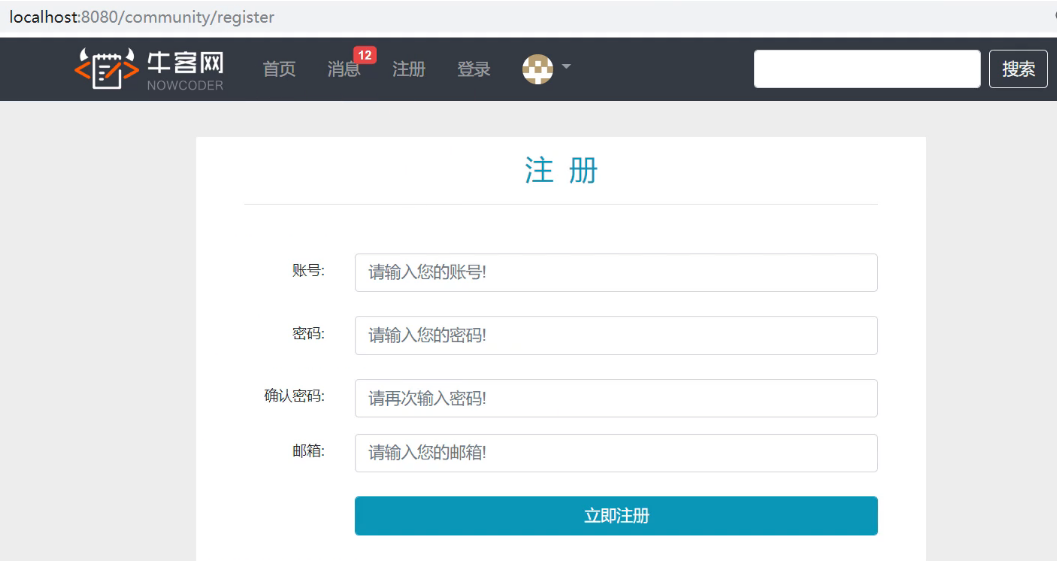
再完成提交注册数据
首先因为在这个过程中经常会到判断字符串,集合等常用的数据空值的情况,我们引入以下包
<dependency>

	<groupId>org.apache.commons</groupId>

	<artifactId>commons-lang3</artifactId>

</dependency>
然后在application.properties配置我们网站的域名:
# community

community.path.domain=http://localhost:8080
然后我们写一个工具类CommunityUtil用来提供两个方法支持我们的注册功能,比方生成随机字符串这个方法
package com.nowcoder.community.util;

import org.apache.commons.lang3.StringUtils;

import org.springframework.util.DigestUtils;

import java.util.UUID;

public class CommunityUtil {

    // 生成随机字符串

    public static String generateUUID() {

        return UUID.randomUUID().toString().replaceAll("-", "");

    }

    // MD5加密

    // hello -> abc123def456

    // hello + 3e4a8 -> abc123def456abc

    public static String md5(String key) {

        if (StringUtils.isBlank(key)) {

            return null;

        }

        return DigestUtils.md5DigestAsHex(key.getBytes());

    }

}
因为我们的注册是针对用户表的操作,所以逻辑应该写在UserService里面
package com.nowcoder.community.service;

import com.nowcoder.community.dao.UserMapper;

import com.nowcoder.community.entity.User;

import com.nowcoder.community.util.CommunityConstant;

import com.nowcoder.community.util.CommunityUtil;

import com.nowcoder.community.util.MailClient;

import org.apache.commons.lang3.StringUtils;

import org.springframework.beans.factory.annotation.Autowired;

import org.springframework.beans.factory.annotation.Value;

import org.springframework.stereotype.Service;

import org.thymeleaf.TemplateEngine;

import org.thymeleaf.context.Context;

import java.util.Date;

import java.util.HashMap;

import java.util.Map;

import java.util.Random;

@Service

public class UserService implements CommunityConstant {

    @Autowired

    private UserMapper userMapper;

    @Autowired

    private MailClient mailClient;

    @Autowired

    private TemplateEngine templateEngine;

    @Value("${community.path.domain}")

    private String domain;

    @Value("${server.servlet.context-path}")

    private String contextPath;

    public User findUserById(int id) {

        return userMapper.selectById(id);

    }

    public Map<String, Object> register(User user) {

        Map<String, Object> map = new HashMap<>();

        // 空值处理

        if (user == null) {

            throw new IllegalArgumentException("参数不能为空!");

        }

        if (StringUtils.isBlank(user.getUsername())) {

            map.put("usernameMsg", "账号不能为空!");

            return map;

        }

        if (StringUtils.isBlank(user.getPassword())) {

            map.put("passwordMsg", "密码不能为空!");

            return map;

        }

        if (StringUtils.isBlank(user.getEmail())) {

            map.put("emailMsg", "邮箱不能为空!");

            return map;

        }

        // 验证账号

        User u = userMapper.selectByName(user.getUsername());

        if (u != null) {

            map.put("usernameMsg", "该账号已存在!");

            return map;

        }

        // 验证邮箱

        u = userMapper.selectByEmail(user.getEmail());

        if (u != null) {

            map.put("emailMsg", "该邮箱已被注册!");

            return map;

        }

        // 注册用户

        user.setSalt(CommunityUtil.generateUUID().substring(0, 5));

        user.setPassword(CommunityUtil.md5(user.getPassword() + user.getSalt()));

        user.setType(0);

        user.setStatus(0);

        user.setActivationCode(CommunityUtil.generateUUID());

        user.setHeaderUrl(String.format("http://images.nowcoder.com/head/%dt.png", new Random().nextInt(1000)));

        user.setCreateTime(new Date());

        userMapper.insertUser(user);

        // 激活邮件

        Context context = new Context();

        context.setVariable("email", user.getEmail());

        // http://localhost:8080/community/activation/101/code

        String url = domain + contextPath + "/activation/" + user.getId() + "/" + user.getActivationCode();

        context.setVariable("url", url);

        String content = templateEngine.process("/mail/activation", context);

        mailClient.sendMail(user.getEmail(), "激活账号", content);

        return map;

    }

    public int activation(int userId, String code) {

        User user = userMapper.selectById(userId);

        if (user.getStatus() == 1) {

            return ACTIVATION_REPEAT;

        } else if (user.getActivationCode().equals(code)) {

            userMapper.updateStatus(userId, 1);

            return ACTIVATION_SUCCESS;

        } else {

            return ACTIVATION_FAILURE;

        }

    }

}
那么业务写完了,我们需要继续在LoginController里面写前后端交互
package com.nowcoder.community.controller;

import com.nowcoder.community.entity.User;

import com.nowcoder.community.service.UserService;

import com.nowcoder.community.util.CommunityConstant;

import org.springframework.beans.factory.annotation.Autowired;

import org.springframework.stereotype.Controller;

import org.springframework.ui.Model;

import org.springframework.web.bind.annotation.RequestMapping;

import org.springframework.web.bind.annotation.RequestMethod;

import java.util.Map;

@Controller

public class LoginController implements CommunityConstant {

    @Autowired

    private UserService userService;

    @RequestMapping(path = "/register", method = RequestMethod.GET)

    public String getRegisterPage() {

        return "/site/register";

    }

    @RequestMapping(path = "/login", method = RequestMethod.GET)

    public String getLoginPage() {

        return "/site/login";

    }

    @RequestMapping(path = "/register", method = RequestMethod.POST)

    public String register(Model model, User user) {

        Map<String, Object> map = userService.register(user);

        if (map == null || map.isEmpty()) {

            model.addAttribute("msg", "注册成功,我们已经向您的邮箱发送了一封激活邮件,请尽快激活!");

            model.addAttribute("target", "/index");

            return "/site/operate-result";

        } else {

            model.addAttribute("usernameMsg", map.get("usernameMsg"));

            model.addAttribute("passwordMsg", map.get("passwordMsg"));

            model.addAttribute("emailMsg", map.get("emailMsg"));

            return "/site/register";

        }

    }

}
处理激活账号的事情
那么我们应该在UserService里增加方法。但是因为这个情况有很多的情况,比方说激活成功,重复激活,激活失败,所以我们定义一些常量接口CommunityConstant。
package com.nowcoder.community.util;

public interface CommunityConstant {

    /**

     * 激活成功

     */

    int ACTIVATION_SUCCESS = 0;

    /**

     * 重复激活

     */

    int ACTIVATION_REPEAT = 1;

    /**

     * 激活失败

     */

    int ACTIVATION_FAILURE = 2;

    /**

     * 默认状态的登录凭证的超时时间

     */

    int DEFAULT_EXPIRED_SECONDS = 3600 * 12;

    /**

     * 记住状态的登录凭证超时时间

     */

    int REMEMBER_EXPIRED_SECONDS = 3600 * 24 * 100;

}
那么现在写对应的方法了
package com.nowcoder.community.service;

import com.nowcoder.community.dao.UserMapper;

import com.nowcoder.community.entity.User;

import com.nowcoder.community.util.CommunityConstant;

import com.nowcoder.community.util.CommunityUtil;

import com.nowcoder.community.util.MailClient;

import org.apache.commons.lang3.StringUtils;

import org.springframework.beans.factory.annotation.Autowired;

import org.springframework.beans.factory.annotation.Value;

import org.springframework.stereotype.Service;

import org.thymeleaf.TemplateEngine;

import org.thymeleaf.context.Context;

import java.util.Date;

import java.util.HashMap;

import java.util.Map;

import java.util.Random;

@Service

public class UserService implements CommunityConstant {

    @Autowired

    private UserMapper userMapper;

    @Autowired

    private MailClient mailClient;

    @Autowired

    private TemplateEngine templateEngine;

    @Value("${community.path.domain}")

    private String domain;

    @Value("${server.servlet.context-path}")

    private String contextPath;

    public User findUserById(int id) {

        return userMapper.selectById(id);

    }

    public Map<String, Object> register(User user) {

        Map<String, Object> map = new HashMap<>();

        // 空值处理

        if (user == null) {

            throw new IllegalArgumentException("参数不能为空!");

        }

        if (StringUtils.isBlank(user.getUsername())) {

            map.put("usernameMsg", "账号不能为空!");

            return map;

        }

        if (StringUtils.isBlank(user.getPassword())) {

            map.put("passwordMsg", "密码不能为空!");

            return map;

        }

        if (StringUtils.isBlank(user.getEmail())) {

            map.put("emailMsg", "邮箱不能为空!");

            return map;

        }

        // 验证账号

        User u = userMapper.selectByName(user.getUsername());

        if (u != null) {

            map.put("usernameMsg", "该账号已存在!");

            return map;

        }

        // 验证邮箱

        u = userMapper.selectByEmail(user.getEmail());

        if (u != null) {

            map.put("emailMsg", "该邮箱已被注册!");

            return map;

        }

        // 注册用户

        user.setSalt(CommunityUtil.generateUUID().substring(0, 5));

        user.setPassword(CommunityUtil.md5(user.getPassword() + user.getSalt()));

        user.setType(0);

        user.setStatus(0);

        user.setActivationCode(CommunityUtil.generateUUID());

        user.setHeaderUrl(String.format("http://images.nowcoder.com/head/%dt.png", new Random().nextInt(1000)));

        user.setCreateTime(new Date());

        userMapper.insertUser(user);

        // 激活邮件

        Context context = new Context();

        context.setVariable("email", user.getEmail());

        // http://localhost:8080/community/activation/101/code

        String url = domain + contextPath + "/activation/" + user.getId() + "/" + user.getActivationCode();

        context.setVariable("url", url);

        String content = templateEngine.process("/mail/activation", context);

        mailClient.sendMail(user.getEmail(), "激活账号", content);

        return map;

    }

    public int activation(int userId, String code) {

        User user = userMapper.selectById(userId);

        if (user.getStatus() == 1) {

            return ACTIVATION_REPEAT;

        } else if (user.getActivationCode().equals(code)) {

            userMapper.updateStatus(userId, 1);

            return ACTIVATION_SUCCESS;

        } else {

            return ACTIVATION_FAILURE;

        }

    }

}
那么方法写好了,需要在Controller调用
package com.nowcoder.community.controller;

import com.nowcoder.community.entity.User;

import com.nowcoder.community.service.UserService;

import com.nowcoder.community.util.CommunityConstant;

import org.springframework.beans.factory.annotation.Autowired;

import org.springframework.stereotype.Controller;

import org.springframework.ui.Model;

import org.springframework.web.bind.annotation.PathVariable;

import org.springframework.web.bind.annotation.RequestMapping;

import org.springframework.web.bind.annotation.RequestMethod;

import java.util.Map;

@Controller

public class LoginController implements CommunityConstant {

    @Autowired

    private UserService userService;

    @RequestMapping(path = "/register", method = RequestMethod.GET)

    public String getRegisterPage() {

        return "/site/register";

    }

    @RequestMapping(path = "/login", method = RequestMethod.GET)

    public String getLoginPage() {

        return "/site/login";

    }

    @RequestMapping(path = "/register", method = RequestMethod.POST)

    public String register(Model model, User user) {

        Map<String, Object> map = userService.register(user);

        if (map == null || map.isEmpty()) {

            model.addAttribute("msg", "注册成功,我们已经向您的邮箱发送了一封激活邮件,请尽快激活!");

            model.addAttribute("target", "/index");

            return "/site/operate-result";

        } else {

            model.addAttribute("usernameMsg", map.get("usernameMsg"));

            model.addAttribute("passwordMsg", map.get("passwordMsg"));

            model.addAttribute("emailMsg", map.get("emailMsg"));

            return "/site/register";

        }

    }

    // http://localhost:8080/community/activation/101/code

    @RequestMapping(path = "/activation/{userId}/{code}", method = RequestMethod.GET)

    public String activation(Model model, @PathVariable("userId") int userId, @PathVariable("code") String code) {

        int result = userService.activation(userId, code);

        if (result == ACTIVATION_SUCCESS) {

            model.addAttribute("msg","激活成功,您的账号已经可以正常使用了");

            model.addAttribute("target","/login");

        }

        else if (result == ACTIVATION_REPEAT) {

            model.addAttribute("msg","无效的操作,该账号已经激活过了");

            model.addAttribute("target","/index");

        }

        else {

            model.addAttribute("msg","激活失败,您提供的激活码不正确");

            model.addAttribute("target","/index");

        }

        return "/site/operate-result";

    }

}
SpringBoot开发七-开发注册功能的更多相关文章
- flask 开发用户登录注册功能
flask 开发用户登录注册功能 flask开发过程议案需要四个模块:html页面模板.form表单.db数据库操作.app视图函数 1.主程序 # app.py # Auther: hhh5460 ...
- SpringBoot写一个登陆注册功能,和期间走的坑
文章目录 前言 1. 首先介绍项目的相关技术和工具: 2. 首先创建项目 3. 项目的结构 3.1实体类: 3.2 Mapper.xml 3.3 mapper.inteface 3.4 Service ...
- springboot项目整合-注册功能模块开发
工程简介 准备工作:项目所用到的html界面以及sql文件链接如下:链接: https://pan.baidu.com/s/18loHJiKRC6FI6XkoANMSJg?pwd=nkz2 提取码: ...
- SpringBoot学习(七)-->SpringBoot在web开发中的配置
SpringBoot在web开发中的配置 Web开发的自动配置类:在Maven Dependencies-->spring-boot-1.5.2.RELEASE.jar-->org.spr ...
- SpringBoot开发十-开发登录,退出功能
需求介绍-开发登录,退出功能 访问登录页面:点击头部区域的链接打开登录页面 登录: 验证账号,密码,验证码 成功时生成登录凭证发放给客户端,失败时跳转回登录页面 退出: 将登录状态修改为失效的状态 跳 ...
- SpringBoot Web开发(5) 开发页面国际化+登录拦截
SpringBoot Web开发(5) 开发页面国际化+登录拦截 一.页面国际化 页面国际化目的:根据浏览器语言设置的信息对页面信息进行切换,或者用户点击链接自行对页面语言信息进行切换. **效果演示 ...
- SpringBoot:Web开发
西部开源-秦疆老师:基于SpringBoot 2.1.6 的博客教程 , 基于atguigu 1.5.x 视频优化 秦老师交流Q群号: 664386224 未授权禁止转载!编辑不易 , 转发请注明出处 ...
- 从零开始实现ASP.NET Core MVC的插件式开发(七) - 近期问题汇总及部分解决方案
标题:从零开始实现ASP.NET Core MVC的插件式开发(七) - 问题汇总及部分解决方案 作者:Lamond Lu 地址:https://www.cnblogs.com/lwqlun/p/12 ...
- springboot多模块开发以及整合dubbo\zookeeper进行服务管理
之前研究了springboot单工程的使用,参考git地址:https://github.com/qiao-zhi/springboot-ssm 下面研究springboot多模块开发的过程. 1.模 ...
随机推荐
- JavaScript编写计算器的发展史
JavaScript编写计算器的发展史: 编写一个普通的四则运算: <!DOCTYPE html> <html lang="en"> <head> ...
- 暑假自学java第十一天
1,使用java.util.Arrays类处理数组 (1 ) public static void sort(数值类型 [ ] a):对指定的数值型数组按数字升序进行排序.在数组排序中设计一个简单的冒 ...
- 微信app支付,完整流程,完整代码 (转)
微信app支付流程 需要的配置参数 private function wechat($body,$indent_id,$cou,$user_id,$total_fee,$ip,$domain,$non ...
- php弱类型比较
前言:今天XCTF题目中出现了弱类型比较,特别过来记录一下, 0x01: == 是弱类型比较,两个不同类型比较时,会自动转换成相同类型后再比较值 ===是强比较,需要比较值和类型 0x02: 看下图案 ...
- Leetcode No.119 Pascal's Triangle II(c++实现)
1. 题目 1.1 英文题目 Given an integer rowIndex, return the rowIndexth (0-indexed) row of the Pascal's tria ...
- 使用Octotree插件在Edge上以树形结构浏览GitHub上的源码
先预览效果左侧的目录通过点击,就可以到达对应的源码位置. 首先点击打开Edge中的浏览器扩展在右上角...=>点击扩展=>点击获取Microsoft Edge扩展按钮=>在左侧搜索所 ...
- Java中的基本数据类型和引用数据类型的区别
一.数据类型 Java中的数据类型分为两大类,基本数据类型和引用数据类型. 1.基本数据类型 基本数据类型只有8种,可按照如下分类 ①整数类型:long.int.short.byte ②浮点类型:fl ...
- kubespray-2.14.2安装kubernetes-1.18.10(ubuntu-20.04.1)
欢迎访问我的GitHub https://github.com/zq2599/blog_demos 内容:所有原创文章分类汇总及配套源码,涉及Java.Docker.Kubernetes.DevOPS ...
- 使用ThinkPHP5.0.12连接Mongo数据库的经验
本地开发环境xamppv3.2.2,ThinkPHP5.0.12版本. 由于之前开发项目时使用的是TP3.2.3+mongo数据库,也是在本地进行的,所以也进行过mongo数据库驱动的配置.详细方法可 ...
- MYSQL一个设备上的主从复制实现-windows
只记录一次在一个设备上实现mysql主从复制的过程,很详细,建议收藏,用到的时候照着步骤做就可以,会记录所有需要注意到的细节和一些容易遇到的坑以及解决办法! 如果需要在同一台电脑(服务器)上实现mys ...