
GIMP 一键均匀添加多条参考线 一键均匀切分图片
添加参考线
#!/usr/bin/env python2

# -*- coding: utf-8 -*-

from gimpfu import *

# orientation: ORIENTATION_HORIZONTAL(0), ORIENTATION_VERTICAL(1)

# diff: 参考线之间的间隔

def add_multi_guides(img, drawable, orientation, diff):

    # img = gimp.image_list()[0]

    # uri = img.uri

    w, h = img.width, img.height

    endposition = None

    add_guide = None

    if orientation == ORIENTATION_HORIZONTAL:

        assert diff < h, 'diff too big'

        endposition = h

        add_guide = pdb.gimp_image_add_hguide

    elif orientation == ORIENTATION_VERTICAL:

        assert diff < w, 'diff too big'

        endposition = w

        add_guide = pdb.gimp_image_add_vguide

    else:

        raise ValueError(('orientation not valid: {0}').format(orientation))

    # 清空原来的参考线

    guide = pdb.gimp_image_find_next_guide(img, 0)

    while guide != 0:

        if orientation == pdb.gimp_image_get_guide_orientation(img, guide):

            pdb.gimp_image_delete_guide(img, guide)

            guide = 0

        guide = pdb.gimp_image_find_next_guide(img, guide)

    position = diff

    while position < endposition:

        add_guide(img, position)

        position = position + diff

register(

    "add_multi_guides",

    # table snippet means a small piece of HTML code here

    "Add fucking guides",

    "long description",

    "hangj",

    "hangj",

    "2020",

    "Add Multi Guides...",

    "*",

    [

        (PF_IMAGE, "img", "Input image", None),

        (PF_DRAWABLE, "drawable", "Input drawable", None),

        (PF_OPTION, "orientation", "orientation", 0, ("HORIZONTAL", "VERTICAL")),

        (PF_INT, "diff", "pixcels between guides", 1000)

    ],

    [],

    add_multi_guides,

    menu="<Image>/Image/Guides"

    )

main()
一键切分图片
一键切分的代码是把我上面添加参考线的代码与 GIMP 内 py-slice.py 合并在一起的。
其实更优的做法是直接复制一份 py-slice.py 换个文件名,然后修改 get_guides 函数(通过用户给的参数直接生成参考线坐标,而不需要真的添加参考线然后再读取参考线的坐标)
#!/usr/bin/env python2

# -*- coding: utf-8 -*-

import os

from gimpfu import *

import os.path

gettext.install("gimp20-python", gimp.locale_directory, unicode=True)

# orientation: ORIENTATION_HORIZONTAL(0), ORIENTATION_VERTICAL(1)

# diff: 参考线之间的间隔

def add_multi_guides(img, orientation, diff):

    w, h = img.width, img.height

    endposition = None

    add_guide = None

    if orientation == ORIENTATION_HORIZONTAL:

        assert diff < h, 'diff too big'

        endposition = h

        add_guide = pdb.gimp_image_add_hguide

    elif orientation == ORIENTATION_VERTICAL:

        assert diff < w, 'diff too big'

        endposition = w

        add_guide = pdb.gimp_image_add_vguide

    else:

        raise ValueError(('orientation not valid: {0}').format(orientation))

    # 清空原来的参考线

    guide = pdb.gimp_image_find_next_guide(img, 0)

    while guide != 0:

        if orientation == pdb.gimp_image_get_guide_orientation(img, guide):

            pdb.gimp_image_delete_guide(img, guide)

            guide = 0

        guide = pdb.gimp_image_find_next_guide(img, guide)

    position = diff

    while position < endposition:

        add_guide(img, position)

        position = position + diff

def pyslice(image, drawable, orientation, diff, save_path,

            image_basename, image_extension,

            image_path):

    add_multi_guides(image, orientation, diff)

    vert, horz = get_guides(image)

    if len(vert) == 0 and len(horz) == 0:

        return

    gimp.progress_init(_("Equally Slice"))

    progress_increment = 1 / ((len(horz) + 1) * (len(vert) + 1))

    progress = 0.0

    def check_path(path):

        path = os.path.abspath(path)

        if not os.path.exists(path):

            os.mkdir(path)

        return path

    save_path = check_path(save_path)

    if not os.path.isdir(save_path):

        save_path = os.path.dirname(save_path)

    image_relative_path = ''

    image_path = save_path

    top = 0

    for i in range(0, len(horz) + 1):

        if i == len(horz):

            bottom = image.height

        else:

            bottom = image.get_guide_position(horz[i])

        left = 0

        for j in range(0, len(vert) + 1):

            if j == len(vert):

                right = image.width

            else:

                right = image.get_guide_position(vert[j])

            if (

                   (len(horz) >= 2 and (i == 0 or i == len(horz) )) or

                   (len(vert) >= 2 and (j == 0 or j == len(vert) ))

               ):

                skip_stub = True

            else:

                skip_stub = False

            slice (image, None, image_path,

                  image_basename, image_extension,

                  left, right, top, bottom, i, j, "")

            left = right

            progress += progress_increment

            gimp.progress_update(progress)

        top = bottom

def slice(image, drawable, image_path, image_basename, image_extension,

          left, right, top, bottom, i, j, postfix):

    if postfix:

        postfix = "_" + postfix

    src = "%s_%d_%d%s.%s" % (image_basename, i, j, postfix, image_extension)

    filename = os.path.join(image_path, src)

    if not drawable:

        temp_image = image.duplicate()

        temp_drawable = temp_image.active_layer

    else:

        if image.base_type == INDEXED:

            #gimp_layer_new_from_drawable doesn't work for indexed images.

            #(no colormap on new images)

            original_active = image.active_layer

            image.active_layer = drawable

            temp_image = image.duplicate()

            temp_drawable = temp_image.active_layer

            image.active_layer = original_active

            temp_image.disable_undo()

            #remove all layers but the intended one

            while len (temp_image.layers) > 1:

                if temp_image.layers[0] != temp_drawable:

                    pdb.gimp_image_remove_layer (temp_image, temp_image.layers[0])

                else:

                    pdb.gimp_image_remove_layer (temp_image, temp_image.layers[1])

        else:

            temp_image = pdb.gimp_image_new (drawable.width, drawable.height,

                                         image.base_type)

            temp_drawable = pdb.gimp_layer_new_from_drawable (drawable, temp_image)

            temp_image.insert_layer (temp_drawable)

    temp_image.disable_undo()

    temp_image.crop(right - left, bottom - top, left, top)

    if image_extension == "gif" and image.base_type == RGB:

        pdb.gimp_image_convert_indexed (temp_image, CONVERT_DITHER_NONE,

                                        CONVERT_PALETTE_GENERATE, 255,

                                        True, False, False)

    if image_extension == "jpg" and image.base_type == INDEXED:

        pdb.gimp_image_convert_rgb (temp_image)

    pdb.gimp_file_save(temp_image, temp_drawable, filename, filename)

    gimp.delete(temp_image)

    return src

class GuideIter:

    def __init__(self, image):

        self.image = image

        self.guide = 0

    def __iter__(self):

        return iter(self.next_guide, 0)

    def next_guide(self):

        self.guide = self.image.find_next_guide(self.guide)

        return self.guide

def get_guides(image):

    vguides = []

    hguides = []

    for guide in GuideIter(image):

        orientation = image.get_guide_orientation(guide)

        guide_position = image.get_guide_position(guide)

        if guide_position > 0:

            if orientation == ORIENTATION_VERTICAL:

                if guide_position < image.width:

                    vguides.append((guide_position, guide))

            elif orientation == ORIENTATION_HORIZONTAL:

                if guide_position < image.height:

                    hguides.append((guide_position, guide))

    def position_sort(x, y):

        return cmp(x[0], y[0])

    vguides.sort(position_sort)

    hguides.sort(position_sort)

    vguides = [g[1] for g in vguides]

    hguides = [g[1] for g in hguides]

    return vguides, hguides

register(

    "equally-slice",

    N_("Cuts an image equally, creates images"),

    """Cuts an image equally, creates images""",

    "hangj",

    "hangj",

    "2020",

    _("_Equally Slice..."),

    "*",

    [

        (PF_IMAGE, "image", "Input image", None),

        (PF_DRAWABLE, "drawable", "Input drawable", None),

        (PF_OPTION, "orientation", "orientation", 0, ("HORIZONTAL", "VERTICAL")),

        (PF_INT, "diff", "pixcels every piece", 1000),

        (PF_DIRNAME, "save-path",     _("Path for images"), os.getcwd()),

        (PF_STRING, "image-basename", _("Image name prefix"),    "equallyslice"),

        (PF_RADIO, "image-extension", _("Image format"),         "jpg", (("gif", "gif"), ("jpg", "jpg"), ("png", "png"))),

        (PF_STRING, "relative-image-path", _("Folder for image export"), "images"),

    ],

    [],

    pyslice,

    menu="<Image>/Filters/Web",

    domain=("gimp20-python", gimp.locale_directory)

    )

main()
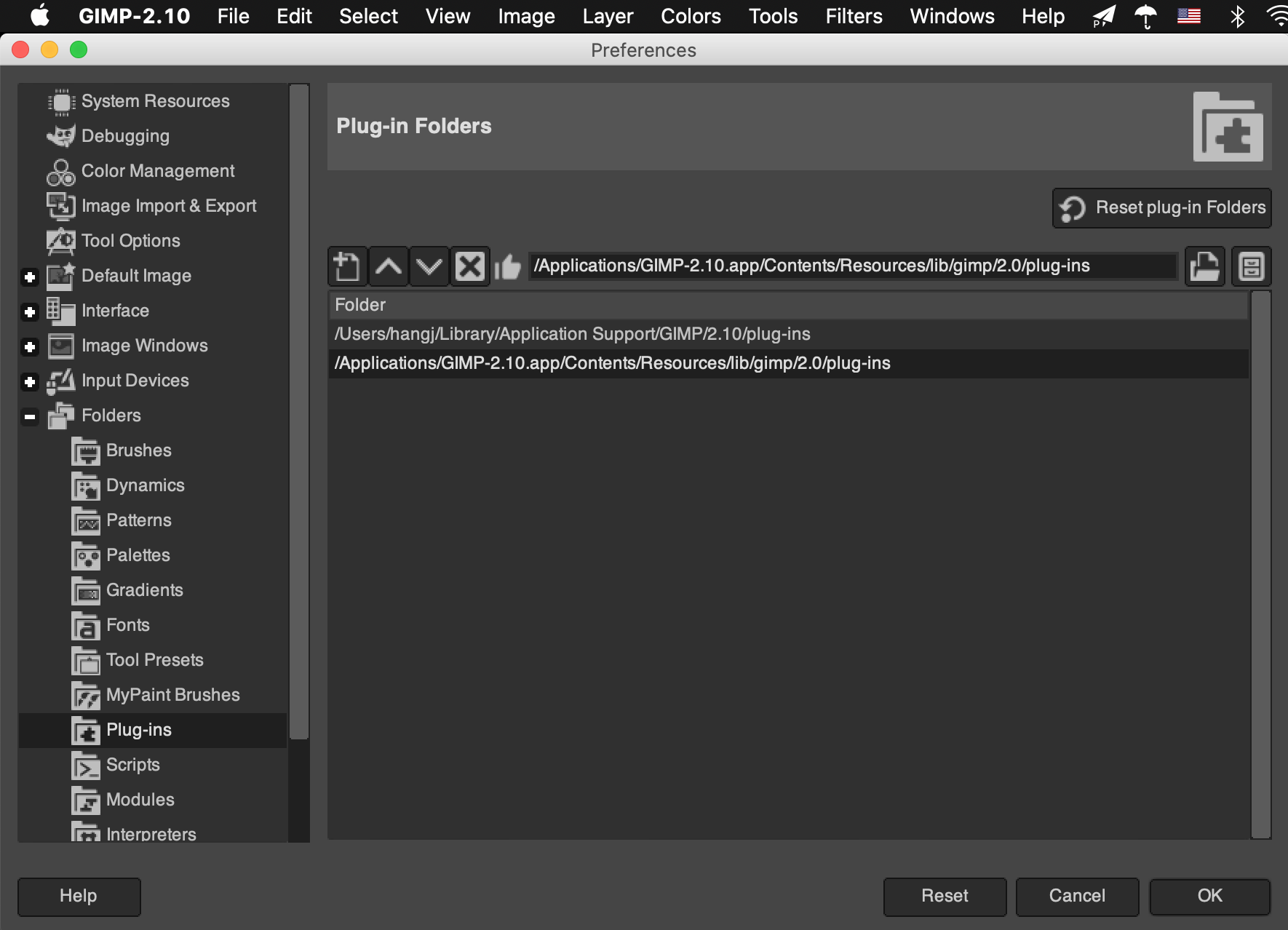
把脚本保存,放到 plug-ins 目录下,然后chmod +x filename,重启 GIMP,设置快捷键
plug-ins 目录在哪?

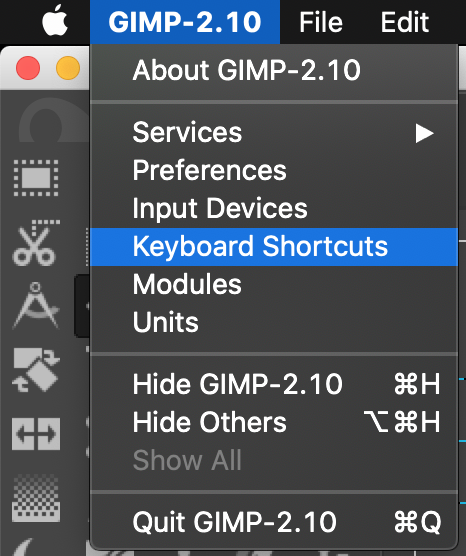
快捷键怎么设置?

输入 equally 找到我们的脚本
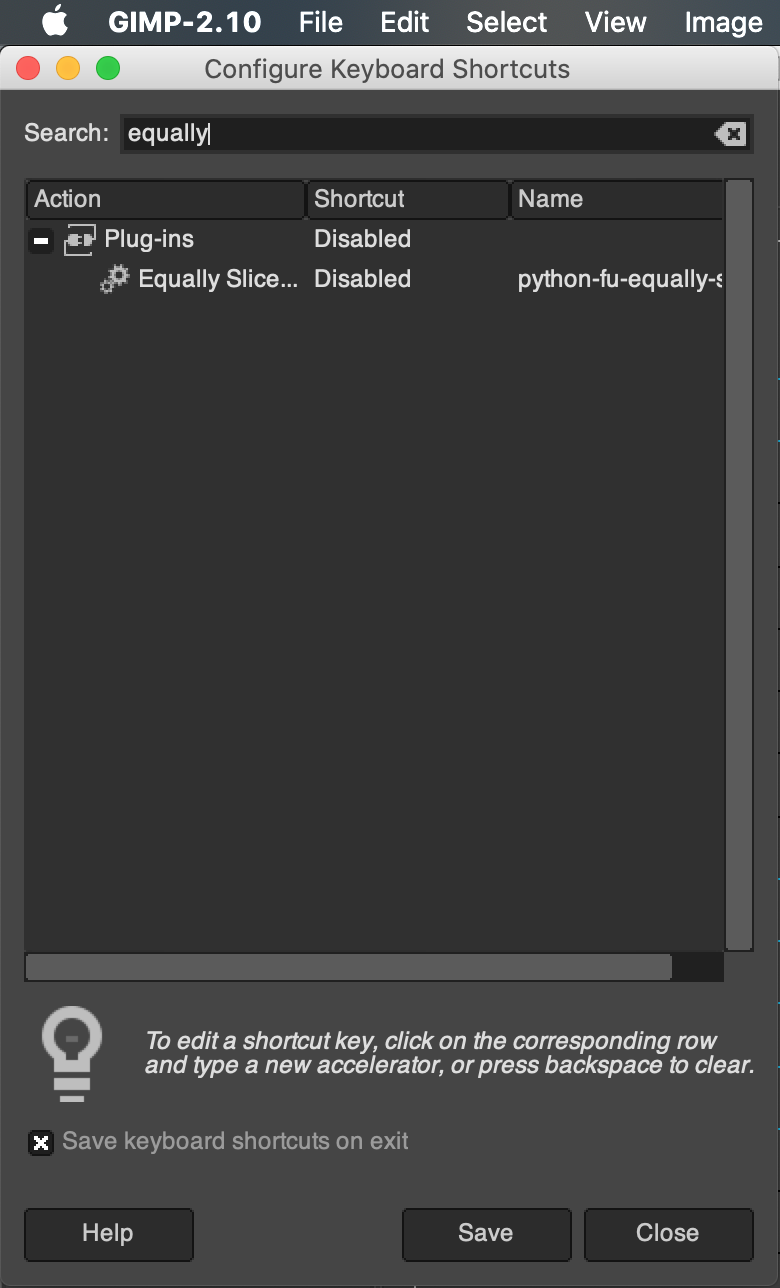
然后自行设置
GIMP 一键均匀添加多条参考线 一键均匀切分图片的更多相关文章
- lnmp一键安装环境添加redis扩展及作为mysql的缓存
lnmp一键安装环境添加redis扩展 Redis-benchmark 压力测试工具Redis-check-aof 检查redis持久化命令文件的完整性Redis-check-du ...
- JS每点击一次添加多少条数据
很久不写文档,平时只写日记,所以对这个有点生疏,如果写的不好别介意. 今天闲的蛋疼,于是要写写白天的东西,并且以后也会一直更新(一直写)下去. 时间太仓促了,这几个月,今天算最晚的一次凌晨1点,吃不消 ...
- mybatis+oracle添加一条数据并返回所添加数据的主键问题
最近做mybatis+oracle项目的时候解决添加一条数据并返回所添加数据的主键问题 controller层 @RequestMapping("/addplan") public ...
- QTableView 添加进度条
记录一下QTableView添加进度条 例子很小,仅供学习 使用QItemDelegate做的实现 有自动更新进度 要在.pro文件里添加 CONFIG += c++ ProgressBarDeleg ...
- struts2上传文件添加进度条
给文件上传添加进度条,整了两天终于成功了. 想要添加一个上传的进度条,通过分析,应该是需要不断的去访问服务器,询问上传文件的大小.通过已上传文件的大小, 和上传文件的总长度来评估上传的进度. 实现监听 ...
- 新建一个DataTable如何手动给其添加多条数据!
早晨起来,想起昨天利用winform做类似于sqlserver数据库导入数据功能的时候,用到了新建一个DataTable手动给其添加多条数据,平时用不到,需要的时候想不起来了,这次不妨把他记下来.以下 ...
- poj 3177 Redundant Paths【求最少添加多少条边可以使图变成双连通图】【缩点后求入度为1的点个数】
Redundant Paths Time Limit: 1000MS Memory Limit: 65536K Total Submissions: 11047 Accepted: 4725 ...
- iOS viewController添加导航条以及返回跳转选择
给单独的viewcontroller或者在Appdelegate的主页面添加导航条,只要在viewcontroller上添加navigationcontroller,在添加此navigationcon ...
- poj3352添加多少条边可成为双向连通图
Road Construction Time Limit: 2000MS Memory Limit: 65536K Total Submissions: 13311 Accepted: 671 ...
随机推荐
- 自制车速记录仪「GitHub 热点速览 v.21.31」
作者:HelloGitHub-小鱼干 如果你有一辆普通的自行车,那么就可以使用下 X-TRACK 这个项目制作一个自己的测速器,记录你的行驶轨迹还有车速,体验一把硬件发烧友的乐趣.如果你有一个非 ma ...
- ASP.NET中Textbox后的必填验证控件RequiredFieldValidator的使用方法。
制作效果如下: 实现方法: 1. 拖动RequiredFieldValidator控件到相应的textbox后位置,点击属性面板,输入ErroMessage相应信息,更改ForeColor为红色 设置 ...
- centos ansible常用命令
ansible在日常运维中经常使用,特别是批量执行多台服务器的时候,有效减小重复的操作成本,以下从安装到使用仅讲解工作中常用的几种方式,模块很多功能很强大,但不做全面讨论. ansible安装 在ce ...
- 创建型-单例模式 SingletonPattern
单例模式 Singleton 保证一个类只有一个实例的实现方法 给其他类提供一个全局的访问点. 由自己创建自己的唯一实例 实现 实现方法分为饿汉式(线程安全).懒汉式(线程不安全).懒汉式(lock+ ...
- noip模拟测试20
考试总结:这次考试,我非常真实地感觉到了自己能力的提高,具体来说,在之前的考试中,读完题之后我只会想到暴力的思路,甚至有的题连暴力都打不出来,但是这次在考场上我已经有了自己的一些想法,有了一个深入思考 ...
- Windows系统安装Mariadb数据库(zip包方式安装)--九五小庞
1.去Mariadb官网下载zip安装包 下载地址:https://downloads.mariadb.org/mariadb/10.3.31/ 2.解压压缩包到指定的安装位置 3.在安装包的data ...
- AndroidStudio快捷键总结
本文总结一下最近常用的命令: 1.格式化代码:Ctrl+Alt+L[可能与电脑快捷键冲突,修改方法:在设置里点击Keymap 搜索:Reformat Code] 2.复制当前类:Ctrl+Shift+ ...
- RHCSA_DAY08
locate与find查找 locate:/var/lib/mlocate/mlocate.db getfacl 目录 chmod权限管理 chmod(英文全拼:change mode)设置用户对文件 ...
- C++ //拷贝构造函数调用时机//1.使用一个已经创建完毕的对象来初始化一个新对象 //2.值传递的方式给函数参数传值 //3.值方式返回局部对象
1 //拷贝构造函数调用时机 2 3 4 #include <iostream> 5 using namespace std; 6 7 //1.使用一个已经创建完毕的对象来初始化一个新对象 ...
- 工资8000以下的Android程序员注意了!接下来要准备面对残酷现实了……
最近在知乎看到一个测试,特扎心: 以下三种情况,哪个最让你绝望? ❶ 每月工资去掉开销还存不到3千: ❷ 家人突然急病住院,医药费10万: ❸ 同班的家长都在争先恐后给孩子报名各种辅导班.兴趣班,但一 ...