
html调用servlet(JDBC在Servlet中的使用)(1)
1.页面的数据表单
在使用Servlet处理用户请求之前,先准备一个页面,该页面用来提供数据表单。数据表单就是HTML中的<form>...</form>部分,当用户单击Submit按钮提交表单之后,表单中包含的一些变量(或者成为字段)将会被发送到服务器端进行处理。下面编写一个HTML文件,文件代码如下:
add.html
<!DOCTYPE HTML PUBLIC "-//W3C//DTD HTML 4.01 Transitional//EN">

<html>

  <head>

    <title>add.html</title>

    <meta http-equiv="keywords" content="keyword1,keyword2,keyword3">

    <meta http-equiv="description" content="this is my page">

    <meta http-equiv="content-type" content="text/html; charset=GB2312">

    <!--<link rel="stylesheet" type="text/css" href="./styles.css">-->

  </head>

  <body>

    <form action="/jdbc_servlet/servlet/addServlet" method="post">

      <label>请输入部门信息:</label><br><br>

      <label>部门号:</label><br>

      <input type="text" name="id"/><br>

      <label>部门名:</label><br>

      <input type="text" name="name"/><br>

      <label>部门人数:</label><br>

      <input type="text" name="num"/><br>

      <label>地址:</label><br>

      <input type="text" name="address"/><br><br>

      <input type="submit" value="提交"/><br>

    </form>

  </body>

</html>
2.添加数据
Servlet的好处之一就是可以简单地获得表单中的数据。在Servlet中使用JDBC技术实现添加的代码如下:
addServlet.java
package com.cn.add;

import java.io.IOException;

import java.io.PrintWriter;

import java.sql.Connection;

import java.sql.DriverManager;

import java.sql.PreparedStatement;

import java.sql.SQLException;

import javax.servlet.ServletException;

import javax.servlet.http.HttpServlet;

import javax.servlet.http.HttpServletRequest;

import javax.servlet.http.HttpServletResponse;

public class addServlet extends HttpServlet {

    /**

     * Constructor of the object.

     */

    public addServlet() {

        super();

    }

    /**

     * Destruction of the servlet. <br>

     */

    public void destroy() {

        super.destroy(); // Just puts "destroy" string in log

        // Put your code here

    }

    /**

     * The doGet method of the servlet. <br>

     *

     * This method is called when a form has its tag value method equals to get.

     *

     * @param request the request send by the client to the server

     * @param response the response send by the server to the client

     * @throws ServletException if an error occurred

     * @throws IOException if an error occurred

     */

    public void doGet(HttpServletRequest request, HttpServletResponse response)

            throws ServletException, IOException {

        response.setContentType("text/html;charset=gb2312");

        PrintWriter out = response.getWriter();

        this.doPost(request, response);

        out.flush();

        out.close();

    }

    /**

     * The doPost method of the servlet. <br>

     *

     * This method is called when a form has its tag value method equals to post.

     *

     * @param request the request send by the client to the server

     * @param response the response send by the server to the client

     * @throws ServletException if an error occurred

     * @throws IOException if an error occurred

     */

    public void doPost(HttpServletRequest request, HttpServletResponse response)

            throws ServletException, IOException {

        System.out.println("到了Servlet!!!");

        response.setContentType("text/html;charset=gb2312");

        request.setCharacterEncoding("gb2312");

        PrintWriter out = response.getWriter();

        String id = request.getParameter("id");   //获取部门编号

        String name = request.getParameter("name");    //获取部门名称

        String address = request.getParameter("address"); //获取部门所在地址

        int num = Integer.parseInt(request.getParameter("num")); //获取部门人数

        Connection conn = null; //声明一个Connection对象,用来连接数据库

        PreparedStatement pstmt = null; //声明PreparedStatement对象,用来向数据库插入数据条数据

        try {

            //连接到MySQL数据库中的bank数据库模式

            Class.forName("com.mysql.jdbc.Driver");

            System.out.println("创建驱动成功!");

            //连接数据库

            conn = DriverManager.getConnection("jdbc:mysql://localhost:3306/bank", "root", "1234");

            System.out.println("连接数据库成功!");

            //插入数据的SQL语句

            String sql = "INSERT INTO dept(id,d_name,address,empnumber) VALUES(?,?,?,?)";

            pstmt = conn.prepareStatement(sql);

            //设置插入数据的顺序

            pstmt.setString(1, id);

            pstmt.setString(2, name);

            pstmt.setString(3, address);

            pstmt.setInt(4, num);

            int result = pstmt.executeUpdate();

            //判断执行结果

            if (result == 1) {

                out.print("插入数据成功!");

            }else {

                out.print("插入数据失败!请重新插入!");

            }

        } catch (ClassNotFoundException e) {

            // TODO Auto-generated catch block

            e.printStackTrace();

        } catch (SQLException e) {

            // TODO Auto-generated catch block

            e.printStackTrace();

        }

        out.flush();

        out.close();

    }

    /**

     * Initialization of the servlet. <br>

     *

     * @throws ServletException if an error occurs

     */

    public void init() throws ServletException {

        // Put your code here

    }

}
web.xml
<?xml version="1.0" encoding="UTF-8"?>

<web-app version="2.5"

    xmlns="http://java.sun.com/xml/ns/javaee"

    xmlns:xsi="http://www.w3.org/2001/XMLSchema-instance"

    xsi:schemaLocation="http://java.sun.com/xml/ns/javaee

    http://java.sun.com/xml/ns/javaee/web-app_2_5.xsd">

  <servlet>

    <description>This is the description of my J2EE component</description>

    <display-name>This is the display name of my J2EE component</display-name>

    <servlet-name>addServlet</servlet-name>

    <servlet-class>com.cn.add.addServlet</servlet-class>

  </servlet>

  <servlet-mapping>

    <servlet-name>addServlet</servlet-name>

    <url-pattern>/servlet/addServlet</url-pattern>

  </servlet-mapping>

  <welcome-file-list>

    <welcome-file>index.jsp</welcome-file>

  </welcome-file-list>

</web-app>
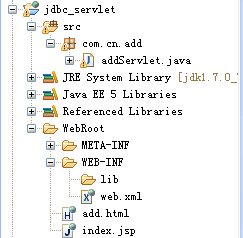
文件整体框架如下:
3.查看单条数据
一般一条数据的id是唯一的,查看单条记录的时候,可以根据id来查询。HTML页面的代码如下:
showById.html
<!DOCTYPE HTML PUBLIC "-//W3C//DTD HTML 4.01 Transitional//EN">

<html>

  <head>

    <title>showById.html</title>

    <meta http-equiv="keywords" content="keyword1,keyword2,keyword3">

    <meta http-equiv="description" content="this is my page">

    <meta http-equiv="content-type" content="text/html; charset=gb2312">

    <!--<link rel="stylesheet" type="text/css" href="./styles.css">-->

  </head>

  <body>

    <form name="f1" id="f1" action="/jdbc_servlet/servlet/SearchEmployee" method="post">

      <table border="0">

        <tr>

          <td>请输入部门编号:</td><tr/><tr/>

          <td><input type="text" name="id"></td>

        </tr>

        <tr>

          <td colspan="2" align="left"><input type="submit" value="查找"></td>

        </tr>

      </table>

    </form>

  </body>

</html>
在该页面中输如id号,点击查找按钮时会进入查询的Servlet,在Servlet中处理根据id查询的操作。根据id查询的Servlet代码如下:
SearchEmployee.java
package com.cn.query;

import java.io.IOException;

import java.io.PrintWriter;

import java.sql.Connection;

import java.sql.DriverManager;

import java.sql.PreparedStatement;

import java.sql.ResultSet;

import java.sql.SQLException;

import javax.servlet.ServletException;

import javax.servlet.http.HttpServlet;

import javax.servlet.http.HttpServletRequest;

import javax.servlet.http.HttpServletResponse;

public class SearchEmployee extends HttpServlet {

    /**

     * Destruction of the servlet. <br>

     */

    public void destroy() {

        super.destroy(); // Just puts "destroy" string in log

        // Put your code here

    }

    /**

     * The doGet method of the servlet. <br>

     *

     * This method is called when a form has its tag value method equals to get.

     *

     * @param request the request send by the client to the server

     * @param response the response send by the server to the client

     * @throws ServletException if an error occurred

     * @throws IOException if an error occurred

     */

    public void doGet(HttpServletRequest request, HttpServletResponse response)

            throws ServletException, IOException {

        response.setContentType("text/html;charset=gb2312");

        request.setCharacterEncoding("gb2312");

        PrintWriter out = response.getWriter();

        String id = request.getParameter("id"); //获取部门编号

        Connection conn = null;  //声明一个Connection对象,用来连接数据库

        PreparedStatement pstmt = null;

        ResultSet rs = null;

        try {

            Class.forName("com.mysql.jdbc.Driver");

            System.out.println("创建驱动成功!");

            //连接数据库

            conn = DriverManager.getConnection("jdbc:mysql://localhost:3306/bank", "root", "1234");

            System.out.println("连接数据库成功!");

            String sql = "SELECT * FROM dept WHERE id = ?";

            pstmt = conn.prepareStatement(sql);

            pstmt.setString(1, id);

            rs = pstmt.executeQuery();

        } catch (ClassNotFoundException e) {

            // TODO Auto-generated catch block

            e.printStackTrace();

        } catch (SQLException e) {

            // TODO Auto-generated catch block

            e.printStackTrace();

        }

        try {

            while(rs.next()){

                out.print("部门编号:"+rs.getString(1)+"\n");

                out.print("部门名称:"+rs.getString(2)+"\n");

                out.print("部门地址:"+rs.getString(3)+"\n");

                out.print("部门人数:"+rs.getString(4)+"\n");

            }

        } catch (SQLException e) {

            // TODO Auto-generated catch block

            e.printStackTrace();

        }

        out.flush();

        out.close();

    }

    /**

     * The doPost method of the servlet. <br>

     *

     * This method is called when a form has its tag value method equals to post.

     *

     * @param request the request send by the client to the server

     * @param response the response send by the server to the client

     * @throws ServletException if an error occurred

     * @throws IOException if an error occurred

     */

    public void doPost(HttpServletRequest request, HttpServletResponse response)

            throws ServletException, IOException {

        response.setContentType("text/html;charset=gb2312");

        request.setCharacterEncoding("gb2312");

        PrintWriter out = response.getWriter();

        this.doGet(request, response);

        out.flush();

        out.close();

    }

    /**

     * Initialization of the servlet. <br>

     *

     * @throws ServletException if an error occurs

     */

    public void init() throws ServletException {

        // Put your code here

    }

}
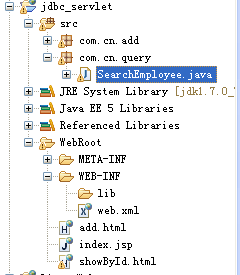
目录结构如下:
4.显示一张表中的全部数据
显示表中全部数据信息的Servlet代码如下:
DeptList.java
package com.cn.query;

import java.io.IOException;

import java.io.PrintWriter;

import java.sql.Connection;

import java.sql.DriverManager;

import java.sql.ResultSet;

import java.sql.SQLException;

import java.sql.Statement;

import javax.servlet.ServletException;

import javax.servlet.http.HttpServlet;

import javax.servlet.http.HttpServletRequest;

import javax.servlet.http.HttpServletResponse;

public class DeptList extends HttpServlet {

    /**

     * The doGet method of the servlet. <br>

     *

     * This method is called when a form has its tag value method equals to get.

     *

     * @param request the request send by the client to the server

     * @param response the response send by the server to the client

     * @throws ServletException if an error occurred

     * @throws IOException if an error occurred

     */

    public void doGet(HttpServletRequest request, HttpServletResponse response)

            throws ServletException, IOException {

        response.setContentType("text/html;charset=gb2312");

        request.setCharacterEncoding("gb2312");

        PrintWriter out = response.getWriter();

        Connection conn = null;

        Statement stmt = null;

        ResultSet rs = null;

        try {

            Class.forName("com.mysql.jdbc.Driver");

            conn = DriverManager.getConnection("jdbc:mysql://localhost:3306/bank", "root", "1234");

            stmt = conn.createStatement();

            rs = stmt.executeQuery("SELECT * FROM dept");

            //在页面中显示表中的所有信息

            out.println(

                    "<html>"+

                    "<head><title>部门表信息</title></head>"+

                    "<body>");

            out.println("<h1>部门表信息:</h1><br><br>");

            //循环遍历输出查询结果

            while(rs.next()){

                out.print("部门编号:");

                out.print(rs.getString(1)+"\t");

                out.print("部门名称:");

                out.print(rs.getString(2)+"\t");

                out.print("部门地址:");

                out.print(rs.getString(3)+"\t");

                out.print("部门人数:");

                out.print(rs.getString(4)+"\t");

                out.print("<br>");

            }

            out.print("</body></html>");

            out.close();

        } catch (ClassNotFoundException e) {

            // TODO Auto-generated catch block

            e.printStackTrace();

        } catch (SQLException e) {

            // TODO Auto-generated catch block

            e.printStackTrace();

        }

    }

    public void init() throws ServletException {

        // Put your code here

    }

}
html调用servlet(JDBC在Servlet中的使用)(1)的更多相关文章
- Java Servlet(三):Servlet中ServletConfig对象和ServletContext对象
本文将记录ServletConfig/ServletContext中提供了哪些方法,及方法的用法. ServletConfig是一个抽象接口,它是由Servlet容器使用,在一个servlet对象初始 ...
- 登录小项目 js+servlet+jdbc+mvc
项目名称: 沪上阿姨 实现需求: 实现用户登录 实现用户退出 实现用户注册 功能分析: 用户登录: 根据用户名和密码查询用户信息.查询则登录成功,查不到则登录失败. 用户退出: 销毁session 用 ...
- JDBC和servlet设计思路、DAO模式思路、MVC思路粗略总结
#JDBC和Servlet联合起来使用的项目思路: 说明:建库,最好一开始设置utf8字符集 step1: 在数据库中建表 如 create table t_user{ ...... } step ...
- Jsp+Servlet+JDBC的使用复习
最近对JDBC进行了复习,对事物的理解,连接池的使用等部分都有一个复习,所以使用Servlet+JDBC完成了一个小Demo,在这里对这种底层的操作进行总结.框架的使用的确方便了我们的开发,但是底层的 ...
- java web开发基础实例(javabean+jsp+servlet+jdbc)
JavaBean:用于传递数据,拥有与数据相关的逻辑处理 JSP:从Model接收数据并生成HTML Servlet:接收HTTP请求并控制Model和View jdbc:用于配置环境 一.[建立数据 ...
- 使用JSP+Servlet+Jdbc+Echatrs实现对豆瓣电影Top250的展示
使用JSP+Servlet+Jdbc+Echatrs实现对豆瓣电影Top250的展示 写在前面: 有的小伙伴,会吐槽啦,你这个标题有点长的啊.哈哈 ,好像是的!不过,这个也是本次案例中使用到的关键技术 ...
- 使用servlet+jdbc+MD5实现用户加密登录
/** * 分析流程: * 1.前端页面提交登录请求 * 2.被web.xml拦截,进入到LoginServlet(有两种方式:方式一,在web.xml文件中配置servlet拦截器;方式二,不用在w ...
- Servlet从本地文件中读取图片,并显示在页面中
import java.io.IOException; import javax.servlet.ServletException; import javax.servlet.http.HttpSer ...
- MVC-1(javabean+jsp+servlet+jdbc)
这是一篇最初版本的mvc设计模式的demo.路要一步一步走,弄明白这其中的逻辑,对后面掌握ssh,ssm等框架大有裨益. 计算机系的同学们也要为毕设做准备了,希望可以帮你们迈出自己做毕设的第一步(微笑 ...
随机推荐
- CSUOJ 1162 Balls in the Boxes 快速幂
Description Mr. Mindless has many balls and many boxes,he wants to put all the balls into some of th ...
- iOS 11开发教程(二)编写第一个iOS 11应用
iOS 11开发教程(二)编写第一个iOS 11应用 编写第一个iOS 11应用 本节将以一个iOS 11应用程序为例,为开发者讲解如何使用Xcode 9.0去创建项目,以及iOS模拟器的一些功能.编 ...
- C# 复制、粘贴文本信息到系统剪贴板
复制: Clipboard.SetDataObject(textBox1.SelectedText); 粘贴: IDataObject iData = Clipboard.GetDataObject( ...
- JS 常用库汇总收集
本文不定期更新, 用于汇总记录一些看着 ok 的 JS 库. 库名 简介 项目地址 macy.js 仅 4 kb的 原生 流布局插件 http://macyjs.com/ Driver.js 仅 4 ...
- PHP中var_export和var_dump的区别
var_dump -- 此函数显示关于一个或多个表达式的结构信息,包括表达式的类型与值. var_export -- 输出或返回一个变量的字符串表示, 它和 var_dump() 类似,不同的是其返回 ...
- hdu 4025 Equation of XOR 状态压缩
思路: 设: 方程为 1*x1 ^ 1*x2 ^ 0*x3 = 0; 0*x1 ^ 1*x2 ^ 1*x3 = 0; 1*x1 ^ 0*x2 ^ 0*x3 = 0 把每一列压缩成一个64位整数,因为x ...
- Loj10153 二叉苹果树
题目描述 有一棵二叉苹果树,如果数字有分叉,一定是分两叉,即没有只有一个儿子的节点.这棵树共 NN 个节点,标号 11 至 NN,树根编号一定为 11. 我们用一根树枝两端连接的节点编号描述一根树枝的 ...
- Git_集中式vs分布式
创建版本库 时光机穿梭 版本回退 工作区和暂存区 管理修改 撤销修改 删除文件 远程仓库 添加远程库 从远程库克隆 分支管理 创建与合并分支 解决冲突 分支管理策略 Bug分支 Feature分支 多 ...
- BZOJ 1500: [NOI2005]维修数列 (splay tree)
1500: [NOI2005]维修数列 Time Limit: 10 Sec Memory Limit: 64 MBSubmit: 4229 Solved: 1283[Submit][Status ...
- Android 手机 无线 ADB
要用网络调试Android需要设备已经获取root权限 如果手机没有命令行工具,请先在手机端安装终端模拟器,然后在终端输入: $su #stop adbd #setprop service.adb.t ...