
Django 2.0 学习(20):Django 中间件详解
Django 中间件详解
Django中间件
在Django中,中间件(middleware)其实就是一个类,在请求到来和结束后,Django会根据自己的规则在合适的时机执行中间件中相应的方法。
- 1.执行完所有的request方法到达执行流程;
- 2.执行中间件的其他方法;
- 3.经过所有response方法,返回客户端;
注意:如果在其中任意中间件中request方法return了值,就会执行当前中间件的response方法,返回给用户,然后抛出错误,不会再执行下一个中间件。

Django 1.9版本之前,如果在request方法中遇到return,会执行最后一个中间件的response方法,然后依次回传。
中间件(类)中5种方法
中间件种可以定义5个方法,分别是:
- process_request(self, request)
- process_view(self, request, callback, callback_args, callback_kwargs)
- process_template_response(self, request, response)
- process_exception(self, request, exception)
- process_response(self, request, response)
1.process_request(self, request),process_response(self, request, response)
当用户发起请求的时候会依次经过所有的中间件,这个时候的请求是process_request,最后到达views函数中,views函数处理后,再依次穿过中间件,这个时候是process_response,最后返回给请求者,在Django中叫做中间件,在其他web框架中,有的叫管道或httphandle
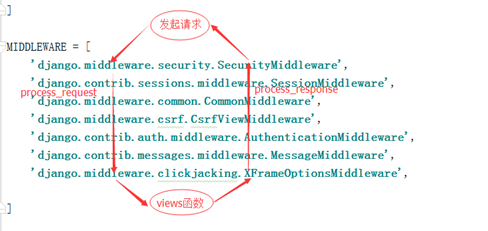
上述截图中的中间件都是Django中的,我们也可以定义自己的中间件,自己写一个类(但是必须继承MiddlewareMixin),下文会对自定义中间件进行详细介绍。
2.process_view(self, request, callback, callback_args, callback_kwargs)
- 执行完所有中间件的request方法
- url匹配成功
- 拿到试图函数的名称、参数(注意不执行),再执行process_view()方法
- 最后去执行视图函数
练习 1
from django.utils.deprecation import MiddlewareMixin

class M1(MiddlewareMixin):

    def process_request(self, request):

        print("M1.request")

    def process_view(self, request, callback, callback_args, callback_kwargs):

        print("M1.process_view")

    def process_response(self, request, response):

        print("M1.response")

        return response

class M2(MiddlewareMixin):

    def process_request(self, request):

        print("M2.request")

    def process_view(self, request, callback, callback_args, callback_kwargs):

        print("M2.process_view")

    def process_response(self, request, response):

        print("M2.response")

        return response
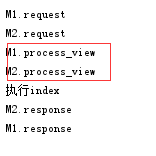
执行结果为:
练习 2
既然process_view拿到视图函数的名称、参数(不执行),再执行process_view()方法,最后才去执行视图函数。那么在执行process_view环节,可以直接把函数执行返回吗?
from django.utils.deprecation import MiddlewareMixin

class M1(MiddlewareMixin):

    def process_request(self, request):

        print("M1.request")

    # callback视图函数名称,callback_args,callback_kwargs视图函数执行所需要的参数

    def process_view(self, request, callback, callback_args, callback_kwargs):

        print("M1.process_view")

        response = callback(request, *callback_args, **callback_kwargs)

        return response

    def process_response(self, request, response):

        print("M1.response")

        return response

class M2(MiddlewareMixin):

    def process_request(self, request):

        print("M2.request")

    def process_view(self, request, callback, callback_args, callback_kwargs):

        print("M2.process_view")

    def process_response(self, request, response):

        print("M2.response")

        return response
执行结果为:
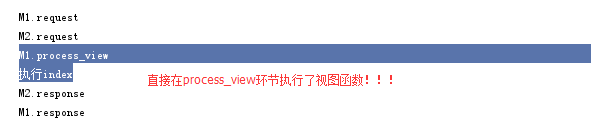
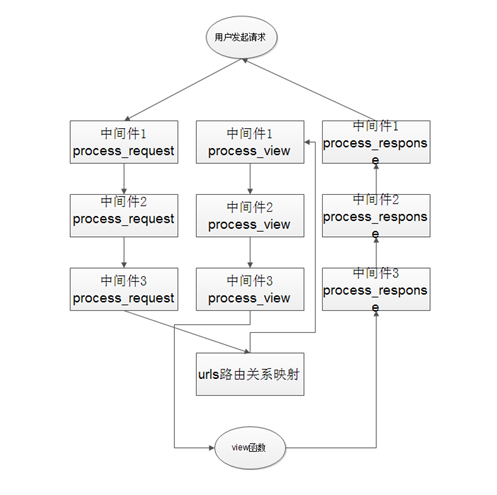
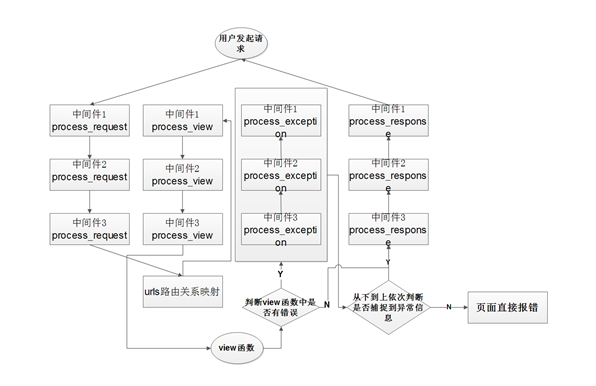
结论:如果process_view函数有返回值,跳转到最后一个中间件,执行最后一个中间件的response方法,逐步返回。和process_request方法不一样,request方法在当前中间件的response方法返回。其过程分析图如下:
3.process_exception(self, request, exception)
from django.utils.deprecation import MiddlewareMixin

class M1(MiddlewareMixin):

    def process_request(self, request):

        print("M1.request")

    # callback视图函数名称,callback_args,callback_kwargs视图函数执行所需要的参数

    def process_view(self, request, callback, callback_args, callback_kwargs):

        print("M1.process_view")

        # response = callback(request, *callback_args, **callback_kwargs)

        # return response

    def process_response(self, request, response):

        print("M1.response")

        return response

    def process_exception(self, request, exception):

        print("M1.exception")

class M2(MiddlewareMixin):

    def process_request(self, request):

        print("M2.request")

    def process_view(self, request, callback, callback_args, callback_kwargs):

        print("M2.process_view")

    def process_response(self, request, response):

        print("M2.response")

        return response

    def process_exception(self, request, exception):

        print("M2.exception")
process_exception默认不执行,所以添加process_exception方法,啥也没执行
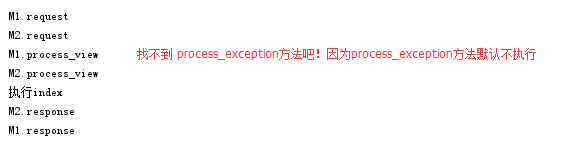
process_exception方法只有在视图函数执行出错的时候才会执行
M1.request

M2.request

M1.process_view

M2.process_view

执行index

M2的process_exception

M1的process_exception

Internal Server Error: /index/

Traceback (most recent call last):

  File "C:\Users\Administrator\AppData\Local\Programs\Python\Python36\lib\site-packages\django\core\handlers\exception.py", line 41, in inner

    response = get_response(request)

  File "C:\Users\Administrator\AppData\Local\Programs\Python\Python36\lib\site-packages\django\core\handlers\base.py", line 187, in _get_response

    response = self.process_exception_by_middleware(e, request)

  File "C:\Users\Administrator\AppData\Local\Programs\Python\Python36\lib\site-packages\django\core\handlers\base.py", line 185, in _get_response

    response = wrapped_callback(request, *callback_args, **callback_kwargs)

  File "F:\untitled1\app01\views.py", line 7, in index

    int("ok")

ValueError: invalid literal for int() with base 10: 'ok'

M2.response

M1.response

[02/Jul/2018 16:43:59] "GET /index/ HTTP/1.1" 500 62663
1.执行完所有request方法;
2.执行所有process_view方法;
3.如果视图函数出错,执行process_exception(最终response,process_exception的return值),如果process_exception方法有了返回值就不再执行其他中间件的process_exception,直接执行response方法响应;
4.执行所有response方法;
5.最后返回process_exception的返回值;
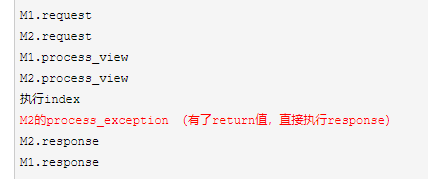
process_exception应用:在视图函数执行出错时,返回错误信息。这样页面就不会报错了:
from django.utils.deprecation import MiddlewareMixin

from django.http import HttpResponse

class M1(MiddlewareMixin):

    def process_request(self, request):

        print("M1.request")

    # callback视图函数名称,callback_args,callback_kwargs视图函数执行所需要的参数

    def process_view(self, request, callback, callback_args, callback_kwargs):

        print("M1.process_view")

        # response = callback(request, *callback_args, **callback_kwargs)

        # return response

    def process_response(self, request, response):

        print("M1.response")

        return response

    def process_exception(self, request, exception):

        print("M1.exception")

class M2(MiddlewareMixin):

    def process_request(self, request):

        print("M2.request")

    def process_view(self, request, callback, callback_args, callback_kwargs):

        print("M2.process_view")

    def process_response(self, request, response):

        print("M2.response")

        return response

    def process_exception(self, request, exception):

        print("M2.exception")

        return HttpResponse("出错了!!")
其过程分析如下图所示:
4.process_template_response(self, request, response)
from django.utils.deprecation import MiddlewareMixin

from django.shortcuts import HttpResponse

class M1(MiddlewareMixin):

    def process_request(self, request):

        print("M1.request")

    # callback视图函数名称,callback_args,callback_kwargs视图函数执行所需要的参数

    def process_view(self, request, callback, callback_args, callback_kwargs):

        print("M1.process_view")

        # response = callback(request, *callback_args, **callback_kwargs)

        # return response

    def process_response(self, request, response):

        print("M1.response")

        return response

    def process_exception(self, request, exception):

        print("M1.exception")

class M2(MiddlewareMixin):

    def process_request(self, request):

        print("M2.request")

    def process_view(self, request, callback, callback_args, callback_kwargs):

        print("M2.process_view")

    def process_response(self, request, response):

        print("M2.response")

        return response

    def process_exception(self, request, exception):

        print("M2.exception")

        return HttpResponse("出错了!!")

    def process_template_response(self, request, response):

        print("M2.process_template_response")

        return response
process_template_response方法默认不执行
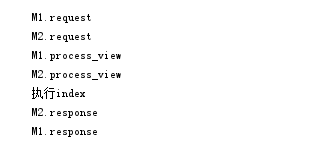
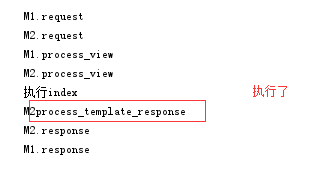
process_template_response方法特性:只有在试图函数的返回对象中有render方法才会执行,并把对象的render方法的返回值返回给用户(注意:不返回试图函数的return结果了,而是返回视图函数return值(对象)的render方法)
class M2(MiddlewareMixin):

    def process_request(self, request):

        print("M2.request")

    def process_view(self, request, callback, callback_args, callback_kwargs):

        print("M2.process_view")

    def process_response(self, request, response):

        print("M2.response")

        return response

    def process_exception(self, request, exception):

        print("M2.exception")

        return HttpResponse("出错了!!")

    def process_template_response(self, request, response):

        # 如果试图函数中的返回值中有render方法,才会执行process_template_response

        print("M2.process_template_response")

        return response
视图函数(views.py)
from django.shortcuts import render,HttpResponse

# Create your views here.

class Foo():

    def __init__(self,requ):

        self.req=requ

    def render(self):

        return HttpResponse('OKKKK')

def index(request):

    print("执行index")

    obj=Foo(request)

    return obj
执行结果为:
应用:
既然process_template_response不返回视图函数的return的结果,而是返回视图函数return(对象)的render方法(多加了一个环节)。就可以在这个视图函数返回对象的render方法里,做返回值的二次加工。多加工几个,视图函数就可以随便使用了(好比喷雾器有了多个喷头,换不同的喷头出不同的水,返回值就可以组件化了)
from django.shortcuts import render,HttpResponse

# Create your views here.

class Dict():   #对视图函数返回值做二次封装 !!

    def __init__(self,requ,msg):

        self.req=requ

        self.msg=msg

    def render(self):

        a=self.msg #在render方法里面 把视图函数的 返回值 制作成字典 、列表等。。。

                   #  如果新增了其他 一个视图函数直接,return对象 即可!不用每个视图函数都写 制作字典 列表 拼接的逻辑了

        return HttpResponse(a)    #

def index(request):

    print("执行index")

    obj=Dict(request,"vv")

    return obj
自定义中间件
1.在项目文件下创建Middle文件夹,并在该文件夹下面创建custom_middle.py文件,该文件代码如下:
from django.utils.deprecation import MiddlewareMixin

class Middle1(MiddlewareMixin):

    def process_request(self,request):

        print("来了")

    def process_response(self, request,response):

        print('走了')
2.在settings.py文件中,注册该中间件(Django项目中的settings模块中,有一个MIDDLEWARE_CLASSES变量,其中每个元素都是一个中间件)
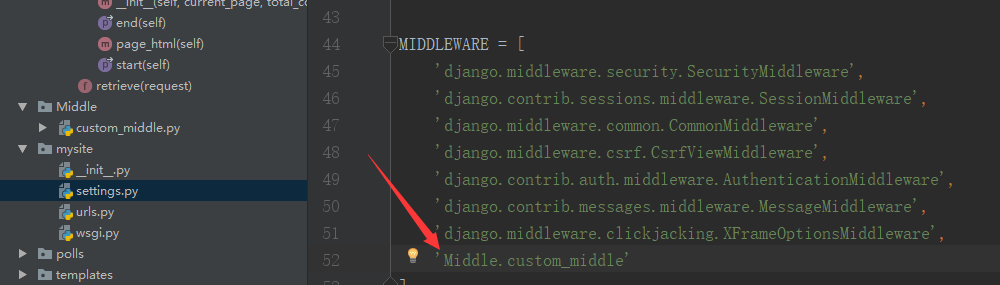
执行结果为

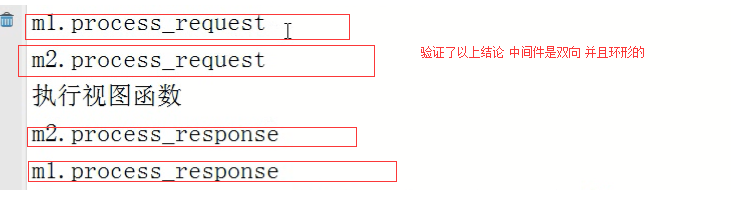
为什么结果报错了??这是因为自定义的中间件response方法没有return,交给下一个中间件,导致http请求中断了!注意:自定义的中间件request方法不要return,因为返回值中间件不再往下执行,导致http请求到达不了视图层,因为request在视图之前执行。
from django.utils.deprecation import MiddlewareMixin

class Middle1(MiddlewareMixin):

    def process_request(self,request):

        print("来了")     # 不用return Django内部自动帮我们传递

    def process_response(self, request,response):

        print('走了')

        return response     # 执行完了这个中间件一定要 传递给下一个中间件
**执行结果为
中间件应用场景
由于中间件工作在视图函数执行前、执行后(就像所有视图函数的装饰器),适合所有的请求/一部分请求做批处理,其应用主要有:
- 1.IP限制:放在中间件类的列表中,组织某些IP访问;
- 2.URL访问过滤:如果用户访问的是login视图(放过),如果访问其他视图(需要检测是不是有session,有则放过;否则返回login),这样省得在多个视图函数上面写装饰器;
- 3.缓存(CDN):客户端请求来了,中间件去缓存看看有没有数据,有直接返回给用户,没有再去逻辑层执行视图函数;
Django 2.0 学习(20):Django 中间件详解的更多相关文章
- tensorflow 1.0 学习:十图详解tensorflow数据读取机制
本文转自:https://zhuanlan.zhihu.com/p/27238630 在学习tensorflow的过程中,有很多小伙伴反映读取数据这一块很难理解.确实这一块官方的教程比较简略,网上也找 ...
- Django 2.0 学习(07):Django 视图(进阶-续)
接Django 2.0 学习(06):Django 视图(进阶),我们将聚焦在使用简单的表单进行处理和精简代码. 编写简单表单 我们将用下面的代码,来替换之前的detail模板("polls ...
- Django中间件详解
Django中间件详解 中间件位置 WSGI 主要负责的就是负责和浏览器和应用之家沟通的桥梁 浏览器发送过来一个http请求,WSGI负责解包,并封装成能够给APP使用的environ,当app数据返 ...
- Asp.Net MVC学习总结之过滤器详解(转载)
来源:http://www.php.cn/csharp-article-359736.html 一.过滤器简介 1.1.理解什么是过滤器 1.过滤器(Filters)就是向请求处理管道中注入额外的 ...
- [深入学习Web安全](5)详解MySQL注射
[深入学习Web安全](5)详解MySQL注射 0x00 目录 0x00 目录 0x01 MySQL注射的简单介绍 0x02 对于information_schema库的研究 0x03 注射第一步—— ...
- Shell学习之Bash变量详解(二)
Shell学习之Bash变量详解 目录 Bash变量 Bash变量注意点 用户自定义变量 环境变量 位置参数变量 预定义变量 Bash变量 用户自定义变量:在Bash中由用户定义的变量. 环境变量:这 ...
- Linux学习之用户配置文件详解(十四)
Linux学习之用户配置文件详解 目录 用户信息文件/etc/password 影子文件/etc/shadow 组信息文件/etc/group 组密码文件/etc/gshadow 用户信息文件/etc ...
- Spark2.1.0——内置RPC框架详解
Spark2.1.0——内置RPC框架详解 在Spark中很多地方都涉及网络通信,比如Spark各个组件间的消息互通.用户文件与Jar包的上传.节点间的Shuffle过程.Block数据的复制与备份等 ...
- expect学习笔记及实例详解【转】
1. expect是基于tcl演变而来的,所以很多语法和tcl类似,基本的语法如下所示:1.1 首行加上/usr/bin/expect1.2 spawn: 后面加上需要执行的shell命令,比如说sp ...
随机推荐
- 树莓派 Zero WH 初使用体验
12号买了一个树莓派 Zero WH,这个是什么型号呢?其实和树莓派Zero是同一系列的,加上W则表示多了无线Wifi和蓝牙模块,加上H则表示在板子上已经焊接好了2x20的排针. 这个Zero真的很迷 ...
- h5小球走迷宫小游戏源码
无意中找到的一个挺有意思的小游戏,关键是用h5写的,下面就分享给大家源码 还是先来看小游戏的截图 可以用键盘的三个键去控制它,然后通关 下面是源代码 <!doctype html> < ...
- CSS3新增特性详解(一)
注:由于CSS3的新特性较多,所以分两篇博文来说明.第一篇主要包括新的选择器.文字及块阴影.多背景图.颜色渐变.圆角等.第二篇主要细说CSS3的各种动画效果,如:旋转.移动.缩放等,还包括图标字体的应 ...
- 微信小程序云开发
什么是云开发? 云开发是由腾讯云联合微信团队为开发者提供的 包含 云函数.云数据库和云文件存储能力的后端云服务 云开发为开发者提供完整的云端支持,弱化后端和运维概念,无需搭建服务器,使用平台提供的 A ...
- AndroidStudio下使用 RecyclerView xml文件不显示预览条目并报错类似:NoClassDefFoundError 问题解决
在项目中使用RecyclerView是很普遍的,最近工作中遇到了这种情况: RecyclerView可以正常使用 不会报错 但是在layout中的xml文件中不显示并且报错,如下图:(报的错忘了截了, ...
- 图形 - bootStrap4常用CSS笔记
.rounded 图片显示圆角效果 .rounded-circle 设置椭圆形图片 .img-thumbnail 设置图片缩略图(图片有边框) .img-fluid 响应式图片 .float-righ ...
- 使用proxyee-down解决百度云下载限速问题
1.在下面页面安装HTTP下载器 https://github.com/proxyee-down-org/proxyee-down#%E4%B8%8B%E8%BD%BD 2.安装switchy插件 h ...
- 2.5星|《AI进化论》:疑似基于PPT与公关稿整理汇编而成
AI进化论·解码人工智能商业场景与案例 全书是目前AI在一些热门领域的应用的介绍,包括各行业内AI可以实现的功能.现有相关公司的具体业务等.对各公司的介绍仅限于能实现什么业务,具体做的怎么样,有什么优 ...
- kubernetes高可用设计-master节点和kubectl
部署master 节点 上一遍是CA证书和etcd的部署,这一篇继续搭建k8s,废话不多说.开始部署. kubernetes master 节点包含的组件有: kube-apiserver kube- ...
- Spark概述及集群部署
Spark概述 什么是Spark (官网:http://spark.apache.org) Spark是一种快速.通用.可扩展的大数据分析引擎,2009年诞生于加州大学伯克利分校AMPLab,2010 ...