
Bind读取配置到C#实例
1.创建一个空的ASP.NET Core Web 应用程序
2.程序包管理控制台执行Install-Package Microsoft.AspNetCore -Version 2.0.1
3.创建json文件命名为:appsettings.json,再添加一个Class类
appsettings.json内容为:
{

  "ClassNo": "",

  "ClassDesc": "ASP.NET Core 101",

  "Students": [

    {

      "name": "name1",

      "age": ""

    },

    {

      "name": "name2",

      "age": ""

    },

    {

      "name": "name13",

      "age": ""

    }

  ]

}
Class 类代码
using System;

using System.Collections.Generic;

using System.Linq;

using System.Threading.Tasks;

namespace OptionsBindSample

{

    public class Class

    {

        public int ClassNo { get; set; }

        public string ClassDesc { get; set; }

        public List<Student> Students { get; set; }

    }

    public class Student

    {

        public string Name { get; set; }

        public string Age { get; set; }

    }

}
4.Startup.cs 编写读取配置构造方法,并在app.Run方法打印,代码如下
using System;

using System.Collections.Generic;

using System.Linq;

using System.Threading.Tasks;

using Microsoft.AspNetCore.Builder;

using Microsoft.AspNetCore.Hosting;

using Microsoft.AspNetCore.Http;

using Microsoft.Extensions.DependencyInjection;

using Microsoft.Extensions.Configuration;

namespace OptionsBindSample

{

    public class Startup

    {

        /// <summary>

        /// 添加构造方法用来获取配置信息

        /// </summary>

        public IConfiguration Configuration { get; set; }

        public Startup(IConfiguration configuration)

        {

            Configuration = configuration;

        }

        // This method gets called by the runtime. Use this method to add services to the container.

        // For more information on how to configure your application, visit https://go.microsoft.com/fwlink/?LinkID=398940

        public void ConfigureServices(IServiceCollection services)

        {

        }

        // This method gets called by the runtime. Use this method to configure the HTTP request pipeline.

        public void Configure(IApplicationBuilder app, IHostingEnvironment env)

        {

            if (env.IsDevelopment())

            {

                app.UseDeveloperExceptionPage();

            }

            app.Run(async (context) =>

            {

                var myClass = new Class();

                Configuration.Bind(myClass);//绑定基础信息

                //输出json配置到页面

                await context.Response.WriteAsync($"ClassNo {myClass.ClassNo}");

                await context.Response.WriteAsync($"ClassDesc {myClass.ClassDesc}");

                await context.Response.WriteAsync($"myClass Count {myClass.Students.Count}");

            });

        }

    }

}
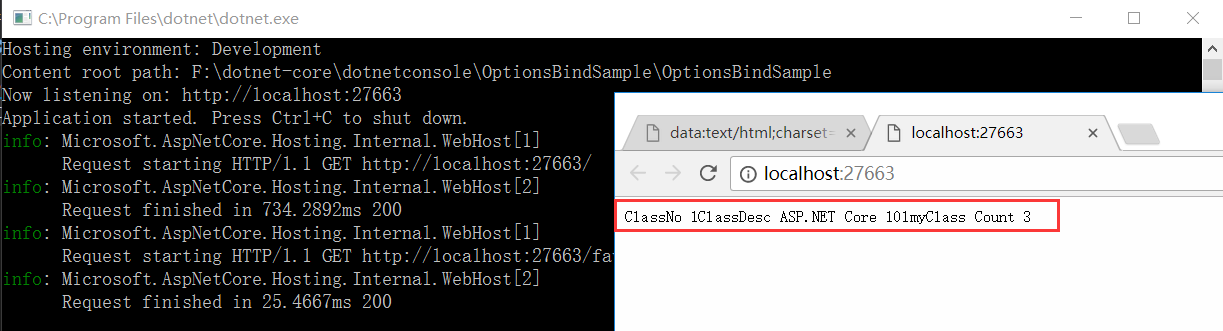
5.启动程序,输出结果
Bind读取配置到C#实例的更多相关文章
- 【ASP.NET Core快速入门】(五)命令行配置、Json文件配置、Bind读取配置到C#实例、在Core Mvc中使用Options
命令行配置 我们通过vs2017创建一个控制台项目CommandLineSample 可以看到现在项目以来的是dotnet core framework 我们需要吧asp.net core引用进来,我 ...
- 菜鸟入门【ASP.NET Core】5:命令行配置、Json文件配置、Bind读取配置到C#实例、在Core Mvc中使用Options
命令行配置 我们通过vs2017创建一个控制台项目CommandLineSample 可以看到现在项目以来的是dotnet core framework 我们需要吧asp.net core引用进来 ...
- 任务12:Bind读取配置到C#实例
将json文件的配置转换成C#的实体 新建项目: Normal 0 7.8 磅 0 2 false false false EN-US ZH-CN X-NONE /* Style Definition ...
- (十二)Bind读取配置到C#实例
继续上一节的,接下来用Options或者Bind把json文件里的配置转成C#的实体,相互之间映射起来.首先新建一个asp.net core mvc项目OptionsBindSample Startu ...
- 使用Bind读取配置到C#的实例
在之前的一篇二级域名绑定的文章<.Net Core 二级域名绑定到指定的控制器>中,有一个小的地方是关于读取Json文件的配置信息的,当时是用了读取文件流的方式,一直以来觉得该方法太Low ...
- Bind,Options读取配置到C#实例
首先创建一个网站 Asp.net Core Mvc 空网站 起名叫做OptionsBindSample 通过Option和Bind将Json文件里面的配置转成C#里面的一个实体,相互之间映射起来 Bi ...
- ASP.NET Core轻松入门Bind读取配置文件到C#实例
首先新建一个ASP.NET Core空项目,命名为BindReader 然后 向项目中添加一个名为appsettings.json的json文件,为什么叫appsettings呢? 打开Progra ...
- asp.net core-6.Bind读取配置文件到C#实例中
1,创建asp.net core web应用程序,选择空网站 2,创建一个appsettings.json文件 为什么要叫appsettings.json呢?因为在Iwebhost启动的时候没有添加任 ...
- Bind安装配置及应用
Bind安装配置及应用 BIND:Berkeley Internet Name Domain ,ISC.org DNS服务的实现: 监听端口:53/UDP , 53/TCP 程 ...
随机推荐
- linux c++连接mysql编译问题
- 并发编程(二)concurrent 工具类
并发编程(二)concurrent 工具类 一.CountDownLatch 经常用于监听某些初始化操作,等初始化执行完毕后,通知主线程继续工作. import java.util.concurren ...
- Java 8 Optional 类深度解析
Java 8 Optional 类深度解析 身为一名Java程序员,大家可能都有这样的经历:调用一个方法得到了返回值却不能直接将返回值作为参数去调用别的方法.我们首先要判断这个返回值是否为null,只 ...
- 20155207 2016-2017-2 《Java程序设计》第九周学习总结
20155207 2016-2017-2 <Java程序设计>第九周学习总结 教材学习内容总结 第16章 整合数据库 16.1 JDBC入门 16.1.1 JDBC简介 数据库本身是个独立 ...
- 【Unity】1.3 Unity3D游戏开发学习路线
分类:Unity.C#.VS2015 创建日期:2016-03-23 一.基本思路 第1步--了解编辑器 首先了解unity3d的菜单,视图界面.这些是最基本的基础,可以像学word操作一样,大致能明 ...
- authentication 和 authorization
单词 词性 解释 authentication n. 认证 authentic adj. 真实的 authorization n. 授权 authorise vt. 授权 authentication ...
- 如何使用masonry设计复合型cell[转]
前言 其实早在@sunnyxx同学发布UIView-FDCollapsibleConstraints的时候 我就说要写一下怎么用代码来稍微麻烦的实现复用的问题 但是一直各种没时间(主要是我的办法太复杂 ...
- 201709012工作日记--一台电脑创建两个Github账户上传代码
1. 在一台主机上面使用多个GitHub账号 有时候,我们需要将个人账号和公司账号区分,这时候我们就会需要在一台电脑上使用2个不同的git账号. 2. 上传文件 http://blog.csdn.ne ...
- python正则表达式转义注意事项
无论哪种语言,在使用正则表达式的时候都避免不了一个问题,就是在匹配元字符的时候,需要对元字符进行转义,让 正则表达式引擎将其当做普通字符来匹配.本文主要以python为例,说明一下转义中需要注意的问题 ...
- (最短路 dijkstra)昂贵的聘礼 -- poj -- 1062
链接: http://poj.org/problem?id=1062 昂贵的聘礼 Time Limit: 1000MS Memory Limit: 10000K Total Submissions ...