
JSTL使用
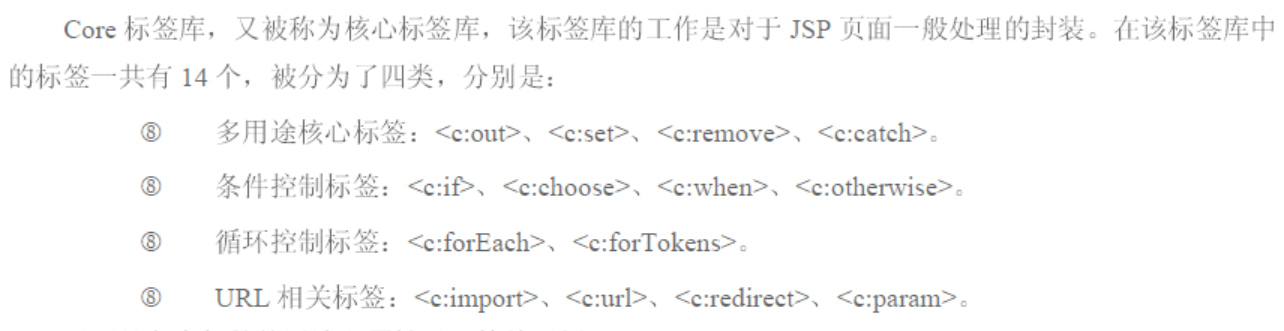
1.标签函数库
核心标签库 c
I18N格式标签库 fmt
SQL标签库 sql
XML标签库 xml
函数标签库 fn
2.JSTL支持EL
二:表达式标签
1.介绍
2.c:out
可以对敏感的字符进行自动转换,强于EL表达式。
语法:
<c:out value="${EL表达式}" >
属性:

3.c:set
为变量或者javaBean属性赋值的工作。
属性:

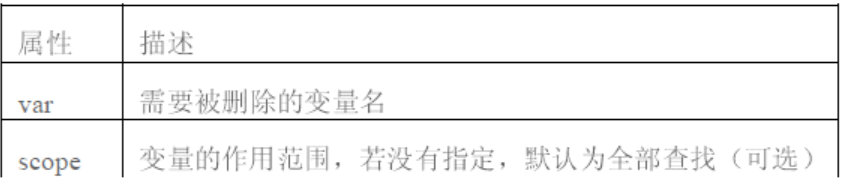
4.c:remove
删除存于scope范围内的变量。
属性:
5.程序customer.java
 package bean;

 public class Customer {

     private String name;

     private int age;

     public Customer() {

     }

     public String getName() {

         return name;

     }

     public void setName(String name) {

         this.name = name;

     }

     public int getAge() {

         return age;

     }

     public void setAge(int age) {

         this.age = age;

     }

     public Customer(String name, int age) {

         super();

         this.name = name;

         this.age = age;

     }

 }
6.index.jsp
 <%@page import="bean.Customer"%>

 <%@ page language="java" contentType="text/html; charset=utf-8"

     pageEncoding="utf-8"%>

 <%@ taglib prefix="c" uri="http://java.sun.com/jsp/jstl/core"%>

 <!DOCTYPE html PUBLIC "-//W3C//DTD HTML 4.01 Transitional//EN" "http://www.w3.org/TR/html4/loose.dtd">

 <html>

 <head>

 <meta http-equiv="Content-Type" content="text/html; charset=ISO-8859-1">

 <title>Insert title here</title>

 </head>

 <body>

     <%

         Customer customer=new Customer();

         customer.setAge(100);

         request.setAttribute("customer", customer);

     %>

     <!-- c:set 为变量赋值的方式-->

     <c:set var="book" value="<java1>" scope="request"></c:set>

     <c:set var="date" value="1999-9-1" scope="session"></c:set>

     <!-- c:set -->

     <c:set target="${requestScope.customer}" property="age" value="88"></c:set>

     <!-- c:out 为javabean属性赋值的方式-->

     <c:out value="${requestScope.book}"></c:out>

     <br>

     <c:out value="${requestScope.customer.age}"></c:out>

     <br>

     <c:out value="${sessionScope.date}"></c:out>

     <!-- c:remove -->

     <c:remove var="date" scope="session"/>

     <br>

     <c:out value="${sessionScope.date}"></c:out>

 </body>

 </html>
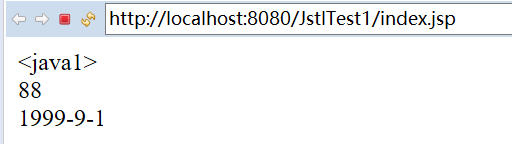
7.效果
三:流程控制标签
1.c:if
属性:

2.程序
 <%@ page language="java" contentType="text/html; charset=utf-8"

     pageEncoding="utf-8"%>

 <%@ taglib prefix="c" uri="http://java.sun.com/jsp/jstl/core" %>

 <!DOCTYPE html PUBLIC "-//W3C//DTD HTML 4.01 Transitional//EN" "http://www.w3.org/TR/html4/loose.dtd">

 <html>

 <head>

 <meta http-equiv="Content-Type" content="text/html; charset=ISO-8859-1">

 <title>Insert title here</title>

 </head>

 <body>

     <!-- c:if -->

     <c:set var="id" value="96" scope="request"></c:set>

     <c:if test="${requestScope.id>18}">成年人</c:if>

     <br>

     <!-- c:if的好处:可以将判断结果保存起来,以备以后使用下面是用法 -->

     <c:if test="${requestScope.id>18}" var="isAdult" scope="request">成年人</c:if>

     <br>

     <c:out value="${requestScope.isAdult}"></c:out>

     <br>

     <!-- c:choose c:when c:otherwise -->

     <c:set var="age" value="11116" scope="session"></c:set>

     <c:choose >

         <c:when test="${session.age > 60}">

             老年

         </c:when>

         <c:otherwise>

             未成年。。。。。。。。。。。

         </c:otherwise>

     </c:choose>

 </body>

 </html>
四:迭代标签
1.c:forEach
为循环控制,可以将Collection中的成员循环浏览一遍。
属性:

varStatus的用法:
可以获取索引
当前第几个
是否是第一个
是否是最后一个
2.程序
 <%@page import="java.util.HashMap"%>

 <%@page import="java.util.Map"%>

 <%@page import="java.util.List"%>

 <%@page import="java.util.ArrayList"%>

 <%@page import="bean.Customer"%>

 <%@ page language="java" contentType="text/html; charset=utf-8"

     pageEncoding="utf-8"%>

 <%@ taglib prefix="c" uri="http://java.sun.com/jsp/jstl/core" %>

 <!DOCTYPE html PUBLIC "-//W3C//DTD HTML 4.01 Transitional//EN" "http://www.w3.org/TR/html4/loose.dtd">

 <html>

 <head>

 <meta http-equiv="Content-Type" content="text/html; charset=ISO-8859-1">

 <title>Insert title here</title>

 </head>

 <body>

     <!-- c:foreach 的用法 遍历Collection-->

     <%

         List<Customer> customer=new ArrayList<Customer>();

         customer.add(new Customer("A",1));

         customer.add(new Customer("B",2));

         customer.add(new Customer("C",3));

         customer.add(new Customer("D",4));

         customer.add(new Customer("E",5));

         request.setAttribute("customer", customer);

     %>

     <c:forEach items="${requestScope.customer}" begin="0" step="2" end="4" var="cust">

         ${cust.name} :  ${cust.age}<br>

     </c:forEach>

     <br>

     <!-- c:foreach 的用法 遍历数组-->

     <%

         String[] strs=new String[]{"A","B","C"};

         request.setAttribute("strs", strs);

     %>

     <c:forEach items="${requestScope.strs}" var="str">

         ${str}

     </c:forEach>

     <br><br>

     <!-- c:foreach中的status属性的用法 -->

     <c:forEach items="${requestScope.customer}" var="cust" varStatus="status">

         ${status.index}:${status.count}:${status.first}:${status.last}:${cust.name}<br>

     </c:forEach>

     <br>

     <!-- c:foreach中的用法,遍历map -->

     <%

     Map<String,Customer> customer2=new HashMap<String,Customer>();

     customer2.put("a",new Customer("A",1));

     customer2.put("b",new Customer("B",2));

     customer2.put("c",new Customer("C",3));

     customer2.put("d",new Customer("D",4));

     customer2.put("e",new Customer("E",5));

     request.setAttribute("customer2", customer2);

     %>

     <c:forEach items="${requestScope.customer2}" var="customer2">

         ${customer2.key }:${customer2.value.name}:${customer2.value.age}<br>

     </c:forEach>

 </body>

 </html>
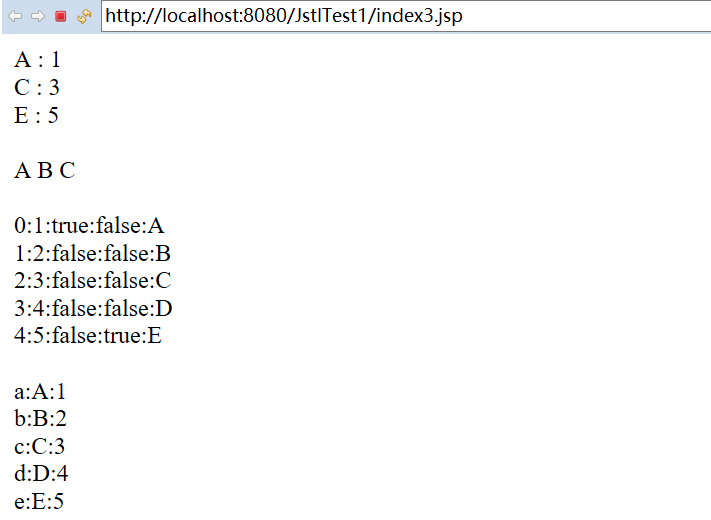
3.效果
4.c:forToken
处理字符串的,类似与String的split方法。
5.程序
 <%@ page language="java" contentType="text/html; charset=ISO-8859-1"

     pageEncoding="ISO-8859-1"%>

 <%@ taglib prefix="c" uri="http://java.sun.com/jsp/jstl/core" %>

 <!DOCTYPE html PUBLIC "-//W3C//DTD HTML 4.01 Transitional//EN" "http://www.w3.org/TR/html4/loose.dtd">

 <html>

 <head>

 <meta http-equiv="Content-Type" content="text/html; charset=ISO-8859-1">

 <title>Insert title here</title>

 </head>

 <body>

     <!-- c:forToken -->

     <c:set value="a,c,d;g,h;u" var="test" scope="request"></c:set>

     <c:forTokens items="${requestScope.test}" delims=";" var="s">

         ${s}<br>

     </c:forTokens>

 </body>

 </html>
6.结果

五:URL标签操作
1.c:import
可以包含任何页面到当前页面。
2.c:redirect
使当前页面重定向到指定的页面
3.c:url
可以产生一个url地址,可以Cookie是否可用来智能URL重写,还能对get请求的参数进行编码
可以使用c:param为url添加参数,会带参数进行自动转码、
value中的/代表的是WEB应用的根目录。
4.程序
 <%@ page language="java" contentType="text/html; charset=utf-8"

     pageEncoding="utf-8"%>

 <%@ taglib prefix="c" uri="http://java.sun.com/jsp/jstl/core" %>

 <!DOCTYPE html PUBLIC "-//W3C//DTD HTML 4.01 Transitional//EN" "http://www.w3.org/TR/html4/loose.dtd">

 <html>

 <head>

 <meta http-equiv="Content-Type" content="text/html; charset=utf-8">

 <title>Insert title here</title>

 </head>

 <body>

     <!-- c:import -->

     <c:import url="http://www.baidu.com"></c:import>

     <!-- c:redirect -->

     <!-- / 代表WEB应用的根目录,与response.sendRedirect("/")不同,因为标签需要处理类解析 -->

     <c:redirect url="/index.jsp"></c:redirect>

     <!-- c:url -->

     <c:url value="/test.jsp" var="testurl">

         <c:param name="name" value="tom"></c:param>

     </c:url>

     URL:${testurl}

 </body>

 </html>
JSTL使用的更多相关文章
- JSP 标准标签库(JSTL)
JSP 标准标签库(JSTL) JSP标准标签库(JSTL)是一个JSP标签集合,它封装了JSP应用的通用核心功能. JSTL支持通用的.结构化的任务,比如迭代,条件判断,XML文档操作,国际化标签, ...
- JSTL标签 参考手册
前言 ========================================================================= JSTL标签库,是日常开发经常使用的,也是众多 ...
- JavaWeb_day08_EL JSTL
本文为博主辛苦总结,希望自己以后返回来看的时候理解更深刻,也希望可以起到帮助初学者的作用. 转载请注明 出自 : luogg的博客园 谢谢配合! day08 EL JSTL EL表达式 语法:${} ...
- java web学习总结(三十) -------------------JSTL表达式
一.JSTL标签库介绍 JSTL标签库的使用是为弥补html标签的不足,规范自定义标签的使用而诞生的.使用JSLT标签的目的就是不希望在jsp页面中出现java逻辑代码 二.JSTL标签库的分类 核心 ...
- [Java] JSP笔记 - EL、JSTL 常用标签
一. 什么是 EL 语言 表达式语言(EL)是 JSP 2.0 引入的一种计算和输出 Java 对象的简单语言. 二.EL 语言的作用 为了使JSP写起来更加简单.表达式语言的灵感来自于 ECMASc ...
- JSTL 操作符
el表达式的取值默认顺序: pageScope requestScope sessionScope applicationScope 结构,采用.导航,也称为存取器 ${us ...
- JSP页面JSTL提供的函数标签EL表达式操作字符串的方法
首先在jsp页面导入标签<%@ taglib prefix="fn" uri="http://java.sun.com/jsp/jstl/functions&quo ...
- JSTL标签库
JSP页面作为内嵌java的Html简化了Servlet在控制页面显示的语法,但JSP脚本中的表达式功能不够强大,语法也稍显繁杂,EL(Expression Language)表达式语言的出现能够大大 ...
- 重温JSP学习笔记--与日期数字格式化有关的jstl标签库
上一篇笔记写的主要是JSTL的core标签库,如果想对一些数字或者日期做一些操作或者在网页上显示指定格式的数字或日期,jstl还提供了另一个fmt标签库,这里简单介绍一下: 第一步,导入标签库: &l ...
- 重温JSP学习笔记--JSTL标签库
以前写jsp的时候对jstl标签库是有些抵触的,因为我觉得嵌入java代码的方式几乎无往不利,没有必要使用标签库,不过这次复习还是好好地学习了一下,发现这个还是很有用处的,用得好能省不少事,JSTL是 ...
随机推荐
- koa中间件机制
Koa是Express原班人马打造的一个更小,基于nodejs平台的下一代web开发框架. koa2利用的是async/await,洋葱圈模型. 1. koa2中间件基本用法
- Rolling in the Deep (Learning)
Rolling in the Deep (Learning) Deep Learning has been getting a lot of press lately, and is one of t ...
- sql 2012之后分页查询速度问题
一.SQL Server 2012使用OFFSET/FETCH NEXT分页,比SQL Server 2005/2008中的RowNumber()有显著改进.今天特地作了简单测试,现将过程分享如下: ...
- Document对象中的一些重要的属性和方法(笔记)
Document对象:每一个web浏览器窗口.标签页和框架由一个window对象所表示.每个window对象都有一个document属性引用的是Document对象,它是一个巨大的API中的核心对象, ...
- python核心编程笔记——Chapter2
对于.py文件,任何一个空的式子都不会有什么输出,如下: #!/usr/bin/env python #-*-coding=utf-8-*- #无任何效果,空语句 1 + 2 * 4 对于i++,++ ...
- Java容器Set接口
Set接口的实现,可以方便地将指定的类型以集合类型保存在一个变量中.Set是一个不包含重复元素的Collection,更确切地讲,Set 不包含满足 e1.equals(e2) 的元素对,并且最多包含 ...
- HDU 4720 Naive and Silly Muggles 平面几何
题目链接:http://acm.hdu.edu.cn/showproblem.php?pid=4720 解题报告:给出一个三角形的三个顶点坐标,要求用一个最小的圆将这个三个点都包含在内,另外输入一个点 ...
- 【译】第五篇 Integration Services:增量加载-Deleting Rows
本篇文章是Integration Services系列的第五篇,详细内容请参考原文. 在上一篇你学习了如何将更新从源传送到目标.你同样学习了使用基于集合的更新优化这项功能.回顾增量加载记住,在SSIS ...
- UNIX环境高级编程 第8章 进程控制
本章是UNIX系统中进程控制原语,包括进程创建.执行新程序.进程终止,另外还会对进程的属性加以说明,包括进程ID.实际/有效用户ID. 进程标识 每个进程某一时刻在系统中都是独一无二的,它们之间是用一 ...
- js选择checkbox值,组织成key-value形式,传值到后台
最近项目中遇到这样一个问题,接口定义需要传一个Map<String,String[]> params的参数,需要在jsp页面组织数据到后台操作,所以记下来以后难免还会用到. 以下是java ...