
[翻译] CSStickyHeaderFlowLayout
CSStickyHeaderFlowLayout
https://github.com/jamztang/CSStickyHeaderFlowLayout



Parallax, Sticky Headers, Growing image heading, done right in one UICollectionViewLayout.
视差效果,悬停的headerView以及实时变化的headerView,一个UICollectionViewLayout就可以实现.
Installation
CSStickyHeaderFlowLayout is available through CocoaPods, to install it simply add the following line to your Podfile:
你可以通过 CocoaPods 来安装 CSStickyHeaderFlowLayout, 在你的 Podfile 里面添加这么一句话即可:
pod "CSStickyHeaderFlowLayout"
Alternatively, you can just drag the files from CSStickyHeaderFlowLayout / Classes into your own project.
当然,你也可以将 CSStickyHeaderFlowLayout 文件夹拖到你的项目当中.
Usage (Swift/Code)
Documentation is coming soon. For now please open CSStickyHeaderFlowLayout.xcworkspace > SwiftDemo target.
很快就会有文档了.你可以先通过运行项目来熟悉api.
Usage (CocoaPods/Objective-C/Storyboard)
To run the example project; clone the repo, and run pod install from the Project directory first.
你需要先获取项目,然后在项目目录中先运行 pod install.
1. Setting up the Sticky Section Header
Configure your collection view to use CSStickyHeaderFlowLayout. Here's an example on how you to do it in Storyboard.
将你的 collection view 配置成 CSStickyHeaderFlowLayout, 参考下图:
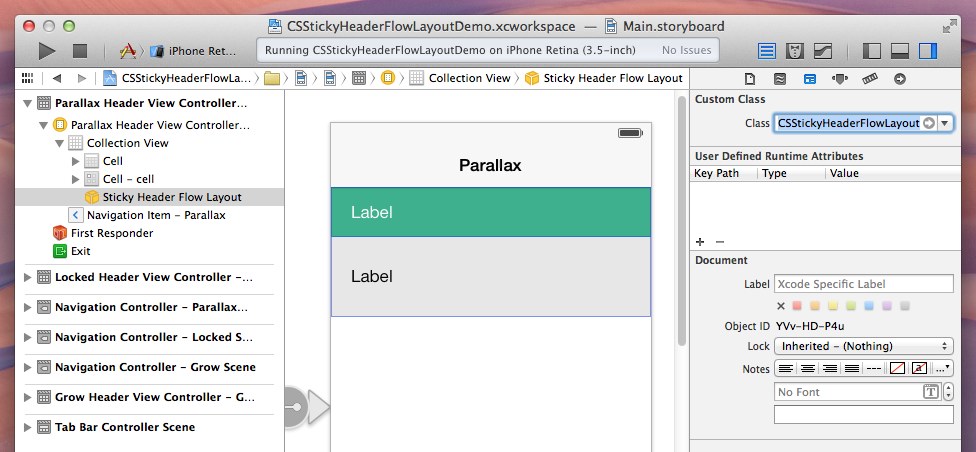
Now all your section headers will get the sticky effect like table view. You can disable it with one line of code.
现在,你所有的 section header 将会获得悬停效果, 你也可以通过一行代码来禁止这种效果.
@property (nonatomic) BOOL disableStickyHeaders;
2. Setting up the Collection View Header
We'll be using supplementary views for our parallax header. Here's an example on how use a nib file for that purpose:
用 supplementary views 来作为视差效果的header, 下面是一个如何使用nib来实现这种效果的例子.
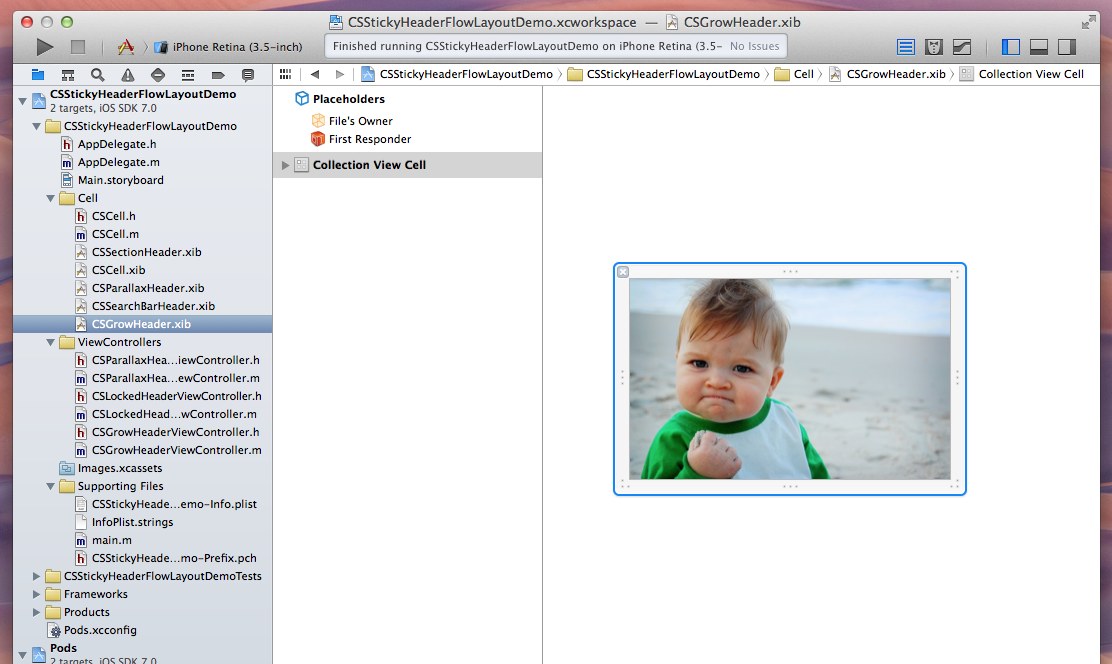
Register that nib file to your collection view controller in code:
然后在你的 collection view 的控制器里面注册这个 nib 文件:
#import "CSStickyHeaderFlowLayout.h"

- (void)viewDidLoad {

    [super viewDidLoad];

    // Locate your layout

    CSStickyHeaderFlowLayout *layout = (id)self.collectionViewLayout;

    if ([layout isKindOfClass:[CSStickyHeaderFlowLayout class]]) {

        layout.parallaxHeaderReferenceSize = CGSizeMake(320, 200);

    }

    // Locate the nib and register it to your collection view

    UINib *headerNib = [UINib nibWithNibName:@"CSGrowHeader" bundle:nil];

    [self.collectionView registerNib:headerNib

          forSupplementaryViewOfKind:CSStickyHeaderParallaxHeader

                 withReuseIdentifier:@"header"];

}
Implement -[UICollectionViewDataSource collectionView:viewForSupplementaryElementOfKind:atIndexPath:]
实现 -[UICollectionViewDataSource collectionView:viewForSupplementaryElementOfKind:atIndexPath:]
- (UICollectionReusableView *)collectionView:(UICollectionView *)collectionView viewForSupplementaryElementOfKind:(NSString *)kind atIndexPath:(NSIndexPath *)indexPath {

    // Check the kind if it's CSStickyHeaderParallaxHeader

    if ([kind isEqualToString:CSStickyHeaderParallaxHeader]) {

        UICollectionReusableView *cell = [collectionView dequeueReusableSupplementaryViewOfKind:kind

                                                                            withReuseIdentifier:@"header"

                                                                                   forIndexPath:indexPath];

        return cell;

    } else if ([kind isEqualToString:UICollectionElementKindSectionHeader]) {

        // Your code to configure your section header...

    } else {

        // other custom supplementary views

    }

    return nil;

}
That's it. You'll be able to get the header you wanted using the best practice.
就这些了,你现在就实现了这些效果.
Configuring other effects are really just the way how you setup the header cell, by combining different settings in the minimal exposed properties in CSStickyHeaderFlowLayout.h
配置其他效果跟你配置 header cell 类似, 通过在 CSStickyHeaderFlowLayout.h 设置以下几个属性即可:
@property (nonatomic) CGSize parallaxHeaderReferenceSize;

@property (nonatomic) CGSize parallaxHeaderMinimumReferenceSize;

@property (nonatomic) BOOL disableStickyHeaders;
Run the project examples and it'll shows you exactly how you achieve different effects.
运行这个项目,然后你就可以看到这些效果了.

Donation
If you think this worths something, tip me a cup of coffee! (p.s. was trying out ChangeTip, or if you know any better donation button, let me know) :)
Updates
0.2.10: Fixed issue because attributes were not copied and datasource might have been niled
0.2.9: Remove Supplementry Header Layout Attribute to prevent crash when returning nil and while is CGSizeZero
0.2.8: Fixed a visual issue when animating contentInsets #85 and crash when dragging cells #69
0.2.7: Fixed scroll indicator covered by cell
0.2.6: Fixing that section header being covered by cell after perform batch update
0.2.5: Fixing a crash when quickly popping back to a view controller using the parallax header
0.2.4: Possibly fix for a crash when parallaxHeaderReferenceSize is changed
0.2.3: Enabled iPhone 6 screen sizes, reverted a patch and fixed a visual bug and content tapping bug.
0.2.2: Fix 1px header and zIndex problem, thanks @m1entus and @Xyand
0.2.1: Fix crash on reloadData in collection view when header is offscreen, thanks @jessesquires
0.2: Added custom UICollectionViewLayoutAttributes to support more advanced example (Spotify App)
0.1.1: Minor fixes for default number of sections, thanks @miwillhite
0.1: Initial Release
Who's using it?
We've a wiki page for that, feel free to add your projects there!
Requirements
- Xcode 5
- iOS 7 (I haven't really test on iOS 6 but it should work if you're using iOS 6 compatible Storyboard)
Author
James Tang, j@jamztang.com
License
CSStickyHeaderFlowLayout is available under the MIT license. See the LICENSE file for more info.
[翻译] CSStickyHeaderFlowLayout的更多相关文章
- 《Django By Example》第五章 中文 翻译 (个人学习,渣翻)
书籍出处:https://www.packtpub.com/web-development/django-example 原作者:Antonio Melé (译者@ucag注:大家好,我是新来的翻译, ...
- 《Django By Example》第四章 中文 翻译 (个人学习,渣翻)
书籍出处:https://www.packtpub.com/web-development/django-example 原作者:Antonio Melé (译者注:祝大家新年快乐,这次带来<D ...
- [翻译]开发文档:android Bitmap的高效使用
内容概述 本文内容来自开发文档"Traning > Displaying Bitmaps Efficiently",包括大尺寸Bitmap的高效加载,图片的异步加载和数据缓存 ...
- 【探索】机器指令翻译成 JavaScript
前言 前些时候研究脚本混淆时,打算先学一些「程序流程」相关的概念.为了不因太枯燥而放弃,决定想一个有趣的案例,可以边探索边学. 于是想了一个话题:尝试将机器指令 1:1 翻译 成 JavaScript ...
- 《Django By Example》第三章 中文 翻译 (个人学习,渣翻)
书籍出处:https://www.packtpub.com/web-development/django-example 原作者:Antonio Melé (译者注:第三章滚烫出炉,大家请不要吐槽文中 ...
- 《Django By Example》第二章 中文 翻译 (个人学习,渣翻)
书籍出处:https://www.packtpub.com/web-development/django-example 原作者:Antonio Melé (译者注:翻译完第一章后,发现翻译第二章的速 ...
- 《Django By Example》第一章 中文 翻译 (个人学习,渣翻)
书籍出处:https://www.packtpub.com/web-development/django-example 原作者:Antonio Melé (译者注:本人目前在杭州某家互联网公司工作, ...
- 【翻译】Awesome R资源大全中文版来了,全球最火的R工具包一网打尽,超过300+工具,还在等什么?
0.前言 虽然很早就知道R被微软收购,也很早知道R在统计分析处理方面很强大,开始一直没有行动过...直到 直到12月初在微软技术大会,看到我软的工程师演示R的使用,我就震惊了,然后最近在网上到处了解和 ...
- ASP.NET MVC with Entity Framework and CSS一书翻译系列文章之第一章:创建基本的MVC Web站点
在这一章中,我们将学习如何使用基架快速搭建和运行一个简单的Microsoft ASP.NET MVC Web站点.在我们马上投入学习和编码之前,我们首先了解一些有关ASP.NET MVC和Entity ...
随机推荐
- rem手机端适配
<script> document.documentElement.style.fontSize=document.documentElement.clientWidth*100/750+ ...
- 大数据技术之_09_Flume学习_Flume概述+Flume快速入门+Flume企业开发案例+Flume监控之Ganglia+Flume高级之自定义MySQLSource+Flume企业真实面试题(重点)
第1章 Flume概述1.1 Flume定义1.2 Flume组成架构1.2.1 Agent1.2.2 Source1.2.3 Channel1.2.4 Sink1.2.5 Event1.3 Flum ...
- [Codeforces Round#488]Div.2
总结 这是我无聊透顶肝到三点半的一场 cf ,结果还真够无聊的 这套题涵盖了英语题,语文题,模拟题.注重考查了选手的英语素养能力,语文阅读能力和精湛的模拟和枚举能力.是不可多得的一套好题. 没什么单独 ...
- Socket编程 - API
基础知识部分:http://www.cnblogs.com/Jimmy1988/p/7839940.html 1. 基本流程 Process Client Server Comment socket( ...
- 重置Root用户密码
在忘记root用户密码是用于重置root用户密码: 1.开机按e. 2.在linux16开头的一行的末尾添加rd.break,按ctrl+x. 3.依次执行命令: mount -o remount,r ...
- [转]How to Create an Add-in for Microsoft Outlook
本文转自:https://www.codeproject.com/Articles/1112815/How-to-Create-an-Add-in-for-Microsoft-Outlook This ...
- 深入理解java虚拟机---java内存区域与内存溢出异常---1内存结构
本文来源于翁舒航的博客,点击即可跳转原文观看!!!(被转载或者拷贝走的内容可能缺失图片.视频等原文的内容) 若网站将链接屏蔽,可直接拷贝原文链接到地址栏跳转观看,原文链接:https://www.cn ...
- C# base64 和图片互转
C# imgage图片转base64字符/base64字符串转图片另存成 //图片转为base64编码的字符串 protected string ImgToBase64String(string Im ...
- 【学习笔记】--- 老男孩学Python,day14 python内置函数大全
参考: https://www.cnblogs.com/pyyu/p/6702896.html http://www.runoob.com/python3/python3-built-in-func ...
- [js常用]文字转化成语音
使用百度语音接口,实现文字转化成语音播放 <!DOCTYPE html PUBLIC "-//W3C//DTD HTML 4.01 Transitional//EN" &qu ...