
Unity控件ScrollView使用问题记录
Unity版本:5.6.2
控件Scroll View由4部分组成,如图:
1.含有Scroll Rect组件的根节点:Scroll View
2.含有Mask组件的节点:Viewport
3.所有内容的父节点Content,常含有布局控件
4.滚动条,包括横向和纵向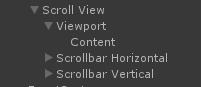
具体的节点细节使用可以参看官方文档:
https://docs.unity3d.com/560/Documentation/Manual/script-ScrollRect.html
使用时遇到的问题记录:
1.显示区域怎么控制?
节点Scroll View中的组件Rect Transform的Width和Height控制着整个区域大小,组件Scroll Rect的滚动条设置也会影响显示区域的边界位置是否完整;
节点Viewport的组件Image中的Image Type属性会影响显示的区域;
节点Content的组件Rect Transform的布局和宽高影响了显示的区域。
2.如何去掉滚动条?
节点Scroll View中的组件Scroll Rect中的属性Horizontal Scrollbar和Vertical Scrollbar设置为None,并将其子节点Scrollbar Horizontal和Scrollbar Vertical删除。
3.内容如何布局?
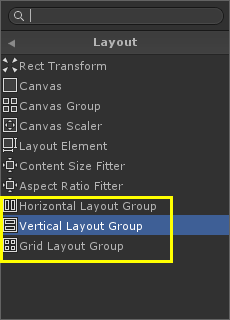
在节点Content中加入对应的布局组件即可。
4.出现无法滑动或者自动回弹到原地方的原因?
如果节点Content的宽度或者高度小于实际内容的宽度或者高度时,就会发生这样的情况。这时需要调整Content的宽高,或者加入组件Content Size Fitter把对应方向设置为Preferred Size来自适应宽高。
5.滑动结束后,往往不能把当前的元素的画面完整显示的情况,如何解决?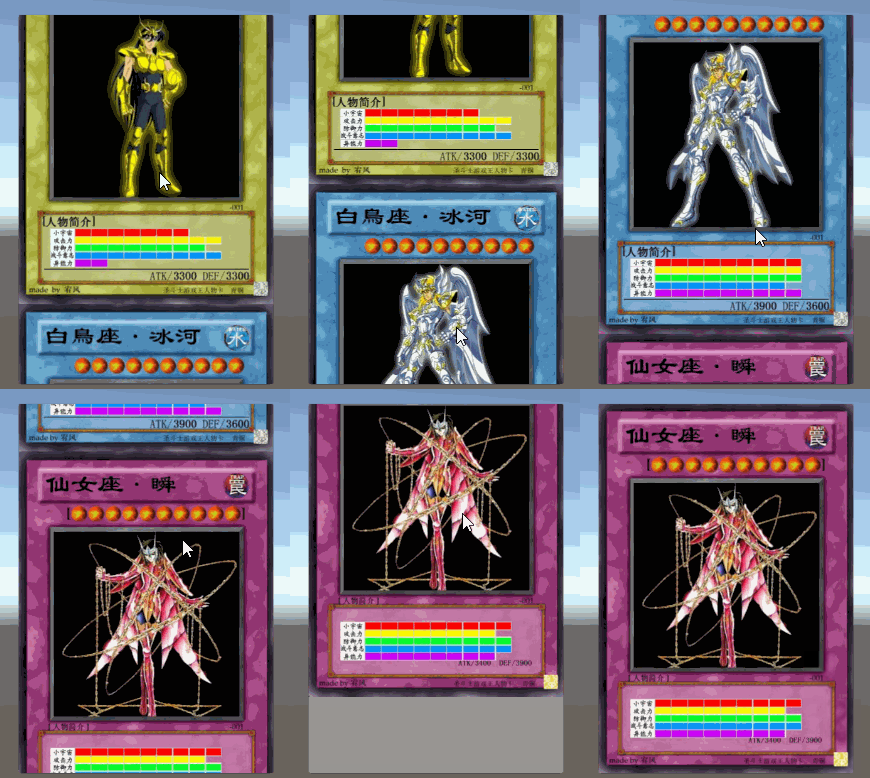
这种情况需要给节点Scroll View挂载脚本来实现,脚本:ScrollRectCenterChild.cs代码如下:
注意:Content节点的RectTransform组件中的Pivot属性必须设置为0,1
Content节点的布局方式可以是Vertical Layout Group、Horizontal Layout Group 或者 Grid Layout Group,但都只支持一个方向的滑动居中。
using System.Collections;

using System.Collections.Generic;

using UnityEngine;

using UnityEngine.UI;

using UnityEngine.EventSystems;

using System;

public enum ScrollDir

{

    Horizontal,

    Vertical

}

public class ScrollRectCenterChild : MonoBehaviour,IEndDragHandler,IDragHandler,IBeginDragHandler

{

    public ScrollDir Dir = ScrollDir.Vertical;

    private bool _isCentering = false;

    public float MoveToCenterSpeed = 10f;

    private ScrollRect _scrollView;

    private Transform _content;

    //用于保存子元素的坐标值

    private List<float> _childrenPos = new List<float>();

    private float _targetPos;

    private int _curCenterChildIndex = -;

    public GameObject CurCenterChildItem

    {

        get

        {

            GameObject centerChild = null;

            if (_content != null &&  <= _curCenterChildIndex && _curCenterChildIndex < _content.childCount)

            {

                centerChild = _content.GetChild(_curCenterChildIndex).gameObject;

            }

            return centerChild;

        }

    }

    private float GetChildItemWidth(int index)

    {

        return (_content.GetChild(index) as RectTransform).sizeDelta.x;

    }

    private float GetChildItemHeight(int index)

    {

        return (_content.GetChild(index) as RectTransform).sizeDelta.y;

    }

    void Awake()

    {

        _scrollView = GetComponent<ScrollRect>();

        if (null == _scrollView)

        {

            Debug.LogError("ScrollRect is null.");

            return;

        }

        _content = _scrollView.content;

        LayoutGroup layoutGroup = null;

        layoutGroup = _content.GetComponent<LayoutGroup>();

        if (null == layoutGroup)

        {

            Debug.LogError("LayoutGroup comment is null.");

            return;

        }

        float spacing = 0f;

        switch (Dir)

        {

            case ScrollDir.Horizontal:

                float scrollViewRectWidth = _scrollView.GetComponent<RectTransform>().rect.width;

                if (layoutGroup is HorizontalLayoutGroup)

                {

                    float childPosX = scrollViewRectWidth * 0.5f - GetChildItemWidth() * 0.5f;

                    _childrenPos.Add(childPosX);

                    spacing = (layoutGroup as HorizontalLayoutGroup).spacing;

                    for (int i = ; i < _content.childCount; i++)

                    {

                        childPosX -= GetChildItemWidth(i) * 0.5f + GetChildItemWidth(i - ) * 0.5f + spacing;

                        _childrenPos.Add(childPosX);

                    }

                }

                else if (layoutGroup is GridLayoutGroup)

                {

                    GridLayoutGroup grid = layoutGroup as GridLayoutGroup;

                    float childPosX = scrollViewRectWidth * 0.5f - grid.cellSize.x * 0.5f;

                    _childrenPos.Add(childPosX);

                    for (int i = ; i < _content.childCount; i++)

                    {

                        childPosX -= grid.cellSize.x + grid.spacing.x;

                        _childrenPos.Add(childPosX);

                    }

                }

                else

                {

                    Debug.LogError("Horizontal ScrollView is using VerticalLayoutGroup.");

                }

                break;

            case ScrollDir.Vertical:

                float scrollViewRectHeight = _scrollView.GetComponent<RectTransform>().rect.height;

                if (layoutGroup is VerticalLayoutGroup)

                {

                    float childPosY = scrollViewRectHeight * 0.5f - GetChildItemHeight() * 0.5f;

                    _childrenPos.Add(childPosY);

                    spacing = (layoutGroup as VerticalLayoutGroup).spacing;

                    for (int i = ; i < _content.childCount; i++)

                    {

                        childPosY += GetChildItemHeight(i) * 0.5f + GetChildItemHeight(i - ) * 0.5f + spacing;

                        _childrenPos.Add(childPosY);

                    }

                }

                else if (layoutGroup is GridLayoutGroup)

                {

                    GridLayoutGroup grid = layoutGroup as GridLayoutGroup;

                    float childPosY = scrollViewRectHeight * 0.5f - grid.cellSize.y * 0.5f;

                    _childrenPos.Add(childPosY);

                    for (int i = ; i < _content.childCount; i++)

                    {

                        childPosY += grid.cellSize.y + grid.spacing.y;

                        _childrenPos.Add(childPosY);

                    }

                }

                else

                {

                    Debug.LogError("Vertical ScrollView is using HorizontalLayoutGroup.");

                }

                break;

        }

    }

    void Update()

    {

        if (_isCentering)

        {

            Vector3 v = _content.localPosition;

            switch (Dir)

            {

                case ScrollDir.Horizontal:

                    v.x = Mathf.Lerp(_content.localPosition.x, _targetPos, MoveToCenterSpeed * Time.deltaTime);

                    _content.localPosition = v;

                    if (Math.Abs(_content.localPosition.x - _targetPos) < 0.01f)

                    {

                        _isCentering = false;

                    }

                    break;

                case ScrollDir.Vertical:

                    v.y = Mathf.Lerp(_content.localPosition.y, _targetPos, MoveToCenterSpeed * Time.deltaTime);

                    _content.localPosition = v;

                    if (Math.Abs(_content.localPosition.y - _targetPos) < 0.01f)

                    {

                        _isCentering = false;

                    }

                    break;

            }

        }

    }

    public void OnDrag(PointerEventData eventData)

    {

    }

    public void OnEndDrag(PointerEventData eventData)

    {

        switch (Dir)

        {

            case ScrollDir.Horizontal:

                _targetPos = FindClosestChildPos(_content.localPosition.x, out _curCenterChildIndex);

                break;

            case ScrollDir.Vertical:

                _targetPos = FindClosestChildPos(_content.localPosition.y, out _curCenterChildIndex);

                break;

        }

        _isCentering = true;

    }

    public void OnBeginDrag(PointerEventData eventData)

    {

        _isCentering = false;

        _curCenterChildIndex = -;

    }

    private float FindClosestChildPos(float currentPos, out int curCenterChildIndex)

    {

        float closest = ;

        float distance = Mathf.Infinity;

        curCenterChildIndex = -;

        for (int i = ; i < _childrenPos.Count; i++)

        {

            float p = _childrenPos[i];

            float d = Mathf.Abs(p - currentPos);

            if (d < distance)

            {

                distance = d;

                closest = p;

                curCenterChildIndex = i;

            }

        }

        return closest;

    }

}
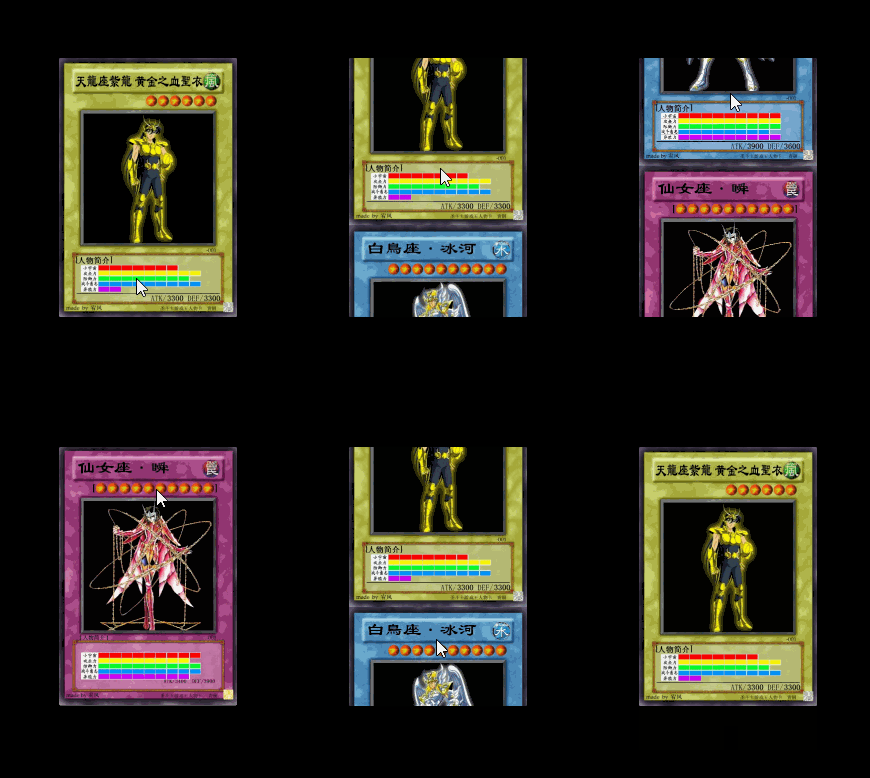
改完之后的效果:
-------------------------------------------------------------------
如果对您有帮助,请按下述操作:
请点击文章下方
请点击文章下方
请点击文章下方
请点击屏幕右下方
如果本文值得您分享,请点击文章下方
Unity控件ScrollView使用问题记录的更多相关文章
- 在GridView控件FooterTemplate内添加记录 Ver3
重构此篇<在GridView控件FooterTemplate内添加记录 Ver2> http://www.cnblogs.com/insus/p/3270644.html 这有些缺陷,怎样 ...
- 在GridView控件FooterTemplate内添加记录 Ver2
中午有发表一篇博文<在GridView控件FooterTemplate内添加记录> http://www.cnblogs.com/insus/p/3269908.html 添加铵钮是放在F ...
- 在GridView控件FooterTemplate内添加记录
在GridView控件FooterTemplate内添加记录,想实现这个功能,有几点要清楚的,这个添加铵钮是在FooterTemplate内,还是在GridView控件外部,位置不同,某些处理逻辑会有 ...
- 禁用GridView控件前5行记录
禁用GridView控件前5行记录. 应该在GridView控件写OnRowDataBound事件: 如果你只想禁用删除铵钮的话: 网页运行效果: 如果你想把整行禁用的话,可以这样写: 运行效果: 禁 ...
- 利用书签功能对TDBGrid控件中多个记录的处理
DELPHI 的TDBGrid 控 件 主 要 用 来 处 理 数 据 表, 它 的 属 性 中 有 一 个dgMultiSelect, 若 此 属 性 设 定 为TRUE, 则 可 以 选 中 多 ...
- Repeater控件最后一笔记录高亮显示
Insus.NET以前有写过 <Repeater控件第前10笔记录高亮显示> 不过,现在有一个想法,就是最后一笔记录高亮显示,怎样实现? 技术要求,就是获取最后一笔的索引即可.可以从数据源 ...
- Android基础控件ScrollView滚动条的使用
1.简介 ScrollView是一个FrameLayout的容器,不过在他的基础上添加了滚动,允许显示的比实际多的内容!另外,只能够往里面放置一个子元素,可以是单一的组件,又或者一个布局包裹着的复杂的 ...
- element ui 日期控件范围时间限制记录、以及计算两个日期之间的天数
日期的筛选经常会有最小的日期选择,例如:当前日期 :clearable="false" :picker-options="pickerOptions0" val ...
- 嵌套在ScrollView中的TextView控件可以自由滚动
//设置TextView控件可以自由滚动,由于这个TextView嵌套在ScrollView中,所以在OnTouch事件中通知父控件ScrollView不要干扰. mContractDesc.setO ...
随机推荐
- Kafka基础认识
1):Apache kafka介绍及架构详解 假设一个场景: 数据源: 应用系统A 产生的用户访问数据和订单数据 10000 条一秒钟 push:推送数据 消息系统:队列 产生的数据量>数据量 ...
- [Oracle]如何查看一个数据文件是否是自动扩展
开始 SQL> col file_id format 99SQL> col file_name format a50SQL> col tablespace_name format a ...
- uefi+gpt安装双系统
uefi+gpt:不要用easybcd!不起作用.找不到.mbr文件. win10空出一个盘: 制作ubuntu启动盘: 分区设置 挂载点 分区大小 新分区类型 新分区位置 用于 / 22000MB ...
- MTCNN(Multi-task convolutional neural networks)人脸对齐
MTCNN(Multi-task convolutional neural networks)人脸对齐 .
- BZOJ4543 Hotel加强版
题面 $\text{BZOJ}$间接权限题 洛谷的弱化版 题解 三点距离两两相等要满足以下条件: 有一个相同的$\text{LCA}$ 所以如果存在一个点,使得另外两个点在它子树中,距离为$d$,且$ ...
- spark-submit python 程序,"/home/.python-eggs" permission denied 问题解决
问题描述,spark-submit 用 yarn 模式提交一个python 脚本运行程序,运行到需要分布式的部分,即map/mapPartition等等RDD的时候,或者actor RDD的时候,报错 ...
- Currency Exchange POJ - 1860 (spfa)
题目链接:Currency Exchange 题意: 钱的种类为N,M条命令,拥有种类为S这类钱的数目为V,命令为将a换成b,剩下的四个数为a对b的汇率和a换成b的税,b对a的汇率和b换成a的税,公式 ...
- eclipse项目转移至IDEA与IDEA tomcat报错(idea自带tomcat版本太高)与war包部署到win服务器与idea提交git的总结
eclipse导出项目到idea时,不要导出target: idea打开eclipse项目后,出现junit找不到的问题,原因是jar包缺失,而maven配置的低版本的junit也显示找不到,解决办法 ...
- 自动化运维工具saltstack05 -- 之salt-ssh模式
salt-ssh模式 1.说明: salt-ssh即通过ssh得方式进行管理,不需要安装salt-minion, salt-ssh 用的是sshpass进行密码交互的. 2.salt-ssh得局限性 ...
- BAT面试必备——Java 集合类
本文首发于我的个人博客:尾尾部落 1. Iterator接口 Iterator接口,这是一个用于遍历集合中元素的接口,主要包含hashNext(),next(),remove()三种方法.它的一个子接 ...