
(1)jsoncpp库的使用
本节主要介绍 json是什么以及jsoncpp库的使用。
(1)JSON是什么
json 是一种轻量级的文本数据交换格式;

json 独立于语言、平台,使用java script语法来描述对象;

json 解析器和json库对多种不同语言均提供了支持;

json (JavaScript Object Notation) 指的是javascript对象表示方法.
(2)c++JSON书写范例
1.书写c++代码:
// main.cpp
#include <iostream>

#include "json/reader.h"

#include "json/value.h"

using namespace std;

int main(int argc,char *argv[])

{

  Json::Value person;

  person["name"] = "MenAngel";

  person["sex"]  = "男";

  person["age"]  = ;

  person["height"] = ;

  cout<<person.toStyledString()<<endl;

  return ;

}
2.头文件及库文件所在路径如下:
头文件:/data01/bm80/ob_rel/include/3rd
库文件:/data01/bm80/ob_rel/lib
库名:libjsoncppD.so
3.使用g++编译链接:
g++ main.cpp -ljsoncppD -I /data01/bm80/ob_rel/include/3rd -L /data01/bm80/ob_rel/lib -o test
4.执行结果如下:
{

   "name" : "MenAngel",

   "sex" : "男",

   "age" : ,

   "height" :

}
(3)html中使用javascript脚本创建java对象
1.书写html:
<html>

<body>

<h2>在 JavaScript 中创建 JSON 对象</h2>

<p>

Name: <span id="jname"></span><br />

sex: <span id="jage"></span><br />

age: <span id="jstreet"></span><br />

</p>

<script type="text/javascript">

var JSONObject= {

"name":"MenAngel",

"sex":"男",

"age":23};

document.getElementById("jname").innerHTML=JSONObject.name

document.getElementById("jage").innerHTML=JSONObject.sex

document.getElementById("jstreet").innerHTML=JSONObject.age

</script>

</body>

</html>
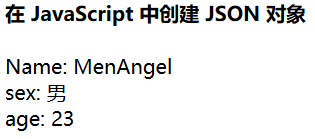
用浏览器打开结果如下:
(4)几个重要的jsoncpp的类
Json::Value       可以表示所有的类型,int、uint、string、object、array,boolean等;

Json::Reader      将json文件流或字符串解析到Json::Value, 主要函数有Parse;

Json::Writer      将Json::Value转化成字符串流,

Json::FastWriter  输出不带格式的json

Json::StyleWriter 输出带格式的json
(5)jsoncpp使用详细范例:
1.从字符串中解析json:
// main.cpp
#include "json/reader.h"

#include "json/value.h"
#include "stdlib.h"

using namespace std;

int main(int argc,char *argv[])

{

  //创建json value 并转化为字符串

  Json::Value person;

  person["name"] = "MenAngel";

  person["isMarriged"]  = false;

  person["age"]  = ;

  person["height"] = "";

  string strJson = person.toStyledString();

  //解析字符串

  Json::Reader reader;

  Json::Value root;

  string name;

  bool isMarriged;

  int age;

  int height,weight;

  if(reader.parse(strJson,root))

  {

    if(!root["name"].isNull())

    name = root["name"].asString();

    if(!root["isMarriged"].isNull())

    isMarriged = root["isMarriged"].asBool();

    if(!root["age"].isNull())

    age = root["age"].asInt();

    if(!root["height"].isNull())

    height = atoi(root["height"].asString().c_str());

    weight = root["weight"].asInt();

  }

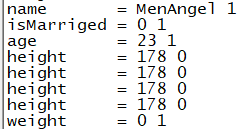
  cout<<"name       = " << name       <<" "<< root["name"].isString()     <<endl

      <<"isMarriged = " << isMarriged <<" "<< root["isMarriged"].isBool() <<endl

      <<"age        = " << age        <<" "<< root["age"].isInt()         <<endl

      <<"height     = " << height     <<" "<< root["height"].isObject()   <<endl //当key不存在时,返回nullValue ,isObject() is 1

      <<"height     = " << height     <<" "<< root["height"].isInt()      <<endl

      <<"height     = " << height     <<" "<< root["height"].isArray()    <<endl

      <<"height     = " << height     <<" "<< root["height"].isNumeric()  <<endl

      <<"weight     = " << weight     <<" "<< root["weight"].isObject()   <<endl;

  return ;

}
2.从文件中解析json
#include <iostream>

#include <fstream>

#include "stdlib.h"

#include "json/reader.h"

#include "json/value.h"

using namespace std;

int main(int argc,char *argv[])

{

  //创建json value 并转化为字符串

  Json::Value person;

  person["name"] = "MenAngel";

  person["isMarriged"]  = false;

  person["age"]  = ;

  person["height"] = "";

  string strJson = person.toStyledString();

  const char * filename = "./json.txt";

  //将json字符串写入文件

  ofstream ofile;

  ofile.open(filename);

  ofile<<strJson<<endl;

  ofile.flush();

  ofile.close();

  //从文件中解析json字符串

  ifstream ifile;

  ifile.open(filename,ios::binary);

  Json::Reader reader;

  Json::Value root;

  string name;

  bool isMarriged;

  int age;

  int height,weight;

  if(reader.parse(ifile,root))

  {

    if(!root["name"].isNull())

    name = root["name"].asString();

    if(!root["isMarriged"].isNull())

    isMarriged = root["isMarriged"].asBool();

    if(!root["age"].isNull())

    age = root["age"].asInt();

    if(!root["height"].isNull())

    height = atoi(root["height"].asString().c_str());

    weight = root["weight"].asInt();

  }

  cout<<"name       = " << name       <<" "<< root["name"].isString()     <<endl

      <<"isMarriged = " << isMarriged <<" "<< root["isMarriged"].isBool() <<endl

      <<"age        = " << age        <<" "<< root["age"].isInt()         <<endl

      <<"height     = " << height     <<" "<< root["height"].isObject()   <<endl //当key不存在时,返回nullValue ,isObject() is 1

      <<"height     = " << height     <<" "<< root["height"].isInt()      <<endl

      <<"height     = " << height     <<" "<< root["height"].isArray()    <<endl

      <<"height     = " << height     <<" "<< root["height"].isNumeric()  <<endl

      <<"weight     = " << weight     <<" "<< root["weight"].isObject()   <<endl;

  //remove(filename);

  return ;

}
//json.txt

{

   "name" : "MenAngel",

   "isMarriged" : false,

   "age" : ,

   "height" : ""

}
3.FastWriter将一个Value对象格式化为JSON格式的字符串 (FastWriter、StyledWriter、StyledStreamWriter)
// main.cpp

#include <iostream>

#include <json/json.h>

using namespace std;

int main(int argc,char *argv[])

{

  Json::Value person;

  person["name"] = "MenAngel";

  person["sex"]  = "男";

  person["age"]  = ;

  person["height"] = ;

  Json::Writer *writer1 = new Json::FastWriter();

  Json::Writer *writer2 = new Json::StyledWriter();

  string str1 = writer1->write(person);

  string str2 = writer2->write(person);

  string str3 = person.toStyledString();//Json::StyledStreamWriter();

  cout<<"str1 : "<<endl

      <<str1<<endl;

  cout<<"str2 : "<<endl

      <<str2<<endl;

  cout<<"str3 : "<<endl

      <<str3<<endl;

  cout<<"str4 : "<<endl

      <<person<<endl;

  return ;

}
str1 :
{"name":"MenAngel","sex":"男","age":23,"height":178}

str2 :
{
   "name" : "MenAngel",
   "sex" : "男",
   "age" : 23,
   "height" : 178
}

str3 :
{
   "name" : "MenAngel",
   "sex" : "男",
   "age" : 23,
   "height" : 178
}

str4 :

{
        "name" : "MenAngel",
        "sex" : "男",
        "age" : 23,
        "height" : 178
}
4.在JsonCpp中对Json:value对象中array、object、member、number、int的操作
// main.cpp

#include <iostream>

#include <json/json.h>

using namespace std;

int main(int argc,char *argv[])

{

  //构建json对象

  Json::Value family;

  Json::Value members;

  family["family_id"] = ;

  family["single_parent"] = false;

  family["age"] = ;

  family["money"] = 13.14;

  for(int i =  ;i < ; ++i)

  {

    Json::Value member;

    member["id"] = i + ;

    member["name"] = "name";

    members.append(member);

  }

  family["members"] = members;

  //打印json value

  string strJson = family.toStyledString();

  cout<<family<<endl;

  //解析json value

  Json::Reader reader;

  Json::Value root;

  if(reader.parse(strJson,root))

  {

    std::vector<std::string> list_strMembers;

    if(!root.isNull() && root.isObject())

       list_strMembers = root.getMemberNames();

    for(auto str:list_strMembers)

    {

      if(!root.isMember(str))

        continue;

      cout<<str<<" : ";

      if(!root[str].isNull())

      {

        if(root[str].isInt())

        {

          int tempInt = root[str].asInt();

          cout<<" is Int,value = "<<tempInt<<endl;

        }

        if(root[str].isBool())

        {

          bool tempBool = root[str].asBool();

          cout<<"is Bool,value = "<<tempBool<<endl;

        }

        if(root[str].isString())

        {

          string tempString = root[str].asString();

          cout<<"is String,value = "<<tempString<<endl;

        }

        if(root[str].isObject())

        {

          Json::Value tempValue = root[str];

          cout<<"is Object,value = "<<tempValue<<endl;

        }

        if(root[str].isArray())

        {

          Json::Value tempMember = root[str];

          cout<<"is Array,size = "<<tempMember.size()<<endl;

          for(int j = ;j < tempMember.size();j++)

          {

            Json::Value tempValue = tempMember[j];

            cout<<"  person "<<j+<<":"<<endl;

            cout<<"    id = "<<tempValue["id"];

            cout<<"    name = "<<tempValue["name"];

          }

        }

        if(root[str].isNumeric() && !root[str].isBool())

        { //布尔值在使用[]获取时返回的即是整型又是数值类型,其中整型是数值类型的一种

            double tempDouble = root[str].asDouble();

            cout<<"is Double,value = "<<tempDouble<<endl;

        }

      }

    }

  }

  //解析

  return ;

}
{

        "family_id" : ,

        "single_parent" : false,

        "age" : ,

        "money" : 13.140,

        "members" :

        [

                {

                        "id" : ,

                        "name" : "name"

                },

                {

                        "id" : ,

                        "name" : "name"

                },

                {

                        "id" : ,

                        "name" : "name"

                },

                {

                        "id" : ,

                        "name" : "name"

                }

        ]

}

family_id :  is Int,value =

single_parent : is Bool,value =

age :  is Int,value =

money : is Double,value = 13.14

members : is Array,size =

  person :

    id =

    name = "name"

  person :

    id =

    name = "name"

  person :

    id =

    name = "name"

  person :

    id =

    name = "name"
在main.cpp中使用了c++11的特性因此编译时要进行指定 -std=c++11
g++ main.cpp -std=c++ -ljsoncppD -I /data01/bm80/ob_rel/include/3rd -L /data01/bm80/ob_rel/lib -o test
5.对json value的修改,删除
// main.cpp

#include <iostream>

#include <json/json.h>

using namespace std;

int main(int argc,char *argv[])

{

  //构建json对象

  Json::Value family;

  Json::Value members;

  family["family_id"] = ;

  family["single_parent"] = false;

  family["age"] = ;

  family["money"] = 13.14;

  for(int i =  ;i < ; ++i)

  {

    Json::Value member;

    member["id"] = i + ;

    member["name"] = "name";

    members.append(member);

  }

  family["members"] = members;

  //打印json value

  string strJsonBefore = family.toStyledString();

  cout<<strJsonBefore<<endl;

  family.removeMember("age");

  family["money"] = ;

  //Json::Value tempDelete;  //新版本中删除json数组中元素的方法

  //family["members"].removeIndex(3,tempDelete);

  string strJsonAfter = family.toStyledString();

  cout<<strJsonAfter<<endl;

  return ;

}
{

   "family_id" : ,

   "single_parent" : false,

   "age" : ,

   "money" : 13.140,

   "members" : [

      {

         "id" : ,

         "name" : "name"

      },

      {

         "id" : ,

         "name" : "name"

      },

      {

         "id" : ,

         "name" : "name"

      },

      {

         "id" : ,

         "name" : "name"

      }

   ]

}

{

   "family_id" : ,

   "single_parent" : false,

   "money" : ,

   "members" : [

      {

         "id" : ,

         "name" : "name"

      },

      {

         "id" : ,

         "name" : "name"

      },

      {

         "id" : ,

         "name" : "name"

      },

      {

         "id" : ,

         "name" : "name"

      }

   ]

}
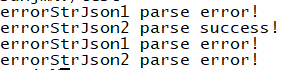
6.处理不合法的json字符串时
// main.cpp

#include <iostream>

#include <json/json.h>

using namespace std;

int main(int argc,char *argv[])

{

  string errorStrJson1 = "{\"key1\":\"value1\",\"}";

  string errorStrJson2 = "1111 {}";

  Json::Reader reader;

  Json::Value root;

  if(!reader.parse(errorStrJson1,root))

  {

    cout<<"errorStrJson1 parse error!"<<endl;

  }

  if(!reader.parse(errorStrJson2,root))

  {

    cout<<"errorStrJson2 parse error!"<<endl;

  }else

  {

    cout<<"errorStrJson2 parse success!"<<endl;

    //root.getMemberNames();会core掉

  }
  //启用严格模式,让非法的json解析时直接返回false,不自动容错。这样,在调用parse的时候就会返回false。

  Json::Reader *pJsonParser = new Json::Reader(Json::Features::strictMode());

  if(!pJsonParser->parse(errorStrJson1,root))

  {

      cout<<"errorStrJson1 parse error!"<<endl;

  }

  if(!pJsonParser->parse(errorStrJson2,root))

  {

    cout<<"errorStrJson2 parse error!"<<endl;

  }else

  {

    cout<<"errorStrJson2 parse success!"<<endl;

    //root.getMemberNames();会core掉

  }

  return ;

}
(1)jsoncpp库的使用的更多相关文章
- ubuntu 下使用 jsoncpp库
做项目的时候需要用c++解析json文件, 之前使用的是libjson 库, 但当g++ 开启 -std=c++11 选项时, 该库的很多功能不能用, 而且还有一些其他的问题, 不推荐使用. 后来采用 ...
- C++处理Json串——jsoncpp库
JSON(JavaScript Object Notation) 是一种轻量级的数据交换格式,和xml类似,本文主要对VS2008中使用Jsoncpp解析json的方法做一下记录.Jsoncpp是个跨 ...
- 编译jsoncpp库以及要注意的问题
原创文章,转载请注明原作者与本文原始URL. 版本:jsoncpp-src-0.5.0.zip简介:jsoncpp是用cpp实现的json库,可以拼装,解析,生成json串.我们要把他编译成动态库.这 ...
- Windows10 VS2017 C++ Json解析(使用jsoncpp库)
1.项目必须是win32 2.生成的lib_json.lib放到工程目录下 3.incldue的头文件放到工程目录,然后设置工程->属性->配置属性->vc++目录->包含目录 ...
- linux::jsoncpp库
下载库:http://sourceforge.net/projects/jsoncpp/files/ tar -zxvf jsoncpp-src- -C jsoncpp () 安装 scons $ s ...
- VS 2010 编译安装 boost 库 -(和 jsoncpp 库共存)
boost库的简单应用很容易,网上有很多资料,但是,如果要json 和 boost 一起使用就会出现这样那样的问题, 有时候提示找不到 “libboost_coroutine-vc100-mt-sgd ...
- JsonCPP库使用
1.使用环境DevC++ a.建立C++工程,并添加.\JsonCPP\jsoncpp-master\jsoncpp-master\src\lib_json中源文件到工程中. b.添加头文件路径 2. ...
- C++的Json解析库:jsoncpp和boost
C++的Json解析库:jsoncpp和boost - hzyong_c的专栏 - 博客频道 - CSDN.NET C++的Json解析库:jsoncpp和boost 分类: 网络编程 开源库 201 ...
- C++的Json解析库:jsoncpp和boost(转)
原文转自 http://blog.csdn.net/hzyong_c/article/details/7163589 JSON(JavaScript Object Notation)跟xml一样也是一 ...
随机推荐
- 【CodeForces - 1200A】Hotelier(水题、模拟)
Hotelier 直接翻译了 Descriptions Amugae的酒店由10人组成10客房.房间从0开始编号0到99 从左到右. 酒店有两个入口 - 一个来自左端,另一个来自右端.当顾客通过左入口 ...
- 『深度应用』NLP命名实体识别(NER)开源实战教程
近几年来,基于神经网络的深度学习方法在计算机视觉.语音识别等领域取得了巨大成功,另外在自然语言处理领域也取得了不少进展.在NLP的关键性基础任务—命名实体识别(Named Entity Recogni ...
- 100天搞定机器学习|Day35 深度学习之神经网络的结构
100天搞定机器学习|Day1数据预处理 100天搞定机器学习|Day2简单线性回归分析 100天搞定机器学习|Day3多元线性回归 100天搞定机器学习|Day4-6 逻辑回归 100天搞定机器学习 ...
- spring boot 打 war包
spring boot .spring cloud打 war包,并发布到tomcat中运行 1.pom文件修改 <packaging>war</packaging> 2.< ...
- 实测win10 efi启动及centos7双系统引导顺序修改
安装win10 安装win10过程中,系统自动建立esp分区,分区格式为FAT16,目录如下 1,EFI/Boot文件夹保持不动 删除 EFI/Microsoft/boot/ 文件夹下面除BCD文件外 ...
- vs中的system指令
vs中的system指令 system(“命令语句”);必须要用到头文件include<stdio.h> system里可以加许多指令 取消关机 shutdown -a 关机 sh ...
- spring security中@PreAuthorize注解的使用
添加依赖<!-- oauth --><dependency> <groupId>org.springframework.cloud</groupId> ...
- 记录一则AIX使用裸设备安装OracleRAC的问题
需求背景:在AIX6.1上安装Oracle 10g RAC,一线工程师反馈节点2运行root脚本无法成功,跟进排查发现实际上底层存储磁盘的准备工作就存在问题. 客户要求底层存储选用裸设备方式,所以必须 ...
- 微信小程序, 解析↵换行
获取到json中的数据,通过“\n”转义,此时我们需要通过正则表达式来替换一下 replace(/↵/g, '\n'); 在页面中可以这样 <text class="test-ti ...
- JVM内存分配及String常用方法
一,JVM内存分配和常量池 在介绍String类之前,先来简单分析一下在JVM中,对内存的使用是如何进行分配的.如下图所示(注意:在jdk1.8之后便没有方法区了): 如上JVM将内存分为 ...