
PipelineDB Install and Test
Installation
Prerequisites:
CentOS Linux release 7.2.1511 (Core)
Download
[root@citus1 ~]# wget https://s3-us-west-2.amazonaws.com/download.pipelinedb.com/pipelinedb-0.9.7u4-centos7-x86_64.rpm

[root@citus1 ~]# sudo rpm -ivh pipelinedb-0.9.7u4-centos7-x86_64.rpm
This will install PipelineDB at /usr/lib/pipelinedb.
To install at a prefix of your choosing, use the --prefix argument:
[root@citus1 ~]# rpm -ivh --prefix=/path/to/pipelinedb pipelinedb-0.9.7u4-centos7-x86_64.rpm
Initializing PipelineDB
Once PipelineDB is installed, you can initialize a database directory. This is where PipelineDB will store all the files and data associated with a database.
[root@citus1 ~]# useradd pipeline

[root@citus1 ~]# su - pipeline

[pipeline@citus1 ~]$ pipeline-init -D /data/pipelinedata
where /data/pipelinedata is a nonexistent directory.
Running PipelineDB
To run the PipelineDB server in the background, use the pipeline-ctl driver and point it to your newly initialized data directory:
[root@citus1 ~]# mkdir /var/log/pipelinedb

[root@citus1 ~]# chown pipeline:root /var/log/pipelinedb

[pipeline@citus1 ~]$ pipeline-ctl -D /data/pipelinedata -l /var/log/pipelinedb/pipelinedb.log start

[pipeline@citus1 ~]$ cat /var/log/pipelinedb/pipelinedb.log

LOG:  could not bind IPv4 socket: Address already in use

HINT:  Is another postmaster already running on port ? If not, wait a few seconds and retry.

LOG:  could not bind IPv6 socket: Cannot assign requested address

HINT:  Is another postmaster already running on port ? If not, wait a few seconds and retry.

WARNING:  could not create listen socket for "localhost"

FATAL:  could not create any TCP/IP sockets
Because I’ve installed citusDB for port 5432,So change the pipelinedb port.
[pipeline@citus1 pipelinedata]$ vi pipelinedb.conf

[pipeline@citus1 pipelinedata]$ pipeline-ctl -D /data/pipelinedata -l /var/log/pipelinedb/pipelinedb.log start

server starting
The -l option specifies the path of a logfile to log to. The pipeline-ctl driver can also be used to stop running servers:
[pipeline@citus1 pipelinedata]$ pipeline-ctl -D /data/pipelinedata stop

waiting for server to shut down.... done

server stopped
The PipelineDB server can also be run in the foreground directly:
[pipeline@citus1 pipelinedata]$ pipelinedb -D /data/pipelinedata
Now enable continuous query execution. This only needs to be done once and is remembered across restarts.
[pipeline@citus1 ~]$ psql -h localhost -p  -d pipeline -c "ACTIVATE"

ACTIVATE

[pipeline@citus1 ~]$ psql -h localhost -p  -d pipeline -c "CREATE STREAM wiki_stream (hour timestamp, project text, title text, view_count bigint, size bigint);CREATE CONTINUOUS VIEW wiki_stats ASSELECT hour, project, count(*) AS total_pages, sum(view_count) AS total_views, min(view_count) AS min_views, max(view_count) AS max_views, avg(view_count) AS avg_views, percentile_cont(0.99) WITHIN GROUP (ORDER BY view_count) AS p99_views, sum(size) AS total_bytes_servedFROM wiki_streamGROUP BY hour, project;"
Now we’ll decompress the dataset as a stream and write it to stdin, which can be used as an input to COPY:
curl -sL http://pipelinedb.com/data/wiki-pagecounts | gunzip | \

        psql -h localhost -p  -d pipeline -c "        COPY wiki_stream (hour, project, title, view_count, size) FROM STDIN"
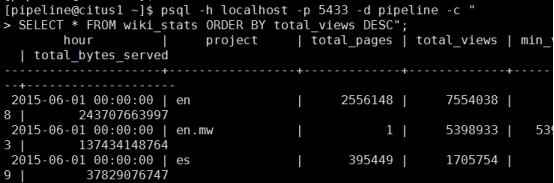
Note that this dataset is large, so the above command will run for quite a while (cancel it whenever you’d like). As it’s running, select from the continuous view as it ingests data from the input stream:
[pipeline@citus1 ~]$ psql -h localhost -p -d pipeline -c "SELECT * FROM wiki_stats ORDER BY total_views DESC";
参考官网:http://docs.pipelinedb.com/installation.html#rpm
PipelineDB Install and Test的更多相关文章
- 如何简单愉快的上手PipelineDB
pipelineDB source:https://github.com/pipelinedb/pipelinedb 安装PipelineDB ./configure CFLAGS="-g ...
- centOS 搭建pipelineDB docs
#下载docs git clone https://github.com/pipelinedb/docs.git #安装python-sphinx &python-dev yum instal ...
- PipelineDB On Kafka
PipelineDB 安装yum install https://s3-us-west-2.amazonaws.com/download.pipelinedb.com/pipelinedb-0.9.8 ...
- OEL上使用yum install oracle-validated 简化主机配置工作
环境:OEL 5.7 + Oracle 10.2.0.5 RAC 如果你正在用OEL(Oracle Enterprise Linux)系统部署Oracle,那么可以使用yum安装oracle-vali ...
- org.jboss.deployment.DeploymentException: Trying to install an already registered mbean: jboss.jca:service=LocalTxCM,name=egmasDS
17:34:37,235 INFO [Http11Protocol] Starting Coyote HTTP/1.1 on http-0.0.0.0-8080 17:34:37,281 INFO [ ...
- 如何使用yum 下载 一个 package ?如何使用 yum install package 但是保留 rpm 格式的 package ? 或者又 如何通过yum 中已经安装的package 导出它,即yum导出rpm?
注意 RHEL5 和 RHEL6 的不同 How to use yum to download a package without installing it Solution Verified - ...
- Install and Configure SharePoint 2013 Workflow
这篇文章主要briefly introduce the Install and configure SharePoint 2013 Workflow. Microsoft 推出了新的Workflow ...
- Basic Tutorials of Redis(1) - Install And Configure Redis
Nowaday, Redis became more and more popular , many projects use it in the cache module and the store ...
- Hadoop学习日志- install hadoop
资料来源 : http://www.tutorialspoint.com/hadoop/hadoop_enviornment_setup.htm Hadoop 安装 创建新用户 $ su passwo ...
随机推荐
- codewars杂记: 寻找缺失的数
题目描述: 给出一个整数列表,找出该列表无法通过各种组合求和得到的最小的整数. 示例: solve([1,2,8,7]) = 4, because we can get 1, 2, 1+2=3. Bu ...
- C# Insert批量插入
最近项目需要做一个批量导入的功能,每次导入最少的记录数都达到1万,之前写了一个通过循环Insert的方法,结果我自己都看不下了.太慢了,所以用了SqlBulkCopy,很快,100万条数据,1分钟都不 ...
- WPF生成二维码
WPF可以通过ZXing.Net库来实现二维码的功能. 可以通过NuGet安装: Install-Package ZXing.Net 二维码的实现代码: #region 二维码的方法 /// < ...
- Cindy components(配色很不错)
https://sourceforge.net/projects/tcycomponents/
- win10 应用商店/相机/计算器误删后的修复方法
“以管理员身份运行”Windows Powershell. 然后在打开的“管理员:Windows Powershell”窗口中输入以下重装应用商店的命令: //商店恢复 Get-AppXPackage ...
- UWP 使用Windows.Web.Http命名空间下的HttpClient使用post方法,上传图片服务器
1.从相册里面选取图片 /// <summary> /// 1.1 从相册里面选取图片 /// </summary> /// <param name="send ...
- 使用 Elastic Stack 来监控和调优 Golang 应用程序
Golang 因为其语法简单,上手快且方便部署正被越来越多的开发者所青睐,一个 Golang 程序开发好了之后,势必要关心其运行情况,今天在这里就给大家介绍一下如果使用 Elastic Stack 来 ...
- Dynamic linking is coming to iOS, tvOS, and watchOS ports of Qt in the 5.9 release
http://blog.qt.io/blog/2017/01/23/qt-5-8-released/ Dynamic linking is coming to iOS, tvOS, and watch ...
- Qt静态编译时使用OpenSSL有三种方式(不使用,动态使用,静态使用,默认是动态使用)
When compiling Qt you can choose one of these options based on the configure command line: no OpenSS ...
- 深入了解Windows句柄到底是什么(句柄是逻辑指针,或者是指向结构体的指针,图文并茂,非常清楚)good
总是有新入门的Windows程序员问我Windows的句柄到底是什么,我说你把它看做一种类似指针的标识就行了,但是显然这一答案不能让他们满意,然后我说去问问度娘吧,他们说不行网上的说法太多还难以理解. ...