
Spring 梳理 - View - JSON and XML View
- 实际案例json
<project xmlns="http://maven.apache.org/POM/4.0.0" xmlns:xsi="http://www.w3.org/2001/XMLSchema-instance"

    xsi:schemaLocation="http://maven.apache.org/POM/4.0.0 http://maven.apache.org/xsd/maven-4.0.0.xsd">

    <modelVersion>4.0.</modelVersion>

    <groupId>csic</groupId>

    <artifactId>oa</artifactId>

    <version>0.0.-SNAPSHOT</version>

    <packaging>war</packaging>

    <name>oa</name>

    <url>http://maven.apache.org</url>

    <properties>

        <project.build.sourceEncoding>UTF-</project.build.sourceEncoding>

    </properties>

    <dependencyManagement>

        <dependencies>

            <dependency>

                <!-- Import dependency management from Spring Boot -->

                <groupId>org.springframework.boot</groupId>

                <artifactId>spring-boot-dependencies</artifactId>

                <version>2.1..RELEASE</version>

                <type>pom</type>

                <scope>import</scope>

            </dependency>

        </dependencies>

    </dependencyManagement>

    <dependencies>

        <dependency>

            <groupId>junit</groupId>

            <artifactId>junit</artifactId>

            <version>4.12</version>

            <scope>test</scope>

        </dependency>

        <dependency>

            <groupId>org.springframework.boot</groupId>

            <artifactId>spring-boot-starter-web</artifactId>

        </dependency>

        <dependency>

            <groupId>org.springframework.boot</groupId>

            <artifactId>spring-boot-devtools</artifactId>

        </dependency>

        <dependency>

            <groupId>org.springframework.boot</groupId>

            <artifactId>spring-boot-starter-freemarker</artifactId>

        </dependency>

    </dependencies>

    <build>

        <plugins>

            <plugin>

                <groupId>org.springframework.boot</groupId>

                <artifactId>spring-boot-maven-plugin</artifactId>

            </plugin>

        </plugins>

    </build>

</project>
package csic.oa.controller; import java.util.HashMap; import org.springframework.beans.factory.annotation.Autowired;
import org.springframework.stereotype.Controller;
import org.springframework.web.bind.annotation.PathVariable;
import org.springframework.web.bind.annotation.RequestMapping;
import org.springframework.web.bind.annotation.ResponseBody;
import org.springframework.web.bind.annotation.RestController; import csic.oa.domain.Person;
import csic.oa.domain.Personxml;
import csic.oa.service.UserService; //@RestController
@Controller
public class UserController { @ResponseBody
@RequestMapping("person")
public Person person(){
Person p=new Person();
p.setName("jt");
p.setAge();
return p;
}
@ResponseBody
@RequestMapping("personxml")
public Personxml personxml(){
Personxml p=new Personxml();
p.setName("jt");
p.setAge();
return p;
} }package csic.oa.domain; public class Person {
private String name;
private int age;
public String getName() {
return name;
}
public void setName(String name) {
this.name = name;
}
public int getAge() {
return age;
}
public void setAge(int age) {
this.age = age;
}
}package csic.oa.domain;
import javax.xml.bind.annotation.XmlRootElement;
import javax.xml.bind.annotation.*; @XmlRootElement(name="person")
public class Personxml {
private String name;
private int age;
public String getName() {
return name;
}
@XmlElement
public void setName(String name) {
this.name = name;
}
public int getAge() {
return age;
}
@XmlElement
public void setAge(int age) {
this.age = age;
}
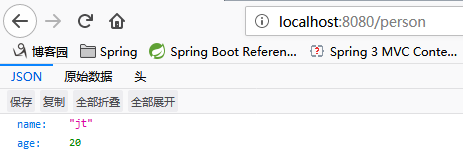
}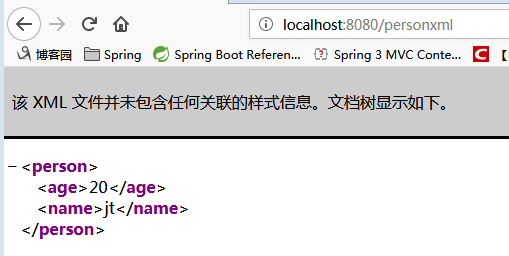
- 实际案例xml
- To output JSON and XML views, you don’t need to do any extra works, Spring MVC will handle the conversion automatically. Read this Spring MVC and XML, and Spring MVC and JSON examples.
XML example
<properties>
<spring.version>3.0..RELEASE</spring.version>
</properties> <dependencies> <!-- Spring dependencies -->
<dependency>
<groupId>org.springframework</groupId>
<artifactId>spring-core</artifactId>
<version>${spring.version}</version>
</dependency> <dependency>
<groupId>org.springframework</groupId>
<artifactId>spring-web</artifactId>
<version>${spring.version}</version>
</dependency> <dependency>
<groupId>org.springframework</groupId>
<artifactId>spring-webmvc</artifactId>
<version>${spring.version}</version>
</dependency> </dependencies>- A simple POJO model and annotated with JAXB annotation, later convert this object into XML output.
package com.mkyong.common.model;

import javax.xml.bind.annotation.XmlElement;

import javax.xml.bind.annotation.XmlRootElement;

@XmlRootElement(name = "coffee")

public class Coffee {

    String name;

    int quanlity;

    public String getName() {

        return name;

    }

    @XmlElement

    public void setName(String name) {

        this.name = name;

    }

    public int getQuanlity() {

        return quanlity;

    }

    @XmlElement

    public void setQuanlity(int quanlity) {

        this.quanlity = quanlity;

    }

    public Coffee(String name, int quanlity) {

        this.name = name;

        this.quanlity = quanlity;

    }

    public Coffee() {

    }

}
Controller
package com.mkyong.common.controller;

import org.springframework.stereotype.Controller;

import org.springframework.web.bind.annotation.PathVariable;

import org.springframework.web.bind.annotation.RequestMapping;

import org.springframework.web.bind.annotation.RequestMethod;

import org.springframework.web.bind.annotation.ResponseBody;

import com.mkyong.common.model.Coffee;

@Controller

@RequestMapping("/coffee")

public class XMLController {

    @RequestMapping(value="{name}", method = RequestMethod.GET)

    public @ResponseBody Coffee getCoffeeInXML(@PathVariable String name) {

        Coffee coffee = new Coffee(name, );

        return coffee;

    }

}
mvc:annotation-driven
<beans xmlns="http://www.springframework.org/schema/beans"

    xmlns:context="http://www.springframework.org/schema/context"

    xmlns:mvc="http://www.springframework.org/schema/mvc"

    xmlns:xsi="http://www.w3.org/2001/XMLSchema-instance"

    xsi:schemaLocation="

        http://www.springframework.org/schema/beans

        http://www.springframework.org/schema/beans/spring-beans-3.0.xsd

        http://www.springframework.org/schema/context

        http://www.springframework.org/schema/context/spring-context-3.0.xsd

        http://www.springframework.org/schema/mvc

        http://www.springframework.org/schema/mvc/spring-mvc-3.0.xsd">

    <context:component-scan base-package="com.mkyong.common.controller" />

    <mvc:annotation-driven />

</beans>
- Alternatively
Alternatively, you can declares “spring-oxm.jar” dependency and include following MarshallingView, to handle the conversion. With this method, you don’t need annotate @ResponseBody in your method.

<beans ...>

    <bean class="org.springframework.web.servlet.view.BeanNameViewResolver" />

    <bean id="xmlViewer"

        class="org.springframework.web.servlet.view.xml.MarshallingView">

        <constructor-arg>

          <bean class="org.springframework.oxm.jaxb.Jaxb2Marshaller">

            <property name="classesToBeBound">

                <list>

                    <value>com.mkyong.common.model.Coffee</value>

                </list>

            </property>

          </bean>

        </constructor-arg>

    </bean>

</beans>
JSON example
- pom.xml
<project xmlns="http://maven.apache.org/POM/4.0.0"

        xmlns:xsi="http://www.w3.org/2001/XMLSchema-instance"

    xsi:schemaLocation="http://maven.apache.org/POM/4.0.0

        http://maven.apache.org/maven-v4_0_0.xsd">

    <modelVersion>4.0.</modelVersion>

    <groupId>com.mkyong.common</groupId>

    <artifactId>SpringMVC</artifactId>

    <packaging>war</packaging>

    <version>1.0-SNAPSHOT</version>

    <name>SpringMVC Json Webapp</name>

    <url>http://maven.apache.org</url>

    <properties>

        <spring.version>3.2..RELEASE</spring.version>

        <jackson.version>1.9.</jackson.version>

        <jdk.version>1.6</jdk.version>

    </properties>

    <dependencies>

        <!-- Spring  dependencies -->

        <dependency>

            <groupId>org.springframework</groupId>

            <artifactId>spring-core</artifactId>

            <version>${spring.version}</version>

        </dependency>

        <dependency>

            <groupId>org.springframework</groupId>

            <artifactId>spring-web</artifactId>

            <version>${spring.version}</version>

        </dependency>

        <dependency>

            <groupId>org.springframework</groupId>

            <artifactId>spring-webmvc</artifactId>

            <version>${spring.version}</version>

        </dependency>

        <!-- Jackson JSON Mapper -->

        <dependency>

            <groupId>org.codehaus.jackson</groupId>

            <artifactId>jackson-mapper-asl</artifactId>

            <version>${jackson.version}</version>

        </dependency>

    </dependencies>

    <build>

        <finalName>SpringMVC</finalName>

        <plugins>

          <plugin>

            <groupId>org.apache.maven.plugins</groupId>

            <artifactId>maven-eclipse-plugin</artifactId>

            <version>2.9</version>

            <configuration>

                <downloadSources>true</downloadSources>

                <downloadJavadocs>false</downloadJavadocs>

                <wtpversion>2.0</wtpversion>

            </configuration>

          </plugin>

          <plugin>

            <groupId>org.apache.maven.plugins</groupId>

            <artifactId>maven-compiler-plugin</artifactId>

            <version>2.3.</version>

            <configuration>

                <source>${jdk.version}</source>

                <target>${jdk.version}</target>

            </configuration>

          </plugin>

        </plugins>

    </build>

</project>
Model
- A simple POJO, later output this object as formatted JSON data.
package com.mkyong.common.model;

public class Shop {

    String name;

    String staffName[];

    //getter and setter methods

}
Controller
Add @ResponseBody as return value. Wen Spring sees

    Jackson library is existed in the project classpath

    The mvc:annotation-driven is enabled

    Return method annotated with @ResponseBody

Spring will handle the JSON conversion automatically.

package com.mkyong.common.controller;

import org.springframework.stereotype.Controller;

import org.springframework.web.bind.annotation.PathVariable;

import org.springframework.web.bind.annotation.RequestMapping;

import org.springframework.web.bind.annotation.RequestMethod;

import org.springframework.web.bind.annotation.ResponseBody;

import com.mkyong.common.model.Shop;

@Controller

@RequestMapping("/kfc/brands")

public class JSONController {

    @RequestMapping(value="{name}", method = RequestMethod.GET)

    public @ResponseBody Shop getShopInJSON(@PathVariable String name) {

        Shop shop = new Shop();

        shop.setName(name);

        shop.setStaffName(new String[]{"mkyong1", "mkyong2"});

        return shop;

    }

}
mvc:annotation-driven
<beans xmlns="http://www.springframework.org/schema/beans"

    xmlns:context="http://www.springframework.org/schema/context"

    xmlns:mvc="http://www.springframework.org/schema/mvc"

    xmlns:xsi="http://www.w3.org/2001/XMLSchema-instance"

    xsi:schemaLocation="

        http://www.springframework.org/schema/beans

        http://www.springframework.org/schema/beans/spring-beans-3.0.xsd

        http://www.springframework.org/schema/context

        http://www.springframework.org/schema/context/spring-context-3.0.xsd

        http://www.springframework.org/schema/mvc

        http://www.springframework.org/schema/mvc/spring-mvc-3.0.xsd">

    <context:component-scan base-package="com.mkyong.common.controller" />

    <mvc:annotation-driven />

</beans>
- pom.xml
Spring 梳理 - View - JSON and XML View的更多相关文章
- 工作的时候用到spring返回xml view查到此文章亲测可用
spring mvc就是好,特别是rest风格的话,一个 org.springframework.web.servlet.view.ContentNegotiatingViewResolver就可以根 ...
- 封装fastjson为spring mvc的json view
可以将其中的main方法删掉.测试用的.我测试的结果是,jackson比fastjson快. fastjson是1.1.36 jackson是2.2.3 jdk是1.7.40,client cpu是i ...
- 如何在Spring MVC Test中避免”Circular view path” 异常
1. 问题的现象 比如在webConfig中定义了一个viewResolver public class WebConfig extends WebMvcConfigurerAdapter { //配 ...
- Android项目部署时,发生AndroidRuntime:android.view.InflateException: Binary XML file line #168: Error inflating class错误
这个错误也是让我纠结了一天,当时写的项目在安卓虚拟机上运行都很正常,于是当我部署到安卓手机上时,点击登陆按钮跳转到用户主界面的时候直接结束运行返回登陆界面. 当时,我仔细检查了一下自己的代码,并 ...
- bug_ _图片_android.view.InflateException: Binary XML file line #1: Error inflating class <unknown>
=========== 1 java.lang.RuntimeException: Unable to start activity ComponentInfo{com.zgan.communit ...
- bug_ _ android.view.InflateException: Binary XML file line #2: Error inflating class <unknown
========= 5.0 android异常“android.view.InflateException: Binary XML file line # : Error inflating ...
- Android(java)学习笔记200:Android中View动画之 XML实现 和 代码实现
1.Animation 动画类型 Android的animation由四种类型组成: XML中: alph 渐变透明度动画效果 scale 渐变尺寸伸缩动画效果 translate 画面转换位置移动动 ...
- java.lang.RuntimeException: Unable to start activity ComponentInfo{com.ex.activity/com.ex.activity.LoginActivity}: android.view.InflateException: Binary XML file line #1: Error inflating class
java.lang.RuntimeException: Unable to start activity ComponentInfo{com.ex.activity/com.ex.activity.L ...
- Caused by: android.view.InflateException: Binary XML file line #12: Error inflating class android.support.design.widget.TabLayout,TableLayout引起页面崩溃
在使用TableLayout的时候,运行引用程序直接Crash. FATAL EXCEPTION: main Process: com.edaixi.activity, PID: 9703 java. ...
随机推荐
- ionic app 优化三件套,让其更贴近原生app
这里推荐一个ionic大神的简书,里面有好多关于好多ionic的技术分享! http://www.jianshu.com/u/c2e637a941ef 捣鼓了好久的ionic,终于在优化过程终于有所进 ...
- javaScript 基础知识汇总(二)
1.运算符 术语或者叫法:一元运算符.二元运算符.运算元(参数) let x=0; x=5+2; //5和2为运算元,“+” 为二元运算符: x=-x; //"-" 为一元运算符 ...
- 如何替换ROS中默认的Planner
官方文档参阅:http://wiki.ros.org/pluginlib 有时候,可能会需要将替换ROS默认的planner替换成别的planner或我们自己的planner.这就涉及到了新plann ...
- vmware上安装的ubuntu连接不上网络
解决方法如下: 1.右键点击ubuntu,选择“设置” 2.网络适配器设置为“仅主机模式”:与主机共享的专用网络.点击“确定”即可.
- [python]python子字符串的提取、字符串连接、字符串重复
1. python使用索引运算符[]和切片运算符[:],来提取字符串. 第一个字符的索引是0,最有一个字符的索引是-1,切片运算符[x:y]表示提取从索引x到索引y-1的字符,不包含索引y. 示例: ...
- 2019DX#5
Solved Pro.ID Title Ratio(Accepted / Submitted) 1001 fraction 辗转相除 4.17%(7/168) ok 1002 three arr ...
- 基于 APIGateway 打造生产级别的 Knative 服务
作者 | 阿里云智能事业群高级开发工程师 元毅 导读:在实际应用中,通过 APIGateway(即 API 网关),可以为内部服务提供保护.提供统一的鉴权管理.限流.监控等能力,开发人员只需要关注内 ...
- Linux基础Day001-001章
运维工作职责:(运行和维护服务器) 1.数据不能丢失, 2.保障网站7*24H正常运行,--一直运行; 3.用户体验要好,--打开网站速度要快 服务器核心硬件(硬盘,内存,CPU) 尺寸: 1U-4. ...
- 宝塔Linux面板命令
安装宝塔 Centos安装脚本 yum install -y wget && wget -O install.sh http://download.bt.cn/install/inst ...
- 003 Python基本语法元素
目录 一.概要 1.1 方法论 1.2 实践能力 一.概要 程序设计基本方法:https://www.cnblogs.com/nickchen121/p/11164043.html Python开发环 ...