
Python实现自动化监控远程服务器
最近发现Python课器做很多事情,在监控服务器有其独特的优势,耗费资源少,开发周期短。
首先我们做一个定时或者实时脚本timedtask.py,让其定时监控目标服务器,两种方式:
第一种:
#!/usr/bin/env python

# -*- coding: utf-8 -*-

# @Time    : 2017/11/27 15:59

# @Desc    : 定时任务,以需要的时间间隔执行某个命令

# @File    : timedtask.py

# @Software: PyCharm

import time, os

from monitorserver import alltask

def roll_back(cmd, inc = 60):

    while True:

        #执行方法,函数

        alltask()

        time.sleep(inc)

roll_back("echo %time%", 5)
第二种:
#!/usr/bin/env python

# -*- coding: utf-8 -*-

# @Time    : 2017/11/27 15:59

# @Desc    : 定时任务,以需要的时间间隔执行某个命令

# @File    : timedtask.py

# @Software: PyCharm

import time, os

def roll_back(cmd, inc = 60):

    while True:

        #监控代码文件所在位置

        os.system('python  /home/../monitorserver.py');

        time.sleep(inc)

roll_back("echo %time%", 5)
做过监控应该都知道,我们主要监控服务器,负载均衡、磁盘、内存、CPU、网络接口(流量)、端口代码,主要针对这些,我做了以下远程监控,第一种和第二种监控代码一样,代码monitorserver.py如下:
#!/usr/bin/env python

# -*- coding: utf-8 -*-

# @Time    : 2017/11/27 15:59

# @Desc    : 服务器监控代码

# @File    : monitorserver.py

# @Software: PyCharm

import pexpect

import re

import time

import threading

"""

主方法

127.0.0.1#远程服务器ip地址

"""

def ssh_command(user, host, password, command):

    ssh_new_key = 'Are you sure you want to continue connecting'

    child = pexpect.spawn('ssh -l %s %s %s' % (user, host, command))

    i = child.expect([pexpect.TIMEOUT, ssh_new_key, 'password: '])

    if i == 0:

        print 'ERROR!'

        print 'SSH could not login. Here is what SSH said:'

        print child.before, child.after

        return None

    if i == 1:

        child.sendline('yes')

        child.expect('password: ')

        i = child.expect([pexpect.TIMEOUT, 'password: '])

        if i == 0:

            print 'ERROR!'

            print 'SSH could not login. Here is what SSH said:'

            print child.before, child.after

            return None

    child.sendline(password)

    return child

"""

内存监控

"""

def mem_info():

    child = ssh_command("远程服务器用户名", "127.0.0.1", "远程服务器密码", "cat /proc/meminfo")

    child.expect(pexpect.EOF)

    mem = child.before

    mem_values = re.findall("(\d+)\ kB", mem)

    MemTotal = mem_values[0]

    MemFree = mem_values[1]

    Buffers = mem_values[2]

    Cached = mem_values[3]

    SwapCached=mem_values[4]

    SwapTotal = mem_values[13]

    SwapFree = mem_values[14]

    print '******************************内存监控*********************************'

    print "*******************时间:", time.strftime("%Y-%m-%d %H:%M:%S", time.localtime()), "******************"

    print "总内存:",MemTotal

    print "空闲内存:", MemFree

    print "给文件的缓冲大小:",Buffers

    print "高速缓冲存储器使用的大小:", Cached

    print "被高速缓冲存储用的交换空间大小:", SwapCached

    print "给文件的缓冲大小:", Buffers

    if int(SwapTotal) == 0:

        print u"交换内存总共为:0"

    else:

        Rate_Swap = 100 - 100*int(SwapFree)/float(SwapTotal)

        print u"交换内存利用率:", Rate_Swap

    Free_Mem = int(MemFree) + int(Buffers) + int(Cached)

    Used_Mem = int(MemTotal) - Free_Mem

    Rate_Mem = 100*Used_Mem/float(MemTotal)

    print u"内存利用率:", str("%.2f" % Rate_Mem), "%"

"""

内核线程、虚拟内存、磁盘、陷阱和 CPU 活动的统计信息

"""

def vm_stat_info():

    child = ssh_command("远程服务器用户名", "127.0.0.1", "远程服务器密码", "vmstat 1 2 | tail -n 1")

    child.expect(pexpect.EOF)

    vmstat_info = child.before.strip().split()

    processes_waiting = vmstat_info[0]

    processes_sleep = vmstat_info[1]

    swpd = vmstat_info[2]

    free = vmstat_info[3]

    buff = vmstat_info[4]

    cache = vmstat_info[5]

    si = vmstat_info[6]

    so = vmstat_info[7]

    io_bi = vmstat_info[8]

    io_bo = vmstat_info[9]

    system_interrupt = vmstat_info[10]

    system_context_switch = vmstat_info[11]

    cpu_user = vmstat_info[12]

    cpu_sys = vmstat_info[13]

    cpu_idle = vmstat_info[14]

    cpu_wait = vmstat_info[15]

    st=vmstat_info[16]

    print '****************************内核线程、虚拟内存、磁盘、陷阱和 CPU 活动的统计信息监控****************************'

    print "*******************时间:", time.strftime("%Y-%m-%d %H:%M:%S", time.localtime()), "******************"

    print "等待运行进程的数量:", processes_waiting

    print "处于不间断状态的进程:", processes_sleep

    print "使用虚拟内存(swap)的总量:", swpd

    print "空闲的内存总量:", free

    print "用作缓冲的内存总量:", buff

    print "用作缓存的内存总量:", cache

    print "交换出内存总量 :", si

    print "交换入内存总量 :", so

    print "从一个块设备接收:", io_bi

    print "发送到块设备:", io_bo

    print "每秒的中断数:", system_interrupt

    print "每秒的上下文切换数:", system_context_switch

    print "用户空间上进程运行的时间百分比:", cpu_user

    print "内核空间上进程运行的时间百分比:", cpu_sys

    print "闲置时间百分比:", cpu_idle

    print "等待IO的时间百分比:", cpu_wait

    print "从虚拟机偷取的时间百分比:", st

'''

cpu监控

'''

def cpu_info():

    child = ssh_command("远程服务器用户名", "127.0.0.1", "远程服务器密码", "cat /proc/cpuinfo")

    child.expect(pexpect.EOF)

    cpuinfo = child.before

    cpu_num = re.findall('processor.*?(\d+)', cpuinfo)[-1]

    cpu_num = str(int(cpu_num) + 1)

    print '***************************************cpu监控***************************************'

    print "*******************时间:", time.strftime("%Y-%m-%d %H:%M:%S", time.localtime()), "******************"

    print u"CPU数目:", cpu_num

    li = cpuinfo.replace('\t', '').split('\r')

    CPUinfo = {}

    procinfo = {}

    nprocs = 0

    for line in li:

        if line.find("processor") > -1:

            CPUinfo['CPU%s' % nprocs] = procinfo

            nprocs = nprocs + 1

        else:

            if len(line.split(':')) == 2:

                procinfo[line.split(':')[0].strip()] = line.split(':')[1].strip()

            else:

                procinfo[line.split(':')[0].strip()] = ''

    for processor in CPUinfo.keys():

        print "CPU属于的名字及其编号、标称主频:",CPUinfo[processor]['model name']

        print "CPU属于其系列中的哪一代的代号:", CPUinfo[processor]['model']

        print "CPU制造商:", CPUinfo[processor]['vendor_id']

        print "CPU产品系列代号:", CPUinfo[processor]['cpu family']

        print "CPU的实际使用主频:", CPUinfo[processor]['cpu MHz']

"""

负载均衡

"""

def load_stat():

    child = ssh_command("远程服务器用户名", "127.0.0.1", "远程服务器密码", "cat /proc/loadavg")

    child.expect(pexpect.EOF)

    loadavgs = child.before.strip().split()

    print '************************负载均衡监控****************************'

    print "*******************时间:",time.strftime("%Y-%m-%d %H:%M:%S", time.localtime()),"******************"

    print "系统5分钟前的平均负载:", loadavgs[0]

    print "系统10分钟前的平均负载:", loadavgs[1]

    print "系统15分钟前的平均负载:", loadavgs[2]

    print "分子是正在运行的进程数,分母为总进程数:",loadavgs[3]

    print "最近运行的进程id:", loadavgs[4]

"""

获取网络接口的输入和输出

"""

def  ionetwork():

    child = ssh_command("远程服务器用户名", "127.0.0.1", "远程服务器密码", "cat /proc/net/dev")

    child.expect(pexpect.EOF)

    netdata = child.before

    li = netdata.strip().split('\n')

    print '************************获取网络接口的输入和输出监控****************************'

    print "*******************时间:",time.strftime("%Y-%m-%d %H:%M:%S", time.localtime()),"******************"

    net = {}

    for line in li[2:]:

        line = line.split(":")

        eth_name = line[0].strip()

        # if eth_name != 'lo':

        net_io = {}

        net_io['Receive'] = round(float(line[1].split()[0]) / (1024.0 * 1024.0), 2)

        net_io['Transmit'] = round(float(line[1].split()[8]) / (1024.0 * 1024.0), 2)

        net[eth_name] = net_io

    print net

"""

磁盘空间监控

"""

def disk_stat():

    child = ssh_command("远程服务器用户名", "127.0.0.1", "远程服务器密码", "df -h")

    child.expect(pexpect.EOF)

    disk = child.before

    disklist = disk.strip().split('\n')

    disklists=[]

    for  disk  in disklist:

        disklists.append(disk.strip().split())

    print '************************磁盘空间监控****************************'

    print "*******************时间:", time.strftime("%Y-%m-%d %H:%M:%S", time.localtime()), "******************"

    for  i in disklists[1:]:

        print "\t文件系统:", i[0],

        print "\t容量:", i[1],

        print "\t已用:", i[2],

        print "\t可用:", i[3],

        print "\t已用%挂载点:", i[4]

"""

端口监控

一般是远程服务器用户名用户

"""

def getComStr():

    child = ssh_command("远程服务器用户名", "127.0.0.1", "远程服务器密码", "netstat -tpln")

    child.expect(pexpect.EOF)

    Com = child.before

    print '******************************端口监控*********************************'

    print "*******************时间:", time.strftime("%Y-%m-%d %H:%M:%S", time.localtime()), "******************"

    print Com

"""

获取网络接口的输入和输出

"""

def  cpu():

    child = ssh_command("远程服务器用户名", "127.0.0.1", "远程服务器密码", 'cat /proc/stat | grep "cpu "')

    child.expect(pexpect.EOF)

    child1 = ssh_command("远程服务器用户名", "127.0.0.1", "远程服务器密码", 'cat /proc/stat | grep "cpu "')

    child1.expect(pexpect.EOF)

    cpus = child.before.strip().split()

    cpus1 = child1.before.strip().split()

    print '************************cpu使用情况****************************'

    print "*******************时间:",time.strftime("%Y-%m-%d %H:%M:%S", time.localtime()),"******************"

    T1=int(cpus[1])+int(cpus[2])+int(cpus[3])+int(cpus[4])+int(cpus[5])+int(cpus[6])+int(cpus[8])+int(cpus[9])

    T2=int(cpus1[1]) + int(cpus1[2]) + int(cpus1[3]) + int(cpus1[4] )+ int(cpus1[5] )+int( cpus1[6] )+ int(cpus1[8] )+ int(cpus1[9])

    Tol=T2-T1

    Idle=int(cpus1[4]) - int(cpus[4])

    print '总的cpu时间1:',T1

    print '总的cpu时间2:', T2

    print '时间间隔内的所有时间片:', Tol

    print '计算空闲时间idle:', Idle

    print "计算cpu使用率:",100*(Tol-Idle)/Tol,"%"

"""

第一种执行

"""

def alltask():

    try:

        threads = []

        t1 = threading.Thread(target=mem_info)

        threads.append(t1)

        t2 = threading.Thread(target=vm_stat_info)

        threads.append(t2)

        t3 = threading.Thread(target=cpu_info)

        threads.append(t3)

        t4 = threading.Thread(target=load_stat)

        threads.append(t4)

        t5 = threading.Thread(target=ionetwork)

        threads.append(t5)

        t6 = threading.Thread(target=disk_stat)

        threads.append(t6)

        t7 = threading.Thread(target=getComStr)

        threads.append(t7)

        t8 = threading.Thread(target=cpu)

        threads.append(t8)

        for n in range(len(threads)):

            threads[n].start()

    except Exception, e:

        print str(e)

"""

第二种执行

"""

if __name__ == '__main__':

    try:

        threads = []

        t1 = threading.Thread(target=mem_info)

        threads.append(t1)

        t2 = threading.Thread(target=vm_stat_info)

        threads.append(t2)

        t3 = threading.Thread(target=cpu_info)

        threads.append(t3)

        t4 = threading.Thread(target=load_stat)

        threads.append(t4)

        t5 = threading.Thread(target=ionetwork)

        threads.append(t5)

        t6 = threading.Thread(target=disk_stat)

        threads.append(t6)

        t7 = threading.Thread(target=getComStr)

        threads.append(t7)

        t8 = threading.Thread(target=cpu)

        threads.append(t8)

        for n in range(len(threads)):

            threads[n].start()

    except Exception, e:

        print str(e)
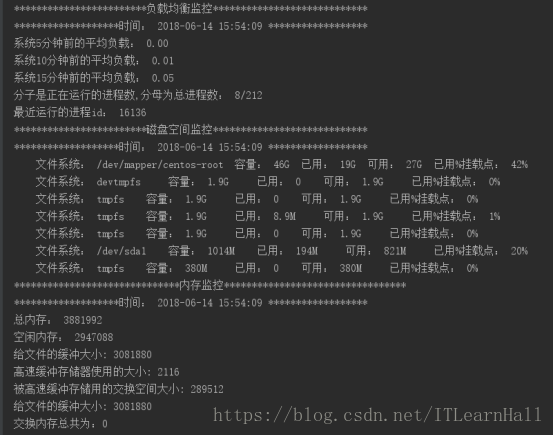
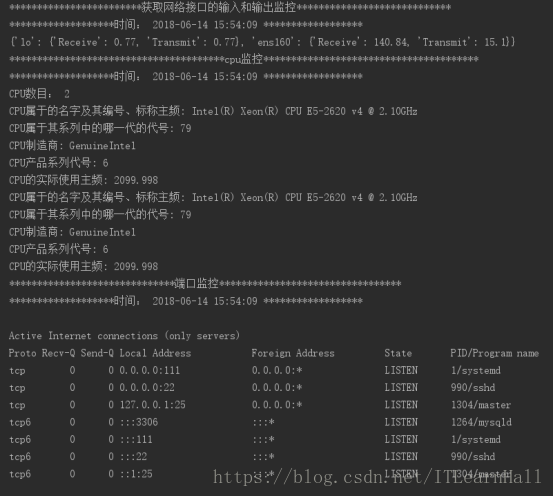
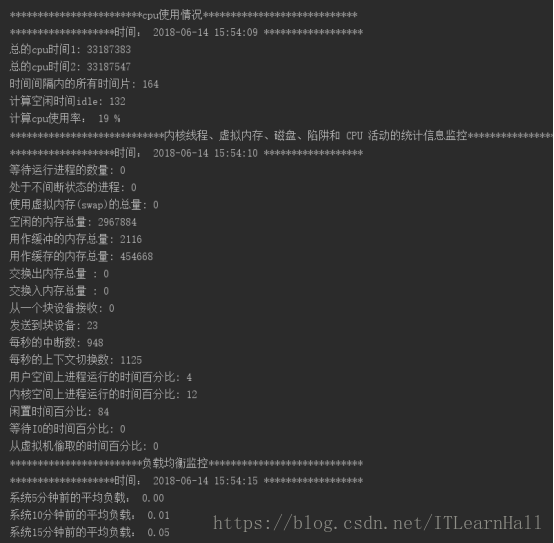
监控结果如下:

接下来做的是把监控结果可视化,即可,可惜没时间做,就交给各位了!!!
花了两天时间整理的,分享给大家,希望对各位有帮助!!!
Python实现自动化监控远程服务器的更多相关文章
- 通过SSIS监控远程服务器Windows服务并发送邮件报警!
利用SSIS不仅可以做BI项目的ETL,而且还可以做一些系统监控和维护工作,由于之前供应商写的Windows服务是读取ESB的消息进行处理,且通过OA流程与访客系统进行了集成,无论是ESB出现状况,还 ...
- 通过SSIS监控远程服务器磁盘空间并发送邮件报警!
由于之前ESB是供应商部署的,且部署在C盘(C盘空间很小,还添加了很多ESB的windows服务日志在C盘,很容易把C盘空间占满,导致ESB服务运行宕机,几乎每隔几周发生一次事故,需要人工干预处理,不 ...
- 关于nagios监控远程服务器对服务器性能影响的测试
1. Nagios监视远程服务器时,是通过在控制端执行以下命令进行数据收集的: /usr/local/nagios/libexec/check_http -I 192.168.16.11 /us ...
- 使用VisualVM监控远程服务器JVM
VisualVM是JDK自带的一款全能型性能监控和故障分析工具,包括对CPU使用.JVM堆内存消耗.线程.类加载的实时监控,内存dump文件分析,垃圾回收运行情况的可视化分析等,对故障排查和性能调优很 ...
- VisualVM监控远程服务器JVM
VisualVM是JDK自带的一款全能型性能监控和故障分析工具,包括对CPU使用.JVM堆内存消耗.线程.类加载的实时监控,内存dump文件分析,垃圾回收运行情况的可视化分析等,对故障排查和性能调优很 ...
- 【Java】监控远程服务器JVM
今天在用JMeter进行测试的时候,发现线程并发量到50的时候会导致阻塞情况,于是需要监控远程JVM,那么如何监控远程JVM呢? 首先,找到启动计量引擎的sh文件,例如我目前的计量引擎启停文件为str ...
- python利用paramiko连接远程服务器执行命令
python中的paramiko模块是用来实现ssh连接到远程服务器上的库,在进行连接的时候,可以用来执行命令,也可以用来上传文件. 1.得到一个连接的对象 在进行连接的时候,可以使用如下的代码: d ...
- JVM监控远程服务器
1. 首先配置服务器端,进入服务器tomcat的bin目录下,打开catalina.sh配置文件,xxx为服务器配置路径. # cd /xxx/apache-tomcat-/bin # vim cat ...
- 使用WMI和性能计数器监控远程服务器权限设置
应用场景:在web服务器中,通过.NET编码使用WMI查询远程服务器的一些硬件配置信息,使用性能计数器查询远程机器的运行时资源使用情况.在网上没有找到相关的东西,特记录与大家共享. 将web服务器和所 ...
随机推荐
- docker镜像制作必备技能
正文 使用过docker的都知道dockerfile,其用于定义制作镜像的流程,由一系列命令和参数构成的脚本,这些命令应用于基础镜像并最终创建一个新的镜像.可参考往期文章学习:docker基础知识整理 ...
- 2019头条java面试总结 (包含面试题解析)
2019滴滴java面试总结 (包含面试题) 本人8年开发经验.今年年初找工作,在互联网寒冬下成功拿到阿里巴巴.今日头条.滴滴等公司offer,岗位是Java后端开发. 面试了很多家公司,感觉大部分 ...
- python中函数调用---可变对象以及不可变对象
# 定义函数 def demo(obj): print("原值: ",obj) obj += obj #调用函数 print("========值传递=======&qu ...
- Windows常用操作
目录 查询IP地址 常用快捷键 显示文件后缀名 查询IP地址 1.进入到dos界面 2.输入命令: ipconfig 常用快捷键 快捷键 作用 win+E 打开计算机 win+R 打开运行 win+R ...
- CDN实现原理
避让:尽可能避开互联网上有可能影响数据传输速度和稳定性的瓶颈和环节,使内容传输的更快.更稳定. 检测:通过在网络各处放置节点服务器所构成的在现有的互联网基础之上的一层智能虚拟网络,CDN系统能够实时监 ...
- JAVA锁有哪些种类,以及区别
原文链接:https://www.cnblogs.com/lxmyhappy/p/7380073.html 在读很多并发文章中,会提及各种各样锁如公平锁,乐观锁等等,这篇文章介绍各种锁的分类.介绍的内 ...
- 【原创】(九)Linux内存管理 - zoned page frame allocator - 4
背景 Read the fucking source code! --By 鲁迅 A picture is worth a thousand words. --By 高尔基 说明: Kernel版本: ...
- 5G:今天不谈技术,谈谈需求和应用
4G改变生活,5G改变社会.随着2019年5G手机的发布,5G时代已经拉开帷幕,无数嗅觉灵敏的投资人和创业者在研究5G行业的投资机会. 但是,市场研究侧重于技术细节与上游产业链设备投资居多,对于贴近消 ...
- git 的一些指令
作为一个前端,git的各种指令应该是需要掌握的,因为前一段时间遇到了一些问题,总觉得每次遇到点问题都去百度这样总归不大好,还是记录一下比较常见的一些指令吧.以后遇到新的再继续添加. 1. 新建本地分支 ...
- C#解析深浅拷贝
前言 前面我们学习完了设计模式,在其中我们有了解到原型模式.这里涉及到了克隆自身对象.那么也就是对对象进行拷贝.这里就涉及到了这么一个概念.深浅拷贝.何为深拷贝何为浅拷贝呢?我们一起来看看吧. 浅拷贝 ...