
基于docker的mysql8的主从复制
基于docker的mysql8的主从复制
创建mysql的docker镜像
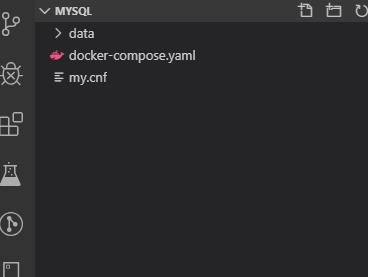
构建docker镜像,其中数据卷配置内容在下面,结构目录如下
version: '3.7'

services:

    db:

      # images 8.x

      image: mysql

      restart: always

      environment:

        MYSQL_ROOT_PASSWORD: 456123

      command:

        --default-authentication-plugin=mysql_native_password

        --character-set-server=utf8mb4

        --collation-server=utf8mb4_general_ci

        --explicit_defaults_for_timestamp=true

        --lower_case_table_names=1

      ports:

        - 3309:3306

      volumes:

        - ./data:/var/lib/mysql

        - ./my.cnf:/etc/my.cnf
配置mysql的主库
更新配置文件
# Copyright (c) 2017, Oracle and/or its affiliates. All rights reserved.

#

# This program is free software; you can redistribute it and/or modify

# it under the terms of the GNU General Public License as published by

# the Free Software Foundation; version 2 of the License.

#

# This program is distributed in the hope that it will be useful,

# but WITHOUT ANY WARRANTY; without even the implied warranty of

# MERCHANTABILITY or FITNESS FOR A PARTICULAR PURPOSE.  See the

# GNU General Public License for more details.

#

# You should have received a copy of the GNU General Public License

# along with this program; if not, write to the Free Software

# Foundation, Inc., 51 Franklin St, Fifth Floor, Boston, MA  02110-1301 USA

#

# The MySQL  Server configuration file.

#

# For explanations see

# http://dev.mysql.com/doc/mysql/en/server-system-variables.html

[mysqld]

pid-file        = /var/run/mysqld/mysqld.pid

socket          = /var/run/mysqld/mysqld.sock

datadir         = /var/lib/mysql

secure-file-priv= NULL

# Disabling symbolic-links is recommended to prevent assorted security risks

symbolic-links=0

# Custom config should go here

# [必须]启用二进制日志

log-bin=mysql-bin

# [必须]服务器唯一ID,默认是1  1~255

server-id=1

sql_mode=STRICT_TRANS_TABLES,NO_ENGINE_SUBSTITUTION
配置操作
启动mysql
docker-compose up -d
更新配置
查看容器
docker ps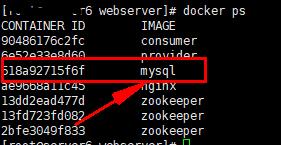
进入mysql交互
docker exec -it 518a92715f6f /bin/bash登录mysql
mysql -u root -p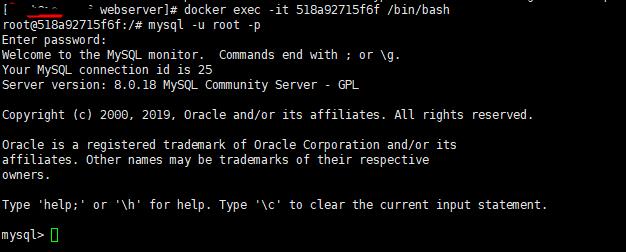
配置
#在主库上创建同步用户并授权

CREATE USER 'replicate'@'112.74.41.236' IDENTIFIED BY '123456';

GRANT REPLICATION SLAVE ON *.* TO 'replicate'@'112.74.41.236';

FLUSH PRIVILEGES;

#最后增加远程访问用户 并赋予所有权限,远程访问测试用

CREATE USER antsdouble IDENTIFIED BY '123456';

GRANT ALL ON *.* TO 'antsdouble'@'%';

#用navicate12及以上可以不用修复修复远程登录报报 caching_sha2_password异常

# mysql8 用新的驱动  driver-class-name: com.mysql.cj.jdbc.Driver

ALTER USER 'antsdouble'@'%' IDENTIFIED BY '123456' PASSWORD EXPIRE NEVER;

ALTER USER 'antsdouble'@'%' IDENTIFIED WITH mysql_native_password BY '123456';

FLUSH PRIVILEGES;

#查询master的状态,此处File,Position数据在配置从库时用到

show master status;

相关说明
server-id是唯一的,主从不能相同,server-id为1表示mysq数据库为主数据库,server-id为2表示mysql的数据库为从数据库
为何必须挂载到/etc/my.cnf 文件上,而不是/etc/mysql/my.cnf 文件上?因为mysql默认配置文件位置在/etc/mysql/my.cnf,挂在方式无法改变容器中文件内容,my.conf内容不会改变,my.cnf中没有我们自定义的配置内容,启动mysql容器会报错
lower_case_table_names:忽略表名、列名等数据结构的大小写(注意:不是每行记录内容的大小写!)。

log-bin:开启二进制记录。这是为了主从复制而做的设置。本文使用RBR(Row-Based Replication)模式。

slow_query_log=1:开启慢查询日志。如果某一条SQL执行的时间超过long_query_time设置的秒数,那么就记录下来。记录文件路径可以使用show variables;命令,在变量名是slow_query_log_file下查找到具体的日志文件路径。

long_query_time=1:单位是秒。指如果某一条SQL语句执行时间超过1秒,就记录下来。必须开启慢查询日志了以后,此变量才能使用。

log_error:开启错误日志。show variables like 'log_error'; 就可以查询到日志文件的路径。mysql的docker官方镜像如果设置别的取值会导致容器无法正常启动。
配置mysql的从库
更新配置文件
# Copyright (c) 2017, Oracle and/or its affiliates. All rights reserved.

#

# This program is free software; you can redistribute it and/or modify

# it under the terms of the GNU General Public License as published by

# the Free Software Foundation; version 2 of the License.

#

# This program is distributed in the hope that it will be useful,

# but WITHOUT ANY WARRANTY; without even the implied warranty of

# MERCHANTABILITY or FITNESS FOR A PARTICULAR PURPOSE.  See the

# GNU General Public License for more details.

#

# You should have received a copy of the GNU General Public License

# along with this program; if not, write to the Free Software

# Foundation, Inc., 51 Franklin St, Fifth Floor, Boston, MA  02110-1301 USA

#

# The MySQL  Server configuration file.

#

# For explanations see

# http://dev.mysql.com/doc/mysql/en/server-system-variables.html

[mysqld]

pid-file        = /var/run/mysqld/mysqld.pid

socket          = /var/run/mysqld/mysqld.sock

datadir         = /var/lib/mysql

secure-file-priv= NULL

# Disabling symbolic-links is recommended to prevent assorted security risks

symbolic-links=0

# Custom config should go here

# [必须]启用二进制日志

log-bin=mysql-bin

# [必须]服务器唯一ID,默认是1

server-id=1

sql_mode=STRICT_TRANS_TABLES,NO_ENGINE_SUBSTITUTION
配置操作
进入交互模式,方法同主库
配置从库
change master to master_host='112.74.41.236',master_port=3309,master_user='replicate',master_password='123456',master_log_file='binlog.000006',master_log_pos=3862;
说明
master_port:Master的端口号,指的是容器的端口号

master_user:用于数据同步的用户

master_password:用于同步的用户的密码

master_log_file:指定 Slave 从哪个日志文件开始复制数据,即上文中提到的 File 字段的值

master_log_pos:从哪个 Position 开始读,即上文中提到的 Position 字段的值

master_connect_retry:如果连接失败,重试的时间间隔,单位是秒,默认是60秒
查看
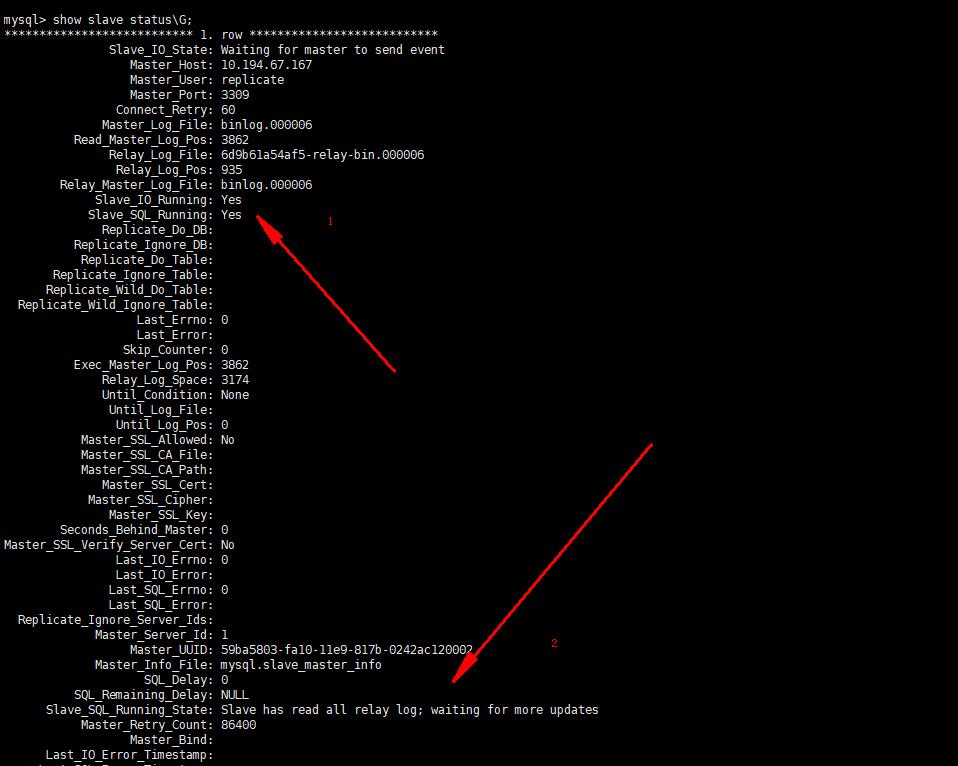
show slave status\G

# 查询slave的状态,Slave_IO_Running及Slave_SQL_Running进程必须正常运行,即YES状态,否则都是错误的状态 错误可以在2标记处查看到原因,也可以通过

show slave status;
测试功能
- 主库添加一条数
- 在从库查看
常见问题
可能产生的原因
网络不通

检查ip,端口

密码不对

检查是否创建用于同步的用户和用户密码是否正确

pos不对

检查Master的 Position
Could not execute Update_rows event on table oa.bui_bill_sum; Can't find record in 'bui_bill_sum', Error_code: 1032; handler error HA_ERR_KEY_NOT_FOUND; the event's master log mysql-bin.000138, end_log_pos 160051747
解决,临时
进入sql 执行

STOP SLAVE;

SET GLOBAL sql_slave_skip_counter =1; #表示跳过一步错误,后面的数字可变

START SLAVE;
永久
在my.cnf中配置

slave-skip-errors = 1032 就会跳过所有的1032的错误,多个用逗号分隔
mysql并没有从my.cnf文件中更新server_id,既然这样就只能手动修改了
set global server_id=2; #此处的数值和my.cnf里设置的一样就行

slave start;
基于docker的mysql8的主从复制的更多相关文章
- 基于docker/dockerfile实现redis主从复制
今天我们来搭建基于docker实现redis主从复制集群 为什么要使用redis集群模式? Redis可以说是内存数据库,mysql的数据库是真实存储在硬盘里的,因此,redis的读取速度要比mysq ...
- 基于Docker Compose搭建mysql主从复制(1主2从)
系统环境 * 3 Ubuntu 16.04 mysql 8.0.12 docker 18.06.1-ce docker-compose 1.23.0-rc3 *3 ==> PS ###我用的是 ...
- 基于Docker的Mysql主从复制搭建
来源:https://www.cnblogs.com/songwenjie/p/9371422.html?tdsourcetag=s_pctim_aiomsg 为什么基于Docker搭建? 资源有 ...
- 基于Docker的Mysql主从复制
基于Docker的Mysql主从复制搭建 为什么基于Docker搭建? 资源有限 虚拟机搭建对机器配置有要求,并且安装mysql步骤繁琐 一台机器上可以运行多个Docker容器 Docker容器之间相 ...
- Docker部署Mysql8.0.20并配置主从复制
1. Linux安装Mysql8.0.20并配置主从复制(一主一从,双主双从) Linux安装Mysql8.0.20并配置主从复制(一主一从,双主双从) 2. 前提准备 # 创建主从数据库文件夹 ...
- Linux基于Docker的Redis主从复制、哨兵模式搭建
本教程基于CentOS7,开始本教程前,请确保您的Linux系统已安装Docker. 1.使用docker下载redis镜像 docker pull redis 安装完成后,使用docker imag ...
- 基于Docker搭建MySQL主从复制
摘要: 本篇博文相对简单,因为是初次使用Docker,MySQL的主从复制之前也在Centos环境下搭建过,但是也忘的也差不多了,因此本次尝试在Docker中搭建. 本篇博文相对简单,因为是初次使用D ...
- 基于 Docker 搭建 MySQL 主从复制
本篇博文相对简单,因为是初次使用Docker,MySQL的主从复制之前也在Centos环境下搭建过,但是也忘的也差不多了,因此本次尝试在Docker中搭建. 根据网上教程走还是踩了一些坑,不过所幸最终 ...
- 如何利用docker快速构建MySQL主从复制环境
在学习MySQL的过程中,常常会测试各种参数的作用.这时候,就需要快速构建出MySQL实例,甚至主从. 考虑如下场景: 譬如我想测试mysqldump在指定--single-transaction参数 ...
随机推荐
- Laravel 从入门到精通 创建并运行一个新的 Laravel 项目
创建一个新的 Laravel 项目 正如官方文档所言,有两种方式可以创建一个新的 Laravel 项目,这两种创建方式都是从命令行执行的:第一种是通过全局的 Laravel 安装器,另一种是通过 Co ...
- jenkins自动化部署项目5 -- 系统管理-系统设置ssh配置
[系统管理]-[系统设置] 如果应用服务(前端后台)要部署在linux服务器上,我选择的是用ssh 为了jenkins登录远程登录linux服务器可以免密登录,先配置公钥和私钥: 我是在windows ...
- C#深入学习笔记 - 可空类型与构造函数默认参数
在实际开发中或许可能会遇到某个属性需要提供一个默认参数,如果该参数是引用类型的话,可以通过 使用 null 来表示未知的值,但如果是int或 其他值类型的话就有点不好办了,因为如果需要一个int或fl ...
- 前端基于VUE的v-charts的曲线显示
目录 前端基于VUE的v-charts的曲线显示 1. 应用背景 2. 分析数据生产者生成 3. 取出数据消费者 4. 前端显示 4.1 安装V-charts插件 4.2 引入veline曲线插件 4 ...
- C/C++中变量的作用域和存储类型简介
写在开头 对于很多C/C++的初学者来说,很容易理不清变量的作用域和存储类型这一块的一些概念,也容易将其中的一些概念搞混淆.作为一个C/C++的初学者,笔者希望在这里能够尝试着去理一理这些较为繁杂的概 ...
- java 对数组进行截取组合操作
1.使用skip跳过和limit限制组合,示例: Integer skip = (page.getPageNum() - 1) * page.getPageNum(); Integer limit = ...
- postman工具使用小结
序言 现在,postman在做接口测试方面,发挥着越来越重大的作用,其支持多种请求方式.并可以模拟各种类型的数据请求类型,在实际开发中使用它可以极大的提高开发的效率. 安装postman 1. 安装 ...
- 序列标注(BiLSTM-CRF/Lattice LSTM)
前言 在三大特征提取器中,我们已经接触了LSTM/CNN/Transormer三种特征提取器,这一节我们将介绍如何使用BiLSTM实现序列标注中的命名实体识别任务,以及Lattice-LSTM的模型原 ...
- 从React-Native坑中爬出,我记下了这些
吐槽 如果React-Native是个人,我估计已经想要打死他了... 上一篇文章 当React开发者初次走进React-Native的世界 前言 最近因为业务需要,做了一些关于React-Nativ ...
- 快学Scala 第十五课 (二进制读取文件,写文件,访问目录,序列化)
二进制读取文件: val file = new File("F:\\scalaWorkspace\\ScalaLearning\\files\\test.txt") val in ...