
Amazon S3数据存储
从官网下载aws 的unity插件,并做了简单修改(主要用修改PostObject),问题:
(一)获取Pool ID
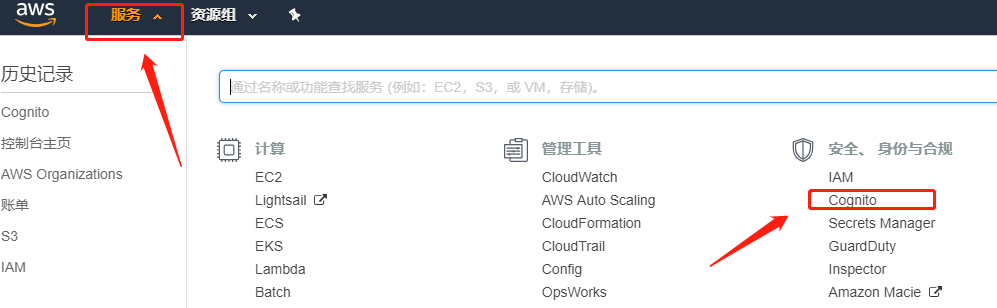
通过服务-Cognito-管理/新建用户池,可以新建或者获取Pool ID
(二)上传失败问题
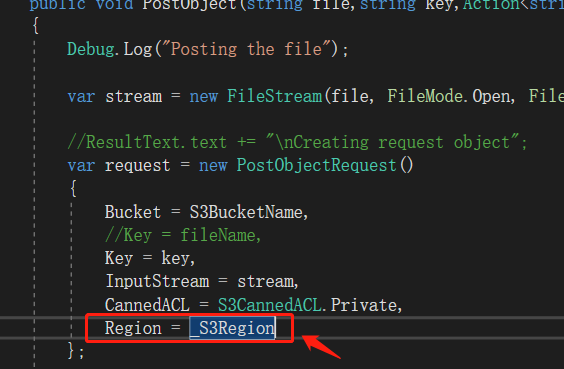
使用unity插件中S3Example中PostObject时抛异常,但是获取GetObject没问题,此时需要在上传时代码中加一下区域,如下图所示。如果此时正在科学上网,请暂停科学上网,不允许通过代理访问(貌似是,本人报代理异常,改用VPN或者暂停科学上网代理即可)
//----------------------------------------------代码--------------------------------------------------//
using UnityEngine;

using Amazon.S3;

using Amazon.S3.Model;

using Amazon.Runtime;

using System.IO;

using System;

using System.Collections.Generic;

using Amazon.CognitoIdentity;

using Amazon;

public class AmazonS3Sdk : MonoBehaviour

{

    public string IdentityPoolId = "";

    public string CognitoIdentityRegion = RegionEndpoint.APSoutheast1.SystemName;

    private RegionEndpoint _CognitoIdentityRegion

    {

        get { return RegionEndpoint.GetBySystemName(CognitoIdentityRegion); }

    }

    public string S3Region = RegionEndpoint.APSoutheast1.SystemName;

    private RegionEndpoint _S3Region

    {

        get { return RegionEndpoint.GetBySystemName(S3Region); }

    }

    public string S3BucketName = null;

    public string SampleFileName = null;

    void Start()

    {

        UnityInitializer.AttachToGameObject(this.gameObject);

        AWSConfigs.HttpClient = AWSConfigs.HttpClientOption.UnityWebRequest;

    }

    #region private members

    private IAmazonS3 _s3Client;

    private AWSCredentials _credentials;

    private AWSCredentials Credentials

    {

        get

        {

            if (_credentials == null)

                _credentials = new CognitoAWSCredentials(IdentityPoolId, _CognitoIdentityRegion);

            return _credentials;

        }

    }

    private IAmazonS3 Client

    {

        get

        {

            if (_s3Client == null)

            {

                _s3Client = new AmazonS3Client(Credentials, _S3Region);

            }

            //test comment

            return _s3Client;

        }

    }

    #endregion

    #region Get Bucket List

    /// <summary>

    /// Example method to Demostrate GetBucketList

    /// </summary>

    public void GetBucketList()

    {

        Debug.Log("Fetching all the Buckets");

        Client.ListBucketsAsync(new ListBucketsRequest(), (responseObject) =>

        {

            Debug.Log(responseObject.Exception.ToString());

            if (responseObject.Exception == null)

            {

                Debug.Log("Got Response");

                responseObject.Response.Buckets.ForEach((s3b) =>

                {

                    string info = string.Format("bucket = {0}, created date = {1} \n", s3b.BucketName, s3b.CreationDate);

                    Debug.Log(info);

                });

            }

            else

            {

                //ResultText.text += "Got Exception " + responseObject.Exception.ToString();

                Debug.Log("Fetching Buckets Exception:" + responseObject.Exception.ToString());

            }

        });

    }

    #endregion

    /// <summary>

    /// Get Object from S3 Bucket

    /// </summary>

    private void GetObject()

    {

        string info = string.Format("fetching {0} from bucket {1}", SampleFileName, S3BucketName);

        Debug.Log(info);

        Client.GetObjectAsync(S3BucketName, SampleFileName, (responseObj) =>

        {

            string data = null;

            var response = responseObj.Response;

            if (response.ResponseStream != null)

            {

                using (StreamReader reader = new StreamReader(response.ResponseStream))

                {

                    data = reader.ReadToEnd();

                }

                Debug.Log(data);

                //ResultText.text += data;

            }

        });

    }

    /// <summary>

    /// Post Object to S3 Bucket.

    /// </summary>

    public void PostObject(string file,string key,Action<string> action)

    {

        Debug.Log("Posting the file");

        var stream = new FileStream(file, FileMode.Open, FileAccess.Read, FileShare.Read);

        //ResultText.text += "\nCreating request object";

        var request = new PostObjectRequest()

        {

            Bucket = S3BucketName,

            //Key = fileName,

            Key = key,

            InputStream = stream,

            CannedACL = S3CannedACL.Private,

            Region = _S3Region

        };

        Debug.Log("Making HTTP post call");

        Client.PostObjectAsync(request, (responseObj) =>

        {

            if (responseObj.Exception == null)

            {

                string info = string.Format("\nobject {0} posted to bucket {1}", responseObj.Request.Key, responseObj.Request.Bucket);

                Debug.Log(info);

                if (action != null)

                    action(responseObj.Request.Key);

            }

            else

            {

                Debug.Log("Posting Exception:"+ responseObj.Exception.ToString());

                //ResultText.text += string.Format("\n receieved error {0}", responseObj.Response.HttpStatusCode.ToString());

            }

        });

    }

    /// <summary>

    /// Get Objects from S3 Bucket

    /// </summary>

    public void GetObjects()

    {

        Debug.Log("Fetching all the Objects from " + S3BucketName);

        var request = new ListObjectsRequest()

        {

            BucketName = S3BucketName

        };

        Client.ListObjectsAsync(request, (responseObject) =>

        {

            //ResultText.text += "\n";

            if (responseObject.Exception == null)

            {

                //ResultText.text += "Got Response \nPrinting now \n";

                responseObject.Response.S3Objects.ForEach((o) =>

                {

                    string info = string.Format("{0}\n", o.Key);

                    Debug.Log(info);

                });

            }

            else

            {

                string info = "Fetching Objects Exception:"+ responseObject.Exception.ToString();

                Debug.Log(info);

            }

        });

    }

    /// <summary>

    /// Delete Objects in S3 Bucket

    /// </summary>

    public void DeleteObject()

    {

        string info = string.Format("deleting {0} from bucket {1}", SampleFileName, S3BucketName);

        Debug.Log(info);

        List<KeyVersion> objects = new List<KeyVersion>();

        objects.Add(new KeyVersion()

        {

            Key = SampleFileName

        });

        var request = new DeleteObjectsRequest()

        {

            BucketName = S3BucketName,

            Objects = objects

        };

        Client.DeleteObjectsAsync(request, (responseObj) =>

        {

            //ResultText.text += "\n";

            if (responseObj.Exception == null)

            {

                //ResultText.text += "Got Response \n \n";

                //ResultText.text += string.Format("deleted objects \n");

                responseObj.Response.DeletedObjects.ForEach((dObj) =>

                {

                    string str = dObj.Key;

                    Debug.Log(str);

                });

            }

            else

            {

                string str = "Got Exception \n";

                Debug.Log(str);

            }

        });

    }

    private string GetFileHelper()

    {

        var fileName = SampleFileName;

        if (!File.Exists(Application.persistentDataPath + Path.DirectorySeparatorChar + fileName))

        {

            var streamReader = File.CreateText(Application.persistentDataPath + Path.DirectorySeparatorChar + fileName);

            streamReader.WriteLine("This is a sample s3 file uploaded from unity s3 sample");

            streamReader.Close();

        }

        return fileName;

    }

    private string GetPostPolicy(string bucketName, string key, string contentType)

    {

        bucketName = bucketName.Trim();

        key = key.Trim();

        // uploadFileName cannot start with /

        if (!string.IsNullOrEmpty(key) && key[] == '/')

        {

            throw new ArgumentException("uploadFileName cannot start with / ");

        }

        contentType = contentType.Trim();

        if (string.IsNullOrEmpty(bucketName))

        {

            throw new ArgumentException("bucketName cannot be null or empty. It's required to build post policy");

        }

        if (string.IsNullOrEmpty(key))

        {

            throw new ArgumentException("uploadFileName cannot be null or empty. It's required to build post policy");

        }

        if (string.IsNullOrEmpty(contentType))

        {

            throw new ArgumentException("contentType cannot be null or empty. It's required to build post policy");

        }

        string policyString = null;

        int position = key.LastIndexOf('/');

        if (position == -)

        {

            policyString = "{\"expiration\": \"" + DateTime.UtcNow.AddHours().ToString("yyyy-MM-ddTHH:mm:ssZ") + "\",\"conditions\": [{\"bucket\": \"" +

                bucketName + "\"},[\"starts-with\", \"$key\", \"" + "\"],{\"acl\": \"private\"},[\"eq\", \"$Content-Type\", " + "\"" + contentType + "\"" + "]]}";

        }

        else

        {

            policyString = "{\"expiration\": \"" + DateTime.UtcNow.AddHours().ToString("yyyy-MM-ddTHH:mm:ssZ") + "\",\"conditions\": [{\"bucket\": \"" +

                bucketName + "\"},[\"starts-with\", \"$key\", \"" + key.Substring(, position) + "/\"],{\"acl\": \"private\"},[\"eq\", \"$Content-Type\", " + "\"" + contentType + "\"" + "]]}";

        }

        return policyString;

    }

}
下面为.Net的上传物体可用代码
  //private static readonly string awsAccessKey = "*****************";

        //private static readonly string awsSecretKey = "***************************";

        private static readonly string awsAccessKey = "**********************************";

        private static readonly string awsSecretKey = "**************************";

        private static readonly string bucketName = "************";

        //private static readonly string bucketName = "****************";

        static AmazonS3Config config = new AmazonS3Config()

        {

            ServiceURL = "http://s3.amazonaws.com"

        };

        static AmazonS3Client client;

        //static AmazonS3Client amazonS3Client;

        static void Main(string[] args)

        {

            //FileStream stream = File.OpenRead(args[0]);

            FileStream stream = File.OpenRead(@"D:\1107.jpg");

            //string resourcePath = @"D:\Demo\002.jpg";

            string info;

            //CreateBucket("test");

            //GetBucketList();

            //UploadbyPath(resourcePath);

            //Download(args[0]);

            using (AmazonS3Client amazonS3Client = new AmazonS3Client(awsAccessKey, awsSecretKey, config))

            {

                PutObjectRequest request = new PutObjectRequest()

                {

                    BucketName = bucketName,

                    //FilePath = args[0],

                    InputStream = stream,

                    CannedACL = S3CannedACL.PublicReadWrite,

                    Key = Path.GetFileName("")

                    //ContentType = "text/plain"

                };

                try

                {

                    amazonS3Client.PutObject(request);

                    info = "success";

                    //amazonS3Client.Dispose();

                }

                catch (AmazonS3Exception ex)

                {

                    info = "failed:" + ex.Message;

                }

                //TransferUtility transfer = new TransferUtility(amazonS3Client);

                //transfer.Upload(path, bucketName, Path.GetFileName(path));

            }

            //stream.Close();

            //stream.Dispose();

            //amazonS3Client.Dispose();

            //return args[0];

            Console.WriteLine(info);

            Console.ReadKey();

        }
Amazon S3数据存储的更多相关文章
- 使用Apache Hudi + Amazon S3 + Amazon EMR + AWS DMS构建数据湖
1. 引入 数据湖使组织能够在更短的时间内利用多个源的数据,而不同角色用户可以以不同的方式协作和分析数据,从而实现更好.更快的决策.Amazon Simple Storage Service(amaz ...
- Amazon Redshift数据迁移到MaxCompute
Amazon Redshift数据迁移到MaxCompute Amazon Redshift 中的数据迁移到MaxCompute中经常需要先卸载到S3中,再到阿里云对象存储OSS中,大数据计算服务Ma ...
- 详解Amazon S3上传/下载数据
AWS简单储存服务(Amazon S3)是非常坚牢的存储服务,拥有99.999999999%的耐久性(记住11个9的耐久性). 使用CloudBerry Explorer,从Amazon S3下载数据 ...
- Hive中导入Amazon S3中的分区表数据的操作
Hive中创建S3的外部表 数据在S3存放的数据是按时间纬度存放的,每天的数据存放在各自的目录下,目录结构如下截图: 每个目录下面的数据是CSV文件,现在将其导入到Hive中进行查询,通过创建对应的表 ...
- Amazon S3 API
一.概述 Amazon s3,全称为Amazon Simple Storage Service.EC2和S3是Amazon最早推出的两项云服务. REST,这也是比较火的一种Web服务架构.简单来说 ...
- Amazon S3 功能介绍
一 .Amazon S3介绍 Amazon Simple Storage Service (Amazon S3) 是一种对象存储,它具有简单的 Web 服务接口,可用于在 Web 上的任何位置存储和检 ...
- HBase介绍(2)---数据存储结构
在本文中的HBase术语:基于列:column-oriented行:row列组:column families列:column单元:cell 理解HBase(一个开源的Google的BigTable实 ...
- Amazon S3 云服务
一.简介 Amazon Simple Storage Service (S3) 是一个公开的服务,Web 应用程序开发人员可以使用它存储数字资产,包括图片.视频.音乐和文档. S3 提供一个 REST ...
- asp.net core系列 69 Amazon S3 资源文件上传示例
一. 上传示例 Install-Package AWSSDK.S3 -Version 3.3.104.10 using Amazon; using Amazon.Runtime; using Ama ...
随机推荐
- CF #579 (Div. 3) B.Equal Rectangles
B.Equal Rectangles time limit per test2 seconds memory limit per test256 megabytes inputstandard inp ...
- SpringBootSecurity学习(08)网页版登录整合MyBatis
创建数据库 前面介绍了springboot-security整合jdbc从数据库中查询用户的方式,适用性有限,下面介绍最常用的整合MyBatis,这种在开发和生产环境中是最常用,也是最实用的.首先需要 ...
- 免费下载 80多种的微软推出入门级 .NET视频
.NET Core 3.0发布视频系列中宣布了80多个新的免费视频,这些视频同时放在Microsoft的Channel 9 和youtube上面. 在线观看由于跨洋网络效果不太好,下载到机器上慢慢上是 ...
- java8 Optional使用总结
[前言] java8新特性 java8 函数接口 java8 lambda表达式 Java 8 时间日期使用 java8 推出的Optional的目的就是为了杜绝空指针异常,帮助开发者开发出更优雅的代 ...
- .net core 3.0 Signalr - 05 使用jwt将用户跟signalr关联
Signalr是以Group.Connect为核心来进行推送,比如,给某个组.某个连接来推送,但实际场景中,核心应该是某个组.某个人:然而一个人可以对应多个连接(浏览器多个tab页):本节就来介绍下自 ...
- EF Core 实现读写分离的最佳方案
前言 公司之前使用Ado.net和Dapper进行数据访问层的操作, 进行读写分离也比较简单, 只要使用对应的数据库连接字符串即可. 而最近要迁移到新系统中,新系统使用.net core和EF Cor ...
- .NET Core 3.0 可卸载程序集原理简析
因为最近在群里被问到如何理解 .NET Core 3.0 可卸载程序集,所以就写了这篇简单的分析. 因为时间实在很少,这篇文章只简单的罗列了相关的代码,请配合官方说明文档理解. 另外,书籍<.N ...
- 离线服务器安装zabbix
因为机房内的服务器并不是所有都能上外网,所以利用zabbix官方源的安装方法就行不通了,又嫌弃编译安装麻烦,所以这里选择离线RPM包安装zabbix.(如需完整rpm包可以留言与我联系) 下载zabb ...
- MongoDB 学习笔记之 检测存储引擎
检测存储引擎: db.serverStatus().storageEngine db.serverStatus().wiredTiger (转)WiredTiger测试结果 单纯写的测试结果 结论:W ...
- mysql 生成数据字典sql语句
SELECT TABLE_SCHEMA, TABLE_NAME, COLUMN_NAME, COLUMN_TYPE, COLUMN_COMMENT FROM information_schema. C ...