
Amazon S3数据存储
从官网下载aws 的unity插件,并做了简单修改(主要用修改PostObject),问题:
(一)获取Pool ID
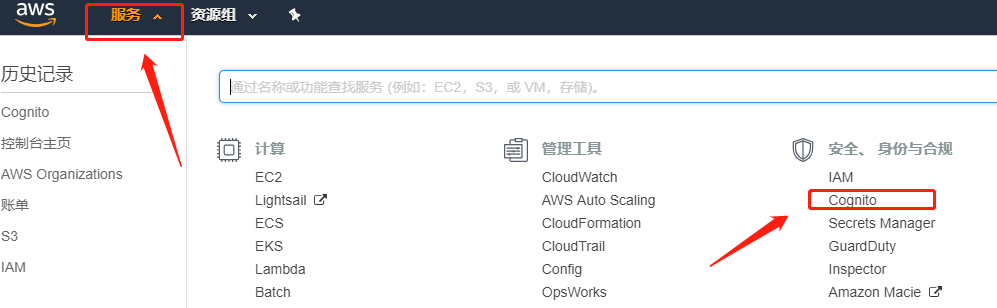
通过服务-Cognito-管理/新建用户池,可以新建或者获取Pool ID
(二)上传失败问题
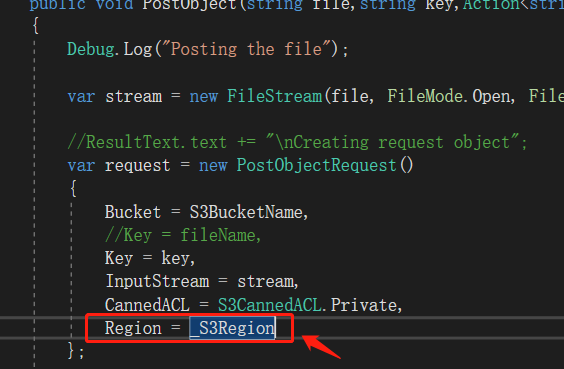
使用unity插件中S3Example中PostObject时抛异常,但是获取GetObject没问题,此时需要在上传时代码中加一下区域,如下图所示。如果此时正在科学上网,请暂停科学上网,不允许通过代理访问(貌似是,本人报代理异常,改用VPN或者暂停科学上网代理即可)
//----------------------------------------------代码--------------------------------------------------//
using UnityEngine;

using Amazon.S3;

using Amazon.S3.Model;

using Amazon.Runtime;

using System.IO;

using System;

using System.Collections.Generic;

using Amazon.CognitoIdentity;

using Amazon;

public class AmazonS3Sdk : MonoBehaviour

{

    public string IdentityPoolId = "";

    public string CognitoIdentityRegion = RegionEndpoint.APSoutheast1.SystemName;

    private RegionEndpoint _CognitoIdentityRegion

    {

        get { return RegionEndpoint.GetBySystemName(CognitoIdentityRegion); }

    }

    public string S3Region = RegionEndpoint.APSoutheast1.SystemName;

    private RegionEndpoint _S3Region

    {

        get { return RegionEndpoint.GetBySystemName(S3Region); }

    }

    public string S3BucketName = null;

    public string SampleFileName = null;

    void Start()

    {

        UnityInitializer.AttachToGameObject(this.gameObject);

        AWSConfigs.HttpClient = AWSConfigs.HttpClientOption.UnityWebRequest;

    }

    #region private members

    private IAmazonS3 _s3Client;

    private AWSCredentials _credentials;

    private AWSCredentials Credentials

    {

        get

        {

            if (_credentials == null)

                _credentials = new CognitoAWSCredentials(IdentityPoolId, _CognitoIdentityRegion);

            return _credentials;

        }

    }

    private IAmazonS3 Client

    {

        get

        {

            if (_s3Client == null)

            {

                _s3Client = new AmazonS3Client(Credentials, _S3Region);

            }

            //test comment

            return _s3Client;

        }

    }

    #endregion

    #region Get Bucket List

    /// <summary>

    /// Example method to Demostrate GetBucketList

    /// </summary>

    public void GetBucketList()

    {

        Debug.Log("Fetching all the Buckets");

        Client.ListBucketsAsync(new ListBucketsRequest(), (responseObject) =>

        {

            Debug.Log(responseObject.Exception.ToString());

            if (responseObject.Exception == null)

            {

                Debug.Log("Got Response");

                responseObject.Response.Buckets.ForEach((s3b) =>

                {

                    string info = string.Format("bucket = {0}, created date = {1} \n", s3b.BucketName, s3b.CreationDate);

                    Debug.Log(info);

                });

            }

            else

            {

                //ResultText.text += "Got Exception " + responseObject.Exception.ToString();

                Debug.Log("Fetching Buckets Exception:" + responseObject.Exception.ToString());

            }

        });

    }

    #endregion

    /// <summary>

    /// Get Object from S3 Bucket

    /// </summary>

    private void GetObject()

    {

        string info = string.Format("fetching {0} from bucket {1}", SampleFileName, S3BucketName);

        Debug.Log(info);

        Client.GetObjectAsync(S3BucketName, SampleFileName, (responseObj) =>

        {

            string data = null;

            var response = responseObj.Response;

            if (response.ResponseStream != null)

            {

                using (StreamReader reader = new StreamReader(response.ResponseStream))

                {

                    data = reader.ReadToEnd();

                }

                Debug.Log(data);

                //ResultText.text += data;

            }

        });

    }

    /// <summary>

    /// Post Object to S3 Bucket.

    /// </summary>

    public void PostObject(string file,string key,Action<string> action)

    {

        Debug.Log("Posting the file");

        var stream = new FileStream(file, FileMode.Open, FileAccess.Read, FileShare.Read);

        //ResultText.text += "\nCreating request object";

        var request = new PostObjectRequest()

        {

            Bucket = S3BucketName,

            //Key = fileName,

            Key = key,

            InputStream = stream,

            CannedACL = S3CannedACL.Private,

            Region = _S3Region

        };

        Debug.Log("Making HTTP post call");

        Client.PostObjectAsync(request, (responseObj) =>

        {

            if (responseObj.Exception == null)

            {

                string info = string.Format("\nobject {0} posted to bucket {1}", responseObj.Request.Key, responseObj.Request.Bucket);

                Debug.Log(info);

                if (action != null)

                    action(responseObj.Request.Key);

            }

            else

            {

                Debug.Log("Posting Exception:"+ responseObj.Exception.ToString());

                //ResultText.text += string.Format("\n receieved error {0}", responseObj.Response.HttpStatusCode.ToString());

            }

        });

    }

    /// <summary>

    /// Get Objects from S3 Bucket

    /// </summary>

    public void GetObjects()

    {

        Debug.Log("Fetching all the Objects from " + S3BucketName);

        var request = new ListObjectsRequest()

        {

            BucketName = S3BucketName

        };

        Client.ListObjectsAsync(request, (responseObject) =>

        {

            //ResultText.text += "\n";

            if (responseObject.Exception == null)

            {

                //ResultText.text += "Got Response \nPrinting now \n";

                responseObject.Response.S3Objects.ForEach((o) =>

                {

                    string info = string.Format("{0}\n", o.Key);

                    Debug.Log(info);

                });

            }

            else

            {

                string info = "Fetching Objects Exception:"+ responseObject.Exception.ToString();

                Debug.Log(info);

            }

        });

    }

    /// <summary>

    /// Delete Objects in S3 Bucket

    /// </summary>

    public void DeleteObject()

    {

        string info = string.Format("deleting {0} from bucket {1}", SampleFileName, S3BucketName);

        Debug.Log(info);

        List<KeyVersion> objects = new List<KeyVersion>();

        objects.Add(new KeyVersion()

        {

            Key = SampleFileName

        });

        var request = new DeleteObjectsRequest()

        {

            BucketName = S3BucketName,

            Objects = objects

        };

        Client.DeleteObjectsAsync(request, (responseObj) =>

        {

            //ResultText.text += "\n";

            if (responseObj.Exception == null)

            {

                //ResultText.text += "Got Response \n \n";

                //ResultText.text += string.Format("deleted objects \n");

                responseObj.Response.DeletedObjects.ForEach((dObj) =>

                {

                    string str = dObj.Key;

                    Debug.Log(str);

                });

            }

            else

            {

                string str = "Got Exception \n";

                Debug.Log(str);

            }

        });

    }

    private string GetFileHelper()

    {

        var fileName = SampleFileName;

        if (!File.Exists(Application.persistentDataPath + Path.DirectorySeparatorChar + fileName))

        {

            var streamReader = File.CreateText(Application.persistentDataPath + Path.DirectorySeparatorChar + fileName);

            streamReader.WriteLine("This is a sample s3 file uploaded from unity s3 sample");

            streamReader.Close();

        }

        return fileName;

    }

    private string GetPostPolicy(string bucketName, string key, string contentType)

    {

        bucketName = bucketName.Trim();

        key = key.Trim();

        // uploadFileName cannot start with /

        if (!string.IsNullOrEmpty(key) && key[] == '/')

        {

            throw new ArgumentException("uploadFileName cannot start with / ");

        }

        contentType = contentType.Trim();

        if (string.IsNullOrEmpty(bucketName))

        {

            throw new ArgumentException("bucketName cannot be null or empty. It's required to build post policy");

        }

        if (string.IsNullOrEmpty(key))

        {

            throw new ArgumentException("uploadFileName cannot be null or empty. It's required to build post policy");

        }

        if (string.IsNullOrEmpty(contentType))

        {

            throw new ArgumentException("contentType cannot be null or empty. It's required to build post policy");

        }

        string policyString = null;

        int position = key.LastIndexOf('/');

        if (position == -)

        {

            policyString = "{\"expiration\": \"" + DateTime.UtcNow.AddHours().ToString("yyyy-MM-ddTHH:mm:ssZ") + "\",\"conditions\": [{\"bucket\": \"" +

                bucketName + "\"},[\"starts-with\", \"$key\", \"" + "\"],{\"acl\": \"private\"},[\"eq\", \"$Content-Type\", " + "\"" + contentType + "\"" + "]]}";

        }

        else

        {

            policyString = "{\"expiration\": \"" + DateTime.UtcNow.AddHours().ToString("yyyy-MM-ddTHH:mm:ssZ") + "\",\"conditions\": [{\"bucket\": \"" +

                bucketName + "\"},[\"starts-with\", \"$key\", \"" + key.Substring(, position) + "/\"],{\"acl\": \"private\"},[\"eq\", \"$Content-Type\", " + "\"" + contentType + "\"" + "]]}";

        }

        return policyString;

    }

}
下面为.Net的上传物体可用代码
  //private static readonly string awsAccessKey = "*****************";

        //private static readonly string awsSecretKey = "***************************";

        private static readonly string awsAccessKey = "**********************************";

        private static readonly string awsSecretKey = "**************************";

        private static readonly string bucketName = "************";

        //private static readonly string bucketName = "****************";

        static AmazonS3Config config = new AmazonS3Config()

        {

            ServiceURL = "http://s3.amazonaws.com"

        };

        static AmazonS3Client client;

        //static AmazonS3Client amazonS3Client;

        static void Main(string[] args)

        {

            //FileStream stream = File.OpenRead(args[0]);

            FileStream stream = File.OpenRead(@"D:\1107.jpg");

            //string resourcePath = @"D:\Demo\002.jpg";

            string info;

            //CreateBucket("test");

            //GetBucketList();

            //UploadbyPath(resourcePath);

            //Download(args[0]);

            using (AmazonS3Client amazonS3Client = new AmazonS3Client(awsAccessKey, awsSecretKey, config))

            {

                PutObjectRequest request = new PutObjectRequest()

                {

                    BucketName = bucketName,

                    //FilePath = args[0],

                    InputStream = stream,

                    CannedACL = S3CannedACL.PublicReadWrite,

                    Key = Path.GetFileName("")

                    //ContentType = "text/plain"

                };

                try

                {

                    amazonS3Client.PutObject(request);

                    info = "success";

                    //amazonS3Client.Dispose();

                }

                catch (AmazonS3Exception ex)

                {

                    info = "failed:" + ex.Message;

                }

                //TransferUtility transfer = new TransferUtility(amazonS3Client);

                //transfer.Upload(path, bucketName, Path.GetFileName(path));

            }

            //stream.Close();

            //stream.Dispose();

            //amazonS3Client.Dispose();

            //return args[0];

            Console.WriteLine(info);

            Console.ReadKey();

        }
Amazon S3数据存储的更多相关文章
- 使用Apache Hudi + Amazon S3 + Amazon EMR + AWS DMS构建数据湖
1. 引入 数据湖使组织能够在更短的时间内利用多个源的数据,而不同角色用户可以以不同的方式协作和分析数据,从而实现更好.更快的决策.Amazon Simple Storage Service(amaz ...
- Amazon Redshift数据迁移到MaxCompute
Amazon Redshift数据迁移到MaxCompute Amazon Redshift 中的数据迁移到MaxCompute中经常需要先卸载到S3中,再到阿里云对象存储OSS中,大数据计算服务Ma ...
- 详解Amazon S3上传/下载数据
AWS简单储存服务(Amazon S3)是非常坚牢的存储服务,拥有99.999999999%的耐久性(记住11个9的耐久性). 使用CloudBerry Explorer,从Amazon S3下载数据 ...
- Hive中导入Amazon S3中的分区表数据的操作
Hive中创建S3的外部表 数据在S3存放的数据是按时间纬度存放的,每天的数据存放在各自的目录下,目录结构如下截图: 每个目录下面的数据是CSV文件,现在将其导入到Hive中进行查询,通过创建对应的表 ...
- Amazon S3 API
一.概述 Amazon s3,全称为Amazon Simple Storage Service.EC2和S3是Amazon最早推出的两项云服务. REST,这也是比较火的一种Web服务架构.简单来说 ...
- Amazon S3 功能介绍
一 .Amazon S3介绍 Amazon Simple Storage Service (Amazon S3) 是一种对象存储,它具有简单的 Web 服务接口,可用于在 Web 上的任何位置存储和检 ...
- HBase介绍(2)---数据存储结构
在本文中的HBase术语:基于列:column-oriented行:row列组:column families列:column单元:cell 理解HBase(一个开源的Google的BigTable实 ...
- Amazon S3 云服务
一.简介 Amazon Simple Storage Service (S3) 是一个公开的服务,Web 应用程序开发人员可以使用它存储数字资产,包括图片.视频.音乐和文档. S3 提供一个 REST ...
- asp.net core系列 69 Amazon S3 资源文件上传示例
一. 上传示例 Install-Package AWSSDK.S3 -Version 3.3.104.10 using Amazon; using Amazon.Runtime; using Ama ...
随机推荐
- Spring MVC-从零开始-@RequestMapping结合@PathVariable (从URL路径中取值,作用于函数参数)
1.可以直接在RequestMapping中value元素中使用{key}描述属性键 2.也可以在{key}中使用正则限定key的取值范围,从而限定url的变化范围 package com.jt; i ...
- shell 获取当前目录下的jar文件
1.示例 function getDir() { ` do fileName=$"/"$item if [ -d $fileName ] then echo $fileName&q ...
- postman工具使用小结
序言 现在,postman在做接口测试方面,发挥着越来越重大的作用,其支持多种请求方式.并可以模拟各种类型的数据请求类型,在实际开发中使用它可以极大的提高开发的效率. 安装postman 1. 安装 ...
- JS 生成唯一值UUID
md5加密new Date()生成的值可能不是唯一的,另一种生成唯一值的方式: getUID: function() { // 获取唯一值 return 'xxxxxxxx-xxxx-4xxx-yxx ...
- 【算法随记五】使用FFT变换自动去除图像中严重的网纹。
这个课题在很久以前就已经有所接触,不过一直没有用代码去实现过.最近买了一本<机器视觉算法与应用第二版>书,书中再次提到该方法:使用傅里叶变换进行滤波处理的真正好处是可以通过使用定制的滤波器 ...
- Bumblebee服务网关之统一请求验证
对于微服务网关来说,统一请求验证是一个比较重要和常用的功能,通过网关验证后台服务就无须关注请求验证:对于多语言平台的服务而言制定验证方式和变更验证配置都是一件比较繁琐和工作量大的事情.Bumblebe ...
- ng 目录详解
在新建的项目中需要我们关注的就是package.json和src文件夹 node_modules (项目所需依赖)是package.json所创建的模块安装到node_modules中 src:是代码 ...
- 采坑指南——k8s域名解析coredns问题排查过程
正文 前几天,在ucloud上搭建的k8s集群(搭建教程后续会发出).今天发现域名解析不了. 组件版本:k8s 1.15.0,coredns:1.3.1 过程是这样的: 首先用以下yaml文件创建了一 ...
- 检测 IP的正则表达式
... /*ip正则表达式*/ /^((?:(?:25[0-5]|2[0-4]\d|((1\d{2})|([1-9]?\d)))\.){3}(?:25[0-5]|2[0-4]\d|((1\d{2})| ...
- Html中解决点击 a 标签刷新的问题,实现点击时不刷新
Html中解决点击 a 标签刷新的问题 我们可以在 <a href=""></a>中,将地址属性href设置为“#” 例如 <a href=" ...