
dubbo集成zookeeper rpc远程调用
注:下面使用dubbo依赖的是zookeeper注册中心,这里没有详细的介绍。在配置之前,请自行准备好zookeeper环境。
后续如果写zookeeper的配置会补放链接
添加Gradle依赖
    compile group: 'com.alibaba', name: 'dubbo', version: '2.5.10'//dubbo

    compile group: 'org.apache.zookeeper', name: 'zookeeper', version: '3.3.3'//zookeeper

    compile group: 'com.github.sgroschupf', name: 'zkclient', version: '0.1'//zkclient
服务端provider
目录结构
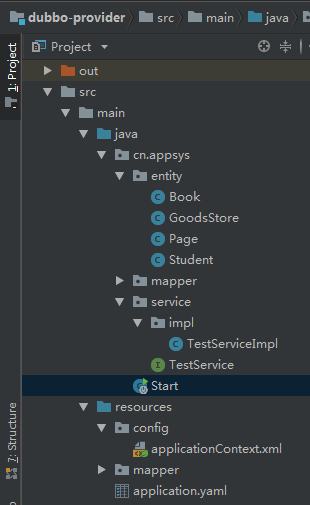
实体类
//这里实体对象实现了Serializable接口,dubbo规定,在远程调用实体对象时必须要实现Serializable接口以保证实体对象能够被序列化,如不实现会报错

public class Student implements Serializable {

    private String name;

    private int age;

    public Student(String name, int age) {

        this.name = name;

        this.age = age;

    }

    public Student() {

    }

    public String getName() {

        return name;

    }

    public void setName(String name) {

        this.name = name;

    }

    public int getAge() {

        return age;

    }

    public void setAge(int age) {

        this.age = age;

    }

}
service方法
public interface TestService {

    //返回字符串测试

    String hello(String word);

    //返回实体对象测试,注意实体类要实现 Serializable 接口

    List<Student> selectAllStudent();

}
实现service方法
//给service起个名字 别人调用提供接口方法时就是来实现本实现类的方法,和xml配置文件中所对应,让spring IOC 注入所管理

@Service("testService")

public class TestServiceImpl implements TestService {

    @Autowired

    private GoodsStoreMapper goodsStoreMapper;

    @Override

    public String hello(String word) {

        return "提供者:"+word;

    }

    @Override

    public List<Student> selectAllStudent() {

        System.out.println("------被调用了------");

        List<Student> list = new ArrayList<Student>();

        list.add(new Student("张三" , 1));

        list.add(new Student("李四" , 2));

        list.add(new Student("王五" , 3));

        return list;

    }

}
applicationContext.xml
<?xml version="1.0" encoding="UTF-8"?>

<beans xmlns="http://www.springframework.org/schema/beans"

       xmlns:xsi="http://www.w3.org/2001/XMLSchema-instance"

       xmlns:dubbo="http://code.alibabatech.com/schema/dubbo"

       xsi:schemaLocation="http://www.springframework.org/schema/beans

    http://www.springframework.org/schema/beans/spring-beans.xsd

    http://code.alibabatech.com/schema/dubbo

    http://code.alibabatech.com/schema/dubbo/dubbo.xsd">

    <!-- 提供方应用信息,用于计算依赖关系-->

    <!--name给当前服务起一个名字-->

    <dubbo:application name="springBootProvider"></dubbo:application>

    <!--protocol指定注册中心类型 这里用的是zookeeper-->

    <!--address注册中心地址 ip地址端口号-->

    <dubbo:registry protocol="zookeeper" address="127.0.0.1:2181" />

    <!-- 用dubbo协议在20880端口暴露服务-->

    <dubbo:protocol name="dubbo" port="20880" />

    <!-- 声明需要暴露的服务接口-->

    <dubbo:service interface="cn.appsys.service.TestService" ref="testService" />

</beans>
启动类
@SpringBootApplication

//读取配置文件

@ImportResource(locations = {"classpath:config/applicationContext.xml"})

public class Start

{

    public static void main(String[] args) {

        SpringApplication.run(Start.class , args);

    }

}
运行服务端,首先先启动zookeeper注册中心
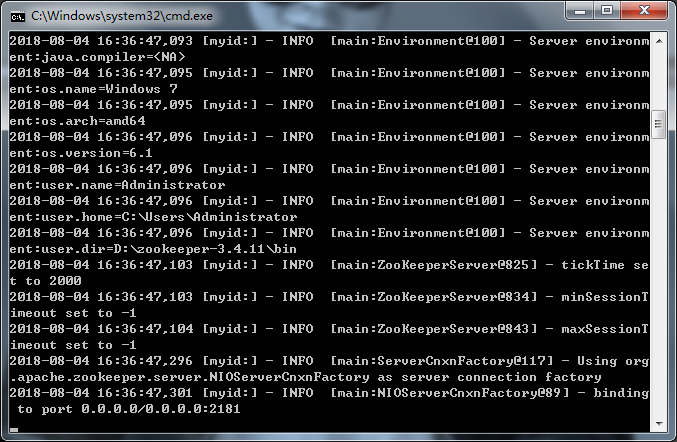
启动启动类,注意zookeeper的变化
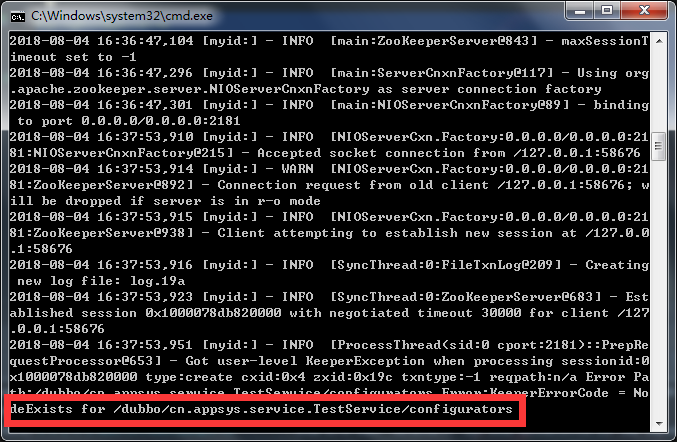
这里看到 在配置文件中外放的接口已经被注册进来了,调用方想调用就要通过此节点来调用服务。
客户端customer
目录结构
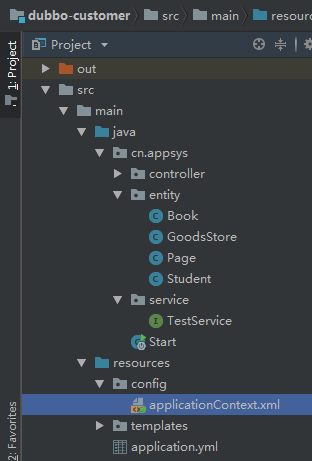
客户端 实体 方法都和服务端的保持一致
注意:方法所在的包也要和服务端保持一致,接口名都需要和服务端保持一致
applicationContext.xml配置文件
<?xml version="1.0" encoding="UTF-8"?>

<beans xmlns="http://www.springframework.org/schema/beans"

       xmlns:xsi="http://www.w3.org/2001/XMLSchema-instance"

       xmlns:dubbo="http://code.alibabatech.com/schema/dubbo"

       xsi:schemaLocation="http://www.springframework.org/schema/beans

    http://www.springframework.org/schema/beans/spring-beans.xsd

    http://code.alibabatech.com/schema/dubbo

    http://code.alibabatech.com/schema/dubbo/dubbo.xsd">

    <dubbo:application name="springBootConsumer"></dubbo:application>

    <dubbo:registry protocol="zookeeper" address="127.0.0.1:2181" />

    <!--包名 接口名 必须要和服务提供方保持一致-->

    <dubbo:reference id="testService" interface="cn.appsys.service.TestService" ></dubbo:reference>

</beans>
启动测试类
@SpringBootApplication

//读取配置文件

@ImportResource(locations = {"classpath:config/applicationContext.xml"})

public class Start

{

    public static void main(String[] args)

    {

        //SpringApplication.run返回一个ApplicationContext对象

        ApplicationContext ac = SpringApplication.run(Start.class , args);

        //通过ApplicationContext对象的getBean获取实现方法

        TestService testService = ac.getBean(TestService.class);

        //调用方法

        String s = testService.hello("aaaaaaaa");

        System.out.println(s);

        List<Student> stus = testService.selectAllStudent();

        for (Student stu : stus)

        {

            System.out.println(stu.getName());

        }

    }

}
启动运行
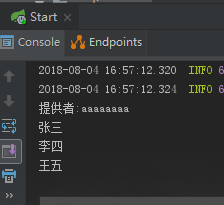
调用成功,再看一下服务端的变化
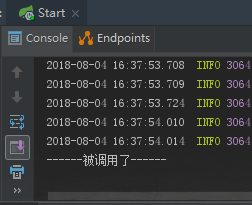
成功!
这里在放上如果不在服务端实体类不实现Serializable接口的报错信息
Exception in thread "main" com.alibaba.dubbo.rpc.RpcException: Failed to invoke the method selectAllStudent in the service cn.appsys.service.TestService. Tried 3 times of the providers [192.168.1.104:20880] (1/1) from the registry 127.0.0.1:2181 on the consumer 192.168.1.104 using the dubbo version 2.0.1. Last error is: Failed to invoke remote method: selectAllStudent, provider: dubbo://192.168.1.104:20880/cn.appsys.service.TestService?anyhost=true&application=springBootConsumer&check=false&dubbo=2.0.1&generic=false&interface=cn.appsys.service.TestService&methods=hello,login,selectAllStudent&pid=8928®ister.ip=192.168.1.104&remote.timestamp=1533373429375&side=consumer×tamp=1533373564236, cause: Failed to send response: Response [id=3, version=2.0.0, status=20, event=false, error=null, result=RpcResult [result=[cn.appsys.entity.Student@45a35c25, cn.appsys.entity.Student@419cd049, cn.appsys.entity.Student@49e561e], exception=null]], cause: java.lang.IllegalStateException: Serialized class cn.appsys.entity.Student must implement java.io.Serializable
java.lang.IllegalStateException: Serialized class cn.appsys.entity.Student must implement java.io.Serializable
dubbo在远程调用时注意事项
1)序列化
我们所有需要用来传输数据的实体一定要实现序列化,不然一定会报错
2)业务注入不进来
例如我们在Controller中注入了一个业务,@Controller使用的是Spring注解,@Reference使用的是Dubbo,如果Spring先进行扫描,那么业务一定是注入不进去的。如所有我们dubbo也要扫描controller。
3)超时设置
根据业务来设定不同的超时配置,如果一个服务很庞大处理的时间相对来说时间会比较长,可以会一直引起超时错误。
dubbo集成zookeeper rpc远程调用的更多相关文章
- ZooKeeper伪分布集群安装及使用 RMI+ZooKeeper实现远程调用框架
使用 RMI + ZooKeeper 实现远程调用框架,包括ZooKeeper伪集群安装和代码实现两部分. 一.ZooKeeper伪集群安装: 1>获取ZooKeeper安装包 下载地址:ht ...
- 測试JSON RPC远程调用(JSONclient)
#include <string> #include <iostream> #include <curl/curl.h> /* 标题:JSonclient Auth ...
- 使用Socket&反射&Java流操作进行方法的远程调用(模拟RPC远程调用)
写在前面 阅读本文首先得具备基本的Socket.反射.Java流操作的基本API使用知识:否则本文你可能看不懂... 服务端的端口监听 进行远程调用,那就必须得有客户端和服务端.服务端负责提供服务,客 ...
- 从0到1:全面理解RPC远程调用
上一篇关于 WSGI 的硬核长文,不知道有多少同学,能够从头看到尾的,不管你们有没有看得很过瘾,反正我是写得很爽,总有一种将一样知识吃透了的错觉. 今天我又给自己挖坑了,打算将 rpc 远程调用的知识 ...
- Openstack Nova 源码分析 — RPC 远程调用过程
目录 目录 Nova Project Services Project 的程序入口 setuppy Nova中RPC远程过程调用 nova-compute RPC API的实现 novacompute ...
- rpc远程调用开发
RPC即远程过程调用,适用于集群管理,集群节点就是RPCServer,而我们发起远程调用的web服务器就是RPCClient.所以是少数rpcClient(可能一个)对多个RPCServer(集群节点 ...
- 使用 RMI + ZooKeeper 实现远程调用框架
目录[-] 1 发布 RMI 服务1.1 定义一个 RMI 接口1.2 编写 RMI 接口的实现类1.3 通过 JNDI 发布 RMI 服务2 调用 RMI 服务3 RMI 服务的局限性4 使用 Zo ...
- Spring集成RMI实现远程调用
前提: 1.开发工具: jdk tomcat ecplise,开发工具的使用本篇不做介绍. 2.需具备以下知识:javase servelt web rmi spring maven 一.关于RMI ...
- Docker+Dubbo+Zookeeper实现RPC远程调用
Docker+Dubbo+Zookeeper 1.安装Docker 1.1卸载旧版本的Docker //如果Docker处于与运行状态 未运行可跳过 [root@MrADiao ~]# systemc ...
随机推荐
- Android MediaPlayer 音频倍速播放,调整播放速度
本文链接: Android MediaPlayer 倍速播放,调整播放速度 现在市面上的很多音视频App都有倍速播放的功能,例如把播放速度调整为0.5.1.5.2倍等等. 从Android API 2 ...
- linux查看系统的一些版本号指令
1.查看系统 [root@iZbp1eoiap1e1jb6pvo390Z ~]# lsb_release -a LSB Version: :core-4.1-amd64:core-4.1-noarch ...
- .Net Core 商城微服务项目系列(十五): 构建定时任务调度和消息队列管理系统
一.系统描述 嗨,好久不见各位老哥,最近有点懒,技术博客写的太少了,因为最近在写小说,写的顺利的话说不定就转行了,哈哈哈哈哈哈哈哈哈. 今天要介绍的是基于.Net Core的定时任务调度和消息队列管理 ...
- 挑战程序设计——迷宫的最短路径(BFS)
题目详情 Description 给定一个大小为 N * M 的迷宫.迷宫由通道和墙壁组成,每一步可以向邻接的上下左右四格的通道移动.请求出从起点到终点所需的最小步数 限制条件: N,M <= ...
- 理解 Redux 的中间件
将该思想抽象出来,其实和 Redux 就无关了.问题变成,怎样实现在截获函数的执行,以在其执行前后添加自己的逻辑. 为了演示,我们准备如下的示例代码来模拟 Redux dispatch action ...
- mysql 变量赋值的三种方法
mysql中变量不用事前申明,在用的时候直接用“@变量名”使用就可以了.第一种用法:set @num=1; 或set @num:=1; //这里要使用变量来保存数据,直接使用@num变量第二种用法:s ...
- 栈二:包含min函数的栈
/** * 题目:包含min函数的栈 * 描述: 定义栈的数据结构,请在该类型中实现一个能够得到栈最小元素的min函数. * 注:用data来保存数据,用另一个栈min保存依次入栈最小的数 * ...
- Coins POJ - 1742
给出硬币面额及每种硬币的个数,求从1到m能凑出面额的个数. Input 多组数据,每组数据前两个数字为n,m.n表示硬币种类数,m为最大面额,之后前n个数为每种硬币的面额,后n个数为相应每种硬币的个数 ...
- xtrabackup 备份+还原
1.安装下载地址:https://www.percona.com/downloads/Percona-XtraBackup-LATEST/ 2.备份# innobackupex --defaults- ...
- 你也可以写个服务器 - C# Socket学习2
前言 这里说的服务器是Web服务器,是类似IIS.Tomcat之类的,用来响应浏览器请求的服务. Socket模拟浏览器的Url Get请求 首先浏览器的请求是HTTP协议.我们上一篇说过,HTTP是 ...