
Swgger2的简单使用
编写接口文档是一个非常枯燥的工作,我们采用Swagger2这套自动化文档工具来生成文档,它可以轻松的整合到Spring Boot中,并与Spring MVC程序配合组织出强大RESTful API文档。
1、在pom.xml文件中加入Swagger2的依赖
<!-- https://mvnrepository.com/artifact/io.springfox/springfox-swagger2 -->

<dependency>

    <groupId>io.springfox</groupId>

    <artifactId>springfox-swagger2</artifactId>

    <version>2.9.2</version>

</dependency>

<!-- https://mvnrepository.com/artifact/io.springfox/springfox-swagger-ui -->

<dependency>

    <groupId>io.springfox</groupId>

    <artifactId>springfox-swagger-ui</artifactId>

    <version>2.9.2</version>

</dependency>
2、创建Swagger2配置类
 package com.offcn.springbootdemo2.Config;

 import org.springframework.context.annotation.Bean;

 import org.springframework.context.annotation.Configuration;

 import springfox.documentation.builders.ApiInfoBuilder;

 import springfox.documentation.builders.PathSelectors;

 import springfox.documentation.builders.RequestHandlerSelectors;

 import springfox.documentation.service.ApiInfo;

 import springfox.documentation.spi.DocumentationType;

 import springfox.documentation.spring.web.plugins.Docket;

 import springfox.documentation.swagger2.annotations.EnableSwagger2;

 @Configuration

 @EnableSwagger2

 public class SwaggerConfig {

    @Bean

    public Docket createRestApi(){

       return new Docket(DocumentationType.SWAGGER_2)

             .apiInfo(apiInfo())

             .select().apis(RequestHandlerSelectors.basePackage("com.offcn.springbootdemo2.Controller"))

             .paths(PathSelectors.any()).build();

    }

    private ApiInfo apiInfo() {

       return new ApiInfoBuilder().title("RestFul风格").description("一种好的习惯")

             .termsOfServiceUrl("http://www.baidu.com").contact("java").version("1.0").build();

    }

 }
3、修改Controller增加文档注释
 package com.offcn.springbootdemo2.Controller;

 import com.offcn.springbootdemo2.Pojo.User;

 import io.swagger.annotations.ApiImplicitParam;

 import io.swagger.annotations.ApiImplicitParams;

 import io.swagger.annotations.ApiOperation;

 import org.springframework.web.bind.annotation.*;

 import java.util.ArrayList;

 import java.util.Collections;

 import java.util.List;

 @RestController

 @RequestMapping("/user")

 public class UserController {

    private List<User> listUser= Collections.synchronizedList(new ArrayList<User>());

    @GetMapping("/")

    public List<User> getUserList(){

       return listUser;

    }

    /***

     * 新增用户

     * @param user

     * @return

     */

    @PostMapping("/")

    public String createUser(User user) {

       listUser.add(user);

       return "success";

    }

    /***

     * 获取指定id用户信息

     * @param id

     * @return

     */

    @GetMapping("/{id}")

    public User getUser(@PathVariable("id") Integer id) {

       for (User user : listUser) {

          if(user.getId()==id) {

             return user;

          }

       }

       return null;

    }

    /**

     * 更新指定id用户信息

     * @param id

     * @param user

     * @return

     */

    @PutMapping("/{id}")

    @ApiOperation(value="更新指定id用户信息", notes="根据id更新用户信息")

    @ApiImplicitParams({

          @ApiImplicitParam(name = "id", value = "用户ID", required = true, dataType = "Long"),

          @ApiImplicitParam(name = "user", value = "用户详细实体user", required = true, dataType = "User")

    })

    public String updateUser(@PathVariable("id") Integer id,User user) {

       for (User user2 : listUser) {

          if(user2.getId() == id) {

             user2.setName(user.getName());

             user2.setAge(user.getAge());

          }

       }

       return "success";

    }

    /***

     * 删除指定id用户

     * @param id

     * @return

     */

    @DeleteMapping("/{id}")

    @ApiOperation(value="删除指定id用户信息", notes="根据id删除用户信息")

    @ApiImplicitParam(name = "id", value = "用户id", required = true, dataType = "Long")

    public String deleteUser(@PathVariable("id") Integer id) {

       listUser.remove(getUser(id));

       return "success";

    }

 }
4、启动项目,在浏览器地址输入
http://localhost:8080/swagger-ui.html
查看Swagger2文档
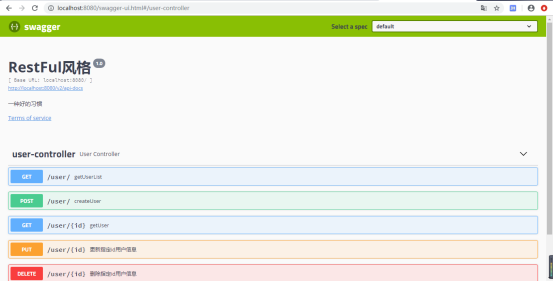
额外添加一个依赖Lombok,可以省略实体类中繁琐的代码
<!-- https://mvnrepository.com/artifact/org.projectlombok/lombok -->

<dependency>

    <groupId>org.projectlombok</groupId>

    <artifactId>lombok</artifactId>

    <version>1.18.10</version>

    <scope>provided</scope>

</dependency>
Swgger2的简单使用的更多相关文章
- 【造轮子】打造一个简单的万能Excel读写工具
大家工作或者平时是不是经常遇到要读写一些简单格式的Excel? shit!~很蛋疼,因为之前吹牛,就搞了个这东西,还算是挺实用,和大家分享下. 厌烦了每次搞简单类型的Excel读写?不怕~来,喜欢流式 ...
- Fabio 安装和简单使用
Fabio(Go 语言):https://github.com/eBay/fabio Fabio 是一个快速.现代.zero-conf 负载均衡 HTTP(S) 路由器,用于部署 Consul 管理的 ...
- node.js学习(三)简单的node程序&&模块简单使用&&commonJS规范&&深入理解模块原理
一.一个简单的node程序 1.新建一个txt文件 2.修改后缀 修改之后会弹出这个,点击"是" 3.运行test.js 源文件 使用node.js运行之后的. 如果该路径下没有该 ...
- 哪种缓存效果高?开源一个简单的缓存组件j2cache
背景 现在的web系统已经越来越多的应用缓存技术,而且缓存技术确实是能实足的增强系统性能的.我在项目中也开始接触一些缓存的需求. 开始简单的就用jvm(java托管内存)来做缓存,这样对于单个应用服务 ...
- 在Openfire上弄一个简单的推送系统
推送系统 说是推送系统有点大,其实就是一个消息广播功能吧.作用其实也就是由服务端接收到消息然后推送到订阅的客户端. 思路 对于推送最关键的是服务端向客户端发送数据,客户端向服务端订阅自己想要的消息.这 ...
- 我的MYSQL学习心得(一) 简单语法
我的MYSQL学习心得(一) 简单语法 我的MYSQL学习心得(二) 数据类型宽度 我的MYSQL学习心得(三) 查看字段长度 我的MYSQL学习心得(四) 数据类型 我的MYSQL学习心得(五) 运 ...
- 使用 Nodejs 搭建简单的Web服务器
使用Nodejs搭建Web服务器是学习Node.js比较全面的入门教程,因为要完成一个简单的Web服务器,你需要学习Nodejs中几个比较重要的模块,比如:http协议模块.文件系统.url解析模块. ...
- ASP.NET Aries 入门开发教程2:配置出一个简单的列表页面
前言: 朋友们都期待我稳定地工作,但创业公司若要躺下,也非意念可控. 若人生注定了风雨飘摇,那就雨中前行了. 最机开始看聊新的工作机会,欢迎推荐,创业公司也可! 同时,趁着自由时间,抓紧把这系列教程给 ...
- 简单入门canvas - 通过刮奖效果来学习
一 .前言 一直在做PC端的前端开发,从互联网到行业软件.最近发现移动端已经成为前端必备技能了,真是不能停止学习.HTML5新增的一些东西,canvas是用的比较多也比较复杂的一个,简单的入门了一下, ...
随机推荐
- dapi 基于Django的轻量级测试平台六 怎样使用压测功能
QQ群: GitHub:https://github.com/yjlch1016/dapi JMeter非GUI模式下: jmeter -n -t jmx脚本 -l jtl文件 -e -o 测试报告目 ...
- 前端(4)BOM与DOM
前端(4)BOM与DOM I/O前戏 到目前为止,我们已经学过了JavaScript的一些简单的语法.但是这些简单的语法,并没有和浏览器有任何交互. 也就是我们还不能制作一些我们经常看到的网页的一些交 ...
- mysql之子查询、视图、事务及pymysql等
数据准备 CREATE TABLE `emp` ( `id` int(0) NOT NULL AUTO_INCREMENT, `name` varchar(10) NOT NULL, `gender` ...
- Java 静态、类加载
1.静态是什么?有什么用? static的主要作用在于创建独立于具体对象的域变量或者方法. 每创建一个对象,都会在堆里开辟内存,存成员(属性),但是不存方法,方法是共用的,没必要每一个对象都浪费内存去 ...
- Scrapy笔记04- Selector详解
Scrapy笔记04- Selector详解 在你爬取网页的时候,最普遍的事情就是在页面源码中提取需要的数据,我们有几个库可以帮你完成这个任务: BeautifulSoup是python中一个非常流行 ...
- [codevs1566]染色
题目描述 Description 给定一棵有n个节点的无根树和m个操作,操作有2类: 1.将节点a到节点b路径上所有点都染成颜色c: 2.询问节点a到节点b路径上的颜色段数量(连续相同颜色被认为是同一 ...
- py 包和模块,软件开发目录规范
目录 py 包和模块,软件开发目录规范 什么是包? 什么是模块? 软件开发目录规范 py 包和模块,软件开发目录规范 什么是包? 包指的是内部包__init__.py的文件夹 包的作用: 存放模块,包 ...
- debian 9 安装远程桌面
1. 安装远程桌面服务: apt-get install xrdp 2. 修改设置文件 dpkg-reconfigure xserver-xorg-legacy 设置为anybody 3. 使用ms ...
- 请用js语言实现sort排序函数,要求:sort([4,5,2,-1,0])返回[-1,0,2,4,5]
Array.prototype.sort1=function(fn){ var len=this.length; while(len>0){ for(var i=0;i<len;i++){ ...
- 深入js系列-类型(对象)
开篇 值的传递方式 1.值传递 表示传递过程中复制了值 2.引用传递 表示传递过程中传递的是值的引用 js的传递方式 值传递 看下面的例子 // 这里值传递很容易理解 var a = 1 var b ...