
spring 使用@AspectJ注解开发Spring AOP
选择切点
代码清单:打印角色接口
package com.ssm.chapter11.aop.service;

import com.ssm.chapter11.game.pojo.Role;

public interface RoleService {

    // public void printRole(Role role);

    public void printRole(Role role, int sort);

}
代码清单:RoleService实现类
package com.ssm.chapter11.aop.service.impl;

import org.springframework.stereotype.Component;

import com.ssm.chapter11.aop.service.RoleService;

import com.ssm.chapter11.game.pojo.Role;

@Component

public class RoleServiceImpl implements RoleService {

    // @Override

    // public void printRole(Role role) {

    //     System.out.println("{id: " + role.getId() + ", " + "role_name : " + role.getRoleName() + ", " + "note : " + role.getNote() + "}");

    // }

    public void printRole(Role role, int sort) {

        System.out.println("{id: " + role.getId() + ", " + "role_name : " + role.getRoleName() + ", " + "note : " + role.getNote() + "}");

        System.out.println(sort);

    }

}
这个类没什么特别的,只是这个时候如果把printRole作为AOP的切点,那么用动态代理的语言就是要为类RoleServi-ceImpl生成代理对象,然后拦截printRole方法,于是可以产生各种AOP通知方法。
创建切面
package com.ssm.chapter11.aop.aspect;

import com.ssm.chapter11.aop.verifier.RoleVerifier;

import com.ssm.chapter11.aop.verifier.impl.RoleVerifierImpl;

import org.aspectj.lang.ProceedingJoinPoint;

import org.aspectj.lang.annotation.*;

@Aspect

public class RoleAspect {

    @DeclareParents(value = "com.ssm.chapter11.aop.service.impl.RoleServiceImpl+", defaultImpl = RoleVerifierImpl.class)

    public RoleVerifier roleVerifier;

    @Pointcut("execution(* com.ssm.chapter11.aop.service.impl.RoleServiceImpl.printRole(..))")

    public void print() {

    }

    // @Before("execution(* com.ssm.chapter11.aop.service.impl.RoleServiceImpl.printRole(..))")

    // @Before("execution(* com.ssm.chapter11.*.*.*.*.printRole(..)) && within(com.ssm.chapter11.aop.service.impl.*)")

    @Before("print()")

    // @Before("execution(* com.ssm.chapter11.aop.service.impl.RoleServiceImpl.printRole(..)) && args(role, sort)")

    public void before() {

        System.out.println("before ....");

    }

    @After("execution(* com.ssm.chapter11.aop.service.impl.RoleServiceImpl.printRole(..))")

    public void after() {

        System.out.println("after ....");

    }

    @AfterReturning("execution(* com.ssm.chapter11.aop.service.impl.RoleServiceImpl.printRole(..))")

    public void afterReturning() {

        System.out.println("afterReturning ....");

    }

    @AfterThrowing("execution(* com.ssm.chapter11.aop.service.impl.RoleServiceImpl.printRole(..))")

    public void afterThrowing() {

        System.out.println("afterThrowing ....");

    }

    @Around("print()")

    public void around(ProceedingJoinPoint jp) {

        System.out.println("around before ....");

        try {

            jp.proceed();

        } catch (Throwable e) {

            e.printStackTrace();

        }

        System.out.println("around after ....");

    }

}
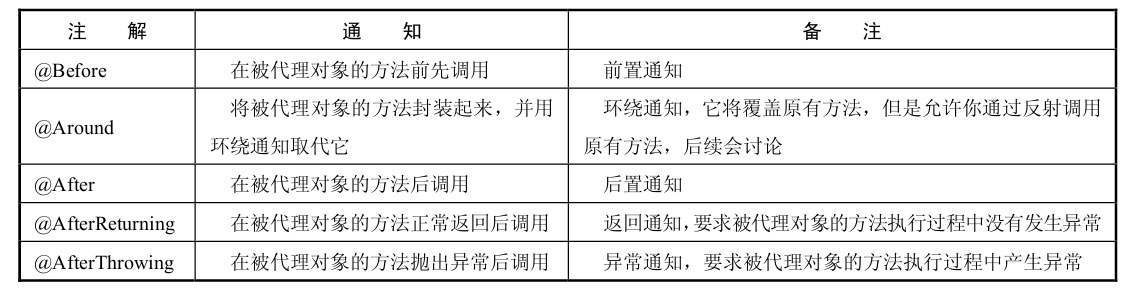

连接点
execution(* com.ssm.chapter11.aop.service.impl.RoleServiceImpl.printRole(..))
依次对这个表达式做出分析。
•execution:代表执行方法的时候会触发。
•*:代表任意返回类型的方法。
•com.ssm.chapter11.aop.service.impl.RoleServiceImpl:代表类的全限定名。
•printRole:被拦截方法名称。
•(..):任意的参数。
显然通过上面的描述,全限定名为com.ssm.chapter11.aop.service.impl.RoleServiceImpl的类的printRole方法被拦截了,这样它就按照AOP通知的规则把方法织入流程中。
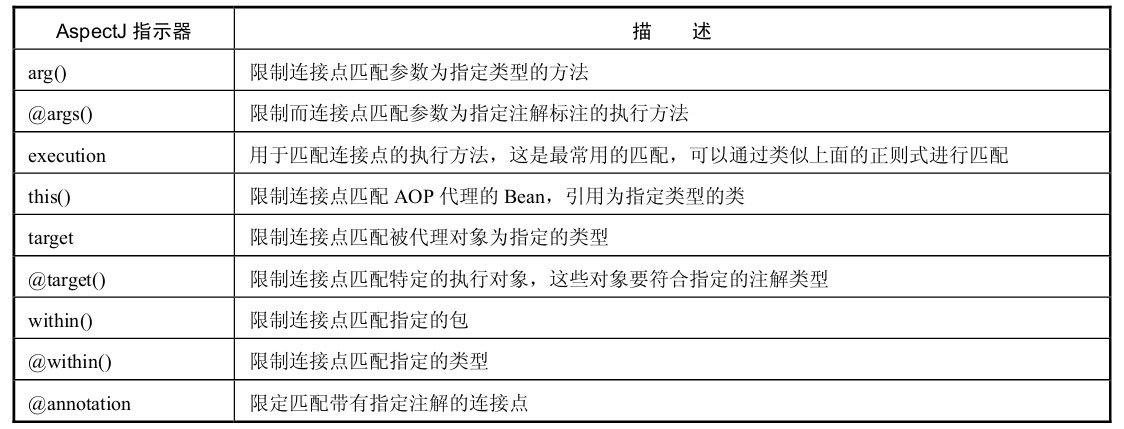

测试AOP
package com.ssm.chapter11.aop.config;

import org.springframework.context.annotation.Bean;

import org.springframework.context.annotation.ComponentScan;

import org.springframework.context.annotation.Configuration;

import org.springframework.context.annotation.EnableAspectJAutoProxy;

import com.ssm.chapter11.aop.aspect.RoleAspect;

@Configuration

@EnableAspectJAutoProxy

@ComponentScan("com.ssm.chapter11.aop")

public class AopConfig {

    @Bean

    public RoleAspect getRoleAspect() {

        return new RoleAspect();

    }

}
Spring还提供了XML的方式,这里就需要使用AOP的命名空间了
<?xml version='1.0' encoding='UTF-8' ?>

<beans xmlns="http://www.springframework.org/schema/beans" xmlns:xsi="http://www.w3.org/2001/XMLSchema-instance"

       xmlns:context="http://www.springframework.org/schema/context" xmlns:aop="http://www.springframework.org/schema/aop"

       xsi:schemaLocation="http://www.springframework.org/schema/beans http://www.springframework.org/schema/beans/spring-beans-4.0.xsd

        http://www.springframework.org/schema/context http://www.springframework.org/schema/context/spring-context-4.0.xsd

        http://www.springframework.org/schema/aop  http://www.springframework.org/schema/aop/spring-aop-4.0.xsd">

    <aop:aspectj-autoproxy/>

    <bean id="roleAspect" class="com.ssm.chapter11.aop.aspect.RoleAspect"/>

    <bean id="roleService" class="com.ssm.chapter11.aop.service.impl.RoleServiceImpl"/>

</beans>
无论用XML还是用Java的配置,都能使Spring产生动态代理对象,从而组织切面,把各类通知织入到流程当中
代码清单:测试AOP流程
package com.ssm.chapter11.aop.main;

import com.ssm.chapter11.aop.verifier.RoleVerifier;

import com.ssm.chapter11.aop.verifier.impl.RoleVerifierImpl;

import org.aspectj.lang.annotation.DeclareParents;

import org.springframework.context.ApplicationContext;

import org.springframework.context.support.ClassPathXmlApplicationContext;

import org.springframework.context.annotation.AnnotationConfigApplicationContext;

import com.ssm.chapter11.aop.config.AopConfig;

import com.ssm.chapter11.aop.service.RoleService;

import com.ssm.chapter11.game.pojo.Role;

public class Main {

    public static void main(String[] args) {

        ApplicationContext ctx = new AnnotationConfigApplicationContext(AopConfig.class);

        // 使用XML使用ClassPathXmlApplicationContext作为IoC容器

        // ApplicationContext ctx = new ClassPathXmlApplicationContext("ssm/chapter11/spring-cfg3.xml");

        RoleService roleService = ctx.getBean(RoleService.class);

        Role role = new Role();

        role.setId(1L);

        role.setRoleName("role_name_1");

        role.setNote("note_1");

        RoleVerifier roleVerifier = (RoleVerifier) roleService;

        if (roleVerifier.verify(role)) {

            roleService.printRole(role, 1);

        }

        System.out.println("####################");

        //测试异常通知

        // role = null;

        // roleService.printRole(role);

    }

}
spring 使用@AspectJ注解开发Spring AOP的更多相关文章
- Spring学习之旅(八)Spring 基于AspectJ注解配置的AOP编程工作原理初探
由小编的上篇博文可以一窥基于AspectJ注解配置的AOP编程实现. 本文一下未贴出的相关代码示例请关注小编的上篇博文<Spring学习之旅(七)基于XML配置与基于AspectJ注解配置的AO ...
- 使用@AspectJ注解开发Spring AOP
一.实体类: Role public class Role { private int id; private String roleName; private String note; @Overr ...
- Spring Aop(二)——基于Aspectj注解的Spring Aop简单实现
转发地址:https://www.iteye.com/blog/elim-2394762 2 基于Aspectj注解的Spring Aop简单实现 Spring Aop是基于Aop框架Aspectj实 ...
- Spring学习之旅(七)基于XML配置与基于AspectJ注解配置的AOP编程比较
本篇博文用一个稍复杂点的案例来对比一下基于XML配置与基于AspectJ注解配置的AOP编程的不同. 相关引入包等Spring AOP编程准备,请参考小编的其他博文,这里不再赘述. 案例要求: 写一 ...
- spring boot纯注解开发模板
简介 spring boot纯注解开发模板 创建项目 pom.xml导入所需依赖 点击查看源码 <dependencies> <dependency> <groupId& ...
- Spring:基于注解的Spring MVC
什么是Spring MVC Spring MVC框架是一个MVC框架,通过实现Model-View-Controller模式来很好地将数据.业务与展现进行分离.从这样一个角度来说,Spring MVC ...
- Spring自动装配----注解装配----Spring自带的@Autowired注解
Spring自动装配----注解装配----Spring自带的@Autowired注解 父类 package cn.ychx; public interface Person { public voi ...
- Spring使用AspectJ注解和XML配置实现AOP
本文演示的是Spring中使用AspectJ注解和XML配置两种方式实现AOP 下面是使用AspectJ注解实现AOP的Java Project首先是位于classpath下的applicationC ...
- Spring注解开发系列Ⅵ --- AOP&事务
注解开发 --- AOP AOP称为面向切面编程,在程序开发中主要用来解决一些系统层面上的问题,比如日志,事务,权限等待,Struts2的拦截器设计就是基于AOP的思想,横向重复,纵向抽取.详细的AO ...
随机推荐
- NOI.ac 模拟赛20181103 排队 翘课 运气大战
题解 排队 20% 1≤n≤20,1≤x,hi≤201\le n\le 20, 1\le x,h_i\le 201≤n≤20,1≤x,hi≤20 随便暴力 50% 1≤n≤2000,1≤x,hi≤1 ...
- HDU - 3555 - Bomb(数位DP)
链接: https://vjudge.net/problem/HDU-3555 题意: The counter-terrorists found a time bomb in the dust. Bu ...
- 2017.10.6 国庆清北 D6T3 字符串
题目描述 如果把一个字符串从头到尾翻转后和原字符串相等,我们称之为回文串,比如“aabaa”.“())(”.“2017102”. 如果一个字符串存在两个出现过的字母出现的次数相等,我们称之为好 的字符 ...
- 【一起来烧脑】一步学会JavaScript体系
[外链图片转存失败(img-b0GOhxRY-1563571645197)(https://upload-images.jianshu.io/upload_images/11158618-ba249b ...
- Navicat premium查看数据库表中文注释的两种方式
有时候我需要查看数据库表中文注释,来确定每个表存的是哪个模块的数据,确保测试时对数据库查询操作无误. 这个操作我忘记了,此处做一个记录 方式一:通过sql语句来,前提是你知道是哪个表,这种方式不容易改 ...
- ElasticSearch : 基础简介
1.安装 我用的docker安装,这个用起来比较方便,我是在腾讯云部署的docker,具体的过两天总结一下 安装: docker pull elasticsearch 运行: docker run - ...
- ZR#1004
ZR#1004 解法: 对于 $ (x^2 + y)^2 \equiv (x^2 - y)^2 + 1 \pmod p $ 化简并整理得 $ 4x^2y \equiv 1 \pmod p $ 即 $ ...
- python中whl的讲解
whl 格式:这是一个压缩包,在其中包含了py文件,以及经过编译的pyd文件. 这个格式可以使文件在不具备编译环境的情况下,选择合适自己的python环境进行安装. 安装方法如下 进入命令行输入:pi ...
- 解释一下 Flux
Flux 是一种强制单向数据流的架构模式.它控制派生数据,并使用具有所有数据权限的中心 store 实现多个组件之间的通信.整个应用中的数据更新必须只能在此处进行. Flux 为应用提供稳定性并减少运 ...
- Hiberfil.sys
Hiberfil.sys 命令窗口中输入 powercfg -h off,即可关闭休眠功能,同时 Hiberfil.sys 文件也会自动删除.