
BootStrap简单table
效果图:
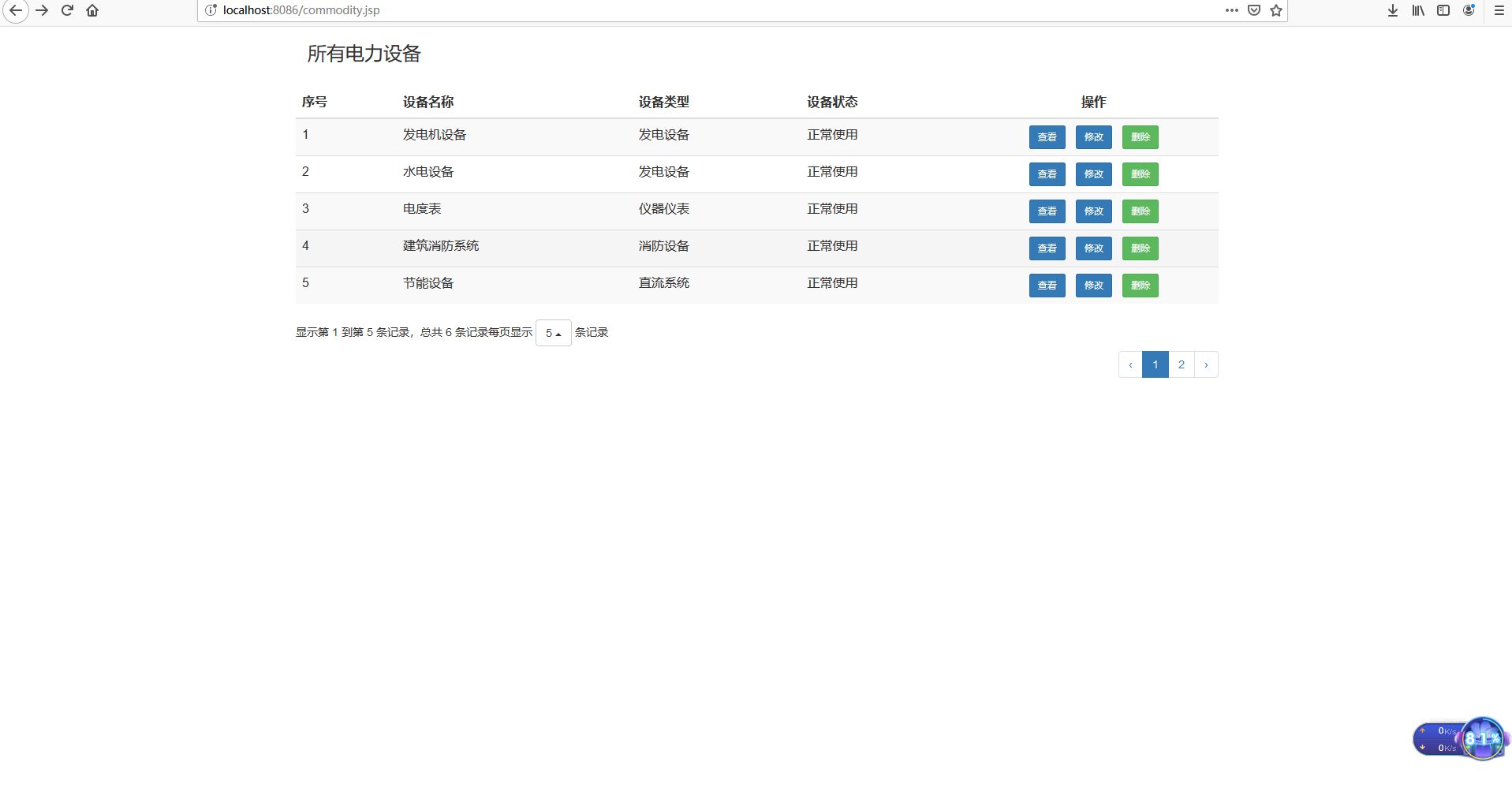
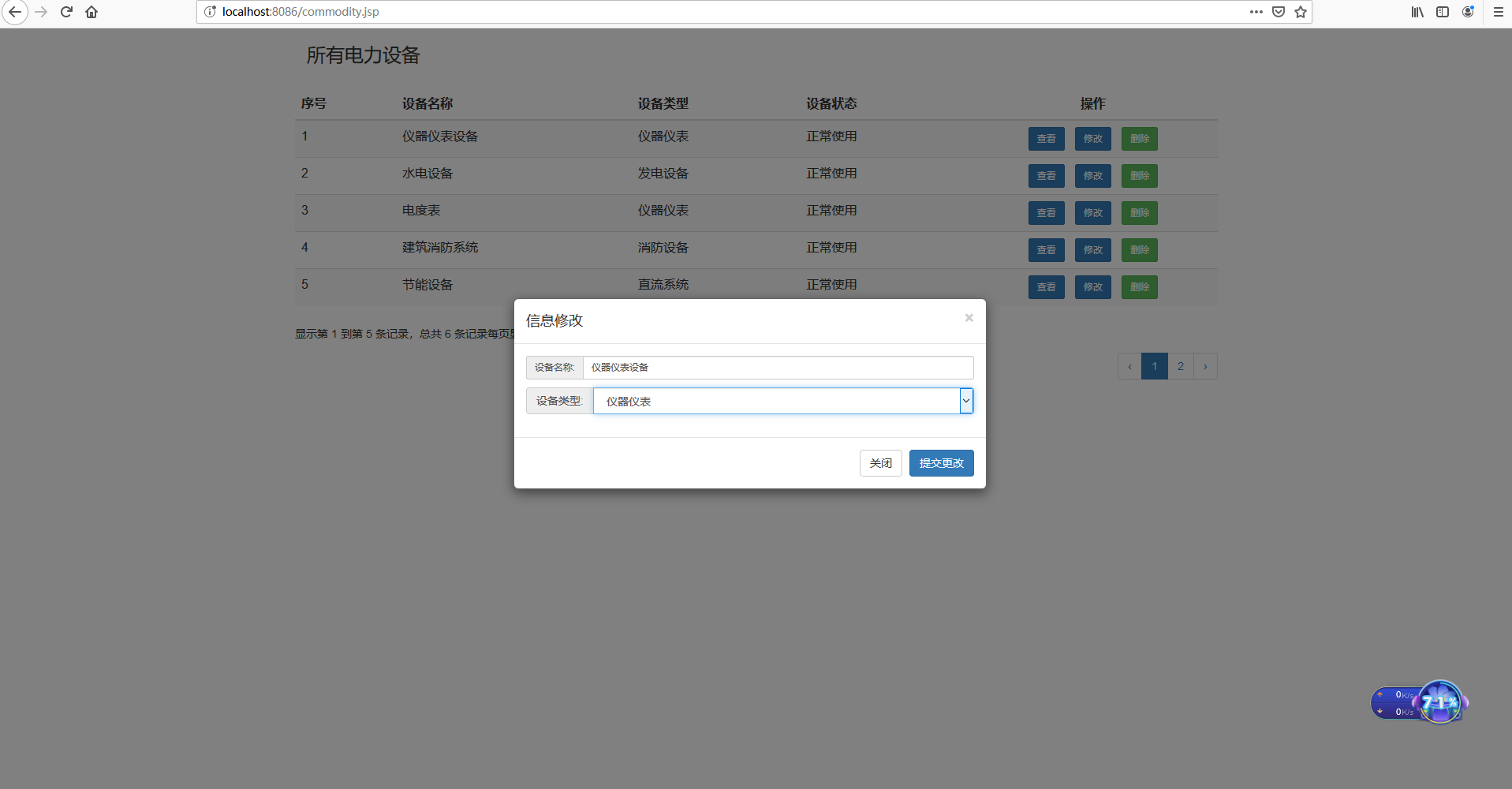
代码如下:
<%--
Created by IntelliJ IDEA.
User: 冷噫雪
Date: 2019/9/1
Time: 13:06
To change this template use File | Settings | File Templates.
--%>
<%@ page contentType="text/html;charset=UTF-8" language="java" %>
<%--引入标签库--%>
<%@ taglib prefix="c" uri="http://java.sun.com/jsp/jstl/core" %>
<%@ taglib prefix="fmt" uri="http://java.sun.com/jsp/jstl/fmt" %>
<html>
<head>
<title>Title</title>
<link rel="stylesheet" type="text/css" href="${pageContext.request.contextPath}/static/bootstrap-3.3.7-dist/css/bootstrap.css">
<link rel="stylesheet" type="text/css" href="${pageContext.request.contextPath}/static/bootstrap-3.3.7-dist/css/bootstrap-datetimepicker.css">
</head>
<body> <div class="container">
<h3>所有电力设备</h3>
<div class="row" style="margin-top: 30px;">
<table id="table01"></table>
</div>
</div>
<%--查看--%>
<div class="modal fade" id="see" role="dialog" tabindex="-1" aria-labelledby="seeCom" aria-hidden="true">
<div class="modal-dialog" role="document">
<div class="modal-content">
<div class="modal-header">
<button type="button" class="close" data-dismiss="modal" aria-hidden="true">
×
</button>
<h4 class="modal-title" id="seeCom">信息详情</h4>
</div>
<div class="modal-body">
<div class="row" style="margin-top: 10px;">
<label class="control-label col-md-3 col-sm-3 col-md-offset-1 col-sm-offset-1">设备名称:</label>
<div class="col-md-5 col-sm-5">
<span id="commodityName2"></span>
</div>
</div>
<div class="row" style="margin-top: 10px;">
<label class="control-label col-md-3 col-sm-3 col-md-offset-1 col-sm-offset-1">设备类型:</label>
<div class="col-md-5 col-sm-5">
<span id="commodityType2"></span>
</div>
</div>
<div class="row" style="margin-top: 10px;">
<label class="control-label col-md-3 col-sm-3 col-md-offset-1 col-sm-offset-1">设备状态:</label>
<div class="col-md-5 col-sm-5">
<span id="commodityStatus"></span>
</div>
</div>
</div>
<div class="modal-footer">
<button type="button" class="btn btn-default" style="text-align: center;" data-dismiss="modal">关闭
</button>
</div>
</div>
</div>
</div>
<%--修改--%>
<div class="modal fade" id="chang" role="dialog" tabindex="-1" aria-labelledby="chan" aria-hidden="true">
<div class="modal-dialog" role="document">
<div class="modal-content">
<div class="modal-header">
<button type="button" class="close" data-dismiss="modal" aria-hidden="true">
×
</button>
<h4 class="modal-title" id="chan">信息修改</h4>
</div>
<div class="modal-body">
<form action="#" method="post" id="changMessage">
<%--设备id--%>
<input type="hidden" id="comId" name="id" />
<div class="input-group input-group-sm">
<span class="input-group-addon">设备名称:</span>
<input type="text" class="form-control" id="commodityName" name="commodityName">
</div>
<div class="input-group" style="margin-top: 10px;">
<span class="input-group-addon">设备类型:</span>
<select class="form-control" id="commodityType" name="commodityType">
</select>
</div>
</form>
</div>
<div class="modal-footer">
<button type="button" class="btn btn-default" data-dismiss="modal">关闭
</button>
<button type="button" onclick="succ()" class="btn btn-primary">
提交更改
</button>
</div>
</div>
</div>
</div>
<script type="text/javascript" src="${pageContext.request.contextPath}/static/js/jquery-3.2.1.js" charset="utf-8"></script>
<script type="text/javascript" src="${pageContext.request.contextPath}/static/bootstrap-3.3.7-dist/js/bootstrap.js"></script>
<script type="text/javascript" src="${pageContext.request.contextPath}/static/bootstrap-3.3.7-dist/table/bootstrap-table.js"></script>
<script type="text/javascript" src="${pageContext.request.contextPath}/static/bootstrap-3.3.7-dist/js/bootstrap-datetimepicker.js"></script>
<script type="text/javascript" src="${pageContext.request.contextPath}/static/bootstrap-3.3.7-dist/js/bootstrap-datetimepicker.zh-CN.js"></script>
<script type="text/javascript" src="${pageContext.request.contextPath}/static/bootstrap-3.3.7-dist/table/locale/bootstrap-table-zh-CN.js"></script>
<script> $("#table01").bootstrapTable({
url:"/findComm",
striped: true, //是否显示行间隔色
cache: false, //是否使用缓存,默认为true,所以一般情况下需要设置一下这个属性(*)
pagination: true, //是否显示分页(*)
sortable: true, //是否启用排序
sortName:"id", //根据哪个字段排序
sortOrder: "asc", //排序方式
sidePagination: "client", //分页方式:client客户端分页,server服务端分页(*)
pageNumber: 1, //初始化加载第一页,默认第一页
pageSize: 5, //每页的记录行数(*)
pageList: [5,10,20,30], //可供选择的每页的行数(*)
minimumCountColumns: 2, //最少允许的列数
clickToSelect: true, //是否启用点击选中行
uniqueId: "ID", //每一行的唯一标识,一般为主键列
exportDataType: "basic", //basic', 'all', 'selected'.
columns:[
{
title: '序号',
field: '',
formatter: function (value, row, index) {
return index+1;
}
},
{
field:'commodityName',
title:'设备名称'
},
{
field:'commodityType',
title:'设备类型',
formatter:function (value, row, index) {
var text = '-';
if (value == 1) {
text = "发电设备";
}else if(value == 2){
text="仪器仪表"
}else if(value == 3){
text="消防设备"
}else {
text="直流系统"
}
return text;
}
},
{
field:'commodityStatus',
title:'设备状态',
formatter:function (value, row, index) {
var text = '-';
if (value == 0) {
text = "维修中";
}else if(value == 1){
text="正常使用"
}else if(value == 2){
text="故障"
}else {
text="其他"
}
return text;
}
},{
title: "操作",
align: 'center',
valign: 'middle',
width: 300, // 定义列的宽度,单位为像素px
formatter: function (value, row, index) {
var see= '<button class="btn btn-primary btn-sm btn-default" onclick="see('+row.id+')">查看</button>';
var chang= '<button class="btn btn-primary btn-sm btn-default" onclick="chang('+row.id+')">修改</button>';
var del='<button class="btn btn-primary btn-sm btn-success" onclick="del('+row.id+')">删除</button>';
return see+' '+chang+' '+del;
}
}
],
onLoadSuccess: function(){ //加载成功时执行
},
onLoadError: function(){ //加载失败时执行
}
}) function see(id) {
$.ajax({
type:"post",
url:"${pageContext.request.contextPath}/findOne",
dataType:"json",
data:{"id":id},
success:function(data){
$("#commodityName2").html(data.commodityName)
if(data.commodityType=='1'){
$("#commodityType2").html('发电设备')
}else if(data.commodityType=='2'){
$("#commodityType2").html('仪器仪表')
}else if(data.commodityType=='3'){
$("#commodityType2").html('消防设备')
}else if(data.commodityType=='4'){
$("#commodityType2").html('直流系统')
}
if(data.commodityStatus=='0'){
$("#commodityStatus").html('维修中')
}else if(data.commodityStatus=='1'){
$("#commodityStatus").html('正常使用')
}else if(data.commodityStatus=='2'){
$("#commodityStatus").html('故障')
}else{
$("#commodityStatus").html('状态不明')
}
$("#see").modal("show");
},
error:function(){
alert("出错003!")
}
})
} function chang(id) { $.ajax({
type:"post",
url:"${pageContext.request.contextPath}/findOne",
dataType:"json",
data:{"id":id},
success:function(data){
$("#comId").val(data.id)
$("#commodityName").val(data.commodityName)
disposeCheckBox(data.commodityType)
$("#chang").modal("show");
},
error:function(){
alert("出错003!")
}
})
} function disposeCheckBox(commodityType) {
$.ajax({
type:"post",
url:"${pageContext.request.contextPath}/findCommTypeName",
dataType:"json",
success:function(data){
var str=''
for (var i=0;i<data.length;i++){
if(commodityType==data[i].id){
str+="<option selected=selected value="+data[i].id+">"+data[i].comTypeName+"</option>";
}else {
str+="<option value="+data[i].id+">"+data[i].comTypeName+"</option>";
}
}
$("#commodityType").html(str);
},
error:function(){
alert("出错!")
}
})
}
function del(id) {
alert(id+"删除") } function succ() {
$.ajax({
type:"post",
url:"${pageContext.request.contextPath}/updateById",
dataType:"json",
data:$("#changMessage").serialize(),
success:function(data){
if(data){
alert("修改成功")
window.location.reload()
}else{
alert("修改失败")
}
},
error:function(){
alert("出错003!")
}
}) } </script>
</body>
</html>
希望对大家有用,有问题记得反馈哦!
BootStrap简单table的更多相关文章
- Bootstrap Blazor Table 组件(二)
原文链接:https://www.cnblogs.com/ysmc/p/16128206.html 很多小伙伴在使用 Bootstrap Blazor Table组件的时候,都会有这样的一个需求: 我 ...
- bootstrap中table的colspan不起作用
bootstrap中table的colspan不起作用,即在不指定宽度的条件下,各个td宽度不符合colspan指定的宽度. 添加table0layout:fixed后显示正常. table{ tab ...
- 基于Bootstrap简单实用的tags标签插件
http://www.htmleaf.com/jQuery/ jQuery之家 自由分享jQuery.html5和css3的插件库 基于Bootstrap简单实用的tags标签插件
- bootstrap中table页面做省市区级联效果(级联库见前面级联编辑)(非select下拉框)
<!DOCTYPE html><html lang="en"><head> <meta charset="UTF-8" ...
- [转]bootstrap的table插件动态加载表头
原文地址:https://blog.csdn.net/abubu123/article/details/78060321 bootstrap的table属性已经很熟悉了,最近遇到一个问题,犹豫每个列表 ...
- 【BootStrap】Table的基本使用
一.前言 新年新气象,转眼今年就28了,不知道今年能不能把妹成功呢?哈哈哈!上班第一天,部门Web技术主管给每个同事都发了红包鼓励大家今年加油,我作为新转入部门员工不能给团队掉链子,要加 ...
- Bootstrap简单入门
Bootstrap简单入门 BootStrap基本模板 <!DOCTYPE html> <html> <head> <meta charset="U ...
- Bootstrap Data Table简单使用(动态加载数据)
直接上代码: <!DOCTYPE html> <html> <head> <meta charset="UTF-8"> <ti ...
- BootStrap的table表格,栅格系统,form表单的样式
BootStrap BootStrap的简介 1. 什么是Bootstrap 由两个前端设计师开发的一个前端的框架(Html,css,js) 简化了程序员写css的代码 2. 为什么使用B ...
随机推荐
- appache开启自定义404错误并编写404.html
1,让apache支持.htaccess 我们要找到apache安装目录下的httpd.conf文件,在里面找到 <Directory /> Options FollowSymLinks ...
- Ant Design的Form
Ant Design的Form 使用onFieldsChange时不要与 mapPropsToFields一起使用,将导致表单校验等失效
- zzulioj - 2558 数字的差值
首先感谢抱抱熊dalao的题解,提供了一种比较简单的思路.[抱抱熊dalao的题解](https://note.youdao.com/ynoteshare1/index.html?id=52f087d ...
- centos7+docker 安装和部署crawlab分布式爬虫平台,并使用docker-compose管理docker
1.先决条件centos7+docker最新版本 sudo yum updat 2.配置一下镜像源,创建/etc/docker/daemon.conf文件,在其中输入如下内容 { "regi ...
- Pandas | 01 数据结构
Pandas的三种数据结构: 系列(Series) 数据帧(DataFrame) 面板(Panel) 这些数据结构,构建在Numpy数组之上,这意味着它们很快 维数和描述 考虑这些数据结构的最好方法是 ...
- c# Aes加解密
using System; using System.Collections.Generic; using System.IO; using System.Security.Cryptography; ...
- sql语句之union与join的区别
union查询: 使用 union 可以将多个select语句的查询结果组合起来. 语法: select 字段1,字段2 from table1 union select 字段1,字段2 from t ...
- java 集合运算
package testjavapro; import java.util.BitSet; public class testjavaa { public static void main(Strin ...
- 使用stunnle加密传输
Stunnel是一个可以用SSL对任意 TCP 连接加密的程序.它可以运行在多种UNIX和Windows上,它是基于 OpenSSL的,所以它要求已经安装了 OpenSSL,并进行了正确的配置.——来 ...
- AQS4源码
@SuppressWarnings("restriction") public abstract class AbstractQueuedSynchronizer1 extends ...